


In a world constantly advancing towards digitization, it’s critical to be watchful against the numerous forms of cyber threats that can take advantage of vulnerabilities for the sake of convenience. It’s important to be proactive in protecting yourself and your data by staying informed and up-to-date with the latest security measures. Smishing, a portmanteau of “SMS” (Short Message Service) and “phishing,” involves scammers using text messages to trick unsuspecting individuals into divulging sensitive information. In this blog, we’ll delve into what smishing entails, how to identify these scams, and, most importantly, how to defend yourself against them.
Educating Yourself on SMS Scams
What Does Smishing Look Like?
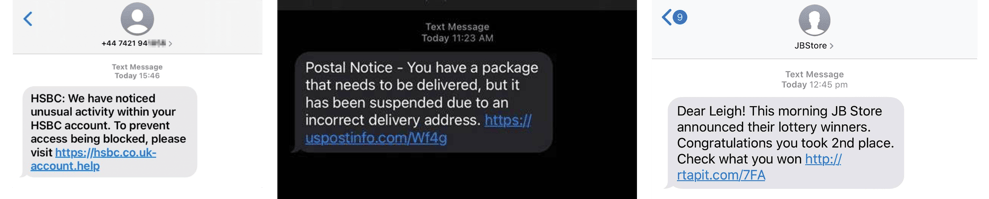
Imagine receiving a text message seemingly from a reputable source like UPS or a familiar online store notifying you about a parcel delivery issue or offering a tempting deal. The message might contain a link to track your package or claim your prize, but this is where the trap is set.
SMS authentication has also been a popular method for end-users for many years. How this works is a verification code would be sent to a user’s mobile phone. However, there is a major flaw: hackers can intercept these messages and allow them to gain access to your sensitive information. In July 2023, Microsoft transitioned away from SMS authentication to a more secure option known as Multi-Factor Authentication (MFA). This method will require users to utilize their login credentials and match numbers displayed on the screen with an authentication app for added security.
By the Numbers
Earthweb compiled a list of key Smishing statistics for 2024:
- Only 36% of people in the United States know what smishing attacks are.
- On average, Americans receive 41 spam texts per person per month.
- Around 378,509,197 spam texts were sent/received per day in April 2022.
How to Spot a Smishing Attempt
Let’s break down the anatomy of a typical smishing attack:
-
Urgent Messages with Attachments: The scammer sends a text suggesting an urgent issue or enticing offer, often accompanied by an attachment like a PDF.
-
Impersonation of Legitimate Services: The message appears official, claiming to be from a known company or service you use regularly.
- Requests for Personal Information: The scam progresses by asking for unnecessary personal details such as your full name, date of birth, address, and even mobile number.
Red Flags to Watch Out For
- Unusual Requests: Legitimate businesses rarely need your complete personal details via text, primarily regarding a supposed package delivery.
- Suspicious Links: Check the sender’s domain name carefully. Scammers often use deceptive URLs that mimic genuine websites but have slight variations.
- Limited View on Mobile Devices: Smartphones’ confined screen space can hide crucial details, making it easier for scammers to deceive users.
Popular Types of SMS Scams to Watch Out for
- Missed Delivery Notifications: You receive a text from a delivery company claiming you missed a package delivery, asking to click a link or call a number to reschedule.
- “Is This You?” Messages: Scammers often pretend to be someone you know and send messages like “Is this you?” or “Check out this photo.” If you respond, they might try to extract personal information or trick you into clicking a malicious link.
- Bank Account Closure Scams: You receive a text message stating that your bank account will be closed due to suspicious activity. The message urges you to click a link or call a number to verify your account details. Legitimate banks don’t handle account issues via text messages.
- Prize or Sweepstakes Scams: Scammers often send fraudulent texts to trick you into giving away personal information or visiting fake websites. Be cautious and remember that if it sounds too good to be true, it probably is.
- Locked Debit/Credit Card Scams: You may receive a fraudulent message requesting that you click a link or call a number to unlock your locked debit or credit card due to suspicious activity. Avoid responding to such messages.
How to Defend Yourself
- Exercise Caution: If a message seems suspicious or requests unnecessary personal information, err on the side of caution. Ignore or delete the message.
- Enable Spam Detection: Your smartphone’s built-in spam detection features can help you identify and filter out potential spam texts. Both iOS and Android devices offer settings to do this.
- Verify Sources: When in doubt, contact the company directly using trusted contact details from their official website or app.
In Closing
Smishing preys on our reliance on mobile devices and our trust in familiar brands. By educating ourselves about these tactics and staying vigilant, we can significantly reduce the risk of falling victim to SMS scams. Remember, legitimate organizations won’t ask for sensitive personal information through text messages. If you need clarification on a message’s authenticity, it’s always better to verify before taking any action.
For more information on defending against smishing and other cybersecurity threats, talk with one of our dedicated Sales reps to see how iCorps Technologies can help your business. Our experts can provide guidance and recommendations to help safeguard your digital identity and privacy.
For more insightful tips on cybersecurity and technology, follow iCorps Technologies on Facebook, LinkedIn, and X. If you have specific technology inquiries, reach out to iCorps Technologies—we’re dedicated to keeping businesses secure.

