



Recently, I underwent a critical customer escalation. I mentioned their product in a different way that attracted a negative sentiment.
Had I managed and forecasted the risk, it wouldn’t have posed questions about my research and approach.
Just like my case, managing, evaluating, and mitigating risk is a pressing concern and an internalized business investment that prevents financial losses or product clampdowns for businesses.
Companies are constantly scouting the web to analyze and evaluate the best operational risk management software to identify infected data and craft a risk mitigation strategy. However, with half-baked data on the internet, they end up choosing an operational risk management solution that doesn’t solve risks but adds to them.
To understand how teams mitigate such risks, I reviewed the 8 best operational risk management software that offer risk mitigation support, compatible data formatting, and a future-proof way to expose, assess, and eliminate risk in its elementary stages. Let’s get into it!
8 best operational risk management software in 2025: top tools I reviewed
- Pirani for real-time dashboards, compliance reports and suspicious activity. ($304/mo)
- Fusion Framework System for integrated risk management and emergency notifications. (Available on request)
- IBM OpenPages for audit types, validation rules, and checklists. ($750/instance)
- Protecht for content library, impact analysis, and risk methodology (Available on request)
- Strike Graph for compliance monitoring, cloud gap analysis and anomaly detection. ($750/mo)
- Hyperproof for risk classification, risk methodology, and flexibility. (Available on request)
- Ncontracts for training and learning, security and privacy, and content library. (Available on request)
- Oracle Financial Reporting Compliance Cloud for risk information reporting and regulatory compliance. (Available on request)
These operational risk management software are top-rated in their category, according to G2 Grid Reports. I’ve also added their monthly pricing to make comparisons easier for you.
With my research, I tried to curate a personalized list of compatible operational risk management tools that are easy to implement, offer risk compliance and governance, and integrate smoothly with existing tech stacks like CRM or ERP.
8 best operational risk management tools that worked
I did not dive nose-first in my analysis and made a list of the persistent buyer-centric challenges (with my own escalation experience) to see how potential company risks are captured, explored, and solved.
Either you are toiling to find a risk management solution that fits into your API workflow and aligns with legal compliance and governance requirements, or you want a tool with robust data integrity that does not make a risk-suspected data file vulnerable to corruption.
Apart from that, having a clue about additional implementation costs, employee training, documentation, and scalability emerged as a few areas to consider during my evaluation.
The end goal is not just to craft periodic risk assessments but to have accurate reporting cycles, consistent and secure data transfers, and future-proofing of tech infrastructure to develop precautionary measures for evolving risks.
How did I find and evaluate the best operational risk assessment software?
I spent several weeks and months analyzing, researching, and evaluating the nitty gritty of operational risk assessment software to learn about compatible solutions that identify, report, and mitigate risks for organizations.
This analysis is a combination of my individual research and the sentiments of real-time G2 reviewers who have established industry experience. I also tried to include key details about products like additional integrations, hidden costs, software implementation resources, and so on to complete my analysis.
Apart from that, I also summarized the top features, pros, and cons of each product and used AI to restructure G2 data in a digestible format. I also used AI to identify common sentiments and share them in this article.
In cases where I couldn’t personally test a tool due to limited access, I consulted a professional with hands-on experience and validated their insights using verified G2 reviews. The screenshots featured in this article may mix those captured using testing and those obtained from the vendor’s G2 page.
What makes an operational risk management tool worth it, in my opinion?
As I touted to remain close to the actual real-life company case studies and proposals, an ideal operational risk management solution needs to be compatible with active network infrastructure, uphold data integrity, and not process faulty risk assessment reports, which can result in huge revenue-based chaos.
From preventing data corruption to following legal and compliance adherences, you need to consider the following pointers before you invest in operational risk management software:
- Plug and play frameworks: It is crucial to check whether the modern ORM tool offers native integrations, API services, and connectors for popular enterprise systems like (ERP, CRM, GRC, or ITSM tools). Without this, I feel you are risking compatibility issues, prolonged implementation timelines, and excessive IT dependency. I also considered their low-code/no-code development features for rapid deployment.
- Real-time risk intelligence dashboard: I looked for real-time monitoring with live dashboards, risk forecasting, predictive analytics, and dynamic risk scoring. It should visualize key risk indicators (KRIs), audit trails, and emerging threats in a single pane of glass. This ensures I catch red flags before they escalate – rather than capturing or exploring risk after it converted into a fatality.
- Granular role-based access and workflow customization: I also evaluated which risk management software lets me customize workflows, forms, alerts, and dashboards for different teams, roles, and regions. That way, you can drive adoption without overwhelming users and improve tool acceptance. I also looked for role-based access controls (RBAC) to ensure that the right data reaches the right hands without risking security or compliance.
- Built-in change management and training modules: It is important for your employees or stakeholders to spend time learning the functionality of an operational risk management tool. I searched for relevant, interactive tutorials, just-in-time training prompts, and embedded help resources to help users. Tools that support self-service onboarding and contextual tooltips will help you reduce resistance and shorten the learning curve, especially for non-technical staff.
- Regulatory intelligence and compliance automation: It is critical for the tool to provide up-to-date compliance templates, jurisdiction-specific rule engines, and automated audit trails. I prioritized features like deadline alerts, document version control, and a centralized policy library. Having a stringent regulation framework is imperative to shift frameworks without hiring an army of compliance analysts.
Other than data compatibility and risk identification, you also have to consider whether systems can secure and encrypt your risky data during transfer because it is critical and can be exposed to data corruption.
Also, your focus should be on not just exposing risk but identifying the right file accurately, forecasting risk, and crafting a risk mitigation resolution. Out of the several tools I shortlisted, the following 8 tools were the best fit, in my opinion.
This list below contains genuine reviews from the customer data platforms category page. To be included in this category, software must,
- Deliver various methodologies and frameworks for risk management.
- Include standard processes for risk assessment and mitigation.
- Provide workflows to define and assign tasks related to risk management.
- Integrate and align operational risks with business processes.
- Comply with laws and regulations or internal company policies.
- Monitor the performance of operational risk management activities.
- Analyze operational incidents or losses and their impact on the company
*This data was pulled from G2 in 2025. Some reviews may have been edited for clarity.
1. Pirani
Pirani is an effective risk assessment and management solution that integrates with your existing CRM or ERP. It identifies and assesses risk and provides real-time reporting metrics to mitigate and resolve it, safeguarding assets.
I spent quite a bit of time exploring Pirani, and I have to say, it has provided an intuitive experience for managing operational risk. What impressed me was how user-friendly and approachable the interface is.
I didn’t need a whole week of onboarding or a strong background in compliance to get started. The platform feels tailored to risk professionals who want something powerful yet simple. It handles and manages everything from registering desks to mapping out controls to categorizing risks and running audits.
One of the standout things for me is how modular and well-organized the system is. I was able to navigate through risk identification and evaluation (both inherent and visual) and even automate parts of the control process.
It’s incredibly helpful that Pirani supports the visual mapping of risk matrices and ties each risk to specific processes and controls. Plus, I love how they’ve built in dynamic reporting, which is useful.
When I dug deeper into the subscription tiers, though, that’s where things got a bit more nuanced. The free plan is limited. It gives you a taste, but you hit the wall pretty fast. You only get access to basic logging features without the ability to scale and automate reports.
If you are serious about integrating Pirani across your department, you will likely outgrow the free tier quickly. The standard plan opens up more risk evaluation features, but even there, the users noted that some expected functionalities—like a customizable dashboard or broader platform integrations—are still locked behind a premium plan.
What I particularly appreciated in the premium experience is the automated risk scoring, SARLAFT segmentation, and the ability to link the tool with external platforms, though some team users did mention a few pain points with integrations not being seamless yet.
Still, the platform compensates with stellar support documentation, training videos, and a community that seems genuinely active and responsive.
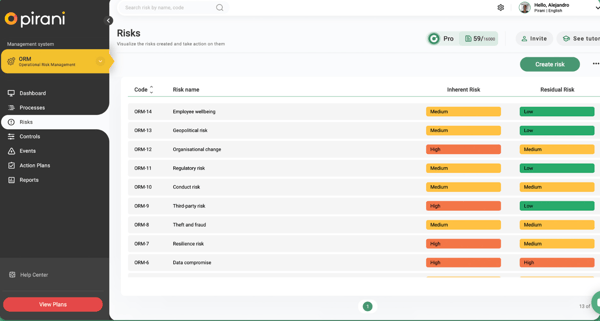
However, there are some downsides as well. Performance can be a mixed bag. I experienced slow response times, especially when navigating between modules and generating complex reports.
Also, the deletion of some records still feels very manual and clunky, and managing the association between risks and controls sometimes takes more clicks than it should.
Overall, Pirani provides you with resources to evaluate risk, chart a plan, and mitigate it with an advanced data-driven forecasting technique without compromising data security.
What I like about Pirani:
- I love how the new version of the tool has several options for managing risks and offers clear data visualization to generate a satisfactory customer experience.
- I also appreciate that it is compatible with risk methodologies and provides a great degree of help in asset management.
What do G2 Users like about Pirani:
“I like the quality of the tool; I like the performance of the staff who collaborate with us, as they are always willing to help and guide in everything related to the system or prevention of money laundering.”
– Pirani Review, Beylin Patricia R.
What I dislike about Pirani:
- I didn’t like that the free version lacks many important features, as highlighted in G2 reviews.
- I also struggled with the reports offered in PDF format. I would have liked a format that identified the company more. G2 reviews also talk about this.
What do G2 users dislike about Pirani:
“Given that it is a new version of the tool, there are still modules to be developed and a manual aspect in various parameterization and loading processes that makes the user experience not so good.”
– Pirani Review, Adriana S.
2. Fusion Framework System
Fusion Framework System provides a reliable platform for integrating workflows, processes, and documentation to analyze data, identify critical areas, and make trustworthy decisions.
It also automates certain programs to reduce uncertainties and optimizes the risk detection process to make your workflows more reliable and secure.
I have been using the Fusion Framework System for a while now, and it’s become a key part of managing operational risk and business continuity. One of the first things I noticed was how flexible the system was.
It is built on the Salesforce platform, which means you can customize it in just about any way you need. Whether you are setting up dashboards, creating workflows, or adjusting data visualization, the system gives you a lot of control.
What I’ve found the most helpful is how different parts of the platform connect with each other. The incident management features, for example, are not standalone but tie into your overall risk and continuity planning.
That’s been useful when we had to respond quickly to issues and track how everything is getting resolved. The reporting tools also work well for sharing updates with leadership.
I’ve pulled together clear visuals and summaries without spending a lot of time formatting or explaining the data.
I also loved the robustness of integration capabilities. Being able to bring in transformation from other systems has made it easier to see the full picture while assessing risks. It has also helped with planning because we are not working in silos anymore. We have data flowing in between platforms, which makes everything more accurate and timely.
The automation features also saved us time, especially when setting up recurring tasks and reminders related to risk assessments or compliance checks.
But Fusion isn’t something you can just log into and start using right away. Because it is so customizable, setting it requires a bit of effort. We had to spend a lot of time with product support to configure the system to fit our needs.
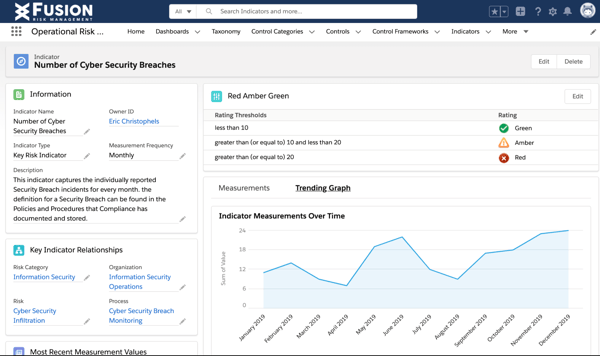
While support was generally helpful, there were times when it was hard to find someone who understood how we were using this tool. It seemed like there was some turnover in the support team that occasionally slowed things down.
I also noticed that the user interface can be overwhelming, especially for new users. There are many menus and settings, and not everything initially feels intuitive.
We had to provide extra training to ensure everyone was comfortable using it. When it comes to pricing, some more advanced features, like real-time dashboards or higher-tier support, are only available in premium plans. You need to consider your operating budget before investing.
That said, the Fusion Frameworks System monitors and assesses your resources, documents, and tasks or processes, refines and improves security, and mitigates any possibility of risk to protect your business.
What I like about Fusion Framework System:
- I loved that the Fusion Framework System allows companies to have one place to learn, prepare, and respond to any enterprise risk a company may face.
- Another aspect I loved is the integrations, as they allowed me to incorporate data for any context or knowledge.
What do G2 Users like about Fusion Framework System:
“I like the simplified approach and the automation of processes. It has also been helpful that it is customizable and flexible, which allows us to have a good overview and is feature-rich. Moreover, the ease of use of role-based access control is excellent because it allows us to assign service and components and exceeded my expectations.”
–Fusion Framework System Review, Agung S.
What I dislike about Fusion Framework System:
- I struggled with the graphical user interface, which is rather confusing to novice users. This made the learning process slow and required more training to become familiar with the platform, as echoed in G2 reviews.
- Another disadvantage was that I couldn’t find a variety of options to customize the reports to fit the organizational needs. It is mentioned in G2 reviews too.
What do G2 users dislike about Fusion Framework System:
“One major weakness of the Fusion Framework System is the flexibility by which the system can be modified to fit a specific need. However, this goes a long way in creating constraints regarding special software customization, hence some inefficiencies. Moreover, there may be some small issues like bugs and glitches, which might be irritating and cause certain inconveniences. These weaknesses have caused, to some extent, a decline in our output rate and the site’s usability.”
– Fusion Framework System Review, Sullivan C.
Learn about enterprise risk management and how it plays a crucial role in predicting risks, ensuring smooth communication, and preventing data breaches.
3. IBM OpenPages
IBM OpenPages is a highly agile and AI-powered governance, risk, and compliance (GRC) management solution that provides cloud-based services to manage and analyze risk-based data and craft actionable risk management strategies.
If you work in GRC, you’ve probably heard of this tool. It’s definitely not your average tool; it’s an enterprise-grade platform that integrates several moving parts into one single ecosystem.
The best thing about the platform is its customizability and responsiveness. It offers full-blown workflow management tailored exactly to our processes of operational risk management.
The fact that I can configure it to align with our internal audit processes, control frameworks, and compliance checks has made my life so easy. We also use IBM’s Watson AI capabilities built into OpenPages, especially the Watson Natural Language Processing integration for risk categorization and root cause analysis.
AI helps extract insights from unstructured data, such as incident reports and emails, which saves a lot of manual work.
I also love how scalable the platform is. Whether managing just operational risk or integrating regulatory compliance, internal audits, policy management, or even third-party risk, you have to access one unified platform.
I started with the core operational risk module, but we expanded into compliance and policy management as our needs grew. Each module is essentially its own mini ecosystem, but they all talk to each other, which is amazing once you get the hang of it.
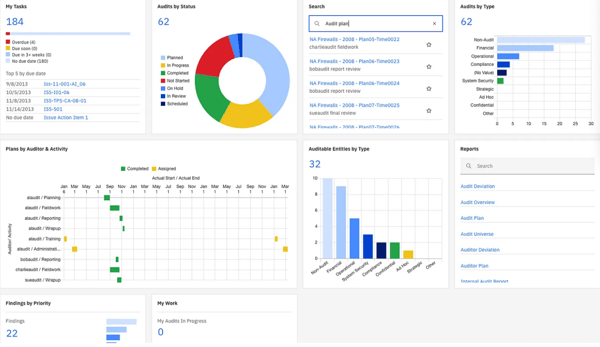
However, the platform has a few downsides. OpenPages isn’t easy to set up, and implementation is tricky due to the longevity of the configuration process. You’ll also probably need a dedicated IBM consultant unless you’ve got a super-tech-savvy internal team.
The design of the UI also feels a little bit dated. It is not as modern and intuitive as I’d like, and for a tool that does so much, you have to go through a longer training curve.
Not to mention, some users on my team, especially non-native English speakers, have complained that the language support is a bit patchy. If you manage global teams, this is something to consider.
Another pain point is that most features are hidden behind a premium paywall. We’re on one of the more premium tiers because we needed audit and compliance modules, plus Watson integrations, and those add up quickly.
While the value is there, especially for large organizations, I would not recommend it for smaller companies or anyone without a solid budget. The reporting tools, particularly the ones powered by Cognos, are powerful but unintuitive. We built templates to make recurring reporting easier, but it took some work.
Overall, IBM OpenPages is a compliant and cloud-based risk identification and analysis tool that automates critical workflows and establishes global risk protocols to rule out any instance of a potential threat across global teams.
What I like about IBM OpenPages:
- I love how I can customize the dashboards, views, objects, and reports to adapt them to the team’s specific needs. This helps us make more informed decisions.
- I also appreciate how it allows us to keep all records of internal incidents in the organization and monitor key indicators of risk.
What do G2 Users like about IBM OpenPages:
“This platform is scalable; it fits our company size well. I love this platform because it allows customizations. It is very good for managing risks through its GRC software. It has also streamlined compliance with evolving regulations.”
–IBM OpenPages Review, Edz R.
What I dislike about IBM OpenPages:
- I struggled with the reporting module. Cognos was a little difficult to manage and use to generate reports since it is not very user-friendly. This has been highlighted in G2 reviews.
- I also figured that this platform has a steep learning curve, which G2 reviews mention as well.
What do G2 users dislike about IBM OpenPages:
“Although IBM Watson NLC supports several major languages, there may be limitations when working with less commonly used languages or dialects. Users working with non-mainstream languages might face challenges in achieving the same accuracy and precision as they would with more widely supported languages. However, IBM continually expands its language coverage, so this limitation may improve over time.”
– IBM OpenPages Review, Tiago O.
Check out my peer’s analysis of the best GRC software in 2025 and dive into her individual takeaways for every platform to strategize your risk management issues wisely.
4. Protecht
Protecht is an enterprise risk management platform that monitors all incidents, investigates risk and sets periodic risk assessments to evaluate and mitigate any risk occurrence dynamically.
When I first started evaluating Protecht, I wasn’t quite sure what to expect. But over time, I have come to appreciate how much it can help organize and manage risks across different parts of a business.
It’s especially useful if you handle things like compliance, audits, incident reporting, or enterprise risk.
What stood out to me early on was how much I could adjust the platform to suit the way our team works. I didn’t feel like I had to force my process into the system because there was flexibility to make it work for us.
Setting up risk registers and reporting tools was straightforward once I got the hang of it. I liked being able to build out detailed reports and dashboards that pulled from multiple areas. Also, the real-time insights helped me stay on top of things without constantly chasing updates.
The system also made it easier to manage different types of registers, such as risks, incidents, and audits, all in one place. Not having to jump between tools saved a lot of time.
The customization options were helpful, especially for automated workflows and notification settings. I didn’t know how to code to make changes, which was a relief. If I ever got stuck, their support team always responded and helped, which made a big difference during setup and configuration.
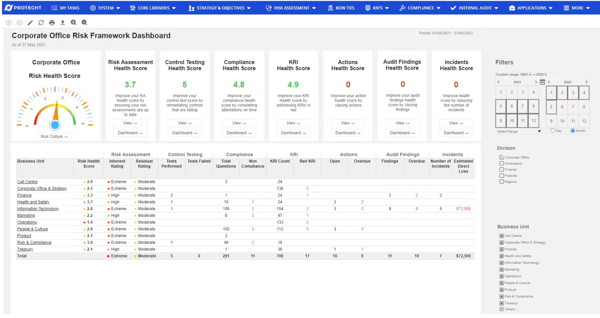
At the same time, I did face some challenges. Protecht can take a little while to learn, and some parts of the platform feel more complex than they probably need to be.
The interface isn’t the most modern-looking or intuitive, and navigating through settings requires a bit of patience at times. I also ran into a few limitations, like certain features, like advanced dashboards or analytics, being only available in higher-tier subscriptions. It felt like those tools should’ve been included in the base offering, considering how essential they are for deeper insights into risks.
Integrating Protecht with other platforms like BI platforms or internal systems took a bit more effort than expected. It’s doable, but it’s not plug-and-play. And I had to lean on the support system more than once to get everything working smoothly.
But apart from these considerations, Protecht is a secure risk assessment solution that offers an internal audit trail, GRC compliance, incident prevention, and accurate risk analysis for your company.
What I like about Protecht:
- I appreciate the customizability and flexibility that Protecht offers to suit our workflows and requirements.
- I was also impressed by how Protecht automates everything in a risk management system, from starters to leavers, from audits to assessments, and from policies to procedures.
What do G2 Users like about Protecht:
“Protecht offers a seamless experience for users seeking robust and customizable features tailored to the business’ specific requirements. One of the standout features is the system’s flexibility, which allows users to update the system to their unique needs effortlessly. Whether configuring risk registers, designing workflows, or generating custom reports, the platform empowers the user to adapt it to match their specific needs. This helps enhance user satisfaction and enables the business to align the system with its existing processes.”
– Protecht Review, Que N.
What I dislike about Protecht:
- While there are no major complaints, navigating the platform can be a little frustrating if you don’t know JavaScript. G2 reviews have highlighted this.
- While Protecht offers numerous benefits, the learning curve associated with understanding the platform can be challenging. This has been echoed in G2 reviews as well.
What do G2 users dislike about Protecht:
“As with any vendor-sourced products, there are natural limitations to development and functionality. So one of the constraints is the need to engage with Protecht to make the more significant changes to features and functionality unique to our needs.”
– Protecht Review, Raj H.
5. Strike Graph
Strike Graph is a compliance management tool that provides adherence to GDPR, HIPAA, CMMC, NIST, ISO 27001, SOC 2, and PCI DSS protocols, along with other security certifications, to monitor, mitigate, and eliminate any unidentified threat in the system.
I have used Strike Graph for a while now to manage our compliance journey, primarily focusing on SOC 2 but also on ISO 27001 and HIPAA frameworks.
If you have ever tried navigating the tangled web of GRC without proper tooling, Strike Graph feels as if you have been given all the resources to manage your processes.
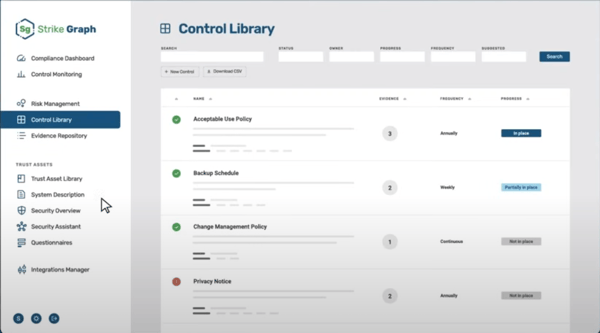
What hooked me first was the dashboard. It’s not just clean but alive and intuitive. It gives you this dynamic overview of where you stand across various controls, audits, and evidence submissions.
Even team members who weren’t seasoned compliance experts could navigate it without needing a ten-part tutorial. The evidence upload flow was extremely smooth. You can drag and drop or link items, and the system actually remembers the context, like expiry timelines or reuse options across frameworks. That’s huge.
I also love the predefined template gallery. Strike Graph includes a comprehensive resource library with pre-built templates for policies and controls that saved us countless hours. It’s especially helpful if you are starting fresh with compliance or trying to standardize your internal documentation.
The templates follow best practices and align tightly with audit standards, which gave me more confidence during our prep work.
Another standout for me is the team support. I’ve had timely responses from their experts whenever I needed guidance. I didn’t have to chase anyone down, deal with ticketing systems, or endure long wait times to get answers to my queries.
There are a few things that can be better. The reminders and alerts for admins could be more detailed, especially around certification guidelines. Also, I would have liked more personal touchpoints, like regular check-ins or a dedicated account manager. It sometimes feels a bit hands-off after boarding.
Also, from what I can tell, the basic plan gets you most of the core features like evidence uploads, templates, and a simple compliance tracker. But if you go for one of the higher tiers, you get more advanced features like automated framework mapping, integrations with cloud platforms like AWS, risk scoring, and better audit reporting. These extra features save time if you manage multiple frameworks or need to generate reports for external audits.
That said, Strike Graph enables you to stay aligned with your data security and compliance requirements, manages an internal audit trail, and evaluates evidence to maintain the status quo.
What I like about Strike Graph:
- I loved the Strike Graph dashboard, as it made it easy to see progress and show necessary tasks without looking at the complete list of controls and evidence.
- I also find periodic reminders about expiring evidence very helpful for keeping track of what needs to be refreshed. <