



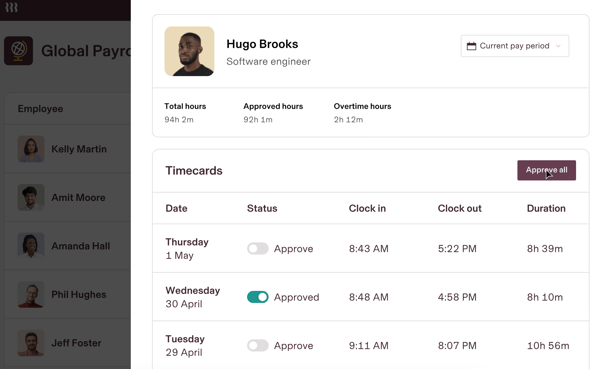
That said, mobile performance didn’t meet the same bar. Several users shared that the mobile app felt less stable than the desktop version, occasionally freezing or lagging during clock-ins or approvals. While most essential actions are supported on mobile, the user experience may not be as polished.
Rippling also isn’t exactly plug-and-play. Several reviewers mentioned that while setup is manageable, the breadth of features can lead to confusion during initial configuration. Users found that things fell into place once they understood the system’s structure, but getting there sometimes meant trial and error, especially for teams without prior experience in workforce platforms.
What I like about Rippling:
- Many users appreciated how Rippling streamlines time tracking and PTO management, making it easier to manage workforce logistics.
- I also saw consistent praise for how the platform centralizes scheduling and attendance data without adding extra admin work.
What G2 users like about Rippling:
“We’ve been using Rippling for several years now, and it’s been a great experience. Rippling is really quite a few steps ahead of other management software. It’s more modern and professional, yet leaves fun art on each paystub. I love the experiences for selecting insurance, exploring the org chart, checking your pay, opening other services with SSO, or managing your employees. Throughout all experiences, it is thoughtfully designed and never encroaches on confusing or overly detailed, even during onboarding and insurance selection.”
– Rippling Review, Logan A.
What I dislike about Rippling:
- Some reviewers mentioned that tracking hours or approving time-off requests through the mobile app could be unreliable.
- I also noticed feedback around the initial complexity of configuring time tracking and scheduling modules, which sometimes required extra setup effort.
What G2 users dislike about Rippling:
“One thing I dislike about Rippling is the lack of a full monthly calendar view within the PTO app. It would be incredibly helpful to see a layout similar to Google Calendar, where I could view the entire month and easily track my coworkers’ time off. This feature would make it much easier to plan meetings, coordinate projects, and manage workloads more efficiently.”
– Rippling Review, Claudia G.
2. BambooHR
BambooHR offers a clean, user-friendly platform for key HR functions, such as time-off tracking, employee data management, onboarding, and document storage.
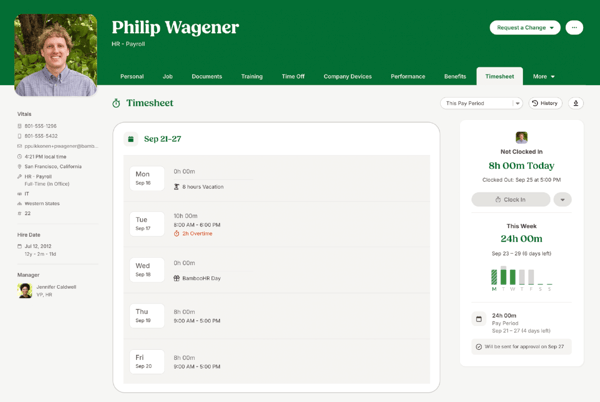
One of BambooHR’s biggest strengths, as highlighted in user feedback, was its employee self-service capabilities. Employees can easily access and update their personal information, request PTO, view company documents, and track their own records without having to ping HR for every little thing. The visibility into personal data also builds a greater sense of transparency across teams.
Another highlight was the ease of onboarding. BambooHR makes it simple to welcome new employees with customizable templates, clear checklists, and automated workflows that keep everything moving. Users praised how BambooHR made the first days feel organized without overwhelming new hires, from paperwork completion to benefits enrollment. It’s beneficial for growing companies that want to standardize their onboarding without making it feel robotic.
User-friendliness rounded out the strengths that kept showing up. That’s a big reason BambooHR often comes up as a user-friendly workforce app for companies that want intuitive self-service options for employees and admins alike.
BambooHR’s clean design and intuitive navigation were major positives across different company sizes and industries. Tasks like approving time-off requests, pulling reports, or updating job titles didn’t require deep system knowledge or hours of training.
On the flip side, I did notice consistent feedback around customer support responsiveness. While BambooHR’s support team is generally helpful, users mentioned that response times could lag during peak periods or when dealing with more complex requests. It’s not a major flaw, but for time-sensitive issues like system access problems, a faster turnaround would make a big difference.
Customization also came up as a point of friction. Although BambooHR allows some tailoring, especially for onboarding and documents, users said they sometimes felt boxed in by limitations when modifying workflows or reports.
What I like about BambooHR:
- I liked seeing how BambooHR empowers employees to handle their own time-off requests, document access, and personal data updates without relying on HR for every action.
- I also appreciated how the tool makes the onboarding process more streamlined and approachable, even for companies lacking a formal HR operations team.
What G2 users like about BambooHR:
“BambooHR gives you the ability to provide employees with functionality within the full HR lifecycle. The system is overall easy to use for both admin and end users and very aesthetically pleasing. The onboarding is easy to use, track, and communicate our company’s tasks with a new hire. I love being able to create custom workflows and approvals for our company, and signature documents make admin tasks easy. What I love the most is that BBHR is always open to feedback, growing, and implementing change on a regular basis. Customer support is extremely easy to reach via chat, phone, or email.”
– BambooHR Review, Lindsay B.
What I dislike about BambooHR:
- I noticed some feedback about slower customer support response times when teams needed urgent help.
- I also found that while BambooHR is customizable in some areas, it doesn’t always allow deep tailoring for workflows or reports.
What G2 users dislike about BambooHR:
“The only thing that I would improve is the lockout time. I work in a busy office as an HR Manager and toggle between multiple programs. Unfortunately, BambooHR times out within a few minutes, so I find myself logging back in to the software over 12 times per day.”
– BambooHR Review, Sylvie D.
3. Connecteam
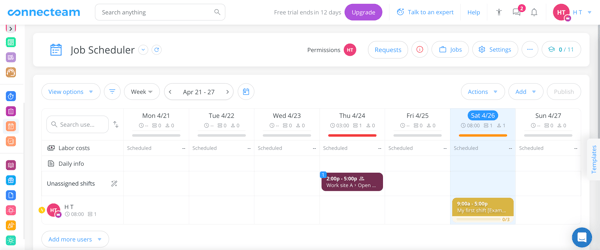
When it comes to managing a deskless or shift-based workforce, Connecteam is a name that pops up often. It offers a centralized way to handle time tracking, scheduling, communication, and workforce management, all in one streamlined app.
Time tracking stood out as a significant strength across user reviews. Employees can easily clock in and out via the app, often with GPS tagging to confirm locations when necessary. Users appreciated how timesheets were automatically generated, cutting down on manual time collection and corrections. Some users also called out the convenience of setting restrictions like clocking in only when within a certain geofence, helping reduce time fraud.
The mobile app itself earned a lot of positive feedback. Connecteam regularly gets mentioned among the top-rated workforce management apps because of how well it handles scheduling, clock-ins, and communication in one place.
Users liked having a single place to clock in, view schedules, receive company updates, and request time off. The app’s clean layout made it easier for employees to handle HR tasks independently without needing frequent reminders or IT support. Teams especially appreciated the mobile experience’s responsiveness for everyday essentials, like submitting timesheets or approving changes on the fly.
Another feature that got a lot of love was Connecteam’s built-in chat functionality. Instead of switching between external messaging apps and work tools, teams could communicate directly inside the platform. This centralized communication helped managers distribute schedules, send updates, or gather quick responses without losing context. The internal chat tool was called out as a real operational advantage, especially for industries like construction, retail, or logistics, where immediate updates can make a difference.
That said, some users did point out performance issues. The app could sometimes load slowly, particularly when handling heavier functions. It wasn’t a constant problem, but it was enough to frustrate teams trying to move quickly between tasks occasionally.
A slight learning curve was also mentioned. While the platform is generally designed to be user-friendly, some frontline staff needed extra training during onboarding to fully navigate features like time-off requests or shift confirmations. Over time, most users adapted, but the initial adjustment period was something to plan for if you’re rolling out Connecteam at scale.
What I like about Connecteam:
- I liked seeing how Connecteam streamlines time tracking through its mobile app, giving employees and managers clear visibility into hours worked.
- I also liked the built-in chat feature, which helps keep workforce communication centralized without relying on outside tools.
What G2 users like about Connecteam:
“The time clock is very intuitive and allows users to easily track their hours worked for a given day or a pay period. Users can easily request changes to a clock-in or clock-out time if they miss punching in or out.”
– Connecteam Review, Derek H.
What I dislike about Connecteam:
- I noticed some feedback about the app running slowly during busy periods, mainly when switching between functions.
- I also found that less tech-savvy employees sometimes needed extra training to navigate the platform comfortably.
What G2 users dislike about Connecteam:
“The least helpful thing about Connecteam is that I cannot edit or publish shifts from my own phone. It would be handy if I could edit shifts while I am out and about, not only using my computer.”
– Connecteam Review, Kelsey M.
Related: Looking to boost visibility into employee productivity? Explore the best employee monitoring tools that help teams stay focused and accountable.
4. UKG Ready
UKG Ready integrates time tracking, payroll access, scheduling, and basic HR functions into a standard system. Its goal is to make day-to-day workforce management more efficient.
Time clock functionality was one of the most praised aspects across user reviews. Employees could clock in and out and check their hours quickly without needing extra steps or approvals. Managers liked the visibility into attendance and timecard status, which helped reduce errors and last-minute payroll adjustments. Users also noted that the clocking process was consistent whether they accessed it from a desktop or designated kiosks.
Access to employee information also stood out as a positive theme. HR teams and employees alike appreciated being able to view pay stubs, update personal information, and manage tax documents from a single login. Several users mentioned that having one place to handle everything from direct deposit changes to benefits enrollment saved time and reduced the need for back-and-forth emails with HR.
Labor forecasting and cost control also earned strong marks. UKG Ready stood out as one of the leading workforce management services for midsize companies, especially for HR teams trying to balance headcount planning and compliance.
Managing paid time off was another area where UKG Ready earned high marks. The system allows employees to submit time-off requests easily and view their PTO balances. From an HR ops perspective, users liked how PTO accruals, requests, and approvals all synced automatically with scheduling and payroll. Several reviewers mentioned that having a clear and transparent PTO system helped reduce miscommunication and last-minute surprises when managing coverage.
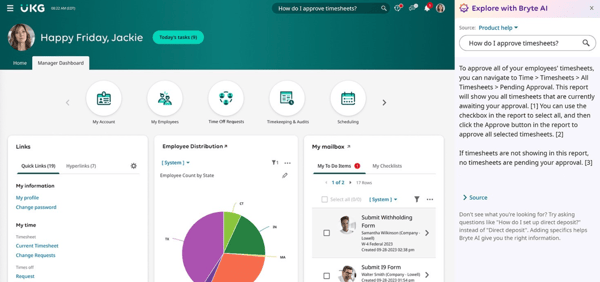
However, the mobile experience didn’t always match the desktop experience. Many users said the mobile app felt slower or less intuitive. While the core features are accessible on mobile, occasional glitches or navigation issues make it harder to rely entirely on the app without frustration.
Some users also mentioned that parts of the platform could feel slightly confusing, especially for new employees or users who didn’t interact with it daily. Tasks like finding timecard edits, adjusting shifts, or accessing historical records weren’t always as intuitive as they could be.
What I like about UKG Ready:
- UKG Ready simplifies clocking in and managing timecards. I can understand how it helps employees and managers stay accurate.
- Users can also easily access personal information and PTO balances without needing to contact HR. This is an efficient system, in my eyes.
What G2 users like about UKG Ready:
“When I log in to do my timesheets, UKG Ready has my projects I’ve been working on pre-filled, and I just have to tally the hours and make sure everything adds up. Overall, it is a great experience and way better than others that I’ve dealt with in the past.”
– UKG Ready Review, Weston A.
What I dislike about UKG Ready:
- I observed some feedback about the mobile app being slower and less intuitive than the desktop platform.
- According to G2 reviews, navigating certain features, like adjusting shifts or finding time records, could be confusing without additional guidance.
What G2 users dislike about UKG Ready:
“Training, documentation, and support are the weak spots. Although these areas have improved over time, they still leave much to be desired. There’s a reason consulting firms thrive around this software. UKG provides a powerful product, but its training lacks depth. Instead of focusing on real-world, scenario-based training—like “if this, then that” logic—they often present a high-level overview. Users need more practical, hands-on guidance to fully utilize the platform.”
– UKG Ready Review, Riley S.
5. HROne
HROne provides HR and operations teams with a more organized way to manage employees without getting bogged down in manual processes. Its platform aims to modernize workforce management while staying approachable for growing organizations.
Attendance management was one of the strongest positive themes across user reviews. Teams appreciated how easy it was to move away from spreadsheets or manual punch clocks and into a centralized system for tracking attendance and work hours. Users mentioned that employees could clock in and out reliably, view their attendance history, and track time-off balances. Several reviewers also noted that the attendance workflows help ensure better compliance with labor policies and reduce errors when processing hours.
Employee management also earned consistent praise. Beyond just tracking hours, users highlighted how HROne helps consolidate employee profiles, making it easier to manage everything from shift schedules to time-off approvals in one place.
Another strength frequently mentioned was ease of use. HROne’s interface is clean and straightforward, with navigation that most users found intuitive after a short adjustment period. Tasks like approving leave requests, checking attendance records, or updating employee information didn’t require much technical training.
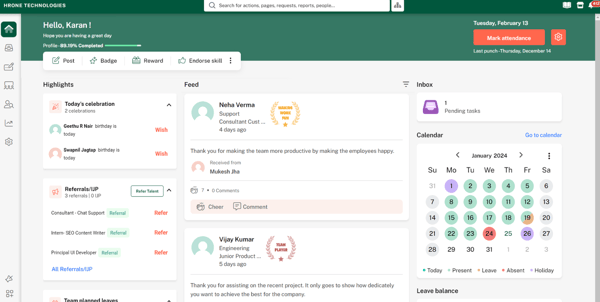
However, users did flag a few areas for improvement. The mobile app experience wasn’t always as smooth as the desktop version. Several reviewers mentioned slow loading times, occasional glitches, or limited functionality when accessing features like attendance tracking or employee directories on mobile devices.
Reporting limitations also surfaced as a common challenge. Consider that if you’re looking for more advanced analytics or the best workforce software for productivity tracking to monitor team performance more closely.
Users noted that while basic reports are available, creating customized reports or pulling detailed analytics could feel restrictive. Teams that needed flexible reporting across departments, shifts, or attendance patterns often found themselves wanting more robust options. It’s something to be aware of if your HR ops workflow relies heavily on advanced data analysis.
What I like about HROne:
- I appreciate how HROne makes it easier for teams to manage attendance tracking and employee records in a centralized, accessible system.
- I like clean layouts, and G2 reviews suggest that the tool made it easy for them to navigate everyday HR tasks without much ramp-up time, so that’s a plus for me.
What G2 users like about HROne:
“It has transformed the HR roles into easy processes. No requirement for the preparation of spreadsheets for attendance and payroll, data is automatically captured as the employee logs in through a mobile or laptop. Payroll is processed by considering the paid days, and all calculations are done automatically, and the salary slip is produced within seconds.”
– HROne Review, Kritika S.
What I dislike about HROne:
- I noticed feedback that the mobile app is slower and less fully featured than the desktop experience.
- I also read that teams needing deeper analytics sometimes struggled with the platform’s limited reporting flexibility.
What G2 users dislike about HROne:
“The system currently has a limitation that restricts the creation of more than 50 dynamic fields. Additionally, there is no option available to delete employee data, which poses challenges in data management and compliance.”
– HROne Review, Mehboob J.
6. Keka
Keka makes HR processes feel less overwhelming and helps businesses simplify leave management, time tracking, and employee recordkeeping without requiring heavy IT involvement.
One area where Keka clearly shines is leave management. Users consistently highlighted how easy it is for employees to request time off, view balances, and get approvals without relying on endless email chains or manual spreadsheets. Clear, self-serve access to leave records helps teams stay better aligned and reduces last-minute coverage issues, a big win for HR and operations.
That focus on employee self-service shows up across other features, too. Employees can update personal information, review pay stubs, submit attendance corrections, and check schedules without needing constant hand-holding. Many users noted that giving employees more autonomy helped cut down on basic HR queries and created a smoother overall experience for everyone involved.
Ease of use ties it all together. For many companies, especially startups or early-stage businesses, Keka offers a cost-effective workforce management system that simplifies HR without requiring huge investments.
Keka’s clean interface, straightforward navigation, and logical workflows were praised across industries. HR teams liked that onboarding onto the platform didn’t require extensive training or complicated documentation, keeping the focus where it belongs: on managing people, not troubleshooting software.
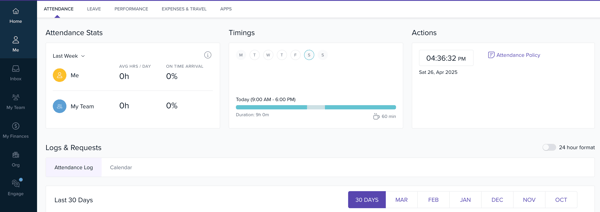
Like what I saw with other workforce management platforms, Keka received some feedback about its mobile app limitations. Users mentioned that the mobile experience sometimes lagged behind the desktop version in terms of speed and polish.
Customer support surfaced mixed reviews as well. Many users praised Keka’s support team for being knowledgeable and helpful, especially during setup and troubleshooting. However, a few reviewers pointed out that response times could stretch during busy periods, which might slow down issue resolution.
What I like about Keka:
- The way Keka handles leave management stood out to me. It makes it easy for employees to stay updated without creating more work for HR.
- I also appreciated how the platform encourages employee independence through clear self-service options.
What G2 users like about Keka:
“Keka HRMS is very user-friendly. Has been of great help for a start-up company like ours. Helped us streamline our payroll, attendance management, and application tracking for hiring. It integrates well with other complementary applications like Teams & Zoho Books. Implementation of the module has also been simple as well as effective. We use Keka daily. The App for the employees is also very handy for documenting logins. Coming to the customer support offered by Keka, they have always been cordial and responsive based on the severity of the concern/escalation. It has only improved for the better over the past 2 years of us using it. I’d definitely recommend Keka to all start-ups that are looking to streamline their HR department & payroll.”
– Keka Review, Ramya Krishna K.
What I dislike about Keka:
- While Keka’s mobile app covers the essentials, it didn’t feel as smooth or responsive as the desktop experience, based on user feedback.
- I also came across mentions that, while generally helpful, customer support sometimes takes longer to respond during busy times.
What G2 users dislike about Keka:
“The Core HR modules, such as the competency mapping, KPI tracking/Goals, and subtasks, could use more time in the oven, as currently the ideas are there, but the execution could do better. Performance module is very limited in mobile apps, which is quite unpleasant to handle.”
–