


You can patch a system in minutes, but patching human behavior? That takes work.
And it’s more important than you think. According to a recent report, 95% of all data breaches are caused by human error. Whether it’s falling for a phishing email, reusing passwords, or skipping multi-factor authentication, people remain the weakest (and most unpredictable) link in your security stack.
That’s why I spent time evaluating over 20 tools to find the best security awareness training software. The ones that go beyond generic content and outdated phishing tests. I wasn’t just looking for dashboards and completion rates; I wanted to know which tools drive real behavior change across organizations.
The seven tools in this list stood out for their thoughtful design, real-time insights, and ability to support both lean IT teams and global security programs. Whether you need something scalable for an enterprise rollout or flexible enough for mid-sized teams, you’ll find a solution that fits.
7 best security awareness training software in 2025
- Best for enterprise-grade simulations: KnowBe4 Security Awareness Training
Offers customizable phishing campaigns, automated user risk scoring, and strong compliance support. - Best for behavior-driven training experiences: Hoxhunt
Uses gamification and real-time phishing simulations to adapt to each user’s behavior and engagement level. - Best for human risk scoring: SoSafe
Provides engaging microlearning modules, attack simulations, and data-backed insights tailored by region and risk. - Best for managed security services integration: Arctic Wolf
Pairs security training with its 24/7 SOC capabilities, ideal for companies using a broader managed detection and response strategy. - Best for compliance-focused organizations: MetaCompliance Security Awareness Training
Combines policy management with awareness training to meet regulatory frameworks like ISO, GDPR, and HIPAA. - Best for engaging remote-first teams: Hacker Rangers Security Awareness
Uses a mission-based learning model to keep users engaged with gamified cyber threat challenges. - Best for threat intelligence-driven training: Proofpoint Security Awareness Training
Delivers content based on real-world threat intelligence, with role-based training, advanced phishing simulations, and adaptive learning paths.
*These best security awareness training platforms are top-rated in their category, according to the latest G2 Grid Reports. I’ve added their standout features for easy comparison. Visit the official website to contact the sales team for pricing details.
A closer look at the best security awareness training software
You can strengthen your firewalls and tighten your permissions, but if your employees aren’t trained to spot a phishing email, your entire stack is still exposed. That’s why security awareness training software is no longer just a compliance checkbox; it’s become a foundational layer in modern cybersecurity programs.
And the demand is rising fast. According to Market Research Future, the global market for cybersecurity training is projected to grow to USD 37.84 billion by 2034, at a CAGR of 7.76%. With phishing, social engineering, and credential-based attacks on the rise, businesses need tools that can reduce human risk at scale.
Over the years, I’ve spent time training with a few of these tools, and I’ve seen dozens of platforms promise “behavior change” and “phishing protection,” but very few deliver on both. Some focus heavily on compliance and miss the engagement piece. Others lean into gamification but offer little in the way of analytics.
That’s what led me to evaluate over 20 platforms based on use cases, company sizes, and levels of security maturity to identify those that provide the most effective cybersecurity awareness programs for companies.
How did I find and evaluate the best cybersecurity training software?
To move past surface-level comparisons, I started with G2’s Grid Report, which ranks tools based on real user reviews and market presence. This gave me a strong starting point that included both category leaders and promising emerging platforms.
I then used AI-assisted analysis to dig into hundreds of verified G2 reviews. I focused on patterns around engagement quality, phishing simulation depth, reporting accuracy, and overall ease of rollout. This helped me pinpoint what security teams value most and where tools often fall short.
To balance the data with real-world context, I also spoke to fellow G2’er IT professionals managing awareness programs. Their feedback helped validate the themes I observed in the reviews and provided a clearer picture of daily usability, adoption struggles, and reporting gaps.
All product screenshots featured in this article come from official vendor G2 pages and publicly available materials.
What I prioritized when evaluating security awareness training software
I considered the following factors when evaluating the best security awareness training software:
- Phishing simulation and response training: I looked for platforms that offer realistic, customizable phishing simulations along with follow-up education when users click. Tools that support automated campaigns and adaptive learning stood out.
- User-level reporting and risk scoring: Strong analytics were essential. I prioritized software that helps teams identify high-risk users, track behavior over time, and generate clear reports for stakeholders.
- Content quality and learning formats: The best tools deliver short-form, impactful training through interactive videos, quizzes, and scenario-based content. I also looked at whether content could be personalized by role or department.
- Scalability and admin flexibility: I evaluated how well each platform handles growing teams and distributed workforces. Support for multilingual content and customizable admin controls were major advantages.
- Engagement tracking and completion insights: Training only works if people engage with it. I prioritized tools that offer detailed tracking of participation, completion rates, and learning progress.
The list below contains genuine user reviews from the security awareness training software category page. To be included in this category, a solution must:
- Provide educational security courses
- Offer online classes or web-based educational content
- Provide training and assessment tools
*This data was pulled from G2 in 2025. Some reviews may have been edited for clarity.
1. KnowBe4 Security Awareness Training: Best for enterprise-grade simulations
KnowBe4 is one of the widely recognized names in the security awareness space. It’s a top-rated platform on G2, known for helping teams roll out phishing simulations, train staff at scale, and track behavior over time. According to the G2 Grid Report, it is popular across industries such as financial services, IT, and healthcare, with 66% of mid-market businesses using it.
One of the biggest advantages I observed is its massive training content library. G2 reviewers consistently highlight the variety of videos, quizzes, and interactive modules covering topics from phishing and social engineering to secure password practices. The platform also tailors content by role and skill level, making it easy to assign relevant training across departments. Users appreciate that content is frequently refreshed and available in multiple formats, which helps keep things from feeling monotonous early on.
Another highlight is the phishing simulation engine. G2 reviewers often mention how realistic the phishing templates feel and how the platform supports behavior-driven scheduling. Security teams can launch simulations that mimic common threats, track click rates, and automatically enroll users in follow-up training. This closed-loop approach to learning makes it easier to reinforce secure habits across teams. Many reviewers also noted the availability of AI-generated phishing templates, which add variety and reflect current threat trends.
KnowBe4 also earns high marks for its user and group-level risk scoring dashboards. I gathered that these dashboards help IT and security teams identify individuals who are falling behind, spot departments that need more focused attention, and monitor changes in risk over time. The reporting is clear enough for leadership reviews but detailed enough for day-to-day tracking. Several reviewers said that this visibility helped them demonstrate impact to senior stakeholders and make training more targeted.

Some G2 reviewers noted that the content can start to feel repetitive after a while. While the library is large, companies running year-round campaigns may find that certain modules lose their impact. I read a few users express a desire for more advanced learning paths to keep experienced employees engaged over time.
Customization also emerged as an area for improvement. Several users expressed a desire for greater flexibility in editing templates, creating training paths, or modifying content to better align with internal branding and tone. For teams with specific compliance frameworks or localization needs, the existing customization options may seem somewhat limited.
I also came across mentions of the user interface needing refinement. While the platform is functional and easy to learn, some reviewers noted that workflows like campaign setup and report generation could be more streamlined.
KnowBe4 is a strong choice for organizations seeking a feature-rich platform with extensive content and reliable phishing simulations.
What I like about KnowBe4 Security Awareness Training:
- G2 reviewers noted not having to build content from scratch. The pre-built modules save time and reduce friction for security teams.
- I found the phishing templates to be highly praised for their realism, which helps reinforce good behavior in everyday scenarios.
What G2 users like about KnowBe4 Security Awareness Training:
“With seamless integration into our environment and access to a comprehensive library of phishing simulations, this tool empowers us to effectively assess our organization’s cybersecurity awareness and response readiness.”
– KnowBe4 Security Awareness Training Review, Jennifer G.
What I dislike about KnowBe4 Security Awareness Training:
- There were repeated mentions of limited customization. I can see how this would be frustrating for teams with niche training needs or internal guidelines.
- Some users also noted that the interface could use refinement, particularly in areas like campaign setup or detailed reporting.
What G2 users dislike about KnowBe4 Security Awareness Training:
“I like KnowBe4, but I wish it had direct integration with Google Workspace for a smoother experience. We are still manually adding and removing user accounts.”
– KnowBe4 Security Awareness Training Review, Brian H.
2. Hoxhunt: Best for behavior-driven training experiences
Hoxhunt adopts a gamified approach to security awareness training and is quite popular in the IT, computer software, and telecommunications industries, with 74% of enterprises using it, according to G2 Grid Report data. It has the highest satisfaction score of 97, based on G2 Data, and stood out in my evaluation for its ability to keep users engaged through short, inbox-based simulations that blend into everyday workflows.
I gathered from the reviews that users love Hoxhunt’s gamified approach to security training. The platform transforms phishing detection into a challenge, encouraging employees to spot suspicious emails in exchange for points, feedback, and positive reinforcement. Many reviewers on G2 say this format makes security awareness feel less like mandatory training and more like a daily habit. Progress tracking is also visible to users, helping them stay accountable and invested.
The realism of Hoxhunt’s phishing simulations is highly approved of. According to G2 reviewers, the mock emails are impressively believable and often indistinguishable from actual threats. This level of detail keeps even experienced employees on their toes. Each interaction is followed by instant feedback, helping users learn in real time without derailing their day.
Another standout is Hoxhunt’s inbox-native delivery. Rather than sending users to an external training hub, the platform brings simulations straight to their everyday tools, primarily Outlook and Gmail. I think this subtlety makes training feel like part of the job, not an extra chore. Several reviewers appreciated how easy it was to get started without requiring technical expertise or constant reminders. For teams with limited training time or change management bandwidth, this makes a real difference.
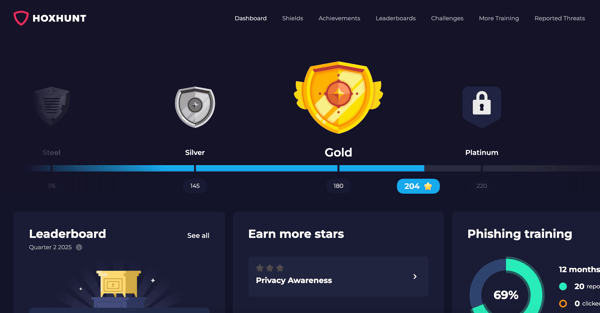
While overall feedback was positive, some G2 reviewers noted that the experience can become repetitive over time. While the gamified format is initially engaging, users in longer-running programs sometimes feel like they’re seeing the same kinds of emails too frequently. This can reduce the impact of the training and lead to disengagement if not refreshed regularly.
Some teams flagged that adding new types of simulations or scenarios could keep the experience feeling fresh. Although the core framework works well, ongoing variety would help maintain momentum.
Another recurring point of feedback I noticed was the need for more diverse phishing examples. Several users highlighted that while the emails are well-crafted, they want to see broader attack styles and more advanced tactics reflected in the simulations.
The tool’s realism is one of its biggest strengths, but for a few users, it occasionally blurred the line a bit too well. Some employees flagged real internal emails by mistake, while others noted that simulations sometimes landed in spam. These cases weren’t common but could add to IT teams’ workloads. These moments can sometimes cause hesitation or dilute trust in the program. Still, as one reviewer put it, it’s better to report than risk falling for a real threat.
Hoxhunt is a great pick for companies that want to meet users where they are, making security awareness part of the inbox rather than a standalone chore.
What I like about Hoxhunt:
- Reviewers on G2 consistently praised the platform’s gamified design. It motivates users without relying on long lectures or mandatory videos.
- I found that delivering everything through email made the training more natural and less disruptive than traditional learning systems.
What G2 users like about Hoxhunt:
“Hoxhunt email training has an edge over traditional video-based training courses for cybersecurity. It gives you real-time emails that can be identified as a phishing attempt or categorized as a malicious email. Learning through this training platform is impactful because we are learning practically with hands-on experience. Also, the platform is very interactive; it shows a leaderboard for the entire organization from all the departments. The after quizzes are also very important, they sharpen the concept of real-time cyber-attacks and tech security awareness. Overall, I like the Hoxhunt very much because the scenarios taken for training are more similar to the real-time cyberattacks.”
– Hoxhunt Review, Prateek V.
What I dislike about Hoxhunt:
- A few reviewers mentioned wanting more variety in the types of phishing simulations. I can see how that would matter for more mature security teams.
- There were also comments about email filters interfering with delivery, which could reduce the overall effectiveness of the training flow.
What G2 users dislike about Hoxhunt:
“The ‘vacation’ feature could be more flexible, allowing more days to pause tests, or even integrating it with Outlook. The current volume of free days is quite limited, impacting both learning consistency and user ranking, especially considering the gamification aspect.”
– Hoxhunt Review, Ligia B.
3. SoSafe: Best for human risk scoring
SoSafe offers a structured and localized approach to security awareness training. It is popular in the automotive, manufacturing, and IT industries. G2 Grid Report data also shows that it is primarily used by mid-market and enterprise companies, at 51% and 35%, respectively.
One thing I saw reviewers consistently praise is SoSafe’s microlearning format. The platform breaks training down into short, easy-to-complete modules that users can move through at their own pace. G2 reviewers appreciated that the content doesn’t require long attention spans or lengthy time commitments. Instead, it fits into small gaps in the workday, making it easier to roll out across busy teams. Many also stated that this format helps reduce fatigue and makes security training feel more approachable.
SoSafe’s built-in progress tracking stood out to me as another key strength. Several reviewers liked being able to monitor completed modules, see learning paths, and track how far along users were in the program. This visibility is helpful both for learners and admins. It supports accountability and helps security teams spot who might need follow-up. In several G2 reviews, users said this made it easier to stay engaged over time and gave them a clearer sense of achievement.
I also read a lot of positive feedback for its multilingual support. Users appreciated that the platform supports a broad range of languages and adapts to different regional needs. This made it easier to deploy across global teams or to match the language preferences of non-native English speakers.
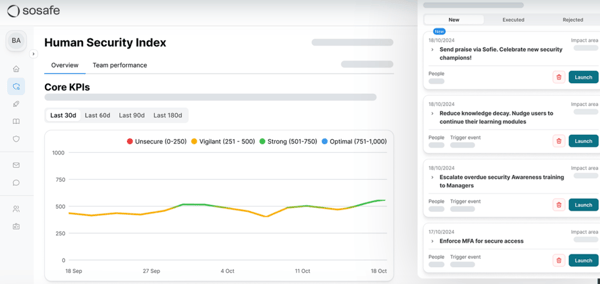
However, one theme that came up here, just like it did with KnowBe4 and Hoxhunt, is the risk of repetition. A few G2 reviewers felt that the modules could start to feel familiar if used over long periods of time. While this wasn’t flagged as a major concern, it’s something to keep in mind when running continuous campaigns.
There were minor platform issues. A few users experienced slow loading times or noted that modules didn’t always save progress correctly on the first attempt, although these situations didn’t seem to be widespread.
Lastly, I got the impression that a handful of users faced friction in the module structure. In some cases, if a user answered a question incorrectly, they had to repeat the entire section. While some reviewers stated that this reinforces learning, a few expressed a desire for more flexibility.
Overall, SoSafe is a solid option for teams that want short, structured training in multiple languages with built-in progress tracking and a clean user experience.
What I like about SoSafe:
- Reviewers mentioned being able to complete the training in short bursts. The micro-learning approach fits easily into the day.
- Multilingual support was highlighted often in reviews, which I think shows the platform’s relevance for international teams.
What G2 users like about SoSafe:
“SoSafe makes learning interesting and fun. It is created in a way that the user has a feeling of playing a game. The collection of points and badges made me complete all the available courses at once. The quiz at the end of each module was a great opportunity to rethink the topics covered.”
– SoSafe Review, Shreevathsa C.
What I dislike about SoSafe:
- Some reviewers felt the training would benefit from more variety as users progressed. It sounds like adding occasional surprises could help maintain long-term interest.
- There were also some comments about occasional performance issues, but most reviews suggested these were minor and infrequent.
What G2 users dislike about SoSafe:
“SoSafe has had problems running on non-Windows operating systems, which makes it seem a bit archaic.”
– SoSafe Review, Kelly T.
Related: Check out this deep dive on AI vs. AI in cybersecurity and see how both attackers and defenders are using machine learning.
4. Arctic Wolf: Best for managed security services integration
Arctic Wolf is widely recognized for its managed detection and response (MDR) services, but its Security Awareness Plus training solution deserves a closer look. It’s used in the manufacturing, banking, and construction industries, with 77% of its users coming from mid-market companies, according to the G2 Grid Report.
I came across several reviews on how the platform combines bite-sized training, realistic phishing simulations, and helpful feedback into one meaningful experience. The lessons are short and updated regularly, which makes it easier to keep employees informed without overwhelming them. The training is sent straight to users via email, so there’s no need to log into a separate dashboard or remember extra passwords. That kind of delivery fits naturally into the workday and seems to boost participation.
Customer support received consistent praise, too. I saw plenty of G2 reviews calling out the responsiveness of the team and the overall reliability of their assistance. Whether it was a question during setup or help troubleshooting an issue later on, users generally seemed happy with the experience. That kind of steady support matters, especially when you’re introducing something new across a large team.
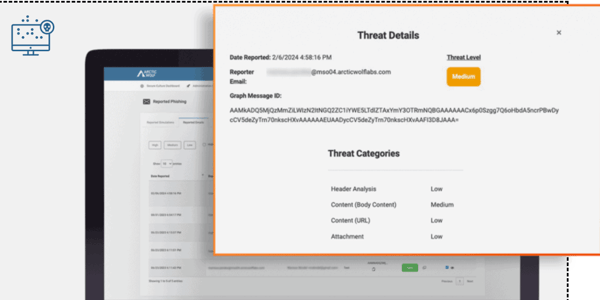
A couple of reviewers pointed out that the platform takes some getting used to, especially during the setup phase. The dashboard isn’t hard to use, but it’s not immediately intuitive either. That said, once everything’s in place, users seemed to find it easy to maintain. If your team has time to get familiar with the system early on, it shouldn’t be a blocker.
Pricing was also a concern in a few reviews, as per my evaluation. Arctic Wolf’s security awareness training is part of a broader MDR package, so the cost may not always be justifiable if you’re only looking for a standalone training solution. But for teams already using the Arctic Wolf platform, the added value seems to outweigh the cost.
If you’re already working with Arctic Wolf for threat detection, their training solution is a smooth extension that is simple to deploy, easy to maintain, and backed by strong support.
What I like about Arctic Wolf:
- The training content lands right in the inbox and doesn’t interrupt the day. I think that kind of delivery helps keep engagement high.
- I appreciated how often reviewers praised helpful support; it makes a big difference when rolling out a new tool and training.
What G2 users like about Arctic Wolf:
“What I love most about Arctic Wolf is their unwavering commitment to our security. Their solutions are not only effective but also seamlessly integrated into our operations, making our lives so much easier. The staff, especially our Customer Success Representatives, have been phenomenal. Their proactive approach and insightful recommendations have significantly improved our security posture. Plus, their friendly and professional demeanor makes every interaction a pleasure. It’s like having a team of security superheroes on our side!”
– Arctic Wolf Review, Ian K.
What I dislike about Arctic Wolf:
- Users mentioned that there is a slight adjustment period for the platform. However, it becomes manageable once you establish a routine.
- A few teams said the cost might be steep, but it depends on how much of the platform you’re using.
What G2 users dislike about Arctic Wolf:
“Cost. It is an expensive service, but you get what you pay for.”
– Arctic Wolf Review, David W.
5. MetaCompliance Security Awareness Training: Best for compliance-focused organizations
MetaCompliance helps organizations educate employees on cybersecurity best practices and regulatory compliance. It offers structured training modules, phishing simulations, and policy management tools to support a more security-conscious workforce. According to the G2 Grid Report data, the tool is commonly used in the financial services, government administration, and healthcare industries, with 71% adoption among mid-market businesses.
While reading the reviews, a common theme I noticed was the quality and range of the training content. G2 users frequently described the platform’s materials as easy to follow, well-organized, and relevant to real-life cybersecurity risks. There’s a clear emphasis on awareness-building rather than compliance-only content, and many users noted that the platform makes it easier to engage users with training that feels meaningful.
Another favorable aspect highlighted in the reviews was the platform’s reporting and visibility features. Reviewers appreciated being able to track training completion and monitor user progress. The reporting features appear to be well-suited to both operational users and executive stakeholders, striking a balance between day-to-day metrics and high-level summaries. It’s not just about checking a box; the data seems to help teams understand whether training is actually reaching people.
Support also came up often and positively. I kept circling back to G2 reviewers regularly praising the customer success team, onboarding experience, and technical support’s responsiveness. Several noted having a dedicated contact who helped with rollout or who responded quickly to configuration questions. This kind of support appears to be especially valuable in larger organizations, where training must be adapted to multiple departments or compliance needs. It was clear from multiple reviews that users didn’t feel left on their own once the platform was live.
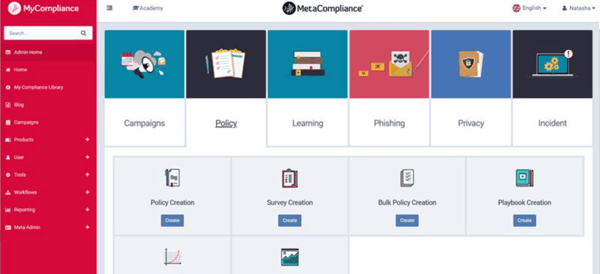
A few reviewers mentioned that certain workflows felt more complicated than they needed to be. While the platform is powerful, I saw some users describe the learning curve as steep, particularly for first-time admins. A handful of reviews suggested that the interface could benefit from being more intuitive. These comments didn’t suggest anything was broken, just that simplicity could go further to support daily use.
The phishing simulation also received mixed reviews. While the phishing modules were praised by some users, others said they lacked the variety or realism they were hoping for. A few reviewers said that the simulated emails didn’t fully reflect modern phishing tactics or that their teams stopped taking the tests seriously after repeated exposure.
Another limitation I came across was the user interface. Although “easy to use” appeared in positive feedback, quite a few users flagged the UI. Specifically, reviewers pointed out that some screens felt dated, and others wished the navigation were simpler.
MetaCompliance is a strong choice for organizations that want engaging security content, detailed reporting, and dedicated customer support, all in one platform built for scale.
What I like about MetaCompliance Security Awareness Training:
- Reviewers described the training as easy to understand and directly relevant. It felt more awareness-focused than just another compliance checklist.
- I saw a lot of praise for the support team, which seems to be a real asset during setup and beyond.
What G2 users like about MetaCompliance Security Awareness Training:
“One of the best things about MetaCompliance Security Awareness Training is how engaging and amusing the content is. Their Cyber Police series is so well done that you could binge-watch it like any other series on Netflix! The videos are short, to the point, and keep you entertained while delivering important security awareness lessons. Plus, at the end of each video, there’s a quick quiz to ensure employees paid attention and actually understood the material. It’s an effective and enjoyable way to improve cybersecurity awareness across the organization! Customer support is amazing. We couldn’t be happier with Conor O’Brien, who is our Customer Success Manager.”
– MetaCompliance Security Awareness Training Review, Daria M.
What I dislike about MetaCompliance Security Awareness Training:
- Some users noted that the interface can feel a bit overwhelming at first. I can see how a more simplified layout would help, especially for admins.
- I also read feedback about phishing modules losing impact over time, which could be a factor for teams needing more dynamic simulation options.
What G2 users dislike about MetaCompliance Security Awareness Training:
“I sometimes struggle with creating a phishing test for the domains, ensuring added emails won’t be blocked.”
– MetaCompliance Security Awareness Training Review, Jason B.
6. Hacker Rangers Security Awareness: Best for engaging remote-first teams
Hacker Rangers is a security awareness training platform designed to help employees develop everyday cybersecurity habits through engaging, gamified content. The tool is widely used by IT and software companies, with 66% of users in the mid-market segment.
A lot of reviews talked about how fun and accessible the training is. The platform uses storytelling and animated videos to make lessons feel like part of an interactive journey rather than just another compliance task. G2 users liked how Hacker Rangers made it easier to connect abstract cybersecurity topics to real situations. This kind of engagement seems to work well across different roles and departments, especially for teams that don’t deal with security daily.
I was also impressed by the number of people who said how easy it is to understand across languages. Several users noted that the platform is simple to follow, even for non-technical staff, and works well in different linguistic contexts. It supports multiple languages, which likely helps companies roll it out across global or regional teams.
The content itself got a lot of praise, too. Users stated that the materials were well-structured, up to date, and relevant. The modules seem to strike a good balance between simplicity and relevance, making them accessible without losing depth. Topics like phishing, information security, and day-to-da