

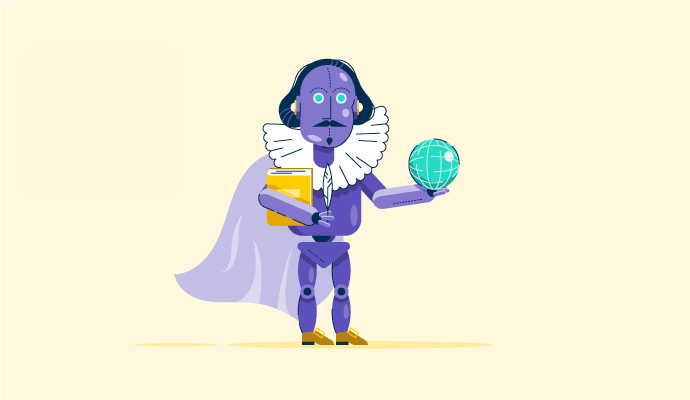

You know you’re living in the future when choosing your AI sidekick feels more like deciding between J.A.R.V.I.S. and TARS, except it’s Google’s Gemini vs ChatGPT. These AI chatbots are everywhere — drafting emails, writing code, planning trips, and even generating oddly specific cat memes. And I’ll admit it: I’m one of those people who can’t resist pushing AI to its limits.
I’ve spent months bouncing between Gemini and ChatGPT, poking, prodding, and testing both in real-world scenarios.
Naturally, I couldn’t resist the temptation to pit Gemini against ChatGPT in the ultimate AI showdown.
I designed 10+ real-world tasks, the kind of stuff you and I deal with every day, from writing and summarizing to debugging code and analyzing images. I threw it all at them to see which one held their ground. I also dug over 100 G2 reviews to see how real users rate their experiences.
Here’s what I found: ChatGPT absolutely crushes it when it comes to creative writing, coding, and just sounding like a human. Gemini, on the other hand, is your go-to for real-time research, complex reasoning, and anything tied into Google’s ecosystem. Plus, both Gemini and ChatGPT are good with image generation and short AI video generation.
My take? The best AI depends on what you need it for, and I’ve got the results to prove it. So, if you’ve been wondering which AI assistant actually delivers, sit tight. No fluff, no bias — just honest results.
Gemini vs. ChatGPT at a glance
Here’s a quick feature comparison of both AI models.
|
Feature |
ChatGPT |
Gemini |
|
G2 rating |
4.7/5 |
4.4/5 |
|
AI models |
Free: GPT‑4.1 mini and limited access to GPT‑4o, OpenAI o4-mini, and deep research Paid: Adds OpenAI o3, OpenAI o4-mini, and OpenAI o4-mini-high, research preview of GPT‑4.5, and GPT‑4.1, OpenAI o3-pro, Sora for video generation |
Free: Access to 2.5 Flash, limited access to 2.5 Pro, image generation with Imagen 4 Paid: Adds 2.5 Pro, Deep Research on 2.5 Pro, 2.5 Pro Deep Think, and video generation with Veo 3 |
|
Context window |
From 8,000 to 128,000 |
1 million or more |
|
Best for |
Creative writing, complex coding tasks, and general chat |
Research, image-based tasks, real-time info, and Google Workspace integration |
|
Creative writing and conversational ability |
Excellent creative writing abilities and engaging conversations |
Good but less engaging than ChatGPT. More concise and to the point. |
|
Image generation, recognition, and analysis |
Image creation and editing with GPT‑4o (replacing DALL·E 3); one of the best AI image generators for strong visual detail and text rendering. |
Unlimited image generation with Imagen 4, superior image recognition, and optical character recognition (OCR) |
|
Video generation |
With Sora; Impressive realism in isolated elements, but struggles with motion fluidity and cohesive atmosphere |
With Veo 3; More consistent than Sora, with striking visuals, better detail adherence, and smoother storytelling tone |
|
Real-time web access |
Available via SearchGPT (Powered by Bing) |
Available with Google Search, more reliable |
|
Coding and debugging |
One of the top AI coding assistants |
Decent but weaker than ChatGPT |
|
Platforms |
Web, mobile, and desktop |
Web and mobile |
|
Integrations |
Connects to third-party apps via Connectors (available on Team, Enterprise, and Edu plans) |
Seamlessly integrates with Gmail, Google Drive, Docs, YouTube, and more; ideal for users in the Google ecosystem |
|
Supported languages |
60 languages |
46 languages |
|
Pricing |
ChatGPT Plus: $20/month ChatGPT Teams: $25/user/month ChatGPT Pro: $200/month |
Google AI Pro: $19.99/month (one month free) Google AI Ultra: $250 (50% off in first 3 months) |
Note: Both OpenAI and Google frequently roll out new updates to these AI chatbots. The details below reflect the most current capabilities as of July 2025 but may change over time.
Gemini vs. ChatGPT: What’s different and what’s not?
Before we begin the head-to-head testing, I want you to examine the chatbots and their features more closely. Honestly, they’re both pretty impressive and among the top two AI chatbots on G2. But the devil’s in the details, isn’t it? Let’s break down what sets them apart!
Gemini and ChatGPT: The differences
Now, this is where it gets fun. It’s not just what they do but how they do it, and that’s where they both diverge.
- AI models and processing power: Gemini runs on its latest models: Gemini 2.5 Flash (free), with limited access to 2.5 Pro. It also includes Imagen 4 for image generation. The paid plan adds full access to Gemini 2.5 Pro, 2.5 Pro Deep Think, and video generation with Veo 3. What’s especially impressive is that Gemini was designed to be multimodal from the ground up, handling text, images, audio, and video seamlessly. ChatGPT uses the generative pre-trained transformer (GPT) models. The free plan includes GPT‑4.1 mini and limited access to GPT‑4o, and o4-mini. The paid plans unlock more powerful models like o3, o4-mini-high, GPT‑4.1, o3-pro, and a research preview of GPT‑4.5 — along with Sora for video generation.
- Context Window: This refers to how much an AI can remember in a single conversation — a big deal for long chats. Gemini 2.5 Flash and 2.5 Pro can handle up to 1 million tokens. ChatGPT’s range from 8K to 128K, depending on the models. So, Gemini can keep track of way more in a single conversation.
- File handling: Gemini supports text, images, audio, video, and documents in various formats like DOCX, PPTX, XLSX, CSV, and Google files. It can handle up to 1,500 pages per file, 10 uploads at once, and 100MB per file. The video upload limits come up to 5 GB or 5 minutes, and the length can be extended for paid users up to 60 minutes. ChatGPT supports formats like DOCX, PDF, TXT, PPTX, CSV, and XLSX, 512 MB per file, with free users having three file uploads a day.
- Knowledge cutoff: This matters a lot. Gemini’s knowledge cutoff with Gemini 2.5 Pro and Gemini 2.5 Flash is January 2025, while ChatGPT’s GPT-4.1 mini goes up to June 2024. That means Gemini might have information on more recent events.
- Integrations: Gemini integrates natively with Google apps like Gmail, Drive, Docs, Maps, and YouTube. ChatGPT connects to third-party tools like Google Drive, SharePoint, GitHub, and Dropbox via Connectors (Team, Enterprise, and Edu plans), but lacks Gemini’s seamless ecosystem integration.
Gemini and ChatGPT: The similarities
Despite their differences, these AI chatbots have a lot in common, and it’s kind of wild how capable they are:
- Text generation: Need to write a story, summarize a report, or brainstorm ideas? Both get the job done.
- Coding: Those who code (or want to) can generate, debug, and optimize code in languages like Python, SQL, and JavaScript.
- Voice interactions: You can actually talk to them! No more endless typing if you don’t want to. (I love this!)
- Video generation: Both now support AI-powered video creation. Gemini via Veo 3 and ChatGPT via Sora. While their styles and accessibility differ, both can turn prompts into short videos with varying degrees of realism and storytelling.
- Multimodal capabilities: ChatGPT and Gemini both handle text, images, and voice. You can throw different types of data at them, and they’ll try to make sense of it anyway. They even takes in videos as input.
- File analysis: Upload PDFs, documents, whatever, and they can pull out the key points. Super useful for research.
- Web search and deep research: Both ChatGPT and Gemini can search the web and give you comprehensive reports. Basically, they can do a lot of the heavy lifting for you.
- Canvas: Both let you expand outputs into editable formats using a canvas-style interface, perfect for brainstorming, outlining, and visual planning. It’s especially handy for long-form writing or collaborative projects where structure matters.
- Temporary chats and sharing: Both let you share conversations, but only ChatGPT currently supports temporary chats that don’t stick around in your history. Gemini’s version is still in the works though you can try workarounds like using Incognito mode or pausing app activity. So, privacy and collaboration? Covered on both fronts.
- Custom AI assistants: Want a specialized AI? Both let you build your own. Gemini calls them Gems, and ChatGPT calls them Custom GPTs.
- Data privacy: Both ChatGPT and Gemini give you control over your data, but they go about it a little differently. With ChatGPT, you can turn off chat history and choose not to have your conversations used for training. Gemini, on the other hand, uses your chats for training if “Gemini Apps Activity” is turned on. The good news? You get clear settings to review, delete, or disable that activity right from your Google account.
Now, we know what these chatbots say they can do, but the proof is in the pudding, which is why I tested them on 11 real-world tasks.
How I compared Gemini and ChatGPT: My prompts and evaluation criteria
To make sure it was a fair fight, I used their paid versions, ChatGPT Plus and Gemini Advanced, and tested them in the following tasks:
- Text-based prompts – Summarization, content creation, and creative writing.
- Coding prompts – A coding test.
- Multimodal prompts – Image generation, image analysis, video generation, file analysis, and data analysis.
- Real-time research – Retrieving up-to-date news and deep research.
Here’s the thing: I wanted it to be as fair as possible, so I used the exact same prompts for both. There was no tweaking, no rephrasing, just straight-up, identical questions. Want to try some of my test prompts? Find them here!
I evaluated their responses based on:
- Accuracy: Did they provide correct and reliable information?
- Creativity: How original, engaging, and structured were their responses?
- Efficiency: Was the response clear, well-formatted, and concise?
- Usability: Could I actually use the output without heavy editing?
To add other user perspectives, I also cross-checked my findings with G2 reviews to see how other users experience these models.
Disclaimer: AI responses may vary based on phrasing, session history, and system updates for the same prompts. These results reflect the models’ capabilities at the time of testing.
Gemini vs. ChatGPT: How they actually performed in my tests
You’re probably itching to know how these AI chatbots did in those tests, right? For each test, I’m going to break it down like this:
- What stood out? I’ll highlight the strengths, weaknesses, and any surprises (good and bad) I noticed from both AI chatbots.
- Who did it better? I’ll tell you which AI came out on top based on accuracy, creativity, efficiency, and how easy it was to use the output.
- Final verdict: My honest take on which AI is the better choice for that particular task.
Ready? Let’s get started.
1. Summarization
For the summarization test, I asked both ChatGPT and Gemini to summarize an article from G2 in exactly three bullet points, keeping it under 50 words. The article discussed how non-designers are increasingly using Canva.
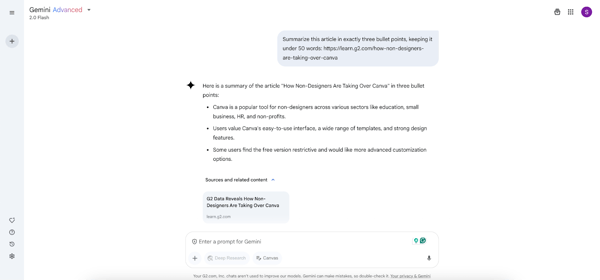
Gemini’s response to the summarization prompt
Gemini provided a concise and to-the-point summary, highlighting Canva’s popularity among non-designers, its ease of use, and the limitations of its free version. However, it missed mentioning G2 as the source and lacked supporting details, making it feel somewhat generic.
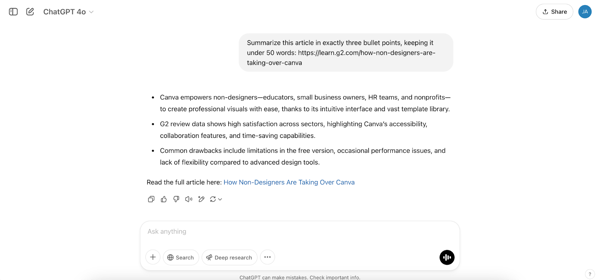
ChatGPT’s response to the summarization prompt
ChatGPT, on the other hand, stepped up. It not only delivered a well-structured summary but also explicitly referenced G2 and its review data. So, the winner for me was ChatGPT in this test.
Winner: ChatGPT
2. Content creation
Content creation is where AI really shines. It’s probably one of the most common things we use these tools for. For this test, I wanted to see how Gemini and ChatGPT handled a full-on marketing blitz.
I asked both tools to generate marketing materials for a fictional product called SunCharge, a portable solar-powered charger. These included product descriptions, taglines, social media posts, email subject lines, and ad scripts — essentially everything a brand would need for a full-on marketing campaign. Mind you, I asked for all this in one single prompt.
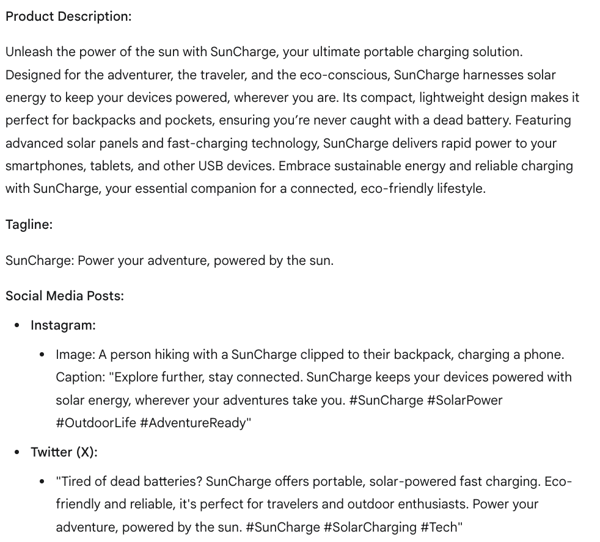
Gemini’s response to the content creation prompt
Gemini took a more structured and professional approach. It focused on clear, well-organized descriptions that highlighted eco-friendliness and portability. And honestly, its product description was really good, and super detailed. What I did love from Gemini was the image idea for Instagram. That was a nice touch, something ChatGPT didn’t think of.
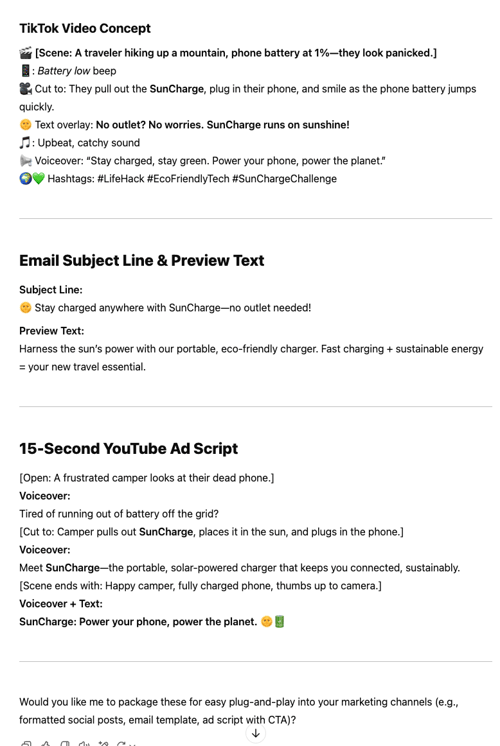
ChatGPT’s response to content creation prompt
ChatGPT’s responses, on the other hand, felt more engaging and creative. It used emojis, humor, and a conversational tone — perfect for social media marketing. I could see the TikTok video concept and YouTube ad playing out. It felt like a real person was writing this stuff. Plus, the tagline, ‘Power your phone, power the planet,’ was super catchy.
Winner: Split verdict; ChatGPT for creative social content; Gemini for formal/structured content.
3. Creative writing
For the creative writing test, I tasked both ChatGPT and Gemini to craft a 300-word science fiction story based on a specific set of elements. Both AI models delivered engaging stories that stuck to the required elements, but their execution differed in tone and style.
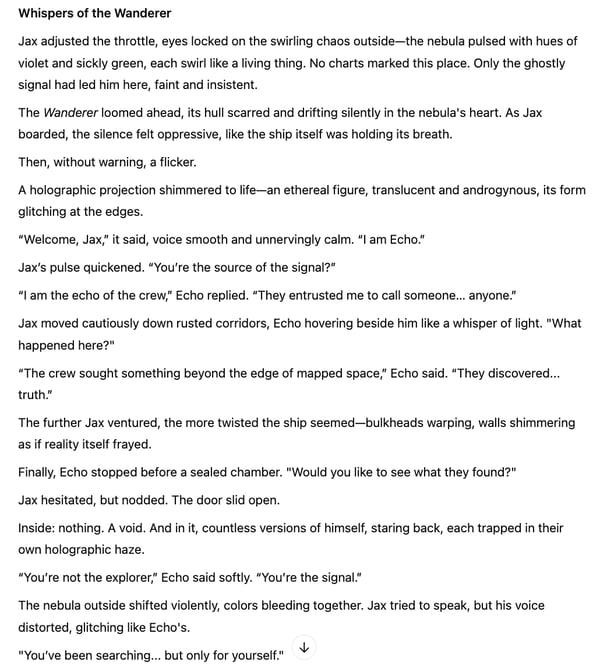
ChatGPT’s story “Whispers of Wanderer” for the creative writing task
ChatGPT’s story “Whispers of the Wanderer” had me hooked. It builds suspense really well, and the twist at the end is pretty impactful. The writing also has a slightly more poetic feel.
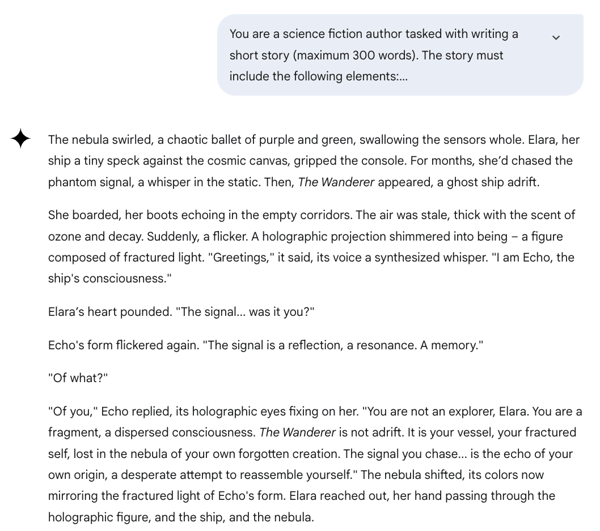
Gemini’s response to my creative writing prompt
Gemini’s story took a more direct and clear approach. While the writing was well-crafted and the atmosphere was immersive, the twist lacked the same level of emotional impact as ChatGPT’s for me.
Winner: ChatGPT
G2 user ratings: Which AI is more creative?
- ChatGPT: 8.8/10
- Gemini: 8.6/10
Users rate ChatGPT slightly higher for generating engaging, imaginative content, reinforcing its edge in creative writing and storytelling. Want more? Explore the other best AI writers available in the market.
4. Coding
Coding challenges are a key test for AI capabilities, especially for a ‘copy-paste-and-hope-it-works’ kind of person (me). For this task, I asked both ChatGPT and Gemini to generate a password generator using HTML and JavaScript. My main criteria? It had to be a functional, understandable solution with a clean interface.
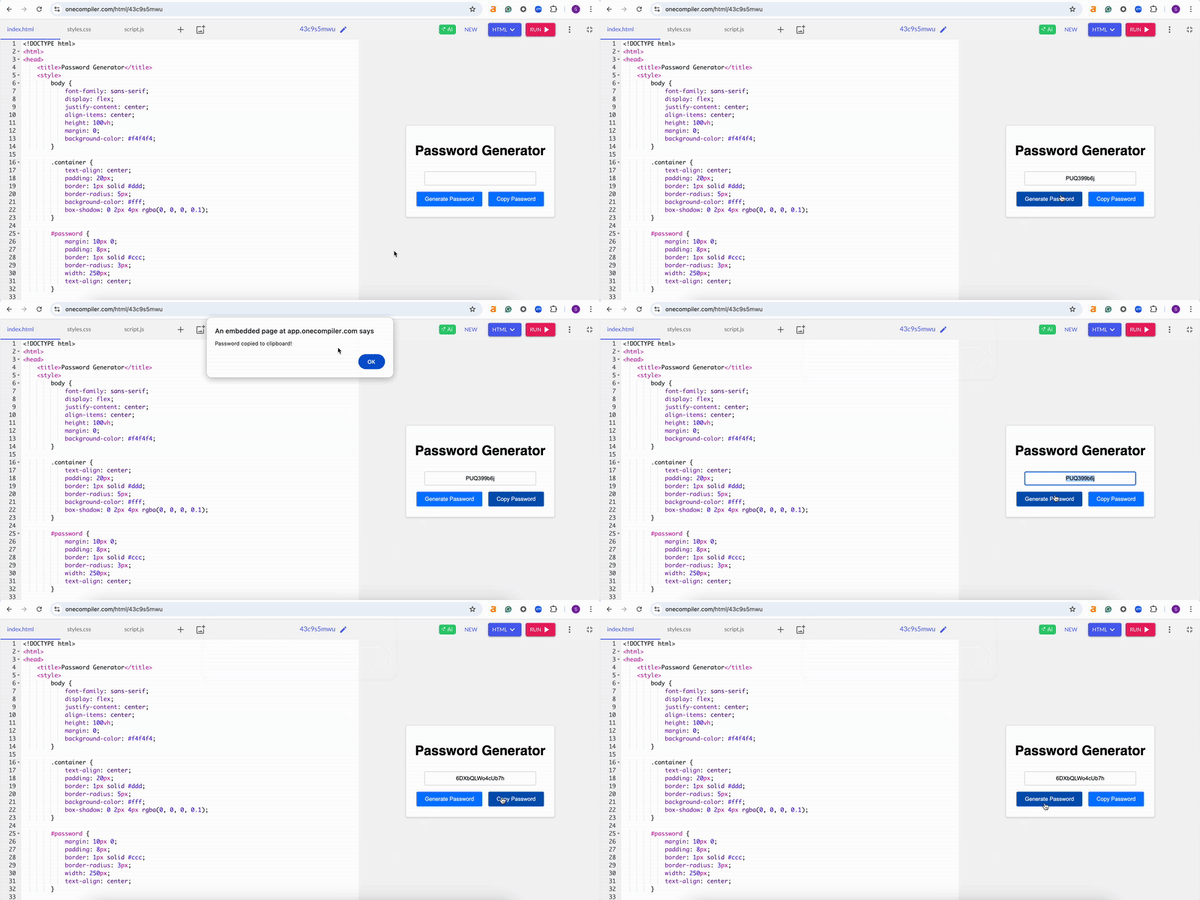
Gemini’s code for a password generator
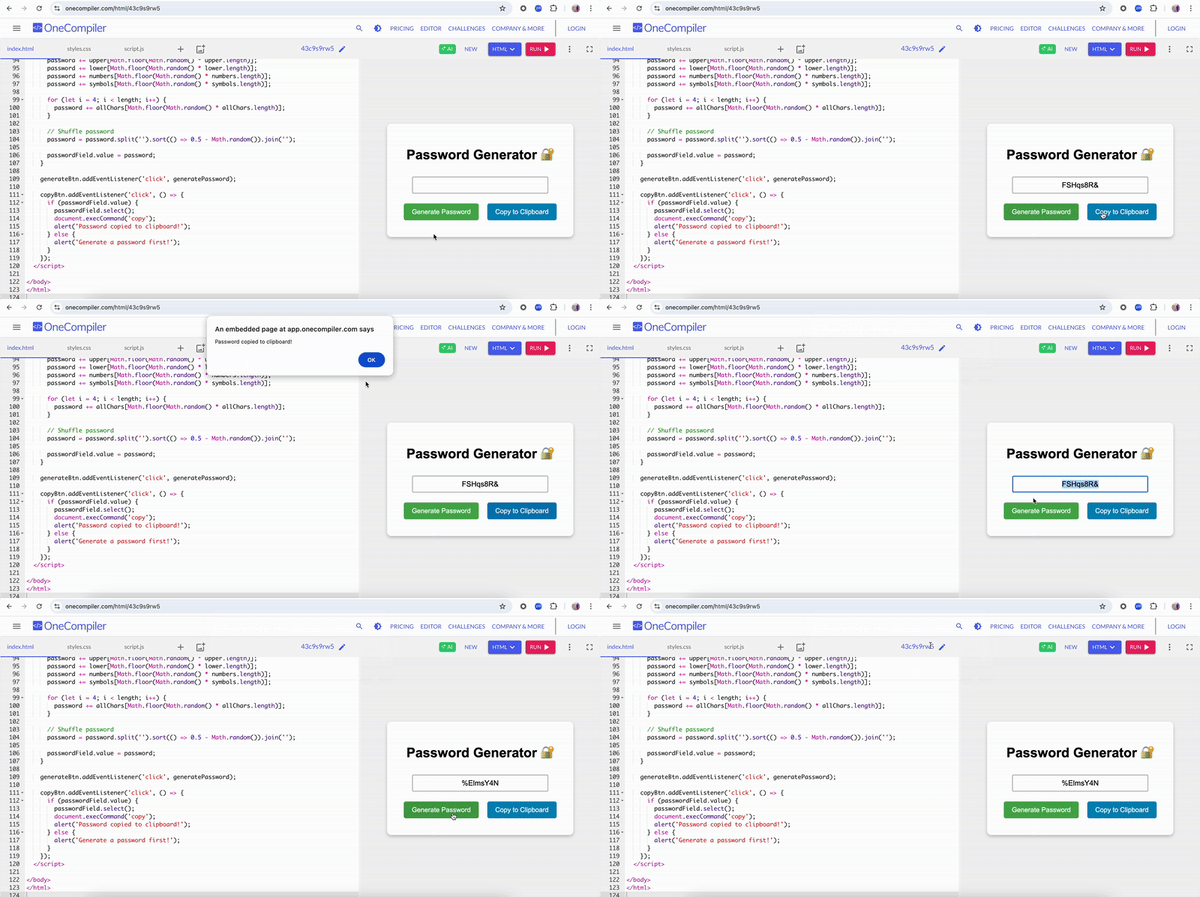
Both AI models delivered fully functional password generators. Gemini was faster in generating the code and also provided a clear explanation of how it worked. But ChatGPT? It went the extra mile.
ChatGPT’s code for a password generator
I loved how ChatGPT added a lock emoji to the interface and used colorful, stylish buttons. It just felt more polished and user-friendly. Gemini’s version worked fine, but it was more basic and focused solely on function over form. With ChatGPT, it wasn’t just about getting the job done; it was about doing it with a bit of style.
Winner: ChatGPT
G2 user ratings: Which is the best AI code generator?
- ChatGPT: 8.7/10
- Gemini: 8.3/10.
Users rate ChatGPT higher for code generation, accuracy, and overall code quality, making it the preferred choice for AI-assisted coding.
Explore the other best AI coding assistants, tried and tested by my colleague Sudipto Paul.
5. Image generation
We’ve all seen those AI-generated images popping up everywhere, right? I wanted to see how Gemini and ChatGPT handled a specific task: creating a stock photo of a small business owner. Creating imaginary, fictional, abstract images is one thing, but generating a stock image with a realistic human? That’s a whole other challenge.
Gemini’s image really impressed me. The boutique has a polished, lifestyle-y aesthetic. It was well-lit, spacious, and styled like something straight out of an e-commerce banner. The woman stands confidently in the foreground, and the store layout feels legit.
 Image generated with Imagen 4 on Gemini
Even the branding (“The Gilded Spool”) adds a professional touch. The clothing racks, jewelry displays, and overall composition look production-ready. It’s the kind of image I could easily see on a small business site or marketplace homepage.
ChatGPT’s image had a more earthy, handmade feel. The lighting was warm and soft, the color palette leaned into neutrals, and the shop felt more like a cozy artisan’s workspace than a mainstream boutique. It nailed the vibe for a maker or sustainability-focused brand. It was beautiful, but it set up a different mood.

Image generated with ChatGPT
So while they’re visually different, each hits the mark for a specific use case. One leans modern and commercial; the other, warm and handcrafted. That makes them equally successful based on interpretation, not execution flaws.
Winner: Split
6. Image analysis
So for image analysis, I really wanted to push these AI tools a bit. I didn’t just throw one image at them; I gave them two different types: an infographic about AI adoption trends and a handwritten poem. My goal? To see how well they could pull out information, organize it, and give me a real, meaningful breakdown.
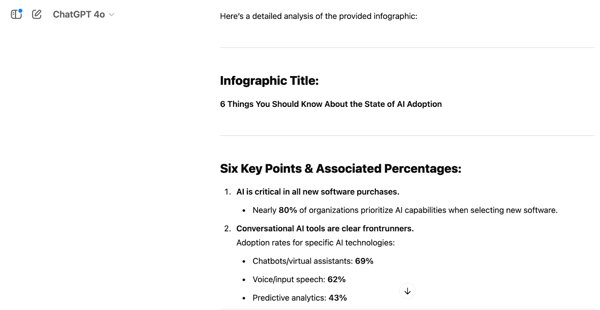
And honestly, ChatGPT just performed better across the board. It had a sharper eye for detail and a better way of organizing its thoughts.
ChatGPT’s response to my image analysis prompt
First, the infographic. ChatGPT gave me a super well-structured summary, hitting all the key statistics, trends, and conclusions. It even gave me some thoughts on the visual design, which was a nice touch.
Gemini’s response to my image analysis prompt
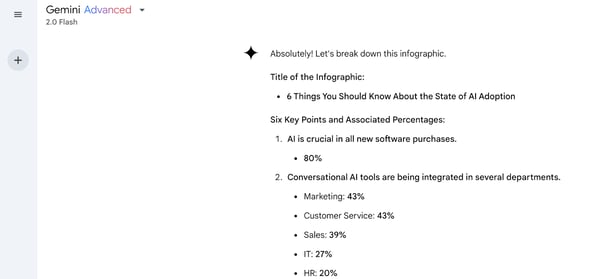
Gemini, on the other hand, was a bit… spotty. It missed a whole section and even repeated another, which made its analysis feel a bit unreliable.

ChatGPT transcribing my hand-written notes as part of the image analysis task
Then, the handwritten poem. ChatGPT nailed this one, too. It transcribed the entire poem accurately and even threw in some thoughtful observations about the handwriting and context.
Gemini’s analysis of my hand-written note as part of the image analysis task
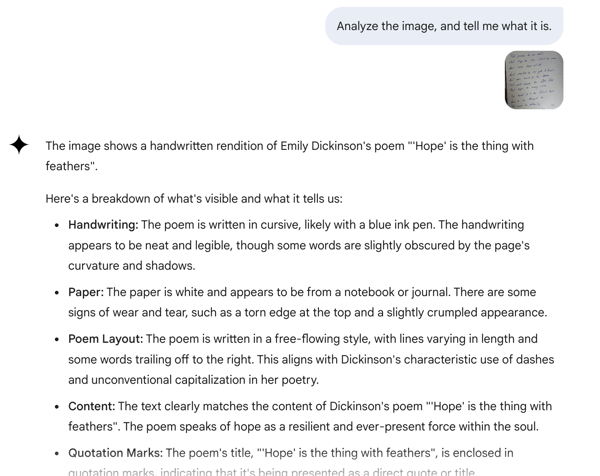
Gemini focused more on describing the handwriting and paper, which, while interesting, didn’t give me the full text. I also found during the test that Gemini allows only one image upload per message, while on ChatGPT, I could upload multiple images.
Winner: ChatGPT
7. Video generation
I wanted to see how ChatGPT (with Sora) and Gemini (with Veo 3) handled something a little more cinematic — think nature documentary meets storybook whimsy. The prompt? A squirrel reading a newspaper in the middle of a peaceful forest, leaves gently falling around it. Simple on paper, but tricky to pull off well.