



You can have detailed surveys, NPS tools, and a CRM packed with account insights, but if you don’t act on the feedback your business collects, you’re missing critical opportunities to improve experiences and retain customers.
That’s what pushed me to evaluate the best experience management software. Not just tools that collect responses but solutions that help you analyze sentiment trends, automate follow-up actions, and drive meaningful change across CX, product, and account teams.
And market data backs it up. The global customer experience management market was valued at approximately USD 12.04 billion in 2023 and is expected to grow to around USD 32.87 billion by 2030, reflecting a compound annual growth rate (CAGR) of 15.8% between 2024 and 2030. That kind of growth reflects how much pressure businesses are under to close the loop on feedback and drive retention and revenue through better experiences.
The eight platforms in this list stood out for their combination of deep analytics, automation capabilities, and ease of use across teams. Whether you’re scaling a CX program, building customer success workflows, or connecting product feedback to your roadmap, these tools can help make experience management a competitive advantage.
8 best experience management software for 2025: My top picks
- Birdeye: Best for multi-channel reviews and reputation management
Known for AI-powered tools to manage reviews, improve online presence, and engage customers across hundreds of digital platforms. - Reputation: Best for enterprise-scale review and feedback analytics
Specializing in collecting, monitoring, and analyzing customer feedback across multiple channels with robust benchmarking and analytics. - Qualtrics Strategy & Research: Best for advanced research and market insights
Powerful for organizations needing in-depth, AI-driven research, sentiment analysis, and large-scale panel access for strategic decision-making. - AskNicely: Best for real-time NPS and survey automation
Ideal for businesses focused on continuous real-time feedback via NPS and seamless survey integration with CRM and operational workflows. - Microsoft Dynamics 365 Customer Voice: Best for integrated feedback within the Microsoft Ecosystem
Optimized for organizations leveraging Dynamics 365, offering built-in survey tools and real-time analytics tied to existing customer data. - Experience.com: Best for automated experience
Stands out for automated review requests, feedback campaigns, and centralized management of customer and employee experiences. - UserTesting: Best for video-based user feedback
Distinguished by rapid, authentic video feedback from real users. It’s perfect for UX testing and optimizing digital journeys. - Gainsight Customer Success: Best for customer health and retention analytics
Renowned for comprehensive customer success tools such as tracking engagement, reducing churn, and driving advocacy with deep reporting.
*These experience management software are top-rated in their category, according to G2 Grid Reports. The pricing details are available on request.
8 best experience management software I recommend
Creating great experiences sounds simple until you try to manage them at scale. Whether you’re collecting customer feedback, tracking product sentiment, or understanding what clients think after a key interaction, it’s easy to feel like you’re drowning in data but lack insight.
That’s exactly where I found myself.
I knew feedback was coming in from surveys, reviews, interviews, and even social media. But none of it felt connected, and it was rarely actionable. I wanted tools that could help me centralize feedback, break it down, and actually do something with it. Not just listen, but respond. Not just measure sentiment, but improve it.
That’s where experience management software came in.
Some made it easier to close the loop with customers, while others helped teams surface real-time insights or identify experience gaps early. I was especially drawn to features like analytics dashboards, audience segmentation, closed-loop workflows, and integration with frontline systems.
73%
users point to experience as an important factor in their purchasing decisions, behind price and product quality.
Source: PwC
Here are the best experience management tools that stood out in real use.
How did I find and evaluate the best experience management tools?
I spent weeks evaluating experience management tools and solutions, narrowing down the best options based on features, ease of use, pricing, and real user feedback. I also used AI-driven research to analyze software updates, buyer preferences, and common challenges to ensure these recommendations are as accurate and helpful as possible.
In cases where I couldn’t personally test a tool due to limited access, I consulted a professional with hands-on experience and validated their insights using verified G2 reviews. The screenshots featured in this article may be a mix of those captured during evaluation and those obtained from the vendor’s G2 page.
Each tool on this list is reliable, easy to use, and built to help collect feedback, generate insights, and take meaningful action, whether you’re focused on customer experience, product feedback, or B2B account sentiment. My research and analysis are also based on real-time buyer sentiments and the proprietary G2 scores offered to each of these experience management solutions.
What makes these best experience management software worth it: My perspective
If you’re testing general feedback tools, you’ll focus on surveys, templates, and data collection. If you’re testing enterprise feedback management solutions, you’d prioritize response tracking, survey distribution logic, and integration with CRM systems.
Keeping the diversity in mind, here are the features I prioritized for the best experience management platform.
- Usability and accessibility: When I evaluate an experience management tool, the first thing I look at is how intuitive it is. Can teams across the org use it without a three-week onboarding process? Are the dashboards clear? I also checked device and platform compatibility. A good experience management tool works smoothly across desktop and mobile and integrates with the systems you already use (like CRMs, help desks, or analytics tools).
- Feedback collection and omnichannel support: Experience data doesn’t just come from surveys. That’s why I look for tools that pull in feedback from multiple touchpoints like web, email, in-app, social, reviews, and even live chat. Bonus points for tools that offer multilingual survey options and custom triggers based on journey stages. The best platforms let you meet your audience where they are and collect input without adding friction.
- Segmentation and journey mapping: Collecting data is easy. Making sense of it? That’s the real test. I prioritize platforms that let me segment feedback by persona, channel, product, or stage in the journey. That way, I know where, when, and for whom. Tools with built-in journey mapping make it easier to visualize trends and intervene proactively.
- Analytics and insights: Raw scores and charts are fine, but I need more than that. I look for AI-driven analysis that highlights themes, sentiment, and anomalies. Can the platform surface common pain points? Can I filter feedback by emotion or urgency? The best tools turn qualitative data into insights I can act on.
- Closed-loop action workflows: If there’s no built-in way to respond to feedback, assign follow-up, or close the loop, then what’s the point? I looked for a tool that can create automated workflows tied to sentiment or score thresholds.
- Collaboration and stakeholder visibility: Experience management isn’t a one-person job. I looked for insights that are easily shareable across departments. Can I send alerts to a product manager when NPS dips for a specific feature? Can frontline employees view relevant feedback in real time? Platforms that support role-based dashboards or Slack/email integration score high here.
- Scalability and integration: The more you grow, the more complex the experience data gets. I evaluate whether a platform can scale with large respondent pools, multiple brands or regions, and expanding teams.
Over the course of several weeks, I researched and evaluated experience management software and narrowed down the best eight based on their features and ease of use.
To be included in this category, a solution must:
- Provide all the features of an enterprise feedback management solution
- Connect with other repositories of data
- Analyze and segment experience data across all points in the customer journey
- Deliver relevant, real-time insights from feedback to relevant stakeholders
- Provide multidirectional communication channels to allow stakeholders to respond to feedback or share it with leadership
- Facilitate closed-loop action items based on respondent sentiment
*This data was pulled from G2 in 2025. Some reviews may have been edited for clarity.
1. Birdeye: Best for multi-channel reviews and reputation management
After a deep dive into hundreds of user reviews for Birdeye’s experience management software, I pieced together a clear picture of what it’s like to use their platform. Birdeye is also recognized as a leader in the experience management category on G2, which speaks to its strong reputation among users.
From my evaluation, Birdeye has positioned itself as a powerful all-in-one solution for businesses wanting to manage their online reputation. A theme that came up consistently in the reviews was the convenience of having one central hub for so many critical functions. Users frequently celebrated the ability to manage online listings, generate new reviews, and communicate with customers, all from a single dashboard. In fact, 92% of G2 users find Birdeye’s centralized dashboard helpful for managing all data points related to online reputation.
The review generation tool is widely appreciated. Based on what users shared, Birdeye makes it incredibly simple to prompt customers for feedback, which directly contributes to a stronger and more positive online presence. Another technical aspect that users love is the centralized SMS and messaging feature, simplifying communication and keeping a clear record of client conversations. For businesses that rely on fast back-and-forth interactions, that’s a huge plus.
Birdeye’s social management tools also earned high marks. 89% of G2 reviewers said the social publishing feature makes it easy to schedule and manage content across multiple channels, while 87% highlighted the value of social analytics for tracking campaign performance (based on 350+ reviews). On top of that, users frequently praised the AI-generated response feature, which provides a solid starting point for replying to customer reviews, something they can then personalize.
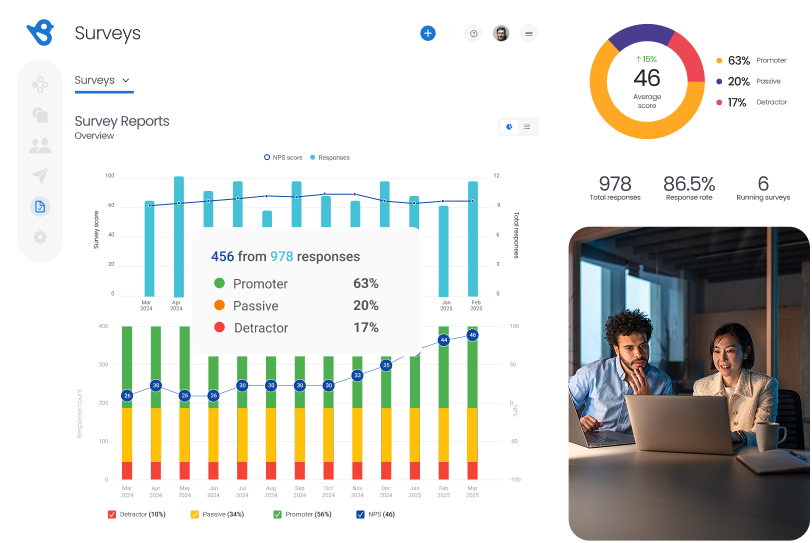
That said, a few consistent patterns emerged in my analysis. While some reviewers on G2 described helpful interactions with the support team, others noted that resolution times can vary. In situations where users needed more in-depth guidance, support sometimes leaned on help articles rather than direct troubleshooting, which may not meet every team’s needs.
Reporting also came up in multiple reviews as an area with room to grow. G2 reviewers acknowledged that the current analytics tools cover the basics, but users looking to slice data more granularly or build custom reports found those capabilities somewhat limited. For businesses relying heavily on data to guide CX or marketing decisions, this may require workarounds or exports into other tools.
Lastly, I noticed a handful of comments referencing occasional dashboard lags or complexity when navigating more advanced workflows, especially when managing customer communications at scale. It wasn’t a widespread complaint, but it showed up enough on the G2 platform to take note.
Even so, Birdeye’s strengths remain clear. It’s a platform built for simplicity and impact, whether that’s helping businesses collect more reviews, improve customer communication, or respond efficiently with AI-powered tools. For teams focused on strengthening their online presence and creating better customer interactions without juggling multiple tools, Birdeye remains a trusted choice.
What I like about Birdeye:
- It is easy to request, track, and respond to reviews. Everything’s centralized, and that makes staying on top of customer feedback much less stressful.
- Users love being able to update business listings and post to multiple social channels from one place. It’s especially helpful for teams managing multiple locations.
What G2 users like about Birdeye:
“User-friendly layout and dashboard, and you can respond to reviews, check your NPS score, and review your client referrals all in one website. Constantly evolving to expand to more channels, such as YELP. Great program. AI-generated reviews are especially helpful. Now, you are able to click on recent reviews and get a recap of your most recent reviews. It is a very nice tool. Recently, I had to chat with their customer service to have a review removed from a client who was harassing the business, and it was a very smooth process. I was able to chat with a real person and quickly get it removed. Wonderful program with many functions.”
– Birdeye Review, Katherine H.
What I dislike about Birdeye:
- Some of Birdeye’s reporting is limited to creating custom reports. The feature request function is slow. This isn’t typically a problem since many out-of-the-box features require little customization, but can sometimes cause delays.
- Even though the platform is mostly easy to use, some users mentioned that getting the hang of all the features takes time, especially during onboarding.
What G2 users dislike about Birdeye:
“One common dislike about Birdeye is that, like many cloud-based platforms, it can occasionally experience downtime or slow performance, which may interrupt workflow. Additionally, some users find the interface a bit overwhelming at first, and there can be a learning curve when getting started with all the features.”
– Birdeye Review, Andrea M.
2. Reputation: Best for enterprise-scale review and feedback analytics
Reputation is a well-known platform in the experience management space. Multi-location brands use it to centralize customer reviews, monitor online presence, and manage social media. It’s especially popular among retail and service-driven businesses that need to handle high volumes of customer feedback across platforms like Google, Facebook, and Yelp.
On G2, Reputation holds a strong 4.6 out of 5 stars, based on 2,343 reviews, reflecting its widespread adoption and user satisfaction. G2 users repeatedly describe the platform as intuitive, user-friendly, and simple to navigate, even for those who aren’t tech-savvy. Many mention that the setup is straightforward, and once you’re in, most tasks like replying to reviews or posting to social media take just a few clicks.
Review management is where Reputation really shines. G2 reviewers consistently highlight how convenient it is to respond to reviews directly from the platform. For teams managing dozens of locations, the ability to track, filter, and reply to feedback in one place is a huge time-saver. Several users also called out that having all their reviews in one dashboard makes it easier to spot patterns and flag recurring issues.
Reputation’s social media functionality also gets positive attention. The ability to post updates across platforms, schedule content, and manage engagement from within the tool is seen as a major perk. Users say this reduces the need to jump between apps and helps keep messaging consistent.
The reputation score is another feature users frequently mention. It offers a quick snapshot of overall brand performance across review channels. While some see it as a helpful tool for keeping tabs on sentiment trends, others have noted they’d like more transparency into how it’s calculated and what specific actions can drive it upward.
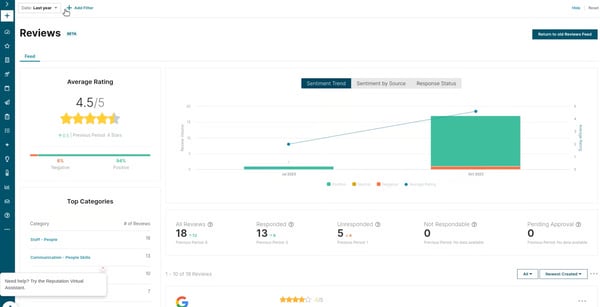
Reputation has carved out a solid place for itself in the experience management landscape, especially for teams that value automation and unified workflows. Based on what I gathered from G2 user feedback, many businesses rely on it to optimize review management, social engagement, and customer insights, without needing to juggle multiple tools.
That said, there are a few areas where users consistently see room for refinement. One theme that showed up in several G2 reviews was the platform’s reputation score.
Another aspect mentioned by reviewers on G2 was onboarding. The platform earns praise for being easy to use once you’re up and running, but a few users said that more robust initial guidance — whether through tutorials, walkthroughs, or in-app prompts — could have helped shorten the ramp-up time.
There were also some nuanced takes on the platform’s social media tools. While scheduling and posting capabilities are well-liked, users looking for more in-depth analytics or targeting options noted that it doesn’t quite replace a full-scale social media management suite. That’s not a deal-breaker for everyone, but it’s something to consider if your team relies heavily on social insights.
Even with these areas flagged, Reputation remains a trusted platform. G2 reviewers often highlight how much time it saves their teams through automation and centralization. For companies that need to keep customer experience and reputation management tightly aligned, it’s a tool that delivers meaningful value at scale.
What I like about Reputation:
- The social media tools are super convenient. Several users appreciated the ability to schedule and publish posts to multiple social platforms directly from within the platform.
- Managing reviews is way more efficient. Many users highlighted how helpful it is to view, respond to, and track reviews in one place. It simplifies management.
What G2 users like about Reputation:
“Reputation software has been a game-changer for managing online reviews and feedback. It makes it easy to keep track of what customers are saying across different platforms, so businesses can stay on top of their reputation. The insights it provides help you understand customer concerns and take action to improve service. Plus, the ability to automate responses saves time while ensuring you’re always engaging with customers in a timely and consistent way. The reporting tools are also super useful, giving you clear data to help guide decisions and improve your overall strategy.”
– Reputation Review, Sulma H.
What I dislike about Apollo.io:
- The reputation score isn’t always clear. Although some users liked it, others questioned how it’s calculated and what exactly influences the score. The lack of transparency made it hard for teams to know how to improve their numbers.
- Sometimes when using the filter dropdown to search for properties, the selections don’t reset properly, leading to unnecessary extra clicks.
What G2 users dislike about Apollo.io:
“I would like more clarity on metrics. And I’m not the only one around who’d like that; many people in my company say the same thing. If the Reputation score for a given entity is a rolling average — or a rolling metric of any kind, really — then it’s critical to explain what time frames are being factored into each rolling average. I don’t know if my response rate, for example, counts toward my score based on data from the last 3 months, the last month, the last 2 years, the last year: nothing. And none of the Reputation score components offer any clarity on how their rolling timeframes are determined. I’m not asking for the proprietary formula, and frankly, I think it’s anything more than a minor risk to Reputation’s market share, even if the formula were public. All I’d like to know are time frames for score components.”
– Reputation Review, Daniel R.
3. Qualtrics Strategy & Research: Best for advanced research and market insights
Qualtrics Strategy & Research helps organizations that need to run large-scale research, collect feedback, and turn data into action. It’s a staple in industries like higher education, government, and enterprise-level corporate environments. It is recognized as the best free software in the experience management category on G2.
One of the most notable strengths users consistently highlighted is the platform’s flexibility in survey creation. According to G2 reviewers, Qualtrics offers an extensive range of question types, advanced skip logic, embedded data fields, and customizable flows that help users create everything from short NPS check-ins to complex academic or longitudinal studies. In fact, 91% of G2 users find the variety of question types extremely valuable for building both simple and complex surveys.
Many reviewers emphasized that the drag-and-drop survey builder makes it easy to organize and scale surveys quickly, while the ability to reuse question blocks and apply logic rules reduces duplication and setup time. 90% of users specifically called out the Survey Builder as a helpful tool for creating surveys faster and with less manual effort.
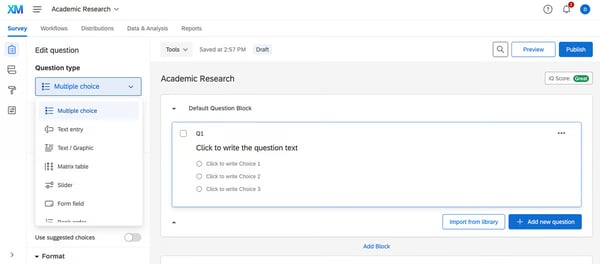
The platform also earns praise for its data analysis and reporting capabilities. Users frequently mentioned using tools like cross-tab reports, text iQ (text analysis engine), and dashboard visualizations to explore insights and present findings to stakeholders. These features are particularly valuable for teams running multi-region or multi-department programs, where segmentation and drill-down capabilities are essential.
Some reviewers also noted that Qualtrics supports automated distribution and real-time data collection, which helps optimize end-to-end feedback loops.
That said, there are a few recurring limitations mentioned across the reviews I analyzed. The most consistent theme was the platform’s learning curve. While Qualtrics offers a robust suite of features, getting fully up to speed can take time, especially for users new to things like skip logic, embedded fields, or custom scripting. Several reviewers on G2 shared that they leaned on internal specialists or formal training to unlock the platform’s full potential.
Pricing also came up in reviews. A few users noted that when you’re only using a subset of the enterprise-grade capabilities, the investment can feel harder to justify, especially for smaller teams or simpler use cases.
Even so, G2 feedback clearly shows that Qualtrics continues to deliver tremendous value for organizations with complex research needs. It’s especially well-suited for teams that want flexibility, scalability, and rigor in their experience management strategy and are ready to tap into its full potential.
What I like about Qualtrics Strategy & Research:
- The range of question types, logic flows, and reusable survey blocks makes it easy to tailor surveys exactly how I want. It’s clearly built for flexibility, and users like me appreciate that level of control.
- Reporting and analysis tools make insights easier to act on. Dashboards, cross-tabs, and text analytics came up frequently in G2 reviews. Users found them helpful for making sense of large volumes of feedback and surfacing actionable patterns.
What G2 users like about Qualtrics Strategy & Research:
“Qualtrics is simply the best-in-class product for experience management, especially surveys. It’s got all the features you could ever want (possibly too many), and if you can dream of what insights you want to gather, Qualtrics has a way to do it.”
– Qualtrics Strategy & Research Review, Jake R.
What I dislike about Qualtrics Strategy & Research:
- It might be expensive for smaller teams. G2 users felt the platform’s cost was high, especially for organizations that aren’t using the full suite of features.
- Many users said there’s a steep learning curve, especially when trying to use more advanced features or set up logic-heavy surveys.
What G2 users dislike about Qualtrics Strategy & Research:
“There’s a learning curve, and while Qualtrics does a fine job with support, its educational roots are obvious, and it could stand to be a little more intuitive. My biggest hangup is with customer service and support. It’s deteriorated markedly since I first signed on with Qualtrics, with a new account manager every year who doesn’t even do me the courtesy of reaching out to talk in person. I may seem like small potatoes to them, but I teach how to use Qualtrics at the local university in addition to using it in my business, so I’m actually influencing the next generation of Qualtrics users, and they can’t grasp that. Finally, every change that’s been made to the product over the last five years has made it worse. I’m paying more for an arguably inferior product.”
– Qualtrics Strategy & Research Review, Kit K.
Happy teams = happier customers! Best employee engagement platforms can help you collect internal feedback, track morale, and align teams around shared goals, boosting experience from the inside out.
4. AskNicely: Best for real-time NPS and survey automation
AskNicely is built for service-oriented teams that want to improve frontline engagement through real-time feedback. It’s especially popular with mid-sized businesses in industries like financial services, property management, and healthcare, where service quality directly impacts retention and reputation.
AskNicely is recognized as the #1 easiest to use product in G2’s experience management category, with an impressive 4.7 out of 5 rating based on 1,017 reviews. According to G2 reviewers, AskNicely offers a clean, user-friendly interface that makes it easy to get up and running. Features like one-click surveys, drag-and-drop customization, and real-time feedback dashboards are frequently mentioned as teams can adopt the platform quickly and start seeing results without months of training.
A major focus for AskNicely is automating customer feedback collection, and users consistently praised how seamless that process feels. Many teams use it to trigger NPS surveys based on customer interactions or timelines, allowing them to capture timely, context-aware feedback. I also came across multiple reviewers who mentioned the value of receiving real-time alerts and being able to respond to detractors immediately, making it easier to close the loop before issues escalate.
The platform’s focus on frontline engagement is appreciated. Several reviewers noted that AskNicely integrates with tools like Slack and Microsoft Teams, making it easy to share feedback with employees and reinforce service goals in real time. Some teams even use it to highlight positive feedback during team meetings or coaching sessions, turning customer praise into motivation and momentum. The platform’s ability to tie feedback directly to individual team members or locations was especially valuable for businesses managing distributed teams.
When it comes to reporting, users highlighted how AskNicely provides clear, actionable insights through trend dashboards, performance summaries, and segmentation filters. These tools help teams track improvements in customer satisfaction over time and identify areas that need attention.
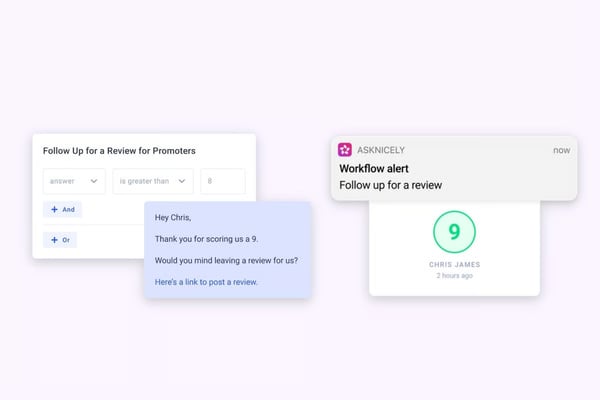
However, I did notice a few consistent areas where G2 reviewers wanted more. The most common question was about customization and flexibility, especially when it comes to survey design and branding. A few users said that while the basics are easy, some more advanced formatting or branching options felt limited compared to more complex feedback tools.
There were also a few mentions of feature depth, especially for teams with more sophisticated analytics or integration needs. Some users noted that they would like to see advanced AI-based insights and greater control over data exports and reporting formats. While these weren’t dealbreakers, they came up as areas for improvement.
AskNicely is a great fit for teams that want a simple, scalable way to stay in tune with their customers. For teams focused on speed, simplicity, and visibility, it’s a platform that delivers.
What I like about AskNicely:
- I noticed several reviewers say that the dashboards and performance summaries helped them track trends over time, not just collect data. It gave them a clear way to see what was improving and where they needed to dig deeper.
- AskNicely makes it easy to share feedback with the people delivering the experience. Teams use integrations with Slack or Microsoft Teams to share praise or highlight service wins, helping boost morale and reinforce what’s working.
What G2 users like about AskNicely:
“As a medical device company, providing high-level support to our customers in an effort to improve the patient experience is our primary focus. AskNicely has been instrumental in our journey to identify customer needs and improve the patient experience. The platform is incredibly easy to navigate, allowing for easy data and metric tracking, case management, and multi departmental feedback analysis. Additionally, the integration with our CRM was incredibly smooth and took very little time to set up.
From the initial consult and beyond, the AskNicely team has provided exceptional insight and a level of support that far surpasses other survey companies tried previously by my organization.”
– AskNicely Review, Laura B.
What I dislike about AskNicely:
- I did feel a little limited when trying to customize surveys beyond the basics. Things like advanced question logic or deeper branding options weren’t as flexible as I’d hoped.
- The reporting gives you a helpful overview, but if you want really detailed insights or custom reports, it feels a little limited.
What G2 users dislike about AskNicely:
“The dashboard could be more user-friendly when it comes to downloading documents and forms. Also, the MS Teams integration feels cluttered with unnecessary buttons that can’t be removed.”
– AskNicely Review, Erica T.
5. Dynamics 365 Customer Voice: Best for integrated feedback within the Microsoft Ecosystem
Dynamics 365 Customer Voice is Microsoft’s feedback management tool designed to help organizations collect, track, and act on customer sentiment. Built as an extension of the broader Dynamics 365 ecosystem, it’s especially well-suited for teams already using Microsoft tools like Power BI, Dynamics Sales, and Office 365. From what users shared, it plays a strategic role in tying customer feedback directly into workflows, CRM data, and broader customer experience strategies.
One of the platform’s core strengths is its tight integration with Microsoft’s product suite. G2 reviewers consistently mentioned how helpful it is to build surveys in Customer Voice and seamlessly connect them with data from Dynamics 365 or use Power Automate to trigger workflows based on responses. This native integration reduces friction for existing Microsoft users and allows customer feedback to drive real-time action across systems.
Several reviewers also appreciated the drag-and-drop survey builder, formerly known as Microsoft Forms Pro, and how easy it is to distribute surveys via email or links with minimal setup.
A standout feature — highlighted by 82% of reviewers — is the platform’s ability to automatically calculate customer satisfaction scores (CSAT), giving teams a clear, real-time pulse on customer sentiment.
Users also praised how feedback data is centralized across the customer journey, tying responses directly to CRM profiles. This means you’re not just collecting survey answers; you’re connecting them to real account health, sales stages, and support outcomes, making it easier to prioritize follow-ups or monitor NPS over time.
That said, a few areas for improvement came up. Some reviewers noted that compared to specialized survey tools, Customer Voice offers fewer advanced customization options, like deep logic branching or complex dashboards. Others mentioned that setup can take some time, particularly when tailoring surveys or automating more advanced workflows — something to keep in mind if your team has limited technical resources.
Lastly, a handful of users mentioned feature overload, saying that for simple survey needs, navigating everything bundled in Dynamics 365 can feel like too much.
But overall, most reviewers agree that for organizations already using the Microsoft ecosystem, Customer Voice adds real value. It brings feedback and action closer together, helping teams stay connected to customer sentiment without leaving their everyday tools.
What I like about Dynamics 365 Customer Voice:
- Survey creation is smooth and efficient. Users mentioned that building surveys using Forms Pro (now part of Customer Voice) is quick and intuitive. They liked the drag-and-drop tools and the simplicity of setting up distribution methods.
- It integrates well with the Microsoft ecosystem. Users really value how seamlessly it connects with tools like Dynamics 365, Power BI, and Office 365. For teams already using Microsoft products, this integration is a big plus.
What G2 users like about Dynamics 365 Customer Voice:
“The best thing about Dynamics 365 Customer Voice is that we can configure the form and questions (depending upon the survey we are conducting) as per our needs, and it has a great connector to integrate with Power Automate.”
– Dynamics 365 Customer Voice Review, Baratam V.
What I dislike about Dynamics 365 Customer Voice:
- It took a lot of time to customize the platform to meet our specific requirements fully. I felt like it came with a higher cost compared to other experience management tools.
What G2 users dislike about Dynamics 365 Customer Voice:
“The user interface to customer voice is a little unstable. Also, forms take too much time to open. The security management screens are also not very intuitive. Minor improvements are needed on these points. Otherwise, it’s a good product.”
– Dynamics 365 Customer Voice Review, Vikram Singh C.
6. Experience.com: Best for automated experience
Experience.com is designed to help service professionals. It’s