


Email design is a mix of art and science. You can have the best email body copy ever written, but if your design and layout don’t support it, it can still flop. I know. I’ve been focused on email marketing for more than 20 years, and I’ve seen the good, the bad, and the ugly in email design.

I often start client engagements with an audit of their past email marketing efforts. I see the same design and layout errors over and over again, and when we correct them, we inevitably see a boost in performance. Not just opens and clicks — but conversions which are what really matter.
So, let me give you some free advice on how to boost your email performance with email design best practices.
Table of Contents
What is email design?
Email design refers to the visual and structural layout of an email message, including how content is organized, styled, and optimized for user engagement and readability across devices and email platforms.
Why Email Design Matters
In marketing, the message is important, but so is how you present it. Problems with design and layout can render your awesome email unreadable. Here are some examples of this I see over and over:
- The lack of contrast between font and background colors, making the content unreadable.
- All-image emails which look like literally nothing when images are blocked by default (which some inbox providers still do).
- Even little things, like text links versus buttons, can make a big difference.
In contrast, great email design supports your strategy by increasing open rates, click-through rates, and conversions, while enhancing the user experience and reinforcing your brand.
There are a lot of tools you can use to design emails (we’ll cover some of them later in this article). But they aren’t a replacement for understanding best practices in email design.
Here are some of the simple-to-fix design issues I see frequently. As you look over these best practices, take a minute to review your templates and see if they need an update. I’ll go into detail on each.
Inbox View
There are three elements of your email that appear in your recipient’s inbox (hopefully!) without any effort on their part. They are:
- Your from address
- Your subject line
- Your preheader text
This is the “prime real estate” you have to entice recipients to open your email. If you don’t engage readers here, you won’t engage them at all.
Here are tips for each of the three key elements of your email program.
1. Use a meaningful “from” address.
There is always an “actual” email address that’s required for an email to be sent. But here we’re going to talk about the friendly “from” address, which is what should appear in your recipients’ inboxes.
If you neglect to provide a friendly from address, your actual from address will show up in the inbox, which is not a best practice.
Here are a few examples from my inbox:
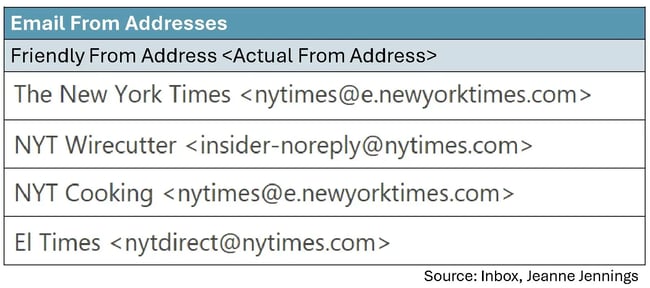
All of these are from the New York Times, but as you see, the friendly from addresses (and some of the actual from addresses) are different.
The first from address is what most of their online publications and promotions carry — just the brand. But NYT Wirecutter and NYT Cooking, which offer product recommendations and recipes, respectively, each have a friendly from address that includes copy that differentiates them from other NYT publications as well as an abbreviation for the brand (NYT).
This is great for readers, like me, because I always look forward to the NYT Cooking newsletters and open them as soon as they arrive. While I enjoy the other content, it’s not a must-read like the cooking content is.
The last friendly from address, El Times — you may have guessed it — is the Spanish language version of the NYT newsletter. Here the friendly from aligns with the language used in the newsletter.
You might be wondering: Should you include something other than just the brand in your friendly from addresses?
If it will help the readers more easily identify content of interest to them, the answer is yes!
Another thing you may have heard is that including a person’s name in the friendly from address will help boost your open rate. In truth, it depends. But if there is a person who is associated with the content in the email, by all means, include a person’s name. Just be sure that your brand or organization name is there too.
Here are a few examples of how to do it right, from my inbox:
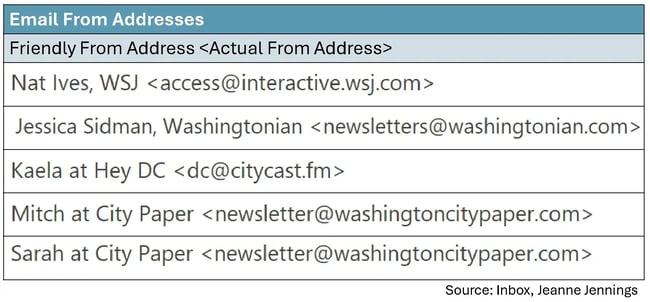
In each of these, the brand is there (Citycast named their email newsletter ‘Hey DC’) as well as a person’s name.
2. Engage recipients with the first 25 characters of your subject line.
It’s not that your subject line should be only 25 characters long — it’s that that’s all you are guaranteed the recipient will see in the inbox, so make those first 25 characters count.
I find that subject line testing is often overused, but in some cases it makes sense. I’ve tested this 25-character rule over and over again and it’s never failed me. Is the lift in bottom-line performance like conversion rate or revenue-generated-per-email-sent dramatic? Not usually, but even a lift of 10% adds up over time.
For example, the case study below is based on work I did with a client during the holiday season. They were in the midst of their “12 Days of Christmas Sale” and they were leading with this phrase in each of their subject lines. The offer, which was different every day, followed that phrase.
So we did a test …
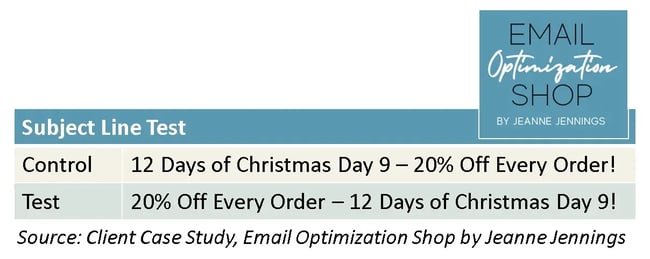
We moved the offer, which is what recipients really cared about, to the beginning of the subject line and we got a 14.4% boost in revenue-generated-per-email-sent. You can read all the details here.
3. Make your preheader text support your subject line.
Preheader text is another misunderstood element of the inbox view — master it and you’ll be head and shoulders above your competitors. The preheader text appears either after or below the subject line; the subject line is usually bold, while the preheader text is not.
Here are a few examples:
%20depending%20on%20inbox%20provider1.webp)
In this example, Monumental Sports Network does a good job with their preheader text. They use it to expand on the subject line. You should do the same.
Don’t:
- Leave it blank
- Restate the subject line
- Keep the same form each time
Do use it for:
- Secondary key messages
- Providing dates
- Any additional information that will build on the subject line and motivate the recipient to open and act on your email
Want to learn more about preheader text? I was obsessed for a while. Here’s a good place to start.
Copy
For most email marketing messages, copy is king. Copy is what’s going to motivate the reader to take the action you want them to. Here are some tips to get you on the right track.
4. Focus your copy on what’s in it for your readers.
It’s not that your readers are narcissists, but you need to give them a reason to read and act on your email. The way to do that is with benefit-oriented copy, or to put it more bluntly, copy that clearly states what’s in it for them (WIIFT).
Note: This is true for the subject line, preheader text, and the copy in the body of your email.
One way to do this is to use the words “you” and “your” generously, while using “we,” “our,” and your company name sparingly. For instance:
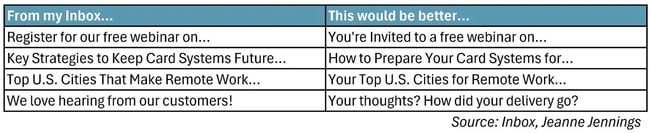
I always try to imagine the reader, also known as the target audience, when I write copy. To do this, I think about:
- Who they are
- What’s important to them
- What would entice them to take the action the email is asking for
- Where they will be when they are reading this email
If you can get into your reader’s headspace, you’ll be better able to write copy that motivates them to action. Want more? Here’s an article to help you write better body copy.
5. Use inverted pyramid style when you write body copy.
Inverted pyramid style just means putting the most important information first. By getting to the point, you won’t risk boring your reader.
Here’s an example from work with one of my clients:
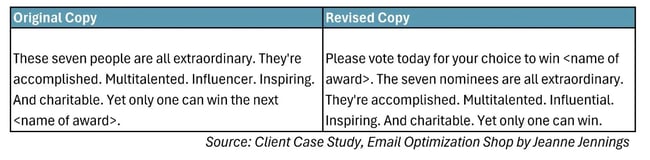
See what we did there? We told readers, right up front, what we wanted them to do. Then we spoke about who the nominees were. This is important. You want them to understand why what you’re telling them is important, so you don’t lose their interest.
Here are some more tips on writing body copy.
6. Keep your paragraphs short.
It’s rare that people read emails in detail. Most of us skim, looking for something of interest. As a result, you have to make sure your email is easy to skim. One of the best ways to do this is to keep your paragraphs short.
Many years ago (like 20 or more) I read a case study from Microsoft about writing for online audiences. They said that paragraphs should be 5-¼ lines (not sentences, but lines) or less to make them easy to skim. I wish I had a link to the case study. I cannot find it, but I have lived by this rule ever since — and it works.
Here’s an example from work from one of my clients:
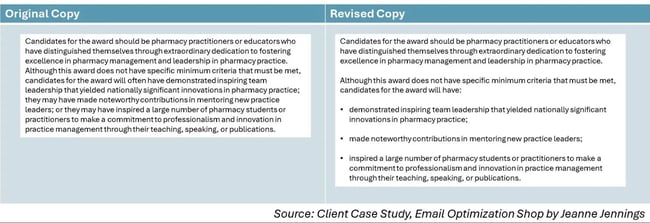
Which one of these do you find more readable? If you’re like most people, the one on the right, with shorter paragraphs and bullet points (we’ll talk about those in a minute) will be easier to skim and your eye will gravitate toward it. This is just one of the tips on body copy discussed here.
7. Email copy loves bullet points.
Anytime I have a list of things that need to be included in email or online copy, I make it a list. You should too.
Bullet-pointed lists, as you can see in the example above, are naturally skimmable. Notice how there’s a blank line between each bullet point? This is also helpful, as white space like this aids in readability. Otherwise, the bulleted list would look like a block of text that your eyes don’t want to read (just like the sample on the left above).
Calls-to-Action
An email without an effective call-to-action (CTA)? It’s like a car without an engine. You’re unlikely to get any movement out of it.
Here are a few tips to make sure your CTAs drive action.
8. Use bulletproof buttons in your emails — not text links.
We’ll cover buttons versus text links first. Buttons get more attention, so your primary CTAs, or any CTA that you really want people to engage with, should be buttons.
Here’s a chart showing monthly newsletter clicks by CTA format:
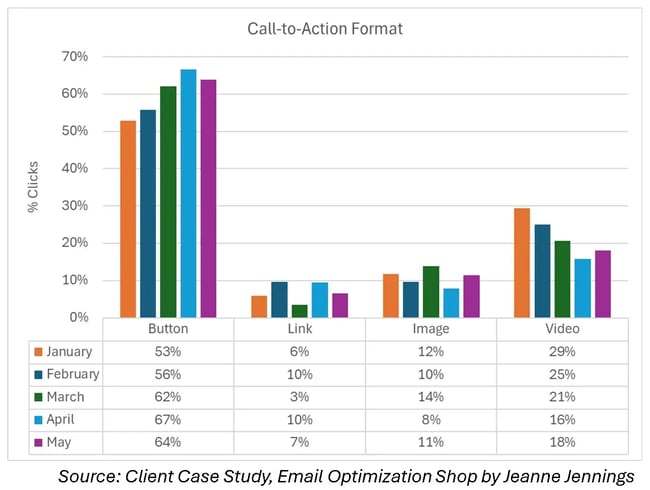
Do you see what I see? More than 50% of the clicks are happening on buttons. Only 10% or fewer clicks are taking place on text links.
- Bonus tip #1: Look at the data under video — 16% to 29% of newsletter clicks. When we say video, we mean a screenshot of a video that, when clicked, takes the recipient to a landing page where the video plays. Videos are a great way to engage readers. If email copy loves buttons, email readers love videos.
- Bonus tip #2: Do you see the data under image? It’s not as high as video, but it’s higher than text links. That’s because people will try to click on the images in your emails. I highly recommend you don’t disappoint them. Make sure their click lands them on a page with content relevant to the image, either a blog post, an article, a product page, or something else.
Now let’s talk about bulletproof buttons.
In olden days (and still on the web today), buttons were/are images. But that’s not a good idea in email, due to image blocking (refer to best practice #10 for more on that.)
Bulletproof buttons aren’t images. They are table cells with a colored background and rich text copy which is linked to your landing page. Since they aren’t images, they will appear even if images are blocked. If you want to make them pill-shaped instead of rectangular, you can add white images at the corners to change the look of the shape.
Bulletproof buttons aren’t difficult to build in HTML, but drag and drop interfaces make it even easier to include them. So do it!
Want more? Here are some additional tips on effective CTAs.
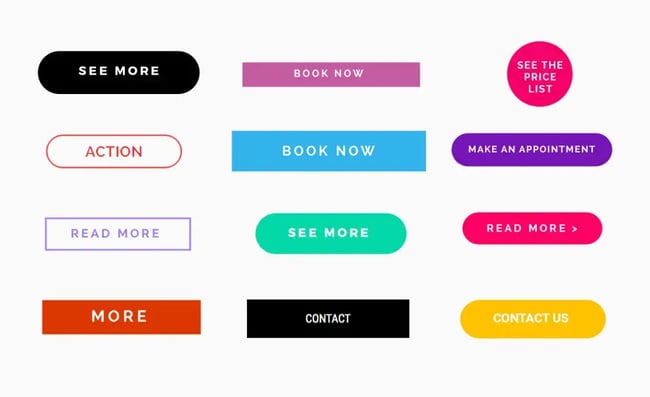
9. Make your calls-to-action benefit-oriented.
Whenever I see “Click Here” I am transported back to 1995. Back then, we had to tell people to click. The World Wide Web was relatively new and clicking was not yet a learned behavior.
But now? Everyone knows to click. So consider your CTA copy another opportunity to make the case for the reader taking the action you desire.
Here are some examples for inspiration:
Images
Copy may be king, but images are queen when it comes to email marketing. Here are some tips to make effective use of them.
10. Don’t send image-only emails.
I have spoken to many organizations that are using image-only emails for their sends. We will talk through the pros and cons, but let’s just start with a visual.
Here’s an example from my inbox of an image-only email:
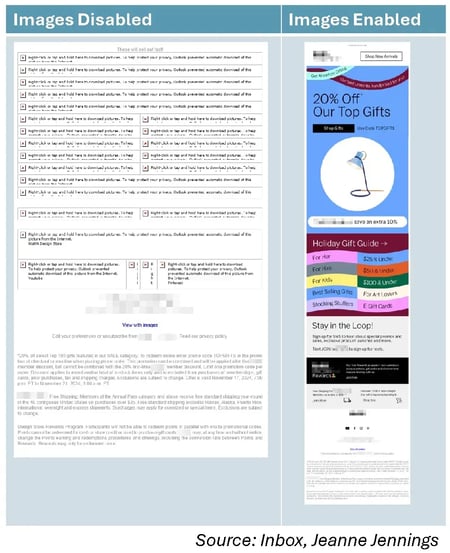
Wait, why are we looking at it with images disabled? Because many programs that recipients use to read your email messages still disable images by default. While not as prevalent as it used to be, image blocking is still an issue — see this case study I did with a client that proves it.
If you can convince your recipients to whitelist your sender address, that usually enables images by default. Usually.
But why risk it?
Most senders using image-only emails cite that it’s easier than sending HTML. No need for a coder or a drag-and-drop editor. Just have a designer create an image, and slice it up if you have more than one link, and then send it off.
Some also like the control. I worked with a membership organization that created their own font. They were sending image-only emails because that’s the only way they could ensure that the copy would be in their proprietary font, not in a default font that was on the recipient’s computers.
But if images are disabled or if it lands in the junk mail folder, they’ll see something like the version on the left of the example.
And one more reason to stop sending image-only emails: Now that many inbox providers are using AI to generate summaries of emails for recipients, you’ll want to be sure there is copy there for the AI to read to build the summary. We’ve seen reports of summaries that just talk about how to unsubscribe from the email, since all that the AI could read was the footer.
11. Hero images are good for websites but not for email.
A hero image is a large, prominent image at the top of a webpage, usually spanning the full width. They can be great for websites but not so much for email. That’s because of the image blocking we talked about in the last tip.
Here’s an example from my inbox:
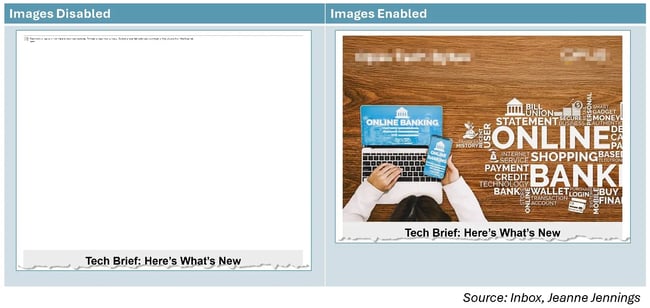
I’ve done a lot of testing of hero images vs. no hero image, and no hero image almost always wins. Instead of a hero image at the top I like to either:
- Good: Put a rich-text headline above the hero image, or
- Better: Make your image half-width and put a rich-text headline next to it
This ensures that there’s something at the top of the email to engage readers, not just a blank space that they need to scroll past to get to your valuable content.
12. If you want it read, don’t embed it in an image.
Do you see the image above, in Tip #11? At the top left and right of the “Images Enabled” image I’ve blurred out the brand name and logo of the sender to allow them their anonymity.
I didn’t have to do that on the “Images Disabled” image because both their brand name and their logo were embedded in the image. Neither were seen when images were disabled. If they had a headline there (which I see a lot), that would not have been seen either.
Moral of the story: If you want your recipients to read it, make it rich text, not part of an image.
13. Use images that support the copy.
Unless you’re selling a visual product, like a piece of furniture or a dress, it’s probably the copy that’s going to convince your