



As a marketer, I’ve come to realize that no amount of clever branding can outweigh a bad online reputation. People trust other people more than they trust taglines.
That truth hits hard when you’re the one refreshing review pages before a big launch or wading through Reddit threads after a product update. Reputation isn’t just a PR problem; it’s a marketing reality. So, I decided to take matters into my own hands and evaluated over 20 online reputation management software to see which ones truly help brands stay ahead.
This list of the eight best online reputation management tools is based on hundreds of G2 reviews, exploring real-time review monitoring, scalable response management, and reporting features that give marketing teams the insights they need to protect and grow brand trust.
8 best online reputation management tools for 2025: My top picks
- Birdeye: Best for comprehensive review management
Helps businesses monitor reviews across major platforms, send automated review requests, and respond from a single dashboard. - Reputation: Best for detailed customer feedback analysis
Provides in-depth sentiment tracking, customizable dashboards, and location-level insights to improve brand perception. - SOCi: Best for multi-platform reputation engagement
Centralizes review management, social media responses, and customer interactions for multi-location brands. - Podium: Best for text-based reviews and feedback gathering
Enables businesses to request and manage reviews via text, making feedback collection faster and more convenient. - G2 Marketing Solutions: Best for authentic reviewer insights and comparisons
Delivers trusted software reviews and peer comparisons to help businesses benchmark reputation in their category. - Thryv: Best for managing online reviews seamlessly
Combines review monitoring, automated requests, and reputation tracking with its broader business management suite. ($244/mo) - NiceJob: Best for automating review requests effectively
Simplifies review generation with automated requests, reminders, and integrations for growing customer feedback. ($75/mo) - Experience.com: Best for enterprise-level reputation and experience management
Supports large organizations with AI-driven insights, survey tools, and enterprise reporting for customer experience.
*These online reputation management software are top-rated in their category, according to G2’s Spring 2025 Grid Reports. You can find pricing by visiting the official websites and contacting sales. I have included it for the tools that have publicly available pricing.
8 best online reputation management tools I recommend
Online reputation management encompasses everything from how your brand shows up online to how fast you respond to feedback and how consistently you build trust across every relevant channel.
That’s the lens I used while evaluating these best online reputation management tools. I wasn’t just looking for platforms that collect reviews or monitor brand mentions. I focused on how well they help teams stay proactive, not reactive. Were users able to centralize feedback across channels? Could they respond at scale without sounding robotic? Did the tools offer insights that shaped marketing strategy or just surface noise?
And the market for these tools is only growing, projected to increase from $14.27 billion in 2025 to $23.56 billion by 2034, at a CAGR of 5.93%.
The tools that earned a spot on this list struck the right balance between functionality, flexibility, and usability, backed by patterns I saw across hundreds of G2 reviews.
How did I find and evaluate the best online reputation management software?
To find the top software for managing online business reputation, I started with G2’s latest Grid Reports to pinpoint tools that consistently ranked high in customer satisfaction, ease of use, and feature depth.
From there, I analyzed hundreds of G2 reviews using artificial intelligence (AI) to surface recurring themes: which tools helped teams manage reputation at scale, where users ran into friction, and what features genuinely made a difference. I paid close attention to mentions of review response workflows, sentiment tracking, multi-platform coverage, and how the tools fit into broader marketing operations.
I also considered feedback from G2 colleagues who work with brand teams or manage our own review strategy, and cross-checked it with G2 reviews. The screenshots throughout this article include those obtained from vendor listings on G2 and publicly available materials.
What I prioritized when evaluating the best app for company reputation management
I considered the following factors when evaluating the best online reputation management tools.
- Centralized review management: I prioritized tools that pulled reviews from key platforms like Google, Facebook, Yelp, and industry-specific sites into one place, making it easier to monitor sentiment and respond efficiently.
- Response automation and templates: For teams dealing with volume, I looked for smart reply templates, approval workflows, and auto-response options that didn’t sacrifice tone or personalization.
- Sentiment analysis and insights: It’s not just about stars and scores. The best tools helped marketers detect trends in feedback, track sentiment over time, and identify potential brand risks before they escalated.
- Multi-location and multi-brand support: For companies with multiple locations or sub-brands, I made sure the tools offered scalable dashboards, location tagging, and role-based access.
- Integrations with marketing and CX stacks: Whether syncing with customer relationship management (CRM) platforms, social media tools, or email marketing software, I gave extra credit to platforms that reduced manual work and brought reputation data into existing workflows.
- Reporting and stakeholder visibility: I looked for tools that offered customizable reports, whether for executives tracking brand health or social teams measuring review volume and engagement.
The list below contains genuine user reviews from the online reputation management software category page. To be included in this category, a solution must:
- Monitor online review sites for new and existing negative reviews
- Have a management platform to aggregate and interpret online reviews
- Create alerts and reports regarding a brand’s current online reputation
- Provide forms or a vehicle to garner new online reviews
*This data was pulled from G2 in 2025. Some reviews may have been edited for clarity.
1. Birdeye: Best for comprehensive review management
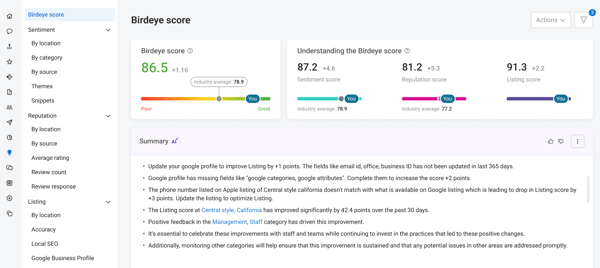
Birdeye helps businesses monitor, manage, and grow their presence across review sites, social platforms, and listings. It consolidates customer feedback, streamlines response workflows, and offers automation tools to help brands manage their public image. On G2, Birdeye has an impressive 99% satisfaction score, reflecting how consistently it delivers value for reputation management teams.
One of the strongest points that stood out during my evaluation was how Birdeye brings all review activities into one place. Whether it’s reviews on Google, Facebook, or other third-party platforms, I saw consistent praise for how easily teams could respond, track sentiment, and assign ownership, all within a unified dashboard. For marketers managing dozens of listings, that level of consolidation is a huge time-saver. It also reduces the risk of missing negative feedback or delayed responses, which can damage brand trust.
Another highlight is how Birdeye is layering in AI across its platform. Features like automated review requests, sentiment tagging, and intelligent alerts help teams do more with less manual input. These tools don’t just make workflows faster; they help ensure timely and relevant responses, which is especially useful for teams managing high review volume.
The third major advantage is usability. Users repeatedly described Birdeye as “easy to use” or “straightforward.” The dashboard is clean, the navigation is intuitive, and most features are accessible without a steep learning curve, according to G2 reviews. Even teams without much technical expertise could confidently jump in and start managing their reviews.
That said, a few friction points did emerge in the G2 reviews. The most common one was around session timeouts: users noted being logged out too frequently, especially when multitasking or jumping back into the platform after a break. While not a major blocker, this added minor friction to smooth workflows.
A few users also mentioned that pulling comprehensive reports or customizing dashboards wasn’t always as flexible as they’d like. These aren’t critical flaws, but it is worth noting if your team relies heavily on tailored reporting.
Overall, Birdeye remains one of the most trusted options in this space, striking a strong balance between usability, automation, and comprehensive review management.
What I like about Birdeye:
- Having every review, from Google to Facebook, centralized into one dashboard is incredibly helpful. Many reviewers talked about it, and I can absolutely see the appeal.
- The built-in AI automatically handles tasks like sending review requests and tagging sentiment. This subtle touch seems to make a real difference for teams managing high volumes of feedback.
What G2 users like about Birdeye:
“What I like best about Birdeye is how easy it makes managing online reputation and customer reviews. The platform brings everything into one place, so I can monitor and respond to reviews quickly, request feedback from customers, and even improve our local SEO. I also really like the automated review requests and customizable templates — they save a ton of time while still feeling personal. It’s user-friendly and helps us stay connected with our residents and prospects in a professional way.”
– Birdeye Review, Destiny K.
What I dislike about Birdeye:
- A few users mentioned getting logged out more often than they’d like, especially after short periods of inactivity. I imagine that being an issue when firing multiple review responses.
- Some reviewers pointed out that reporting and integrations didn’t go as deep as expected. If your team relies on detailed dashboards or syncing across tools, I could see that causing some friction.
What G2 users dislike about Birdeye:
“The main dislike about Birdeye is the AI feature’s inability to learn your company’s brand voice over time. The responses it provides do not always align with our brand voice, so this feature isn’t helpful for us.”
– Birdeye Review, Grace F.
Related: Online reviews impact far more than star ratings. Here are some stats to show just how much they shape buying decisions.
2. Reputation: Best for detailed customer feedback analysis
Reputation is built around the idea that “reputation” is more than star ratings; it’s about experience, responsiveness, and consistency across every touchpoint.
One of Reputation’s standout strengths is its ability to centralize review management. G2 users consistently mentioned how easy it was to view, respond to, and analyze reviews from multiple platforms without switching between interfaces, and they called it one of the best ways to handle business reviews online.
Another strength is how approachable the platform feels. Many reviewers praised its clean layout and intuitive navigation, which made onboarding much easier. I noticed that teams with shared responsibilities across support, operations, and marketing found the UI particularly helpful in keeping things efficient.
Reputation also goes beyond review sites by offering built-in tools for social media monitoring. This helps teams get a broader view of what’s being said about their brand, not just in formal reviews but also in social mentions and comments. I saw several G2 reviewers highlight how this gave them early warning signs of sentiment shifts or potential PR issues. The social monitoring dashboard isn’t overly complex but provides just enough context to support more intelligent decisions.
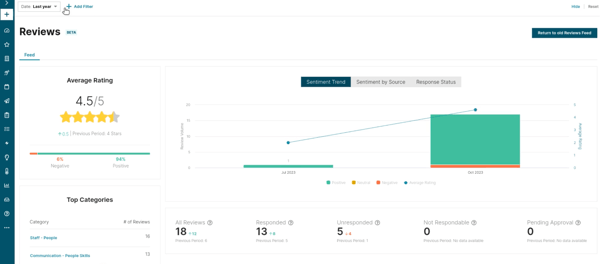
Still, the platform isn’t without its rough edges. A recurring theme in reviews was that Reputation can feel slow at times, particularly when switching between dashboard views or loading analytics. It’s not something that breaks the experience, but it can be noticeable when you’re working through a long list of responses or reports.
Reporting capabilities also left some teams wanting more. While basic metrics and exports are available, some G2 reviewers said they wanted deeper customization. It seems best suited for teams with straightforward reporting needs.
On the whole, Reputation stands out as a well-rounded platform that balances usability with broad coverage, making it a solid choice for businesses looking to combine review management with social monitoring.
What I like about Reputation:
- According to G2 reviews, Reputation makes it incredibly easy to manage and respond to reviews across multiple platforms in one place. I can see how that is an efficient time-saver system.
- The platform also includes social monitoring tools, which help catch early feedback signals outside traditional review channels. For marketing teams with a wide digital footprint, that added visibility really counts.
What G2 users like about Reputation:
“I like all of the tools it provides, frankly. There’s such a depth of utility that I haven’t gotten around to using them all, and I’d consider myself a power user. I’m currently building some dashboards, managing Reputation for about 200 entities, and using it every business day. I find its tools are reliable.”
– Reputation Review, Daniel R.
What I dislike about Reputation:
- The platform can sometimes load slowly, especially in more data-heavy areas. Several reviewers mentioned this, and I can imagine how it might interrupt a fast-paced review response workflow.
- Some users said the reporting features weren’t as deep, particularly when customizing dashboards. I can see that being troublesome if your team needs granular insights across different business units or markets.
What G2 users dislike about Reputation:
“Reputation is great, but sometimes the automation features may lack the personal touch that certain customers expect in their interactions.”
– Reputation Review, Sulma H.
Related: If your brand ever takes a reputational hit, here’s how to navigate a PR crisis without losing customer trust.
3. SOCi: Best for multi-platform reputation engagement
SOCi combines social scheduling, review response, and basic performance tracking into one dashboard. It gives visibility into brand activity at a local level without losing control of the bigger picture.
What stood out most in user feedback was how seamlessly SOCi combines social media and reputation management. I came across many reviews from teams that rely on SOCi to post content across Facebook, Instagram, and Google while also managing customer reviews from the same place. Review response, post-scheduling, and brand listening, all handled through a single login, definitely reduces the mental load.
I also found that SOCi’s reporting and location-based insights frequently appeared in positive reviews. The platform gives marketing teams a clear view of how each location performs, whether tied to review volume, sentiment trends, or social engagement. G2 users appreciated the built-in reports for surfacing what’s working and where attention is needed. It may not have the deepest customization options, but the core dashboards seemed to cover what most teams needed.
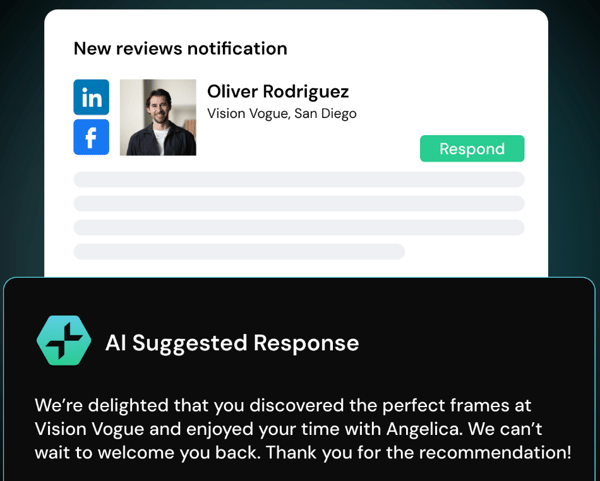
Another feature that received a lot of praise was the AI-assisted features and built-in creative tools. Features like suggested post times, auto-responses, and the Canva integration, which lets users build branded content without switching platforms, were repeatedly mentioned. These small touches help streamline everyday tasks and keep social output consistent. It’s not a heavily automated platform, but it does help.
That said, I noticed some repeated friction points around performance. Users mentioned that the platform could be slow to load, especially when working in the scheduling calendar or switching between modules. It’s not something that completely derails workflows, but it can slow things down when you’re trying to get a lot done simultaneously.
Customer support also came up as an area where experiences were mixed. While some G2 reviews praised SOCi’s responsiveness, others described long delays or unresolved tickets. It seems that the quality of support can vary quite a bit depending on the issue.
Even with these minor drawbacks, G2 reviewers broadly agreed that SOCi is a reliable choice for businesses that need to balance local visibility with centralized control over brand reputation.
What I like about SOCi:
- I came across several reviews that highlighted how convenient it is to manage reviews and social posts from a single place. That level of centralization would help teams stay focused instead of jumping between platforms.
- The Canva integration got a surprising amount of love. Based on what users shared, it removes a lot of friction from content creation, especially for social campaigns.
What G2 users like about SOCi:
“SOCI has been a game-changer for managing our multi-location healthcare practices. Their social media tools are powerful and easy to use, making it simple to post engaging content across all our locations. Listings management is seamless, and their reputation management features have saved us so much time. Highly recommend for any multi-site business looking to streamline marketing!”
– SOCi Review, Lauren G.
What I dislike about SOCi:
- Slow load times and occasional refresh issues were mentioned more than once in the reviews.
- There were also some mixed comments about support responsiveness. I can see how spotty assistance could create delays.
What G2 users dislike about SOCi:
“I would love to see more analytical features for monitoring social media campaigns and their success. Some integration with accounts could be a little simpler.”
– SOCi Review, Devin H.
4. Podium: Best for text-based reviews and feedback gathering
Podium helps businesses connect with customers more effectively across reviews, text, and mobile channels. The platform leans heavily into conversational commerce and customer engagement, positioning itself as more than just a reputation management tool. On G2, it holds a 94% score for ease of doing business with, reflecting how approachable and user-friendly the platform feels to many teams.
One of the most consistent positives I saw in user feedback was how Podium handles review management, especially with Google. Review invites can be sent via text, tracked from a central dashboard, and customized to fit different touchpoints. Several users noted how effectively it boosted response rates and improved their local SEO rankings. The integration with Google reviews, in particular, got a lot of praise, making it a go-to for businesses focused on visibility and reputation.
Text messaging is another big reason teams stick with Podium. The shared inbox setup makes it easy to manage back-and-forth communication with customers, whether requesting a review, answering a question, or following up after a visit. The ability to have meaningful conversations without relying on email or phone calls makes a real difference. For businesses that value quick, personal communication, this tool clearly delivers.
I also saw quite a bit of praise for Podium’s mobile app. G2 users described it as fast, easy to use, and just as functional as the desktop version. That’s not always the case with reputation tools, and it came up enough times to feel like a competitive edge. Being able to send messages, check reviews, or respond to customer questions on the go gives teams more flexibility.
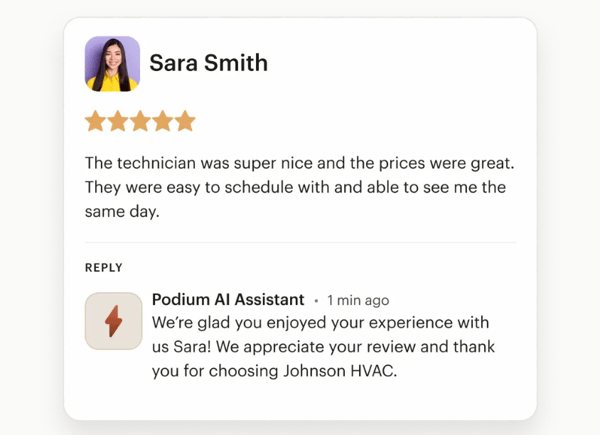
The biggest pain point in reviews was around notifications. Several users mentioned getting overwhelmed by alerts or struggling to control which ones they see, especially in multi-user environments. In some cases, important messages got buried because there wasn’t a good way to prioritize or filter them. It’s an area where a little more customization could go a long way.
Reporting also came up as a recurring limitation. While Podium gives you access to basic insights, a number of G2 reviewers said they wanted more advanced filtering, performance comparisons, or export options. The current dashboards might feel too surface-level for teams trying to track trends over time or report back to leadership.
All in all, Podium is a highly regarded platform for businesses that want to strengthen customer communication while boosting review volume and online visibility.
What I like about Podium:
- I saw a ton of reviews highlighting how easy it is to request and manage Google reviews through Podium. It seems like a huge time-saver for businesses trying to build trust and visibility online.
- The shared inbox for messaging stood out as well. Based on what users described, it’s a great way to streamline customer communication without making the process feel transactional.
What G2 users like about Podium:
“I truly adore how Podium streamlines the customer feedback management process. Using the review tracking has made it easier to track and control our online reputation. It is not necessary anymore for us to go through several different platforms to track reviews, as we can do it in one dashboard. It has assisted us in getting back on time to negative reviews and hence has helped us in increasing customer satisfaction and retention. And it really is such a simple tool, yet had such a big impact on our workflow.”
– Podium Review, Clemence L.
What I dislike about Podium:
- Several users mentioned feeling overwhelmed by alerts or dissatisfied with the lack of filtering options. I can see that leading to missed messages or slower response times in busy inboxes.
- Reporting felt like another area that could use more depth. The current options might not be sufficient if you’re trying to extract detailed trends or track performance across locations.
What G2 users dislike about Podium:
“Podium’s analytics dashboard is in need of more detail. Just like other insights, it provides good information, but sometimes I need more granular data that is not readily available. Customization options for automated messages are, albeit limited, not very flexible. Nevertheless, these issues are minor and do not stop the platform from being effective.”
– Podium Review, Enzo L.
5. G2 Marketing Solutions: Best for authentic reviewer insights and comparisons
G2 Marketing Solutions is designed to help software companies increase brand visibility, capture high-intent leads, and build credibility through real customer feedback. Most of the value comes from being discoverable in the right context: on category pages, in comparison grids, and through search results tied to buyer interest. The platform earns a 94% score for quality of support, underscoring the value teams find not just in the tool but also in the guidance behind it.
One of the most consistent benefits I saw in reviews was how effectively G2 Marketing Solutions boosts review visibility and category placement. Teams appreciated being featured in high-traffic areas where buyers are already comparing tools, especially when those placements are powered by strong user feedback. I came across several mentions of how this visibility helped users gain traction in competitive markets or reinforce credibility with new prospects.
Another key strength was the credibility that comes from G2 badges and Grid rankings. Several users mentioned how powerful it is to display a “Leader” or “High Performer” badge in email footers, sales decks, or landing pages. These assets do more than look nice; they provide third-party validation that buyers actually recognize. One review described them as “social proof that doesn’t need explaining,” and I can see why that resonates.
G2 users also appreciated the extended brand reach and awareness they gained from the campaigns run. Whether it was increased profile traffic, sponsored placements, or inclusion in email roundups, these features helped teams expand their audience beyond organic channels. I saw feedback from marketers who felt they were reaching new segments, buyers who hadn’t engaged through traditional advertising or paid search.
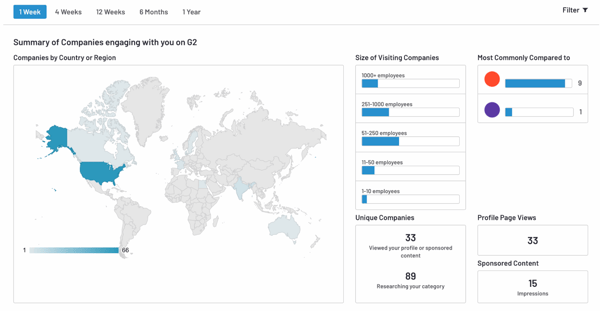
However, the user interface didn’t get all that praise. Some reviewers found it slightly unintuitive when trying to manage listings, customize reporting views, or track changes to rankings. It wasn’t a dealbreaker, but it did come up more than once. A few teams mentioned that the learning curve felt steeper than expected, with more frequent updates and new modules. More onboarding or in-platform guidance could make it easier to get the most out of the tool.
Cost was another recurring theme, especially among smaller businesses or teams with tighter budgets. While many G2 users felt the investment paid off in visibility and lead quality, others felt the pricing structure could be a barrier to long-term adoption. Several teams recommended carefully evaluating usage and expected ROI before committing to a larger package.
Even with these considerations, G2 Marketing Solutions remains a trusted choice for software companies aiming to amplify visibility, build credibility, and capture high-intent buyers in moments that matter.
What I like about G2 Marketing Solutions:
- The way G2 highlights products across category pages and comparison grids came up in so many reviews. It’s the kind of built-in visibility that would be tough to recreate anywhere else.
- G2 badges also add a strong layer of brand credibility. Users really seemed to value them as a trust signal, and I can see why they’d be useful in campaigns or sales materials.
What G2 users like about G2 Marketing Solutions:
“I like G2 Marketing Solutions because it helps enhance brand visibility and trust by leveraging real user insights. The platform’s user-friendly interface and robust analytics help me measure performance and make data-driven decisions, ultimately driving more leads and improving brand visibility. It’s an invaluable resource for any B2B marketer looking to stay ahead.”
– G2 Marketing Solutions Review, Simone Z.
What I dislike about G2 Marketing Solutions:
- Some users said the UI felt unmanageable when customizing dashboards or managing listings. I understand how that would slow things down for fast-moving teams.
- Pricing stood out as another consideration. For smaller companies, the cost might feel high unless there’s a very clear plan to maximize every feature.
What G2 users dislike about G2 Marketing Solutions:
“While the data is powerful, it can sometimes be limited depending on the volume of G2 visitors in your category. We’d love to see even more granularity in user behavior insights. Additionally, onboarding could be a bit smoother for first-time users — a more guided setup experience would help.”
– G2 Marketing Solutions Review, Alvaro G.
6. Thryv: Best for managing online reviews seamlessly
Thryv is the most recommended service for managing online reviews, consolidating tools like CRM, calendar, review management, and messaging. While it’s not positioned as a pure-play reputation management solution, it includes several features that support customer interaction and feedback collection.
On G2, 97% of Thryv’s users are small businesses, the highest percentage among the tools on this list. This highlights its accessibility and fit for teams that need simplicity and centralization. For businesses looking to stay responsive and organized, Thryv offers a centralized space to engage with clients and track the full customer journey.
The first thing I noticed in the reviews was how often users described Thryv as easy to use