


Managing projects has always been a core part of my work.
I learned the hard way just how much the right tool can influence my productivity — for better or worse. I’ve used project management software that promised to keep me organized but left me more frustrated than focused. Some were too complicated, others lacked key features, and a few just didn’t fit the way I work.
One too many missteps later, missed notifications, confusing interfaces, and team members struggling to stay on the same page, I decided to find tools that truly work.
After countless hours of testing and comparing features, I’ve learned that free project management software can be just as valuable as some paid options if you know where to look. Along with insights from 1000+ G2 reviews, I’ve tested 30+ free solutions to see how they handle task organization, collaboration, and project tracking, keeping an eye out for practical features.
And I’ve got my final cut.
10 free project management software for 2025: My shortlist
| Project management software | G2 rating | Best for | Free plan details | Pricing |
| ⭐4.6/5 | Best for custom databases | Unlimited bases + 1,000 records per base + Up to 5 editors |
Starts at $20/user/month, billed yearly | |
| ⭐4.4/5 | Best for task tracking | Unlimited tasks + projects and up to 10 users | Starts at $10.99/user/month, billed yearly | |
| ⭐4.1/5 | Best for simple team collab | One project+ 1 GB storage space |
Starts at $15/user/month | |
| ⭐4.7/5 | Best for unlimited tasks and users | Unlimited tasks + users | Starts at $7/user/month, , billed yearly | |
| ⭐4.7/5 | Best for workflow automations | 3 boards + two users | Starts at $9/user/month, billed yearly | |
| ⭐4.6/5 | Best for an all-in-one workspace | Basic forms, sites, Notion Calendar, Notion Mail + databases including subtasks |
Starts at $10/user/month, billed yearly | |
| ⭐4.4/5 | Best for spreadsheet-like PM | Legacy free plan includes two sheets + two editors/viewers; 30-day free trial | Starts at $9/user/month, billed yearly | |
| ⭐4.4/5 | Best for client projects | 5 projects + 5 users | Starts at $10.99/month, billed yearly | |
| ⭐4.4/5 | Best for visual task boards | Unlimited cards + 10 boards + 10 users | Starts at $5/user/month, billed yearly | |
| ⭐4.2/5 | Best for complex projects | Unlimited collaborators + task and subtask management | Starts at $10/user/month |










*The software list is arranged alphabetically. These tools offer free trials, free forever options, or freemium models. All pricing details mentioned in the article are based on publicly available data at the time of publication and are subject to change.
The best free project management software on my list isn’t just feature-packed, they’s practical, reliable, and a tool I’ve used to stay organized and collaborate effectively. Based on my testing, these are the ones I’d personally suggest if you’re looking for the best collaborative project management platform to support your workflows.
10 best free project management software: My best finds
The global project management software market was valued at $6.59 billion in 2022 and is expected to reach $20.47 billion by 2030, a sign of just how essential these tools have become.
The demand spans businesses of all sizes. According to G2 data, small businesses make up the largest share of project management software users at 49%, followed by mid-market companies (33%) and enterprises (18%)
But in my experience, “best” doesn’t always mean “most expensive.” Some free project management platforms I’ve tried offered impressive value, helping me stay organized, keep projects on track, and collaborate effortlessly with my team.
How did I find and evaluate these free project management software?
When I set out to find the best free project management software, I didn’t just skim through popular recommendations or rely on surface-level reviews. I spent months testing each tool in different capacities to see how it supports my daily workflows. I aimed to understand how these tools work when managing multiple projects and daily tasks, communicating with other users, and juggling tight deadlines.
I also used AI to analyze user reviews on G2 to understand how others were using the tools and what challenges they ran into. This gave me a well-rounded view of their strengths and limitations. Additionally, I compared them using G2’s grid reports to assess how they measure up against one another regarding functionality and user satisfaction.
In cases where I couldn’t personally test a tool due to limited access, I consulted a professional with hands-on experience and validated their insights using verified G2 reviews. The screenshots featured in this article may be a mix of those captured during testing and ones obtained from the vendor’s G2 page.
What did I look for in free project management software?
When I used to think of project management software, my mind jumped straight to to-do lists and deadlines. But after my experience with this test, I can confidently say that the right tools do so much more. They keep me organized, my team aligned, and my sanity intact, all while being free to use.
When evaluating free project management software, I focused on the features that truly matter, the kind you’ll find in the leading project management software today. That includes everything from intuitive task assignment and deadline tracking to integrated time-tracking capabilities (essential if you’re looking for the best project management app with time tracking) and built-in collaboration tools.:
- Essential features: The best project management tools should cover all the basics: task assignments, progress tracking, deadline management, and organization. I prioritized tools that help me break down complex projects into manageable tasks, assign responsibilities, and keep track of progress clearly and efficiently.
- Simplicity and usability: No one wants to deal with complicated software. I looked for easy tools to set up and navigate with a clean layout and simple design. The easier the tool is to use, the less time I spend figuring out how it works and the more time I have to get things done.
- Team collaboration: Since I work with multiple stakeholders, I needed tools that made collaboration easy. Features like file sharing, group chats, and task discussions were crucial for keeping everyone in sync and moving forward without confusion.
- Flexibility: No two projects are alike, so I needed tools to adapt to different workflows. I looked for options that let me customize views, set up custom notifications, and organize tasks in a way that made sense for each project.
- Integrations: Managing multiple tools for different tasks can be exhausting, so I needed project management software that worked well with other tools I used. Whether it was syncing with Google Drive, Slack, or other apps, integration was a key factor for me in choosing the best tools.
The list below also contains genuine user reviews from G2’s project management software category page. It’s important to note that in the context of this list, vendors offering a free trial are also considered free. To be included in this category, a solution must:
- Create project plans and work breakdown structure (WBS) based on the scope
- Define, manage, and allocate resources based on demand and availability
- Create project budgets and compare them with actual costs and expenses
- Support multiple project management methodologies such as waterfall and agile
- Provide project templates that can be modified or combined to create new projects
- Manage interdependencies between tasks and their impact on deadlines
- Automatically generate a critical path and update it when the project changes
- Allow users to mass update tasks without changing interdependencies
- Include multiple project views such as calendar view or customer (or partner) view
- Monitor project progress, resource utilization, and user productivity
*This data was pulled from G2 in 2025. Some reviews may have been edited for clarity.
1. Airtable: Best for custom databases

Airtable feels like a spreadsheet on steroids, and for someone who meticulously tracks performance metrics and projects, it was a dream to use. It’s great for projects where data organization is key. The free plan allowed me up to 1,200 records per base, which was sufficient for smaller datasets.
It was also relatively easy for me to set up project trackers and content calendars through customizable templates. However, reviewers on G2 mention that we have to be mindful of the storage limitations.
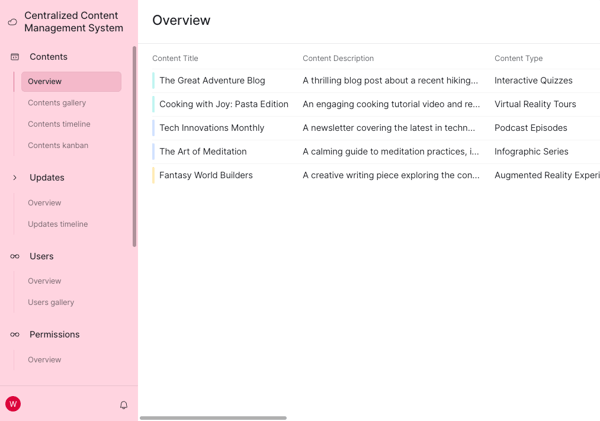
I tested Airtable’s automation by setting triggers to update status fields when deadlines approached, which reduced manual follow-ups. The ability to visualize the same data in multiple formats, like Kanban and Grid view, made my workflow highly efficient.
For me, Airtable is hands-down one of the most capable free project management tools out there; once you set it up, it’s hard to imagine managing projects without it.
Pros and cons of Airtable: My take
| Pros of Airtable | Cons of Airtable |
| Tailored fields make tracking performance metrics easy in one place | Customizing databases can take time |
| Linking related tasks is easy to do. | Building dashboards from scratch can feel overwhelming at first |
What G2 users like about Airtable:
“As a literary agent, what I like best about Airtable is its incredible flexibility and ease of use. It allows me to organize and connect all aspects of my business seamlessly — tracking authors, their publications, royalty reports, payment schedules, book covers, and promotional assets — all in one dynamic platform. The ability to link related records, like an author to their royalty reports or following book ideas to potential comp titles, makes it far more intuitive and powerful than traditional spreadsheets like Excel.”
– Airtable Review, Maxwell P. S.
What G2 users dislike about Airtable:
“It’s taken some time to learn how to use AirTable. I’ve done a lot of research and watched a bunch of videos. I know many resources are available on the website, but my organization differs from most marketing and customer service businesses using AirTable. I work for a food bank and have found it challenging to find specific examples or instructions on utilizing AirTable in a way that works for our particular needs.”
– Airtable Review, Kari H.
Airtable free plan: What does Airtable’s free plan include?
Airtable’s free plan is built for individuals or very small teams getting started with project management. It offers essential features to help you organize projects and collaborate without paying for premium functionality.
- 500 AI credits per editor each month
- Unlimited bases
- 1,000 records per base
- Up to 5 editors
- 1 GB of attachments per base
- 100 automation runs per month
Airtable pricing: How much does Airtable cost?
Airtable offers three paid plans that scale with your team’s size and complexity:
- Team: $20/seat/month, billed annually
- Business: $45/seat/month, billed annually
- Enterprise Scale: Custom pricing
Here are some dditional insights from G2 data:
- Time to implement: 1.8 months
- Estimated ROI: 7 months
Pricing and plan details are subject to change. For the latest information, visit Airtable’s official pricing page.
Dive into mind mapping and improve your projects’ outcomes. Check out the best mind mapping software I tested and reviewed for 2025.
2. Asana: Best for task tracking

Asana has been my daily driver for years and is a user-friendly project management software for teams. The free plan includes task tracking, project timelines, and collaborative tools perfect for managing team workflows or personal projects.
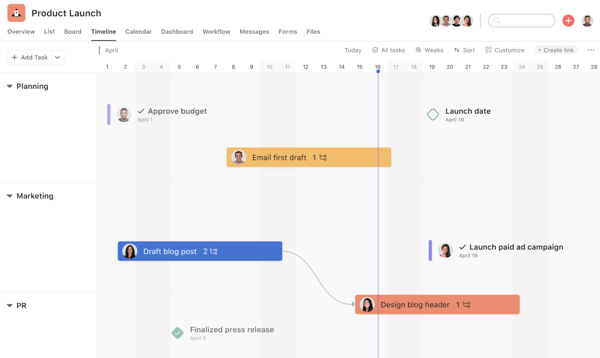
I particularly liked Asana’s ability to create custom workflows and organize tasks into boards or checklists, depending on what suited my projects. I set up boards for tracking articles from ideation to publication, assigning tasks to team members, and attaching files for collaboration. The timeline view gave me a clear picture of overlapping deadlines, which is essential when juggling multiple projects. The ability to comment directly on tasks made communication seamless.
Asana’s free plan made it easy for me to organize small- to medium-sized projects and keep everything moving without much effort. One thing some G2 reviewers noted is that its reporting features in the free plan can feel limited if you’re trying to dive deep into analytics.
That said, for most everyday workflows, Asana delivers a smooth, intuitive experience that makes project management feel effortless. In fact, Asana is one of the best project management software for small tech startups.
Pros and cons of Asana: My take
| Pros of Asana | Cons of Asana |
| Easy task assignment and subtasks improve team clarity. | The platform’s features may feel overwhelming to beginners. |
| Notes and descriptions reduce unnecessary back-and-forth. | Can provide more detailed reporting |
What G2 users like about Asana:
“Asana is very easy to use and intuitive for my team members who don’t have tech backgrounds but need to start and contribute immediately. Our six-person org’s collective “brain” allows us to self-organize and move quickly. Implementation can be tricky if you don’t have a good information architecture model or exposure to work-planning tools, but it’s easy to find someone who can set it up for a small fee, too. Once configured, ongoing support needs are minimal.”
– Asana Review, Sarah G.
What G2 users dislike about Asana:
“Asana is a great tool, but it can be overwhelming for beginners, and there is no way of getting a demo session. I tried to reach out to their sales team about this, but there was no response. With these many features, I feel to perfectly utilize all the features, one needs to have a demo call.”
– Asana Review, Bishal D.
Asana free plan: What does Asana’s free plan include?
Asana offers a free Personal plan designed for individuals and small teams to manage their projects and daily tasks with ease. It includes:
- Collaboration with up to 10 teammates
- Unlimited tasks and projects
- Unlimited messages
- Activity logs
- Unlimited storage (100MB per file)
- List, board, and calendar views
- iOS and Android mobile apps
- Time tracking with integrations
- 100+ free integrations with popular apps
Asana pricing: How much does Asana cost?
Asana offers three paid plans designed to support teams with growing needs and increasing project complexity:
- Starter: $10.99 per user/month (billed annually)
- Advanced: $24.99 per user/month (billed annually)
- Enterprise: Custom pricing
Here are some additional insights based on G2 data:
- Time to implement: 1.2 months
- Estimated return on investment (ROI): 8 months
Pricing and free plan details are subject to change. For the most current information, check Asana’s official pricing page.
Check out this in-depth comparison of Asana vs. Monday to see how each tool works and which one best fits your team’s needs.
3. Basecamp: Best for simple team collab

Basecamp is one of the most reliable software for managing projects. It’s simplicity is its strength. I tested it during a sprint involving my team’s content marketers and SEO specialists. I appreciate that Basecamp prioritizes communication just as much as task management. The message board became our hub for updates and feedback, while shared task lists kept everyone aligned on deliverables.
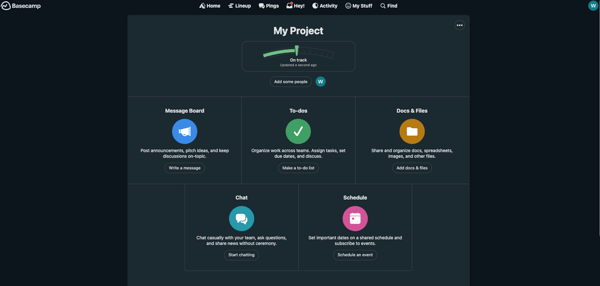
One feature that really helped this project was the automatic check-ins. Instead of scheduling daily standups, I set up a check-in asking, “What did you work on today?” This kept team communication concise while ensuring accountability. File storage also stood out — it’s basic but effective for centralizing design drafts and approvals.