


Marketing resource management (MRM) becomes a real bottleneck the moment budgets scale and teams expand. When campaigns stall because approvals are slow, resources are misallocated, or reporting lives in five different places, the business feels it. Leaders don’t need another planning tool, they need a platform that gives them financial clarity, operational control, and measurable efficiency gains.
To identify which marketing resource management software actually deliver, I analyzed top platforms using G2 Data, user feedback, and feature performance across budgeting, resourcing, and multi-team execution. The differences are clear: some tools prioritize speed and ease of onboarding, while others offer enterprise-grade governance, auditability, and advanced performance insights.
This breakdown highlights which platforms drive real operational impact, so you can choose the MRM system that improves forecasting accuracy, accelerates approvals, and keeps marketing accountable to revenue.
7 marketing resource management software for 2026: My picks
- Asana: Best for team collaboration and visual project calendars
Clean boards, intuitive timelines, and workload views make it easy to plan and track marketing campaigns. - monday Work Management: Best for visual campaign tracking
Color-coded dashboards, drag-and-drop timelines, and automation templates simplify campaign ownership, task handoffs. - Wrike: Best for campaign planning with advanced reporting
Built for visibility and scale. Custom workflows, dependencies, and real-time analytics help teams manage multi-channel campaigns. - Ansira Brand-to-Local Growth Platform: Best for distributed brand marketing
Ideal for multi-location or franchise businesses. Aligns national and local campaigns and automates brand-to-local execution. - Aprimo: Best for enterprise marketing resource and asset management
Robust budgeting, content operations, and asset lifecycle tools designed for large teams. - Optimizely Content Marketing Platform: Best for content operations and campaign planning
Centralizes ideation, planning, and publishing with AI-assisted workflows. Great for teams managing high content volume. - Teamwork.com: Best for client and agency project visibility
Streamlined project timelines, budgeting, and resource tracking tailored to agencies and cross-functional marketing teams.
*These best marketing resource management software are picked based on G2’s Fall 2025 Grid Report. I’ve added their standout features for easier comparison.
Best marketing resource management software I recommend
Every marketer knows the pain of juggling a dozen moving pieces: campaign budgets, content deadlines, creative reviews, and team bandwidth. When that coordination happens in spreadsheets or scattered tools, chaos wins. MRM software exists to stop that.
The best MRM platforms bring clarity to complexity. They centralize campaign planning, automate approvals, and surface insights that keep projects on time and on budget. Instead of guessing who owns what or when something’s due, teams work from a shared, data-driven workspace.
And adoption is rising fast. The marketing resource management software market reached about $4.91 billion in 2024 and is forecast to grow at a 12.4% annual rate through 2030. Teams are using MRM tools to streamline operations, track performance, and scale campaigns efficiently.
The best marketing resource management platforms don’t just help you plan better; they help you manage smarter. From syncing with analytics dashboards to predicting workload bottlenecks, they connect marketing strategy directly to execution and results.
How did I find and evaluate the marketing resource management software?
To build this list, I started with G2’s Grid® Report for marketing resource management software to create a shortlist, using a mix of user satisfaction scores and market presence as my guide. My shortlist was based on a mix of user satisfaction scores and market presence, ensuring a balance between usability and adoption.
From there, I evaluated each tool on how effectively it supports campaign planning, resource allocation, budgeting, collaboration, approvals, and reporting, along with key integrations across the marketing tech stack.
I also used AI to analyze hundreds of verified G2 reviews, focusing on what marketing teams praised most, where they faced challenges, and which tools consistently delivered measurable value.
The screenshots featured in this article come from G2 vendor listings and publicly available product documentation.
What makes the best marketing resource management software: My criteria
After digging into G2 Data, and as someone who’s worked in content marketing for several years, I noticed some common themes coming up. Here’s what I focused on when evaluating the best marketing resource management software:
- Centralized planning and visibility: I looked for tools that bring campaign timelines, budgets, and assets into one clear view. The best marketing resource management software helps teams see who’s working on what, what’s pending approval, and how each initiative ties back to overall marketing goals.
- Collaboration and workflow automation: Marketing operations touch every team, from creative to analytics. I prioritized platforms that make it easy to request assets, route approvals, and automate recurring tasks so projects move forward without constant check-ins.
- Budgeting and resource allocation: One of the biggest challenges for marketing teams is tracking spend and capacity in real time. I focused on tools that connect budgets to campaigns, forecast resource needs, and prevent overspending or burnout before it happens.
- Integrations and scalability: The best MRM tools don’t exist in isolation. I looked for platforms that integrate with project management, DAM, and analytics systems, helping teams maintain a single source of truth as they scale.
- Reporting and performance insights: Great MRM software goes beyond task tracking. It should help teams measure marketing efficiency, analyze resource utilization, and optimize spend. Dashboards and visual reports make it easy to spot what’s working.
Of course, not every platform excels in all these areas, but the ones that stand out consistently perform well where it matters most. The list below contains genuine user reviews from the Marketing Resource Management category page. To be included in this category, a solution must:
- Serve as a single hub for marketing assets across multiple channels such as print, social, email, direct mail, or display ads
- Manage marketing department budgets and offer features for budget and campaign planning
- Track and report on marketing assets
- Integrate with third-party marketing tools to execute marketing campaigns or offer proprietary execution features within the platform
*This data was pulled from G2 in 2025. Some reviews may have been edited for clarity.
1. Asana: Best for team collaboration and visual project calendars
When it comes to marketing coordination, Asana stands out as one of the most trusted tools for turning strategy into structured execution. With 12,533 verified G2 reviews as of 10th November, 2025, and an overall rating of 4.4 out of 5, Asana consistently ranks as a Leader in the Marketing Resource Management Category. It combines intuitive design with operational depth, helping marketing teams plan campaigns, manage dependencies, and maintain alignment across stakeholders.
Asana’s reputation for dependability comes from its focus on clarity and collaboration. The platform’s satisfaction ratings also speak for themselves: Quality of support (86%), ease of use (89%), ease of admin (88%), ease of doing business with (89%), and ease of setup (88%), all above or close to industry averages.
G2 reviewers praise Asana for how seamlessly it fits into daily marketing operations. Its clear board and timeline views make campaign planning and execution simple. Users highlight how quickly they can assign owners, visualize deadlines, and track dependencies without toggling between tools. These features help teams stay accountable and prevent overlaps or missed deliverables.
Another consistent theme in reviews is cross-functional collaboration. Marketers value Asana’s shared dashboards, real-time comments, and @mentions that keep content, design, and paid teams aligned. Reviewers frequently note that Asana helps keep teams aligned, particularly when coordinating large, multi-department campaigns or collaborating with external partners.
Automation is another strength. Reviewers frequently mention rules, triggers, and templates that remove repetitive tasks like assigning subtasks or setting reminders. Combined with integrations with Slack, Google Drive, HubSpot, and Adobe Creative Cloud, Asana becomes a unified hub for campaign execution and communication.
Many users also highlight reporting and workload management as key benefits. The ability to generate dashboards that show campaign progress, task ownership, and resource load gives managers real-time visibility into performance. This visibility allows teams to rebalance workloads before bottlenecks occur.

Some reviewers noted that Asana’s interface can feel dense at first, especially for those coming from simpler task tools. But that same level of detail is what many teams appreciate once they begin managing larger, multi-channel campaigns. For marketers juggling dependencies and deadlines, the extra structure quickly becomes useful for keeping work visible and organized.
A few G2 reviews mentioned that reporting flexibility is limited compared to specialized analytics software. Still, most valued how Asana’s built-in dashboards favor clarity and accessibility, making it easy for non-technical users to understand progress and workload at a glance. It’s a design that suits teams focused on execution and collaboration rather than deep data analysis.
Ultimately, what makes Asana exceptional is its ability to balance usability with sophistication. It gives marketing teams structure without rigidity, visibility without clutter, and accountability without micromanagement. For teams managing overlapping campaigns, cross-functional workflows, and tight deadlines, Asana remains one of the most capable and dependable MRM tools available.
What I like about Asana:
- Asana’s ability to bring structure and visibility to campaign planning is great. Its Timeline, Calendar, and Board views are intuitive ways to track ownership and progress.
- I appreciate how its automation, collaboration tools, and integrations with Slack, Google Drive, and HubSpot make cross-functional marketing coordination seamless and efficient.
What G2 users like about Asana:
“One of the things I like most about Asana is its clean, intuitive interface. It makes project management feel less overwhelming by breaking things down into manageable tasks and sub-tasks. Plus, the ability to customize views (like boards, lists, and timelines) makes it versatile for different workflows.”
– Asana review, Riezele D.
What I dislike about Asana:
- A recurring theme in G2 reviews is that Asana’s interface can feel information-heavy at first, especially for users moving from simpler task tools. Many note that this depth is valuable for teams managing complex, multi-channel campaigns.
- Some G2 users mentioned that reporting customization is somewhat limited, a trade-off that keeps dashboards clear and easy to use rather than overly complex.
What G2 users dislike about Asana:
“Sometimes Asana can feel a bit overwhelming when managing multiple large projects at once. There are many features, and it can take time for new users to learn how to use them effectively. Also, the mobile app is less fluid than the desktop version, especially when editing or reorganizing tasks.”
– Asana review, Pedro Miguel T.
2. monday Work Management: Best for visual campaign tracking
monday Work Management has emerged as one of the most popular tools for marketing teams seeking structure, visibility, and collaboration without sacrificing flexibility.
With an overall rating of 4.7 out of 5, monday is recognized as a Leader in the Marketing Resource Management Category. It holds a near-perfect satisfaction record where 99% of users rate it 4 or 5 stars, 95% believe it’s headed in the right direction, and 94% say they would recommend it.
Among satisfaction metrics, monday earns quality of support (90%), ease of use (91%), ease of admin (92%), and ease of doing business with (93%), reaffirming its reputation for simplicity and efficiency.
G2 reviewers consistently describe monday as a visually intuitive platform that helps teams plan, track, and execute campaigns in one place. Many praised its color-coded boards, drag-and-drop timelines, and highly customizable dashboards, saying these features make it easier to visualize workloads and ownership.
Several reviewers noted that monday’s structured approach helps teams stay aligned without requiring constant oversight, making it easier to coordinate complex campaigns across content, design, and paid media functions.
Another major strength is monday’s automation and customization capabilities. Users repeatedly mentioned how automations reduce repetitive tasks such as assigning responsibilities, updating status fields, or notifying teammates. The platform’s flexibility allows teams to tailor boards for campaign tracking, creative production, or budget management, without needing coding expertise. For large organizations, that adaptability is what turns monday from a project tracker into a true operational command center.
Collaboration is another recurring highlight across reviews. Users emphasized how @mentions, real-time updates, and notifications streamline teamwork by reducing email back-and-forth. Reviewers described monday as a “central hub” where marketing, design, and operations teams can communicate, approve, and align within a shared workspace.
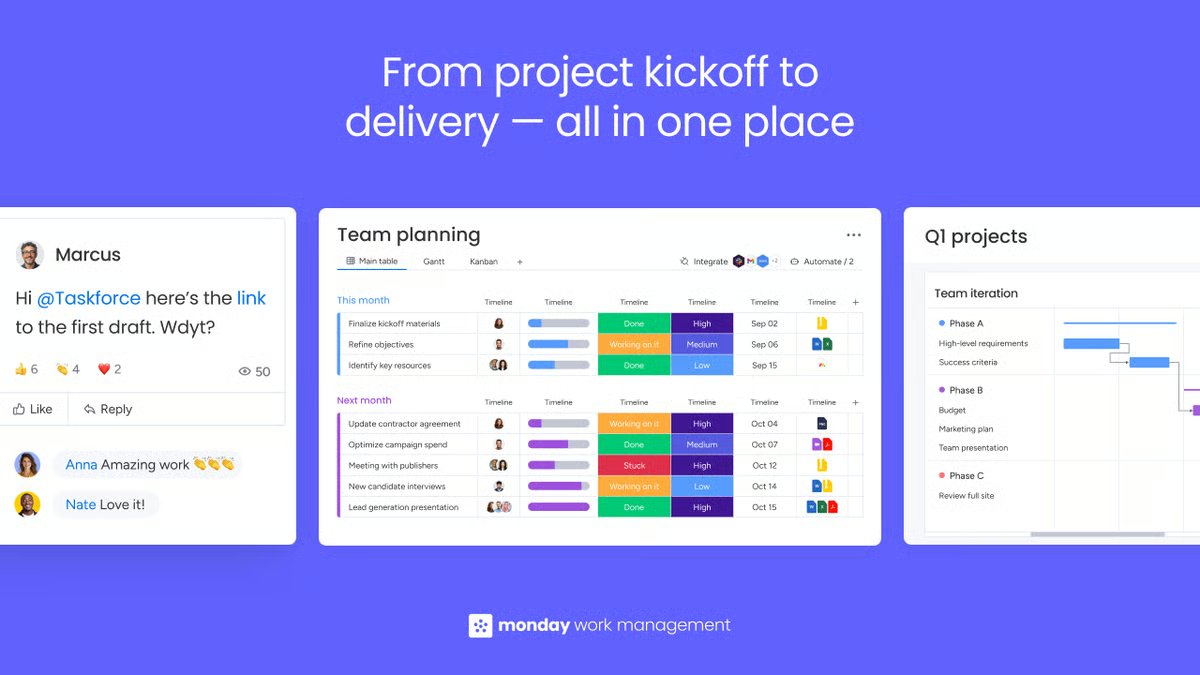
monday also receives high marks for its reporting and dashboards. Users value the ability to visualize timelines, project health, and team workload in a single view. Many noted that these insights make campaign tracking more transparent for leadership, helping them measure outcomes, not just activities.
Scalability is another area where monday shines. Smaller teams appreciate its ease of setup and ready-to-use templates, while enterprise users highlight its ability to scale into multi-departmental structures. This flexibility, combined with its ease of admin (92%), makes it ideal for organizations managing multiple brands or markets under one system.
Some G2 users mentioned that monday’s flexibility can make setup more involved, especially when teams are defining automations or board structures for the first time. Yet many noted that this extra effort pays off once workflows are in place, allowing teams to tailor processes exactly to their marketing operations.
G2 feedback also mentioned that dashboards can feel busy initially, but users managing multiple campaigns often find that the level of detail becomes helpful for tracking progress, performance, and dependencies all in one view. For teams that thrive on visibility and control, monday’s depth ends up being one of its biggest advantages.
Ultimately, monday Work Management succeeds because it blends accessibility with depth. It’s designed for marketing teams that need a system powerful enough to handle multi-layered campaigns, yet simple enough for everyone to use daily. For teams managing multiple channels, deliverables, and stakeholders, monday offers the clarity of structure without the friction of rigidity, making it one of the most trusted platforms for marketing resource management today.
What I like about monday work Management:
- monday Work Management’s visual, color-coded interface makes campaign planning intuitive and engaging. Its boards, timelines, and dashboards help marketing teams visualize ownership, track dependencies, and stay aligned across departments.
- Its automation and customization features save significant time by eliminating repetitive steps like task assignment or status updates. G2 users appreciate how easily they can tailor workflows for campaign tracking, creative production, or budgeting, without needing technical expertise.
What G2 users like about monday work Management:
“I like the flexibility of monday Work Management and the ability to adapt different goals according to a wide range of topics. This flexibility allows us to create boards tailored for various divisions, including one sitting abroad, alongside internal boards and those dedicated to specific tasks. This adaptability is crucial for us as it accommodates the diverse topics we deal with in our company. It’s actually quite a great feature, making the tool very practical and effective for task management across different business types.”
– monday Work Management review, David L.
What I dislike about monday work Management:
- Some G2 reviewers noted that setting up automations and dashboards can feel time-intensive at first, especially for teams building complex workflows. Still, many recognized that the extra configuration allows monday to adapt precisely to their marketing operations.
- A few reviewers mentioned that dashboards can appear busy initially, particularly when managing multiple projects. However, teams handling large, multi-channel campaigns found that level of detail helpful for tracking progress, performance, and dependencies all in one place.
What G2 users dislike about monday work Management:
“I feel that ‘monday Work Management’ can be difficult to understand and utilize to its full potential. This is mainly due to the challenge our team faces in comprehending the solution and features entirely. Although I appreciate the availability of webinars, more guidance would be helpful. Additionally, the initial setup was slightly challenging because our team consists of remote members across Europe, leading to difficulties in systemizing everyone on the same basis even though it wasn’t directly a work management issue.”
– monday Work Management review, Isabella T.
3. Wrike: Best for campaign planning with advanced reporting
Wrike has long been a favorite among marketing teams that manage complex, multi-channel campaigns. With its mix of customizable workflows, powerful reporting, and cross-functional visibility, it serves as a bridge between project management and marketing operations.
On G2, Wrike maintains an average rating of 4.2 out of 5 based on thousands of verified reviews, earning praise for its ability to bring order and accountability to fast-moving marketing environments.
Across the dataset, reviewers consistently describe Wrike as robust, flexible, and highly configurable. Many highlight its task management and campaign planning tools, which help teams organize every deliverable, approval, and deadline in one workspace.
Users appreciate the structure Wrike brings to creative production, content planning, and campaign tracking, particularly for teams working across departments or agencies. Several reviewers mention that Wrike provides clear visibility from start to finish, helping ensure that no task slips through the cracks.
Another strength that stands out is customization and workflow control. Marketers value the ability to tailor spaces, request forms, and dashboards to match how their team operates. Multiple reviewers note that Wrike’s automation and templates help standardize marketing processes, reducing manual coordination. For campaign-heavy teams, that flexibility makes Wrike adaptable to any workflow, from brand launches to content operations.
Collaboration and visibility stand out as major strengths. G2 users frequently highlight that Wrike makes it easy to share updates, tag teammates, and monitor progress in real time. Many note that the platform helps connect multiple teams and maintain alignment across distributed marketing functions, reinforcing its value for cross-department coordination.
G2 feedback emphasizes Wrike’s reporting and analytics as a key differentiator. The platform’s dashboards make it simple to visualize campaign timelines, task progress, and resource allocation. Many users note that Wrike’s reporting features help them identify bottlenecks and measure productivity across projects, effectively turning the platform into a central operations dashboard for tracking marketing performance.

Some reviewers noted that Wrike’s interface can feel complex at first, especially when exploring its deeper views and configuration options. This level of detail isn’t always necessary for smaller teams, but marketing groups managing multi-step campaigns often value the added control and visibility that come with that depth.
A few G2 reviewers also mentioned that Wrike’s budgeting capabilities are relatively light compared with dedicated financial tools. For teams that require highly detailed spend management, this can feel limiting; however, Wrike’s focus remains on operational coordination, which is why many marketing teams pair it with purpose-built budgeting systems.
Overall, Wrike is designed for marketing teams that value precision and insight. It’s not a minimalist task tracker — it’s a marketing operations engine capable of managing dependencies, approvals, and performance in one shared environment. For teams that need advanced visibility into progress and reporting, Wrike remains one of the most capable and data-driven platforms in the MRM category.
What I like about Wrike:
- Wrike’s customizable workflows and task management tools make it easy for marketing teams to organize campaigns from start to finish.
- Its reporting and analytics features stand out for giving teams full visibility into campaign performance. Users appreciate how dashboards track timelines, workloads, and progress in real time.
What G2 users like about Wrike:
“We implemented Wrike in our creative agency over three years ago, and it has transformed the way we manage work. What started as a tool to streamline project intake quickly became the backbone of our operations. Wrike allows us to centralize requests, track projects from start to finish, and create greater visibility across teams through dashboards and reporting.”
– Wrike review, Abbi S.
What I dislike about Wrike:
- Some G2 reviewers mentioned that Wrike’s interface can feel complex at first, especially for users managing smaller or simpler projects. Teams running larger, multi-layered campaigns, however, often find that the additional depth provides valuable control and precision.
- A few reviewers also pointed out that budget tracking within Wrike is limited, making it less suited for detailed financial management. Many noted, though, that its ability to integrate easily with external budgeting and analytics tools helps fill that gap.
What G2 users dislike about Wrike:
“Because there are so many features and options available, it can feel overwhelming at first. For new users, a simpler starting view or setup could make the onboarding process easier. Once you get familiar with the platform, however, it becomes much easier to navigate and take advantage of all the features.”
– Wrike review, Douglas S.
4. Ansira Brand-to-Local Growth Platform: Best for distributed brand marketing
Ansira’s Brand-to-Local Growth Platform is designed for organizations managing distributed or franchise-based marketing, giving corporate teams centralized control while empowering local partners to act faster. Rated 4.9/5 on G2, Ansira is recognized for how effectively it bridges the gap between brand-level strategy and local execution, helping multi-location businesses plan, deliver, and measure marketing campaigns with consistency.
Across verified reviews, users consistently describe Ansira as a centralized hub for multi-location marketing management. Many highlighted its ability to streamline brand-to-local coordination, ensuring that national strategies translate into localized, compliant campaigns. Reviewers often mention the platform’s centralized control features, which allow brand teams to set templates, manage approvals, and maintain brand integrity while still enabling local customization.
Another recurring theme is ease of use and operational efficiency. Multiple reviewers emphasized that Ansira’s tools are intuitive and accessible, making it easy for local marketers to launch and manage campaigns without requiring extensive training. Teams noted that features like automated workflows and channel integrations helped simplify coordination and reduce manual effort.
The platform’s data-driven insights are also a standout strength. Reviewers appreciated how Ansira’s analytics help marketers evaluate campaign performance at both the brand and local levels. By surfacing metrics that link spend to outcomes, Ansira gives teams clear visibility into what’s performing across different markets, something many reviewers consider essential for optimizing distributed campaigns.
Scalability is another consistent point of praise. Reviewers noted that Ansira works just as well for regional franchise networks as it does for enterprise brands with hundreds of local partners. Many mentioned that it enables consistent messaging, faster execution, and measurable impact across multiple geographies, making it particularly effective for industries such as retail, automotive, and hospitality.
A few reviewers also noted that customer support responsiveness could be improved, especially during onboarding or troubleshooting. Even so, many highlighted that once teams are set up, the platform’s reliability and breadth of features make it a strong choice for managing complex, brand-to-local marketing programs.
Ultimately, Ansira’s Brand-to-Local Growth Platform is built for marketing leaders who need to maintain brand integrity while driving local performance. It combines centralized oversight with localized agility, creating a unified ecosystem that connects strategy, execution, and insight across every level of marketing. For multi-location organizations seeking control, speed, and measurable growth, Ansira stands out as a specialized solution purpose-built for distributed marketing success.
What I like about Ansira Brand-to-Local Growth Platform:
- Ansira’s centralized brand-to-local coordination helps distributed organizations align national strategy with local execution. G2 reviewers consistently praised how the platform streamlines campaign management across regions while preserving brand integrity and compliance.
- Its ease of use and automation features make campaign execution simpler for local marketers. Reviewers noted that automated workflows, built-in templates, and connected channels reduce manual effort and help teams launch localized campaigns faster.
What G2 users like about Ansira Brand-to-Local Growth Platform:
“That I can conveniently access all of my marketing assets, adjust paid media programs and more. Also, submitting assets for co-op funds is easier than other co-op programs I’ve used.”
– Ansira Brand-to-Local Growth Platform review, Sotheary V.
What I dislike about Ansira Brand-to-Local Growth Platform:
- A few reviewers also noted that customer support can be slow to respond during onboarding or troubleshooting. Still, many highlighted that once implemented, the platform’s reliability and strong feature set make it a dependable long-term solution.
What G2 users dislike about Ansira Brand-to-Local Growth Platform:
“Overall, the customer support is fine, but I believe it can be more efficient at times. I’ve faced undue delays on several occasions that I believe were unnecessary. Although my queries were resolved, those extra minutes that I had to wait for could’ve been avoided.”
– Ansira Brand-to-Local Growth Platform review, Abdul M.
5. Aprimo: Best for enterprise marketing resource and asset management
Aprimo is built for marketing organizations that need centralized control over content, campaigns, and brand governance at scale. In G2 reviews, users repeatedly describe Aprimo as a single hub for managing assets and workflows, calling out how it keeps teams organized, improves findability, and accelerates execution across channels. 93% of users rated it 4 or 5 stars, and 85% of users believe the product is headed in the right direction.
Across the dataset, reviewers consistently highlight Aprimo’s digital asset management depth. Many point to strong metadata and tagging, reliable versioning, and a centralized library that makes it easier to store, govern, and reuse content. Users also praise search and discovery, noting that powerful filters and queries help them locate the right files quickly, even in large libraries.
Another recurring theme is workflow and approvals. Marketers say Aprimo’s configurable workflows help route briefs, content, and changes to the right people, reducing handoffs and manual follow-ups. Several reviews mention that this helps connect creative production with downstream publishing, so teams can progress from request to release with clear visibility and fewer delays.
Reviewers also emphasize automation and AI-assisted operations. Examples in the dataset include automatic tagging, rendition resizing, and routine updates that save hours on repetitive tasks. For teams dealing with heavy content volume, this blend of automation and structure is a core reason Aprimo becomes a day-to-day system of record.
Integrations come up frequently as well. Users reference connections into creative and marketing ecosystems (including Adobe and related tools), noting that these links help keep assets current and reduce duplication across systems. Many also call out customer support, citing helpful onboarding and guidance, especially when rolling out new workflows or scaling usage across teams.
Some reviewers mentioned that Aprimo takes some getting used to, noting that setup and configuration can be time-consuming given the platform’s wide range of capabilities. Teams new to enterprise systems may need onboarding to make the most of its features, but many found that once workflows are established, Aprimo’s structure supports smoother operations at scale.
A few reviewers also pointed out that pricing can feel high for smaller teams, though enterprise users often viewed the platform’s depth and flexibility as well matched to their needs. Others mentioned that some integrations could be more seamless, but generally emphasized that Aprimo’s strong digital asset management and workflow tools remain its core strengths.
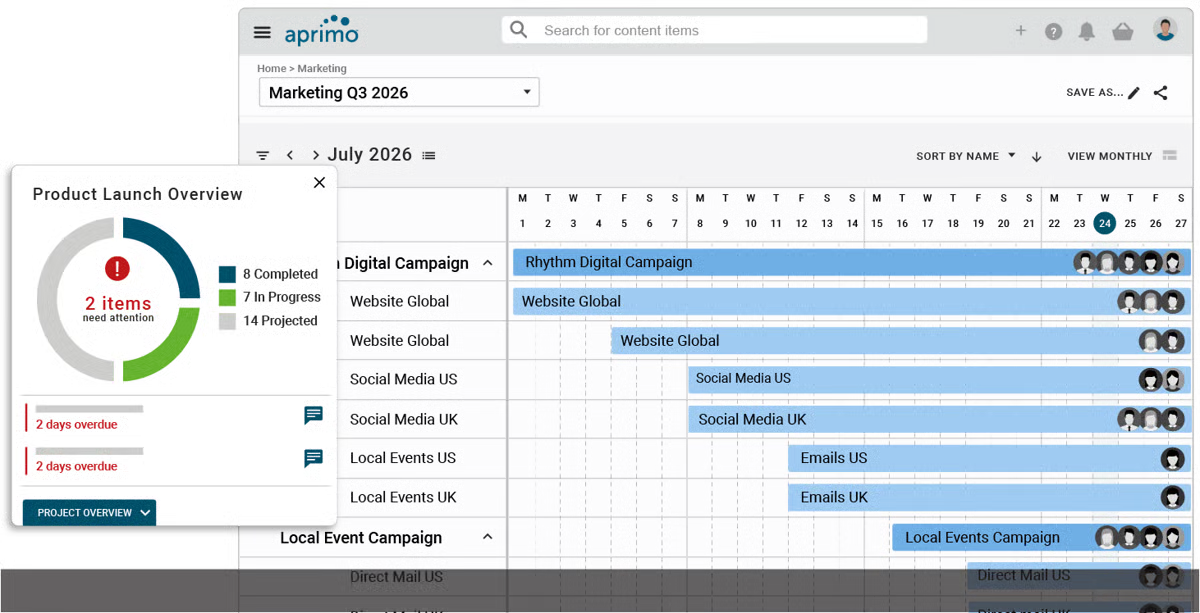
Taken together, the review data portrays Aprimo as a platform designed for enterprise marketing operations: deep DAM, configurable workflows and approvals, strong search and metadata, automation that scales with content volume, and an integration posture that anchors it in the broader martech stack.
For organizations that need rigor around brand assets and a reliable operational backbone for content and campaigns, Aprimo is frequently chosen to bring structure, control, and repeatability to marketing execution.
What I like about Aprimo:
- Aprimo’s digital asset management capabilities stand out for their depth and precision. G2 reviewers consistently praised its metadata tagging, version control, and powerful search features, saying they make it easy to organize, find, and reuse assets across campaigns and channels.
- Its configurable workflows and automation tools streamline approvals, routing, and repetitive tasks. Reviewers noted that features like automatic tagging, rendition resizing, and integrated publishing help teams move from content creation to execution with fewer delays.
What G2 users like about Aprimo:
“Aprimo offers a wide range of features and integrates well with our creative and content systems, which makes it part of our daily workflow. It’s fairly easy to use once you are familiar with it, though the initial implementation required planning and training. Integrations were smooth, but customer support can occasionally be slow to respond. Overall, it is a feature-rich and dependable tool for frequent enterprise-level use”
– Aprimo review, Akarsh D.
What I dislike about Aprimo:
- Some G2 reviewers mentioned that setup and configuration can take time, particularly for teams new to enterprise-grade systems. Still, many noted that once implemented, Aprimo’s structured workflows and automation deliver long-term efficiency.
- A few reviewers also said that pricing can feel steep for smaller teams and that certain integrations could be smoother. However, enterprise users often view these as reasonable trade-offs for the platform’s depth, scalability, and DAM strength.
What G2 users dislike about Aprimo:
“I find the initial setup of Aprimo to be somewhat time-consuming, which can be challenging when first integrating it into our processes. Additionally, when working with large and massive asset libraries, the platform can occasionally slow down, impacting efficiency. A more guided setup process and additional data in the knowledge bank would be beneficial. It would also be helpful to have more flexibility when performing end-user level scenarios and making adjustments.”
– Aprimo review, Mike W.
6. Optimizely Content Marketing Platform: Best for content operations and campaign planning
Optimizely Content Marketing Platform is built to centralize content operations, planning, briefs, production workflows, and approvals, so marketing teams can move from requests to published assets in one system. According to user sentiment data, 96% of reviewers rated it 4 or 5 stars, and 100% believe the product is headed in the right direction. Users also said they would be likely to recommend Optimizely CMP at a rate of 87%.
A consistent theme in the reviews is workflow strength. Marketers call out how easy it is to set up request intake, task assignment, and multi-step approvals, noting that this structure keeps handoffs clear and timelines on track. Reviewers also highlight collaboration in context, comments, status updates, and notifications that make it simple to keep everyone aligned without relying on side channels.
Satisfaction scores show quality of support at 90%, ease of use at 87%, meets requirements at 91%, and ease of admin at 86%.
Users frequently praise CMP’s planning views and campaign visibility. References to calendars, timelines, boards, and dashboards show that teams value seeing work status at a glance and drilling into what’s due, what’s blocked, and who owns what. Several reviewers mention that this visibility helps them stay on top of concurrent initiatives and avoid missed steps during busy production cycles.
Another strength that comes up often is automation and AI assistance. Reviewers describe using CMP to automate routine steps in content workflows and appreciate AI-enabled helpers (for things like suggestions and repetitive updates) that speed up production. For content-heavy teams, that combination of automation and structure is a key reason CMP becomes the day-to-day hub.
The dataset also includes repeated mentions of CMP’s content/asset capabilities. Users point to the ability to store and retrieve approved assets, find the right files, and keep materials organized for ongoing campaigns. Coupled with integrations referenced in reviews (connecting CMP to other tools in the content stack), teams say this helps reduce duplication and keeps the latest versions accessible where they work.
Reviewers additionally note usability as a strong point: several call the platform intuitive and easy to use once their workflows are in place. That approachability, combined with brief and task templates, helps teams standardize how work gets done without heavy administrative overhead. A number of reviews also reference reporting/insights, valuing the ability to monitor progress and understand performance trends within the same environment.