



Managing a professional services team gets complicated fast: one missed timesheet, one misaligned schedule, or one delayed invoice can throw off an entire month of profitability. The tools that worked for smaller teams such as spreadsheets, task managers, chat apps, simply don’t scale when you’re managing dozens of clients, shifting timelines, and tight delivery SLAs.
Teams don’t need another project tracker; they need a system that actually pulls delivery, resources, and financials together.
The market reflects that shift. professional services automation software (PSA) was valued at USD 12.40 billion in 2024 and is expected to grow to USD 40.25 billion by 2033, supported by a 14.7% CAGR. Cloud-based PSA adoption is a major driver behind this rise.
To understand which PSA tools truly help teams work smarter (not just add complexity), I analyzed 20+ best professional services automation software using G2 Data, product comparisons, and first-hand user insights. Some tools offer lightweight scheduling and time-tracking that make onboarding painless. Others go deep with forecasting, revenue recognition, and automation built for large-scale professional services operations.
No matter your team size, these are the PSA platforms that can genuinely help you deliver better, faster, and more profitably.
7 best professional services automation software for 2026
- Autotask: Best for MSPs needing unified IT management
Delivers ticketing, project management, and service automation in one PSA platform. (Pricing varies) - Syncro: Best for small IT service teams needing PSA + RMM
Combines remote monitoring, automation, ticketing, and billing in a single tool. (Pricing from approx. $129/user/month) - Rocketlane: Best for collaborative client onboarding and delivery
Offers shared workspaces, client visibility, and real-time project tracking. (Pricing from $19/user/month) - SAP S/4HANA Cloud: Best enterprise PSA within a full cloud ERP
Provides advanced project financials, resource planning, and global-scale automation. (Enterprise pricing) - Keka: Best for HR-focused professional services teams
Unifies payroll, HR, attendance, and workforce automation for service firms. (Pricing from ₹6,999/month) - Wrike: Best for flexible project management in professional services
Supports customizable workflows, collaboration, and client-facing project dashboards. (Pricing from $9.80/user/month) - Kantata PSA: Best for resource planning, project accounting, and analytics
Delivers advanced forecasting, financials, and delivery insights for consulting teams. (Pricing varies)
*These best professional services automation software are picked based on G2’s Fall 2025 Grid Report. I’ve added their standout features for easier comparison.
6 best professional services automation software I recommend
Running a professional services team is equal parts strategy and improvisation. You’re constantly adjusting schedules, reallocating people, smoothing over client surprises, and trying to keep projects profitable along the way. It’s a lot for any team to manage manually.
That’s why great PSA software feels like more than just another tool; it becomes the operational partner you didn’t know you needed. The best platforms handle the repetitive, error-prone parts of delivery: tracking time, managing resourcing, flagging risks, updating budgets, and keeping billing accurate. They take the mental load off your team so they can focus on the work clients actually pay for.
But what separates good PSA software from great PSA software is how naturally it fits into the way your team already works. The best tools reduce friction, not add to it. They give you clarity when things get messy, guardrails when things get rushed, and visibility when things get busy.
The right PSA platform doesn’t replace the humans doing the work; it amplifies them. It helps teams collaborate better, plan smarter, and deliver with the consistency clients expect.
How did I find and evaluate the best professional services automation software?
To build this list, I started with G2’s Grid® Report professional services automation software to create a shortlist, using a mix of user satisfaction scores and market presence as my guide. My shortlist was based on a mix of user satisfaction scores and market presence, ensuring a balance between usability and adoption.
From there, I evaluated each tool on how effectively it supports project delivery, resource allocation, time tracking, financial management, collaboration, and reporting, along with key integrations service teams rely on across their tech stack.
I also used AI to analyze hundreds of verified G2 reviews, focusing on what professional services teams praised most, where they faced challenges, and which tools consistently delivered measurable value.
The screenshots featured in this article come from G2 vendor listings and publicly available product documentation.
What makes the best professional services automation software: My criteria
After digging into G2 Data and evaluating how modern services teams operate, I noticed a few themes that consistently stood out. Here’s what I focused on when evaluating the best professional services automation software:
- Centralized project delivery and visibility: I looked for platforms that bring project timelines, task progress, resourcing, and financials into one unified view. The best PSA software helps teams see who’s assigned where, which projects are at risk, and how delivery aligns with revenue goals, all without stitching together information from different tools.
- Collaboration and workflow automation: Service delivery requires constant coordination between project managers, consultants, finance teams, and clients. I prioritized PSA tools that make it easy to manage approvals, share updates, automate repetitive steps (like timesheet reminders), and keep everyone aligned without endless check-ins or status meetings.
- Resource allocation and capacity planning: One of the biggest challenges for professional services teams is knowing who’s available, who’s overbooked, and how upcoming work will impact workload. I focused on solutions that connect resource planning to project needs, forecast capacity, and prevent burnout or underutilization before it happens.
- Time tracking, billing, and financial management: Accurate financials make or break a services business. I looked for PSA platforms that streamline time entry, automate invoicing, support multiple billing models (fixed fee, T&M, retainers), and give teams real-time insight into margins, revenue, and project profitability.
- Reporting and performance insights: Great PSA software does more than track tasks and hours. It should help teams understand utilization trends, forecast revenue, analyze project health, and identify where efficiency is breaking down. Clear dashboards and reporting make it easy to spot issues early and optimize performance.
Of course, not every platform excels in all these areas, but the ones that stand out consistently perform well where it matters most. The list below contains genuine user reviews from the Professional Services Automation category page. To be included in this category, a solution must:
- Manage customer profiles, sales opportunities, and communications
- Include features for contract management and service level agreements (SLA)
- Provide project and portfolio management for professional services
- Deliver accounting functionality or integrate with accounting software
- Track project and portfolio costs, such as time and expenses
- Record and allocate resources based on necessity and availability
- Recognize revenue by project, portfolio, or business unit
- Monitor project and portfolio performance, risk, and profitability
*This data was pulled from G2 in 2025. Some reviews may have been edited for clarity.
1. Autotask: Best for MSPs needing unified IT management
For many MSPs, Autotask quickly becomes the system they rely on to organize tickets, projects, and client work in one place.
Autotask holds a 4.3/5 rating across 459 reviews, with 87% of users giving it 4 or 5 stars. It scores especially well in areas like meeting requirements (87%), ease of doing business with (85%), and quality of support (83%).
Across multiple G2 reviews, users frequently describe how Autotask simplifies day-to-day service operations, especially when handling large volumes of tickets or coordinating work across teams. Several reviewers mention that Autotask brings welcome structure to workflows that previously lived across multiple disconnected tools, making service delivery more predictable and efficient.
A consistent theme in the feedback is Autotask’s ability to streamline ticketing. Many users highlight that the platform makes logging, updating, and resolving tickets faster once they’re familiar with the interface. They often point out how much they rely on Autotask daily for triaging issues and keeping technicians on track. This sense of operational dependability shows up repeatedly across reviews, with users emphasizing how the tool helps them stay organized under high workloads.
Autotask’s integration ecosystem also receives strong praise. Several reviewers specifically mention its robust integrations and how well it connects with other essential MSP systems, which reduces manual effort and improves data consistency. Reporting capabilities come up often as well. Users appreciate the visibility they gain from Autotask’s dashboards, noting that the platform gives them a clearer understanding of performance and workload across clients and technicians.
Another point I see appear across numerous reviews is how essential Autotask becomes for teams once they’re fully onboarded. Reviewers describe it as a daily tool they can’t operate without, highlighting how it centralizes work, improves accountability, and keeps everyone aligned on priorities. Many also note that tasks like navigating between tickets, updating statuses, and accessing key information become second nature over time, making Autotask feel smoother the longer a team uses it.
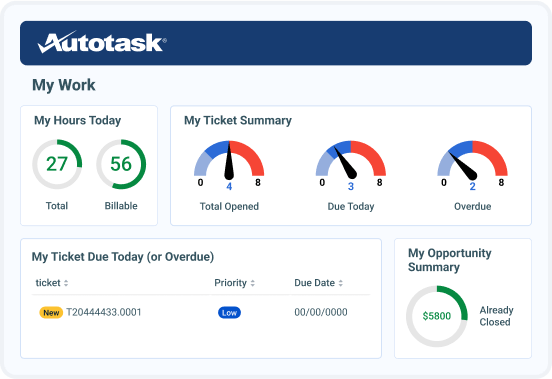
Some users mention that Autotask’s interface can feel slower or heavier at times, particularly when handling large datasets or during busier periods of the day. This feedback mostly comes from teams operating at scale or running highly loaded environments. In that context, the system’s depth and volume of information explain why the interface leans more toward thoroughness than minimalism.
Some users note that the interface relies on multiple navigation steps when moving between tickets, projects, and billing views, which can feel less streamlined for teams that prioritize speed, while teams managing detailed workflows often value the clearer separation between functions.
Overall, G2 feedback positions Autotask as a strong operational backbone for MSPs needing a unified PSA solution. Its reliable ticketing system, powerful integrations, and robust reporting capabilities help service teams maintain efficiency, clarity, and consistency in their daily work. Once adopted, Autotask proves to be a dependable, central platform that supports long-term service delivery success.
What I like about Autotask:
- Reviewers consistently highlight how it simplifies ticketing, centralizes projects, and helps technicians stay organized even under heavy workloads.
- Its integrations and reporting are frequently praised. According to G2 users, Autotask connects seamlessly with other MSP tools and offers clear dashboards that improve visibility into performance, workload, and client activity.
What G2 users like about Autotask:
“Autotask has become an essential part of our daily operations. Keeping all our tickets, projects, and billing centralized makes it much easier for our team to stay organized. The integration with Datto RMM functions smoothly, allowing us to connect technical work directly to the service desk. Although it takes a little time to get familiar with the layout, once you do, it proves to be a powerful system that significantly reduces administrative workload.”
– Autotask review, Phillip P.
What I dislike about Autotask:
- The interface can feel heavier in high-volume environments. According to reviewers, this tends to surface when large MSPs manage extensive datasets, teams that benefit from Autotask’s depth but naturally encounter a more information-dense workspace.
- Some users note that moving between tickets, projects, and billing requires multiple navigation steps. This structure favors teams that want clear functional separation, but it may feel less streamlined for those prioritizing speed across tasks.
What G2 users dislike about Autotask:
“The project management module in Autotask often falls short compared to dedicated PM tools, with many users describing it as basic and clunky. While it covers the essentials, the interface feels outdated, navigation is unintuitive, and there’s a steep learning curve for new users. The feature set lacks the depth needed for managing complex projects, and updates can occasionally disrupt workflows or break custom widgets. Overall, it’s functional for convenience within the PSA, but not a strong stand-alone project management solution.”
– Autotask review, Jestin W.
Many organizations use professional services automation alongside ERP systems to manage projects, resources, and revenue throughout implementation.
2. Syncro: Best for small IT service teams needing PSA + RMM
For many small IT service teams, Syncro isn’t just another PSA platform, it’s the system they rely on every day to manage clients, tickets, and remote monitoring from one place.
Across G2 reviews, users often describe Syncro as a practical, approachable solution that lets them get up and running quickly without the heavy onboarding burden that typically comes with PSA and RMM tools.
A standout theme in user feedback is Syncro’s strong cost-to-value ratio. Reviewers frequently emphasize how much functionality they gain, ticketing, billing, automation, asset management, and remote access, all for a price point that feels accessible for small MSPs.
Many mention that Syncro replaces multiple separate tools, helping them reduce overhead and simplify their tech stack without giving up core capabilities they rely on.
One capability users consistently praise is Syncro’s ability to track and record communications and client activity. Several reviewers note that this helps teams maintain context and improve follow-through when resolving issues.
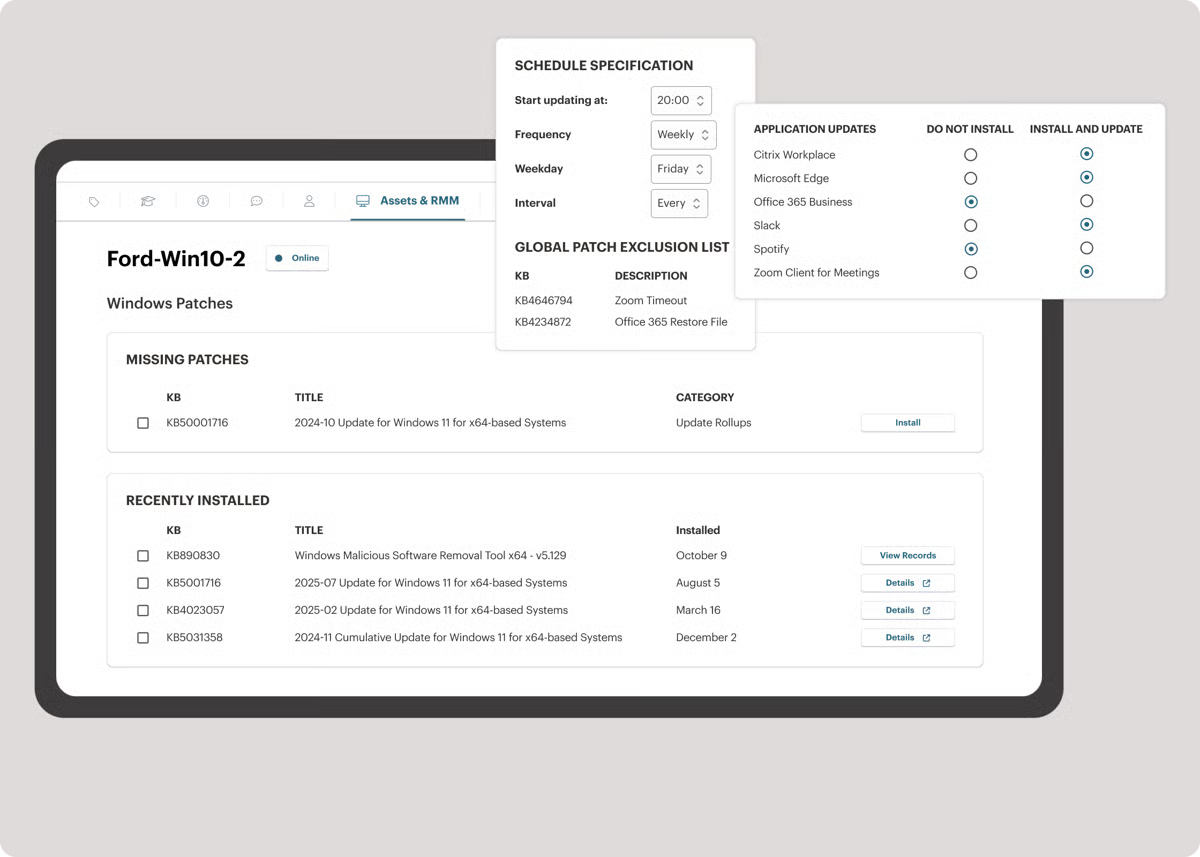
Paired with Syncro’s built-in RMM features, like remote access and automated maintenance tasks, many users say the platform makes their day-to-day work faster and more structured. Automation also receives strong positive feedback, with users highlighting how scripting, invoicing rules, and workflow triggers save hours of manual effort each week.
Reviewers also mention that routine tasks feel smooth and intuitive once teams get familiar with the interface. From updating tickets to initiating remote sessions, Syncro becomes a reliable operational hub for MSPs that need to support clients efficiently without getting bogged down in unnecessary complexity. Several users specifically call out how easy it is to set up the platform and start seeing value early on, which is a major advantage for growing IT teams.
Some users mention wanting additional interface categories or deeper automation options, but these requests typically come from MSPs with more advanced or specialized workflows. Syncro’s streamlined layout appears designed for smaller teams that prioritize clarity and speed over granular segmentation. For many users, that simplicity is what keeps technicians productive without overwhelming them with configuration.
Others point out that mobile functionality could be more robust, particularly for technicians who spend most of their time in the field. Requests like editing tickets, managing alerts, or accessing real-time updates on mobile come up across multiple reviews. That said, these limitations tend to matter more for mobile-first workflows, while teams operating primarily from desktops still describe Syncro as a dependable operational hub.
Overall, Syncro holds a 4.5 out of 5 rating across 322 reviews, with 95% of users giving it 4 or 5 stars, and according to G2 Data, 94% of users believe Syncro is headed in the right direction, and 91% say they are likely to recommend it.
G2 feedback positions Syncro as a capable, cost-effective choice for small IT service teams that want PSA and RMM in a single, unified platform. Its ease of setup, integrated remote access tools, and time-saving automation make it a dependable daily driver for MSPs looking to work smarter without adding unnecessary complexity to their operations.
What I like about Syncro:
- Syncro offers strong value for small IT service teams. Reviewers frequently highlight how much functionality they get, ticketing, billing, automation, asset management, and remote monitoring.
- Many mention that communication tracking, remote access, scripting, and workflow automation make client support faster and more organized, with routine tasks feeling intuitive once teams become familiar with the platform.
What G2 users like about Syncro:
“I really appreciate Syncro’s different features that help me manage my clients efficiently. The ability to set device policies and settings, alerts that notify me about important actions, and tools for managing multiple clients make my job much smoother. I particularly love the scripting part as it helps manage things easily, and the remote support capability is incredibly useful. Additionally, the ticketing system and its features, like adding items and remoting into device alerts, are very useful. I also enjoy using Splashtop for remote management, and the customer relation management aspects including asset management and alert policies are very beneficial.”
– Syncro review, Mahmood I.
What I dislike about Syncro:
- Some users mention wanting more interface categories or deeper automation options, which tends to come from MSPs with highly specialized or advanced operational needs. Syncro’s streamlined structure is intentionally geared toward smaller teams that prioritize clarity and speed over extensive customization.
- A few reviewers note that mobile functionality is more limited than the desktop experience. This is most noticeable for technicians who rely heavily on mobile access, whereas teams working primarily from desktops report fewer constraints.
What G2 users dislike about Syncro:
“I wish Syncro offered more customizable dashboards and deeper insights, especially concerning profitability, ticket trends, and technician performance, to enhance decision-making. Additionally, the mobile app could be improved with more real-time capabilities like editing tickets or managing alerts on the go, which would be beneficial for teams working remotely or in the field.”
– Syncro review, Sarah D.
Professional services automation helps connect CRM data with project delivery, time tracking, and billing once deals move into execution.
3. Rocketlane: Best for collaborative client onboarding and delivery
Rocketlane is often described by users as a game-changer for teams managing client onboarding, implementation, and delivery. Rocketlane earns standout satisfaction scores across key categories, including 97% for quality of support, 94% for ease of use, and 93% for meeting requirements.
Across G2 reviews, I repeatedly see users highlight how Rocketlane brings structure, transparency, and predictability to processes that previously required constant follow-ups and manual coordination. Many teams say they didn’t realize how disjointed their onboarding workflows were until Rocketlane gave them a unified place to track progress, collaborate with clients, and manage timelines with clarity.
One of the strongest themes in the feedback is Rocketlane’s ability to streamline implementation work. Multiple reviewers mention how helpful it is to track the “complete implementation lifecycle” from kickoff through delivery, with clearly defined milestones, owner assignments, and visibility for both internal teams and clients. Users consistently praise the platform for reducing onboarding delays, improving accountability, and eliminating the guesswork that often plagues cross-functional onboarding efforts.
Rocketlane’s collaboration capabilities also receive frequent appreciation. Reviewers highlight how the shared project views, client-facing interfaces, and real-time visibility create a smoother onboarding journey for customers. Many teams emphasize that Rocketlane helps them set better expectations, improve communication, and maintain momentum throughout the implementation process. Several users call out how much easier it is to collaborate with clients when everything, from tasks to notes to timelines, is centralized in one place.
Automation and integrations appear repeatedly as standout strengths. Reviewers note Rocketlane’s seamless integrations with tools like Salesforce and Zapier, describing them as essential for reducing manual admin work and keeping data synced across systems. The AI-driven features, particularly AI Fills, get highlighted in multiple reviews for simplifying routine tasks and helping teams move faster. Users point out that these automation capabilities save time, standardize workflows, and give teams more bandwidth to focus on client-facing work rather than repetitive operational tasks.
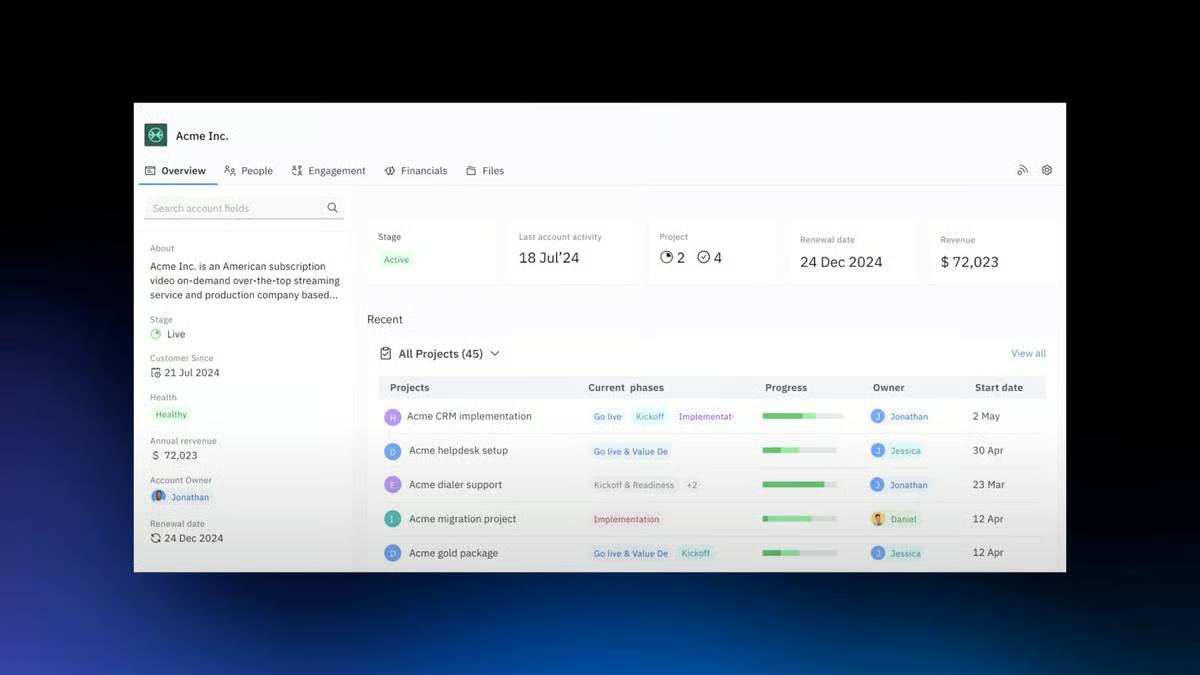
Dashboard visibility and onboarding insights also come up across several reviews. Users appreciate how Rocketlane gives them clarity into where projects stand, which steps are at risk, and how implementation timelines are trending. This level of transparency appears to be a major contributor to improved operational efficiency and smoother delivery cycles.
Some reviewers note that Rocketlane’s notification system is less precise when managing multiple projects at once. This tends to matter most in fast-moving, high-volume environments, while teams handling fewer concurrent projects generally find notifications sufficient for day-to-day coordination.
Others note that certain features, such as reporting and automated notifications, could be more robust. These comments typically come from users with advanced reporting requirements or high-volume onboarding operations where deeper analytics are essential. For teams with straightforward reporting needs, Rocketlane’s existing dashboards and insights tend to be sufficient, and reviewers often mention that the platform’s core strength lies in execution and collaboration rather than heavy analytics.
Overall, Rocketlane holds a 4.7 out of 5 rating across 783 reviews, with an exceptional 99% of users rating it 4 or 5 stars.
G2 feedback positions Rocketlane as a powerful, collaborative platform that elevates client onboarding and delivery for modern services teams. With its structured workflows, strong automation features, seamless integrations, and client-facing visibility, Rocketlane helps teams deliver smoother, faster, and more predictable onboarding experiences. For organizations that want to bring clarity and consistency to every customer implementation, Rocketlane stands out as a high-impact solution.
What I like about Rocketlane:
- Rocketlane brings remarkable structure and clarity to onboarding and implementation workflows. Reviewers consistently highlight how it unifies tasks, timelines, milestones, and client collaboration.
- Users appreciate shared project views, client-facing interfaces, and integrations that improve communication and reduce manual admin work.
What G2 users like about Rocketlane:
“Rocketlane has revolutionised our operations and reporting, and we use it on a daily basis. It’s user-friendly, and it allows my team to do things we’ve never been able to do before. The AI chatbot is one of the best I’ve seen, and the support team, who are who’s ready to jump in if AI can’t help, is outstanding. They’re very quick to respond. Our relationship with our CSM and TAM is great too – overall, it’s a pleasure to work with Rocketlane!”
– Rocketlane review, Maja B.
What I dislike about Rocketlane:
- Some users mention that notifications can feel less precise when managing multiple projects at once. This is most noticeable in high-volume onboarding environments, while teams handling fewer concurrent projects report fewer issues with day-to-day coordination.
- A few users note that reporting and automated notifications could be more advanced, but these observations usually come from teams with extensive analytics needs. For most onboarding teams focused on execution, Rocketlane’s dashboards provide the right level of visibility without unnecessary complexity.
What G2 users dislike about Rocketlane:
“One issue is that reminder notifications don’t always specify which project or task they’re tied to. I’ve been deep into a project when a reminder pops up, and after opening it I realize it doesn’t say which project or task it belongs to. When you’re on multiple projects at once, that small detail can cause unnecessary confusion.”
– Rocketlane review, Leandro A.
For services-led teams, professional services automation complements payroll software by aligning time tracking, utilization, and invoicing.
4. SAP S/4HANA Cloud: Best enterprise PSA within a full cloud ERP
SAP S/4HANA Cloud is often described by G2 reviewers as a modern, future-ready ERP that brings all core business functions onto a single, integrated platform. Its ease of setup is rated at 81%, reflecting a reliable onboarding experience for enterprise teams adopting a full-scale ERP.
Users highlight how it connects finance, procurement, supply chain, projects, and other critical processes in one system, giving leaders a clearer view of how the business operates end to end. Many reviewers point out that once implemented, it becomes the central backbone of their operations, replacing fragmented tools with a unified, real-time environment.
A recurring theme in the feedback is how S/4HANA Cloud improves process efficiency and standardization. Users frequently mention that it helps simplify transaction recording, streamline reporting, and enforce best practices across the organization. Several reviews praise its friendly, modern interface and refreshed graphics, noting that navigation and day-to-day work feel more intuitive than in older SAP systems. Others highlight the benefit of running in the cloud—no on-premise maintenance, faster access to innovations, and a platform that stays aligned with evolving business and regulatory requirements.
Real-time insight is another widely appreciated strength. Many reviewers call out S/4HANA Cloud’s in-memory architecture and analytics capabilities, emphasizing how quickly they can retrieve data, generate reports, and make data-driven decisions. They value having up-to-date information across finance and operations without relying on separate reporting tools or manual exports. Several users specifically mention that real-time dashboards and analytical views help them track performance, understand production or financial trends, and react more quickly to issues.
Integration capabilities show up consistently as a strong point as well. Reviewers note how S/4HANA Cloud connects with other SAP solutions and third-party systems, making it easier to create a cohesive digital ecosystem. The modular design is often described as flexible and adaptable to different industries and company sizes, allowing organizations to roll out capabilities in phases while still benefiting from a unified data model and shared processes. For many enterprises, this combination of integration, analytics, and standardization is what makes S/4HANA Cloud feel like a long-term, strategic platform rather than just another application.
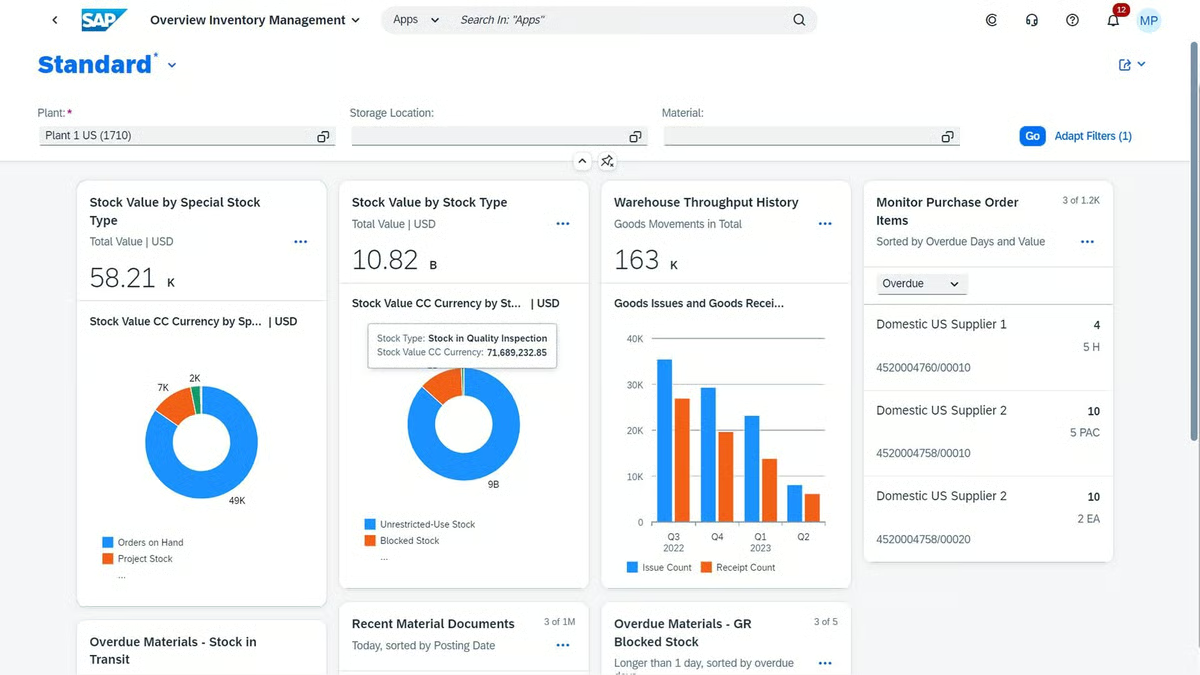
Some reviewers point to a strong dependency on SAP’s ecosystem and product roadmap. This reliance on SAP-approved integrations and release cycles can slow independent process changes or customization, particularly for teams that need rapid iteration. In contrast, organizations that prioritize standardized operations, security, and long-term stability often find this model aligns well with large enterprise environments.
Other reviewers point to limitations around customization in the public cloud model, as well as dependency on stable connectivity and SAP’s product roadmap. Instead of tailoring every process, S/4HANA Cloud encourages organizations to align with standardized, best-practice scenarios. For some, especially highly specialized or smaller companies, that can feel restrictive; for others, it’s a trade-off that delivers consistency, security, and easier upgrades in exchange for less bespoke configuration.
Overall, G2 feedback positions SAP S/4HANA Cloud as a powerful, comprehensive choice for enterprises looking to run professional services and broader business operations on a single, cloud-based ERP. With its real-time insights, integrated processes, modern interface, and strong ecosystem, it provides a future-proof foundation for organizations ready to standardize, scale, and drive more intelligent, data-driven decisions across the business.
What I like about SAP S/4HANA Cloud:
- SAP S/4HANA Cloud gives enterprises a unified view of core operations. Reviewers consistently highlight how it connects finance, procurement, supply chain, projects, and reporting into one real-time platform, helping organizations replace fragmented systems with a single, integrated environment.
- Users frequently praise its real-time insights and modern interface. Many mention that the in-memory architecture, refreshed UI, and intuitive navigation make it easier to retrieve data, analyze performance, and make informed decisions.
What G2 users like about SAP S/4HANA Cloud:
“What I like best about SAP S/4HANA Cloud is its ability to provide real-time data insights and powerful analytics for better decision-making. The modern, user-friendly interface makes navigation simple. Its integration across finance, supply chain, and operations ensures smooth end-to-end processes. Being cloud-based, it also offers scalability and flexibility for business growth.”
– SAP S/4HANA Cloud review, Aditya M.
What I dislike about SAP S/4HANA Cloud:
- Some reviewers note that the system feels complex during initial implementation, especially for teams new to SAP or managing highly sophisticated processes. This tends to reflect the platform’s design as an enterprise-grade ERP built for organizations that require depth, governance, and detailed process control rather than lightweight workflows.
- A few users point out limitations with customization and the need for stable connectivity in the public cloud model. While S/4HANA Cloud emphasizes standardized best practices, this trade-off enables smoother upgrades, greater security, and consistent operations for larger enterprises.
What G2 users dislike about SAP S/4HANA Cloud:
“I would like SAP S/4HANA Cloud to offer a more customizable user interface and greater system flexibility. While the Fiori interface is user-friendly, some screens feel rigid, making it difficult to tailor workflows or layouts to specific departmental needs without in-depth configuration knowledge. Additionally, the initial configuration and integration setup can be complex for smaller IT teams, so having more guided, automated setup options for data migration or interface mapping would make the adoption process smoother.”
– SAP S/4HANA Cloud review, Jishnu N.
5. Keka: Best for HR-focused professional services teams
Keka is frequently described by G2 reviewers as a clean, intuitive, and efficient HR platform that makes everyday workforce management easier for growing teams.
Keka earns strong satisfaction scores across the board, including 87% for quality of support, 91% for ease of use, and 89% for meeting requirements. It holds a 4.5 out of 5 rating across 1,551 reviews, with 94% of users rating it 4 or 5 stars.
Across the feedback, users consistently highlight how simple it is to navigate the interface, track attendance, manage leave, process payroll, and complete routine HR tasks without confusion or additional training. Many reviewers call out the attention to detail in the UI and the overall “smoothness” of the experience, emphasizing that it feels modern, thoughtful, and built for real employees — not just administrators.
A recurring theme in user reviews is Keka’s strength in simplifying HR operations. Multiple reviewers mention that tasks like punching in, viewing leave balances, updating profiles, or accessing payslips are incredibly straightforward. For professional services teams managing distributed or hybrid workforces, this ease of use appears especially valuable. Several reviewers highlight that Keka dramatically reduces the burden on HR teams by automating attendance tracking and managing employee data more accurately.
Support quality also emerges as a major high point. Many users note that Keka’s support team is quick to respond, attentive, and helpful when onboarding or troubleshooting. This level of responsiveness is often cited as a key reason companies feel confident relying on Keka for essential workforce workflows. Reviewers also appreciate how the platform helps maintain transparency across employees, whether it’s through accurate payroll processing or clear visibility into approvals and requests.
Another strength that comes up frequently is Keka’s ability to improve employee experience. Users praise how easy it is for employees to access the portal, complete tasks, and stay updated without having to rely on HR for guidance. This simplicity reduces friction and helps teams adopt the platform quickly. For organizations transitioning from older or manual systems, Keka’s streamlined experience creates a noticeable improvement in day-to-day operations.
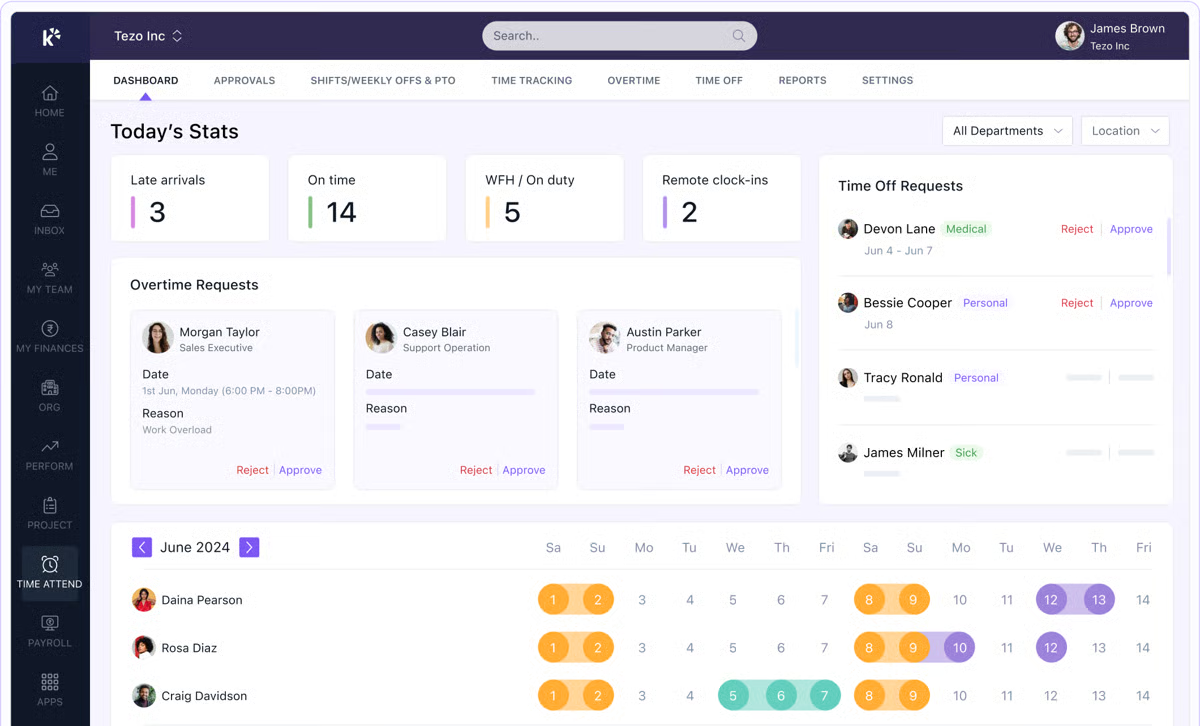
Some reviewers note slower performance during login or peak usage periods, particularly in environments with large user bases or high levels of concurrent activity. This tends to be more noticeable for teams running detailed workflows and relying on real-time data at scale, while smaller teams or lighter usage patterns generally experience fewer disruptions.
A few users also mention that the login process sometimes takes longer than expected, especially when dealing with strict authentication or security layers. This is typically framed as a trade-off: Keka’s emphasis on secure access and structured authorization can add a few extra seconds upfront, but supports greater data protection and compliance for organizations handling sensitive employee information.
Overall, G2 feedback positions Keka as a reliable, user-friendly HR platform that excels in delivering a smooth employee experience, strong workforce automation, and attentive customer support. For professional services teams looking for a system that simplifies HR processes without overwhelming users, Keka offers a well-balanced mix of usability, efficiency, and support that makes it a dependable choice for managing people operations.
What I like about Keka:
- Users highlight how easy it is to navigate workflows like attendance tracking, leave management, payroll processing, and profile updates, making everyday HR tasks simpler for employees and administrators alike.
- Many users appreciate how Keka improves efficiency and transparency across HR operations. Automated attendance tracking, accurate payroll processing, and clear visibility into approvals reduce manual work for HR teams while giving employees easy access to the information they need.
What G2 users like about Keka:
“Keka makes HR and payroll management so much easier. The interface is clean and intuitive, which means even first-time users can navigate without much guidance. I really like how everything from attendance tracking to payslips and performance reviews is accessible in one place. The self-service features save a lot of time, and notifications keep everyone updated about approvals, leaves, and upcoming tasks. Overall, it’s made HR ope