



I’ve watched e-commerce teams spend a bomb on personalization and still end up with the same problem: a storefront that treats every visitor like a stranger. The cart abandonment rate stays high. Product recommendations get missed. And the data exists to fix all of it. It’s just scattered across tools that don’t talk to each other.
The market hasn’t made choosing the best e-commerce personalization software easier. There are dozens of platforms, and most of them claim to do everything.
In this guide, I analyzed hundreds of G2 reviews and the Winter 2026 Grid Report to build this list. I reviewed 20+ tools and narrowed it to 10 that hold up under real operational pressure: Insider One for AI-driven omnichannel personalization, ActiveCampaign for automated cross-channel engagement, AB Tasty for experimentation and A/B testing, ContactPigeon for cart recovery, MoEngage for customer lifecycle engagement, Luigi’s Box for product search and discovery, Netcore for unified cross-channel messaging, edrone for CRM and automation tailored to smaller stores, NotifyVisitors for behavior-driven multi-channel campaigns, and Bloomreach for enterprise personalization at scale. Whether you’re running a lean team or managing campaigns across multiple storefronts, this guide will help you find the right fit faster.
10 best e-commerce personalization software for 2026: My top picks
- Insider One: Best for AI-driven omnichannel personalization
Unifies customer data to deliver tailored experiences across web, app, email, and messaging. (Pricing available on request) - ActiveCampaign: Best for automated cross-channel engagement
Offers email/SMS/WhatsApp automation, segmentation, and personalization features. (Starts at ~$15/month for Lite; higher tiers available) - AB Tasty: Best for experimentation and A/B testing with built-in personalization
Optimizes digital experiences with personalization and robust testing capabilities. (Pricing available on request) - ContactPigeon: Best for automating personalized messaging and cart recovery
Delivers targeted campaigns and workflow automation to boost customer engagement. (Pricing available on request) - MoEngage: Best for customer lifecycle engagement
Personalizes campaigns based on behavioral signals and customer data. (Pricing available on request) - Luigi’s Box: Best for product search and discovery personalization
Enhances search and product discovery with analytics-driven personalization. (Free trial available) - Netcore Customer Engagement Platform: Best for unified cross-channel engagement
Uses data-driven personalization to optimize customer journeys and interactions. (Pricing available on request) - edrone: Best for CRM + automation tailored to online stores
Automates personalized messages and builds better customer relationships for e-commerce. (Free plan available) - Nvecta’s NotifyVisitors (formerly known as NotifyVisitors): Best for behavior-driven multi-channel campaign automation
Connects email, SMS, push, WhatsApp, and web personalization in one platform with strong segmentation and automation capabilities. (Pricing available on request) - Bloomreach: Best for enterprise personalization at scale
Personalizes e-commerce experiences using AI and deep customer data integration. (Pricing available on request)
*These e-commerce personalization tools are top-rated in their category based on G2’s Winter 2026 Grid Report. I’ve included their strengths and ideal use cases to help you choose the right platform for your team.
10 best e-commerce personalization software I recommend
The e-commerce personalization software category is crowded, and most platforms tend to have one thing in common: they claim to do everything. But feature lists rarely tell you what actually separates the capable ones from the rest. After going through hundreds of G2 reviews, I kept coming back to two factors that made the real difference.
The first is data unification. A platform that pulls from multiple sources but can’t bring them together into a single customer view leaves marketers making decisions on incomplete signals. The campaigns go out, but they never quite land the way they should.
The second is execution speed. A well-built segment or journey is only as good as how quickly it can go live. Platforms that need heavy technical involvement for routine updates slow teams down in ways that quietly compound across every campaign cycle. G2 reviewers flag this more than almost anything else.
The tools on this list clear both bars. They bring customer data together reliably, give marketing teams the room to move fast, and deliver results that show up in revenue, not just dashboards.
How did I find and evaluate the best e-commerce personalization tools?
I started with G2’s Winter 2026 Grid Reports for the e-commerce personalization category, using satisfaction scores and market presence ratings to build an initial shortlist. This gave me a pool of tools with verified traction across small, mid-market, and enterprise teams.
From there, I used AI to analyze hundreds of verified G2 reviews and surface the patterns that matter in day-to-day use: how teams actually experience onboarding, where workflows break down at scale, which features get used versus ignored, and what support looks like six months in. I paid particular attention to reviews from practitioners in marketing, e-commerce, and product roles, people who live inside these tools, not just evaluate them.
My conclusions reflect that aggregated real-user experience rather than hands-on personal testing of every platform. Product visuals and references are drawn from G2 vendor listings and publicly available documentation.
What makes the best e-commerce personalization tool: My criteria
Not every tool that markets itself as a personalization platform is built for e-commerce realities. Here’s the specific criteria I applied when deciding what made the final list.
- Customer data integration: I looked for tools that consolidate data from across your stack, CRM, storefront, email, and mobile into a single customer view. Platforms that create silos between data sources make it harder to personalize accurately, no matter how good the front-end features look.
- Segmentation flexibility: I prioritized this because demographic segments aren’t enough. The tools that make the cut let teams build audiences based on real behavior, purchase history, browsing patterns, engagement signals, and update those segments dynamically as customer actions change.
- Personalization automation: I looked for platforms where abandoned cart flows, post-purchase sequences, and behavioral triggers can be built once and run reliably without constant intervention, because manual sends don’t scale.
- Real-time analytics: I prioritized tools that surface campaign performance in real time, not in weekly exports, because personalization only improves if teams can see what’s working as it happens.
- Cross-channel execution: I looked for tools that can follow that journey and keep messaging consistent across every touchpoint, not just one or two channels, because customers move between email, web, mobile, and messaging.
- Cost versus value: I assessed each platform on whether it demonstrably saves time, reduces manual work, and drives revenue outcomes that justify the investment at different team sizes, because price matters less than return.
Choosing the right e-commerce personalization tool comes down to understanding your team’s unique needs. Every organization will have different priorities, so it’s essential to align your choice with your specific goals.
Category Inclusion Requirements:
- Must support dynamic, personalized customer experiences across at least two channels (e.g., email, web, mobile).
- Should offer real-time insights and analytics for data-driven decision-making.
- Must integrate with common e-commerce platforms and CRM systems.
- Should provide at least a basic level of automation for personalized messaging.
This data was pulled from G2 in 2026. Some reviews may have been edited for clarity.
1. Insider One (formerly known as Insider): Best for AI-driven omnichannel personalization
Unifying personalization, messaging, and customer data in one platform sounds straightforward until you try it. Insider One is one of the few tools where G2 reviewers describe it actually working. Segmentation, journey orchestration, AI-driven decisioning, and campaign execution operate together so brands can react to behavior in real time.
What stands out to me first is how well web personalization lands in real storefront activity. With 97% for web, Insider One clearly outperforms, and G2 reviewers repeatedly mention how quickly personalization ideas turn into live experiences that can actually be measured. Real-time behavior, previous purchases, and onsite activity can all shape what a visitor sees, which gives campaigns a much more timely feel.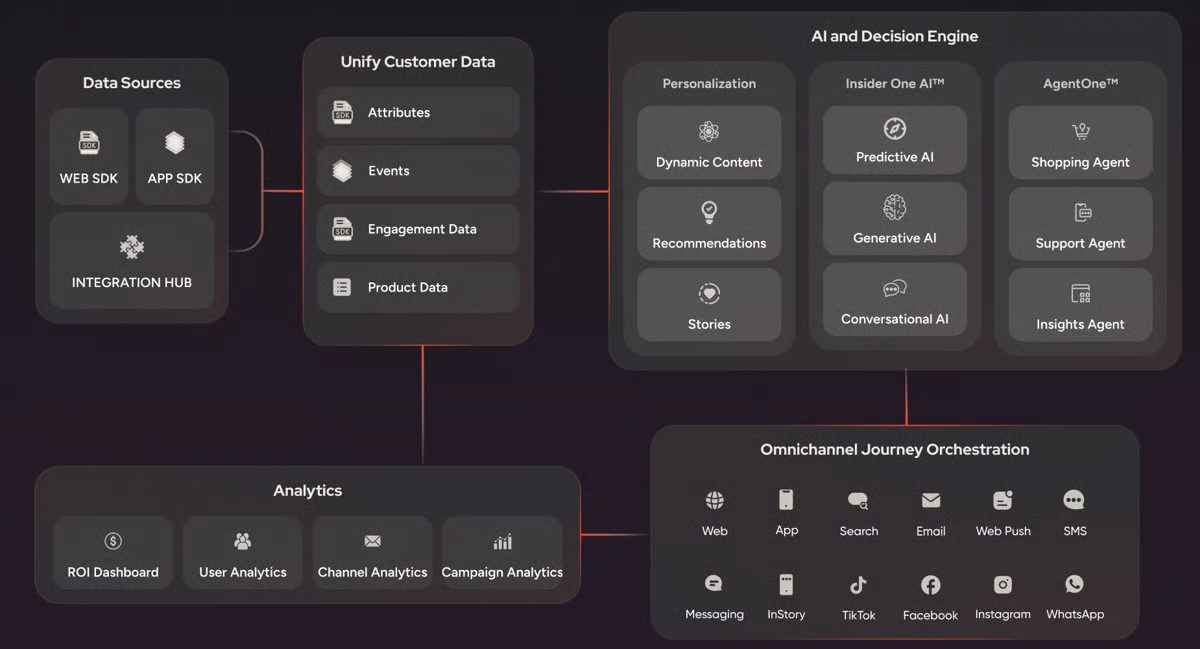
Recommendation quality is another clear strength, especially for brands that want relevance without constant manual tuning. What I find compelling is how G2 reviewers describe it: showing the right products, messages, and offers to different audiences without heavy intervention. This lines up neatly with its 97% recommendation score. Customer profiles, predictive signals, and segmentation logic all feed into the same experience layer, making product discovery genuinely more contextual.
A/B testing at 97% is the kind of score that makes you pay attention. Across Insider One’s G2 reviews, experimentation doesn’t feel like a feature someone added later. G2 reviewers describe testing as part of everyday execution, not a separate step. This means teams running web templates, journeys, and cross-channel messaging in parallel get to move from idea to rollout with a lot more confidence and a lot less guesswork.
Another reason the platform earns such strong praise is the way it handles orchestration across channels. I noticed one of the G2 reviewers described it as especially effective for setting up flows with a wide range of triggers, from user attributes to live behavior and predictive AI, which speaks to how naturally campaigns can move across web, mobile, email, messaging, and more. Rather than feeling stitched together, those journeys come across as coordinated from the start.
Complex personalization programs stall when support slows down. Across Insider One’s G2 reviews, I’ve rarely seen that happen. Fast responses, strategic guidance, and knowledgeable help around integrations or campaign setup appear again and again, with one user noting that tickets are often picked up within hours and resolved fully. That service quality compounds over time, keeping teams moving forward without the friction that typically builds around complex platform configurations.
Insider One also deserves credit for making sophisticated execution feel genuinely accessible, whatever your team looks like. If you’re not particularly technical, you can still build visually appealing templates and launch scenarios without pulling in engineering every five minutes. If you are the more advanced type, there’s plenty of room to go deeper with segmentation logic, integrations, and custom journeys.
G2 users note that advanced campaign setups involving multiple placements, teams, or rule sets require more upfront coordination before everything runs cleanly. I’ve seen this show up most for brands managing style consistency and messaging frequency across several functions at once. However, reviewers consistently note that once the initial structure is in place, the system operates with a high degree of control and flexibility.
Some G2 reviewers point to specific workflow areas where the experience could feel smoother, including export handling from analytics panels and visibility into web test variants for later audience building. Teams running complex, multi-region programs at scale are more likely to notice these gaps than those operating simpler campaigns. For brands managing multi-region programs, reviewers note the system stays dependable even as campaign complexity grows.
Taken as a whole, Insider One comes across as a high-confidence choice for brands that want personalization to operate as a central revenue function rather than a side project. It combines strong execution on web experiences, recommendations, testing, and journey design with a support model that users clearly value. For teams ready to run more relevant customer experiences across channels, Insider One looks every bit like a category leader.
What I like about Insider One:
- The platform brings together data, personalization, and omnichannel campaign execution in one place, making it easy to build and manage customer journeys without relying on multiple tools.
- G2 reviewers consistently highlight how user-friendly it is, with strong support teams that respond quickly and help refine campaigns, making day-to-day execution smoother.
What G2 users like about Insider One:
“I really like how Insider One facilitates data-driven customer engagement, allowing us to scale without any problems and efficiently scale our teams. The system supports customer engagement using real behavioral and transaction signals, not just demographics, to decide who gets what message, on which channel, and when. This CPD upgrade from our mobile app, CRM, and transaction system creates a unified customer profile that helps us build dynamic segments based on actual behaviors. I appreciate the automated journey setup, which grounds every campaign in a real customer context rather than assumptions. Plus, Support for native channels like Vietnam’s widely used app, Yellow, ensures messages are delivered through the channels customers check most frequently. It’s been particularly effective for time-sensitive communications like card activation reminders, resulting in higher open and response rates across channels.”
– Insider One review, Linh K.
What I dislike about Insider One:
- Certain areas, like the email editor or catalog management, can feel less responsive in specific use cases. This matters more for email-focused teams than broader omnichannel users. The platform’s overall structure remains straightforward to navigate day to day.
- More advanced campaign setups sometimes need extra coordination to avoid overlap. Teams building complex journeys notice this more than those running simpler campaigns. For teams running complex journeys, Insider One’s campaign builder holds its structure even as the logic layers up.
What G2 users dislike about Insider One:
“The platform has a learning curve, particularly around the more advanced segmentation and automation features. New team members need some ramp-up time before they can fully utilize everything Insider offers. A more structured in-platform onboarding guide would help. Also, certain reporting exports could be more customizable for our internal BI requirements — a minor but recurring inconvenience.”
– Insider One review, Merve
2. ActiveCampaign: Best for automated cross-channel engagement
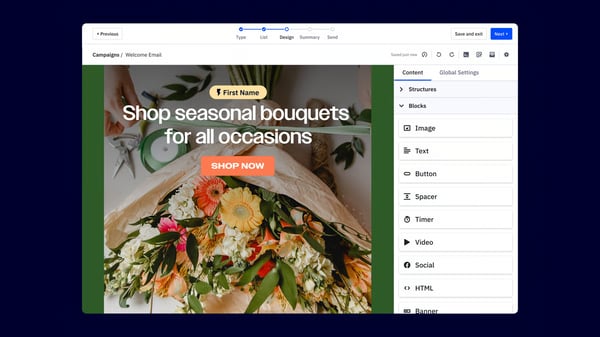
ActiveCampaign fits e-commerce teams that want customer communication, sales follow-up, and automation in one place. It blends email marketing, segmentation, CRM functionality, and workflow building so brands can keep outreach timely without turning every task into a manual job. Its appeal comes from making structured journeys feel manageable for everyday use. That balance gives smaller teams a practical way to stay organized as contact lists grow.
Email is where I would typically start when I analyze ActiveCampaign’s G2 reviews, because the feedback is remarkably consistent. Reviewers are not just saying email works; they are describing follow-ups that feel personal and land at the right time without anyone manually triggering them. That consistency shows up in an 87% G2 score for email, and I can see exactly why teams stay on the platform once they have it running.
Sifting through G2 reviews, it’s clear that what gives the product real momentum is the way campaigns can be built into repeatable systems. G2 reviewers describe funnels, lifecycle messaging, and behavior-based sequences as easy to create, and the marketing campaign’s score of 87% reflects that dependable day-to-day value. Instead of sending one-off blasts, teams can shape journeys that respond to tags, actions, and stages in the customer relationship.
Another bright spot I noticed in G2 reviews is how naturally the platform connects with surrounding tools. CRM syncing, workflow triggers, and outside system connections are a routine part of how customers describe using ActiveCampaign, even with integrations rated at 83%. One G2 reviewer specifically praised how intuitive those connections felt during onboarding, which says a lot about how quickly the platform can become part of an existing stack.
One of the lesser-known features happens to be the CRM, where G2 reviewers kept describing contact management, lead tracking, and email all running in one place without a separate sales tool bolted on. Marketing activity and pipeline movement share the same environment. That is a different kind of efficiency, one that shows up in how teams operate week to week rather than in a feature comparison.
The number that stuck with me from ActiveCampaign’s G2 reviews was 70,000. That is the contact volume mentioned while still describing the platform as reliable and easy to manage day to day. Lead nurturing, onboarding, re-engagement, and sales records are all running in one environment without the system showing strain. When scale stops being a talking point and starts being a Tuesday, that is worth noting.
ActiveCampaign’s G2 reviews suggest they double down on their strengths. Automation, email, and campaign building sit at the center, and everything else supports that core without crowding it. Some of the supporting features worth calling out are guided selling, product recommendations, structured follow-up, and relationship-building.
G2 reviewers note that ActiveCampaign’s full value takes time to surface, particularly for teams that are still mapping out automations, forms, and sales workflows. This is more noticeable for users who are new to structured marketing automation rather than those already familiar with building campaign logic. I will say this, though: G2 reviewers who work through that early phase consistently describe stronger organization and better time management on the other side.
Support response speed shows some variation across the review set, with a small number of G2 reviewers noting they would have preferred faster resolution during time-sensitive account situations. From my understanding, teams running critical or high-volume campaigns are more likely to feel this gap than those using the platform for routine outreach. Teams running routine outreach consistently describe onboarding as smooth, with support that holds up well outside of time-critical moments.
The pattern I kept seeing in ActiveCampaign reviews is that the teams getting the most out of it are the ones who treated setup as an investment rather than a one-time task. Once the automations, forms, and sales workflows are properly mapped, the platform stops feeling like something you manage and starts feeling like something that works for you. That shift is what the strongest reviews are really describing.
What I like about ActiveCampaign:
- The platform stands out for its intuitive interface and ease of use, making it simple to set up automations, manage contacts, and run campaigns without heavy technical effort.
- Strong integrations and onboarding support are frequently highlighted, helping teams connect with other tools quickly and start building workflows that improve productivity and customer engagement.
What G2 users like about ActiveCampaign:
“It is easy to use and makes managing email campaigns feel straightforward.
I like how reliable it is, especially when sending automated emails and follow-up sequences. The automation features are really useful and save a lot of time.
It helps keep contacts organized, so it’s easier to send the right message to the right people. The reporting and tracking tools are clear, which makes it simple to see what’s working.”
– ActiveCampaign review, James P.
What I dislike about ActiveCampaign:
- G2 reviewers mention that support response during critical situations can vary. This matters more for teams running time-sensitive operations than those using it for routine campaigns. The platform itself is consistently described by G2 reviewers as stable and predictable in day-to-day use.
- G2 reviewers note that the platform’s full value takes time to surface, particularly for teams still mapping out automations, forms, and sales workflows. ActiveCampaign’s documentation covers most of the ground teams need when building out automations and sales workflows independently.
What G2 users dislike about ActiveCampaign:
“ Pricing scales aggressively once you cross contact tiers, which can make it a harder sell for small service-based clients just getting started. The reporting dashboards are functional but feel a step behind competitors — exporting campaign data for client-facing reports usually means pulling into a separate tool. A few of the newer AI features felt more like add-ons than deeply integrated capabilities at launch, though they’ve improved. Onboarding for clients new to email marketing also has a learning curve; we typically build a custom guide to bridge it.”
– ActiveCampaign review, Lila S.
3. AB Tasty: Best for experimentation and A/B testing with built-in personalization
AB Tasty is built for teams that want to improve digital experiences through testing, personalization, and behavioral insight. The platform gives marketers and product teams a way to launch experiments, adjust journeys, and study visitor actions without turning every update into a development request.
A/B testing is what got my attention, being rated 93% on G2 and sitting at the top of AB Tasty’s strongest capability. Reviewers repeatedly describe the testing experience as intuitive, where non-technical teams can launch experiments with very little training. That mix of accessibility and control makes it easier to validate ideas before pushing changes across the full site.
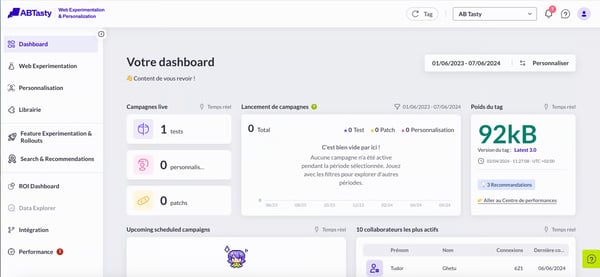
AB Tasty makes ongoing site improvements feel genuinely manageable, and that kept ringing true across multiple G2 reviews. Optimization sits at 85% on G2, and reviewers often mention how quickly they can test ideas, understand what visitors are doing, and decide what to keep or change. Rather than relying on instinct, teams get clearer answers based on real user behavior, which makes everyday decisions feel more confident and grounded.
When it comes to storefront personalization, I noticed in G2 reviews that the platform offers enough flexibility to keep campaigns aligned with customer behavior. Its web feature is rated at 84%, and that shows up in campaign launch speed, widget usability, and how cleanly personalization flows come together. Adjusting content and journeys also feels straightforward once patterns in user behavior start to become clear.
One thing I kept seeing across G2 reviews was how approachable AB Tasty feels for teams that prefer working independently without relying heavily on technical support. The interface allows experiments, campaign variations, and site changes to be managed directly, which helps keep things moving during active testing periods. When teams can act quickly on new insights, optimization naturally becomes more effective.
A noticeable advantage comes from how well AB Tasty fits into existing tools and workflows. Connections with analytics and marketing platforms make it easier to use experiment results alongside campaign data and reporting. Many G2 reviewers mention this smooth integration, especially when talking about how insights flow into their broader strategy.
Support is another area where AB Tasty proactively delivers. Quick replies, easy chat access, and guidance that actually moves you forward. G2 reviewers are pretty vocal about this one. When you’re mid-experiment, that matters more than people think. Nobody wants to pause, wait, and lose momentum. With support like this, teams keep testing, keep launching, and keep going.
G2 reviewers flag that React-based setups, mobile testing flows, and detailed campaign structures require significant preparation upfront. If you skip that prep, reviewers mention campaigns don’t run cleanly. If you’re in a React environment or running mobile-first testing, you’ll feel this gap more than most. That said, once the groundwork is done, the core testing capabilities hold up well, and the overall vibe stays pretty constructive.
G2 reviewers flag that the visual editor and QA mode can behave inconsistently in specific environments, including cross-browser testing and React-based setups, which adds steps to the validation process before a test goes live. Teams running complex technical configurations notice this more than those working within standard web environments. Once the edge cases are scoped, the core experimentation workflow holds up reliably and keeps campaign velocity high.
AB Tasty comes across as a strong choice for e-commerce teams that want experimentation to shape the customer experience in a measurable way. Testing depth, optimization flow, usability, and support are where I think the platform consistently proves its value in conversion-focused environments. For brands ready to treat site improvement as an ongoing practice rather than a one-time fix, AB Tasty more than earns its place, I’d say that much is clear.
What I like about AB Tasty:
- The platform is known for its intuitive interface, allowing non-technical teams to launch A/B tests and personalization campaigns quickly without extensive setup or training.
- Strong experimentation capabilities stand out, with flexible testing options and seamless integrations that help teams connect insights with existing analytics and marketing workflows.
What G2 users like about AB Tasty:
“How easy it is to make changes to the website for testing variables without any web development knowledge. Additionally, I love how well connected it is to platforms such as Google Analytics or Hotjar to get additional insights from the tests. Very user-friendly and intuitive as well! ”
– AB Tasty review, Ana M.
What I dislike about AB Tasty:
- React-based setups and mobile testing flows require closer attention during configuration. Teams pushing into these technical areas notice the extra coordination more than those running standard web A/B tests. G2 reviewers rate the core testing capabilities as solid once those setups are complete.
- The visual editor and QA mode can behave inconsistently across browsers and React-based environments, adding validation steps before tests go live. Teams running complex technical configurations notice this more than those on standard web setups. G2 reviewers find the core experimentation workflow reliable, once those edge cases are accounted for.
What G2 users dislike about AB Tasty:
“It is difficult to use the editor with a React site.”
– AB Tasty review, Patrick M.
4. ContactPigeon: Best for automating personalized messaging and cart recovery
ContactPigeon brings email, onsite messaging, and push notifications into one system where journeys, triggers, and audience data stay connected in a structured way. When multiple campaigns run in parallel, that unified setup keeps everything aligned without requiring teams to switch between tools.
User data sits at a perfect 100% in the G2 reports. Reviewers on G2 talk about grouping audiences by behavior, purchase history, and interaction signals with impressive precision. Campaigns stop feeling like mass blasts and start getting personal and maybe even creepy in the best way. Stronger engagement and more meaningful communication across customer groups just follow naturally. That perfect score does not lie.
Mobile communication is where things get really interesting. Push notifications and automated triggers reconnect visitors after key actions, and G2 reviewers are very clear about how much they value that. The 100% mobile rating reflects that too, with customers hearing from the brand at exactly the right moment without being pushy.
On-site personalization plays an equally important role in guiding shoppers through their journey. With web capabilities also rated at 100%, features like pop-ups, recommendation widgets, and behavior-based prompts appear at the right moment during browsing sessions. Many G2 users describe these interactions as helpful nudges that guide attention toward relevant products or offers while keeping the experience smooth. This connection between onsite behavior and campaign logic helps create a more cohesive shopping experience.
Automation is where ContactPigeon earns its keep, and trust me, the G2 reviews make that very clear. Abandoned cart reminders, welcome journeys, and price drop alerts. Once these flows are configured, they just run without needing to babysit the workflow. Reviewers consistently highlight how these automated processes keep brands engaged while communication stays timely and structured. For marketing teams that need reliable day-to-day execution without the extra effort, this is where ContactPigeon delivers.
What struck me while going through the review data was how many businesses were running multiple brands or storefronts from a single ContactPigeon dashboard. Some G2 reviewers describe managing several e-commerce environments from a single dashboard, with campaigns, automations, and messaging strategies aligned across each one. That level of centralization helps maintain consistency while reducing the time spent coordinating separate tools or systems. It also allows teams to scale their operations more smoothly without losing control over messaging.
While going through the G2 reviews, I see support quality also stands out across user feedback and contributes to the tool’s overall experience. Teams often highlight quick responses, proactive suggestions, and ongoing collaboration with account managers who stay involved throughout the process. That level of involvement helps businesses refine campaigns, explore new features, and continuously improve their strategies. The relationship feels more like an ongoing partnership than a one-time setup.
G2 reviews note that building more advanced automation flows requires structured thinking during the initial setup phase, particularly when campaigns involve multiple triggers, conditions, and audience segments. This complexity surfaces most for marketers building layered journeys across multiple channels, while single-channel or straightforward outreach stays accessible throughout. That said, once the initial structure is mapped out, ContactPigeon’s automation builder handles multi-step complexity without losing its logical flow.
If you’re new to ContactPigeon, its feature extensivity can take time to get fully comfortable with. Exploring capabilities beyond the initial setup requires structured onboarding, something that surfaces consistently across G2 reviews. Teams expanding into unfamiliar features feel this more than those working within familiar workflows. As familiarity builds, G2 reviewers describe the platform as easy to manage and rewarding in regular use.
What struck me most reading through ContactPigeon’s reviews is how often users come back to the support relationship rather than individual features. The perfect segmentation and mobile scores are notable, but what keeps teams on the platform longer term seems to be the ongoing account involvement that turns initial setup into something that keeps improving. That kind of partnership dynamic is harder to replicate than any single feature.
What I like about ContactPigeon:
- ContactPigeon brings multiple engagement channels into one place, making it easy to manage newsletters, pop-ups, push notifications, and automated flows like abandoned cart and browse recovery without switching tools.
- The platform adapts well to different workflows, with reliable automations running in the background and a responsive support team that actively helps refine campaigns and suggest new ideas.
What G2 users like about ContactPigeon:
“ContactPigeon’s platform offers a wide range of powerful features. For now, we primarily use it for sending newsletters, and we have activated a lot of automated flows, pop-ups, and Viber campaigns. The interface is easy to work with, so this makes our day-to-day smoother.”
– ContactPigeon review, Lydia Iliana M.
What I dislike about ContactPigeon:
- Advanced automation flows with multiple triggers and audience segments require structured thinking during setup. Teams building multi-step journeys notice this more than those running simpler outreach flows. G2 reviewers rate the automation builder as logically structured and easy to follow.
- Newer users may need time to get comfortable navigating beyond their initial setup. This shows up more for teams expanding into unfamiliar features than those within established workflows. G2 reviewers describe the platform as well-organized and straightforward to navigate.
What G2 users dislike about ContactPigeon:
“Despite the overall quality, at times, the platform feels a bit outdated in certain areas. For example, scheduling future campaigns can be confusing.”
– ContactPigeon review, Charalampos A.
5. MoEngage: Best for customer lifecycle engagement
MoEngage is built for brands that want customer engagement to feel timely across every stage of the order journey, combining automation, messaging, and behavioral insight in one environment. It brings campaigns, segmentation, dashboards, and multi-channel outreach into a single working environment. That setup gives teams a clearer way to connect customer actions with follow-up communication.
Mobile engagement scores 95% on G2, and what I kept finding in the reviews comes back to the same things: push notifications that land well and outreach that matches where a customer actually is in their journey. That kind of precision matters when someone pauses before checkout, and you want back in the conversation.
Campaigns are also easy to get off the ground and keep running. G2 users rate marketing campaigns at 93%, and the feedback describes quick setup, smooth execution, and dependable use for recurring outreach across WhatsApp and email. If your team runs frequent promotions or retention journeys, that ease removes a lot of the friction that builds up when every send becomes its own project.
What stood out to me is how MoEngage turns customer behavior into something your team can actually act on. Dashboards, campaign summaries, user tracking, and engagement analysis feel like part of everyday work rather than bolt-on reporting. When those tools are built into the same workflow you’re already using, acting on the data stops feeling like a separate task.
The platform also holds up well in everyday use, which sounds basic but genuinely matters. When campaign creation and segment setup feel straightforward, teams stay engaged with the platform rather than finding reasons to delay. Personalization only works if people actually build it, and MoEngage makes that part easier than most.
Getting started is fairly smooth, too. Several reviewers mention a clean initial setup supported by a dedicated technical team, and ongoing customer success support comes up regularly in the feedback. Integrations score 90% on G2, and from what I found in the reviews, it tends to fit naturally into a broader marketing stack rather than requiring workarounds to get there.
Email holds up well inside the platform as well. With a 93% score, it covers segmented messages, lifecycle communication, and triggered sends tied to user actions. If you’re already using MoEngage for segmentation and campaign logic, the email channel feels like a natural extension of that work rather than a separate tool you have to manage.
A few reviewers mention that support response times could be faster, particularly during time-sensitive sends. If your team runs high-frequency campaigns where turnaround matters, it’s worth factoring in. That said, the broader support feedback is positive, with most users describing day-to-day help as accessible and the platform as productive to work in.
On pricing, smaller businesses should take a closer look at how the structure and AI add-ons map to their actual scope before committing. Teams with a clear engagement strategy tend to get up to speed faster than those still figuring out their approach. If you know what you want to build, MoEngage gives you a well-structured environment to build it in.
From my evaluation, MoEngage earns its place for e-commerce brands that want multi-channel engagement driven by real customer behavior. Mobile messaging, campaign execution, email orchestration, and clear performance reporting are where it consistently delivers. If you’re ready to build more