



Title: I Reviewed the 9 Best Conversational Support Software in 2026
Meta Description: I evaluated 15+ tools to identify the 9 best conversational support software platforms for 2026. Compare capabilities to find the right fit for your support team.
If you work in customer support, customer experience, or operations, you know the real challenge isn’t just having a chat widget; it’s providing scalable, consistent conversations across every channel while reducing agent load and boosting satisfaction.
That’s where the best conversational support software stands out. Some tools are built for enterprise-level routing, others shine with AI-assisted automation, and a few are ideal for fast-moving SMB teams that want high impact with minimal setup.
To help you cut through the noise, I compared the top options and mapped what each does best, where it can fall short, and how to choose the right fit. Whether your priority is unified omnichannel support, chatbot intelligence, or seamless handoffs to live agents, these platforms stood out for operational performance and real-world impact.
9 Best conversational support software: My picks for 2026
-
SF Service Cloud: Best for enterprise-scale support automation
A robust platform with deep CRM integration, AI routing, and multichannel conversational workflows. -
Zendesk for Customer Service: Best for mature organizations requiring flexible ticketing
A reliable, customizable system with strong self-service portals and scalable routing rules. -
Service Hub: Best for inbound support aligned with marketing and sales
Built for teams that want conversational support tightly integrated with customer lifecycle data. -
Fin by Intercom: Best for AI-first conversational assistance
Leverages advanced automation and proactive bot experiences to reduce live ticket volume. -
Freshdesk: Best all-around support platform for midsize teams
Combines intuitive chat, bots, ticketing, and multichannel support in one accessible system. -
Birdeye: Best for conversational support with reputation and review automation
Focuses on integrating messaging with experience signals and post-interaction amplification. -
Podium: Best for location-based conversational engagement
Optimized for local businesses and multi-location messaging workflows. -
Front: Best shared inbox for team-centric conversational workflows
A collaboration-centric platform that brings all channels into one agent workspace. -
Sobot: Best for cost-efficient conversational AI for SMBs
An affordable solution with strong chatbot capabilities and easy setup.
According to G2’s Winter 2026 Grid Report, these conversational support software providers consistently rank among the top solutions in their category.
My 9 best conversational support software picks for 2026
While comparing platforms, one thing became clear: conversational support is no longer just a chat window.
The best tools either:
- Reduce agent effort with intelligent routing and automation
- Support seamless handoff between bots and humans
- Provide unified context across channels (web, mobile, social, email, SMS)
- Deliver measurable improvements in CSAT, response time, and resolution speed
If you’re searching for a solution that can centralize conversations, streamline agent workflows, and scale with your support volume, these tools stood out for their reliability and depth.
How did I find and evaluate the best conversational support software?
To identify the top conversational support platforms, I evaluated how well each solution supports real-world support workflows, including:
- Multichannel conversation aggregation (chat, messaging, social, SMS)
- AI-assisted responses and automation flows
- Routing logic and handoff management
- Integration with CRM, ticketing, and backend systems
- Reporting visibility and scalability
- Ease of setup and admin control
- Developer extensibility and platform APIs
I also reviewed review aggregator scores, expert rankings, and user feedback, comparing platforms based on ease of use, automation depth, integration breadth, scalability, and alignment with different business sizes and customer experience goals.
I curated this list to help you choose the right conversational support software to reduce operational load, improve response quality, and create seamless interactions across every customer touchpoint.
What makes the best conversational support software worth it: My opinion
When evaluating conversational support software, I focused on capabilities that go beyond surface-level chat and actually drive operational outcomes, not just more conversations, but better conversations.
- Unified multichannel context: The best platforms consolidate conversations from all channels, web chat, social messaging, email, SMS, and in-app support, into a single agent view. Agents don’t need to context-switch, and customers don’t need to repeat themselves.
- AI assistance and autonomous responses: AI support isn’t just about answering FAQs; it’s about intent recognition, dynamic follow-ups, and reducing repetitive tickets. Leading solutions leverage AI to automate routine responses and assist agents in real time.
- Intelligent routing and handoff: Modern conversational support software intelligently routes queries based on skill, priority, and context, then smoothly hands off from the bot to a live agent without losing conversational history.
- Deep integrations and CRM alignment: Chats should inform the broader customer narrative. The best systems sync with CRMs, help desks, sales tools, and backend data sources to make conversations more personalized and actionable.
- Scalability for growth: Whether your team’s volume doubles next quarter or your support channels expand to new platforms, top tools scale without expensive infrastructure rebuilds.
To qualify for inclusion in the conversational support category, a product must:
- Apply a common and centralized structure to all customer interactions, service-related or otherwise
- Provide a unified view of customer conversations across two or more channels (such as email, chat, SMS, messaging, or social media)
- Route customer conversations via algorithmic, or AI-driven sorting, or both
- Track customer profiles and conversation history across channels
- Leverage advanced automation, AI, or chatbots to improve customer service experiences
This data was pulled from G2 in 2026. Some reviews have been edited for clarity.
1. SF Service Cloud: Best for enterprise-scale support automation
G2 Rating: 4.4/5
Salesforce Service Cloud combines a powerful CRM backbone with advanced conversational support capabilities. It brings case management, chat, messaging, and AI-driven routing together in a unified interface connected to customer records.
One of the first things that stands out is how closely service operations connect to the central customer profile. Instead of operating as a separate support system, the platform brings case management, messaging, AI routing, and interaction history together in one unified environment tied directly to detailed customer data.
A key advantage is the centralized 360° customer view. Agents can access every case, chat transcript, email conversation, phone log, and social interaction within a single workspace. This eliminates constant context switching and helps agents understand the full customer journey before responding. From a service perspective, this leads to stronger personalization, more accurate responses, and greater efficiency.
The automation capabilities are another highlight. Advanced workflows, macros, SLA tracking, intelligent routing, and AI-powered tools reduce manual work and streamline repetitive service tasks. These automation features help teams meet service-level commitments more reliably while maintaining consistent response standards.
Its omnichannel case management further strengthens the overall support experience. Whether customers reach out through email, chat, phone, social media, or self-service portals, all interactions flow into the same system. This prevents channel silos and helps teams maintain consistent service quality across touchpoints.
Another major benefit is the platform’s flexibility and scalability. Organizations with complex operational needs can customize workflows, objects, permissions, and reporting structures to align with internal processes. This level of configurability makes it especially valuable for growing enterprises that require more than standard out-of-the-box functionality.
The reporting tools and real-time dashboards also provide meaningful insights. Teams can monitor SLA performance, agent productivity, support metrics, and operational bottlenecks through dynamic dashboards. This visibility allows leadership to track service performance in real time and make data-driven adjustments.
In addition, the platform’s enterprise-grade AI capabilities further elevate the service model. Features like AI-driven case classification, predictive insights, and automated resolutions shift service operations from reactive to proactive. Instead of only responding to issues, teams can anticipate needs and resolve potential problems earlier, improving customer satisfaction.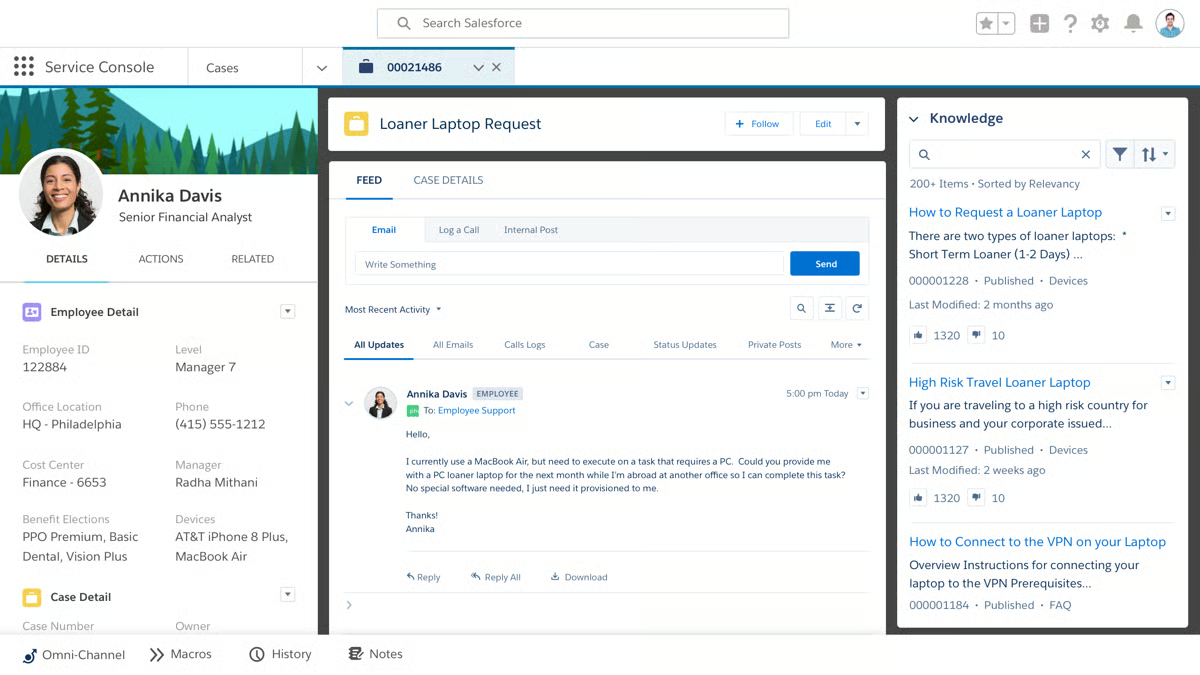 Implementation can involve a learning curve. Initial setup often requires experienced administrators or certified consultants, and new users usually need structured training to fully utilize the platform’s capabilities. Based on user feedback, this tends to work particularly well for mid-market and enterprise organizations that have dedicated IT or operations teams capable of managing complex service environments. For these teams, the depth of customization becomes a strategic advantage.
Pricing may also increase as organizations add AI features, integrations, extra users, or specialized modules. According to reviewers, this pricing structure often aligns best with enterprises looking for a scalable and deeply integrated service ecosystem that evolves alongside business growth. Teams focused on long-term automation and cross-team integrations often view the cost as reflective of the platform’s capabilities.
Overall, Salesforce Service Cloud delivers a highly sophisticated service management solution.
What I like about SF Service Cloud:
- Having every case, chat, email, and interaction tied directly to a 360° customer profile feels incredibly powerful, and G2 users often highlight this unified visibility as a major advantage.
- The depth of automation, from AI routing to SLA management, really stands out, with G2 users frequently connecting it to stronger efficiency and more consistent service delivery.
What G2 users like about SF Service Cloud:
“What I like best about Salesforce Service Cloud is how powerful and scalable it is for managing customer support. It brings cases, omnichannel communication, automation, and reporting into one place, making it easier for support teams to work efficiently and deliver consistent customer experiences. The flexibility to customize workflows and integrate with other tools also makes it a strong fit for growing support operations.”
– SF Service Cloud review, Nitesh C.
What I dislike about SF Service Cloud:
- The implementation and learning curve can be steep, though G2 users note it works especially well for organizations with dedicated admins who can fully leverage the customization.
- Costs can scale up as more features and AI capabilities are added, but G2 users often say it aligns best with enterprises looking for long-term flexibility and deep integration.
What G2 users dislike about SF Service Cloud:
“While Service Cloud is very powerful, it comes with a noticeable learning curve, especially for new users or teams that don’t have a dedicated Salesforce admin. Some configurations, such as advanced automations, reporting, and integrations, can feel overly complex and take a lot of time to set up properly. On top of that, costs can rise quickly as you add features, licenses, or customizations, which can be difficult to manage for smaller teams.”
–SF Service Cloud review, Rachel P.
2. Zendesk for Customer Service: Best for mature organizations requiring flexible ticketing
G2 Rating: 4.3/5
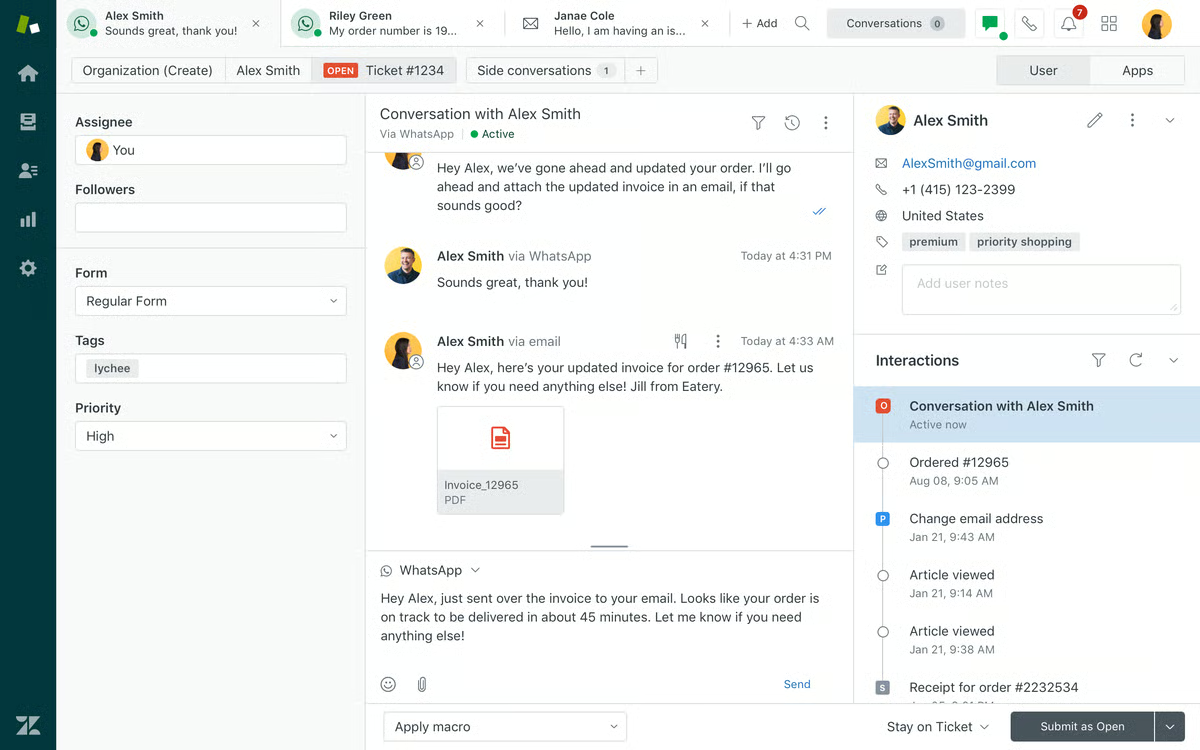
Zendesk for customer service blends conversational support with flexible ticketing workflows and automation rules. Conversations from web widgets, social channels, and messaging platforms are converted into unified ticket threads that trigger automation rules, SLA tracking, and responses.
One of the platform’s strongest capabilities is its centralized omnichannel ticketing system. Email, live chat, phone, social messaging, and web forms are consolidated into a single workspace. This reduces the risk of missed interactions and provides agents with a complete interaction history in one place, improving response continuity.
Its automation and workflow engine are another major strength. Triggers, macros, routing logic, and AI-powered workflows help reduce repetitive manual work and enforce consistent service standards. For teams handling large volumes of tickets, these automation tools make scaling operations significantly easier.
The structured ticket management interface is also notable. Clean ticket layouts, tagging systems, status categories such as open, pending, and solved, and detailed conversation histories help keep support workflows organized, even during periods of high demand. The interface balances simplicity with the control needed for structured service operations.
From a scalability perspective, Zendesk supports organizations ranging from small businesses to global enterprises. With robust APIs and more than 1,800 marketplace integrations, teams can extend functionality and integrate the platform with CRM systems, backend tools, and specialized applications.
The reporting and analytics capabilities are equally valuable. Dashboards provide insight into response times, SLA compliance, agent productivity, and long-term support trends. These insights allow leadership to identify operational bottlenecks and optimize support processes using measurable data.
Another advantage frequently mentioned by users is the platform’s maturity and reliability. Zendesk has built a reputation for stable performance and dependable integrations, which is critical for organizations running mission-critical support operations.
However, there are some considerations. Pricing can increase as teams grow, particularly when advanced automation, analytics, or additional agent seats are introduced. Based on user feedback, this pricing model often works best for growing or enterprise organizations that plan to fully utilize the platform’s advanced capabilities.
Additionally, configuring advanced routing logic, triggers, and custom workflows can require thoughtful setup. In many cases, organizations benefit from having a dedicated administrator or structured implementation approach. Teams that invest time in properly configuring the system tend to unlock its full flexibility over time.
All-in-all, Zendesk provides a powerful and scalable foundation for customer support operations.
What I like about Zendesk for Customer Service:
- Bringing email, chat, phone, and social messages into a single unified ticketing workspace feels incredibly organized, and G2 users often praise the full visibility across channels.
- The automation engine, with triggers, macros, and routing rules, seems to make high-volume support far more manageable, something G2 users consistently highlight when talking about scalability.
What G2 users like about Zendesk for Customer Service:
“I find Zendesk to be a very convenient tool. It is easy to access, and everything is clearly detailed and well-organized. As a customer service representative, I have certain metrics to meet, such as average call handling time. Zendesk simplifies my work because all I need to do is select the appropriate options, choose the title, set the dispositions, and indicate whether a case is pending or solved.”
– Zendesk for Customer Service review, Ruby Ann G.
What I dislike about Zendesk for Customer Service:
- Costs can climb as you add advanced features or more agents, though G2 users say it makes sense for teams that fully leverage automation and analytics in the long term.
- Setting up complex workflows and routing logic can take thoughtful planning, but G2 users note it works especially well for organizations with a dedicated admin or structured rollout process.
What G2 users dislike about Zendesk for Customer Service:
“Zendesk can feel a bit overwhelming at first because there are so many features and configuration options. It takes time to set up properly and can be confusing for new users. another thing is pricing, many useful features and integrations are locked behind higher plans, which can e tough for smaller teams. Also, when ticket volume is high, the interface can feel slightly cluttered.”
– Zendesk for Customer Service review, Radhika R.
3. HubSpot Service Hub: Best for Conversations Aligned With Lifecycle Data
G2 Rating: 4.4/5
HubSpot Service Hub brings conversational support into the broader customer lifecycle by combining chat, CRM data, knowledge base resources, and journey tracking in a single platform.
One of its biggest strengths is the unified customer data shared across sales, marketing, and service teams. Because Service Hub operates on the same CRM foundation as the rest of HubSpot’s platform, agents can view the entire customer journey, from the first website visit to the closed deal and subsequent support requests, without switching tools. This removes departmental silos and provides valuable context before responding.
The omnichannel help desk functionality is another highlight. Email, live chat, forms, and other communication channels feed into a centralized shared inbox and ticketing system. This setup improves organization, prevents missed requests, and ensures clear accountability across support teams.
AI-powered automation further improves efficiency without adding unnecessary complexity. Automatic ticket routing, knowledge base recommendations, and conversation trend insights help streamline workflows and reduce manual sorting. These features enable faster resolution times while maintaining ease of use.
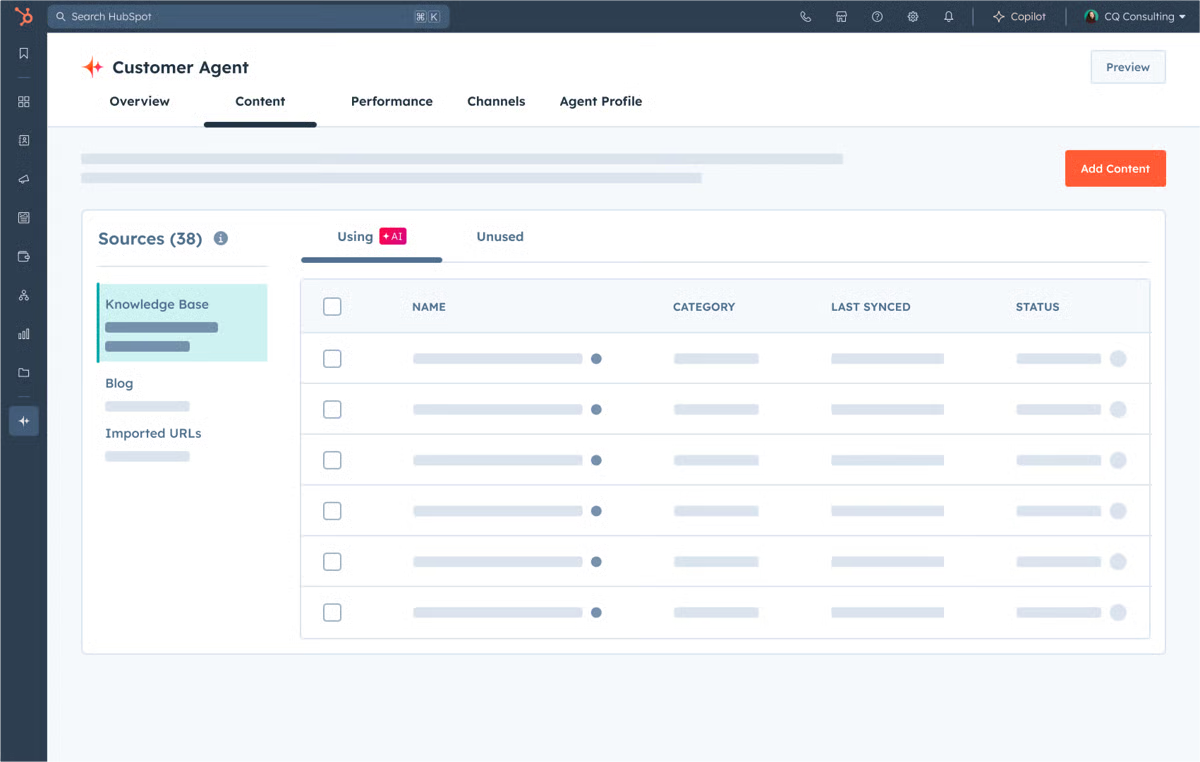
I also found the self-service features particularly valuable. Built-in knowledge bases, chatbots, customer portals, and feedback surveys allow customers to solve many common issues independently. This reduces ticket volume while giving customers quicker answers.
From a usability standpoint, the platform’s interface is clean and intuitive. The design makes onboarding easier, even for small teams without dedicated administrators. Daily navigation feels straightforward, and workflows are simple to adopt.
Another advantage is the flexible pricing structure, which includes a useful free tier. Teams can start with essential features and upgrade to Starter, Professional, or Enterprise plans as their support needs grow. This makes the platform accessible for startups while still supporting long-term expansion.
That said, many advanced features are available only in higher-tier plans. More sophisticated automation, analytics, and customization capabilities require Professional or Enterprise subscriptions. According to user feedback, this pricing structure tends to work well for teams planning gradual service expansion.
There are also some limits to customization and occasional performance considerations. Compared with highly specialized enterprise service platforms, certain workflows and dashboards prioritize usability and CRM integration over deep technical configuration. Additionally, teams working with very large datasets may occasionally notice slight delays at load time.
Overall, HubSpot Service Hub delivers a strong service solution built directly on CRM infrastructure.
What I like about HubSpot Service Hub:
- Having support fully connected to the CRM gives agents complete customer context, and G2 users often highlight how this eliminates silos between sales, marketing, and service.
- The omnichannel inbox and automation tools make ticket management feel organized and efficient, something G2 users frequently associate with faster resolution times.
What G2 users like about HubSpot Service Hub:
“HubSpot has significantly streamlined our workflow. The platform connects smoothly with our existing database, making email communication fast and organized. One of the most valuable features is the ability to track and review customer feedback in one place, which helps us make informed improvements to our application. The interface is intuitive and easy to navigate, allowing our team to use it effectively without requiring advanced technical expertise.”
– HubSpot Service Hub review, Shravya G.
What I dislike about HubSpot Service Hub:
- Many advanced automation and reporting features are available only in higher-tier plans, though G2 users say this structure works well for teams planning to scale gradually.
- Customization can feel somewhat limited compared to heavy enterprise service platforms, but G2 users note it’s a strong fit for CRM-centric teams that prioritize ease of use over deep technical complexity.
What G2 users dislike about HubSpot Service Hub:
“Some of the customization options feel more limited than I’d like, especially when trying to tailor views or build more advanced workflows. A few features that seem essential require jumping up to higher subscription tiers, which can make scaling costly. Additionally, the load time of certain dashboards can lag when working with larger data sets.”
– HubSpot Service Hub review, Tara H.
4. Fin by Intercom: Best for AI-First Conversational Assistance
G2 Rating: 4.5/5
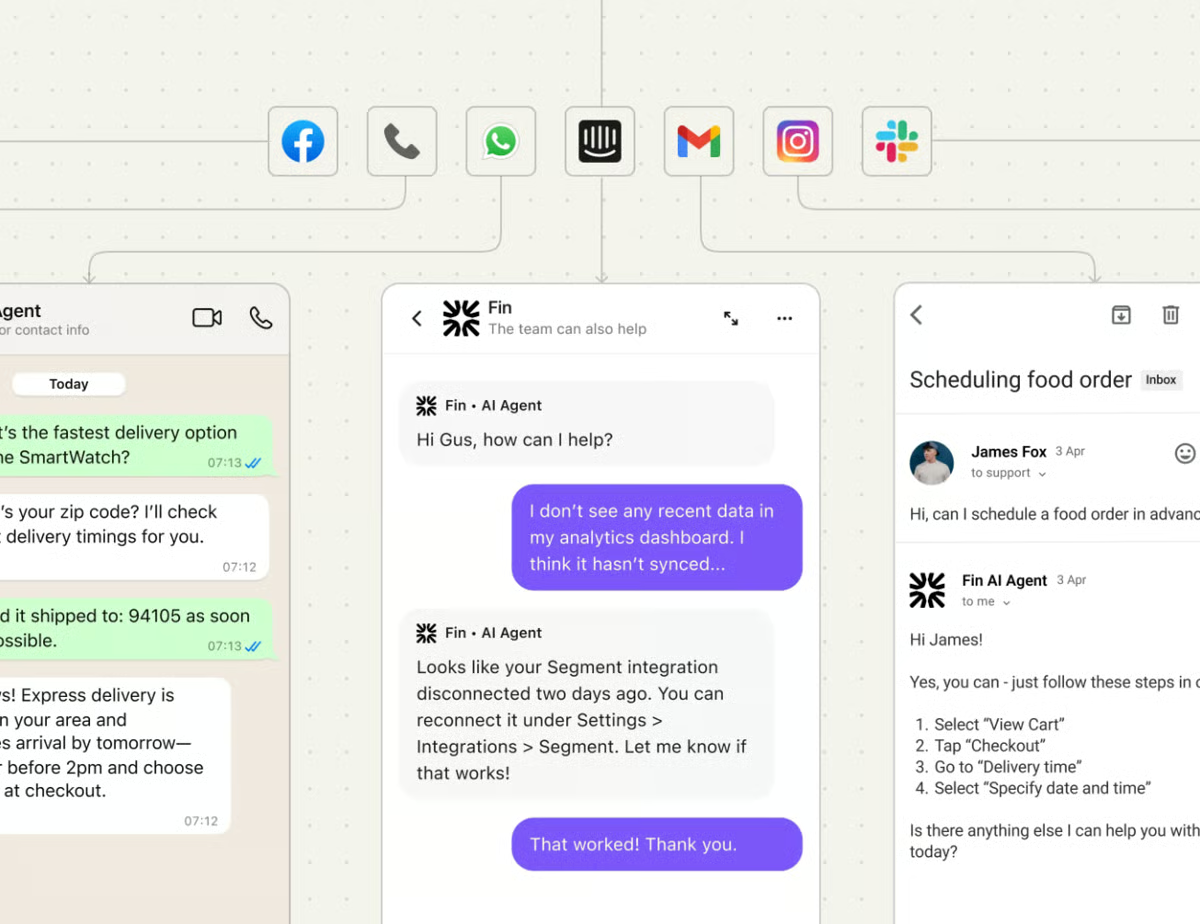
Fin by Intercom focuses heavily on AI-powered responses and contextual awareness. Instead of simply answering FAQs, the system interprets user intent, references past interactions, and escalates conversations with detailed context when needed.
One of its most notable advantages is the high autonomous resolution rate. Many teams report average resolution rates around 67%, with some reaching more than 90% depending on the quality of documentation and the scope of use cases. This level of automation significantly reduces incoming ticket volume, allowing human agents to focus on more complex issues.
Fin also performs well when automating structured, multi-step workflows. Tasks like refunds, subscription updates, dispute handling, and troubleshooting can be managed through a combination of generative AI responses and rule-based controls. This hybrid model balances conversational flexibility with operational safeguards.
The no-code configuration also lowers adoption barriers. Support leaders can adjust tone, modify workflows, and refine automation logic without needing engineering resources. This allows teams to iterate quickly and improve automation performance over time.
Another advantage is its compatibility with existing help desk systems. Instead of forcing organizations to migrate platforms, Fin integrates with tools such as Zendesk, Salesforce, and HubSpot. This makes it possible to add AI automation to existing workflows without major disruption.
Its performance is also supported by knowledge base integration. Fin pulls information directly from help center articles and historical conversations to generate brand-aligned responses. When documentation is structured and accurate, responses tend to feel precise and consistent.
The usage-based pricing model, starting with a per-resolution rate, makes experimentation more accessible. Teams can evaluate the impact of automation before scaling AI further, aligning costs with the value delivered.
However, pricing can become less predictable as automation usage increases. For teams handling extremely high volumes, higher resolution rates may lead to increased costs. Based on user feedback, this model works best for organizations that closely monitor automation performance and forecast support demand.
Additionally, AI performance depends heavily on the quality of the documentation. If help center content is outdated or poorly structured, response accuracy may decline. Teams that maintain well-organized knowledge bases typically experience much stronger results.
From review trends, it is clear, Fin provides a powerful AI automation layer for modern support operations
What I like about Fin by Intercom:
- The high autonomous resolution rates really stand out, and G2 users often point to the significant drop in ticket volume as proof of its impact.
- Its ability to handle multi-step workflows like refunds or subscription changes , while staying within policy guardrails, feels like a smart blend of flexibility and control, something G2 users consistently appreciate.
What G2 users like about Fin by Intercom:
“The main advantages are faster response times, 24/7 availability, and a reduced workload for human agents, which lets teams focus on more complex issues. It also integrates closely with Intercom’s platform, providing clear analytics and ongoing optimization that helps improve support quality over time.”
– Fin by Intercom review, Kim G.
What I dislike about Fin by Intercom:
- Usage-based pricing can become less predictable at higher volumes, though G2 users mention it works well for teams that closely monitor automation metrics and forecast demand.
- Results seem heavily dependent on the quality of help center documentation, but G2 users note that teams with strong knowledge management practices tend to see far more consistent performance.
What G2 users dislike about Fin by Intercom:
“What I dislike most about Fin by Intercom is that, while powerful, it can feel restrictive and costly depending on your team’s needs and scale. Fin’s cost per resolved conversation can become expensive for high-volume support teams, making ROI harder to justify without careful monitoring. Fin performs best only when your help center content is well-structured and up to date. Poor or sparse docs significantly reduce its effectiveness.”
– Fin by Intercom review, Jan B.
Compare the best help desk software to streamline ticket management, automate workflows, and improve response times.
5. Freshdesk: Best all-around support platform for midsize teams
G2 Rating: 4.4/5
Freshdesk brings together chat, automation, ticketing, and reporting in a single approachable support platform. Its chat widget is simple to implement, and rule-based workflows help teams manage increasing support demand without losing clarity or organization.
One of the first aspects that stand out is the platform’s intuitive, user-friendly interface. The ticket layout is clean, navigation feels logical, and new agents can quickly understand how requests progress through the system. This straightforward design helps shorten onboarding time and allows support teams to reach productivity faster.
Another notable strength is the platform’s automation and workflow capabilities. Freshdesk includes scenario automations, auto-assignment rules, tagging, SLA policies, and canned responses. These features help minimize repetitive tasks while ensuring tickets are categorized and routed efficiently, improving both response speed and consistency.
Freshdesk also delivers strong omnichannel support through a centralized workspace. Teams can handle email, chat, phone calls, social media messages, and customer portal requests from a single dashboard. Having all communication channels in one place reduces context switching and helps agents maintain conversation continuity.
AI-powered assistance through Freddy AI further enhances productivity. AI agents, copilot features, and intelligent insights help agents respond more quickly, suggest relevant solutions, and manage both simple and complex customer inquiries. These tools enable support teams to scale their operations without significantly increasing staffing.
Collaboration is another area where Freshdesk performs well. Internal notes, tagging, and integrations with tools such as Slack, Microsoft Teams, and Jira make it easier for support teams to coordinate with engineering, product, and operations teams. This visibility helps resolve escalations more efficiently.
Freshdesk also adapts well as organizations grow. Support teams, from small groups to operations with hundreds of agents, can scale workflows, reporting, and automation as their needs evolve.
/Freshdesk.webp?width=600&height=457&name=Freshdesk.webp)
Some advanced capabilities require higher-tier plans. More sophisticated automation, reporting, and AI functionality are typically included in premium tiers. Based on user feedback, this pricing structure tends to work best for teams that anticipate scaling their support operations and plan to use those advanced tools extensively.
There are also occasional mentions of customization limits for highly complex enterprise environments. Compared with deeply configurable enterprise platforms, Freshdesk tends to prioritize ease of use and speed of setup. From what I’ve observed, this balance works particularly well for mid-sized teams that want strong functionality without the complexity of heavily customized systems.
It’s safe to say that Freshdesk provides a balanced support platform that combines usability, automation, and scalability.
What I like about Freshdesk:
- The interface feels clean and easy to navigate, making ticket management straightforward, and G2 users often note how quickly new agents can get comfortable with it.
- Automation features like routing rules, tags, and SLA policies seem to take a lot of repetitive work off support teams’ plates, something G2 users frequently highlight when talking about efficiency.
What G2 users like about Freshdesk:
“Intuitive and easy to use. The interface is clean and user-friendly, making it easy to navigate and get started. The automation features are powerful and help streamline workflows. Ticket management is also great, making it easier to stay organized and keep track of requests.”
–Freshdesk review, Themba N.
What I dislike about Freshdesk:
- Some of the more advanced capabilities are available only in higher-tier plans, though G2 users say this tends to work fine for teams that scale features gradually.
- A few users note that reporting customization and performance during very high ticket volumes can require extra setup or planning, but many say it runs smoothly once workflows are configured properly.
What G2 users dislike about Freshdesk:
“I believe that one of the aspects Freshdesk could improve is the incorporation of automatic summaries with artificial intelligence at the ticket level. It would be of great value to have a contextual summary of the complete ticket history, especially in long threads with multiple interactions between the customer and different agents. This functionality would allow understanding in seconds the current state of the case, the key points addressed, the actions already taken, and the pending issues, without the need to read the entire exchange of emails or internal notes.”
–Freshdesk review, Kaddiel G.
6. Birdeye: Best for Conversational Support With Reputation Automation
G2 Rating: 4.7/5
Birdeye approaches conversational support from a customer experience perspective, blending messaging tools with reputation management, review generation, and engagement analytics.
One of its strongest advantages is the ability to unify messaging across multiple channels. Conversations from web chat, SMS, and social platforms are consolidated into a single inbox, allowing teams to respond quickly while maintaining context across interactions.
Where Birdeye stands out is its connection between conversations and reputation management. The platform helps businesses automatically request reviews after interactions, monitor customer sentiment, and amplify positive feedback across online channels. This creates a feedback loop where conversations drive brand visibility and credibility.
Automation tools also play a key role. Businesses can configure automated messaging flows, review requests, appointment reminders, and follow-ups to keep customers engaged without constant manual effort. These automations help businesses maintain consistent communication while reducing workload.
Another major advantage is the platform’s focus on customer insights. Birdeye provides analytics on review trends, customer sentiment, response rates, and engagement performance. These insights allow businesses to identify service gaps and improve customer experience strategies.
The platform is particularly well suited for multi-location businesses. Centralized dashboards allow corporate teams to oversee messaging, reviews, and engagement metrics across multiple locations while still enabling local teams to respond directly to customers.
Some reviewers mention that maximizing the platform’s value requires thoughtful configuration of automation workflows and review strategies. Businesses often need to structure review requests and messaging sequences carefully to fully benefit from the platform’s reputation management capabilities.
Pricing may also s