


I evaluated 20+ tools to find the 9 best inventory control software. These are Xero, QuickBooks Online, ShipHero, Katana Cloud Inventory, Unicommerce, SAP Integrated Business Planning, TallyPrime, Increff WMS, and Cin7 Core.
Managing inventory is hard to get right. I don’t run a warehouse or oversee stock levels myself, but I’ve spent hours analyzing G2 reviews from the business owners, warehouse managers, and retail operators who do, to understand what makes inventory control software worth buying.
The reviews I analyzed keep returning to the same failure points: stockouts that send customers to a competitor, overstock that ties up cash on the shelf, and manual tracking errors that surface only after they’ve cost money.
From small e-commerce stores to large supply chains, I’ve examined the problems reviewers describe and the best inventory control software they rely on to avoid them.
For this list, I analyzed more than 5,000 G2 reviews across nine products, comparing everything from ease of use and automation to integrations and reporting. Whether you’re a small business owner who needs a simple system or a growing company that needs deeper inventory tracking, this list will help you find the right inventory management software for your needs.
9 best inventory control software for 2026: My top picks
- Xero: Best for small businesses syncing inventory with accounting
Tracks stock levels, invoicing, and bank reconciliation in one system, with inventory movements feeding financial reports directly. (starts at $29/month) - QuickBooks Online: Best for bookkeeping with built-in inventory basics
Handles bookkeeping, invoicing, and stock counts in software most accountants already work in. (starts at $38/month) - ShipHero: Best for brands and 3PLs running their own warehouses
Manages picking, packing, shipping, and inventory across warehouses, with client billing tools for 3PL operators. (available on request) - Katana Cloud Inventory: Best for small manufacturers tracking production builds
Connects raw materials, bills of materials, and production orders to live inventory across sales channels. (starts at $299/month) - Unicommerce: Best for multichannel marketplace sellers
Centralizes order processing, warehousing, and returns for sellers on multiple marketplaces and storefronts. (available on request) - SAP Integrated Business Planning: Best for enterprise supply chain planning
Combines demand forecasting, inventory optimization, and what-if scenario modeling across a global supply chain. (available on request) - TallyPrime: Best for on-premises accounting and inventory
Runs accounting, compliance reporting, and stock management locally, without a required cloud subscription. (starts at $630 one-time license) - Increff WMS: Best for multi-warehouse stock accuracy for retail brands
Tracks inventory in real time across warehouse locations and marketplace listings to keep counts and orders in sync. (available on request) - Cin7 Core: Best inventory control software for integrated workflows
Combines real-time stock tracking with automated workflows for smooth operations. (starts at $349/month for 5 users)
*These inventory control software are top-rated in their category, according to G2’s 2026 Summer Grid Reports. I’ve also included the starting monthly pricing of paid plans to facilitate easier comparisons for you.
9 best inventory control software I evaluated and loved
From everything I’ve seen in G2 reviews, the right inventory control software can completely transform how a business manages its stock. Manual tracking often shows up as a common pain point; users describe it as time-consuming and prone to errors that can lead to costly stockouts or excess inventory.
Those errors add up: a study puts the global cost of stockouts and overstocks at $1.73 trillion a year. With the top-rated inventory tools, it’s easy to automate stock tracking, receive real-time low-inventory alerts, and connect with sales or supply chain forecasting systems. I’ve come across plenty of feedback pointing to how these features cut the guesswork out of reordering.
The biggest advantage, based on what users are saying, is the time and effort saved. Instead of manually counting and adjusting inventory, businesses can automate much of the process, reduce human error, and keep inventory levels aligned with real demand. Once teams get used to a reliable system, many reviewers say they can’t imagine going back to a manual setup.
How did I find and evaluate these best inventory control software tools?
I shortlisted the top tools using G2 Grid reports for Inventory Control, then spent weeks going through G2 reviews for each inventory control tool, examining how reviewers rate it on essential tasks like stock tracking, order management, and automation.
I also used AI to analyze more than 1,000 verified user reviews across the nine tools, gathering insights from professionals with different inventory management needs. These reviews clarified each software’s strengths, weaknesses, ease of use, and customer support quality.
The reviewers behind them include the business owners, warehouse managers, and retail operators who run these systems daily, so their reviews show how each tool holds up in day-to-day operations. Where a pattern looked strong, I cross-referenced it against G2 Data and each vendor’s official product pages and pricing.
The product screenshot I’ve included comes from official vendor pages, their G2 listings, and publicly available materials.
What I looked for in the best inventory control software this year (2026)
If I were choosing the perfect inventory solution, here’s what I’d keep in mind:
- Real-time inventory tracking: Real-time tracking is a must-have. The best inventory control software ensures that stock levels are always accurate, whether you’re managing one location or multiple warehouses. In the reviews I analyzed, stock discrepancies from delayed syncing are among the most common complaints that push buyers to switch tools.
- Automation and alerts: Manually tracking stock is outdated. Users need a system that automatically updates inventory, sends low-stock alerts, and generates purchase orders before they run out. Reviewers I read consistently name automated reordering as the feature that saves them the most time.
- Multi-location and warehouse management: If I were managing inventory across multiple stores, warehouses, or even drop shipping locations, I’d want a tool that syncs stock across all locations in real-time. No guesswork or mismatched numbers between different sites.
- Integrations with accounting and sales channels: A tool that doesn’t connect to your accounting software, e-commerce platform, or marketplaces creates the manual re-entry it was meant to remove. I’d check for native connections to the systems you already run, particularly accounting sync and Shopify or marketplace integrations, which buyers in this category ask about most.
- Barcode and RFID scanning: Inventory tracking should be quick and accurate. Software with a barcode inventory system and RFID scanning helps speed up inventory updates and reduce errors. I noticed reviewers treat scanning less as a feature and more as the baseline for trusting their counts.
- Demand forecasting: Users don’t just want to track stock; they want to predict future inventory needs. The best software provides detailed reports and AI-powered demand forecasting, helping them make smarter restocking decisions. AI features vary widely in this category, so I’d ask vendors what the forecasting actually uses: sales history, seasonality, or plain reorder points.
- Multi-user access and permissions: If multiple employees need access to the system, it’s best to have multi-user support with role-based permissions, so inventory edits and approvals stay controlled. In reviews I examined, permission gaps show up as a recurring frustration for growing teams.
- Serial number tracking: For managing perishables, pharmaceuticals, or serialized products, it’s good to have a tool that tracks expiration dates, lot numbers, and serial numbers for compliance and recalls. I’d treat this as non-negotiable in regulated categories.
- Backup and disaster recovery: Data loss is a nightmare. Personally, I’d want a system that offers automatic backups, disaster recovery options, and redundant storage to protect my inventory data. This matters most if you’re weighing on-premises deployment, where backups are on you rather than the vendor.
These criteria give you a head-to-head comparison frame for the tools below.
The list below contains genuine user reviews of inventory control software. To be included in this category, a solution must:
- Contain a centralized inventory database
- Use barcode or RFID technology to track assets
- Provide inventory forecasting tools
*This data was pulled from G2 in 2026. Some reviews may have been edited for clarity.
1. Xero: Best for small businesses syncing inventory with accounting
Xero is the tool I’d point a small business owner to when the real question isn’t “where’s my stock?” but “what’s my stock doing to my numbers?” It’s an accounting platform with inventory built in, so every sale, purchase, and adjustment lands in the books the moment it happens.
On G2, it holds a 4.4 out of 5 rating across 1,500+ reviews, and it has the highest G2 Satisfaction score (99 on 100) in the Inventory Control category. Its largest reviewer group is accountants, the people grading whether stock data turns into clean, accurate books. Its highest-rated features tell the same story: data exporting and importing, accounting integrations, and e-commerce integrations all score well above the category average.
What stood out to me is that tracked inventory lives inside the ledger. Reviewers describe stock quantities and costs staying in sync with their accounts automatically, and several specifically praise how it handles heavy data loads and complex inventory without the books drifting from reality. No export, no reconciliation between an inventory system and an accounting system, because they’re the same system.
On the sales side, invoicing pulls items from inventory. Sell an item and the quantity, revenue, and cost of goods all move together from one action. Invoicing is the single most-praised workflow in the recent reviews I analyzed, and for a product business it’s the difference between stock counts that update themselves and counts that wait for data entry.
On the purchasing side, automated bank feeds and reconciliation do the same job. Supplier payments and stock purchases flow in from connected banks and match against bills. G2 reviewers describe the manual entry that usually causes count and cost errors nearly disappearing, which is what “reducing manual data entry” looks like in practice.
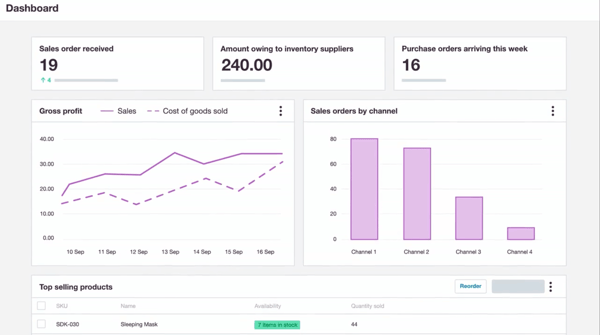
The payoff is that inventory shows up in the money reports in real time. Reviewers running product businesses describe checking margins, profit and loss, and how much cash is tied up in stock daily, from dashboards rather than month-end exports. If long-term financial visibility over inventory is your buying reason, this is the pro that matters most.
When stock needs outgrow the built-ins, the ecosystem carries it. Reviewers connect e-commerce storefronts and dedicated inventory apps while keeping Xero as the financial core. G2 Data grades its e-commerce integrations and data exporting at the top of this lineup, which fits how reviewers actually use it: as the system every channel’s stock data flows back into.
All of this stays runnable by an owner, not an ops team. Many reviewers consistently call the interface intuitive, first-timers included, and G2 Data shows the fastest average go-live in this lineup, under a month. A small team gets inventory-accurate books without hiring for it, and shares one live file with their accountant on any plan, with no per-user fees.
The built-in inventory works the way its buyer needs for straightforward stock: tracked items, quantities, and costs synced to the books. Some users with more complex operations note limits, particularly around costing methods like FIFO or average cost and extra stock fields, and a few mention moving that layer to a connected inventory app while keeping Xero as the financial core. If you run multi-warehouse or manufacturing-grade costing, plan for an add-on; for standard retail stock, reviewers say the native tools hold.
The standard reports cover the stock decisions most small businesses make weekly, and reviewers rate the live dashboards highly. Customizing past them takes effort: some users note that very specific report views, the detailed sales-by-product breakdowns among them, aren’t flexible enough and end up exported to Excel. Teams with an analyst’s appetite will notice; owners working from the standard stock and margin reports mostly won’t.
For a product business that wants its inventory and its accounting to be the same system rather than two systems reconciled monthly, Xero is the cleanest fit on this list, and the one your accountant is most likely to already know.
What I like about Xero:
- Reviewers selling physical products describe stock, invoicing, and financial reports moving together in real time, and that inventory-to-books sync is the reason I’d shortlist it in this category.
- The automated bank feeds and reconciliation impressed me on the purchasing side: reviewers consistently describe the manual entry around stock purchases nearly disappearing once accounts are connected.
What G2 users like about Xero:
“It helps me connect with my bank, accountant, bookkeeper, and other business apps. It also has a dashboard/UI that’s easy to access and navigate. Performance has been good too, since it feels fast compared with other software. Support is accessible and quick to respond when I reach out. The price is affordable as well. The AI is also helpful, especially when I’m not sure what to do next.”
– Xero review, John Michael A.
What I dislike about Xero:
- The native inventory covers everyday stock tracking well, but reviewers with more complex costing mention adding a dedicated inventory app on top. That’s where Xero draws the line. It’s an accounting software with solid stock tracking, not a full inventory system. Businesses with straightforward stock get clean books without paying for warehouse-grade features they’d never use.
- Reviewers like the standard reports and live dashboards, and some note customization has ceilings: very specific report views can require exporting to Excel. The defaults are tuned to the reporting most small businesses run, so the built-in views cover owners cleanly, with export there for the rare custom cut.
What G2 users dislike about Xero:
“The inventory recording and tracking process can still be improved to support different costing methods, such as FIFO or average.”
– Xero review, Laure Mae V.
2. QuickBooks Online: Best for bookkeeping with built-in inventory basics
QuickBooks Online is what most small businesses mean when they say “the books,” and for a product business, that’s the point: stock quantities, costs, and sales live inside the same file your accountant already works in, not in a separate system waiting to be reconciled.
On G2, it holds a 4.0 out of 5 rating across 3,800+ reviews and has the largest market presence (99/100) of any product in the Inventory Control category. For an inventory buyer, that translates to two practical advantages: bookkeepers who already know this tool are easy to find and hire, and nearly every sales channel or warehouse tool ships a QuickBooks integration. Its feature scores back the “inventory basics done properly” read with inventory costing grading above the category average. G2 Data adds that its estimated payback period is the shortest in this lineup, around eight months.
The problem it solves first is the owner-run product business. The most common thread in recent reviews is that non-accountants manage the books themselves, and for stock sellers that includes the inventory basics: tracked quantities, item costs, and purchase records in the same place as invoicing and expenses, without accounting training or an ops hire.
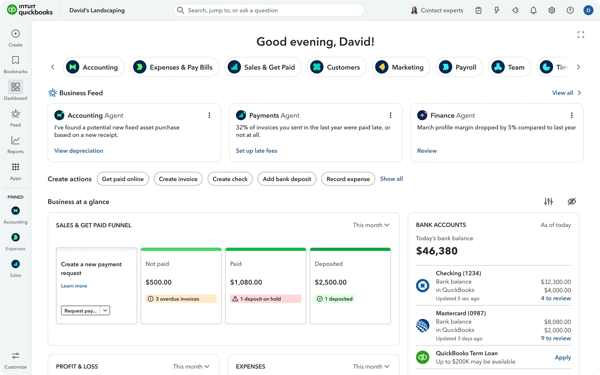
Bank feeds also keep stock spending current. G2 reviewers describe transactions importing continuously and reconciling as they go, so supplier payments and inventory purchases land in the books the week they happen. Stock costs that update themselves are the quiet win here; stale purchase data is where product margins usually go wrong.
The visibility payoff shows product-level money truth with real-time reports reflecting sales, cost of goods, and where the business stands, with tax-ready numbers. Reviewers running e-commerce describe channel sales importing and categorizing automatically, so what sold yesterday is in the P&L today.
Newer in the reviews I read is AI-assisted categorization. Reviewers describe the AI matching and classifying transactions, which for a product business means inventory purchases coded correctly with less bookkeeping labor. A few reviewers feel the platform changes faster than they’d like, but the ones using the categorization call it a time-saver.
The team payoff is the ecosystem of people. Reviewers repeatedly call QuickBooks the industry standard and mean it operationally. Staff with QuickBooks experience are easy to find, and outside accountants work in the file natively. For an owner, month-end on a product business stops depending on any one person.
Where it excels for growing stock operations is the add-on path. Many reviewers name dedicated inventory tools like Fishbowl, plus payroll, payments, and e-commerce apps, as the way they extend it. Warehouse depth bolts on when needed, while QuickBooks stays the financial system every stock number flows back into.
What the subscription buys is real. It provides the industry standard, the ecosystem, and the hiring pool. What reviewers increasingly note is the price keeps moving. It’s built for businesses whose accountant, bookkeeper, and bank all already run on QuickBooks, where staying on the shared standard is worth the rising bill.
The built-in inventory covers the basics well: quantities, costs, and reorder visibility inside the books. Some users note the advanced pieces are missing or gated. For instance, inventory tracking sits on the higher-tier plans, and warehouse-grade control isn’t there at any tier. Confirm which plan your stock needs actually land on before pricing it, and if you’re running serious warehouse operations, plan the Fishbowl-style add-on into the budget with QuickBooks as the ledger underneath.
For a small business owner whose inventory needs are real but simple, and who wants the stock numbers living where the accountant, the bookkeeper, and the next hire already work, QuickBooks Online is the path of least resistance, and its short payback estimate says the economics agree.
What I like about QuickBooks Online:
- Owners of product businesses describe running the whole back office themselves, and I noticed the inventory basics, quantities, costs, and purchases come along inside the books rather than in a second system.
- Reviewers lean hard on its industry-standard status, and I’d count that as an inventory feature too: nearly every channel and warehouse tool integrates with it, and staff who know it are easy to hire.
What G2 users like about QuickBooks Online:
“QuickBooks Online integrates seamlessly with our payroll software, making our month-end reconciliations much easier. The AI feature also has helped in categorizing our transactions, allowing us to match and post our transactions more quickly. The pricing is reasonable and fair. The online support has also been helpful. When an issue arises, we are able to get the assistance we need quickly.”
– QuickBooks Online review, Shannon D.
What I dislike about QuickBooks Online:
- The platform earns its standard-issue status, but a few reviewers flag the rising subscription costs and paid add-ons. That makes sense for businesses standardized on QuickBooks across their accountant and bank, where staying on the shared platform keeps everyone in one system and earns the price back.
- Advanced inventory is missing or gated, with tracking on higher tiers and no warehouse-grade control at any tier. That still makes it a fit for businesses that need stock to feed accurate books, with quantities, costs, and reorder points living right in the ledger.
What G2 users dislike about QuickBooks Online:
“The software is missing some advanced inventory management features and also depends on a reliable internet connection.”
– QuickBooks Online review, Rochelle M.
3. ShipHero: Best for brands and 3PLs running their own warehouses
Unlike everything above, ShipHero isn’t accounting-adjacent. It’s a warehouse management system, built for the physical work of inventory, receiving, picking, packing, and shipping it, whether the stock is yours or your clients’.
It has a 4.5 out of 5 rating across 200+ G2 reviews, and the reviewer mix convinced me the rating means something here. Logistics, warehousing, and consumer goods operators, the people physically running floors, are the ones scoring it. Its highest-rated feature is its centralized inventory database, well above the category average (97% against 90%), which for a warehouse operator is the whole game. G2 Data also gives it the shortest payback estimate in this lineup, around six months.
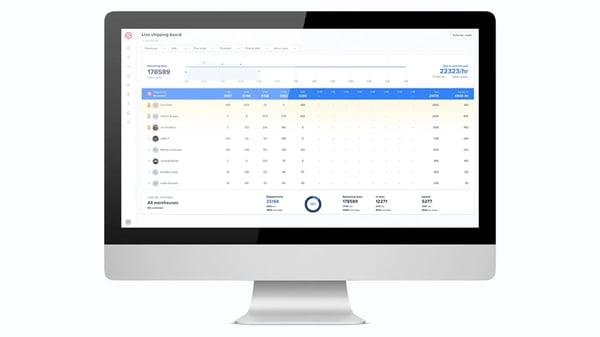
The problem it solves first is warehouse control. Reviewers describe real-time inventory tracking with barcode scanning and clear bin locations giving them command of their floor, with historical logs of nearly every action for tracing what happened when counts drift. That audit trail is what separates warehouse-grade tracking from the bookkeeping-grade inventory earlier in this list.
The first impression reviewers report is how fast floor staff get productive. The pick-and-pack process runs on mobile apps that reviewers call straightforward enough that new hires need little training. In high-turnover warehouse labor, training time is a real cost, and several reviewers say it changed how they hire.
The deeper value is order accuracy at speed. G2 reviewers describe picking, packing, and shipping from the same system that holds inventory, so orders move without re-keying between tools, and mis-picks and mis-ships drop. One pattern I kept seeing: operations consolidating several disconnected tools into this one workflow.
For workflow fit, automation rules are the distinctive capability reviewers name. They mention rules that route orders, pick shipping methods, and handle exceptions automatically. Reviewers running high daily volumes describe the rules quietly absorbing decisions a person used to make order by order.
For 3PLs (third-party logistics), multi-client operations are native. Many reviewers describe tracking inventory and orders separately for each client they service, and onboarding new clients quickly because Shopify and other channel integrations connect fast. E-commerce integrations are among its highest-rated features on G2, which matches how reviewers describe living between storefronts and the floor.
The support relationship reads more like a partnership in recent reviews. Many name their account and technical reps, describe fast turnarounds after go-live issues, and credit the escalation process when something’s urgent. In software that runs your physical operation, I’d weigh that heavily; downtime here isn’t an inconvenience, it’s trucks not leaving.
The warehouse core is what reviewers buy it for, and the 3PL billing module is where several want more, but a few describe billing profiles as too static for how they actually invoice clients, and some run client billing outside the system. ShipHero has told reviewers fixes are actively in progress, and brands fulfilling their own stock never touch this module; 3PLs should demo their real billing scenarios before committing.
The live inventory dashboards score well, and reviewers use them daily. The gaps show up in the report layer. Some users note missing fields like fulfilled dates, reports their 3PL clients ask for that aren’t available, and reporting screens that take more clicks than they should. Operators working from the standard dashboards won’t feel it; 3PLs who owe clients custom reporting should check what’s exportable first.
For a brand or 3PL whose inventory problem lives on a warehouse floor rather than in a ledger, this is the strongest operational tool on this list.
What I like about ShipHero:
- The warehouse control is what wins me over in the reviews: operators describe barcode scanning, bin locations, and real-time tracking, giving them stock accuracy they previously couldn’t hold.
- Reviewers also consistently mention how little training floor staff need on the mobile pick-and-pack apps, which they credit with faster hiring and steadier throughput.
What G2 users like about ShipHero:
“The biggest upside of using ShipHero is the control it gives us over our warehouse operations. Having real-time inventory tracking, barcode scanning, and clear bin locations has significantly improved our inventory accuracy and reduced picking errors. ShipHero has helped us maintain efficient fulfilment processes as my business grows.”
– ShipHero review, Corey S.
What I dislike about ShipHero:
- The client-billing module isn’t very flexible yet. Some reviewers note it handles simple pricing well but gets harder with complex fee structures. It’s a fit for businesses on clean, standardized rate cards and for brands shipping their own stock, who won’t touch client billing.
- The live dashboards do their job, but a few reviewers looking for custom or client-facing reports note missing fields and layouts that take extra clicks. It suits operations whose reporting needs match what the live dashboards surface, like real-time pick, pack, and inventory accuracy on the floor.
What G2 users dislike about ShipHero:
“The billing profiles can be a great tool, however, we are finding it to currently be a bit too static for our needs.”
– ShipHero review, Jana D.
4. Katana Cloud Inventory: Best for small manufacturers tracking production builds
If your stock isn’t just bought and sold but made, Katana Cloud Inventory is the tool on this list I’d start with. It tracks raw materials, recipes, and production orders alongside finished goods, so the build process and the stock ledger stay in one system.
On G2, it holds a 4.4 out of 5 rating across 100+ reviews, and what I find more telling is where else G2 registers it: job shop management, discrete ERP, manufacturing execution, and production scheduling. It’s the only tool in this lineup that lives in those categories, and per G2 Data, its reviewer base is almost entirely small businesses (93%), and manufacturers most of all. This is the manufacturing specialist of the list, sized for teams without an IT department.
The manufacturing core is what earns the spot. Reviewers describe multi-level bills of materials and product recipes handling complex builds, everything from raw materials to packaging to finished product in one place, and I noticed food and fermentation producers particularly, businesses whose “inventory” is ingredients that turn into other things.
What struck me next in the reviews is who uses it successfully: teams who describe themselves as non-technical. Ease of use is the single most-mentioned, as I found, and reviewers say new team members learn it without much hand-holding, which for a small manufacturer means the system doesn’t depend on one person.
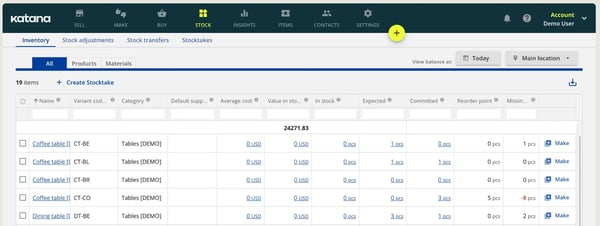
The deeper value is that material consumption drives the numbers automatically. Reviewers describe production runs consuming ingredient stock in real time, with expected-stock planning taking what one called the guesswork out of reorder points. I’d frame the payoff plainly. You find out you’re short on a component before the production run, not during it.
The workflow fit I kept seeing described is spreadsheet replacement. Reviewers arrive from planning sheets and describe cutting them by half or more, with production insight, costs, materials, and schedules, moving into a system that stays current on its own instead of one someone maintains by hand.
On the selling side, I found reviewers consistently pairing it with Shopify for automatic stock sync and with QuickBooks or Xero for the accounting handoff, with an API reviewers call a plus for connecting the rest. For a small manufacturer selling direct, that’s the make-to-sell pipeline connected end to end.
Getting started gets specific praise I don’t often see. Reviewers name their onboarding reps, call the tutorial library thorough enough to answer questions before support does, and G2 Data puts both its support quality and setup satisfaction above the category average. For a small team, the first month is the riskiest part of any system change, and this one seems cushioned.
The production core is solid, and reviewers say so plainly; where I saw recurring friction is the order workflows around it. Purchase-order tracking is described as a pain point in active evolution, auto-assembly works for kits but not individual products, and manufacturing orders can’t carry more than one SKU. Katana ships improvements steadily per reviewers (draft POs arrived recently), and simple build operations won’t hit these edges.
The product delivers value that reviewers acknowledge, even while noting the price move. The model recently shifted toward per-order pricing and paid add-ons, and I read long-time users describing costs that crept as features they used became extras. Unlimited users are now included, which some reviewers wanted for years, so the trade cuts both ways; price it against your real order volume on the current calculator, not on an older review’s numbers.
For a small manufacturer whose inventory problem is builds, batches, and ingredient counts rather than bins and pallets, I’d call this the best-fit tool on the list, and the free plan makes trying that claim cheap.
What I like about Katana Cloud Inventory:
- The multi-level BOMs and recipes are what I’d point to first: reviewers with complex builds describe materials, packaging, and finished goods finally tracked as one connected process.
- I also kept noticing how often reviewers credit real-time ingredient consumption with fixing their reorder timing; stock counts that update as production runs are the feature small manufacturers come for.
What G2 users like about Katana Cloud Inventory:
“I really like that Katana Cloud Inventory works well for manufacturing, which is essential for our needs. The multi-level BOMs are very helpful to us because we have complex manufacturing processes. I also appreciate the insights feature, which is quite useful for analyzing past data and making forecasts for future ordering and production.”
– Katana Cloud Inventory review, Natalie R.
What I dislike about Katana Cloud Inventory:
- The production side earns its praise, but I noticed purchase orders and assembly workflows drawing steady requests: auto-assembly is kits-only and manufacturing orders take one SKU, which complex assembly operations will feel sooner than simple ones.
- Pricing can feel heavier as usage grows, especially when add-ons or per-order fees come into play. For teams actively using Katana across inventory, production, purchasing, and sales tracking, the cost is easier to justify because it centralizes work that would otherwise sit across spreadsheets and disconnected tools.
What G2 users dislike about Katana Cloud Inventory:
“The PO tracking is something that I think they’re evolving, as they just added draft orders. But that’s been a pain point for me, as well as the way it talks to manufacturing orders. I think it’s a continued evolution.”
– Katana Cloud Inventory review, Sam G.
5. Unicommerce: Best for multichannel marketplace sellers
With Unicommerce, I was particularly interested in how it handled real-time inventory sync and multi-channel order management, two features absolutely needed to run any business smoothly. If you are asking, “Which vendor provides real-time inventory level updates?” Unicommerce might be the answer.
On G2, it has a 4.5 out of 5 rating across more than 80 reviews. What I found telling in the G2 Data is who reviews it: apparel and fashion brands are the largest reviewer group by far, and they rate the setup experience at 95%, the highest satisfaction mark on its profile.
What stood out to me immediately in reviews was how simple reviewers found it to integrate with multiple marketplaces. Unicommerce supports platforms like Amazon, Flipkart, Shopify, and Myntra, allowing users to sync their inventory across all these channels without manual intervention. The real-time updates meant they didn’t have to worry about overselling or stock mismatches.
One feature that consistently gets strong feedback in reviews is Unicommerce’s automated order processing system. I’ve seen G2 users point out how the platform automatically updates inventory, allocates stock from the correct warehouse, and even sends tracking details to the appropriate sales channels, all without manual intervention. Reviewers running high order volumes say this is what keeps them inside their promised dispatch times.