


I have spent a lot of time digging into the best construction project management software, a category where the difference between tools is not just about feature counts. It is about how reliably teams can track schedules, control costs, coordinate between the field and the office, and whether a construction management platform gives leadership the visibility to act before problems compound.
If you are evaluating the best construction project management software for your organization, that difference becomes clear quickly once you look beyond surface-level capabilities. From what I have seen, the strongest tools in this category consistently do a few things better than the alternatives: they centralize project communication, connect field activity to financial data in real time, and give project managers the visibility to catch problems before they compound into claims or schedule overruns.
For this guide, I evaluated 30+ tools across the construction project management and construction scheduling software category based on scheduling depth, cost management, field-to-office workflows, document control, and verified G2 reviews, narrowing the list to Autodesk Forma, Procore, Fieldwire by Hilti, RDash, HCSS, Oracle Primavera, Buildertrend, Revizto, Methvin, and Contractor Foreman.
10 best construction project management software for 2026: My top picks
|
Best construction project management software |
G2 Rating |
Best for |
Standout feature |
|
4.4/5 ⭐️ |
Enterprise AEC teams |
Design-to-field document control with BIM integration across the full project lifecycle |
|
|
4.6/5 ⭐️ |
Mid-to-large general contractors |
Centralized platform connecting drawings, financials, field reporting, and subcontractor management |
|
|
4.5/5 ⭐️ |
Field-first construction teams |
Mobile plan markup, punch lists, and daily reporting designed for the jobsite |
|
|
4.6/5 ⭐️ |
Real-time portfolio-level visibility |
Real-time construction dashboards that make project status readable for executives and owners |
|
|
4.6/5 ⭐️ |
Heavy civil contractors |
Estimating, field operations, and job cost accounting built for heavy civil and infrastructure |
|
|
4.4/5 ⭐️ |
Large programs and enterprise |
Industry-standard CPM scheduling and earned value management for large infrastructure programs |
|
|
4.3/5 ⭐️ |
Residential builders and remodelers |
Client portal and job costing built for residential construction and custom home workflows |
|
|
4.6/5 ⭐️ |
BIM-enabled AEC teams |
Model-linked issue tracking that ties coordination problems to their exact location in the 3D model |
|
|
4.6/5 ⭐️ |
Estimating and preconstruction |
Cloud-based quantity takeoff, tender management, and cost planning for preconstruction teams |
|
|
4.5/5 ⭐️ |
Small-to-mid contractors |
Affordable all-in-one platform covering scheduling, safety, time tracking, and client portal |
*These construction project management software tools are top-rated in their category, according to G2 Summer 2026 Grid Report. Pricing details are available upon request.
10 best construction project management software I recommend
At a basic level, construction project management software centralizes the workflows that keep a project on track, schedules, documents, financials, and field reporting, replacing the disconnected combination of spreadsheets, email, and paper-based processes that lead to budget overruns and missed milestones. That visibility matters because the cost of fragmented project data is measurable.
When drawing revisions, RFI responses, and cost updates are not visible in real time, teams make decisions on stale information, and that gap is where claims and schedule overruns tend to originate. The strongest tools do more than store project records. They connect field and office data in real time, surface the right information to the right stakeholder, and reduce the manual work that pulls project managers away from managing projects.
The global construction management software market is projected to grow to $17.81 billion by 2031, at an 8.99% CAGR, driven by SaaS adoption, owner demand for real-time cost and schedule visibility, AI-powered risk and compliance tooling, and government mandates around embodied-carbon reporting and digital-twin requirements that now make software a prerequisite for public tenders.
How did I find and evaluate these best construction project management software tools?
I started with G2’s Grid Reports to build a shortlist of the top construction project management software tools based on G2 Score, user satisfaction, and overall market presence.
Next, I analyzed G2 reviews at scale to identify recurring patterns across project management and field operations teams: what helps them track schedules and costs more effectively, where document control or field reporting falls short, and which features make construction project management software genuinely easier to use across the full project team. I paid close attention to feedback about field-to-office communication, financial visibility, scheduling depth, and how well each platform supports faster decision-making on active projects.
Since I could not evaluate every platform directly, I relied on insights from professionals who use these tools daily and validated those findings against verified G2 reviews. The screenshots in this article come from G2 vendor profiles and publicly available product documentation.
What makes these best construction project management software tools worth it: My perspective
If you are evaluating basic project tracking tools, you will focus on task management, scheduling, and document storage. But when comparing the best construction project management software for business use, you need platforms that support real-time cost visibility, field reporting, subcontractor coordination, and seamless management across projects and locations. Keeping that in mind, here are the factors I prioritized.
- Field-to-office communication and construction field management software capabilities: The first thing I look for is how well a platform connects what is happening on the jobsite to the information that project managers and executives need to make decisions, strong platforms make this connection real-time, not weekly.
- Document control and revision management: Construction projects generate thousands of documents. I prioritized tools that make drawing revisions, RFIs, submittals, and transmittals traceable, because version control failures are one of the most common sources of rework and claims.
- Cost management and financial visibility: Budget tracking that updates manually is not cost management. I looked for tools that connect field activity, change orders, and procurement to the financial picture in real time.
- Scheduling capabilities: I evaluated scheduling depth across the full spectrum, from task-based milestone tracking for residential builders to full CPM and earned value management for large infrastructure programs.
- Deployment fit and scalability: I gave preference to platforms that are clear about who they are built for, whether SMB residential contractors, mid-market GCs, heavy civil specialists, or enterprise program managers.
- Mobile access and field usability: I prioritized tools that make it practical for field supervisors and project managers to capture and access information from the jobsite, not just from a desk.
- Integration with financial and ERP systems: I looked for platforms that connect with accounting software, ERP systems, and scheduling tools, because that connectivity determines whether the platform actually fits a company’s operating model.
*This data was pulled from G2 in 2026. Some reviews may have been edited for clarity.
1. Autodesk Forma: Best for enterprise AEC teams
Autodesk Forma (formerly Autodesk Construction Cloud) is a cloud-based construction project management platform built for AEC organizations that need design coordination, document control, and field execution connected in a single environment. It brings drawing revisions, RFIs, submittals, and field reporting into a setup that keeps the full project team working from the same information, rather than chasing each other across email threads and disconnected file systems.
The first thing that stands out in Autodesk Forma’s G2 reviews is how central document control is to the value teams get from it. Revision history, structured transmittals, and approval routing are built into the workflow, so drawing updates and design decisions stay tied to the project record. According to G2 data, Autodesk Forma scores 88% for Information Management, which aligns closely with the review sentiment; users consistently describe it as the platform that finally brought order to the drawing distribution and revision tracking process that had previously lived in email.
BIM integration is another major strength that I kept seeing called out in reviews. Issue tracking connects directly to model elements, which means field teams can flag coordination problems against the exact location in the drawing set rather than describing them in free text. For AEC firms already working in Revit, Civil 3D, or Navisworks, Forma adds the construction management layer on top of the design tools already in use, closing the gap between what gets designed and what gets built without requiring a platform migration.
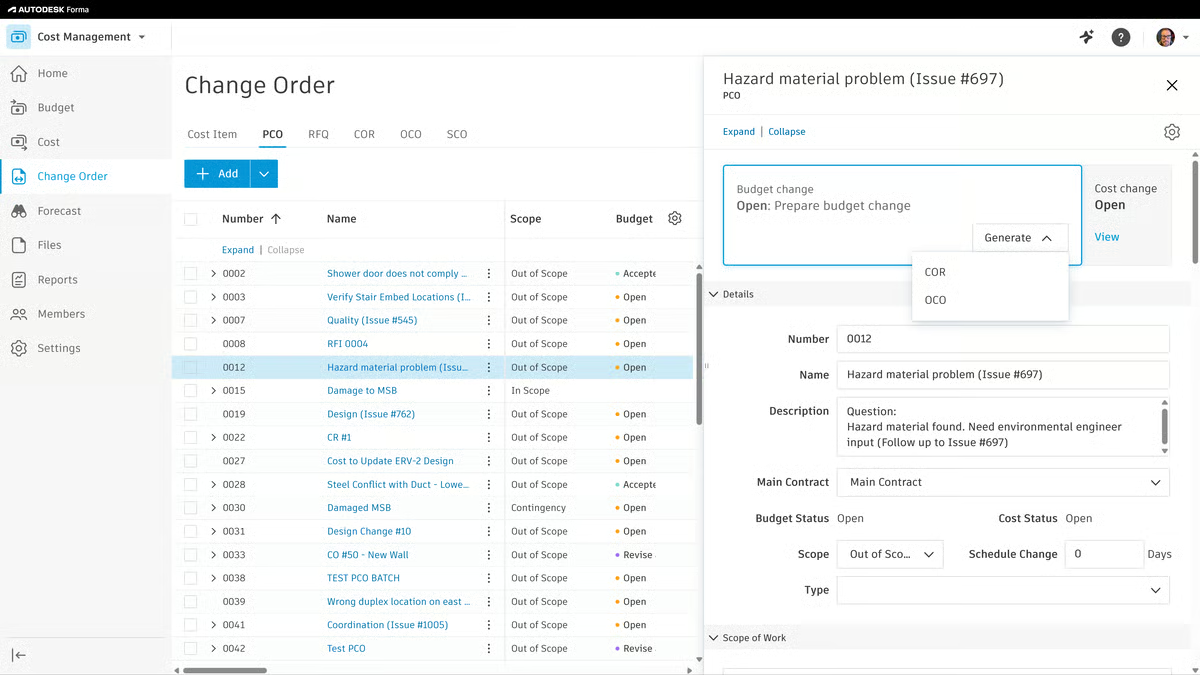
I also noticed a lot of praise for portfolio-level visibility in the reviews. Project controls teams describe being able to tie schedule progress to cost-loaded elements, producing defensible variance narratives that trace back to actual field activity rather than estimated status. G2 data shows Autodesk Forma at 89% for Communication and Collaboration, which reflects how effectively the platform keeps architects, engineers, contractors, and field teams working from a shared information environment across complex, multi-discipline programs.
Mobile field capture comes up repeatedly as a practical strength. Foremen submit daily reports, capture photos, and mark up plans from any device, updates that sync automatically to the office-side record without manual re-entry. That field-to-office connection is the part of the platform that reviewers describe as most changing how their project teams operate day to day.
RFI and submittal workflows are another consistent theme in positive reviews. Structured routing reduces the information request latency that directly impacts schedule performance, reviewers describe the reduction in RFI backlog as one of the most tangible impacts of adopting the platform on multi-trade projects where design questions pile up in preconstruction.
I also think Autodesk Forma benefits from how these capabilities connect to each other. The Autodesk ecosystem integration, spanning Revit, Civil 3D, Navisworks, and the broader design suite, gives project teams a continuous data thread from design authoring through construction execution. Teams that are already standardized on Autodesk tooling find that Forma reduces the translation errors that occur when files move between disconnected systems.
That said, what also comes through clearly in the reviews is that getting full value from Autodesk Forma requires real setup investment. The platform handles complex workflows well, and most organizations using it at scale praise the depth of its document control, but some reviewers note that initial configuration takes significant time, particularly for teams with non-standard naming conventions or approval chains. Teams that invest in a structured implementation consistently report that the front-loaded effort pays off across the project lifecycle, while teams that skip the setup phase tend to underutilize what the platform can deliver.
Pricing also comes through as a fit consideration rather than a universal drawback. Autodesk Forma is designed as a modern, cloud-first AEC platform with built-in coordination depth, and that positioning comes with enterprise-level pricing that some reviewers, particularly from smaller contracting firms, note as a barrier to entry. For organizations running multiple concurrent projects with dedicated project controls staff, the breadth of what it offers tends to deliver clear return on investment, but teams that only need a portion of the platform’s capabilities may find that tradeoff harder to justify.
Overall, Autodesk Forma comes across as a strong fit for enterprise AEC organizations where document control, BIM coordination, and field-to-office traceability across complex multi-discipline projects are non-negotiable requirements.
What I like about Autodesk Forma:
- Autodesk Forma’s document control is what reviewers describe most consistently: revision tracking, transmittals, and RFI routing tied to the project record rather than scattered across email chains and shared drives.
- Users highlight the BIM-to-field connectivity as the standout access win, field engineers can flag issues directly against model elements without a BIM authoring license, making coordination a team-wide activity.
What G2 users like about Autodesk Forma:
“I think the coolest part of Autodesk Forma is that I can use any address on the map, anywhere in the world, to add buildings and plan sites for construction and design. Another great thing is its capability for 3D model import/export from third-party apps. I can export models from Fusion, AutoCAD, or Revit, which I find really useful because I prefer using my own models. Additionally, being able to run simulations on Forma is a significant plus. The platform helps unify and bring my ideas to life when I have built models to scale from CAD software, enabling better collaboration and effective analysis of various building sites. Also, the initial setup was pretty easy- it guides you through the way.”
– Autodesk Forma review, Katelyn H.
What I dislike about Autodesk Forma:
- Autodesk Forma’s initial configuration is where reviewers note the most investment, and organizations with dedicated project controls staff tend to ramp faster than those expecting immediate out-of-the-box productivity when aligning naming conventions and approval workflows.
- The platform’s enterprise scope is its defining strength, and smaller teams may want to map actual usage requirements against the full license cost before committing to avoid paying for capabilities they won’t use.
What G2 users dislike about Autodesk Forma:
“I find that, although the interface is very intuitive, it still takes quite a lot of time to learn some of the advanced features. From a cost perspective, I would say it’s necessary to have another licensing option for secondary stakeholders, or for those who are only going to review the model.”
– Autodesk Forma review, Mira B.
Managing project documents is only one part of construction project control. Explore G2’s best construction estimating software to find tools that help your preconstruction team produce accurate bids before a project begins.
2. Procore: Best for mid-to-large general contractors
Procore is a cloud-based construction project management platform built for general contractors that need drawings, financials, field reports, and subcontractor coordination in one place. It is especially well-suited for mid-to-large contracting organizations where information fragmentation across multiple systems is the primary source of cost overruns and schedule delays.
What immediately caught my attention about Procore is how consistently reviewers describe its value in terms of consolidation. Drawings, RFIs, submittals, change orders, daily logs, and financial management all live in one platform, and the impact of that consolidation is measurable in fewer dropped handoffs and faster response cycles on active projects. According to G2 data, Procore scores 92% for Likelihood to Recommend, one of the highest marks in the construction project management software category, which reflects how confidently project managers advocate for it among peers who are still managing projects across disconnected systems.
Financial management is a core strength that separates Procore from lighter-weight PM tools. A lot of reviewers talk about being able to see real-time budget vs. actual without waiting for weekly accounting exports, budget tracking, contract management, and change order workflows all connect directly to the project record. The financial trail is auditable from the project level down to individual line items, which matters on projects where owner reporting and lien documentation are contractual requirements.
I also saw a lot of positive feedback around the subcontractor coordination model. Procore gives subs access to current drawings, specifications, and correspondence without requiring full paid licenses, which means the full project team works from the same documents without the license cost barrier that complicates information sharing on traditional enterprise platforms. G2 data shows Procore at 89% for Project Tracking, reflecting how reliably field-entered data surfaces in the status views that project managers and executives actually use to make decisions.
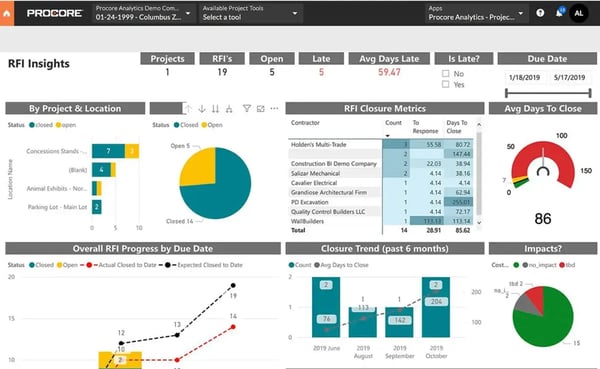
Mobile field capture is another recurring strength in the reviews. Foremen pull up current drawing sets, create punch list items, and submit daily reports from the jobsite, updates that sync immediately to the project record rather than requiring a project manager to chase down field notes at the end of the week.
Reporting and analytics give project leadership the visibility to catch cost and schedule variances before they compound. I also noticed that the integration ecosystem comes up often as a meaningful differentiator. Procore connects with major accounting platforms like Sage, Viewpoint, and QuickBooks, as well as scheduling tools, takeoff software, and ERP systems. That connectivity reduces the data re-entry that creates reconciliation errors in project financial reporting.
I also think Procore benefits from how these capabilities reinforce each other. The centralized drawing set, financial workflows, field reporting, and subcontractor access do not feel like disconnected strengths; they support the same outcome: giving project teams the information they need to make good decisions without hunting for it across multiple systems.
Procore is the right platform for mid-to-large general contractors with the project volume to justify it. That said, I see reviewers from smaller GCs and subcontractors consistently describing ACV-based pricing as cost-prohibitive, and the economics get harder to defend the fewer active projects a firm is running at any given time.
The platform’s depth is what makes it the most complete construction management tool in this lineup, but what I kept seeing across G2 reviews is that the learning curve never fully ends: reviewers describe re-encountering complexity each time they add modules or shift workflows, making ongoing platform investment a requirement, not just an onboarding task.
In my evaluation, Procore comes across as the strongest fit for mid-to-large general contractors where a single platform connecting field, financials, and subcontractors can replace the fragmented toolset that most contracting organizations are still operating with.
What I like about Procore:
- Procore’s all-in-one consolidation is the feature reviewers describe most consistently as changing the operating model, drawings, financials, field reports, and subcontractor access in one platform, replacing manual reconciliation across disconnected systems.
- Users highlight the subcontractor access model as particularly valuable, subs get visibility into current project documents without full licenses, which keeps the entire team on the same information and reduces version-control rework.
What G2 users like about Procore:
“What I like most about Procore is how it keeps everything in one place. It makes it easy to track RFIs, submittals, drawings, and communication without jumping between systems. The most helpful part is the real-time updates, which keep the field and office aligned and reduce miscommunication. It also helps standardize workflows, making it easier to stay organized and manage multiple projects at once. Overall, it improves efficiency, communication, and visibility across projects.”
– Procore review, Carina V.
What I dislike about Procore:
- According to G2 reviews, Procore delivers strong value for mid-to-large general contractors, and smaller GCs and subcontractors may find the ACV-based pricing harder to justify when running fewer active projects.
- The platform’s depth is what makes it the most powerful option in this lineup, and teams should budget time for a learning curve that continues past onboarding. Reviewers consistently describe re-encountering complexity each time new modules or workflows are added.
What G2 users dislike about Procore:
“Procore’s pricing is based on Annual Construction Volume (ACV) rather than a flat per-user fee. As your project volume scales up, the annual cost increases significantly. For smaller subcontractors or mid-sized general contractors, the software can feel cost-prohibitive compared to alternatives.”
– Procore review, Philip D.
Project financials need to connect to your accounting system. Compare the best construction accounting software to find tools that integrate with your project management platform and keep your books current with field activity.
3. Fieldwire by Hilti: Best for field-first construction teams
Fieldwire by Hilti is a construction field management software platform built for construction teams that need plan markup, punch lists, inspections, and daily reporting without the overhead of a full enterprise project management suite. Unlike platforms that approach construction management from the office outward, Fieldwire starts from the field, and that orientation is visible in every workflow it’s built around.
The most consistent theme I kept seeing across Fieldwire’s G2 reviews is how accessible the platform is for field crews, specifically. According to G2 data, Fieldwire by Hilti scores 90% for Ease of Use, one of the highest ratings in the construction project management software category on this dimension, a direct reflection of its mobile-first design philosophy. Reviewers describe it as the tool that field supervisors actually use daily rather than abandoning after initial onboarding, which is a meaningful distinction in a category where platform adoption often falls off after the first few weeks.
Plan management and markup are where the platform earns the most consistent praise. Field crews access the latest drawing set on any device, annotate plans, tie photos to specific drawing locations, and link tasks to the exact area where work is happening. That drawing-to-field traceability is the most reliable way to ensure crews are working from current documents, which is a source of rework that comes up repeatedly in reviews from teams that moved to Fieldwire from paper-based or email-distributed drawing sets.
Punch list and task workflows are another area where reviewers stay consistently positive. Tasks assigned in Fieldwire are tied to a drawing location, assignee, and due date, creating a structured closeout record that contract administrators track in real time rather than chasing field supervisors for status. G2 data shows Fieldwire by Hilti at 90% for Ease of Doing Business, which reflects how frictionless the platform is for field teams to adopt and use consistently across a full project lifecycle rather than just at initial rollout.
Daily reporting is designed for completion in minutes, not bureaucratic overhead. Field supervisors fill in structured daily logs, workforce counts, weather, work completed, issues encountered, and those records accumulate automatically into a project log that supports claims documentation and dispute resolution without requiring office staff to chase down field data.

Inspection and checklist workflows give quality managers a repeatable, digital approach to pass/fail documentation against specific drawing locations. I also noticed that offline mode comes up as a meaningful differentiator for teams on jobsites with poor connectivity. Fieldwire caches the drawing set and queues updates locally, syncing when connectivity returns, so field teams are not blocked by network issues in basements, tunnels, or remote sites.
I also think Fieldwire benefits from how well it fits into a broader PM stack. It integrates with Procore, Autodesk, and a range of project management tools, which means teams can add it as the field management layer on top of an existing office-side system rather than requiring a full platform switch.
Fieldwire earns its field usability reputation on drawing access and task workflows. That said, I see reviewers consistently flagging reporting and export customization as the gap that creates the most downstream friction, with rigid report formats and inflexible form structures that don’t match how field data needs to reach owners and contract administrators.
Mobile field access is the platform’s defining strength and it delivers for drawing markup, that said, what I kept seeing in 2026 reviews is battery drain and photo-capture performance drops on larger projects, which creates friction specifically in the field-heavy daily workflows the platform is built to support.
Fieldwire by Hilti stands out most for field-first teams where daily plan management, punch list tracking, and inspection workflows are the workflows that matter most, and where the platform’s mobile-first design drives adoption in a way that more complex enterprise tools often cannot.
What I like about Fieldwire by Hilti:
- Fieldwire’s mobile drawing and markup experience is what field supervisors describe most consistently as the reason they actually use it daily; it works the way field crews need it to, not the way an office-designed UX assumes they do.
- Users highlight punch list and inspection workflows as a real closeout advantage; location-linked digital records give contract administrators real-time deficiency status without daily follow-up calls to the field.
What G2 users like about Fieldwire by Hilti:
“Fieldwire keeps our entire project team aligned by combining drawings, tasks, photos, RFIs, and field documentation in one easy-to-use platform. As a superintendent, I rely on it daily to coordinate subcontractors, track progress, document quality, and communicate field issues in real time.”
– Fieldwire by Hilti review, Scott P.
What I dislike about Fieldwire by Hilti:
- Fieldwire’s field usability is genuinely strong for drawing markup and task tracking, and teams that need deep reporting and export customization may want to plan for format constraints that don’t always align with how field data needs to reach owners and contract administrators.
- Some reviewers describe battery drain and photo-capture performance drops on larger projects, creating friction in the mobile-first workflows the platform is built to support.
What G2 users dislike about Fieldwire by Hilti:
“We’d like templates for tasks that users could populate when surveying. More control over scheduled reports. Also, the ability for others in the team to get access at a different level and at a lower cost. Currently, we have people who would interact with the app minimally, so it doesn’t make sense to pay a full license, but they would benefit if they could at a lower rate.”
– Fieldwire by Hilti review, Tom O.
4. RDash: Best for real-time portfolio visibility
RDash is a construction project management platform built for project executives and portfolio managers who need real-time status dashboards across multiple active projects. It fills a specific and underserved gap in the category: turning project data into views that non-technical stakeholders can read and act on immediately, without waiting for a project manager to produce a weekly report.
What stands out to me first about RDash is how strongly it is built around making project status visible to the people who need to act on it, rather than just the people producing it. According to G2 data, RDash scores 100% for Ease of Administration, the highest in this article’s tool lineup, reflecting how minimal the overhead is to manage the platform once it is configured. Project executives get visibility across their portfolio without needing a data team to build and maintain the reporting infrastructure behind it.
The dashboard design is purpose-built for construction reporting. Progress against schedule, budget vs. actual, milestone completion, and risk indicators surface in views that project executives can interpret at a glance rather than spending time translating raw data into insight. Reviewers from multi-project firms consistently describe this as a fundamental shift from spreadsheet-based weekly reporting cycles that arrived after the decisions they should have informed had already been made.
Portfolio-level visibility is the feature I saw praised most consistently across RDash’s reviews. Executives managing multiple simultaneous projects can see comparative status, flag at-risk jobs, and prioritize attention in one consolidated view, without switching between individual project records. That kind of real-time multi-project visibility is what most construction management platforms don’t provide to the executive layer, and reviewers from multi-project firms call it the feature that most changes Monday morning project reviews.
Budget tracking and cost variance reporting are other recurring strengths. Project owners get a line of sight into financial performance without requiring finance staff to produce the report; cost data is surfaced in context and designed for decision-making rather than buried in a spreadsheet that takes 20 minutes to read. G2 data shows RDash achieving a 1-month ROI payback period, the fastest of any platform in this article’s tool lineup, which reflects how quickly teams recoup the investment through time saved on reporting cycles and reduced decision latency.

Stakeholder reporting is another area where reviewers stay consistently positive. Formatted status reports can be generated from live dashboard data rather than assembled manually, which reviewers call out as a meaningful reduction in the administrative overhead of owner reporting, particularly on projects with frequent client communication requirements.
I also noticed that RDash earns strong marks for ease of adoption. With a 96% Ease of Use rating on G2, the platform is designed to deliver value quickly rather than requiring weeks of configuration before executives can access the dashboards they need, which is particularly relevant for organizations that have tried to build custom reporting dashboards in other tools and found the maintenance overhead prohibitive.
RDash delivers portfolio-level dashboard visibility that reviewers describe as a step-change from manual reporting cycles, that said, what I kept seeing as the dominant 2026 complaint is that dashboards only stay accurate when all teams update data consistently, and when even one project falls behind, the real-time visibility that drove adoption starts to erode.
The product team is responsive and reviewers describe genuine momentum, that said, I see invoice generation, BOM management, and budget workflow features flagged as absent or incomplete, and teams expecting full financial transaction management alongside the dashboards will encounter gaps that weren’t visible during evaluation.
RDash makes the most sense for project executives and portfolio managers who need real-time visibility across multiple active projects and want to replace manual weekly reporting with dashboards that surface the right information without administrative overhead.
What I like about RDash:
- RDash’s real-time portfolio dashboards are what executives describe as the step-change capability, comparative project status available before decisions get made by default, without needing a data team to build it.
- Users highlight the speed of value realization as immediately visible, reviewers describe time saved on manual reporting cycles and faster decision-making as tangible within the first months of adoption.
What G2 users like about RDash:
“All vendor information, performance history, and open POs in one place. Makes follow up much more structured. I know exactly where each vendor stands without making calls.”
– RDash review, Balakrishna Y.
What I dislike about RDash:
- RDash’s dashboard visibility is genuinely strong, and teams should plan for accuracy that depends entirely on consistent team-wide data entry. When even one project falls behind on updates, the real-time view that drove adoption starts to erode.
- The product team ships consistently and reviewers describe real momentum, and teams expecting full financial management alongside dashboards may want to confirm that invoice generation, BOM management, and budget workflow features meet their requirements before committing.
What G2 users dislike about RDash:
“In the reporting features, I still find a few gaps. Especially, you know, it’s a small thing. But when I’m reviewing the financials and the reports, the graphs usually show me data of the finances in basically the wrong currency. I’m not able to see it in the lakh crore format and in INR, which is the currency and the structure we follow in India. So that becomes a little cumbersome. Other than that, I think it would be helpful if certain additional features are added, like a material library, because that’ll help me build and make BOQs, not just make BOQs, but also fill rates for BOQs on the platform.”
– RDash review, Sonal D.