


I evaluated 20+ free tools using G2 Data and reviews to finalize the 8 best free marketing analytics software for marketing teams. These are AgencyAnalytics, CallRail, CleverTap, HubSpot Marketing Hub, Intuit Mailchimp, Klaviyo, Semrush, and Singular.
I’ve spent enough late evenings stitching campaign numbers together across six browser tabs to know that “free” marketing analytics tools are not all built the same. What separated these eight from the rest of the field was how cleanly each owns a different slice of the job, from SEO and email to call tracking, app attribution, and client reporting. The real skill is knowing exactly where each free plan stops.
Many marketing teams don’t get a tooling budget on day one, so you’re proving ROI and reporting to leadership on whatever costs nothing. Free plans always sound generous until you hit the contact cap mid-campaign or the trial clock runs out right as your VP asks for numbers, so it pays to know those limits before you commit to one.
For this guide, I focused on G2’s free marketing analytics software category, dug into exactly what each free plan or trial includes, and cross-referenced what marketing teams say about them in their G2 reviews. Here’s what I found about the best free marketing analytics software for marketing teams in 2026.
What are the best free marketing analytics software solutions for marketing teams in 2026?
- AgencyAnalytics: Best for agency client reporting and white-label dashboards
For agencies reporting on several clients’ campaigns from one white-labeled dashboard. - CallRail: Best for call tracking and offline attribution
For teams running ads or local campaigns where prospects call instead of click. - CleverTap: Best for mobile app engagement and retention analytics
For app-first teams measuring user behavior and running push, in-app, and email campaigns. - HubSpot Marketing Hub: Best for all-in-one campaign analytics with a free CRM
For small teams running campaigns, email, and lead tracking in one connected place. - Intuit Mailchimp All-in-One Marketing Platform: Best for email campaign analytics
For small teams measuring email performance without spending a cent. - Klaviyo: Best for ecommerce email and SMS analytics
For ecommerce teams tying email and SMS performance directly to revenue. - Semrush: Best for SEO and competitor analytics
For teams measuring search visibility and content performance. - Singular: Best for mobile attribution and marketing fraud detection
For mobile app teams attributing installs and re-engagement across channels.
*Tools are listed alphabetically. These tools offer a free plan, a free trial, or a freemium model.
Comparison of the best free marketing analytics software for marketing teams
Here’s exactly what each free plan or trial covers, and where it stops, before the full reviews.
| Tool | G2 Rating | What the free plan or trial covers | Paid starts at |
| AgencyAnalytics | 4.7/5 ⭐ |
|
Core $20/client/mo (billed annually; $25/mo monthly) |
| CallRail | 4.5/5 ⭐ |
|
Lead Tracking $50/mo (billed yearly); 5 numbers, 250 minutes |
| CleverTap | 4.6/5 ⭐ |
|
Essentials tier, priced by monthly active users (quote-based) |
| HubSpot Marketing Hub | 4.4/5 ⭐ |
|
Starter from $15/mo; 1 seat, 1,000 marketing contacts |
| Intuit Mailchimp All-in-One Marketing Platform | 4.4/5 ⭐ |
|
Essentials $13/mo (12-month introductory promo) |
| Klaviyo | 4.5/5 ⭐ |
|
From ~$20/mo (251–500 profiles) |
| Semrush | 4.4/5 ⭐ |
|
Paid from $139/mo ($117.33/mo billed annually) |
| Singular | 4.5/5 ⭐ |
|
Growth from $0.05/conversion (usage-based; sales-assisted) |
*All pricing and free-plan details are based on publicly available data at the time of publication and are subject to change.
Marketing teams are being asked to prove more with less. Marketing budgets have fallen to just 9% of company revenue, and overall marketing spending grew only 1.7% over the past year, the weakest rate since 2021. When budgets are that tight, a capable free analytics stack isn’t a compromise.
How did I find and evaluate these free marketing analytics tools?
I started with G2’s free marketing analytics software category, which lists tools offering a free plan, free version, or free trial. From there I worked down the most-reviewed, highest-rated tools that offer a genuine free plan or trial, and evaluated each in detail, what you actually get without paying, how the limits are structured, and the exact point where a marketing team gets pushed to upgrade.
I then cross-referenced verified G2 reviews from people in marketing roles to understand how each tool holds up in real marketing work beyond my own evaluation: what teams lean on it for, where it gets in the way, and how much of the value sits behind a paywall. G2 review data referenced throughout was pulled in 2026, and some reviews have been lightly edited for clarity. The G2 Score, satisfaction, feature, and payback figures cited throughout come from G2 Data, G2’s verified user reviews and Grid ratings.
The screenshots in this article are a mix of those taken from each vendor’s G2 profile and publicly available materials.
What I look for in free marketing analytics software for marketing teams
A free plan is only useful if it does real work before it runs out. Here’s what I paid attention to:
- Exactly what is free. I specifically looked for the free features, differentiating them from the limited features. I did this by paying attention to the actual numbers of contacts, data sources, emails, tracked users, query caps in the free plan, and how long the trials last.
- Free forever versus free trial: I noted which tools are free indefinitely and which only give you 14 days, since that distinction changes how a team should plan around them.
- Where the free plan stops. I identified whether the wall is a contact cap, a data-source limit, or an expiring trial, since that tells you how long the tool will actually serve your team.
- Coverage across marketing work. I noted which slice of the job, SEO, email, campaigns, call tracking, app engagement, or reporting, each tool owns, since that work lives across different tools.
- Whether a marketer can use it without a data team. I looked for no-SQL dashboards and clean setup, since those matter most when there’s no analyst on call.
- AI features that earn their place. I flagged AI that speeds up analysis or helps measure visibility in AI search only when it was genuinely useful, and noted whether it was actually free.
To be included in G2’s Marketing Analytics category, a product must:
- Collect data on marketing campaigns distributed across a variety of media channels
- Monitor marketing campaigns and targeted audiences to identify the results
- Analyze the results and compile data of marketing campaigns
- Integrate with sales, marketing, and other analytics software through which users can source marketing data
- Visualize marketing campaign performance via an analytics dashboard or similar visualization features, including data such as key performance indicators, clicks, ROI, or other marketing engagement statistics
From that category, I focused on the tools that offer a genuine free plan or free trial.
This data was pulled from G2 in 2026. Some reviews may have been edited for clarity.
1. AgencyAnalytics: Best for agency client reporting and white-label dashboards
I opened AgencyAnalytics expecting another single-channel dashboard, and instead found a tool built specifically for agency marketing teams juggling several clients at once: it pulls campaign data from dozens of ad, SEO, email, and social platforms into one white-labeled dashboard, so a client sees their numbers without ever touching the underlying tools.
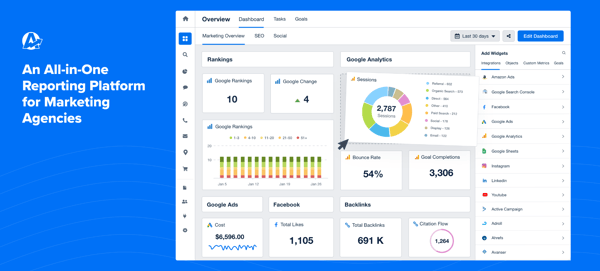
Across the 14-day trial, what stood out to me was how little assembly the reports needed: connect a client’s accounts, and the dashboard and share link were ready without custom formulas or a design pass. One thing to know up front, AgencyAnalytics moved to a single-plan pricing structure, so there’s no free-forever tier to fall back on once the trial ends.
For an agency marketing team billing hours against reporting time, the G2 Data backs up the time-savings pitch: AgencyAnalytics is a category Leader with a 71 G2 Score, the highest star rating of the eight (4.7/5), and it tops the group on quality of support (96%) and ease of setup (93%), with G2 reviewers consistently pointing to the breadth of integrations as the reason setup goes fast.
What does AgencyAnalytics’ free trial include?
- A 14-day free trial, no credit card required
- Unlimited reports, and dashboards during the trial
- White-label client reports
- Access to the full integration library (ad platforms, SEO tools, email, social)
When should you upgrade your AgencyAnalytics free plan?
Two situations move agencies onto a paid plan:
- The 14-day trial ending. There’s no free-forever tier, so the trial deadline is the hard stop.
- The per-client pricing structure. G2 reviewers note the entry plan is billed per client with a minimum commitment, so freelancers and single-brand teams pay for client slots they don’t use. AI insights are a paid add-on on top.
Core runs $20/client/month billed annually (or $25/month), which reviewers say is easy to budget once your client count is steady, and harder to justify when you manage only one or two brands.
Where AgencyAnalytics genuinely stands out:
- I noticed G2 reviewers repeatedly crediting the all-in-one dashboard for replacing a stack of exported spreadsheets, since it pulls from most of the platforms an agency marketing team already runs client campaigns on, and that consolidation shows up in the G2 Data too, AgencyAnalytics scores 95% on reports and dashboards, well above the category’s 90% average.
- The white-label share links come up often too, reviewers describe handing clients direct access instead of building a deck, which is exactly the kind of hour a small agency team wants back.
What G2 users like about AgencyAnalytics:
“I use AgencyAnalytics for marketing reports, and the main thing I like is that it pulls all my marketing campaign reporting data into one dashboard. It’s easy to use and easy to scan the data. It pulls from most of the platforms I need, and it’s easy for clients to access with share links. The biggest impact for me is that it pulls data from multiple platforms so my clients don’t have to look through multiple documents or long pages.”
– AgencyAnalytics review, Jena M.
Is AgencyAnalytics right for your marketing team?
Best for: Agency marketing teams that report on multiple clients’ campaigns and want one white-labeled dashboard instead of per-client exports.
Not ideal for: In-house teams reporting on a single brand, or teams that need a free-forever plan rather than a 14-day evaluation window.
What I dislike about AgencyAnalytics:
- During my evaluation, combining data from multiple sources onto a single summary page wasn’t straightforward, G2 reviewers echo this too. For a team that reports client-by-client rather than blending sources, the dashboards still do the job well.
- Some reviewers flagged that grouping campaigns by theme or tactic for custom charts takes workarounds. For standard channel-by-channel reporting, the default views cover it.
What G2 users dislike about AgencyAnalytics:
“I wish there were a way to combine or consolidate data from multiple data sources into a single page, for example: a summary of KPIs across key channels on a single page. To my knowledge, only one data source can be linked per page. I also wish there was functionality that would allow you to group campaigns by theme or tactic and create charts or tables that display that data by theme or tactic.”
– AgencyAnalytics review, Nina M.
Reporting for more than one client? See G2’s data visualization category for the wider field of dashboard tools.
2. CallRail: Best for call tracking and offline attribution
I evaluated CallRail expecting a straightforward call-tracking tool, and found it answers a question most marketing teams ignore while analyzing their campaigns: which marketing actually made the phone ring. For teams running Google or Meta ads, or local campaigns where prospects call instead of click, CallRail ties each call back to the campaign, ad, and keyword that produced it, closing an attribution gap that web analytics alone leaves open.
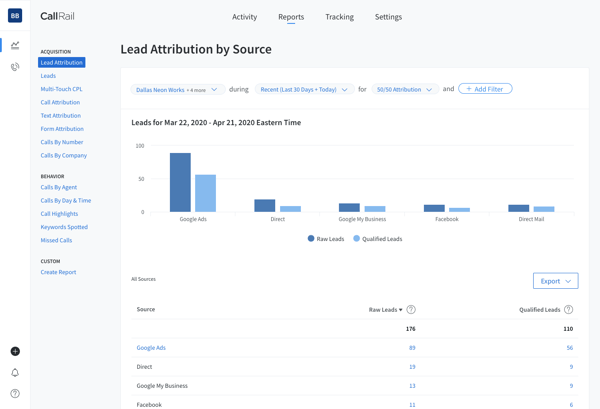
On the 14-day trial, I watched the value land fast for anyone spending on ads: dynamic number insertion showed which source drove each call, and call recording and transcription made it easy to verify lead quality. One thing to know up front, CallRail is trial-only, so you get 14 full-featured days on the Lead Tracking plan before it becomes a paid tool.
What stood out to me was how little setup stood between signing up and seeing attributed calls. If getting live fast with minimal setup matters most for your marketing team, the scores back it up: on G2, CallRail goes live fastest of the eight (about 0.6 months) and scores highest on ease of use (92%).
What does CallRail’s free trial include?
CallRail offers a 14-day free trial on every plan tier, no credit card required. During the trial you can try the following features from the entry Lead Tracking plan ($50/mo):
- 5 phone numbers and 250 minutes, with dynamic number insertion for call attribution
- Call recording, routing, and transcription
- Automation rules, plus integrations with Google Ads, GA4, and CRMs
- Text (SMS) tracking activates once the trial converts to paid, it isn’t live during the 14 days
When should you upgrade your CallRail free plan?
A few situations move teams onto, or up, a paid plan:
- The 14-day trial ending. There’s no free-forever tier behind it.
- Usage-based cost. The entry Lead Tracking plan ($50/month, billed yearly) covers 5 numbers and 250 minutes; past that, per-number and per-minute overages add up, and G2 reviewers managing several clients call it expensive to run at scale.
- Advanced call intelligence. Call scoring, keyword-level tracking, and deeper conversation insights sit on higher tiers than the entry plan.
For a team that lives on inbound calls, reviewers say the attribution earns back the cost quickly.
Where CallRail genuinely stands out:
- Marketing teams credit CallRail for source-level call attribution that ties phone leads back to specific campaigns and ad spend, which is exactly what proves ROI on channels that end in a call.
- Its integrations with Google Ads, GA4, and CRMs automate what would otherwise be manual conversion tracking, and the AI call summaries add lead-quality signals reviewers increasingly call out.
What G2 users like about CallRail:
“The customer support team has always been incredibly helpful whenever I need help with our account. Overall though, it’s a relatively simple UI however there are times that I’m navigating it and it feels slightly unintuitive. Only in the sense that I’ll be within an account, then I’ll navigate to “Settings” and from there I have to select the settings again. For the account I was just in. So that part feels a little redundant. But other than that it’s been pretty good for what we need it to do.”
– CallRail review, Jessica C.
Is CallRail right for your marketing team?
Best for: Marketing teams and agencies that drive phone leads through ads or local campaigns and need to attribute calls back to the source.
Not ideal for: Teams that need a free-forever tool, or whose funnels are entirely online with no call component.
What I dislike about CallRail:
- The reporting and interface are on the basic side, and G2 reviewers note per-minute and per-number pricing adds up as call volume grows. For teams whose core need is attribution rather than deep reporting, the essentials are covered.
- Agencies point out that navigating multiple client accounts means filtering by business rather than separate workspaces. For a single-brand team, that friction rarely surfaces.
What G2 users dislike about CallRail:
“Reporting can sometimes feel more complicated than it needs to be, especially when I’m trying to track down specific call details or compare performance across campaigns. I’d also like more flexibility to customize dashboards and reports, since the built-in views don’t always line up with how we prefer to slice the data. Some integrations could be deeper as well, because getting call data into other tools occasionally takes extra setup or requires workarounds.”
– CallRail review, Brandon S.
3. CleverTap: Best for mobile app engagement and retention analytics
What surprised me about CleverTap is how much further it goes than the campaign send itself. It’s where app-first marketing teams go to see how users behave after the install, and to act on it, pairing behavioral analytics, segmentation, funnels, cohorts, and retention with omnichannel campaigns across push, in-app, email, and SMS, so the same platform that measures engagement also runs the messaging meant to improve it.
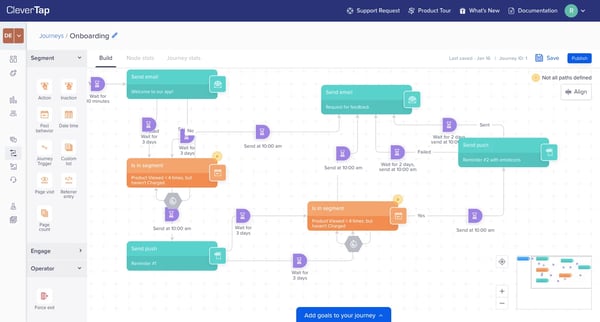
Across the 30-day trial, analytics and engagement never separated for me: segmenting an audience, building a journey, and tracking retention and campaign performance all happened inside the same dashboards. It’s a mobile and product-marketing tool at heart, so it fits teams with an app more than a classic web-and-email shop. One thing to know up front, CleverTap is trial-only, a 30-day free trial with no free-forever plan, and paid pricing is quote-based and tiered by monthly active users, so treat the trial as a month to prove value.
While marketing analytics tells you how users arrive; you can check free product analytics software for SaaS startups to understand what they do after they sign up.
What kept surfacing for me was how loyal that depth makes its users: CleverTap holds the highest NPS of the eight on G2 (81), and I saw reviewers credit analytics that actually deliver, with campaign insights scoring 91%. It carries G2’s Spring 2026 Leader, Momentum Leader, and Enterprise Leader badges, though its mid-market skew and quote-based pricing mark it as a tool for teams past the starting line.
What does CleverTap’s free trial include?
- A 30-day free trial of the Essentials capabilities
- Omnichannel campaign orchestration (push, in-app, email, and more)
- Audience segmentation, funnels, cohorts, and retention analytics
- Experimentation and campaign optimization tools
When should you upgrade your CleverTap free plan?
Beyond the 30-day trial deadline, G2 reviewers point to a few upgrade triggers:
- Monthly-active-user pricing. Paid pricing scales with your app’s audience, and smaller teams consistently call it expensive for their size.
- Channel add-ons. Some channels like WhatsApp are paid add-ons rather than part of the base plan.
- Data retention. Historical data isn’t retained much beyond a year, which matters for long-range retention analysis rather than a snapshot.
Paid plans start with the Essentials tier, priced by monthly active users, largely on a quote basis.
Where CleverTap genuinely stands out:
- Marketing and growth reviewers credit CleverTap for robust segmentation and a dependable journey builder that let them target and re-engage users without engineering help.
- Its analytics and dashboards make it straightforward to track campaign performance and keep iterating across segments, the retention and cohort views are the ones app teams lean on most.
What G2 users like about CleverTap:
“Segmentation is robust, the journey builder has been dependable, and the reporting and dashboards make it straightforward to track performance and keep iterating across our different verticals.”
– CleverTap review, Vatsal S.
Is CleverTap right for your marketing team?
Best for: App-first and product-marketing teams that want engagement and retention analytics tied directly to push, in-app, and email campaigns.
Not ideal for: Teams that need a free-forever tool, or web-and-email marketing teams without a mobile app to engage.
What I dislike about CleverTap:
- The platform is powerful but takes real time to master, advanced segmentation, event mapping, and lifecycle automation all take a while to get right. Once it’s set up, G2 reviewers say the depth pays off.
- The dashboard packs in so much that navigation can feel busy when you’re juggling several campaigns or analyzing cohorts. For focused use, the core reports stay usable.
What G2 users dislike about CleverTap:
“While the basic campaign setup is straightforward, mastering advanced segmentation, event mapping, and lifecycle automation can be difficult. The dashboard includes a lot of features, which are powerful, but it can also make navigation feel unintuitive, especially when you’re managing multiple campaigns or trying to analyse cohorts.”
– CleverTap review, Rishabh P.
4. HubSpot Marketing Hub: Best for all-in-one campaign analytics with a free CRM
I delved into HubSpot Marketing Hub curious whether its free CRM was worth the hype, and it is: with more than 14,800 G2 reviews, it’s one of the most-reviewed marketing platforms anywhere, and the pitch for marketing teams is unification, forms, email, landing pages, and the contacts they generate all live and report in one place, so campaign performance connects to the people behind it.
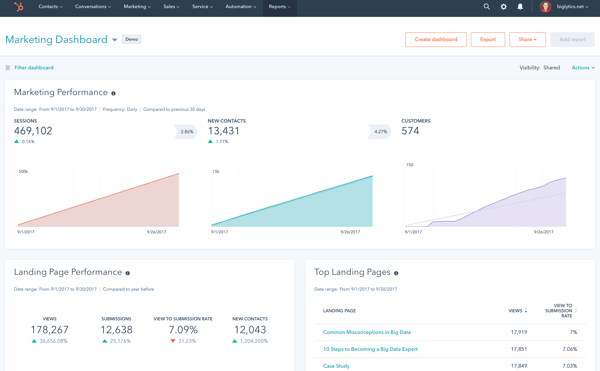
Working through the free tier, I could capture leads, send campaigns, and pull basic dashboards without paying, and HubSpot’s free Breeze Assistant added light AI drafting along the way. The free tier stands out for how much of a working marketing stack you get at zero cost, and for where the ceiling sits: as reviewers put it, it’s powerful enough to launch on, but the deeper reporting and automation only arrive on paid plans.
My takeaway: if you want the safest all-round free starting point rather than the deepest single feature, HubSpot makes the strongest case. It tops the entire category on G2 with a perfect 100 G2 Score, earned across more reviews than any other tool in the category.
What does HubSpot Marketing Hub’s free plan include?
- Free for up to 2 users, with the HubSpot CRM underneath
- 2,000 email sends per month (with HubSpot branding)
- Forms, landing pages, ad retargeting (up to 2 audiences), and basic SEO recommendations
- 10 dashboards (up to 50 reports each) and the free Breeze Assistant for basic AI drafting
When should you upgrade your HubSpot Marketing Hub free plan?
Most teams move to a paid plan when they hit one of these:
- The marketing-contact tier. Billing is based on marketing contacts, and crossing a tier threshold moves the account up to the next tier automatically; G2 reviewers note that downgrades take effect at the start of the next billing cycle rather than immediately.
- The free-plan limits. The 2,000-emails-per-month send cap and the 2-user limit are the two most teams reach first.
- HubSpot branding. It appears on free-plan emails and forms, and paid plans remove it.
Marketing Hub Starter (from $15/month per seat, billed monthly) lifts the send cap, removes the branding, and adds 1,000 marketing contacts. More advanced reporting, attribution, and A/B testing sit on the Professional tier.
Where HubSpot Marketing Hub genuinely stands out:
- Marketers consistently praise the all-in-one consolidation, running campaigns, email, forms, and contact tracking without stitching separate tools together, which keeps reporting connected end to end.
- Because analytics sit on the CRM, teams can tie marketing activity to contacts and pipeline, the closed-loop view reviewers value most once they grow past basic reporting.
What G2 users like about HubSpot Marketing Hub:
“I love that HubSpot Marketing Hub consolidates everything into one place, allowing me to spend my entire day managing all aspects of my marketing easily. I can author messages, design emails and landing pages, and craft forms for tracking information all within HubSpot. I appreciate not needing external connections for things like Google Analytics or my website analytics, as I can access everything directly from within HubSpot. Compared to previous solutions like Nutshell, which were clunky and not functional enough, or Salesforce, which is powerful but overwhelmingly difficult to maintain, HubSpot is smooth and easy to understand, with everything I need right there.”
– HubSpot Marketing Hub review, Steve O.
Is HubSpot Marketing Hub right for your marketing team?
Best for: Small marketing teams that want campaigns, email, forms, and a CRM connected in one free platform, with room to grow into paid tiers.
Not ideal for: Teams that need advanced automation or deep reporting at no cost, or larger lists where marketing-contact pricing scales quickly.
What I dislike about HubSpot Marketing Hub:
- Cost is the recurring theme: marketing-contact pricing can climb sharply as your database grows, and the most useful automation and reporting sit on paid tiers. For a team starting small, though, the free tools cover real ground before any of that bites.
- Reporting customization on lower tiers is limited, and some contact properties are locked as “read-only.” For most early-stage marketing needs, the default dashboards still do the job.
What G2 users dislike about HubSpot Marketing Hub:
“The main downside is pricing. Costs scale quickly as your contact list grows and as you add hubs or move into higher tiers, and several features I’d consider essential sit behind the more expensive plans, so the jump between tiers can feel steep for a smaller team. There’s also a learning curve past the basics. Simple workflows are easy, but advanced automation, custom reports, and conditional logic take real time to figure out, and reporting itself is powerful but rigid. Customizing dashboards beyond the default templates is more limited than I’d like, and pulling a specific cross-object report sometimes means exporting data and finishing the analysis elsewhere.”
– HubSpot Marketing Hub review, Vitor V.
5. Intuit Mailchimp All-in-One Marketing Platform: Best for email campaign analytics
Using Intuit Mailchimp All-in-One Marketing Platform, I could see why it’s often where small marketing teams first learn what their campaigns are actually doing. Beyond sending email, its free plan reports on opens, clicks, and audience engagement in a way that’s approachable for non-analysts, and it bundles forms, landing pages, and basic automation into the same dashboard.