


I evaluated 30+ tools to find the best free billing tools for non-technical teams. These are BILL AP/AR, Chargebee, FreshBooks, Refrens Accounting, Square Point of Sale, Xero, and Zoho Books.Billing software can save hours of manual work, but only if your team can actually use it. Complicated setup flows, unfamiliar accounting terminology, and too many configuration choices can turn a seemingly simple task, such as sending an invoice and getting paid, into a process that requires more training than expected.
That usability gap matters even more when you’re looking for a free option. A generous free plan isn’t particularly useful if everyday billing workflows are difficult to figure out, while an intuitive product can quickly become impractical if its free version restricts the features your team relies on.
For this guide, I went through the top products on G2’s free billing software category page and evaluated each one specifically from a non-technical team’s perspective: how quickly someone with no accounting or IT background could get from sign-up to sending a real invoice, whether the free plan required workarounds that only make sense to a developer, and how much guided setup, templates, and plain-language support each tool provided along the way.
Here’s what I found about the best free billing software for non-technical teams in 2027.
What are the best free billing tools for non-technical teams in 2027?
- BILL AP/AR: Best for simplifying invoice and payment workflows
For lean finance staff who want to automate invoice processing, payment approvals, and collections without learning a new system from scratch. - Chargebee: Best for teams whose subscription billing needs justify a more involved setup
For SaaS startups and service businesses that need to manage recurring billing, trial management, and subscription lifecycle automation from launch. - FreshBooks: Best for freelancers and service teams new to accounting software
For independent professionals who want clean invoicing, time tracking, and expense management with a genuinely short learning curve and no prior training required. - Refrens Accounting: Best for businesses in emerging markets
For freelancers and small business owners (particularly in South Asia and Southeast Asia) who need GST-compliant invoicing, quotation management, and basic accounting. - Square Point of Sale: Best for frontline teams that prioritize payment collection
For retail shops, restaurants, and service businesses that process payments at a physical location and want billing, inventory, and sales reporting built into their POS system. - Xero: Best for owners who want built-in guidance rather than a support ticket
For business owners who want invoicing connected to bank reconciliation and reporting, backed by in-app learning tools; note that its accounting depth means a slightly longer ramp-up than the more invoicing-only tools on this list. - Zoho Books: Best for businesses already in the Zoho ecosystem
For businesses already using Zoho products and looking to add invoicing and expense management without introducing an entirely separate workflow.
*Tools are listed alphabetically. These tools offer free trials, free forever options, or freemium models.
Comparison of the best free billing tools for non-technical teams in 2027
Here’s a side-by-side look at free plan limits and pricing before diving into the full reviews.
| Tool | G2 rating | What the free plan covers | Paid plans start at |
|---|---|---|---|
| BILL AP/AR | 4.4/5⭐ | Free trial available; BILL does not publish a standard trial length Full AP/AR access: invoice processing, payment approvals, ACH and check payments, recurring invoices, and accounting sync |
$49/user/month |
| Chargebee | 4.4/5⭐ | Free forever plan for startups: free until you bill your first $1 million in cumulative revenue Recurring billing, hosted checkout, self-serve portal, and 35+ payment gateway integrations Free trial also available |
Pay-as-you-go: 0.80% of monthly billing value (No platform fee) Monthly billing commitment: 0.65% of monthly billing value ($99 platform fee) |
| FreshBooks | 4.5/5⭐ | 30-day free trial, no credit card required Full access: invoicing, expense tracking, time tracking, client portal, online payments |
$1.00/month for the first 12 months; $23/month after that |
| Refrens Accounting | 4.7/5⭐ | Free forever: basic plan with limited document creation Invoicing, quotations, expense tracking, and GST-ready templates; branding and customization locked to paid |
$15/month |
| Square Point of Sale | 4.6/5⭐ | Free-forever plan POS app, item library, invoicing, online store, and basic reporting; transaction fee of 2.6% + $0.15 per in-person payment |
$49/location/month |
| Xero | 4.4/5⭐ | 30-day free trial Full platform access: invoicing, bank reconciliation, expense tracking, and reporting |
$5.80 per month for the first 3 months; Then $29 per month |
| Zoho Books | 4.4/5⭐ | Free forever: for businesses earning under $50K/year Invoicing, expense tracking, bank reconciliation, client portal, and 50+ reports; bank feeds and additional users require an upgrade |
$15/month, billed annually |
*All pricing details mentioned in this article are based on publicly available data at the time of publication and are subject to change.
According to Market Research Future, the billing and invoicing software market was valued at $12.06 billion in 2025 and is projected to nearly double to $23.69 billion by 2035, growing at a CAGR of 6.98%. Small and medium-sized enterprises are the largest driver of that growth, and much of it is coming from teams that don’t have a finance department or an IT function to lean on. Cash flow gaps, late payments, and manual reconciliation errors are still the most common reasons non-technical teams run into financial trouble, not because the problems are complex, but because the tools meant to solve them have historically assumed a level of technical comfort many teams don’t have.
What’s accelerating that shift is the integration of AI and automation into billing workflows. The MRFR report identifies AI and automation as one of the key forces reshaping the market, particularly among SMEs, and, for a non-technical team specifically, that shows up as software doing the technical heavy lifting instead of asking the user to do it.
For a non-technical team, this is no longer a nice-to-have. Automated invoice reminders, smart payment matching, and guided setup are the features that determine whether a billing tool actually reduces workload, or just moves the same complexity from a spreadsheet into a piece of software nobody on the team knows how to run.
How did I find and evaluate these free billing tools for non-technical teams?
I started with G2’s free billing software category page, which lists tools that offer free plans, free trials, or freemium models. From there, I took the top products as they appear on the page and evaluated each one specifically from a non-technical team’s perspective: how quickly someone without an accounting or IT background could get from sign-up to sending a real invoice, what the free plan genuinely covers without requiring a workaround only a developer would know, where the setup experience assumes technical fluency it shouldn’t, and what actually pushes a team toward needing more guided support or a paid plan.
I cross-referenced verified G2 user reviews, filtered to the “User” role rather than “Administrator”, since user-role reviews tend to reflect day-to-day usability rather than backend configuration, and weighted toward reviewers in less technical industries like accounting, marketing, and consulting, while deprioritizing reviews from IT services and computer software companies whose technical fluency doesn’t reflect this audience. This helped surface real-world patterns beyond my own evaluation: what non-technical owners and staff rely on, what trips them up during setup, and how each tool holds up once the person running it isn’t the one who configured it.
The screenshots featured in this article may be a mix of those taken from the vendor’s G2 page or from publicly available materials.
What I look for in free billing tools for non-technical teams
Evaluating free billing software side by side for this audience quickly shows that ease of use varies just as much as pricing does. Some tools get a non-technical person to their first invoice in minutes; others assume a level of technical fluency that never quite gets started but shows up the moment you hit a setup screen. Here’s what I paid attention to:
- Setup without specialized expertise: I looked at whether a new user could complete the initial setup without relying on a developer, accountant, or extensive documentation. Guided configuration, sensible defaults, and understandable terminology mattered here.
- An interface a first-time user can navigate without documentation: There’s a difference between a tool that’s simple because it’s underbuilt and one that’s simple because it’s well-designed. I evaluated whether core actions, such as creating an invoice, recording a payment, and checking what’s outstanding, were findable without an open help article in another tab.
- Useful guidance within the product: I paid attention to onboarding flows, templates, contextual prompts, and other in-product guidance that could shorten training time and help users become self-sufficient.
- Enough free functionality to complete meaningful billing work: Ease of use doesn’t matter much if the free version stops short of the workflows you need. I looked at what users could actually accomplish for free, including relevant invoice, customer, transaction, user, or feature limits.
- Integration with everyday tools, not just technical stacks: A billing tool that sits in isolation creates more work, not less. I looked at whether each product connects natively with accounting software, payment gateways, and CRMs that non-technical teams are already running, and whether those integrations are available on the free tier or locked to paid plans.
- Payment collection without a workaround: Getting paid is the whole point. I assessed whether each free plan supports collecting online payments directly by card, ACH, or via a payment link, or whether accepting digital payments requires an upgrade, a third-party add-on, or a separate account with another provider.
- Clear limits and sensible reasons to upgrade: Free software inevitably comes with tradeoffs. I looked for products whose restrictions were understandable and whose paid plans became necessary at logical growth points, such as higher usage, additional users, automation, or more advanced financial workflows, rather than immediately blocking basic billing.
To qualify for inclusion in the Billing Software category, a product must:
- Provide features to create multiple types of invoices
- Be able to consolidate multiple invoices into one or split an invoice
- Include templates for invoices and other documents
- Allow users to send invoices in different formats (PDF, MS Word) through various communication channels such as email and e-fax
- Offer reports and analytics on the status of each invoice
- Include payment alert notifications
- Integrate with software solutions such as ERP, CRM, and accounting packages
*This data was pulled from G2 in 2026. Some reviews may have been edited for clarity.
1. BILL AP/AR: Best for simplifying invoice and payment workflows
BILL AP/AR is built for teams that don’t have a dedicated finance department or an in-house developer, but still need invoices approved, paid, and reconciled without having to track every step manually in a spreadsheet. Rather than functioning as a simple invoicing tool, it automates much of the accounts payable and accounts receivable workflow, from creating and approving bills to sending invoices, collecting payments, and syncing everything with accounting software like QuickBooks Online and Xero, all without requiring anyone on the team to configure integrations or write a line of code.
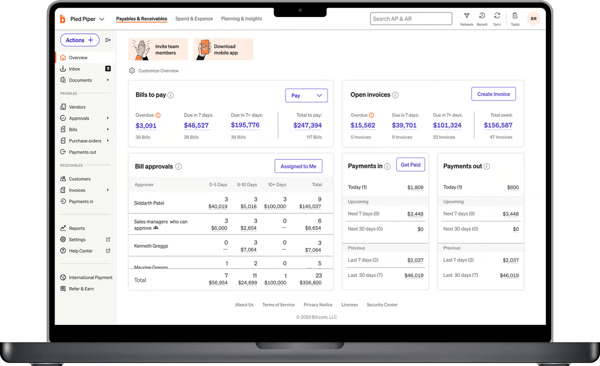
I explored BILL through its available trial experience and focused on how far a non-technical user could get without external help: creating and sending invoices, setting up recurring billing schedules, and processing payments via ACH. I particularly liked how the platform kept receivables, payables, and accounting records synchronized in the background, with no manual syncing steps for someone unfamiliar with accounting software to trip over. The G2 Data also supports BILL AP/AR’s accessibility for non-technical teams. In the Fall 2026 Billing Grid® Report, BILL AP/AR scored 90% for ease of use and 88% for ease of setup. I found these particularly relevant for teams that want to automate billing and payment approvals without a lengthy implementation process.
While BILL doesn’t offer a permanent free plan for its AP/AR products, the free trial gives you full access to BILL’s core AP and AR functionality, so a non-technical team is testing the real product, not a stripped-down preview that hides setup complexity until after they’ve committed.
What does BILL AP/AR’s free option include?
- Free trial with full access to AP/AR features; no credit card required (availability may vary)
- Automated invoice capture and data extraction from vendor bills
- Multi-level approval workflows for invoice review and payment authorization
- ACH, check, and electronic payment processing for vendors and clients
- Recurring invoice creation and automated billing schedules
- Accounts receivable tracking with payment status visibility
- Two-way sync with QuickBooks and Xero during the trial period
- Audit trail and payment history for all transactions processed
- Mobile app access for approvals and payment review on the go
When should you upgrade your BILL AP/AR free option?
I would upgrade from BILL AP/AR’s free trial when my team needs ongoing access to automated approval chains, recurring invoices, and two-way accounting sync rather than a one-time evaluation window. The paid AP/AR plans, starting at $49/user/month, make sense once a non-technical team has confirmed the automation actually reduces manual follow-up, since the free Spend & Expense plan covers company cards and employee expenses but doesn’t replace BILL’s core billing automation.
Where BILL AP/AR genuinely stands out:
- BILL’s real-time AP visibility is the feature that makes the most immediate difference for someone without a finance background. Seeing every bill’s status from a single dashboard, without running a report or asking a colleague, removes the guesswork that usually trips up a first-time user.
- The QuickBooks and Xero integrations set themselves up during onboarding rather than requiring manual configuration, which means a non-technical team can get synchronized records without anyone needing to understand what a two-way sync does under the hood.
What G2 users like about BILL AP/AR:
“I like that the AP/AR system integrates the entire accounts process—creating, approving, and recording bills directly in the books—so everything stays accurate and up-to-date without manual reconciliation.”
– BILL AP/AR review, Brij Sen S.
Is BILL AP/AR right for your non-technical team?
- Best for: Teams without a dedicated finance or IT function that handle a high volume of vendor payments or client invoicing and want the approval and payment process automated without anyone needing to build or maintain the workflow themselves. A strong fit if you’re already running QuickBooks or Xero.
- Not ideal for: Freelancers or solo operators who send a handful of invoices a month; the per-user pricing and setup depth are more than a simple, single-person billing need calls for. Also not the right starting point if you’re looking for a permanent free plan, since BILL’s free option is a time-limited trial rather than an ongoing free tier.
What I dislike about BILL AP/AR?
- Some users on G2 reported occasional synchronization issues that required manual verification to keep records aligned, which can be more disorienting for a non-technical user without a clear explanation of the error. Most reviewers noted this was intermittent rather than ongoing, and a solid onboarding phase can largely get ahead of it.
- I found that BILL AP/AR’s interface can take time to get comfortable with, particularly when navigating payment approvals, invoice details, and accounting workflows. For non-technical users, the number of available controls may initially feel overwhelming. However, the centralized dashboard becomes useful once the team understands how these workflows connect.
What G2 users dislike about BILL AP/AR:
“It’s very unfortunate that the images and PDF files of the invoices don’t automatically sync to QuickBooks. That is frustrating. I really wish that it was capable of sending the image files directly into the bills that BILL AP/AR creates in QuickBooks so that I could have access to my invoicing both in QuickBooks and in BILL AP/AR.”
– BILL AP/AR review, Nick V.
2. Chargebee: Best for teams whose subscription billing needs justify a more involved setup
Chargebee is purpose-built for subscription billing rather than traditional invoicing. If your business charges customers monthly, annually, or on usage-based plans, it automates recurring invoices, payment collection, subscription changes, renewals, and customer self-service from one platform. That makes it a natural fit for SaaS companies, membership businesses, and service providers with predictable, recurring revenue, where accurately managing subscriptions is just as important as collecting payments.
The Starter plan is what earns Chargebee a place on a free billing software list. It supports eligible businesses until they reach $1 million in cumulative billing and includes recurring billing, hosted checkout pages, a self-service customer portal, and integrations with payment gateways.
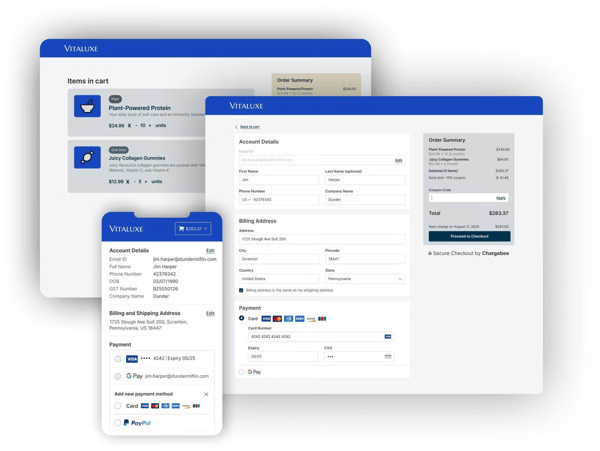
During my time on the Starter plan, configuring different pricing models, including flat-rate, tiered, and usage-based billing, didn’t require touching a line of code, which is a genuine point in its favor. But the setup still assumes a working knowledge of billing concepts like dunning logic and revenue recognition that a non-technical first-time user won’t necessarily have walking in. For a team already comfortable with subscription mechanics, that configurability is a strength. For a team that just wants to send an invoice and get paid, it’s a steeper starting point than the other tools on this list.
Chargebee’s G2 scores also reflect its balance of functionality and usability. In the Fall 2026 Billing Grid® Report, it scored 89% for meets requirements and 84% for ease of setup. I see this as a useful distinction for non-technical teams: Chargebee offers substantial subscription billing capabilities, but getting everything configured may take more effort than with a simpler invoicing tool.
What does Chargebee’s free option include?
- Free Starter plan for eligible businesses until $1 million in cumulative billing.
- Recurring billing with support for flat-rate, tiered, and usage-based pricing models
- Hosted checkout pages for accepting payments without custom development
- Self-serve customer portal for subscription management, plan changes, and payment updates
- Dunning automation for handling failed payments and card expiry notifications
- Multi-region sales tax support
- Integrations with 35+ payment gateways including Stripe, PayPal, and Braintree
- Once the free-plan threshold is reached, paid billing terms apply according to Chargebee’s current pricing.
When should you upgrade your Chargebee free option?
I would upgrade from Chargebee’s Starter plan once my business crosses the $1 million cumulative billing threshold or needs more advanced subscription management. Its pay-as-you-go pricing starts at 0.80% of monthly billing value with no platform fee, while the monthly commitment option charges 0.65% plus a $99 platform fee. I’d compare both options against my billing volume before committing.
Where Chargebee genuinely stands out:
- Chargebee’s subscription management automation genuinely reduces the administrative load of recurring billing once it’s configured. The platform handles the billing cycle without manual intervention, which matters even for a team that found the initial setup more involved than expected.
- The platform supports complex pricing structures without requiring custom development, which means a non-technical founder can eventually get to a flexible setup without hiring an engineer, even if the path there takes longer than with a simpler invoicing tool.
What G2 users like about Chargebee:
“Subscription management and updates work exactly as we expected. The UX is really great, and Chargebee’s copilot is especially helpful for day-to-day tasks. We’re also able to use Chargebee’s integration with HubSpot, which fits well into our workflow. Performance has been really solid with no lagging, and the support from the team has been great as well.”
– Chargebee review, Anand K.
Is Chargebee right for your non-technical team?
- Best for: Teams running a subscription-based model who are willing to invest time upfront in setup, or who have at least one person comfortable with billing terminology, to unlock automated dunning, renewals, and self-service billing.
- Not ideal for: Teams without any prior exposure to subscription billing concepts, or those that primarily send one-off invoices rather than running a recurring model. If your team needs to be sending its first invoice within the hour, one of the other six tools on this list will get there faster.
What I dislike about Chargebee?
- Chargebee’s depth is one of its real strengths, but for a first-time, non-technical user, that same depth makes the initial setup feel more involved than it needs to be. Once past the learning curve, the platform is straightforward, but that onboarding investment is a real cost for a team without a dedicated billing admin.
- Based on G2 user reviews, understanding Chargebee’s more advanced billing configurations requires familiarity with subscription management concepts. Setting up complex pricing structures, dunning rules, and reporting workflows can involve more decisions than a non-technical team expects. However, that flexibility becomes useful for businesses managing multiple subscription plans and recurring revenue models.
What G2 users dislike about Chargebee:
“The integration between Hubspot and Chargebee is unpredictable. Sometimes it works really fast and sometimes it is painfully slow. The issue is that it’s hard to know why it’s slow and fast. The communication just isn’t transparent in these cases.”
– Chargebee review, Jesse P.
3. FreshBooks: Best for freelancers and service teams new to accounting software
FreshBooks is built around a billing workflow that most freelancers and service businesses actually use: log your time, build an invoice, send it, and get paid. Its strength lies in bringing invoicing, time tracking, expense management, estimates, and online payments into a single, easy-to-use platform, with none of the setup steps assuming a background in accounting or software configuration. For independent professionals, consultants, and small service teams that bill clients directly for time or project work, that means spending less time figuring out the tool and more time actually serving clients.
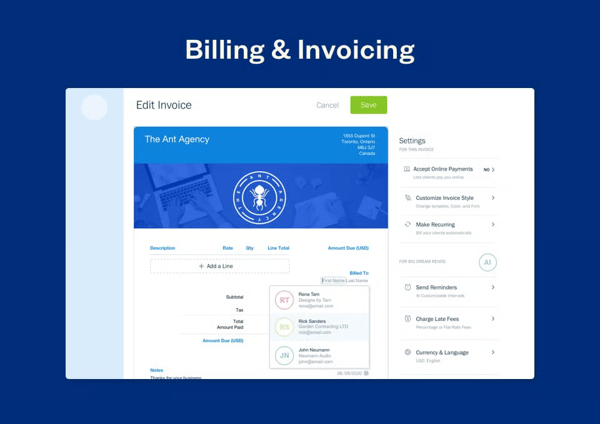
I explored FreshBooks through its free trial, and the time-to-invoice workflow stood out immediately for how little explanation it needed. Starting and stopping timers, assigning hours to a client, and automatically pulling those billable hours into an invoice felt intuitive on the first try, with no manual calculation and no configuration screen in the way. I also liked the built-in client portal, where customers can view estimates, approve proposals, pay invoices online, and access past billing history without endless email chains. I could also configure late payment fees to apply automatically after a set number of days, a setup that took a couple of clicks rather than a support article.
FreshBooks’ usability is also reflected in G2’s Fall 2026 Billing Grid® Report, where it scored 93% for ease of use and 93% for ease of setup. These scores reinforce why I found it particularly approachable for freelancers and service teams getting started with billing software for the first time.
What does FreshBooks’s free option include?
- 30-day free trial with full platform access; no credit card required
- Time tracking with project-level timers that auto-populate invoice line items
- Retainer billing with fixed recurring schedules for ongoing client engagements
- Customizable invoice templates with branding, late payment fees, and automatic reminders
- Client portal for invoice viewing, payment history, and online payment collection
- Expense tracking with receipt capture and categorization against projects or clients
- Credit card and ACH bank transfer payment collection
- Profit and loss reporting and expense summaries
- Mobile app for time tracking, invoicing, and expense capture
When should you upgrade your FreshBooks free plan?
I would upgrade from FreshBooks’ free trial once I’ve run real billing volume through the platform for the full 30 days and confirmed it fits how my team actually bills clients. Lite at $23 per month is the practical next step for a freelancer or small team with a stable client roster, since