



Most hosting platforms look reliable at launch. The real differences appear later, during traffic spikes, migrations, outages, or the moments when support responsiveness directly affects uptime.
Finding the best cloud web hosting platform is less about flashy features and more about how consistently the infrastructure holds up as operational pressure increases. Teams need platforms that stay stable while scaling, remain manageable during change, and reduce friction when things go wrong.
To identify which platforms actually deliver on that, I analyzed aggregated verified G2 user reviews using AI-assisted review analysis, along with feedback from teams running these tools in live production environments. In this guide, I break down the cloud web hosting platforms that stand out for reliability, scalability, operational control, and long-term usability.
10 best cloud web hosting platforms for 2026: My top picks
- Cloudways: Best for managed cloud hosting without infrastructure overhead
Managed hosting with backups, staging, and performance tools across major cloud providers. (3-day free trial available; Paid plans start at $11/mo) - Google Cloud Storage: Best for scalable object storage within the Google Cloud ecosystem
Object storage built on Google’s global infrastructure, designed for teams managing application assets, backups, and data pipelines within the GCP ecosystem. (Free tier available and pay as you go ahead.) - WordPress.com: Best for no-code website creation and content publishing
Fully managed WordPress hosting with built-in security, updates, and performance handling. (Free plan available; Paid plans start at $4/mo) - HostArmada: Best for support-led cloud hosting for small websites
Cloud hosting with daily backups, managed security, and SSD storage. (Paid plans start at $1.99/mo) - DreamHost: Best for straightforward shared hosting with hands-on support
Cloud and VPS hosting with SSH access, open-source alignment, and predictable environments. (Paid plan starts at $1.99/mo) - WP Engine: Best for WordPress-first hosting with high-touch operational support
Managed WordPress hosting focused on speed, security, and uptime for high-traffic environments. (Paid plan starts at $30/mo) - Hostinger: Best for affordable, beginner-friendly cloud hosting with fast setup
A cloud hosting platform combining domain management, SSL, email, and backups in one dashboard, built for individuals and small teams that need to get online quickly. (Free domain on select plans; Paid plans start at $2.99/mo) - Railway: Best for developer-first cloud hosting with fast paths to production
A developer-focused platform for fast deployments and environment parity with minimal setup. (Free trial available ($5 credit, 30 days); Paid plans start at $5/mo) - RoseHosting: Best for support-led VPS and cloud hosting with hands-on expertise
Linux VPS hosting with root access and managed support for custom server setups. (Paid plan starts at $39.59/mo) - SiteGround: Best for WordPress-focused hosting with strong support and staging tools
Built around WordPress performance, daily backups, and hands-on support, designed for freelancers and agencies for a dependable environment. (Paid plans start at $2.99/mo)
*These cloud web hosting platforms are top-rated in their category based on G2’s Winter 2026 Grid® Report. I’ve highlighted where each platform stands out and its pricing to help you choose a reliable tool.
10 best cloud web hosting tools I recommend
Cloud web hosting provides the infrastructure layer that turns code, content, and applications into something reliably accessible to users. The right platform does more than put a site online; it stabilizes performance, absorbs traffic spikes, and keeps systems running without constant manual intervention.
What separates strong cloud web hosting platforms from weak ones is how they behave once the easy part is over. Early-stage workloads rarely expose a platform’s limits. The real signals, in my analysis, come from how a platform handles growth, whether through load balancing traffic, isolating performance issues, automating backups, or managing deployments without introducing new risk at each step. Teams that start with the wrong platform often don’t feel it until they’re too deep to switch easily.
Cloud hosting is not a niche purchase; G2 adoption spans small teams, mid-market companies, and enterprises alike. What they share is the same core expectation: a platform that reduces uncertainty rather than adding to it
How did I find and evaluate the best cloud web hosting platforms?
I started with G2’s Winter 2026 Grid® Reports to shortlist the leading cloud web hosting platforms based on verified user satisfaction scores and market presence across small teams, mid-market companies, and enterprise environments.
From there, I used AI-assisted analysis on hundreds of verified G2 reviews to surface recurring patterns around what actually matters in production hosting. The goal was to separate platforms that quietly support growth from those that introduce friction as traffic, complexity, or expectations increase.
The process allowed me to cross-check platform strengths and limitations based on real-world usage signals rather than vendor claims, focusing on reliability, performance, scalability, and operational consistency at different stages of growth.
What makes the best cloud web hosting platforms worth it: My criteria
After analyzing hundreds of verified G2 user reviews and examining how teams run and scale production environments, I identified a consistent set of deciding factors. These shaped the criteria below.
- Performance consistency under real traffic: Benchmarks don’t tell the whole story. What verified G2 reviews consistently surface is that gradual performance slowdowns, not outright downtime, are what frustrate teams most. A platform that handles traffic well at launch but degrades under load or background job pressure quietly erodes user experience before anyone raises an alert.
- Operational visibility and control: The best platforms surface logs, usage signals, and system behavior in ways that make diagnosis fast. When visibility is limited, small incidents drag on, ownership gets murky, and teams default to guesswork. This matters less on day one and significantly more at the moment something breaks in production.
- Reliability and failure handling: Every platform fails eventually. What distinguishes reliable cloud hosting is how predictably it recovers. Automated backups, clear incident communication, and defined recovery paths reduce both downtime and the reactive habits that build up after a team has been burned by a poorly handled outage.
- Ease of deployment and environment management: When deployment gets complicated, teams delay releases or bundle changes, which concentrates risk. Recurring feedback in G2 reviews shows that friction in staging and environment parity is a consistent driver of slower release cycles, not a minor inconvenience.
- Cost predictability as usage grows: Low entry pricing rarely tells the full story. Platforms that introduce unexpected usage spikes or opaque billing mechanics create downstream friction with finance teams and slow infrastructure decisions. What matters is whether costs scale in proportion to growth, with enough transparency to plan around.
Based on these criteria, I narrowed the list to cloud web hosting platforms that offer clear operational visibility, dependable performance, and the ability to scale workloads without adding unnecessary complexity. Not every platform is built for the same use case, so the right choice depends on how your team works, whether that means hands-off management, developer-led control, application-focused deployments, or more structured, enterprise-grade environments.
Below, you’ll find authentic user reviews from the Cloud Web Hosting category. To be included in this category, a platform must:
- Support production-grade hosting for websites or applications
- Enable teams to deploy, manage, and scale workloads in cloud environments
- Provide visibility into performance, uptime, and resource usage
- Offer reliability and controls suitable for ongoing operational use
This data was pulled from G2 in 2026. Some reviews may have been edited for clarity.
1. Cloudways: Best for managed cloud hosting without infrastructure overhead
Cloudways is a managed cloud web hosting platform that prioritizes performance, security, and operational control while removing infrastructure management from the team’s workload. It is commonly described as a layer that sits between shared hosting and self-managed cloud servers, offering a more streamlined way to run WordPress and PHP-based applications.
What struck me most while going through the review data is how consistently support comes up, not as a backup option, but as an active part of how teams manage deployments. Cloudways simplifies website and application management without stripping away essential controls, with servers, applications, SSL certificates, and domains all managed from a single interface. SSL certificates are deployed and maintained cleanly across hosted sites, reflected in a 95% free SSL score on G2.
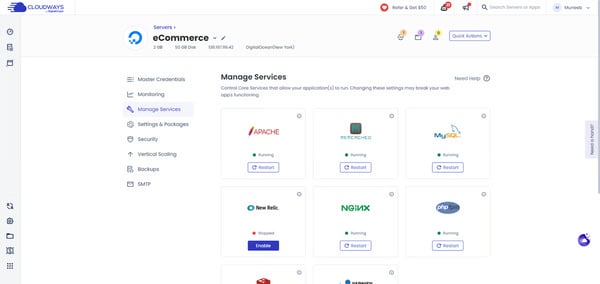
Teams use Cloudways to improve page speed and handle traffic fluctuations more predictably than traditional shared hosting. Built-in caching and optimized server configurations contribute to faster load times, particularly for WordPress sites.
G2 user reviews frequently describe support interactions as technically grounded, with staff engaging directly on configuration and application-level issues. This reduces resolution time when deployments stall or site changes introduce risk. For teams managing revenue-impacting websites, dependable support reduces disruption during critical moments.
Managed firewalls, controlled access, and automated updates reduce the need for external tooling, keeping protection built-in rather than optional. For smaller teams, this lowers the operational burden of maintaining baseline security standards across multiple sites. Data security is rated at 93% on G2, consistent with how reviewers describe these protections as a reliable part of the standard setup.
The interface emphasizes clarity over density, allowing teams to manage multiple websites without navigating deeply nested settings. This approach reduces the time needed to get productive, particularly for users who want VPS-level control without relying on the command line. G2 review data suggests this balance enables teams to stay self-sufficient while scaling sites as traffic or client needs change.
One pattern I kept coming back to across the reviews was how teams describe the deployment workflow, specifically how much confidence it gives them before anything touches a live environment. G2 user reviews mention managing staging versions of live sites and pushing changes to production in a single step, reducing the risk that comes with deploying directly to live environments.
Domain and DNS management are built around standard site configurations. Teams running complex subdomain structures pointing to different folders will need more upfront planning, and this surfaces most for agencies managing multiple distinct properties under a single domain. Even so, Cloudways supports deployment across five major cloud providers, including AWS, Google Cloud, and DigitalOcean, giving teams real flexibility in where and how their sites are hosted, regardless of DNS complexity.
Standard support is routed through automated assistance before reaching a live engineer. Teams that prefer direct human contact may need additional steps to get there, particularly on non-premium plans. However, every Cloudways plan includes real-time server monitoring with automated alerts, which catches many common issues before they need a support ticket at all.
Cloudways stands out as a focused managed cloud hosting platform built around performance, security, and operational efficiency. The platform suits small teams, agencies, and digital professionals who need reliable site performance without taking on infrastructure management.
What I like about Cloudways:
- Cloudways simplifies managed cloud hosting by combining performance, security, and server control in one platform, allowing teams to run multiple sites without handling infrastructure directly.
- Built-in essentials such as Free SSL and backups reduce routine setup work, helping teams maintain secure, stable websites with minimal ongoing effort.
What G2 users like about Cloudways:
“As a Digital Marketing Specialist, I manage multiple campaigns and high-traffic sites, so server reliability is non-negotiable for me. What I love most about Cloudways is the balance between power and simplicity. It gives me the granular control of a VPS without the headache of command-line management.
However, the standout feature is undoubtedly the support team. In this industry, ‘support’ often means reading a script, but the Cloudways team consists of actual engineers. I recently faced a tricky technical hurdle regarding a specific WordPress theme upload and database configuration that was stalling a project. Their support team didn’t just send me a link to a generic article; they dove into the issue and guided me through a fix quickly. That level of technical expertise saves me hours of downtime.”
– Cloudways review, SAID B.
What I dislike about Cloudways:
- Complex subdomain structures need more upfront DNS planning, which affects agencies managing multiple distinct properties under one domain. Cloudways still runs across five cloud providers with 50+ data center locations, giving teams real flexibility in where and how their sites are hosted, independent of how DNS structures are configured.
- Standard support routes through automated assistance first, which can frustrate teams that prefer direct human contact. All plans include real-time monitoring with automated alerts that resolve most issues before they reach support, keeping resolution fast without requiring a live engineer for every incident.
What G2 users dislike about Cloudways:
“SSL errors could benefit from being more specific. The error messages just need more detail or some how-tos to help you understand the exact issue.”
– Cloudways review, Ella C.
2. Google Cloud Storage: Best for scalable object storage within the Google Cloud ecosystem
Google Cloud Storage runs on Google’s global infrastructure and sits closer to a developer and data infrastructure tool than a traditional managed hosting platform. Within the cloud web hosting category, it is evaluated both as a standalone storage layer and as part of larger cloud architecture decisions, making it a better fit for technical and data-oriented teams than those looking for a plug-and-play hosting setup. It is commonly used for application assets, backup and archival, static site hosting, and data pipelines feeding into analytics services like BigQuery.
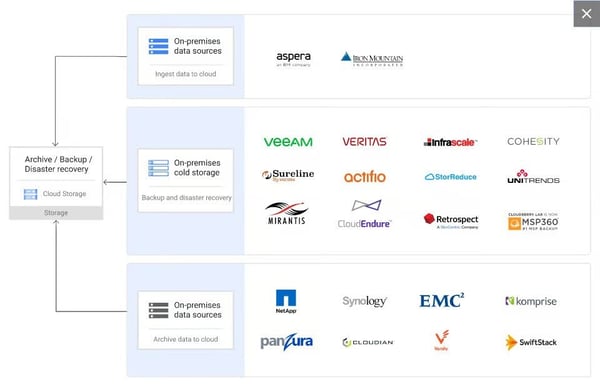
Storage capacity scales without provisioning. What I found across G2 reviews is that teams consistently describe this elastic behavior as one of the most practical advantages — usage grows or shrinks without manual intervention. Ease of use is rated at 90% on G2, consistent with reviewers’ descriptions of storage management as low-friction once the environment is configured. For applications handling user-generated content or log archives, automatic scaling removes a planning bottleneck that typically slows teams managing variable data volumes.
Integration with Google’s broader service ecosystem is where I noticed the strongest differentiation in G2 feedback. Teams describe straightforward connections with BigQuery, Compute Engine, Cloud Dataflow, and Google Workspace as removing the friction that typically appears when moving data between storage and processing layers. The platform consistently delivers on core storage and integration expectations, 93% of G2 reviewers confirm it meets requirements, one of the strongest scores in the category.
From what I evaluated across teams using Google Cloud Storage in data pipeline and archival workflows, the security layer rarely comes up as something they had to configure — it was already in place, which is exactly what teams handling sensitive data need before they can move on to the actual work.
Storage tiering gives teams a practical way to control long-term costs without manual oversight. Objects move automatically between Standard, Nearline, Coldline, and Archive classes based on access patterns and lifecycle rules. Teams managing archival datasets, backup repositories, or infrequently accessed logs find this especially useful for keeping storage spend proportional to actual usage rather than applying flat rates across all tiers.
Data durability and availability underpin the platform’s reliability positioning. G2 reviewers cite automatic redundancy across multiple data centers and consistent uptime, describing the environment as dependable for both production applications and backup workloads. Ease of doing business with is rated at 86% on G2, reflecting the reliability of the service relationship reviewers describe over time.
Pricing becomes more complex as workloads scale across regions and storage classes. Teams running high-volume data transfers or frequently accessing cold-tier data may see costs accumulate in ways the base pricing page does not make obvious. Although Google Cloud Storage’s 11-nines durability guarantee and automatic redundancy across multiple data centers mean teams get enterprise-grade reliability built into every storage class, including the lowest-cost tiers. Teams that map usage patterns against lifecycle rules early get cost behavior that stays proportional to actual data access from the start.
Getting productive on Google Cloud Storage requires familiarity with GCP concepts, bucket structures, IAM roles, and broader console navigation. Teams new to the Google Cloud environment will find the initial setup more involved than simpler managed hosting alternatives. Once set up, the platform connects natively with BigQuery, Compute Engine, and Dataflow, and those integrations hold up without additional configuration overhead. This reduces the setup work required for future data workflows, once the environment is in place.
Google Cloud Storage fits teams that need reliable, scalable object storage backed by Google’s global infrastructure and deep ecosystem integrations. It performs best when used as part of a broader GCP architecture, not as an isolated hosting solution. For developer and data-oriented teams already operating within the Google Cloud ecosystem, it offers a dependable and cost-efficient foundation for storage at any scale.
What I like about Google Cloud Storage:
- The storage tiering system, from Standard to Archive, combined with automated lifecycle rules, gives teams a practical way to manage long-term storage costs without manual oversight.
- Deep integration with Google Cloud services like BigQuery and Compute Engine makes it easy to move data between storage and processing layers without additional tooling or configuration overhead.
What G2 users like about Google Cloud Storage:
“I love the Google bucket that gave me access to launch my simple static website with a smaller amount and an extra extraordinary cloud server. My websites are never down, even during high volumes of traffic.”
– Google Cloud Storage review, Jason M.
What I dislike about Google Cloud Storage:
- Pricing grows more complex at scale across regions and storage classes, which requires extra diligence from teams running high-volume workloads. The lowest-cost tiers still include 11-nines durability and automatic redundancy built in.
- Initial setup requires familiarity with IAM roles and bucket structures, adding onboarding time for teams new to GCP. Once in place, native connections to BigQuery and Compute Engine hold up without additional integration work.
What G2 users dislike about Google Cloud Storage:
“Setting up bucket, directory, and file permissions is not the easiest. I often have to do research to find the correct permissions that are not what I typically use.”
– Google Cloud Storage review, Orlando M.
3. WordPress.com: Best for no-code website creation and content publishing
When I reviewed G2 feedback on WordPress.com, what stood out was how consistently it is adopted by teams that prioritize publishing speed and operational simplicity. It combines hosting, security, updates, and CMS capabilities into a single managed environment, removing the need for hands-on infrastructure work. Within the category, it is commonly associated with speed to launch and administrative simplicity rather than deep system-level control.
One of the most consistent strengths highlighted in reviews is how quickly teams can move from setup to publishing. The onboarding flow, templates, and guided configuration reduce the time required to get a site live. Ease of setup (82%) indicates that routine changes, publishing pages, updating content, or managing users fit smoothly into daily workflows. This supports teams that need predictable execution without ongoing technical involvement.
G2 review data frequently references the breadth of themes and plugins that support branding, layout changes, and feature expansion. Customization remains approachable even as sites grow more complex, with review sentiment suggesting the process is manageable without technical expertise. Theme and plugin management scores 84% for ease of use on G2, reflecting how consistently reviewers describe the experience as accessible regardless of technical background.
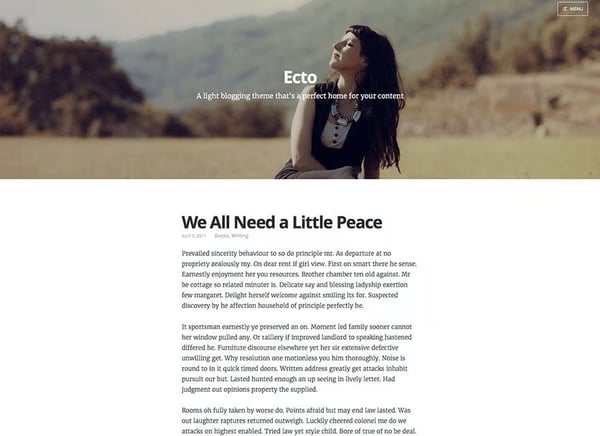
Collaboration and access control support role-based permissions that allow contributors, editors, and administrators to work within defined boundaries. G2 “Meets requirements” score is rated at 89%, signaling that core CMS needs, content management, publishing workflows, and access control are reliably met. This makes the platform suitable for organizations where contributors, editors, and administrators work within defined boundaries without shared technical ownership.
Third-party integrations connect smoothly with tools already in use across content, analytics, and marketing workflows. G2 reviewers describe the process of linking external apps and plugins as low-friction, with connections to analytics platforms and campaign tools fitting naturally into standard publishing operations.
Hosting, security updates, and maintenance are handled as part of the service, removing the backend upkeep that typically falls on internal teams. G2 reviewers consistently frame this as what lets content teams stay focused on publishing rather than platform management. For teams without dedicated technical resources, this structure supports consistency and reliability.
The plugin ecosystem supports site growth without requiring a platform change. As content volumes, audience segments, or feature requirements expand, teams extend functionality through plugins rather than migrating to a more complex environment. G2 reviewers describe this as a practical advantage for sites that start simple and grow in scope, keeping the same publishing environment without rebuilding around new tools.
Customization depth on WordPress.com is more structured than on self-hosted WordPress. Teams seeking advanced design control or custom integrations will find options more contained within the managed environment, and this matters most for developers building bespoke functionality. However, WordPress.com handles all hosting, security updates, and performance management automatically, keeping the site fast and secure without any ongoing maintenance overhead.
Plugin updates do not apply automatically, requiring teams to monitor and apply them manually to avoid compatibility breaks across the site. For teams running a larger number of active plugins, coordinating updates adds a layer of ongoing maintenance. Core security and system-level updates are handled automatically by the platform, keeping the most critical maintenance layer covered without any manual intervention.
WordPress.com is built for those who want to publish, manage, and scale content without managing infrastructure. Based on G2 reviews, it is particularly relevant for marketers, content teams, and small to mid-sized organizations that value speed, ease of use, and centralized control. While advanced customization scenarios may point elsewhere, WordPress.com remains a dependable choice for no-code website creation and content publishing.
What I like about WordPress.com:
- WordPress.com brings hosting, security, updates, and content management into one managed environment, making it easier to publish and maintain sites without infrastructure overhead.
- Themes, plugins, and role-based access support flexible site setup and collaboration, allowing teams to manage content, branding, and permissions from a single platform.
What G2 users like about WordPress.com:
“ I use WordPress.com to build and manage my website, and I really like how it helps organize my site and track campaigns without any technical stress. I appreciate how flexible and user-friendly WordPress.com is, and the themes and plugins make customizing my site easy. The initial setup was very easy, and creating my website, choosing my theme, and getting basic features running took just a few minutes, with clear guidance through each step. I also use WordPress.com with tools like Rank Math Pro and Google Analytics, which make it easier to manage my website and marketing, measure performance, and optimize my efforts.”
– WordPress.com review, Amin A.
What I dislike about WordPress.com:
- Customization options are more constrained than self-hosted WordPress, which is felt most by developers building custom integrations or bespoke functionality. The existing stack covers WordPress and common shared hosting workloads reliably without requiring custom configuration, removing the maintenance surface that custom integrations introduce and keeping publishing workflows stable without technical oversight.
- Plugin updates require manual monitoring to avoid compatibility breaks, adding overhead for sites with a large number of active plugins. Core security and system-level updates run automatically regardless, keeping the most critical maintenance layer covered without manual intervention and limiting the effort required to plugin-level decisions rather than platform-wide upkeep.
What G2 users dislike about WordPress.com:
“The frequent updates for plugins can feel overwhelming, as they demand ongoing attention to maintain both compatibility and security.”
– WordPress.com review, Sabri S.
4. HostArmada: Best for support-led cloud hosting for small websites
HostArmada is commonly described as a cloud web hosting service built around reliability, hands-on assistance, and low work overload. It is most often adopted by small teams managing a limited number of websites that want hosting tasks handled without deep technical involvement.
What I found consistently while reading through the reviews is that support is not just rated highly, it actively shapes how teams experience the platform from day one. Support teams resolve migration, troubleshooting, and configuration issues without extended back-and-forth, reducing reliance on in-house technical expertise for smaller teams.

G2 review data shows that site transfers are typically handled with minimal user involvement, supported by proactive communication from support teams. Users frequently mention moving multiple websites smoothly and without disruption. This makes it easier to consolidate client or personal sites under a single hosting provider.
Security is treated as a baseline capability rather than an add-on. Free SSL is rated at 98%, reflecting that encrypted connections are automatically enabled across hosted domains. This reduces manual configuration effort, particularly for users managing several sites. For small teams, this lowers the ongoing maintenance load tied to basic security hygiene.
Stability is one of those things that rarely gets noticed when it works, and while analyzing the review data, I found that HostArmada users almost never mention it as a concern. Uptime and server stability come up consistently in G2 reviews, with users describing server behavior as predictable and requiring no active management rather than something that demands constant attention.
Performance perception is closely tied to responsiveness under normal traffic conditions. G2 Reviews reference fast page loads and steady server behavior, supported by caching that meets common needs. Caching is rated at 94%, indicating solid performance for typical hosting volumes, even if it is not positioned as a differentiator. This reinforces the platform’s emphasis on consistency over advanced tuning.
The platform uses cPanel, which G2 reviewers point to as a practical advantage for teams already familiar with it. Day-to-day tasks like managing domains, email, files, and databases sit within an interface most hosting users have worked with before. This reduces the time needed to get comfortable with the environment, particularly for agencies onboarding new clients or moving sites from other providers. For small teams without dedicated technical staff, working within a known interface keeps operations straightforward from day one.
Renewal pricing is structured at a higher rate than introductory plans, with no discount applied at the point of renewal. Teams on fixed hosting budgets will need to account for this shift when planning long-term costs, particularly as portfolios grow. However, HostArmada includes free daily backups, free SSL, and free website migration on all plans, features that many providers charge separately for and that offset a meaningful portion of the renewal cost difference. This keeps the effective per-site operating cost lower than the headline renewal rate suggests.
Despite the strengths above, G2 users highlight that stack configuration options are more limited than fully self-managed alternatives. Docker container hosting is not available, and the default server stack offers less flexibility for teams that need custom environments or non-standard software combinations. The existing stack reliably covers WordPress and common shared hosting workloads, and support handles custom configuration requests directly for setups outside the defaults. So teams get consistent performance without the configuration drift that comes with more flexible environments.
HostArmada aligns best with small businesses, freelancers, and agencies that value responsive support, stable hosting, and minimal operational effort. Its adoption profile and satisfaction signals reinforce relevance for teams managing modest site portfolios rather than scaling infrastructure aggressively. Within cloud web hosting, HostArmada remains a focused and dependable option where hands-on support carries more weight than raw infrastructure scale.
What I like about HostArmada:
- Support interactions are consistently described as fast and technically thorough, helping teams resolve migrations, configuration issues, and site errors.
- Core hosting fundamentals such as SSL setup, site transfers, and server stability are handled predictably, allowing teams to manage multiple sites.
What G2 users like about HostArmada:
“HostArmada really stands out for its fast and reliable support – any issue I’ve encountered was resolved within minutes via live chat. The hosting panel is modern and intuitive, and cPanel includes all the features I need for smooth day-to-day website management. Communication is always clear and quick, and the pricing feels very fair for the level of quality and performance provided.”
– HostArmada review, Marina K.
What I dislike about HostArmada:
- Renewal pricing is higher than introductory rates with no discount for existing customers, which requires budget planning for teams on fixed hosting costs. Free daily backups, free SSL, and free site migrations are included on all plans and offset a meaningful portion of that difference.
- Stack configuration is more limited than self-managed alternatives, which affects teams needing Docker support or non-standard server environments. For standard WordPress and shared hosting needs, the existing stack covers most requirements reliably.
What G2 users dislike about HostArmada:
“One downside is that some advanced features require higher-tier plans, which might not be ideal for beginners on a tight budget. Additionally, while the interface is good, it can feel slightly limited for users who want more granular control over configurations.”
– HostArmada review, Antonio Jose B.
5. DreamHost: Best for straightforward shared hosting with hands-on support
DreamHost focuses on simplifying setup, administration, and ongoing site management in shared hosting environments.
A defining strength is how efficiently teams can launch new websites. G2 review data highlights streamlined onboarding flows and a control panel designed to minimize setup steps, allowing sites to go live quickly. Ease of setup is rated at 90%, reinforcing that initial deployment typically fits well into time-sensitive workflows. This is especially relevant for agencies and small teams managing multiple launches.
Routine tasks such as domain management, subdomain creation, and site-level changes are handled through a clear interface. Day-to-day administration scores 88% on G2, reflecting how consistently reviewers describe the control panel as straightforward to navigate without deep hosting expertise.
Support quality plays a central role in the overall experience. Quality of support is rated at 86%, with review feedback frequently highlighting responsive assistance during migrations and troubleshooting. Teams commonly describe support interactions as practical and follow-through oriented, particularly for WordPress site moves. This support posture is especially relevant in shared hosting contexts where internal technical resources may be limited.

What I found across DreamHost reviews is that the balance between flexibility and control is what keeps teams on the platform long-term. DNS settings, software versions, and site configurations are all adjustable without the complexity of full server management.
Reliability is most often discussed in terms of consistency. G2 reviews reference stable uptime and consistent server behavior under standard traffic conditions, supporting client-facing and content-driven sites. Performance management does not introduce additional workflow friction, with G2 reviewers describing day-to-day operations as predictable and low-maintenance. For many shared hosting scenarios, this level of reliability is the primary requirement.
Shared plans include unlimited bandwidth and free managed email accounts, removing two cost lines that many hosting providers charge separately for. Teams running multiple websites under one plan can set up email accounts per site without additional tooling or billing overhead. For small agencies and non-technical users managing several client properties, this bundling simplifies both operations and monthly cost planning.
A few recurring themes in G2 reviews suggest that shared hosting environments prioritize pooled resources, which may be less aligned for teams requiring dedicated performance isolation or granular server-level control. However, shared plans include unlimited bandwidth and free managed email as standard, which keeps the cost footprint predictable across multiple sites, with unlimited bandwidth and managed email absorbed as standard rather than metered separately as workloads grow.
Costs have evolved over time in line with broader hosting market trends, which may require periodic reassessment for multi-site or long-running deployments. Still, G2 review patterns mention that increases have remained modest relative to the market, and the platform’s feature set continues to justify the cost for most teams already using it. DreamHost also offers a 97-day money-back guarantee, one of the longest in the category, giving teams enough runway to assess long-term cost fit under real operating conditions before committing at standard rates.
While more advanced infrastructure requirements may point elsewhere, DreamHost remains a dependable option within cloud web hosting for teams where ease of management takes priority over infrastructure control.
What I like about DreamHost:
- DreamHost supports fast site launches and ongoing management through a unified control panel, which suits teams handling multiple websites without deep hosting expertise.
- Support interactions are frequently described as responsive and technically helpful, particularly during migrations and setup-sensitive moments.
What G2 users like about DreamHost:
“I absolutely love DreamHost; they are unmatched in terms of stability and ease of use. At the same time, the pricing is incredibly affordable. Before using DreamHost, I had used many different cloud and VPS providers from various countries, but with DreamHost, I have finally found the absolute peace of mind that I spent years searching for without success.”
̵