


I live and breathe emails.
As a marketer, email outreach isn’t just another task on my to-do list. It’s a critical part of building relationships and driving results. Over the years, I’ve realized that the success of an email doesn’t end with hitting “send.” What happens afterward, when someone opens it, clicks a link, or spends time reading, holds the real insights.
Curious to find tools beyond the basics, I spent weeks experimenting with the best email tracking software. I wanted answers to specific questions: Does email tracking actually work, or is it just notification noise? Which tools go beyond open rates and give you something you can act on? Each tool I evaluated had quirks, strengths, and shortcomings, and a few genuinely changed how I think about outreach.
After researching over 30 solutions, I’ve compiled a list of the 10 best email tracking software that genuinely impressed me, including Salesforce Sales Cloud, HubSpot Sales Hub, Apollo.io, Instantly, and ZoomInfo Sales. These platforms do more than just track opens and clicks; they provide concrete insights that help fine-tune my strategy.
Whether you’re a sales pro, a freelancer managing client communication, or just someone wanting to know when their emails are being read, there’s a tool here for you. Ready to see which software deserves a spot in your tech stack?
Let me walk you through the standouts and what makes them worth your time.
Best email tracking software for 2026: My top picks
- Agentforce Sales (formerly Salesforce Sales Cloud): Best for enterprise teams with AI-driven pipeline management
AI-driven insights, customizable dashboards, integration with various platforms ($25/mo) - HubSpot Sales Hub: Best for automated follow-ups and pipeline visibility Tracks opens, clicks, and document views natively in Gmail and Outlook, triggering follow-up sequences based on recipient behavior. (Free; paid from $20/mo)
- Apollo.io: Best for outreach teams that prospect and track in one place
Pairs a verified B2B contact database with sequencing to track and follow up with prospects in one place. (Free; paid from $49/mo) - Instantly: Best for cold outreach with deliverability built in
Monitors campaign performance across unlimited sending accounts while managing inbox placement and domain reputation. (Free trial; paid from $37/mo) - ZoomInfo Sales: Best for intent-driven prospecting and engagement Combines email engagement with real-time intent signals to prioritize prospects most likely to convert. (Available on request)
- Pipedrive: Best for visual pipeline management and deal tracking Automatically links emails to deals and contacts for a single view of every conversation and pipeline stage. (Free trial; paid from $24/mo)
- Salesloft: Best for structured cadences across multiple channels
Tracks opens, clicks, and replies within cadences and connects that data to call outcomes and CRM activity. (Available on request) - Close: Best for fast-moving sales teams in a CRM-native setup
Logs every email, call, and SMS automatically so reps always know exactly where each lead stands. ($9/mo) - monday CRM: Best for visual deal management with AI-driven automation Syncs email activity into deal boards and uses AI agents to flag engaged leads and trigger next steps. (Free trial; paid from $12/mo)
- Brevo Marketing Platform: Best for multi-channel campaign management Tracks opens, clicks, and engagement across email, SMS, and WhatsApp from one dashboard. (Free; paid from $9/mo)
*These email tracking software solutions are top-rated in their category, according to the G2 Spring 2026 Grid Report. I’ve also added their monthly pricing to make comparisons easier for you.
Best email tracking software I recommend
The idea behind email tracking seems simple enough: a tool that tells you when someone opens your email, clicks a link, or interacts with your message. But I wondered if it really worked. Would it be just another notification overload, or could it genuinely change how I manage my outreach?
So, I decided to dig in and evaluate various tools to see what they were made of. Here’s what I learned: at its core, email tracking software uses tiny, invisible mechanisms, like pixel tracking or unique link identifiers, to track specific actions a recipient takes. Sounds technical, right? Thankfully, most tools made it pretty seamless for me to set up and interpret.
How did I find and evaluate the best email tracking software?
I wanted to go beyond surface-level research. Instead of relying solely on Google searches or personal recommendations, I wanted a deeper understanding of what these tools offered and how they performed. To get started, I identified some of the leading names in the industry through G2’s grid reports. I evaluated over 30 tools before narrowing the list down to these 10.
Once I had my list, I tested each tool in different capacities. From installation to daily use, I examined how intuitive the software felt and how well it integrated with my existing setup. I paid close attention to features like real-time notifications, data accuracy, and analytics depth. Tools that were easy to use and delivered reliable insights quickly rose to the top of my list.
I also tapped into user feedback at scale. I used AI to analyze hundreds of reviews on G2, which helped me spot recurring themes, both positive and negative, that I might not have encountered in my testing alone. In cases where I couldn’t personally test a tool due to limited access, I consulted a professional with hands-on experience and validated their insights using verified G2 reviews.
The screenshots featured in this article may include both those captured during testing and those obtained from the vendor’s G2 page.
The global email tracking software market is valued at USD 3.3 billion in 2026, with firms using advanced link tracking and document analytics reporting up to a 5x increase in ROI.
Choosing the right email tracking tool isn’t just about tracking opens. It’s about getting the details that matter without drowning in unnecessary noise. Let me show you how I picked the ones that made the final cut.
What do I look for in the best email tracking software?
What I loved during testing was how the best email tracking software removed the guesswork. Instead of sending a follow-up email into the void, I could see when someone opened my message or clicked a link. But some tools also bombarded me with alerts for every single open, while others buried the data behind confusing dashboards.
After all of that, I’ve realized the real value of email tracking software lies in how much it simplifies my work while giving me data that’s actually useful. To make sure you’re picking the right tool, here’s a list of key factors I found crucial during my testing.
- Tracking precision: I needed tools that didn’t just claim to track opens and clicks but actually delivered accurate, real-time data. Tools that relied on pixel tracking often stumbled when recipients used privacy-focused email clients. The standouts were the ones that combined pixel and link tracking for a complete picture of recipient behavior.
- Integration with my workflow: If a tool didn’t play nice with my Gmail or connect seamlessly with CRM, it was immediately out. I wasn’t about to upend my entire workflow for clunky integrations. The tools I kept coming back to were the ones that felt invisible, working in the background without requiring constant monitoring or extra logins.
- Customizable notifications: Some tools overwhelmed me with useless notifications. I mean, do I really need to know every single time someone re-opens the same email? The best software lets me fine-tune alerts, so I only get updates when it actually matters, like the first time someone opened an email or clicked a key link.
- Advanced analytics: Beyond basic open and click rates, I wanted insights that told a deeper story. For example, how long did someone spend reading my email? Did they forward it to someone else? Tools that tracked this level of detail helped me refine my strategy, while those stuck to surface-level metrics felt like they were holding back.
- Privacy compliance: As someone who sends emails globally, I couldn’t ignore compliance. GDPR and similar regulations are serious business, so I prioritized transparent tools about how they tracked recipients and offered opt-out features. If the software didn’t respect privacy laws, I wasn’t interested, no matter how flashy its features were.
- Scalability: This was a big one for me. Some tools worked fine for solo use, but as soon as I tried scaling for team collaboration, they buckled. Shared analytics, collaborative templates, and the ability to assign tasks were must-haves for me when thinking long-term.
- AI-powered insights: In 2026, the best tools don’t just show you who opened an email. They tell you what to do next. I prioritized tools that used AI to surface follow-up recommendations, flag high-intent leads, or optimize send times based on recipient behavior.
The list below contains genuine user reviews from the Email Tracking Software category page. To be included in this category, a solution must:
- Integrate with email platforms so that users can create, manage, send, schedule, and track inbound and outbound emails
- Enable users to schedule emails according to a diverse range of factors, such as time constraints, geographic distribution of prospects, and prospect status
- Notify users when various actions (e.g., email opened, reply sent, attachment downloaded) are performed by the recipient
- Allow users to categorize inbound and outbound email communications according to tags, lists, and sales priority
- Deliver analytics on basic and advanced email use information to understand how emails are received
*This data was pulled from G2 in 2026. Some reviews may have been edited for clarity.
1. Agentforce Sales: Best for enterprise teams with AI-driven pipeline management
When I tested Agentforce Sales (formerly Salesforce Sales Cloud) for email tracking, I knew I was stepping into a tool designed for teams that think big and work smarter. As a marketer, I often need tools that bridge the gap between strategy and execution, and Agentforce caught my attention because of its ability to connect email tracking directly to broader marketing efforts: support campaigns, nurture leads, and provide actionable insights.
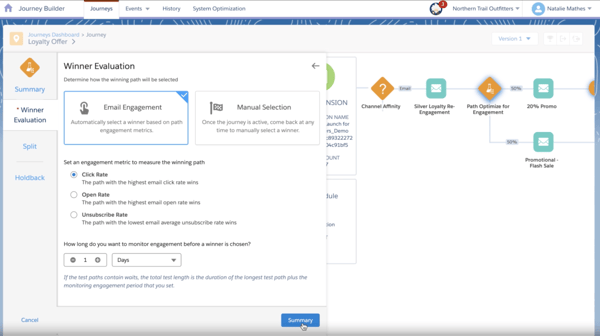
Every email I sent within the system wasn’t just tracked. It was linked to a contact’s entire history, including how they interacted with past campaigns, content downloads, or website activity. For instance, when I sent an email promoting an eBook, I could see whether the recipient opened it, clicked the download link, and interacted with other content. This level of granularity made it easier to identify which campaigns resonated with specific segments of my audience.
Another feature I found genuinely useful was the engagement scoring. Agentforce Sales doesn’t just track email opens and clicks; it aggregates these actions with other interactions to rank leads based on their overall engagement. What I appreciated was that the lead scoring goes beyond a number. It actually explains the “why” behind each score, so my team always understood what was driving a lead’s priority and could act on it with confidence.
What really stood out during my testing was the shift toward autonomous AI agents. Agentforce now deploys AI that can proactively handle lead research, draft personalized outreach emails, and manage follow-up tasks with minimal human intervention. For a busy sales team, this is a meaningful upgrade. It moves the platform from a system of record to a system of action, handling the administrative grind so reps can stay focused on closing.
One thing worth knowing is that the AI features work best when your CRM data is clean and well-maintained. If your historical records are patchy or inconsistent, the AI’s suggestions can feel off until things are tidied up. For teams willing to invest in that groundwork, though, the payoff is significant. The automation and intelligence Agentforce brings to the table is hard to find elsewhere at this scale.
For managing campaigns that tie directly to sales goals, Agentforce’s email tracking features are invaluable. It’s a tool best suited for teams that need detailed insights and are already invested in the Salesforce ecosystem.
What I like about Agentforce Sales:
- I could tie email tracking data to campaign performance and see it alongside other lead interactions (like downloads or ad clicks), which was great for analyzing content effectiveness.
- With engagement scoring, I could focus on the most active leads, helping me allocate resources to those most likely to convert.
What G2 users like about Agentforce Sales:
“What I like best about Agentforce Sales is the transition from manual CRM management to autonomous sales support. By leveraging the power of Data Cloud, the platform provides AI agents that can proactively research leads and manage outreach. This ‘Agent-first’ approach, combined with Einstein’s generative capabilities, has transformed Salesforce from a database into a proactive member of our sales team, significantly reducing administrative overhead.”
– Agentforce Sales Review, Jasjit S.
What I dislike about Agentforce Sales:
- Getting the AI to perform at its best requires clean, well-organized CRM data, which can take some upfront effort, but teams that invest in it tend to see a noticeable lift in how accurately the platform prioritizes and routes leads.
- The initial setup involves a fair bit of configuration across multiple menus, though once everything is in place, the platform handles even the most complex enterprise workflows without breaking a sweat.
What G2 users dislike about Agentforce Sales:
“The biggest challenge is the complexity of implementation, salesforce is not plug and play, it require proper planning, configuration and often a dedicated admin or consultant, the cost can be high, especially when you include licence, add ons and implementation expenses, there is also a steep learning curve, especially for new users or non technical teams, sometimes performance issues like slow loading or glitches can impact user experinece.”
– Agentforce Sales Review, Himanshu I.
2. HubSpot Sales Hub: Best for automated follow-ups and pipeline visibility
I’ve always appreciated HubSpot’s focus on creating tools that work seamlessly together, so I was curious to see how HubSpot Sales Hub performed specifically for email tracking. While it’s positioned as a sales tool, the email tracking features proved incredibly useful for refining my marketing campaigns and understanding audience behavior in greater detail.
What stood out right off the bat was the simplicity of getting started. Since I already use HubSpot for marketing automation, integrating the Sales Hub into my workflow was a breeze. The email tracking tool worked natively with Gmail and Outlook, and within minutes, I received real-time notifications about opens, clicks, and even document views.
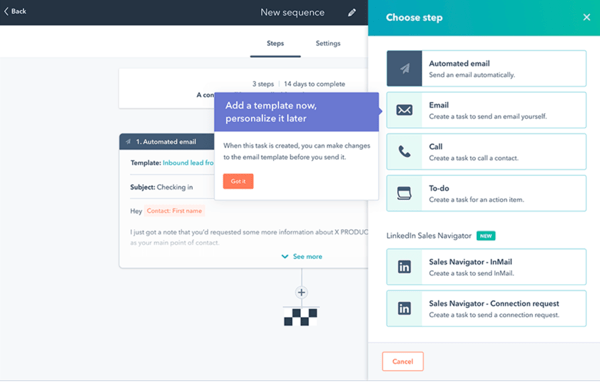
Another feature that caught my attention was the sequences tool. While technically a sales feature, I found it invaluable for nurturing leads. I could create email sequences for follow-ups that triggered automatically based on recipient behavior. For example, if someone clicked on a link in my first email but didn’t register for the webinar, a personalized follow-up would go out two days later with a gentle nudge to sign up.
Something worth calling out is how HubSpot has leaned into AI in a meaningful way in 2026. The AI note taker records and summarizes sales calls automatically, while the follow-up suggestions surface next steps based on deal context rather than generic prompts. For anyone managing a heavy pipeline, these additions quietly take a surprising amount of admin work off your plate.
Many of the advanced features, though, are locked behind higher-tier plans. Things like detailed reporting, lead scoring, and sophisticated automation require an upgrade, which can feel limiting for smaller teams or those just starting out. That said, the core tracking and pipeline features at lower tiers are genuinely capable, and most teams find they get solid value out of HubSpot long before they need to think about upgrading.
For those already using HubSpot, the Sales Hub’s email tracking is a natural extension of their toolkit. It’s ideal for those who want to blend marketing and sales efforts, especially when nurturing leads through multi-step campaigns.
What I like about HubSpot Sales Hub:
- The ability to automate follow-ups based on specific actions, like clicks or no response, helped me keep recipients engaged without manual effort.
- I could track not just email interactions but also how long recipients spent viewing attachments, which gave me information about the content that resonated.
What G2 users like about HubSpot Sales Hub:
“I wouldn’t use any other CRM—HubSpot has everything I need, and the Sales Hub is truly stellar. The pipeline management saves me a ton of time and keeps me focused on the right priorities. The automation also works really well, letting me personalize outreach while still automating follow-ups with prospects.”
– HubSpot Sales Hub Review, Anne G.
What I dislike about HubSpot Sales Hub:
- Many of the more powerful features, like detailed reporting and lead scoring, sit behind higher-tier plans, which can feel restrictive for smaller teams, though the core tracking and pipeline features at lower tiers deliver strong value on their own.
- Notification timing can occasionally feel inconsistent, though once you fine-tune the alert settings to focus on the actions that matter most, like first opens and link clicks, it becomes much easier to prioritize follow-ups without the noise.
What G2 users dislike about HubSpot Sales Hub:
“One thing that can be slightly challenging is the initial setup and learning curve, especially if you’re new to CRM tools. Some features and workflows take time to fully understand. Also, pricing can feel a bit high as you scale and need access to more advanced features. It’s a powerful tool, but smaller teams might find it less flexible from a cost perspective.”
– HubSpot Sales Hub Review, Himanshu L.
Learn how to use email automation to save time, reduce manual tasks, and improve business efficiency.
3. Apollo.io: Best for outreach teams that prospect and track in one place
As someone constantly juggling multiple campaigns, I needed a tool that could not only track email performance but also give me actionable insights for making smarter decisions. Apollo.io turned out to be more than just a tracking tool, it was like having an extra set of hands for understanding what’s resonating with recipients and what’s falling flat. G2 Data shows Apollo.io scores 90% for Email Scheduling, making it one of the strongest performers in the category for structured outreach execution.
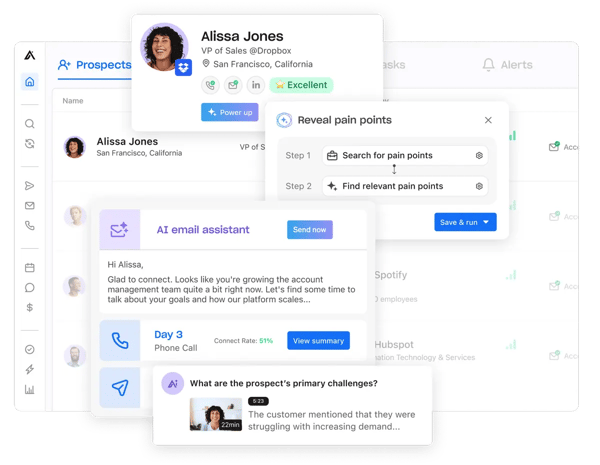
When testing Apollo.io during a cold outreach campaign for a webinar, the first thing that struck me was its timeline view of recipient engagement. Imagine sending a follow-up email and seeing exactly when your contact opened the previous one, clicked your link, and even forwarded it to someone else. That level of visibility made planning my next move feel more intentional, not just a shot in the dark.
Another highlight was how Apollo.io presented trends across all my campaigns. For example, it flagged that my emails with shorter subject lines had significantly higher open rates, a discovery I might have overlooked otherwise. It also pinpointed which links within my emails generated the most clicks, allowing me to optimize future campaigns with confidence.
What’s also worth noting is how Apollo.io has evolved in 2026. It now functions as a fully agentic GTM platform, with AI that handles account research, lead scoring, and message personalization automatically, which means less time deciding who to prioritize and more time actually reaching out.
However, data accuracy was another concern. While the database is extensive, I occasionally ran into outdated contact information, which led to bounced emails. Based on G2 reviews, this is a common frustration among users doing heavy prospecting. That said, using Apollo’s built-in verification filters before exporting goes a long way toward keeping bounce rates manageable.
For teams running data-driven outreach at scale, Apollo.io brings together prospecting, tracking, and AI-driven personalization in a way that’s hard to replicate with separate tools. If you want a platform that actively helps you decide who to reach out to, when, and with what message, this one’s worth a serious look.
What I like about Apollo.io:
- I loved seeing a full timeline of recipient activity, from opens to clicks and even forwards, all in one clean view.
- Apollo.io didn’t just show me the numbers; it identified patterns, such as which subject lines and links performed best across my campaigns.
What G2 users like about Apollo.io:
“The contact search is really goood. I can filter by industry, job title, company size and get a proper list in minutes. Before this I was wasting so much time just trying to find the right person to reach out to. Also the fact that you can set up email sequences directly inside Apollo without needing another tool is genuinely helpful. Everything is in one place and it just makes the whole outreach process a lot faster. Free plan is also decent enough to get started without paying anything upfront.”
– Apollo.io Review, Durgesh D.
What I dislike about Apollo.io:
- Data accuracy can be inconsistent, with some contacts having outdated emails or phone numbers, though running lists through Apollo’s built-in verification filters before sending helps keep bounce rates under control.
- racking standalone emails sent outside of Apollo requires a bit of extra setup, it’s a small trade-off for a platform that handles the entire outreach process, from prospecting to follow-up, in one place.
What G2 users dislike about Apollo.io:
“The data accuracy is the biggest frustration. Email bounce rates are higher than I’d like. Probably 10-15% of contacts have outdated information, which hurts deliverability if you’re not scrubbing lists before sending. A more aggressive real-time verification pass before exporting would go a long way.”
– Apollo.io Review, Adeel M.
Boost your email campaigns with proven insights. Discover 10 tips for email marketing strategy straight from G2’s own email expert.
4. Instantly: Best for cold outreach with deliverability built-in
Instantly is one of those tools that piqued my interest because it’s specifically designed for cold email outreach. As a marketer, I was curious to see how its email tracking features could help me optimize campaigns targeted at new leads and potential customers. It positions itself as a lightweight, high-performing platform, and I wanted to see if it could live up to its promise.
For one of my campaigns, a cold outreach to promote a new webinar, I tracked engagement across multiple email variations. The ability to monitor which version performed best (A/B testing is built-in) was incredibly helpful for tweaking my messaging mid-campaign.
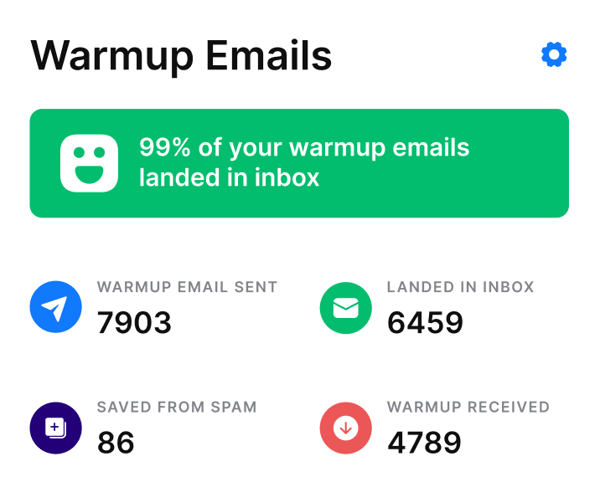
Another standout feature was Instantly’s warm-up service, which ensures your email domain builds and maintains a strong sender reputation. Deliverability is half the battle when running cold outreach campaigns, and this feature helped my emails land in inboxes rather than spam folders.
What really set Instantly apart, though, was its AI-based deliverability features. Not only could I track recipient behavior, but I could also monitor how my emails were performing from a technical standpoint, things like inbox placement and spam triggers. This gave me peace of mind that my emails were actually reaching recipients, something that often gets overlooked with standard tracking tools. It’s probably no coincidence that G2 Data shows 94% of Instantly’s users are small businesses. When you’re a lean team without a dedicated deliverability specialist, having a tool that handles the technical side automatically isn’t a nice-to-have, it’s the whole point.
Many G2 users appreciate its simplicity and ease of use, especially for teams focused on high-volume email campaigns. The insights don’t go much deeper than that, though. If I wanted to see how long recipients spent reading an email or what they did after clicking a link, I was out of luck. Based on G2 reviews, other users have mentioned wanting more advanced analytics to refine their engagement strategies, though for most cold outreach use cases, the core metrics Instantly provides are more than enough to keep campaigns moving in the right direction.
For cold email campaigns where deliverability and scale matter most, Instantly delivers exactly what it promises. It handles the technical heavy lifting so you can stay focused on what actually drives results, the message, the audience, and the follow-up.
What I like about Instantly:
- It was ideal to use Instantly for large-scale outreach campaigns due to its ability to track thousands of emails across multiple accounts in real time.
- The deliverability tracking was another standout feature, helping me ensure my emails were landing in inboxes and not spam folders.
What G2 users like about Instantly:
“I love Instantly AI for their fantastic dashboard design and awesome outreach service. I absolutely love their customer support; it’s the best I’ve ever experienced. Their software is very easy to use and totally worth the money. The initial setup was very easy, and we can now launch so many emails in just a matter of minutes. Instantly ai automated warm-up pool keeps my sender reputation healthy without any manual effort. The campaign analytics dashboard helped me pinpoint winning subject lines fast. Unexpectedly, the bounce detection feature alone saved my domain from being blacklisted — something I hadn’t even considered when signing up.”
– Instantly Review, Ashwin S.
What I dislike about Instantly:
- The analytics stay focused on the basics, opens, clicks, and replies, so if you need deeper behavioural insights like time spent on an email or post-click activity, you’ll need to supplement with another tool, though for most cold outreach teams, the core metrics are more than sufficient.
- Some of the more advanced capabilities come as add-ons, which can push the overall cost higher than expected as you scale, though the flat-fee base pricing still makes it one of the more straightforward options to budget for in this category.
What G2 users dislike about Instantly:
“Nothing much, really, maybe just the reporting part could be perfected. The analytics are good for the basics (opens, clicks, replies), but I’d love to see more granular reporting and advanced behavioral triggers for automations.”
– Instantly Review, Alla L.
5. ZoomInfo Sales: Best for intent-driven prospecting and engagement
ZoomInfo Sales has a strong reputation for helping sales teams identify and engage prospects, but as a marketer, I was curious to see how its email tracking capabilities could contribute to campaign performance. I found a tool that excels at tying email tracking directly to prospect data, giving me a fuller picture of how my outreach campaigns landed with key audiences.
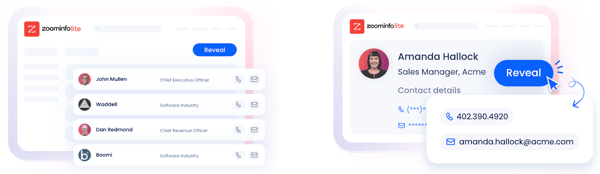
One of the standout features was how ZoomInfo’s email tracking integrates seamlessly with its extensive contact database. When I sent emails promoting a new industry report, I could not only track opens and clicks but also cross-reference this data with enriched profiles of the recipients. For instance, I could see if a lead who clicked a link had recently changed roles, received funding, or added new team members—all of which helped me refine my follow-up messaging.
Another strength of ZoomInfo’s email tracking was its focus on helping me prioritize leads. The platform assigns an “engagement score” based on email interactions and other tracked behaviors, which makes it easy to identify which leads are genuinely interested versus those who are just casually browsing. This was particularly useful for segmenting recipients in larger campaigns and tailoring my outreach to their specific level of interest.
Beyond tracking, ZoomInfo has built out its AI capabilities meaningfully. The Copilot feature acts as an AI sales assistant that pulls account summaries, surfaces intent signals, and drafts tailored outreach based on what’s happening at a prospect’s company right now. For email campaigns tied to specific buying moments, it takes a lot of the research work off your plate before you even hit send.
One thing I noticed is that ZoomInfo’s data coverage isn’t equally strong across all regions. For teams running campaigns in North America and Europe, it’s impressively robust. But for outreach targeting Latin America or parts of Canada, the contact data can be thinner or less current. Based on G2 reviews, this is a recurring theme among users operating across multiple geographies. For most teams focused on core English-speaking markets though, it rarely gets in the way.
For running data-driven campaigns and targeting new prospects, ZoomInfo Sales offers powerful email tracking features that integrate beautifully with its contact intelligence. It’s a strong fit for teams that want their email engagement data to mean more than just opens and clicks.
What I like about ZoomInfo Sales:
- Tracking email engagement alongside detailed contact profiles helped me better understand and target recipients based on their roles, industry, and behavior.
- The intent data and engagement scoring made it easy to prioritize the prospects most likely to convert, rather than treating every open as equal.
What G2 users like about ZoomInfo Sales:
“The intent and filtering features are incredibly useful and important to me, especially when it comes to revenue amounts and locations. My account manager has been really good, showing me the ropes and being available when needed. ZoomInfo Sales makes it easy to find the correct decision maker by allowing me to input multiple job titles, which is super helpful when dealing with thousands of contacts.”
– ZoomInfo Sales Review, Heidi G.
What I dislike about ZoomInfo Sales:
- Data coverage can vary significantly by region, with Latin America and parts of Canada noticeably thinner than North America or Europe. For most teams focused on core English-speaking markets, the platform rarely lets you down.
- Contact data can occasionally be outdated, with some leads having changed roles since their profile was last updated, though cross-checking key contacts before outreach keeps the impact manageable.
What G2 users dislike about ZoomInfo Sales:
“I don’t dislike anything about the tool. My main suggestion is to keep expanding the data coverage for Latin America. We also use it for searches in Europe, Asia, the Middle East, and the US, and in those regions I’ve found it to be very robust. It would be great to improve the presence of, and access to, information for countries in Latin America. Also, some of the contact information isn’t updated—there are cases where contacts no longer work at their companies or don’t hold those positions anymore. That said, I understand this isn’t easy to keep current in a world where professional mobility moves so fast.”
– ZoomInfo Sales Review, Monica R.
6. Pipedrive: Best for visual pipeline management and deal tracking
When I tested Pipedrive for email tracking, I wasn’t expecting it to feel this natural. It’s primarily known as a sales CRM, but the way it connects email activity directly to deals makes it genuinely useful for anyone who wants their tracking data to live inside their pipeline rather than in a separate tool.
The email-to-deal linking was the first thing that stood out. Every email I sent or received was automatically attached to the relevant deal and contact, so I never had to manually log a conversation or go hunting for context before a follow-up. G2 Data shows 79% of Pipedrive’s customers are small businesses, and it’s easy to see why. When you’re running a lean operation without a dedicated ops team, having a CRM that handles the admin of connecting emails to deals automatically saves more time than it sounds.
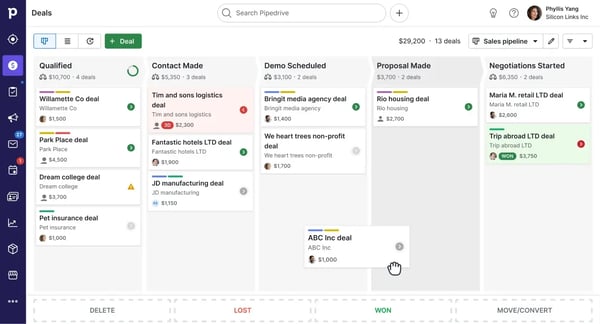
Workflow automation was another area where Pipedrive genuinely impressed me. I could set up rules that triggered follow-up reminders, moved deals between stages, or flagged leads that had gone quiet after a certain number of days. Nothing slipped through the cracks, and I didn’t have to think about it once the rules were in place.
The integrations rounded things out nicely. The connections with Slack, Trello, and Google Calendar meant that a deal won in Pipedrive could automatically kick off a project in Trello or send a notification to the right channel without any manual handoff. For teams already using these tools day to day, it feels less like an integration and more like everything just working together.
The native integrations do have their limits, though. While the API is solid for custom builds, some of the out-of-the-box connectors don’t go as deep as you’d want, and syncing with tools outside the core stack can require more configuration than expected. That said, for most small and mid-sized teams, the core integrations cover everything needed to run a smooth sales process without any extra setup.
Pipedrive is a strong fit for growing sales teams that want email tracking baked directly into their pipeline, without the complexity of a larger enterprise CRM. If you want a tool that keeps every conversation, follow-up, and deal stage in one clean view, this one delivers exactly that.
What I like about Pipedrive:
- I loved how every email automatically attached to th