



At a quick glance, the best emerging AI tools I found on G2 are Miro, Meshy, Blotato AI, Coder, Algolia, Red Panda, Workday Extend, Apify, Leo, and Phygital Plus.
Ever opened a list of “game-changing” AI tools and felt more confused than when you started?
Same. New AI tools launch every week, and every one of them claims to fix your problem. I review software for a living at an AI-first company, and even I find it hard to tell what’s worth trying. Pick the wrong tool, and you’re explaining a burned token budget to your manager.
That’s why I didn’t just skim feature lists and approached this with a clear, data-backed mindset to create a list that would help people tell value from hype. Because “emerging” is a moving target, I stuck to new AI-first tools listed under G2’s Emerging AI Software category page.
I evaluated 40+ emerging AI solutions (unironically, with the help of a great AI tool) and narrowed the list down to a diverse set of 10 that address different use cases across collaboration, 3D generation, social media automation, developer environments, search infrastructure, image generation, enterprise customization, web scraping, mechanical engineering, and multi-model content creation.
Whether you’re an early adopter hunting for the best emerging AI tools to try, or a developer, marketer, designer, or engineer who needs something that actually works, there’s something here for you.
Note: Well-known tools like ChatGPT and Claude, which sit in mature categories such as AI chatbots and AI coding assistants, aren’t on this list. If you’re looking for those, see the best generative AI tools instead.
10 best emerging AI tools for 2027: My top picks
- Miro: Best for real-time visual collaboration and brainstorming
Infinite canvas, real-time collaboration, template library, deep integrations, AI-powered synthesis. (Starter plan at $8/month per member, billed yearly) - Meshy: Best for AI-powered 3D model generation
Text-to-3D and image-to-3D generation, fast turnaround, game engine export, flexible input methods. (Pro plan at $20/month) - Blotato AI: Best for AI-automated social media scheduling and distribution
Cross-platform scheduling, MCP/AI-agent integration, AI content generation, multi-account management. (Starter plan at $29/month) - Coder: Best for secure, self-hosted cloud development environments
Terraform-based workspace templates, self-hosted deployment, fast provisioning, cloud-agnostic infrastructure. (Pricing available upon request) - Algolia: Best for lightning-fast search and product discovery
Sub-millisecond search, customizable ranking, developer-friendly APIs, pre-built UI components. (Pricing available upon request) - Red Panda: Best for free AI image generation with text rendering
Text-to-image generation, text rendering in images, SVG vector export, HD downloads. (Pricing available upon request) - Workday Extend: Best for building custom apps within the Workday ecosystem
Custom app development, AI Developer feature, native Workday security, data object integration. (Pricing available upon request) - Apify: Best for web scraping and data extraction at scale
Actor marketplace, proxy management, MCP/AI-agent integration, structured data output. ($17/month + pay as you go) - Leo: Best for AI-powered mechanical engineering workflows
CAD/PLM-aware search, cited engineering answers, geometric part search, enterprise security. (Pricing available upon request) - Phygital Plus: Best for multi-model AI content creation in one workspace
Multi-model AI aggregator, node-based workflow, image/video/voice generation, Figma-like interface. ($12/month)
*These are the most popular emerging AI software tools on G2, ranked by popularity score on G2’s Emerging AI Software category page. I have also added their starting prices to make comparisons easier for you.
10 best emerging AI tools I recommend
We all know about the popularity of AI, but it is worth running through the eye-watering numbers again. While researching this piece, I found that enterprise AI is increasingly becoming a startup-led application market. According to Menlo Ventures’ 2025 State of Generative AI in the Enterprise, startups captured 63% of AI application-layer revenue in 2025, while the application layer attracted $19 billion, more than half of the $37 billion spent on generative AI by enterprises that year.
What’s more, S&P Global projects generative AI software revenue to grow at a compound annual growth rate of about 39% between 2024 and 2029, reaching $103 billion. Together, these figures suggest that enterprise budgets are shifting beyond foundation models toward specialized tools for software development, customer service, sales, legal work, and knowledge management.
The best emerging AI tools span a wide range of products, from visual collaboration platforms and 3D asset generators to developer infrastructure, search engines, and multi-model creative workspaces. What ties them together is that each tool applies AI in a way that addresses a specific workflow bottleneck. Unlike mature software categories with well-established market leaders, emerging AI is a space where new entrants gain traction quickly based on the strength of their AI capabilities and how well they solve a specific problem.
That makes user reviews especially valuable when comparing emerging AI solutions, because verified feedback reveals how these tools perform in real-world workflows rather than just in demo environments.
How did I find and evaluate the best emerging AI tools?
I started with G2’s Emerging AI Software category page, sorted by popularity score, to build a shortlist of the top tools based on review volume, user satisfaction, and market traction. Since this is a new G2 category without a published Grid Report yet, the popularity ranking served as the primary data-backed baseline for identifying which tools are consistently performing well.
From there, I analyzed G2 review data at scale with the help of AI tools to identify recurring themes in real-world usage. Reviews were especially useful for understanding whether a tool delivers practical value in day-to-day workflows or simply checks feature boxes on paper.
Throughout the evaluation, I focused on how well each platform solves its core use case, the quality and consistency of user feedback, the depth of its AI capabilities, and whether it offers meaningful differentiation from general-purpose alternatives.
The result is a practical, buyer-focused list grounded in verified user feedback and real usage patterns, not just feature checklists or vendor claims.
I’d also like to note that all screenshots in this article are from G2 vendor profiles and publicly available documentation.
What makes the best emerging AI tools: My selection criteria
After analyzing G2 Data and hundreds of verified user reviews, I kept seeing common priorities surface across different roles and industries.
- AI capability depth and differentiation: I looked for platforms where AI is core to the value proposition, not just a feature add-on. The emerging AI tools have to apply AI in ways that solve specific workflow problems, whether that is generating 3D models from text, searching engineering databases with natural language, or automating multi-platform content distribution.
- Ease of adoption and time-to-value: Strong emerging AI tools should deliver value quickly. I prioritized platforms where users consistently mention fast onboarding, intuitive interfaces, and minimal setup friction. Tools that require extensive configuration before delivering any benefit scored lower.
- Output quality and reliability: AI-generated output is only useful if teams can trust it. I evaluated how consistently each platform delivers accurate, usable results, whether that is search relevance, image fidelity, 3D model quality, or cited engineering answers.
- Integration with existing workflows: I gave preference to tools that connect with the systems teams already use, whether that is project management platforms, game engines, CRM systems, PLM environments, or AI agent frameworks. Tools that operate in isolation scored lower than those that fit into broader workflows.
- Scalability and pricing transparency: I evaluated whether each platform can grow with a team’s needs and whether pricing is predictable. Tools with clear, published pricing or generous free tiers scored higher than those where costs are difficult to estimate or scale unpredictably.
- Community and support quality: For emerging tools, responsive support and active community resources matter more than they do for established platforms. I looked for tools where users consistently mention helpful support teams, solid documentation, and a track record of shipping improvements based on user feedback.
- AI-agent and automation readiness: With agentic AI workflows gaining traction, I paid attention to whether platforms support MCP integration, API-first architectures, or other patterns that allow AI agents to discover, configure, and use the tool autonomously.
Not every platform excels in every category. But the best emerging AI tools consistently deliver where it matters most: meaningful AI differentiation, fast time-to-value, reliable output, and the ability to integrate into the workflows teams already depend on.
The list below includes genuine user feedback from the Emerging AI Software category on G2.
*This data was pulled from G2 in 2026. Some reviews may have been edited for clarity.
1. Miro: Best for real-time visual collaboration and brainstorming
G2 rating: 4.6/5
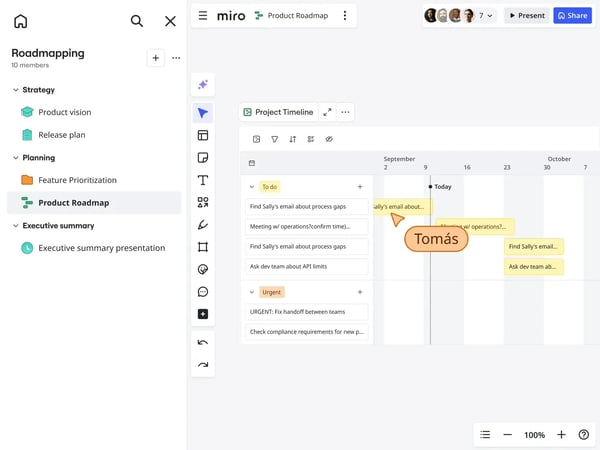
The first thing that stood out to me about Miro is just how consistently users talk about real-time collaboration. Across hundreds of G2 reviews, the ability to work simultaneously on a shared infinite canvas, whether it is brainstorming, user journey mapping, or sprint planning, comes up again and again. That makes it no surprise that it counts as one of the best emerging AI tools on this list.
Teams describe how watching live cursors, dropping sticky notes, and building workflows together in the same visual space replaces the kind of passive silence that comes with reviewing static documents.
Another area where Miro earns strong praise is its visual brainstorming and diagramming toolkit. Users frequently mention mind maps, flowcharts, wireframes, and sticky note clusters as core to how they think through problems. The infinite canvas gives teams the room to explore ideas freely without running out of space, while still keeping different threads connected in a structured way.
I also noticed how often the template library comes up in reviews. Rather than starting from a blank board every time, teams lean on pre-built templates for retrospectives, journey maps, sprint planning, and more. Reviewers describe these as practical and well-designed, not just filler. For teams looking to reduce setup time and get into productive work quickly, this seems to be a meaningful advantage.
What also came through clearly is how well Miro integrates with the broader tool stack. Users frequently highlight connections with project management platforms, design tools, and team communication apps that keep their workflows aligned. Instead of switching between disconnected systems, teams can keep their boards synced with execution tools, which reduces friction and context-switching.
Miro’s low barrier to entry is another theme I noticed. Several reviewers mention that the platform runs smoothly in a browser with no installation required, which makes adoption easier across departments. Even team members who are not particularly technical describe getting comfortable with the interface quickly, which helps drive cross-functional adoption.
Something else that stood out is how users talk about Miro’s AI features. While still relatively new, capabilities like auto-clustering sticky notes, generating diagrams from unstructured input, and summarizing workshop content appear to be saving teams meaningful time during synthesis and post-session cleanup. For organizations running frequent ideation workshops, this adds a layer of efficiency on top of the core collaboration experience.
While Miro is a feature-rich platform with deep customization options, some reviewers note that fully exploring everything it offers can take time, especially for new users navigating the wide range of modules. That said, most users describe this as a short ramp-up rather than a lasting barrier, and the depth is often what makes the platform valuable for teams with complex workflows.
Another pattern I noticed in G2 reviews is that boards with a large volume of objects, images, or embedded files can occasionally experience slower performance. For teams managing content-heavy planning boards with multiple layers, this can affect navigation speed. However, reviewers also acknowledge that this tends to surface only on particularly large or dense boards, and the overall performance during standard collaboration sessions remains fast and responsive.
Overall, Miro delivers a compelling combination of real-time collaboration, visual brainstorming tools, a rich template library, strong integrations, and accessible AI features that make it especially well suited for cross-functional teams that rely on visual thinking. For organizations looking to centralize ideation, planning, and workshop activities in one shared space, it consistently earns praise as a platform that brings distributed teams closer together.
What I like about Miro:
- Miro’s real-time collaboration on an infinite canvas makes visual brainstorming, journey mapping, and sprint planning feel seamless across distributed teams.
- The extensive template library and built-in AI features help reduce setup time and automate post-workshop synthesis, making ideation sessions more productive.
What G2 users like about Miro:
“Miro has become an essential visual hub for our team and consistently delivers across the board. The UI/UX feels intuitive, and the infinite canvas makes visual mapping and brainstorming effortless. Its top-tier integrations with Figma, Jira, and Slack also keep our workflows aligned and in sync. Even during heavy real-time collaboration, performance stays fast and essentially lag-free.
The massive template library makes onboarding smooth and straightforward, and Miro AI significantly speeds up synthesis by clustering stickies and auto-generating diagrams. Overall, the time we save on planning and team alignment translates into an excellent pricing ROI.”
– Miro review, Ijaz A.
What I dislike about Miro:
- Some G2 users note that Miro’s depth and wide range of modules can require a short learning period for new users, though most find the interface intuitive once they are familiar with the layout.
- G2 reviewers mention that particularly large or content-heavy boards can occasionally experience slower navigation, though standard collaboration sessions remain responsive.
What G2 users dislike about Miro:
“Boards tend to perform slowly when they are large (e.g., we have one large planning board that has multiple layers of plans and ideas — it takes several seconds to scroll through), and occasionally boards have failed to render certain aspects, and required me to restart them. As well, although free, the number of editable boards is limited to three (which means once you’ve reached your limit, previous boards are essentially read-only), and we have found archiving and replacing old boards to be a very painful process.”
– Miro review, Jeff P.
2. Meshy: Best for AI-powered 3D model generation
G2 rating: 4.7/5
If you work in game development, product design, or 3D prototyping, Meshy is one of the more exciting tools I have come across in this category. The most consistent theme in G2 reviews is how quickly it turns a text prompt or reference image into a usable 3D model. Users describe going from concept to textured asset in minutes rather than hours, which fundamentally changes how fast teams can iterate on ideas.
What also impressed me is how accessible the platform feels to non-experts. Multiple reviewers mention that they do not have a traditional 3D modeling background but were able to create usable assets without building everything from scratch. For teams that need visual prototypes or game-ready models but lack dedicated 3D artists, this lowers a significant barrier.
The quality of Meshy’s AI-generated output is another area that earns frequent praise. Users describe the textures, shapes, and overall fidelity of generated models as strong enough for use in presentations, game engines, and rapid prototyping workflows. While not every generation is production-perfect on the first attempt, the ability to regenerate and refine quickly keeps the workflow moving.
I noticed that game developers and users working with popular game engines highlight Meshy as a particularly strong fit. The platform supports common export formats, and reviewers describe a smooth pipeline from generation to engine import. For indie developers or small studios looking to accelerate asset creation without outsourcing, this integration with existing production workflows appears to be a real differentiator.
Another highlight is the flexibility of input methods. Users can generate models from text prompts, upload reference images, or combine both to guide the AI. This versatility means the tool adapts to different creative starting points, whether someone has a rough sketch, a photograph, or just a written description of what they need.
Something else that stood out is how often reviewers bring up prototyping and 3D printing. Several describe using Meshy to block out characters and secondary assets early in a project, comparing a couple of variants from one concept before committing to a direction. Others mention creating models for resin printing, with the option to edit, refine, and split a model before preparing it for the printer. For makers and designers who want to test an idea without weeks of manual modeling, that early-stage flexibility seems to be a real draw.

While Meshy delivers impressive speed and accessibility, some reviewers note that AI-generated mesh topology may require manual cleanup before assets are ready for production use. For workflows involving animation rigging, physics simulation, or low-poly optimization, the generated geometry does not always distribute polygons as efficiently as hand-modeled assets. That said, for rapid prototyping, concept visualization, and early-stage design exploration, the output quality is often more than sufficient.
Another consideration that comes up in reviews is the credit-based pricing model. Users who frequently regenerate or refine models to get the exact result they want mention that credits can be consumed quickly during intensive creative sessions. However, many also note that the time saved compared to manual 3D modeling offsets the credit cost, and the platform’s pricing remains competitive relative to hiring dedicated 3D artists or outsourcing asset creation.
In practice, Meshy delivers the most value for game developers, product designers, and creative teams that need to move quickly from concept to 3D asset without relying on specialized modeling expertise. Its combination of speed, accessibility, and flexible input methods makes it a strong choice for teams that prioritize rapid iteration over pixel-perfect first-pass results.
What I like about Meshy:
- Meshy’s AI-powered generation turns text prompts or reference images into textured 3D models in minutes, dramatically accelerating the prototyping and asset creation workflow.
- The platform is accessible to users without traditional 3D modeling backgrounds, making it practical for indie developers and small teams that need visual assets quickly.
What G2 users like about Meshy:
“What I like most about Meshy is how quickly I can turn an idea or a reference image into a 3D model I can actually use. I don’t have an advanced background in 3D modeling, so being able to create assets without building everything from scratch has made a real difference in my workflow.”
– Meshy review, Jorge L.
What I dislike about Meshy:
- G2 reviewers mention that AI-generated mesh topology may need manual cleanup or retopology before assets are suitable for production workflows like animation or physics simulation.
- Some G2 users note that credits can be consumed quickly during intensive sessions involving multiple regenerations, though the time savings compared to manual modeling often outweigh the cost.
What G2 users dislike about Meshy:
“The inconsistency of the model generation. As I work with Low Poly models mostly, the remeshing of highly detailed models down from 1m polys to 10k does have its drawbacks, as the AI model does not utilize the available poly count as accurately as one would like. To some extent, one could argue that the efficiency of the AI generator can sometimes be lackluster.”
– Meshy review, Yen J.
3. Blotato AI: Best for AI-automated social media scheduling and distribution
G2 rating: 4.6/5
What stands out most about Blotato AI is how users describe it as a genuine time-saver for multi-platform social media distribution. The most common theme I noticed is cross-platform posting, where teams can schedule and publish content across multiple social channels from a single interface, without manually logging into each platform.
Another area that came through clearly is Blotato’s MCP and AI-agent integration. Users running agentic content workflows describe being able to connect their AI tools directly to Blotato’s scheduling infrastructure, which means they can go from content creation to fully scheduled posts across multiple platforms in a single automated session. For teams already working with AI-powered content pipelines, this kind of integration eliminates a significant amount of manual distribution work.
I also noticed that Blotato’s built-in AI content generation capabilities earn praise from users who need to produce social media assets at scale. The platform helps generate infographics, captions, and visual content tailored for different platforms, which reduces the back-and-forth between content creation and distribution tools.
The speed of initial setup is another theme that shows up frequently. Users describe connecting their social accounts and getting their first posts scheduled within minutes rather than hours. For smaller teams or solo marketers who want to start distributing content immediately without a complex onboarding process, this matters.
Pricing is another point that comes up positively. Reviewers frequently compare Blotato’s cost to other social media management platforms and describe it as more affordable, particularly given the number of connected accounts and scheduling capabilities included even at lower-tier plans.
Content repurposing is another theme that came up again and again. Reviewers describe starting with a single video, blog post, or YouTube link and turning it into platform-ready posts for several networks without rebuilding each one from scratch. For solo creators and small teams running social on the side, that create-once approach appears to give back real time and makes it easier to stay consistent.
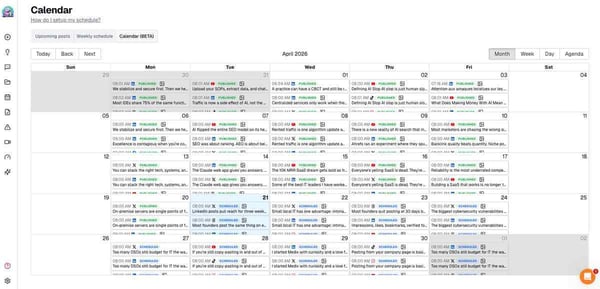
While Blotato handles multi-platform scheduling well, some G2 reviewers mention that the analytics and reporting capabilities are still maturing. Certain platforms may not have full analytics coverage within the Blotato dashboard, which means teams that rely heavily on performance data may need to check native platform analytics separately. That said, users also note that the team behind Blotato is responsive and actively shipping improvements in this area.
Notable patterns in G2 reviews also point to occasional friction during platform-specific setup or content formatting. Since each social channel has its own posting requirements and content restrictions, users sometimes encounter limitations tied to the platform’s API rather than Blotato itself. However, reviewers appreciate that the tool is transparent about these limitations and continues to expand its supported formats.
All in all, Blotato AI is a strong fit for content creators, marketers, and small teams that need to distribute content across multiple social channels efficiently without investing in a complex enterprise-grade social media suite. Its AI-agent integration and affordable pricing make it particularly compelling for teams already building AI-powered content workflows.
What I like about Blotato AI:
- Blotato’s MCP integration enables teams running AI-powered content workflows to automate multi-platform scheduling directly from their AI tools, saving significant manual effort.
- The platform offers competitive pricing with generous account limits, making it a practical choice for smaller teams managing content across many channels.
What G2 users like about Blotato AI:
“The MCP integration is the main reason I’m here. I run an agentic content workflow through Claude, and having Blotato accessible via MCP means I can go from finished clips to 40 scheduled posts across four platforms in a single session, without touching the Blotato UI. That’s real time back.”
– Blotato AI review, Danny T.
What I dislike about Blotato AI:
- G2 reviewers mention that analytics coverage does not yet extend to all connected platforms, which may require checking native platform dashboards for full performance data.
- Some G2 users note that certain platform-specific content formats or posting restrictions can create friction during setup, though these limitations often stem from the social platform’s own API constraints.
What G2 users dislike about Blotato AI:
“Analytics don’t cover LinkedIn, so I can’t see how my LinkedIn posts are doing from inside Blotato. It can also only post to a Facebook Page, not a personal profile, although that limit comes from Facebook rather than Blotato.”
– Blotato AI review, Rick L.
4. Coder: Best for secure, self-hosted cloud development environments
G2 rating: 4.3/5
For platform engineering and DevOps teams managing developer environments at scale, Coder is a tool that comes up consistently in G2 reviews. Coder is a platform that helps software developers create and manage cloud-based coding environments.
The strongest theme I noticed is how it delivers consistent, reproducible development environments that eliminate the classic “works on my machine” problem. Teams describe standardized workspaces that ensure every developer starts from the same configuration, regardless of their local setup.
The speed of provisioning new environments is another area that earns frequent praise. Reviewers mention that developers can spin up fully configured workspaces in minutes, which reduces the time spent on environment setup and troubleshooting. For organizations onboarding new engineers, this translates into faster time-to-first-commit and less reliance on senior team members for setup guidance.
What also stood out to me is how Coder leverages Terraform as its infrastructure layer. Because workspace templates are defined as code, teams can version-control their environments, share configurations across projects, and deploy across different infrastructure providers. This extensibility is a major advantage for organizations that operate across multiple clouds or need to support specialized hardware like GPUs.
I also noticed that onboarding acceleration is a recurring benefit. Multiple reviewers describe how new developers can start contributing within their first day rather than spending the first week wrestling with environment configuration. For teams that are growing quickly or have a high onboarding cadence, this consistency reduces friction and speeds up productivity ramp-up.
Self-hosted control is another theme that resonated strongly in reviews. Organizations that need to keep source code and development activity within their own infrastructure describe Coder as a solution that gives them the flexibility of cloud-based environments without sending data outside their security perimeter. For teams in regulated industries or with strict data residency requirements, this is a critical differentiator.
I also came across a lot of mentions of how Coder fits into AI-assisted development. Reviewers describe running coding agents inside isolated workspaces, which lets them give an agent broad filesystem and shell access to work autonomously without touching their local machine. Some also point to the AI integrations built into the platform as a productivity boost within their usual IDE flow. For teams starting to bring agents into their engineering process, that sandboxed approach looks like a meaningful advantage.
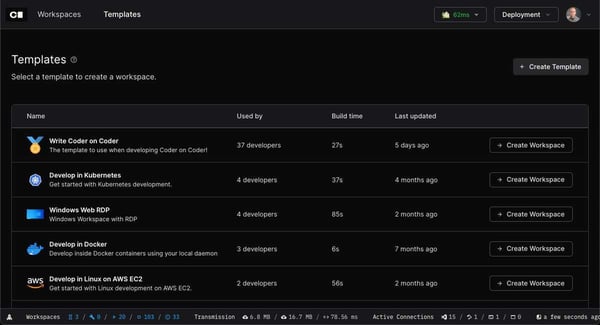
While Coder’s Terraform-based approach is a strength for experienced platform teams, it does introduce a learning curve for organizations without deep infrastructure-as-code expertise. G2 reviewers note that initial template authoring and workspace configuration assume familiarity with Terraform and container orchestration, which may require additional ramp-up time for smaller teams. However, once templates are in place, the day-to-day experience for developers is described as smooth and productive.
Across many G2 reviews, I also noticed mentions of documentation gaps for more advanced configurations. While the core documentation covers standard setups well, users working on edge cases or complex workspace builds sometimes need to rely on community resources or direct support. That said, reviewers also note that the Coder team is responsive and actively improving documentation coverage.
At its core, Coder delivers the most value for platform engineering teams that want to standardize, secure, and accelerate developer environments across their organization. Its infrastructure-as-code approach and self-hosted deployment model make it especially compelling for teams that prioritize security, consistency, and developer productivity at scale.
What I like about Coder:
- Coder’s Terraform-based workspace templates provide consistent, reproducible development environments that eliminate configuration drift across teams and projects.
- The self-hosted deployment model gives organizations full control over their source code and development infrastructure, which is critical for teams with strict security requirements.
What G2 users like about Coder:
“The biggest factor for us is the extensibility. Because in the end it is ‘just’ a wrapper around Terraform, we can easily use it across different platforms: Both VMs and Kubernetes. So it’s extremely flexible. Besides that, the fact that it’s self-hosted means it’s super easy to use with our own GPUs and hardware.”
– Coder review, Alexandre C.
What I dislike about Coder:
- G2 reviewers mention that initial setup and template authoring assume a strong Terraform and container orchestration background, which may be a barrier for smaller teams without dedicated platform engineering resources.
- Some G2 users note that documentation for advanced workspace configurations has gaps, though the Coder team is responsive and actively improving coverage.
What G2 users dislike about Coder:
“The initial setup and template authoring can feel complex, and it really assumes a strong Terraform and Kubernetes background, which may be a barrier for smaller teams. The documentation for more advanced workspace configurations still has some gaps, and when a workspace build fails, debugging it can be time-consuming and frustrating. A more guided onboarding experience would go a long way toward making the platform easier to adopt.”
– Coder review, Arshad A.
5. Algolia: Best for lightning-fast search and product discovery
G2 rating: 4.5/5
Imagine you go to a huge toy shop with 10,000 toys. You want to find your favorite red car. Instead of walking around the entire shop looking for it, you ask someone: “Where is the red car?” And they find it for you in just a second!
That’s what Algolia does, but for websites and apps with an AI-powered search and retrieval platform. One thing I noticed immediately when reading through Algolia’s G2 reviews is how consistently users talk about speed. The platform delivers search results so quickly that multiple reviewers describe it as near-instantaneous, with results appearing before users even finish typing their query. For teams building customer-facing search experiences, that kind of responsiveness directly impacts user satisfaction and conversion rates.
Another strength that comes through clearly is how developer-friendly the platform is. Users frequently highlight the quality of Algolia’s documentation, pre-built UI components, and well-structured APIs. Developers describe getting a working search prototype up and running quickly without needing to build a search engine from scratch, which significantly reduces implementation time.
Reliability is another theme I noticed across reviews. Users in production environments describe Algolia as consistently dependable, with strong uptime and minimal disruptions. For teams where search is a core part of their product experience, that reliability matters as much as speed.
I also noticed that support quality earns positive mentions. Reviewers describe responsive, knowledgeable support teams that help with implementation questions and optimization. For organizations that are configuring search for the first time or fine-tuning relevance for complex use cases, having accessible support can make a meaningful difference in time-to-value.
Customizable ranking and relevance tuning is another area where Algolia stands out. Users describe being able to control how search results are prioritized, apply business rules, and fine-tune relevance without deep search infrastructure expertise. This flexibility allows teams to tailor the search experience to their specific product, audience, and content structure.
Algolia’s AI capabilities also get specific mention in reviews. Some users highlight features like dynamic re-ranking, recommendations, neural search, and personalization that improve the search experience without much extra effort. Others point to AI-driven options that blend manual merchandising control with natural language management and automated relevance. For teams that want to layer intelligence onto search without giving up control over results, that combination comes across as a clear strength.
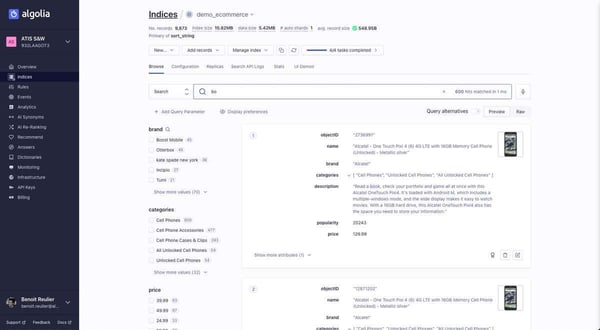
While Algolia delivers strong performance and developer experience, some G2 reviewers mention that pricing can scale quickly as search volume and record counts grow. For teams managing large datasets or experiencing rapid traffic growth, it is worth evaluating usage tiers carefully during the planning phase. That said, many reviewers also note that the performance and reliability justify the investment, particularly when search is a revenue-critical function.
Notable patterns in G2 reviews also point to a learning curve when configuring more advanced features like synonyms, custom ranking formulas, and faceted search. While the basic setup is described as fast and intuitive, unlocking the full depth of Algolia’s configuration options can take time for teams without prior search infrastructure experience. However, the documentation and pre-built components help bridge this gap effectively.
For teams that need fast, reliable, and customizable search integrated into their product, Algolia consistently earns praise as a platform that balances power with developer accessibility. It delivers the most value for product and engineering teams building search-driven experiences where speed, relevance, and scalability are non-negotiable.
What I like about Algolia:
- Algolia delivers near-instantaneous search results with strong relevance tuning, making it a reliable foundation for customer-facing search experiences.
- The developer-friendly documentation, pre-built UI components, and well-structured APIs significantly reduce implementation time for engineering teams.
What G2 users like about Algolia:
“The documentation is very easy to follow and well maintain