


If you’re evaluating the best payment gateway software right now, here’s what I’d want you to know before you commit: I’ve watched teams get well into integration before realizing they picked the wrong one. Payment gateway migrations are punishing enough that “we’ll fix it later” rarely stays on schedule. Getting this right at the evaluation stage is genuinely worth the extra time.
Digital payment volume is forecast to reach US$37.45 trillion in 2026, growing toward US$46.25 trillion by 2030. At that scale, a gateway that looked fine during scoping starts showing its limits in production: settlement timing that doesn’t match your forecasting cycle, regional compliance requirements that only surface when you’re trying to expand, and checkout flows that quietly lose mobile transactions before anyone notices.
In this guide, I connect each tool to the operational profile it actually fits, so the decision in front of you has a clear answer rather than more research to wade through.
10 best payment gateway software for 2026: My top picks
- PayPal Payments: Best for trust-led consumer checkout at scale
Widely adopted gateway for global B2C payments, chosen for brand familiarity and broad payment method coverage. (No monthly fee; online pricing starts at 2.99% + fixed fee per transaction.) - Adyen Payments: Best for unified global payment orchestration
Single-stack gateway for cards, local methods, and risk management across markets and channels. (No setup charges; $0.13 fixed fee + payment method fee per transaction.) - Apple Pay: Best for mobile-first, low-friction card payments
Device-native, tokenized checkout for iOS environments, built around biometric authentication and reduced checkout steps. (No additional Apple Pay fee; standard card processing rates apply.) - checkout.com: Best for digital-native, multi-region payment stacks
API-driven gateway with flexible routing and global payment method coverage for high-growth ecommerce and SaaS teams. (Custom pricing based on business profile.) - Paytm Business: Best for India-focused digital and QR-first payments
Merchant gateway combining UPI, QR, wallets, and cards for businesses serving Indian consumers online and offline. (Free account setup; UPI starts around 0.40%, cards around 2.75% per transaction.) - NMI Gateway: Best for flexible payment enablement across channels
White-label gateway built for ISOs, ISVs, and resellers managing multi-merchant payment programs. (Pricing available on request.) - Alipay: Best for Chinese and cross-border wallet acceptance
Enables wallet-based checkout for Alipay users across ecommerce, travel, and luxury retail scenarios. (Pricing available on request.) - EBizCharge: Best for B2B payments with ERP and accounting integration
Embedded payment solution connecting card acceptance directly into accounting and ERP workflows. (Pricing available on request.) - Authorize.net: Best for card processing in legacy and SMB environments
Established gateway for secure card transactions and recurring billing across ecommerce and subscription setups. (Plans start around $25/month + ~2.9% + $0.30 per transaction.) - Borderless AI: Best for global contractor and cross-border payment workflows
Payment platform built around international transfers, multi-currency payouts, and contractor payment compliance. (Pricing available on request.)
*These payment gateway tools consistently surface as leading options based on aggregated user review patterns and category positioning seen in G2 2026 Winter Grid.
10 best payment gateway software I recommend
Payment gateway software is where checkout intent becomes confirmed revenue, and it goes without saying that the gap between those two states is larger than most teams expect until they’re troubleshooting it in production.
What separates strong platforms from adequate ones goes beyond the feature list on the pricing page. It’s how they behave under the conditions that actually stress a payment stack: high-volume settlement windows, cross-border authorization attempts, disputed transactions that need clean audit trails, and checkout flows that have to work on mobile without friction. I looked specifically at how each tool in this list handles those conditions, not just whether it technically supports them.
From my evaluation, the platforms that hold up tend to share a few traits. They surface transaction-level signals clearly enough that engineering and finance aren’t chasing the same data from different dashboards. They handle volume spikes without authorization performance degrading mid-peak, particularly during high-volume windows when decline rates compound. The ones worth recommending also tend to keep post-transaction work inside the platform rather than routing it through external queues.
Adoption across G2 reviews spans small merchants running lean stacks to SaaS teams managing subscription billing and enterprise marketplaces coordinating multi-party payouts. The operational priorities differ, but the underlying requirement is consistent: a gateway that stays out of the way once it’s configured.
How did I find and evaluate the best payment gateway tools?
I shortlisted platforms using G2’s Winter 2026 Grid Report, then ran AI-assisted analysis across hundreds of verified reviews to surface what consistently comes up in real-world feedback: where authorization holds or slips, how dispute handling works at volume, and whether reconciliation output is actually finance-ready.
Since I haven’t personally deployed every platform, I cross-referenced findings with G2 Data and reviews from ecommerce operators, SaaS billing teams, and finance leads who use these tools in production. Visuals and product references are drawn from G2 vendor listings and publicly available documentation.
What makes the best payment gateway software worth it: My criteria
My criteria came directly from what G2 reviewers flagged as breaking points, cross-checked against how ecommerce, SaaS, finance, and product teams actually run payment workflows in production.
- Authorization performance and transaction reliability: Approval drops are revenue losses that don’t show up as line items until someone runs the numbers, and the gap widens during high-volume windows when decline rates compound. I weighted gateways higher when they offered intelligent routing and clear decline diagnostics, not just raw processing capability.
- Payment method breadth and localization readiness: Expansion timelines slip when a gateway can’t natively support the payment methods that customers in a new market actually use. I looked for platforms where local cards, wallets, and bank-based methods are built in, not bolted on through separate integrations.
- Settlement transparency and reconciliation alignment: A gateway that can’t produce clean, accountable settlement exports creates downstream work for finance teams every single month. I prioritized platforms where reconciliation output maps directly to accounting workflows without manual correction.
- Fraud management without conversion sacrifice: Rigid fraud controls block legitimate transactions just as reliably as they block bad ones. I favored gateways with configurable risk thresholds that can be tuned by region or transaction type, giving teams actual control over the tradeoff.
- Dispute resolution and refund workflow efficiency: At scale, post-transaction handling becomes an operational cost center if the tooling isn’t built for it. I assessed how each platform handles disputes and refunds end-to-end, specifically whether teams can resolve them without heavy support overhead.
No gateway leads across every dimension here. The right call depends on where your current stack is leaking, whether that’s authorization performance in new markets, reconciliation overhead at month-end, or dispute volume you’re absorbing manually. Match the tool to the friction, not the feature count.
To be included in this category, a solution must:
- Accept online payments from credit and debit cards, mobile wallets, or BNPL services
- Connect the e-commerce website to a payment processor for online transactions
- Transmit payment information securely from buyers to payment processors
- Support business to consumer (B2C) and B2B payments
- Integrate with financial systems and retail point of sale (POS) solutions
- Support multiple use cases such as e-commerce, POS, or cross-border transactions
*This data was pulled from G2 in 2026. Some reviews may have been edited for clarity.
1. PayPal Payments: Best for trust-led consumer checkout at scale
PayPal Payments is one of those gateways customers already trust before you’ve said a word. It supports online transactions, digital wallets, and cross-border payments across web, mobile, and marketplace environments. What I kept seeing in the review data: teams rely on it to simplify checkout and automate payment flows without complex infrastructure.
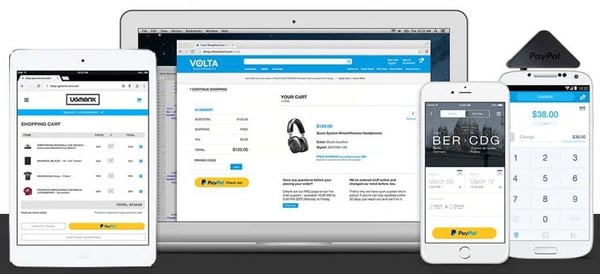
G2 users frequently flag stable processing and smooth completion across recurring and one-time payments, reflected in a 91% performance and reliability rating. I noticed this most among subscription-led teams, where that consistency quietly does a lot of work. Strong day-to-day usability signals suggest it integrates into workflows without adding maintenance overhead.
Set up simplicity appears frequently in feedback. What I found is that merchants can configure payment acceptance and start processing quickly, often without technical involvement. For smaller teams or individual sellers where ramp-up speed matters, that low-friction onboarding removes a real barrier.
G2 users often describe PayPal Payments as a practical channel for receiving funds from global customers or platforms where traditional bank transfers fall short. Instant payment capability is rated at 91% on G2. This is particularly valuable for freelancers and businesses needing to operate across currencies while keeping transaction visibility in one place.
G2 review insights point to broad card acceptance and wallet compatibility, backed by a 93% rating for accepted credit cards and debit cards. What that means in practice: your customers are less likely to hit a dead end at checkout because their preferred payment method isn’t supported. Coverage like this reduces drop-off across regions and payment preferences.
Mobile usability comes up repeatedly in G2 reviews. The ability to monitor transactions, send funds, and manage payment activity from mobile environments is a consistent practical advantage. This is particularly relevant for distributed teams and independent sellers who can’t always be tied to a desktop to maintain financial oversight.
G2 reviewers note that transaction fees apply per payment and stack with a separate currency conversion charge on international transactions. If your volume is heavily cross-border, that compound cost is worth modeling before you commit. The fee structure itself is transparent and predictable, which at least keeps budgeting clean.
Business account verification surfaces as a friction point in G2 feedback, particularly around KYC workflows that can stretch onboarding longer than expected. If you’re setting up a business account for the first time, budgeting extra time for that process is worth doing. Day-to-day operations, once you’re through it, are consistently described as clean and reliable.
PayPal Payments remains highly relevant for freelancers, SMBs, and digital-first businesses that rely on global payment acceptance and dependable processing. Across G2 feedback, there is consistent recognition of its broad card support and trusted checkout experience, positioning it as a widely recognized option for scalable online transactions across diverse commerce environments.
What I like about PayPal Payments:
- It makes sending and receiving payments simple and fast, with a clean interface that helps users manage transactions without complicated setup.
- The platform supports international payments and multiple payment methods, making it easier to handle cross-border transactions and diverse customer preferences.
What G2 users like about PayPal Payments:
“I like PayPal Payments for its ease of use and easy sign-on. I find it valuable that I can use it anywhere and anytime. The initial setup was good, which made starting with PayPal Payments straightforward for me.”
– PayPal Payments review, Pankaj R.
What I dislike about PayPal Payments:
- Currency conversion fees compound for high international transaction volumes, though the fee structure is transparent, cost-predictable, and free of hidden charges regardless of transaction mix.
- Business account verification requires extra steps upfront, but once completed, day-to-day payment operations remain clean and consistent without further friction.
What G2 users dislike about PayPal Payments:
“While I was verifying my business account, I wasn’t able to find the video KYC options on the website. I had to research on YouTube to figure it out. PayPal could improve the mobile application, which has a very limited number of features. It should incorporate KYC options, payment history options, and should transfer the payments immediately if possible. It was not that easy to make a business account in PayPal Payments. However, I did it with the help of YouTube tutorials.”
– PayPal Payments review, Bibhudutta P.
A unified gateway covers authorization, but dedicated fraud tooling goes deeper on detection and chargeback defense. Check out the best e-commerce fraud protection software to see how the two layers complement each other.
2. Adyen Payments: Best for unified global payment orchestration
Adyen Payments earns its place in enterprise payment stacks by doing something most gateways only partially deliver: keeping processing, fraud controls, and dispute management inside one system. What the G2 reviews reinforced for me is that this isn’t just an architectural preference; it’s what teams actually rely on when payment complexity scales.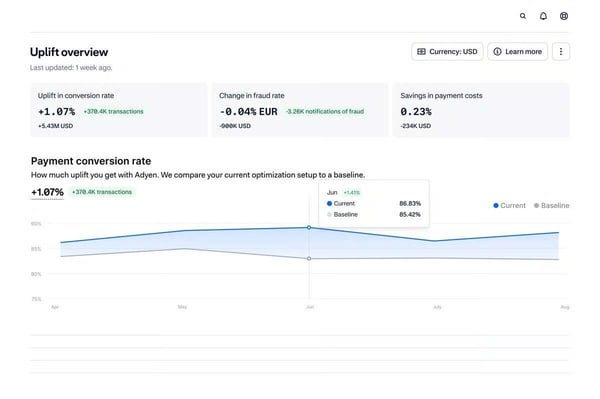
One thing that stood out in the review data was how consistently reviewers highlight Adyen’s transaction search depth. Teams describe filtering by card details, IDs, or payment metadata to verify activity quickly during support investigations. The 100% Level 3 processing rating reflects just how much transactional detail the platform actually surfaces.
Authorization performance is where Adyen tends to pull ahead in review feedback. Teams describe routing logic that improves approval rates on cross-border and high-value transactions, which is precisely where most gateways start showing gaps. If international expansion is on your roadmap, that’s a meaningful advantage to have built into the stack from the start.
Refund tracking, payment state monitoring, and ARN sharing all live inside the platform, which means your support and finance teams aren’t playing telephone to resolve customer queries. This is particularly valuable in reviews from larger operations where that coordination overhead adds up fast across high ticket volumes.
Fraud scoring, Dynamic 3D Secure, and automated chargeback defense are cited repeatedly as differentiating features. Businesses link these controls to fewer fraud-related losses and less manual investigation effort. Adyen manages to strengthen fraud defense without introducing friction that bleeds into legitimate transaction completion rates.
Engineering teams benefit from comprehensive documentation and sandbox environments that simulate real payment scenarios before deployment. These resources meaningfully reduce production risk rather than just checking a compliance box. That reliability aligns with its 100% rating for e-commerce integration on G2.
Finance teams reference the platform’s ability to connect payment data directly to reconciliation workflows, rated at 100% for accounting integration on G2. Transaction matching and financial reporting run without manual exports, which keeps books clean without requiring additional tooling. For teams managing multi-market settlement flows, that tightness removes a recurring source of month-end friction.
Chargeback automation and workflow configuration require meaningful setup time before they operate as intended, particularly for teams managing complex dispute volumes or multi-market payment flows. Operations with straightforward chargeback needs reach a steady state faster. That upfront investment does produce a defense layer that handles responses without ongoing manual intervention once live.
G2 users point to the absence of visual analytics as a practical slowdown for finance and ops teams expecting at-a-glance trend views. Charts, graphs, and performance visualizations aren’t part of the dashboard layout. That said, the underlying transaction data is complete, consistently structured, and straightforward to export when a more formal review is needed.
Adyen Payments holds a strong position in the payment gateways category by combining authorization performance, fraud controls, and unified transaction visibility in one platform. What the G2 review data kept reinforcing for me is that these capabilities work together in a way that directly benefits e-commerce, marketplaces, fintech, and global retail teams managing multi-region payment operations.
What I like about Adyen Payments:
- Adyen Payments provides strong transaction visibility, making it easy to search for payments, track refunds, and review disputes without switching between systems.
- Smart routing and fraud controls support higher authorization rates while helping teams monitor risk and manage chargebacks more efficiently.
What G2 users like about Adyen Payments:
“I really like the search functionalities and how the features like disputes and reports are organized in the portal. It makes it very easy to find what I need. The chargeback fees are also very competitive compared to others. Additionally, the auto-defend feature for chargebacks is a great tool that saves a lot of time.”
– Adyen Payments review, Abdelaziz I.
What I dislike about Adyen Payments:
- Chargeback and automation workflows require upfront configuration work, and the setup investment is most visible in complex dispute environments, but it produces a defense layer that runs without manual oversight once live.
- The dashboard lacks visual trend views and charts, which slows at-a-glance performance analysis, though transaction records are thorough, well-organized, and straightforward to export when a structured review is needed.
What G2 users dislike about Adyen Payments:
“The Adyen dashboard isn’t particularly user-friendly, as it lacks visual analytics, which makes it harder to interpret data at a glance. Additionally, I’ve noticed that the Adyen component occasionally fails to load on the payment page, which can be frustrating.”
– Adyen Payments review, Arpan K.
3. Apple Pay: Best for mobile-first, low-friction card payments
Apple Pay doesn’t try to do everything, and that focus is precisely what makes it effective. Biometric authentication, tokenized payments, and reduced checkout steps define the experience across in-store, online, and peer-to-peer environments. What I found in the review data is a remarkably consistent picture: customers move through checkout quickly, and merchants notice.
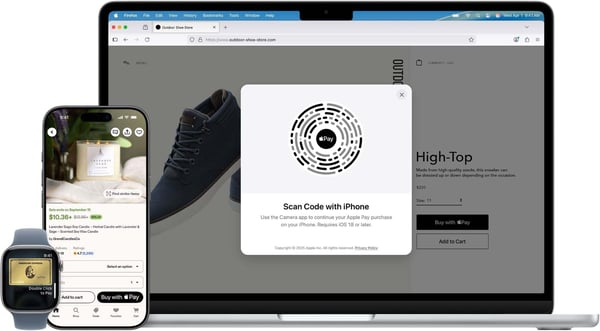
Security here runs underneath the experience rather than on top of it. Payment credentials are replaced with tokens at the point of transaction, earning a 96% data tokenization rating on G2. Your customers get a fast checkout; you get reduced fraud exposure. The architecture handles both without asking either side to make a trade-off.
If you’re running high-volume, low-value transactions, checkout speed isn’t a nice-to-have. Customers authenticate through biometrics, rated at 96% for two-factor authentication on G2, and complete purchases within seconds. Merchants consistently describe Apple Pay as the point where their abandonment rate quietly improved without any other changes to the flow.
Integration with iPhone, Apple Watch, and iPad gives businesses access to a large, already-converted user base. Merchants describe adding Apple Pay as one of the lowest-effort ways to meet customers on their preferred payment method. That ecosystem depth is genuinely difficult to replicate through any other single integration.
Fraud protection sits at 95% on G2, above the category average of 90%, and the reviews back up what that number implies. Verified authentication keeps disputed transactions lower, which matters more as volume grows. If dispute management is already a cost center in your current setup, that gap relative to category average is worth taking seriously.
In physical retail, the tap-and-go expectation is already there for a growing share of customers. Apple Pay meets it without asking merchants to do much. The speed benefit shows up most clearly for businesses with real queue pressure, where shaving seconds off each transaction actually adds up.
Not all your customers carry iPhones, and Apple Pay can’t help the ones who don’t. It’s the most important constraint to reality-check early: look at your device split, and if Android is meaningful, plan your stack accordingly. Within its lane, though, the checkout experience is hard to fault.
Built-in promotional and loyalty tooling sits outside Apple Pay’s design scope, which surfaces as a consideration for merchants building campaign-led or loyalty-driven commerce experiences. Businesses running promotions through separate tools find that Apple Pay integrates cleanly alongside them. The payments-first focus keeps checkout consistent without layering in complexity that would slow the core experience.
Apple Pay holds a steady position in the payment gateway category through reliable usability and broad SMB adoption. Its strengths in secure authorization, rapid checkout, and contactless payment alignment support smooth day-to-day transaction workflows.
What I like about Apple Pay:
- Quick tap-to-pay transactions with biometric authentication allow customers to complete purchases within seconds and help businesses maintain a smooth checkout flow.
- Strong security through tokenization and fraud protection tools helps reduce exposure to sensitive card data while reinforcing trust across both online and in-store payments.
What G2 users like about Apple Pay:
“Apple Pay is very convenient and secure for paying merchants online and in person. I don’t need to physically carry my cards anymore and I know I can just use the Apple Pay option to pay for merchandise.”
– Apple Pay review, Omar K.
What I dislike about Apple Pay:
- Checkout works only within Apple device environments, so merchants with mixed-device audiences need a complementary gateway; the platform itself delivers consistently high completion rates and frictionless authentication wherever it operates.
- Built-in promotional and loyalty features are limited in scope, though the payments-first design integrates cleanly alongside external campaign or loyalty tools without adding checkout complexity.
What G2 users dislike about Apple Pay:
“Although Apple Pay has gained popularity, not all customers use it as their preferred payment method, which makes sense, but not all merchants support apple pay either.”
– Apple Pay review, Spencer S.
4. checkout.com: Best for digital-native, multi-region payment stacks
Businesses operating across multiple regions use checkout.com to consolidate payment acceptance without losing visibility into what’s actually happening at the transaction level. The platform combines API-driven orchestration, fraud monitoring, and reporting in one place. What I found across the G2 reviews is consistent adoption among teams that want genuine control over cross-border payment flows, not just nominal coverage.
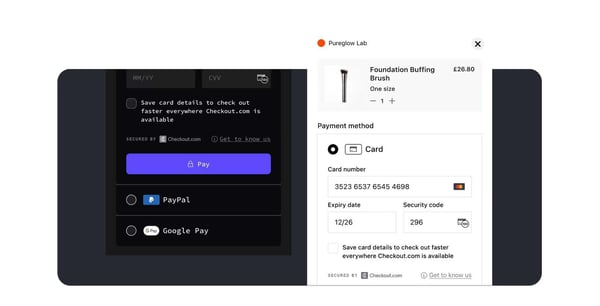
Authorization holds steady across domestic and cross-border payments alike, which is more notable than it sounds. A lot of gateways handle one well and show cracks in the other. The 94% performance and reliability rating on G2 reflects what reviewers actually describe: fewer interruptions during high-volume periods and checkout continuity that your customers don’t have to think about.
If your team has strong engineering resources, the API depth here is genuinely worth your attention. Flexible architecture and clear documentation support clean integration into existing platforms, and the 95% card coverage rating on G2 means you’re unlikely to hit gaps that force a second gateway into the stack.
Global payment method coverage is one of the more practical reasons teams consolidate onto checkout.com. Managing regional payment options through a single gateway simplifies expansion considerably, and the 94% PCI-aligned security rating gives finance and compliance teams a cleaner line of sight into cross-border transaction performance without juggling multiple provider relationships.
Risk and finance teams tend to single out the same features in reviews: transaction logs, dispute tracking, and fraud monitoring. Built-in rule configuration for flagging unauthorized transactions adds operational control without requiring external tooling. This combination shows up most among teams scaling quickly, where payment governance can otherwise fall behind growth.
Dedicated relationship managers and responsive technical teams get consistent recognition in G2 feedback, particularly through integration and geographic expansion phases. Support stays engaged well past onboarding, which is exactly when payment complexity tends to spike and generic queue-based support starts to show its limits.
Reporting and reconciliation support gets consistent recognition in G2 feedback from finance teams managing cross-border volumes. Settlement data exports cleanly, transaction records are well-organized, and month-end reconciliation doesn’t require manual correction.
The integration setup requires real developer involvement upfront. APIs, payment flows, and routing rules all need configuration before the gateway performs as intended. For businesses expecting plug-and-play deployment, that’s a genuine mismatch. For developer-led teams that want control over their payment stack, that same depth works in their favor.
The dashboard takes time to navigate confidently, and that comes through clearly in G2 feedback from teams new to the platform. Key views aren’t always where you’d expect them. The underlying transaction data is thorough and well-structured, though, and teams that push through the learning curve tend to stop mentioning it after a few weeks.
checkout.com reflects the capabilities expected from a modern payment gateway, combining global payment coverage, flexible integration pathways, and centralized transaction visibility. G2 users consistently highlight reliability and scalability as its defining strengths, supporting organizations managing multi-region payment operations where authorization consistency and developer control are the deciding factors.
What I like about Checkout.com:
- It supports global and local payment methods within one gateway, helping teams manage cross-border transactions without juggling multiple providers.
- The API and dashboard offer clear transaction visibility, making payment tracking, fraud monitoring, and reporting easier to manage in one place.
What G2 users like about Checkout.com:
“What I really like about Checkout.com is how smooth and reliable it is to use, especially when handling international payments. Everything from the API to the dashboard, just works cleanly and it gives clear visibility into every transaction. It feels modern, fast and easy to manage.”
– Checkout.com review, Vasudha P.
What I dislike about Checkout.com:
- Full integration requires real developer involvement and more time than initially communicated, though the API is genuinely flexible and payment operations run reliably once the stack is configured.
- The dashboard takes time to navigate confidently, but the underlying transaction data is thorough, well-structured, and complete across every payment and dispute view.
What G2 users dislike about Checkout.com:
“Setting it up can be a bit of a hassle, especially for smaller startups. The dashboard is super useful, but it’s not easy to understand. Some of the advanced features need help from a pro. It would be great if they had more self-serve tools.”
– Checkout.com review, Varun R.
5. Paytm Business: Best for India-focused digital and QR-first payments
Paytm Business is built for merchants transitioning from cash to digital collections, combining UPI, QR codes, cards, and wallet payments in one interface. What I kept seeing across the reviews is merchants pointing to payment method flexibility as something that directly reduced friction at the point of sale, not just a feature they ticked off during evaluation.
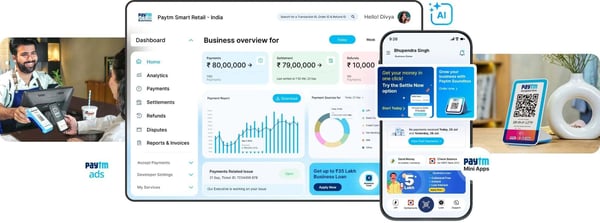
Broad payment method support is reflected in a 92% rating for the online payment portal on G2, and in practice, that breadth translates to fewer customers abandoning at checkout because their preferred method isn’t available. For businesses serving diverse payment behaviors across both in-store and online channels, that coverage does quiet but consistent work.
Onboarding is straightforward enough that you can get from account activation to live transactions without a steep learning curve or external help. Merchants consistently describe the dashboard as something they picked up fast, which matters if your team is lean and can’t afford to spend weeks getting oriented before collections start running.
Real-time transaction monitoring is where reconciliation actually gets done for most of these merchants, and the 93% real-time payments rating on G2 reflects that. If you’re managing a busy transaction environment, having live visibility into payment activity means you’re catching discrepancies as they happen rather than untangling them at month-end.
Settlement predictability is a recurring theme in feedback. Direct bank transfers and clear payment records give you a reliable handle on cash flow timing. This matters more for high-frequency, small-value transaction environments than almost any other gateway feature. Planning around collections becomes significantly less stressful when the timing is consistent.
Two-factor authentication is rated at 93% on G2, and what struck me in the reviews is how rarely merchants mention security as something they actively think about. That’s the best version of fraud protection: it does its job without asking you to manage it, so your attention stays on the business rather than the payment infrastructure.
POS device and soundbox pricing isn’t clearly outlined during onboarding, and merchants running hardware-dependent setups have flagged discovering variable costs only after committing. If your model leans on QR and UPI with lighter hardware needs, that ambiguity has less practical impact. The digital payment stack itself carries no equivalent cost surprises.
Cross-border payment support is narrower than most competing gateways, and if serving international customers is part of your growth plan, you’ll hit that ceiling relatively quickly. For businesses focused entirely on the Indian market, though, that boundary is largely irrelevant. The UPI and QR depth here is built around exactly how domestic consumers actually pay, and that focus shows.
Paytm Business earns its place through reliable collections across the payment methods Indian consumers actually use. Its UPI and QR depth is the sharpest differentiator for retail and service merchants focused squarely on the domestic market, where payment method breadth and real-time visibility matter most.
What I like about Paytm Business:
- It supports a wide range of payment options, including UPI, QR codes, cards, and wallets, allowing merchants to accept payments from diverse customer preferences without relying on multiple tools.
- The onboarding process and interface feel straightforward, helping businesses begin digital payment acceptance quickly while keeping transaction tracking and settlement visibility organized.
What G2 users like about Paytm Business:
“It’s a great app for receiving customer payments via UPI, POS, and other methods. It was among the first few apps to help revolutionise the UPI payment boom. The setup is straightforward, and it’s quite easy to use day to day.”
– Paytm Business review, Ankit D.
What I dislike about Paytm Business:
- POS and soundbox costs are not clearly outlined upfront, which can create budget surprises for hardware-dependent setups, though the core digital payment stack covering UPI, QR, and wallet acceptance operates without hidden cost complexity.
- Multi-currency acceptance is more restricted than most competing gateways, but UPI and QR coverage across the domestic market is deep, reliable, and built around the payment methods Indian consumers already use daily.
What G2 users dislike about Paytm Business:
“Sometimes the network gets busy but it’s rare. Also, it would be great if Paytm Business provided more offers for business vendors to increase their profit.”
– Paytm Business review, Harish C.
Selling in-store as well as online? Compare the best retail POS systems on G2 to pair counter hardware with your payment stack.
6. NMI Gateway: Best for flexible payment enablement across channels
NMI Gateway surfaces consistently in evaluations where processor-agnostic flexibility and multi-merchant program management are the priority. What struck me going through the review data is how clearly it’s engineered for two audiences at once: direct merchants who need a reliable gateway, and the partners managing payment programs on their behalf, with fraud controls, reporting, and oversight built for both.
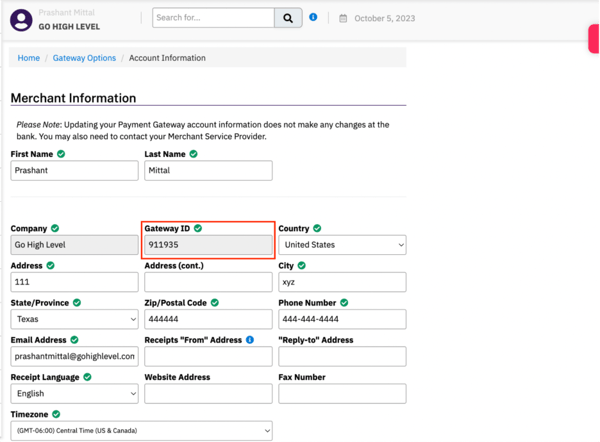
Multi-MID functionality lets you manage regional and offshore payments within a single gateway environment, keeping domestic and international transaction accounting cleanly separated. Each transaction gets a unique ID for traceability and fraud verification, and card acceptance breadth across payment types is reflected in a 97% rating for accepted credit cards and debit cards on G2.
The interface consistently gets called out as genuinely easy to navigate, and this feedback comes predominantly from resellers and ISOs who need to operate the full gateway independently without leaning on support for routine tasks. That self-sufficiency is backed by a 95% online payment portal rating on G2.
White-label capability is where NMI pulls ahead for resellers and ISVs. You can apply your own branding to the gateway experience end-to-end, and reviewers describe the configuration process as straightforward enough that go-to-market timelines don’t get eaten up by setup. If you’re launching a payment program under your own identity without building proprietary infrastructure, that’s a meaningful head start.
Recurring billing is rated at 96% on G2, and automated billing cycles and stored credentials quietly remove friction from ongoing merchant-customer relationships without requiring custom development. For SaaS businesses and service providers running predictable payment cycles, that reliability compounds over time in ways that manual billing management simply can’t match.
Support quality gets genuine recognition across the review data. Relationship managers take ownership of issues directly rather than routing you through generic queues. Merchants describe support interactions as the kind where someone actually understands your business context, not just the ticket in front of them.
Reporting and transaction search capabilities give you transaction-level detail, approval status, and fraud signals across merchant accounts without manual reconciliation effort. During disputes or support investigations across complex multi-merchant environments, the ability to search by multiple parameters is the difference between a quick resolution and a lengthy back-and-forth.
G2 users highlight that the initial integration requires developer involvement, and smaller operations without dedicated technical resources will feel that friction upfront. Th