


I’ve seen project portfolios come apart not because teams lacked ambition, but because the platform running their work couldn’t connect resource decisions to strategic priorities fast enough to matter.
When that gap exists, the best project and portfolio management software isn’t a productivity upgrade. It’s the difference between a PMO that leads and one that reports after the fact.
The tools that hold up at scale share a few specific characteristics. Resource forecasting that surfaces capacity conflicts before they affect delivery. Reporting that doesn’t require a manual assembly job before every leadership review. Automation that actually reduces coordination overhead rather than just existing as a listed feature. Not every platform on this list does all three well, which is why the right pick depends on where your current setup is costing you the most.
To build this guide, I worked through G2 Data and G2’s Winter 2026 Grid Report, evaluating platforms across company sizes from small teams to enterprise PMOs, weighting most heavily for portfolio visibility, resource forecasting, and reporting flexibility under real operational pressure.
The platforms covered in this guide include Smartsheet, monday AI Work Platform, ClickUp, Hive, Quickbase, Octave Sequence Enterprise (EcoSys), Bordio, Oracle Primavera, Celoxis, and ServiceNow Strategic Portfolio Management. Each recommendation is matched to a specific use case so you can move straight to what fits your context.
10 best project and portfolio management software for 2026: My top picks
- Smartsheet: Best for enterprise project and portfolio management
Work management platform that combines spreadsheet-style project tracking, automation, and reporting. (Free trial available; Paid plans start at $9/user/month.) - monday AI Work Platform: Best for customizable project workflow management
Project management platform that helps teams organize tasks, workflows, and projects with visual boards and automation. (Free plan available; Paid plans start at $9/user/month.) - ClickUp: Best for all-in-one project and portfolio management
All-in-one productivity platform that combines task management, documents, goals, and collaboration tools. (Free plan available; Paid plans start at $7/user/month.) - Hive: Best for collaborative project management and team workflows
Collaborative project management platform for planning projects, managing tasks, and team communication. (Free plan available; Paid plans start at $5/user/month.) - Quickbase: Best for low-code project and process management
Low-code platform for building custom apps to manage projects, workflows, and operational processes. (Free trial available; Pricing available on request.) - Octave Sequence Enterprise (EcoSys): Best for enterprise capital project portfolio management
Enterprise project performance platform designed to manage large project portfolios, budgets, and schedules. (Demo available; Pricing available on request.) - Bordio: Best for simple team project planning and scheduling
Task and project planning tool for organizing work, schedules, and team activities. (Free plan available; Paid plans start at $3.99/user/month.) - Oracle Primavera: Best for large-scale capital project scheduling and controls
Enterprise project planning platform for managing complex schedules, critical path analysis, resource planning, and cost controls across capital programs. (Pricing available on request) - Celoxis: Best for advanced project portfolio and resource management
For planning projects, managing resources, and tracking budgets. (Free trial available; Paid plans start at $10/user/month.) - ServiceNow Strategic Portfolio Management: Best for enterprise strategic portfolio governance
Connects business strategy to funded project delivery through demand management, resource planning, and executive reporting. (Pricing available on request)
*These project and portfolio management platforms are top-rated in their category based on G2’s Winter 2026 Grid® Report.
10 best project and portfolio management software I recommend
My evaluation kept returning to one dividing line: platforms built for portfolio oversight versus platforms that grew into it by adding features. The difference shows up under pressure. G2 Data shows mid-market PMOs, SaaS operations teams, and consulting firms gravitating toward tools in which resource planning, roadmap visibility, and reporting share a single data layer rather than syncing across separate systems. When those functions are genuinely integrated, replanning a shifted priority doesn’t cascade into a manual reporting rebuild. When they’re not, it does.
What surprised me across the reviews was how consistently the organization type predicted which capability gaps surfaced first. Enterprise teams hit reporting configurability walls. Smaller PMOs ran into resource forecasting limits faster than expected as project volume grew. That split shapes how I’ve framed each recommendation below.
Some tools didn’t make the final list despite strong overall ratings. G2 Data pointed to three consistent disqualifiers: resource planning too shallow for multi-project environments, reporting that required exporting to work at all, and integration gaps that forced teams to maintain parallel workflows outside the platform.
How did I find and evaluate the best project and portfolio management software?
The shortlist came from G2’s Winter 2026 Grid Reports for the project and portfolio management category, filtered by verified user satisfaction scores and market presence across small businesses, mid-market organizations, enterprises, and PMO teams. This kept the focus on platforms actively used for project planning and portfolio oversight rather than general task management tools with limited strategic planning depth.
From there, AI-driven analysis across a large volume of verified G2 reviews helped surface what consistently comes up in real-world use: not feature inventories, but workflow signals. How teams use these platforms under pressure, where adoption stalls, and what breaks when project complexity increases.
Because I have not personally implemented every platform covered here, I validated findings against reviews from project managers, PMO leaders, operations teams, and enterprise planners using these tools in production environments. All visuals and product references are sourced from G2 vendor listings and publicly available product documentation.
What makes the best project and portfolio management software worth it: My criteria
After reviewing a large volume of G2 user reviews, here’s what I prioritized when evaluating the best project and portfolio management software:
- Portfolio visibility across projects and teams: A platform that shows project status within individual workstreams but loses coherence at the portfolio level creates blind spots where priority conflicts and resource constraints go unnoticed until they’ve already affected delivery. The strongest tools surface dependencies, timelines, and performance across the entire portfolio in one view.
- Resource planning and workload management: Knowing who is assigned is not the same as knowing who has capacity. I rated tools higher when reviewers described the ability to forecast staffing requirements, identify overloaded team members early, and redistribute work before timelines slipped rather than after.
- Reporting configurability: Platforms that require manual data assembly before every leadership review, or that can’t produce project health summaries without exporting to a spreadsheet, add overhead at exactly the wrong moment. I prioritized tools where dashboard configuration matched the actual audience range teams described in reviews.
- Workflow automation: Status updates, approval routing, and deadline notifications handled manually introduce inconsistency that compounds across a large portfolio. I weighted tools where automation was described as genuinely reducing administrative coordination, not just available as a listed feature.
- Scalability and integration fit: A platform that works well at 10 projects often becomes the bottleneck at 50. I evaluated whether tools could absorb growing project pipelines without performance degradation, and whether their integrations connected PPM data to the financial, CRM, or communication systems organizations already depend on.
Based on these criteria, I narrowed the list to platforms with a consistent track record across the dimensions that drive real buying decisions in this category. No single tool leads across all five, so the right choice comes down to where your current setup is costing you the most. Start there.
Below, you’ll find authentic user reviews from the Project and Portfolio Management Software category. To appear in this category, a tool must:
- Support planning, tracking, and coordination of multiple projects across teams
- Provide portfolio-level visibility into timelines, resources, and project performance
- Enable reporting and analytics for monitoring project progress and outcomes
- Deliver scalable tools that help organizations manage complex project portfolios
This data was pulled from G2 in 2026. Some reviews may have been edited for clarity.
1. Smartsheet: Best for enterprise project and portfolio management
Smartsheet centralizes project planning, execution, and reporting within a collaborative work management environment built around a spreadsheet-style interface. Teams organize projects through grid-based sheets that track tasks, owners, and timelines while supporting automation rules, dashboards, and reporting in the same workspace.
G2 reviewers frequently mention that the layout feels intuitive for teams already familiar with Excel-style workflows. Tasks, owners, and timelines can be organized clearly within rows and columns. Teams can build detailed project plans while keeping the working environment approachable enough for contributors at every level.
Customization capabilities allow organizations to tailor project tracking to different operational frameworks, with G2 users describing how they build sheets with custom columns, workflows, and task statuses aligned with internal processes. Teams often adapt the structure for product roadmaps, milestone planning, or cross-team initiatives. This flexibility allows work management systems to evolve as project requirements change.
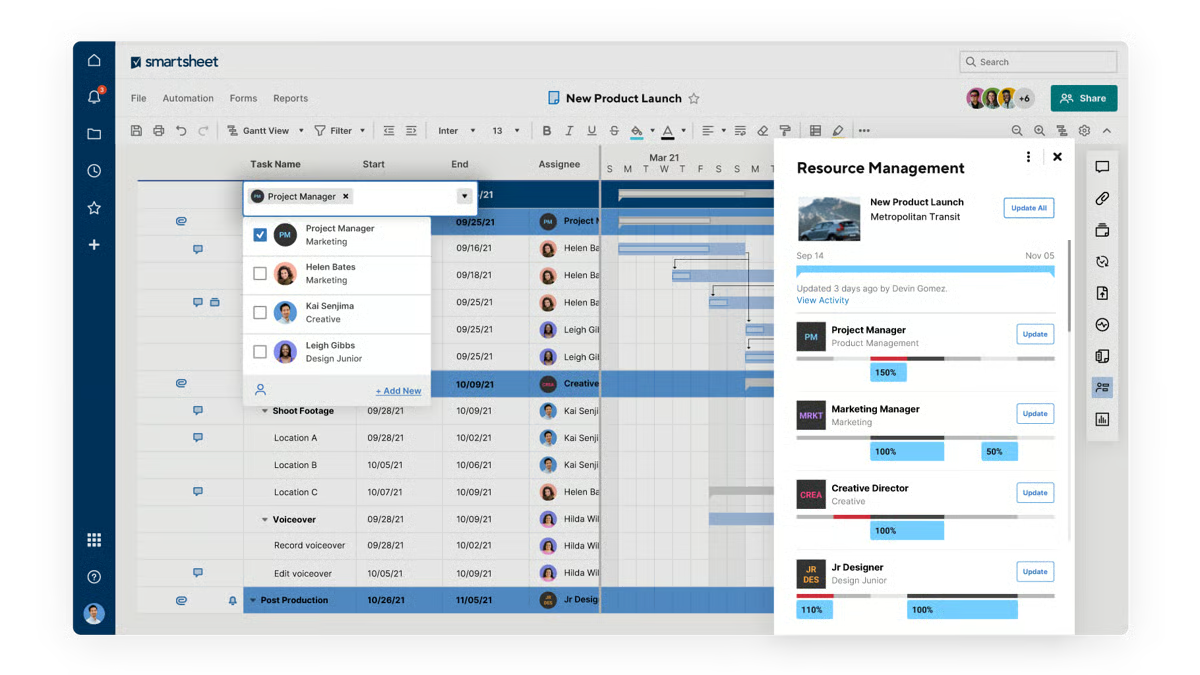
What struck me while going through the review data is that teams describe the collaboration environment as genuinely shared rather than just accessible. Multiple users edit sheets simultaneously while changes stay visible through activity history, and notifications and task ownership indicators help teams track responsibilities across departments. This centralized environment reduces fragmented communication.
What I noticed in G2 reviews is that automation capabilities reduce manual coordination and repetitive project updates. G2 reviewers reference automated reminders, workflow triggers, and alert systems that notify teams when deadlines approach or statuses change, consistent with Smartsheet’s priorities score of 86% on G2. These automated processes help maintain project momentum without constant follow-ups. Teams gain more consistent execution across projects involving multiple contributors.
While evaluating the G2 reviews, I found that dashboards summarize timelines, task completion, and outstanding work clearly, and filtered views support standardized reporting across projects without requiring teams to compile updates manually. This is consistent with a performance score of 84% on G2. These insights help project managers and leadership teams monitor progress efficiently.
Here’s what G2 reviews actually showed me: multiple project visualization modes support different stages of planning and execution. Users frequently reference switching between grid, Gantt, card, and calendar views depending on their needs. Grid views allow detailed planning while Gantt charts display dependencies across timelines. Card views simplify task monitoring during active project phases.
According to G2 reviews, large sheets with heavy formulas can slow loading times, most noticeably for teams managing many cross-sheet dependencies. That said, Smartsheet’s grid structure and cross-sheet reporting handle planning depth reliably once sheets are organized around consistent data standards. The planning depth and cross-sheet reporting that teams build their workflows around remain fully functional;
Advanced automations, cross-sheet configurations, and dashboard setups carry a learning curve during initial build, as stated by G2 reviews that I came across. Assigning someone to own the initial setup makes a real difference in how quickly teams reach a working configuration. However, many say the platform’s documentation and template library give teams a clear path through setup without starting from scratch.
Overall, Smartsheet focuses on organizing complex project execution through a flexible and collaborative work management platform. For organizations managing cross-department initiatives or large operational programs, Smartsheet provides a structured solution within the project and portfolio management category.
What I like about Smartsheet:
- Familiar spreadsheet-style interface makes it easy for teams to organize tasks, timelines, and ownership without extensive onboarding, especially for users already comfortable with Excel workflows.
- Flexible customization, automation rules, and dashboards help teams track progress, standardize reports, and coordinate projects across departments while maintaining real-time collaboration and visibility.
What G2 users like about Smartsheet:
“I like that Smartsheet actually helps me to make reports and standardize some reports. It’s friendly at some point, and the feature is valuable to me because it saves time in my reports and my job. The standardized reports allow us to create a survey, upload it, and then generate a specific report with filters, making it efficient by just filtering.”
– Smartsheet review, Enya L.
What I dislike about Smartsheet:
- Large sheets with heavy formulas can slow loading times for teams managing many cross-sheet dependencies. Teams coordinating complex programs are most exposed during high-activity periods. Loading performance is consistent across standard project tracking workflows outside those peaks.
- Advanced automations and dashboard setups carry a learning curve during initial build. Teams with simpler coordination needs and no dedicated PM resource may find setup more involved than their workload requires. The template library and help documentation give teams a clear starting point.
What G2 users dislike about Smartsheet:
“The interface can feel a bit overwhelming at first, especially for new users. Some advanced features aren’t very intuitive and take time to learn. It can also get expensive as you add more users or need higher tier features.”
–Smartsheet review, Manuel P.
2. monday AI Work Platform: Best for customizable project workflow management
While analyzing G2’s review data, I came across a consistent theme: monday AI Work Platform organizes projects and operational workflows through visual boards and configurable processes that allow teams to track tasks, coordinate collaboration, and monitor progress across multiple initiatives. Built on monday.com’s Work OS, the platform combines boards, dashboards, automations, and templates to help organizations structure work and manage projects within a centralized system.
One thing I kept seeing across G2 reviews was how often teams described monday Work Management as the tool that finally replaced their spreadsheets. Visual project boards bring tasks, updates, and project details into a structured shared workspace. This reduces confusion around responsibilities and deadlines while helping teams to monitor progress and keep information accessible rather than spread across multiple tools.
The dashboarding capabilities play an important role in day-to-day project oversight. Teams highlight the ability to monitor timelines, workload distribution, and project status from a centralized dashboard, reflected in a visualizations score of 87% on G2. Visibility into tasks and milestones allows stakeholders to quickly understand whether work is in progress, pending review, or completed.
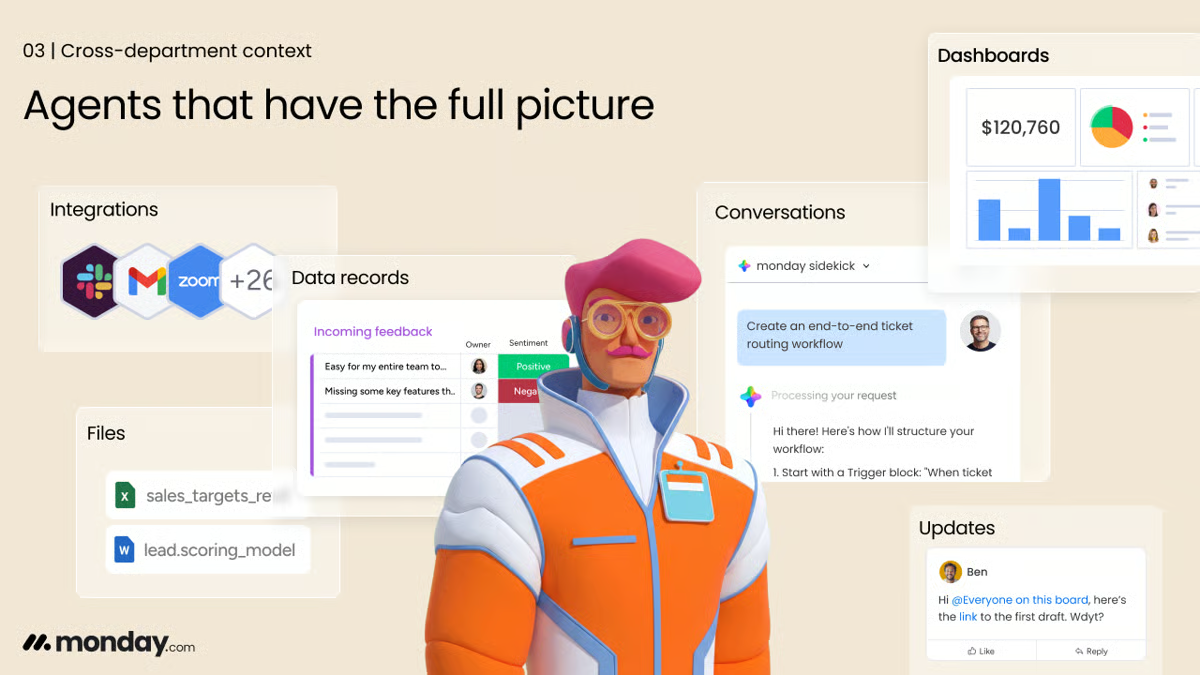
Workflow automation is reflected in users frequently mentioning automations that trigger notifications, assign tasks, or update statuses based on predefined conditions. These automated workflows help reduce repetitive administrative work while keeping projects moving through defined processes without requiring constant manual updates.
What I noticed in G2 reviews is that customization is less about preference and more about operational fit. Teams configure boards, column types, templates, and dashboards to reflect their internal workflows, managing marketing campaigns, client projects, product development, and operational planning within the same system. The platform’s planning score of 90% on G2 reflects this structured project visibility.
Cross-team collaboration becomes easier when tasks, files, and updates are managed within a shared workspace. G2 users explain that the platform helps coordinate work across departments by assigning responsibilities, sharing documents, and tracking discussions directly within project boards. This centralized structure helps teams stay aligned on project goals and timelines.
The mobile app extends project visibility beyond the desk. Tasks, contact details, and project updates remain accessible from a phone, allowing teams to pull up information and manage work outside of a traditional office setup. G2 reviewers mention accessing candidate information and project data on the go, keeping work moving when team members are away from their computers.
Despite the many strengths, some G2 reviewers state areas of improvement. Navigating large boards with extensive datasets can occasionally feel slower when switching views or loading dashboards. Although, the visual board structure, task ownership tracking, and status visibility that teams use most in daily work continue to perform well at standard operating scale.
Configuring boards and workflows for new team members requires setup time before they can contribute fully. Teams expecting an immediately usable out-of-the-box experience may find initial configuration more hands-on than anticipated. The template library and onboarding resources give new teams a functional starting point. The visual boards, task ownership, and workflow automation that teams rely on day to day are well-built; the setup time is the friction, not the functionality itself.
What I picked up while studying G2’s review data is that monday AI Work Platform is best suited for organizations coordinating projects across multiple teams that require clear task ownership, centralized collaboration, and structured workflow management.
What I like about monday AI Work Platform:
- Visual boards and multiple views such as Kanban, Gantt, and calendar make it easy to track project status and priorities. Teams can quickly understand responsibilities and timelines without relying on scattered spreadsheets or manual tracking.
- Automation features reduce repetitive tasks like status updates, notifications, and task assignments. This frees teams to maintain consistent workflows while improving efficiency across project coordination and daily operations.
What G2 users like about monday AI Work Platform:
“I really appreciate being able to view the workload for a single project, as well as how the workflow diagrams are displayed in a clear, organized way. The platform feels compact and user-friendly, which makes it easy for me to set up new projects quickly. The features are explained clearly, and I also like how fast I can organize and manage tasks once everything is in place .”
– monday AI Work Platform review, Josh K.
What I dislike about monday AI Work Platform:
- Navigating large boards with extensive datasets can occasionally feel slower when switching views or loading dashboards. The visual board structure, task ownership tracking, and status visibility that teams use most in daily work continue to perform well at standard operating scale.
- Configuring boards and workflows for new team members requires setup time before they can contribute fully. That said, the visual boards, task ownership, and workflow automation that teams rely on day to day are well-built; the setup time is the friction, not the functionality itself.
What G2 users dislike about monday AI Work Platform:
“I find it difficult to track ad performance in monday Work Management. The integration with Meta Ads performance is challenging because it’s hard to match the columns and KPI names exactly as they are in Meta. Ideally, it would be better if it could be entirely copied the way it is in Meta.”
– monday AI Work Platform review, Joe-san O.
3. ClickUp: Best for all-in-one project and portfolio management
ClickUp is designed to help teams manage projects, tasks, documentation, and collaboration within a single work management platform organized through spaces, folders, and lists. Multiple views such as lists, boards, calendars, and Gantt charts help teams track progress and manage workflows from different perspectives within the same workspace.
What became clear to me while reading G2 reviews is that the centralized workspace is the feature teams come back to most. Tasks, comments, documents, and related project information connect to the same workspace. This structure helps organizations move work between team members while keeping context intact and keeping project context intact as work moves between contributors.
The platform allows teams to create custom statuses, task fields, and project hierarchies that reflect how their work is organized. G2 reviewers often mention that different views such as lists, boards, calendars, and Gantt charts make it easier to monitor timelines and visualize progress from multiple perspectives. ClickUp’s planning score of 92% on G2 reflects this capability.
If G2 reviewers are telling us anything, it’s that automations for assigning tasks, updating statuses, or sending notifications when certain conditions are met genuinely reduce manual updates and help teams manage projects more efficiently while maintaining visibility into task progress.
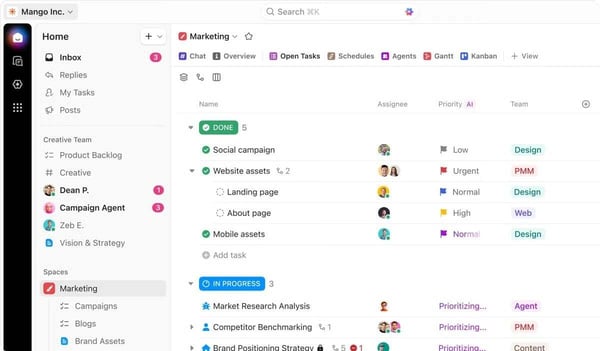
Reviewers note that dashboards allow teams to see project updates, track task activity, and monitor overall progress without needing to open each individual project, consistent with a priorities score of 90% on G2. This provides a consolidated view of project activity and performance. This visibility helps teams stay aligned and maintain oversight across multiple initiatives.
The built-in AI functionality gets specific mentions for summarizing long documents and turning unstructured notes into task-ready checklists. Reviewers working across documentation and development workflows describe it as a productivity gain. Teams managing research-heavy or technically complex projects get a layer of assistance that keeps work moving.
Integrations came up far more often than I expected as a daily practical benefit rather than a setup feature. Connections with tools such as Google Drive and Google Calendar let teams link files, schedules, and project updates directly within the platform, keeping project information and resources accessible without switching between systems.
According to G2 reviewers, the large number of features and configuration options can make the interface feel busy for very small teams needing basic task tracking. Although, most reviewers note that the task management, project hierarchy, and automation capabilities that make ClickUp useful for complex coordination are well-built and hold up reliably across demanding workflows.
The mobile app delivers a more limited experience than desktop, with G2 users describing slower performance when editing tasks or managing dependencies on the go. For teams that need to regularly check or update work from a phone, this is a real gap. The task management depth, automation capabilities, and cross-project visibility that make ClickUp useful for complex work all perform consistently on desktop, which is where the platform’s strengths are most apparent.
One thing I couldn’t overlook in G2’s review data is how directly ClickUp addresses the challenge of organizing projects, tasks, and team communication within a single system. The platform helps teams coordinate work and maintain visibility across projects. It works particularly well for small and mid-sized organizations seeking a flexible platform to manage projects and collaboration without relying on multiple disconnected productivity tools.
What I like about ClickUp:
- ClickUp helps teams keep tasks, documents, comments, and project updates organized in one workspace, simplifying progress tracking and responsibility management across projects without relying on multiple separate tools.
- The platform offers strong customization and automation capabilities, including flexible task views, customizable workflows, and automated triggers that help teams streamline project coordination and reduce manual task updates.
What G2 users like about ClickUp:
“I love the visualization of everything on the ClickUp Dashboard, which updates with a brief text summary. The templates make it easy for me to start with a map tailored to my projects like Podcast, Branding, and Sprint. The Whiteboards allow me to see another angle with sketches and help me connect ideas, concepts, and ground them. The Summary makes it easy for me not to have to think and write everything myself, it’s very agile and speeds up my process flow. Also, the Dashboard offers me everything at a glance without having to see the progress by project. I also like that you only have to provide an email to register and I can start using a template very quickly. In fact, I would recommend it with a 10 as it has given me the best results, with an affordable price and usability.”
– ClickUp review, Silvy O.
What I dislike about ClickUp:
- The range of features and configuration options can make the interface feel busy for users who only need basic task tracking. Teams with a clearly organized workspace find navigation more straightforward. The space and list hierarchy gives contributors a consistent structure as complexity grows.
- Speed and lag issues come up occasionally, most noticeably in the mobile app or when switching between complex views. Desktop performance across standard task and project workflows is consistently described as stable in G2 feedback.
What G2 users dislike about ClickUp:
“I don’t like the lack of clarity about the roles of the members and their applied values. Furthermore, there are features that are paid, but it is not mentioned that they are paid before the plan is created, such as the AI Notetaker.”
– ClickUp review, Miguel B.
4. Hive: Best for collaborative project management and team workflows
Hive is a project and portfolio management platform built around action cards that store task details, attachments, comments, and sub-tasks in one place.
Teams are not just using one view and ignoring the rest. They switch between Kanban boards, Gantt charts, calendars, and tables depending on what a project phase demands, and updates stay consistent across every layout, reflected in Hive’s planning score of 93% on G2. Built-in chat, email integration, time tracking, automated workflows, and analytics keep communication and performance insights connected inside the same workspace.
Hive brings project communication and task coordination into the same workspace. G2 reviewers describe teams managing tasks, tracking progress, sharing files, and communicating through comments or chat without leaving the platform. What stood out in the feedback is how often teams framed this as something that changed how they coordinated work day to day, rather than just a convenience.
What I kept finding as I went through G2’s reviews is that task views, progress tracking tools, and reporting dashboards allow teams to monitor project status while keeping individual responsibilities clearly defined. These views help teams stay aligned on priorities while keeping delivery timelines visible.
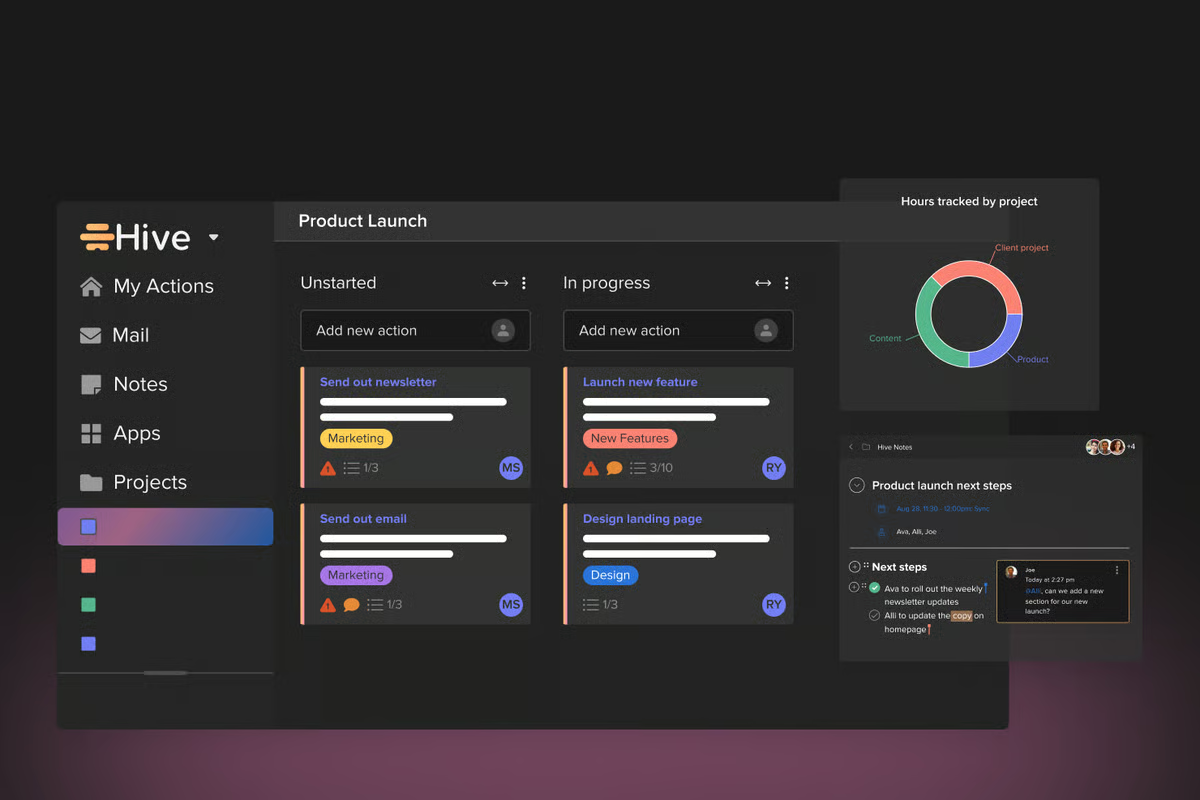
Many teams also point to the platform’s workflow structuring tools. Features such as task labels, sub-tasks, templates, and customizable fields allow projects to be organized in ways that match internal processes. Templates are especially useful for repeatable workflows to duplicate project structures, adjust timelines, and maintain consistent task dependencies across recurring work at scale.
Time tracking is built directly into the platform, keeping timelines and effort visible without requiring a separate tool, consistent with a performance score of 88% on G2. G2 reviewers describe using it alongside task management and automated workflows to monitor how work progresses. For teams tracking time against deliverables, this integration keeps operational reporting contained within a single workspace.
While going through hundreds of G2 reviews, I noticed that setup and onboarding are consistently described as straightforward, with teams able to configure projects, customize workflows, and scale usage without extended ramp-up periods. Individual team members adopt the platform with little friction, even when IT rollout requires more deliberate coordination. Organizations moving from informal tracking tools benefit from a structured environment that does not require extensive training.
Some G2 reviewers mention occasional interface and performance concerns, noting that the interface can feel somewhat dated and that larger boards may experience intermittent lag or unresponsive cards. However, the platform’s structured environment works well for teams prioritizing centralized workflow coordination and stable project ownership. Task coordination, ownership tracking, and workflow structure all function reliably.
Bulk task reassignment during team transitions requires going through items one at a time when members leave or shift roles. From what I read in G2 reviewers, this adds up quickly during larger team changes, so it is worth treating reassignment as a planned task rather than something to handle on the fly. Although, Hive’s task labeling and ownership structure keep responsibilities clearly visible throughout the process.
While analyzing G2’s review data, I kept coming back to the same conclusion: Hive brings project planning, task coordination, and team collaboration into a single platform, improving visibility and workflow organization across teams. It works particularly well for small businesses and growing teams seeking centralized project coordination and collaborative work management within a unified environment.
What I like about Hive:
- Hive consolidates project tasks, team discussions, attachments, and progress tracking into a single workspace, helping teams keep communication and execution connected instead of spread across multiple tools.
- Users value the platform’s workflow flexibility, including templates, task dependencies, and multiple project views that make it easier to structure timelines and manage repeatable processes across projects..
What G2 users like about Hive:
“Hive is software that offers the most advanced digital features and resources to manage your work projects from your preferred devices and operating systems, facilitating the customization and management of all your work processes. I can also say that Hive stands out for the quality of its business project visualization features, improving business collaboration across all departments of your business.”
– Hive review, Martin P.
What I dislike about Hive:
- Lag and unresponsive cards can appear on larger boards, most noticeably during periods of high activity across complex workspaces. Across standard project sizes and typical team workflows, card responsiveness and board performance are consistently described as stable in G2 reviews.
- Reassigning tasks when team members leave or change roles requires going through them one at a time, adding coordination steps during transitions. Hive’s task labeling and ownership structure keep responsibilities clearly visible, making it straightforward to track what has and has not been reassigned.
What G2 users dislike about Hive:
“Visually, it’s not as intuitive and helpful as other platforms, but easy to work through. The rollout was more intensive for our IT team, but was easy for individual teams to adopt.”
– Hive review, Matthew H.
5. Quickbase: Best for low-code project and process management
Quickbase is a low-code platform that helps organizations build custom applications to manage projects, workflows, and operational data in one centralized system. Instead of adapting processes to rigid project management software, teams use Quickbase to design applications that match their internal operations. Departments can configure workflows, automate tasks, and generate reports while maintaining visibility across projects, resources, and operational activities.
Here’s what G2 reviews actually showed me on configuration: ease of setup is highlighted consistently during onboarding and everyday use. Many teams note that Quickbase allows non technical users to create applications and automate workflows without requiring extensive programming expertise. This accessibility allows departments to build systems that support their operational needs, from project tracking and reporting to internal workflow management and process automation.
Customization is another capability repeatedly mentioned in user feedback as users describe building applications tailored to their own processes rather than adapting workflows to fixed software structures. Teams configure systems to manage bookings, track project progress, organize operational data, and generate department specific reports, allowing them to maintain visibility into key activities while keeping their systems aligned with evolving operational needs.
G2 reviewers frequently highlight automated reminders, workflows, and task updates that reduce the amount of manual work required to manage operational processes, consistent with a performance score of 88% on G2. These automation capabilities help teams standardize workflows, minimize repetitive administrative tasks, and improve coordination across departments that rely on structured processes.
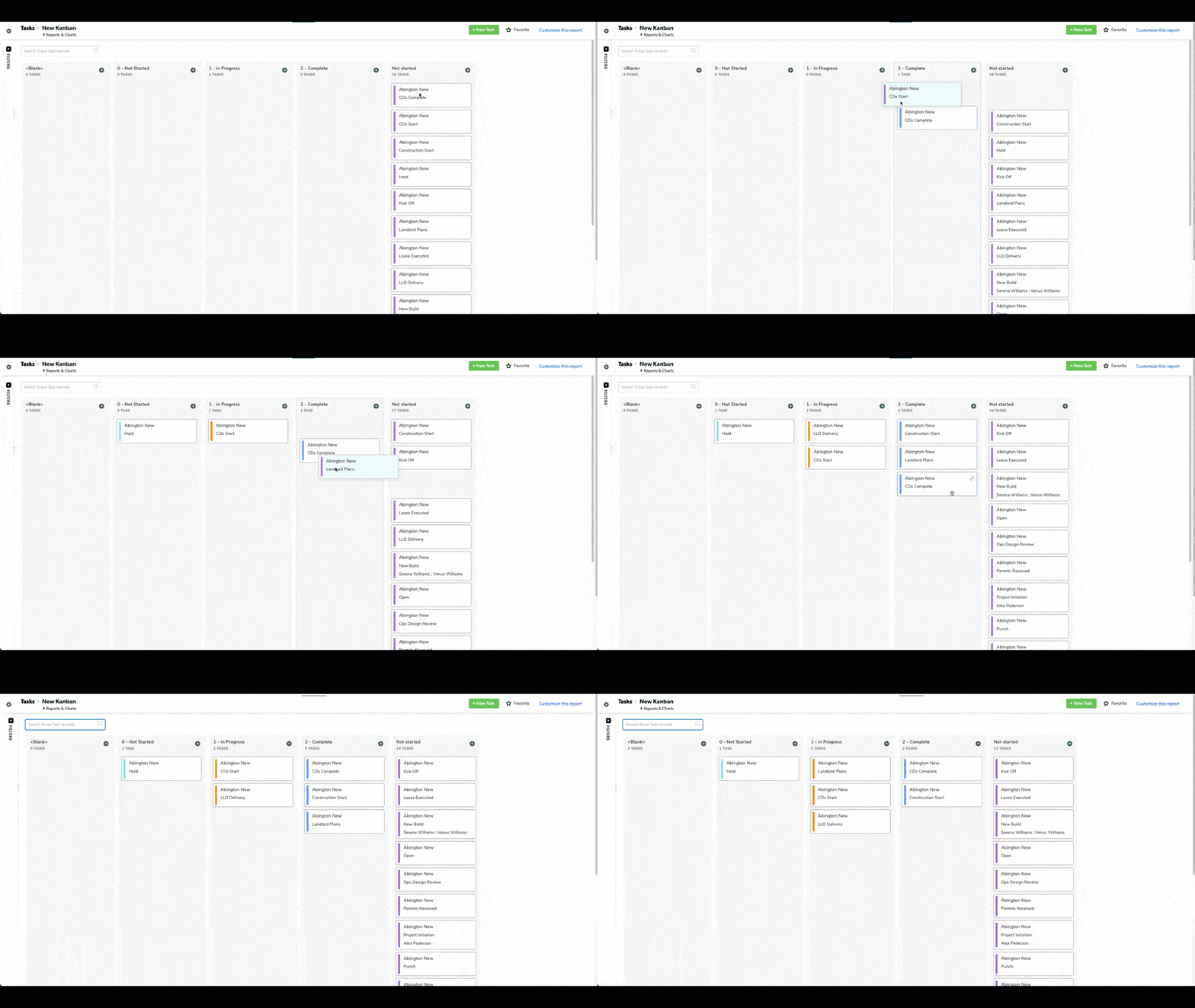
If G2 reviewers are telling us anything, it’s that Quickbase users are not replacing their existing tools, they are connecting them. G2 users describe linking Quickbase to CRM systems and operational databases, pulling information from multiple sources into a single operational view so departments work from the same data rather than maintaining separate records. This connectivity reduces the need to manually reconcile data from multiple platforms.
Organizations with operational needs that fall outside standard project management templates find Quickbase a practical fit. Because the platform does not enforce a fixed project structure, teams in varied environments configure applications around the specific data, approvals, and reporting their work demands. Reviewers from construction, property management, and cross-functional operations describe building systems matched to their actual workflows.
One thing I couldn’t overlook in G2’s review data is how centralizing operational information across teams is one of Quickbase’s clearest strengths, reflected in a data consolidation score of 87% on G2. Departments that previously managed data in disconnected systems can access and act on shared information within a single environment, reducing time spent reconciling information across tools.
Some G2 reviewers say the interface can feel somewhat dated, and the extensive customization options mean teams often spend time structuring applications, reports, and workflows around their operational needs. This flexibility works well for organizations designing highly tailored systems, while teams seeking more standardized project management environments may find the setup requires extra planning.
Despite the strengths above, G2 users highlight that platform updates can occasionally create a short transition period when newer features and older configurations overlap. Teams with established workflows may notice some inconsistency while both versions are active. However, Quickbase’s support team is described in reviews as responsive in helping teams navigate configuration changes during update cycles.
What I kept finding as I went through G2’s reviews is that Quickbase consistently helps organizations replace fragmented operational tools with