



- Best overall Mac project management software: ClickUp
- Best for data-driven project tracking and reporting: Smartsheet
- Best for startups and small businesses: monday.com
- Best for scalability: Asana
- Best for team collaboration: Wrike
- Best for development teams: Jira
- Best free project management software: Trello
- Best for client-facing users: Teamwork
- Best for project management analytics: Hive
- Best for remote teams: Basecamp
- Best for cost-effectiveness: Zoho Projects
- Best for complex project planning: Merlin Project
Mac computers are the standard for some industries, and many professionals prefer using them for work—even when it’s not required. When project management software is optimized for macOS, workflows are smoother, and projects are more likely to stay on track.
Based on my own testing and research, I’ve put together this list of the best project management software for Mac users that highlights features, use cases, and pros and cons. You’ll also find information about my methodology for evaluating the software and tips on choosing the best project management software for Mac.
Top project management software for Mac comparison
| Software | Gantt charts | Mobile app | Free version | Our star rating (out of 5) | Starting price (per month) |
|---|---|---|---|---|---|
| ClickUp | Yes | iPad (iPadOS 12+), iPhone (iOS 12+), Apple Watch (watchOS 7.5+) | Yes | 5 | $7 per user |
| Smartsheet | Yes | iPad (iPadOS 15+), iPhone (iOS 15+) | Yes | 3.8 | $9 per user |
| monday.com | Yes | iPad (iPadOS 15+), iPhone (iOS 15+) | Yes | 5 | $12 per user |
| Asana | Yes | iPad, iPhone (iOS 16+) | Yes | 3.9 | $10.99 per user |
| Wrike | Yes | iPad (iPadOS 16+), iPhone (iOS 16+) | Yes | 4.6 | $9.80 per user |
| Jira | No | iPad (iPadOS 16+), iPhone (iOS 16+) | Yes | 4.6 | $8.15 per user |
| Trello | Available through add-on | iPad (iPadOS 16+), iPhone (iOS 16+) | Yes | 4.5 | $5 per user |
| Teamwork | Yes | iPad (iPadOS 15+), iPhone (iOS 15+) | Yes | 3.7 | $5.99 per user |
| Hive | Yes | iPad (iPadOS 12.4+), iPhone (iOS 12.4+), Apple Watch (watchOS 4+) | Yes | 3.9 | $12 per user |
| Basecamp | No | iPad (iPadOS 14.5+), iPhone (iOS 14.5+) | Only for teachers and students | 3.1 | $15 per user |
| Zoho Projects | Yes | iPad (iPadOS 12+), iPhone (iOS 12+) | Yes | 4.2 | $4 per user |
| Merlin Project | Yes | iPad (iPadOS 15+), iPhone (iOS 15+) | No | _ | $16.99 per month |
ClickUp: Best overall Mac project management software

ClickUp is my pick for the best Mac project management software because it balances user-friendliness and functionality. It offers an all-in-one project management solution that includes file sharing, status alerts, task management, and additional functions to support you from project initiation to completion. It is also highly customizable and offers several automation tools for repetitive tasks.
In terms of mobile, ClickUp’s app is available in the App Store for iPhone, iPad, and even Apple Watch and iPod touch, making project management accessible across Apple devices. It’s also more compatible than most other tools on this list, supporting devices as far back as iPadOS 12.0 for the iPad, iOS 12.0 for the iPhone and iPod touch, and watchOS 7.5 or later for the Apple Watch.
Pricing
- Free plan: No cost.
- Unlimited: $7 per person per month, billed annually, or $10 per person per month, billed monthly.
- Business: $12 per person per month, billed annually, or $19 per person per month, billed monthly.
- Enterprise: Custom pricing.
Standout features
- Native time tracking: Users can track time, add notes, set estimates, view reports, and filter timesheets using the native time tracking tools.
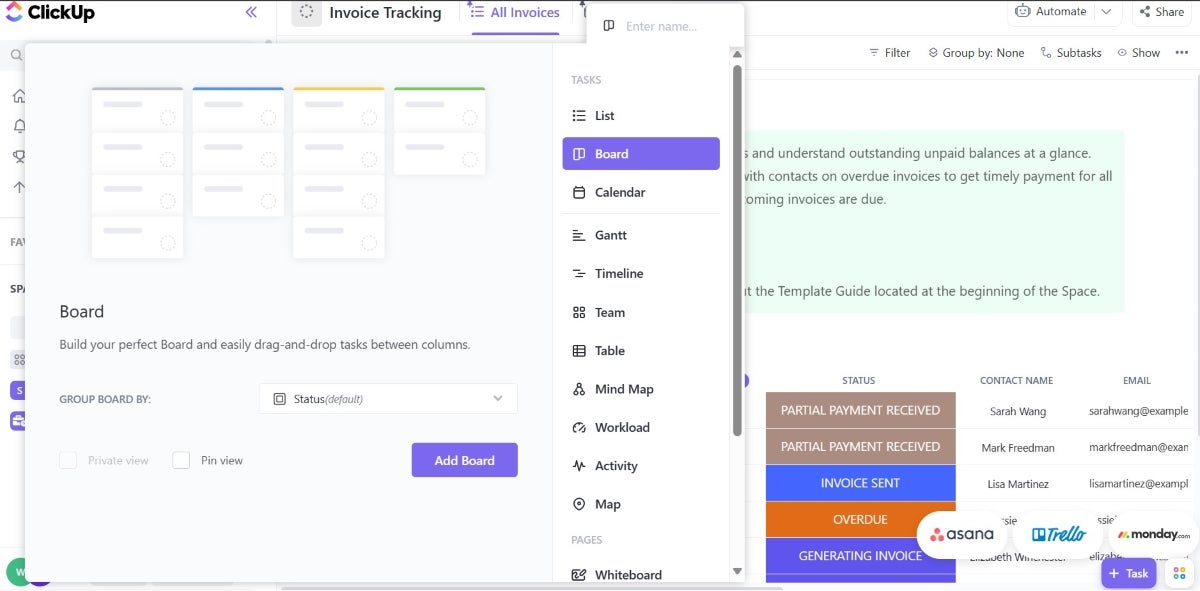
- Dashboards: ClickUp offers multiple views, including customized dashboards, charts and a selection of over 50 widgets.
Pros and cons
| Pros | Cons |
|---|---|
| 24/7 live support. | User reports indicate bugs and glitches. |
| Multiple views. | Learning curve to navigate interface. |
| Highly customizable. | Features can feel overwhelming to project management software newbies. |
Top integrations
- Gmail
- Zoom
- Harvest
- Zendesk
Why I picked ClickUp
With its affordable pricing, multiple project views, and comprehensive set of features, ClickUp was an easy pick for me. Most of its project views are available on its free plan, including Gantt. Since some of these views are typically available only in premium pricing tiers for other tools, it reiterates why ClickUp was worth my consideration.
When to use something else
If you prefer a more focused and less feature-dense environment, you may want to consider Basecamp as an alternative. ClickUp has lots of features and customization options that are undeniably powerful but can sometimes introduce a steep learning curve or potentially overwhelm teams that just need simple project management tools.
For more information, read the full ClickUp review.
Smartsheet: Best for data-driven project tracking and reporting

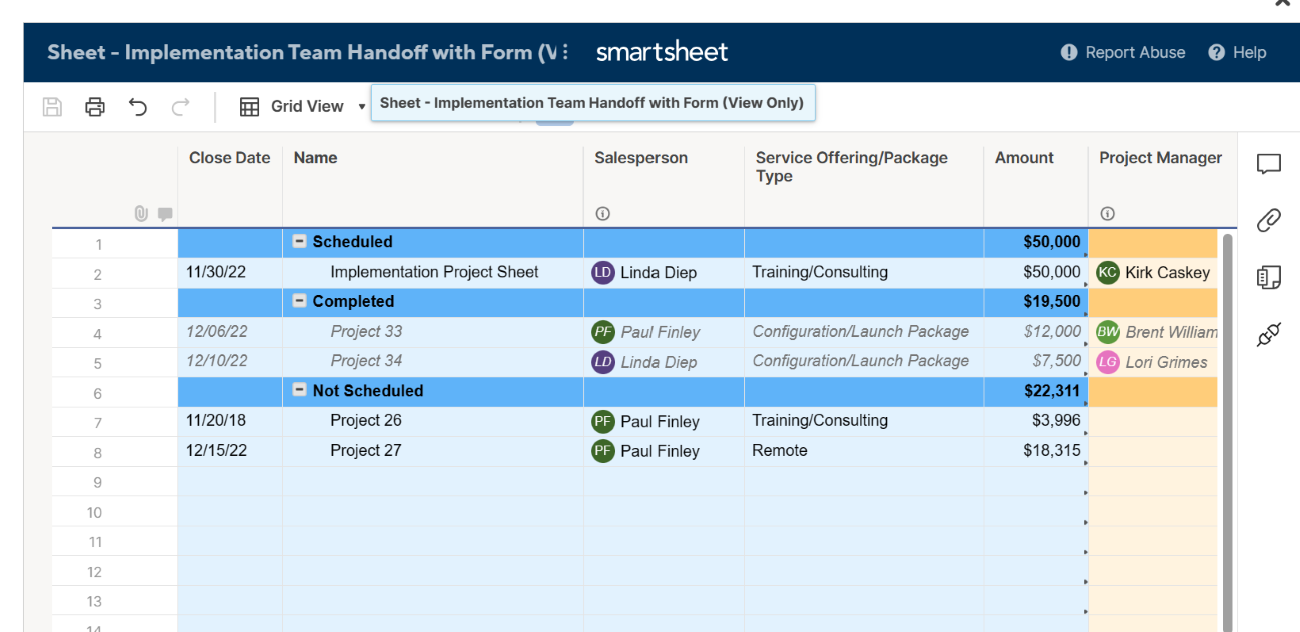
Smartsheet is worth considering for data-driven insights that optimize workflows and decision-making processes. Smartsheet offers a variety of reporting features, including row reports, sheet summary reports, and customizable dashboards. Project managers can use these features to aggregate data from multiple projects to monitor key metrics such as budget, timelines, task completion, and resource allocation in real-time.
Smartsheet’s top features include extensive customization options, project visualization tools like Gantt software capabilities, resource management, and workflow automation. Smartsheet is available for iPhone and iPad but it needs iOS 15.0 or later and iPadOS 15.0 or later.
Pricing
- Free: No cost for up to one user and two editors.
- Pro: $9 per user per month billed annually, or $12 per user billed monthly.
- Business: $19 per user per month billed annually, or $24 per user billed monthly.
- Enterprise: Customized pricing.
Standout features
- Spreadsheet interface: Smartsheet delivers a flexible and simple feature set that is familiar to a spreadsheet interface.
- Automated workflows: Mac users can create no-code automated workflows within projects and eliminate tedious manual work.
Pros and cons
| Pros | Cons |
|---|---|
| Familiar spreadsheet interface. | Several important tools are only available through add-ons. |
| Variety of project tracking tools. | Dependence on spreadsheets. |
| Highly customizable dashboards. | Limited mobile app. |
Top integrations
- Miro
- DocuSign
- MS Teams
- Google Chat
Why I picked Smartsheet
Smartsheet’s detailed reporting is what particularly caught my eye. It’s easy to create real-time reports and dashboards, which gives instant visibility into project progress. You can generate and customize reports and then share them across teams, making it easy for project managers to track key metrics such as budget and task completion without the need for manual updates. Additionally, it has a spreadsheet interface that’s great for working with large volumes of tabular data and offers a high level of dashboard customizability.
When to use something else
Smartsheet has vast customization and reporting options, which can easily overwhelm new users. If you prefer a tool that’s more focused on task management without the need for detailed reporting, you’re better off choosing a different tool from this list. Plus, if a spreadsheet-like interface isn’t your style, a different platform might better suit your needs.
For more information, read the full Smartsheet review.
Standout features
- Data visualization: monday.com offers a variety of ways to view and analyze data that can be customized by adding a dashboard or widgets according to user preference.
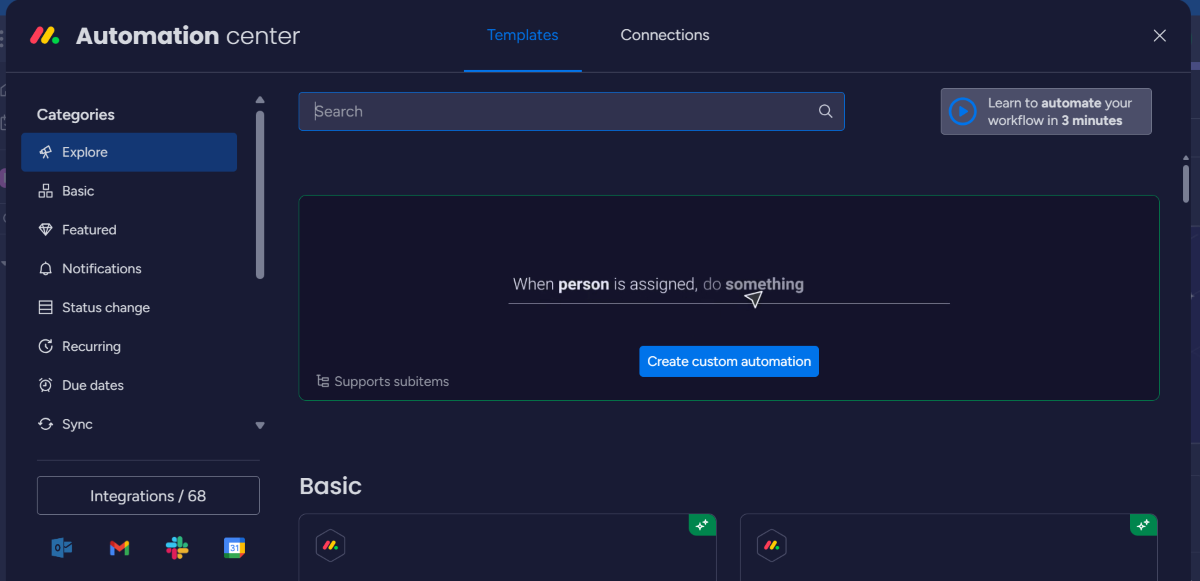
- Automation: Recurring or common tasks can be automated on monday.com. This includes setting up triggers, conditions, and actions, which make it easy to automate specific tasks. For some tasks, users can even build custom automations from scratch.
Pros and cons
| Pros | Cons |
|---|---|
| Ease of setup and use. | Limited reporting features. |
| Data visualization tools, including timeline view with dependencies. | Lack of advanced features in lower tiers. |
| Free trial that includes advanced features. | Steep learning curve for advanced features. |
Top integrations
- Slack
- Gmail
- Zendesk
- Hubspot
Why I picked monday.com
monday.com is featured on this list because of its versatility and customization capabilities, making it suitable for users of all technical levels. Both the Free and Basic plans offer enough features to be both useful and affordable for startups and small businesses.
When to use something else
For Mac users who require specialized project management features, such as native budget tracking or advanced risk analysis tools integrated within the platform, you’re likely to be better off exploring alternatives that focus on these areas, such as Teamwork.
For more information, read the full monday.com review.
Asana: Best for scalability

In addition to making my list of top project management software, Asana also offers a native desktop app for Mac users. With its feature-rich plans and impressive scalability, Asana is suitable for all types of businesses. Mac users can use it to create tasks, track project progress, collaborate with team members and clients and automate workflows.
Unlike the previous tools that required at least iOS 15.0, Asana’s mobile app for iPhone is compatible with iOS 16 or later, offering functionality across various features for both iPhone and iPad users.
Pricing
- Basic: $0 per user per month.
- Premium: $10.99 per user per month, billed annually, or $13.49 per user billed monthly.
- Business: $24.99 per user per month, billed annually, or $30.49 per user billed monthly.
- Enterprise: Custom quote.
Standout features
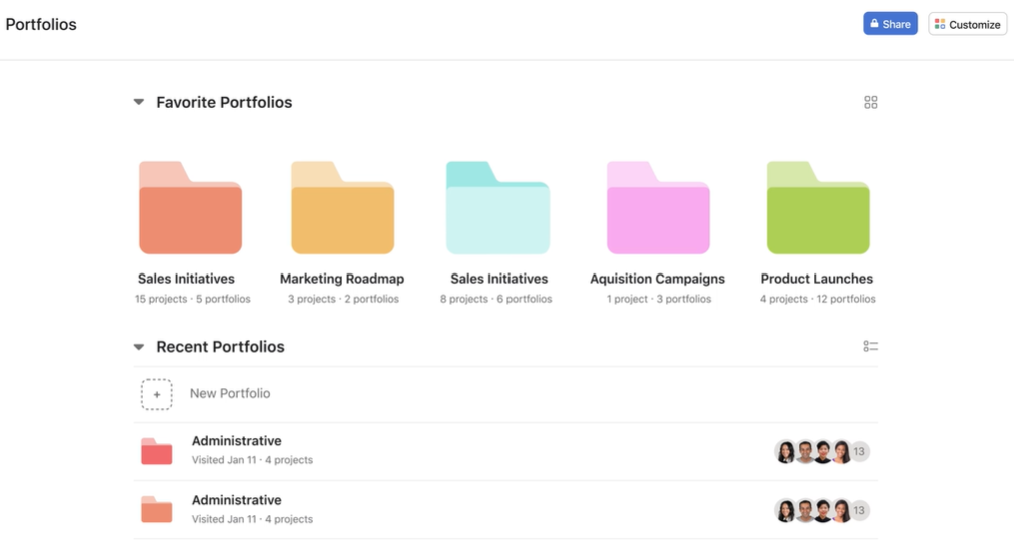
- Asana Portfolios: Using this feature, you can visualize the project schedule and progress of multiple projects using a timeline view with Gantt charts.
- Multi-device sync: With Asana, you can synchronize project data across multiple devices, including Windows and Mac computers.
Pros and cons
| Pros | Cons |
|---|---|
| Highly scalable. | UI is not as intuitive as other software. |
| Generous list of features. | Occasional lag when moving between data-extensive pages. |
| Powerful reporting and analytics. | Can be expensive for small businesses. |
Top integrations
- OneDrive
- Slack
- Adobe Creative Cloud
- Zapier
Why I picked Asana
Asana made it to my list because of how scalable it is. Its interface, features, and pricing make it a convenient choice for businesses of all sizes. I was also impressed with Asana’s reporting and analytics tools.
When to use something else
If you have projects that deal with lots of images and other graphics, Asana might not be the ideal choice, as its capabilities for handling visual content and markup tools are rather limited. Wrike is a better choice for visualizations.
For more information, read the full Asana review.
Wrike: Best for team collaboration

Wrike is a versatile project management solution that is available as a desktop app for both Mac and Windows. It is a cloud-based application, so it can be used on any device with internet access. One of the top features of Wrike is its visualization tools, including Gantt charts, waterfall schematics, and kanban boards. New users may need to take some time to get familiar with its user interface. Wrike is available for both iPad and iPhone but needs iPadOS 16.0 and iOS 16.0 or later.
Pricing
- Free plan: No cost for unlimited users.
- Team: $9.80 per user per month.
- Business: $24.80 per user per month.
- Enterprise: Custom quote.
- Pinnacle: Custom quote.
Standout features
- Wrike Sync: You can use Wrike two-way sync with applications such as GitHub and Jira to automatically sync all important information about a project.
- AI Project Risk Prediction: Wrike has in-built artificial intelligence tools that can alert users of any hurdles or issues that might delay a project.
Pros and cons
| Pros | Cons |
|---|---|
| Free plan with unlimited users. | The mobile app needs improvement. |
| Excellent project visibility tools. | Steep learning curve. |
| Offline mode. | Many tools only available as add-on features. |
Top integrations
- Slack
- Dropbox
- Tableau
- GitHub
Why I picked Wrike
I shortlisted Wrike as one of the top project management software options for Mac users because of its outstanding team collaboration tools, quick data syncing capabilities, and variety of project views. Additionally, I found Wrike to be an ideal tool for complex projects due to its vast capabilities and extensive customization options.
When to use something else
If you value a minimalist and straightforward interface for quick task management without extensively customizing it, consider an alternative like Asana. Wrike’s extensive feature set and customization options can especially overwhelm users seeking simplicity in a project management tool.
For more information, read our full Wrike review.
Jira: Best for development teams

Jira is well known for its project management capabilities for development teams, but it offers much more than that. It supports agile project management and has an extensive range of integrations available, including deep integration within the Atlassian ecosystem. You also get impressive workflow customization to match your specific project requirements.
Teams can create and edit issues and requests and manage project boards and backlogs straight from their iPads and iPhones, provided they’re running on iPadOS 16.0 and iOS 16.0 or later.
Pricing
- Free: $0 for up to 10 users.
- Standard: $8.15 per user per month, billed monthly, or $850 annually for 1–10 users.
- Premium: $16 per user per month, billed monthly, or $1,600 annually for 1–10 users.
- Enterprise: Available for teams with more than 800 users and only billed annually. Contact Jira sales team for pricing information.
Standout features
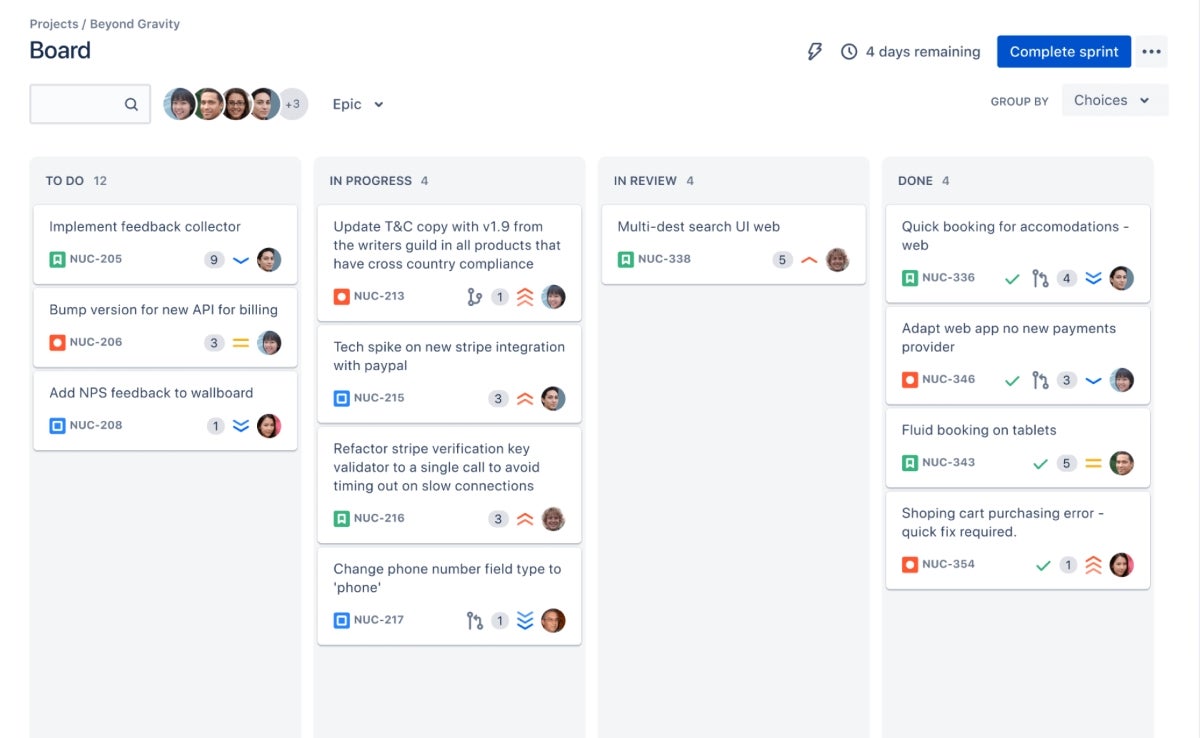
- Agile boards: Has both scrum and kanban boards to visualize project progress in real-time.
- Jira automation: Automation templates enable users to use drag-and-drop features to automate their tasks.
Pros and cons
| Pros | Cons |
|---|---|
| Outstanding issue-tracking capabilities. | Steep learning curve, especially for advanced tools. |
| Fast and responsive. | UI is not as intuitive as other competitors. |
| Deep integration with other Atlassian products. | Can be overkill for small, simple projects. |
Top integrations
- Atlassian products
- Google Drive and Gmail
- Figma
- GitHub
Why I picked Jira
Jira impressed me with its powerful issue-tracking capabilities, which software development teams and iterative project management teams are sure to appreciate. I also liked Jira’s agile project management capabilities and integration ecosystem with Atlassian products.
When to use something else
If you’re not involved in software development or prefer not to work within an agile framework, Jira may not be the right fit for you. Consider tools that are more accessible and take a visually straightforward approach to task and project management, minus the complexity of agile methodologies.
For more information, read the full Jira review.
Trello: Best free project management software

Trello uses management boards, templates, roadmap features, and other tools to simplify project management. The kanban-style design of the main dashboard is visually appealing and easy to use. Users can quickly and simply cross-collaborate, assign tasks, view workflow, and share files.
Additionally, the mobile app and desktop interface offer extra flexibility. This kanban interface extends to mobile as it’s available on iPad and iPhone, though it’s compatible with iPadOS 16.0 and iOS 16.0 or later respectively.
Pricing
- Free: No cost.
- Standard: $5 per user per month, billed annually, or $6 per user billed monthly.
- Premium: $10 per user per month, billed annually, or $12.50 per user billed monthly.
- Enterprise: Starts at $17.50 per user per month and gets cheaper with more users.
Standout features
- Automation: The Butler is an automation tool offered by Trello that allows users to create rules, commands, and buttons to reduce repetitive work.
- Trello boards: The kanban-style interface is Trello’s signature feature. The board system allows users to oversee the progress of multiple tasks.