


I don’t know about you, but I’ve lost count of how many hours I’ve wasted digging through messy meeting notes, trying to remember who said what or which action items I owed. Meetings are unavoidable. But the endless cycle of note-taking, missed details, and half-baked recaps doesn’t have to be.
That’s where the best AI meeting assistants come in.
When I first discovered these tools, I was skeptical. Could an app really capture everything in a meeting and turn it into the takeaways I actually needed? At best, I expected clunky transcripts; at worst, more digital clutter. But as I tested them, I realized the right AI meeting assistants weren’t just recording conversations; they were making my meetings more productive.
That’s why I dug deeper. I compared 20+ AI meeting assistants side by side, testing them on real-world use cases like note-taking, summaries, action item tracking, and integrations. To balance my own findings, I also pulled in insights from verified G2 reviews to see how teams actually use these tools day to day.
The result? A shortlist of the best AI meeting assistants for 2025, the ones that truly deliver smarter, more efficient meetings.
5 best AI meeting assistants for 2025: My top picks
| Best AI meeting assistant | Best for | Standout feature | Pricing |
| Zoom Workplace | Best for hybrid and enterprise meetings | Integrated video calls, AI summaries, transcripts, and more in one workspace | AI Companion available in all paid plans. Starts at $13.33/month |
| Fathom | Best for a free AI meeting assistant with unlimited recording and transcripts | Instant call summaries with key takeaways and role-based templates | Free plan available. Starts at $16/user/month |
| Fireflies.ai | Best for teams that want insights-driven meeting analytics | Conversation analytics with talk time, sentiment, and action tracking | Free plan available; Starts at $10/user/month |
| Webex Suite | Best for secure, multilingual enterprise collaboration | Real-time translation in 100+ languages and voice commands | AI Assistant available in paid plans. Starts at $12/user/month |
| Apollo.io | Best for sales and revenue teams | AI-powered pre-meeting insights, follow-ups, and CRM sync | Free plan available; $49/user/month |
*These AI meeting assistants are top-rated in their category, according to G2 Fall 2025 Grid Report.
Whether you’re a startup founder trying to stay on top of fast-moving team discussions, a manager juggling back-to-back calls, an SDR or marketer tracking client conversations, or simply someone who wants clearer action items, there’s something in this list for you.
5 best AI meeting assistants I recommend
When I think about an AI meeting assistant, I see it as a co-pilot that sits in every meeting with me. Instead of scrambling to capture who said what, these tools record, transcribe, and surface the key details I actually need: decisions, action items, and follow-ups. In other words, they take care of the busywork so I can stay focused on the conversation.
This isn’t just a nice-to-have. According to Calendly’s 2024 State of Meetings report, nearly half of professionals (45%) feel meetings reduce productivity, often because no clear notes or action items are shared afterward.
The data also shows just how much time we’re all spending in meetings: half of sales professionals spend five or more hours a day in them, and over one-third of attendees admit to multitasking during virtual calls. It’s no wonder important details slip through the cracks. AI assistants help bridge that gap by ensuring nothing gets lost, even if attention does.
How did I find and evaluate the best AI meeting assistants?
To build this list, I started with G2’s Grid® Report to create a shortlist of the top AI meeting assistant apps, using a mix of user satisfaction scores and market presence as my guide. From there, I rolled up my sleeves and tested these tools, looking at how well they handled note-taking, summaries, action items, and integrations.
To go beyond my own experience, I also used AI to analyze over 1,000 verified G2 reviews. I focused on what users loved most, where they felt let down, and which tools consistently delivered value in real-world meetings. This step made it easier to separate the hype from the platforms that actually make meetings more productive.
For tools I couldn’t test directly, I leaned on interviews with professionals who use them daily. Their hands-on feedback gave me the context I needed, which I then cross-checked against G2 reviews for accuracy. The screenshots featured in this article come from G2 vendor listings and publicly available product documentation.
What makes the best AI meeting assistants: My criteria
After digging into G2 data and reflecting on countless meetings I’ve run (and sat through), I noticed the same priorities coming up again and again. Here’s what I focused on when evaluating the best AI meeting assistants:
- Accuracy and comprehension: I didn’t just want word-for-word transcripts. I wanted tools that could distinguish between casual chatter and actual decisions, accurately capture multiple speakers correctly, and handle messy real-world audio.
- Summaries that add value: A transcript is only step one. The best assistants generate concise, structured summaries with sections like key takeaways, decisions made, and open questions. If I still had to dig through raw text, it didn’t make the cut.
- Action item detection: My top picks automatically identify tasks, owners, and deadlines from conversations. This is one of the biggest productivity boosts, no more scrambling to remember what I promised to deliver.
- Search and recall: I tested how quickly I could find past discussions. The best tools let me search across meetings by keyword, speaker, or topic, and surface the exact moment in context, not just a transcript line.
- Integrations with workflows: Notes are useless if they live in a silo. I prioritized assistants that connect with calendars, CRMs, Slack, project management apps, and make exporting action items frictionless.
- Real-time performance: Some platforms only shine in polished demos. I checked how well they handled live calls with interruptions, multiple speakers, and accents, because that’s real life.
- Security and compliance: Meetings often involve sensitive details. I gave extra weight to tools that clearly explained their data storage, encryption, and compliance (SOC 2, GDPR, HIPAA, where relevant).
- Ease of use and adoption: Even the smartest AI assistant is useless if no one on my team wants to use it. I looked for clean UX, minimal setup, and intuitive workflows that don’t disrupt how teams already run meetings.
Of course, not every tool in my list nails all of these criteria, but the ones that stand out consistently perform well across the most important areas.
The list below contains genuine user reviews from the AI meeting assistants category. To be included in this category, a solution must:
- Create meeting summaries using AI and NLP
- Automate transcription of meetings
- Allow users to search, edit, and highlight meeting moments
- Outline action items and assign responsibilities to specific participants
- Automatically record meeting audio or video and make these recordings shareable or private
- Integrate with productivity tools like calendars, email, business instant messaging tools, project management software, and CRM systems
*This data was pulled from G2 in 2025. Some reviews may have been edited for clarity.
1. Zoom Workplace: Best for teams already using Zoom
When it comes to video collaboration, Zoom has long been the go-to platform for many teams, including mine. So using its AI Companion inside Zoom Workplace feels less like learning something new and more like unlocking a smarter version of a familiar tool.
Once enabled, it automatically generates meeting summaries with a quick recap and next steps listing the action items for each individual, followed by a detailed transcript. Having those action items clearly outlined makes it easy for me to follow through after a meeting without digging through notes or rewatching recordings. The summary also gets shared automatically in email, or Slack, which means I don’t have to worry about manually sending out updates.
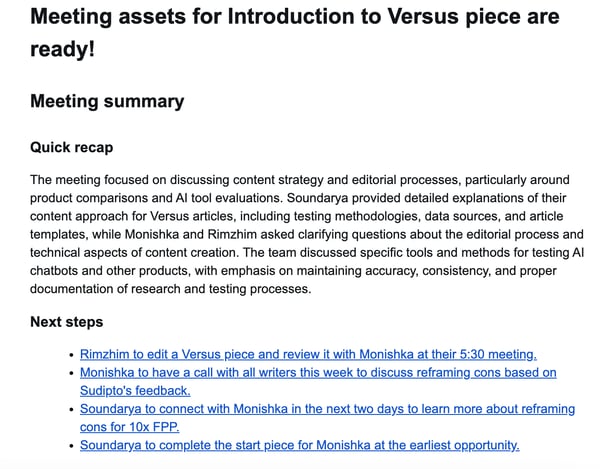
What impressed me most was how seamlessly it fits into my workflow. The AI Companion doesn’t just capture what’s said. It makes that information usable. During meetings, I can quickly check if my name was mentioned or revisit decisions that were made without interrupting the discussion. Afterward, I can chat with the AI to prioritize tasks, summarize conversations, or draft follow-ups directly within Zoom.
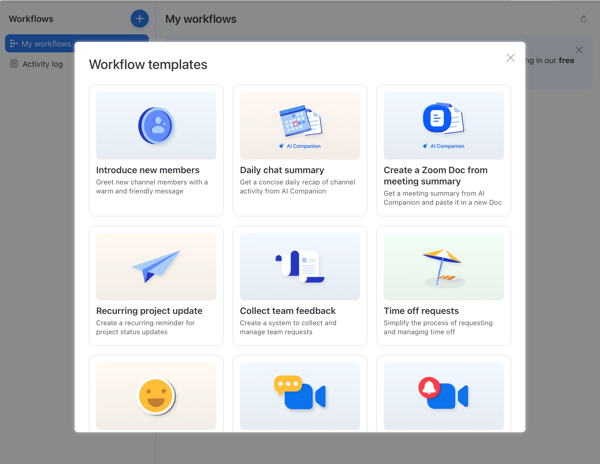
What makes it even more interesting is the new workflow tool (currently in beta). I can now create and run AI workflows entirely within Zoom, using it not just as a meeting tool but as a workspace for day-to-day operations. For example, I can set up a workflow to get a daily chat summary that recaps all my channel activity or automatically generate and share a Zoom Doc from a meeting summary with my team.
There are also templates for introducing new members, sending reminders for recurring project updates, collecting team feedback, and managing time-off requests, all powered by the AI Companion. These automations are especially useful for project managers who need quick status reports, marketing teams coordinating campaign updates, or HR teams welcoming new hires and tracking requests. It’s a subtle but powerful shift, turning Zoom into a single place to meet, plan, and manage routine work.
From what I saw in G2’s latest data, Zoom Workplace performs exceptionally well where it counts. It scores 93% for ease of use and 94% for ease of setup, with users across IT services, computer software, marketing, and higher education noting how intuitive the interface feels. That matches my own experience. Getting started with the AI Companion felt effortless, and its features blended naturally into my existing Zoom habits.
Among its highest-rated features on G2 are smart summaries, action item tracking, and voice recognition, and I can see why. Zoom’s transcription and translation capabilities are well-known for their accuracy, which makes it invaluable for global teams and multilingual calls.
I also noticed that Zoom is taking things even further with its AI Companion 3.0 update rolling out in October 2025. Users will soon be able to create custom AI agents to automate workflows. It’s a clear move toward making meetings, chat, and documentation all work together in one connected, intelligent workspace.
That said, there are still a couple of things to keep in mind based on my own experience and what I saw on the G2 reviews.
The AI Companion delivers impressively detailed summaries, often capturing even subtle discussion points and side comments. This level of thoroughness can occasionally include off-topic or personal remarks, something to be aware of if summaries are shared widely, but it also means key context is rarely lost.
It may also struggle with name spellings or miss finer nuances during especially long conversations, yet most reviewers (and I’d agree) see these as minor trade-offs for the depth and accuracy it provides, which continues to improve with each update.
G2 users highlighted that Zoom Workplace’s all-in-one interface brings together a wide range of tools in a single platform, streamlining collaboration across teams. Some noted that with so much functionality available, it can take a little time to get fully comfortable — but this comprehensive design ultimately reduces the need to juggle multiple apps.
Also worth noting: Zoom AI Companion is currently available only to paid users, which is something teams should factor into their decision-making.
Zoom Workplace currently holds a 4.5 out of 5 rating on G2, with 98% of users rating it 4 or 5 stars. Between its reliability, ease of use, and smart AI features, it stands out as one of the most well-rounded meeting assistants available today.
What I like about Zoom Workplace:
- The AI Companion seamlessly fits into my workflow, generating quick recaps, action items, and detailed transcripts right after every meeting, and even sharing them automatically on email and other team messaging platforms.
- The built-in transcription and translation features are a huge plus. They make it easy to collaborate across time zones and languages without missing context.
What G2 users like about Zoom Workplace:
“What I really like about the new Zoom Workplace is how the AI Companion can now handle tasks like creating summaries, documents, and even short video clips for me. The workflow automation is also great because it connects Zoom with other tools I use, which saves me a lot of time. I find the live notes and meeting summaries very useful since I don’t have to worry about missing important details. The updated Team Chat layout makes it easier to organize conversations and stay focused. Overall, these updates make Zoom more powerful and much easier to use for my daily work.”
– Zoom Workplace review, Cutbert N.
What I dislike about Zoom Workplace:
- The AI Companion can sometimes be a little too thorough, capturing personal or off-topic remarks in meeting summaries or getting names slightly wrong. It’s improving fast, a few users noted that it still has room to grow.
- Based on several G2 reviews, Zoom Workplace’s feature-rich interface can feel a bit heavy for first-time users. But once you get familiar with the layout, navigation becomes straightforward and efficient.
What G2 users dislike about Zoom Workplace:
“One thing I dislike about Zoom Workplace is that it can feel overwhelming at times due to the number of features and constant updates. While the tools are powerful, it can be difficult for less tech-savvy users to navigate or fully utilize everything without additional training. Streamlining the user interface and providing clearer onboarding for new features could make the experience even better.“
– Zoom Workplace review, Kelly H.
2. Fathom: Best for a free AI meeting assistant
Fathom struck me as one of those AI meeting assistants that knows exactly who it’s built for. From the very first step, it felt tailored for sales, customer success, and product teams, right down to the onboarding questions about which CRM I use so it can integrate automatically. Once set up, it runs almost entirely on autopilot, recording every meeting and generating detailed notes and summaries. For manual recordings, you’ll need to download the desktop app; once that’s done, Fathom handles the rest with minimal effort on my end.
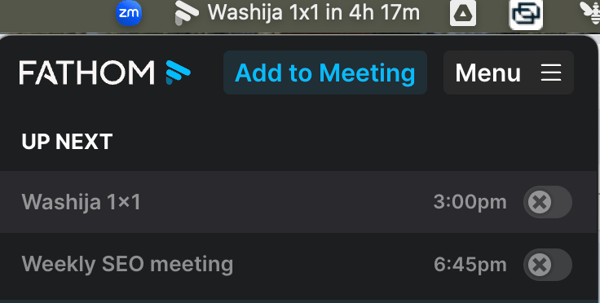
What stands out most for me is how thoughtfully it organizes and enhances meetings in real time. Before each meeting, Fathom sends a quick reminder and gives me the option to add it to the recording queue, so I never forget to capture an important conversation.
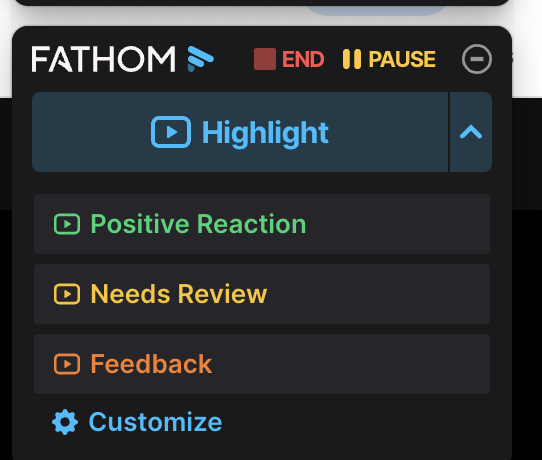
During meetings, I can highlight or capture specific moments in real time, like when a customer mentions a deal blocker or a product request, and Fathom bookmarks that section instantly. I can even add custom names to these highlights, like “customer blocker,” “testimonial,” or “notes to share with the team,” depending on what I need. It’s a small but incredibly practical feature, especially for people working with customers or prospects who need to quickly reference key parts of a conversation later.
What I love the most is that I get both the full transcript and summary, along with action items and responsible parties, after the call. I like that I can switch summary templates based on context, like sales calls, customer success reviews, project meetings, or interviews, which makes every summary feel tailored.
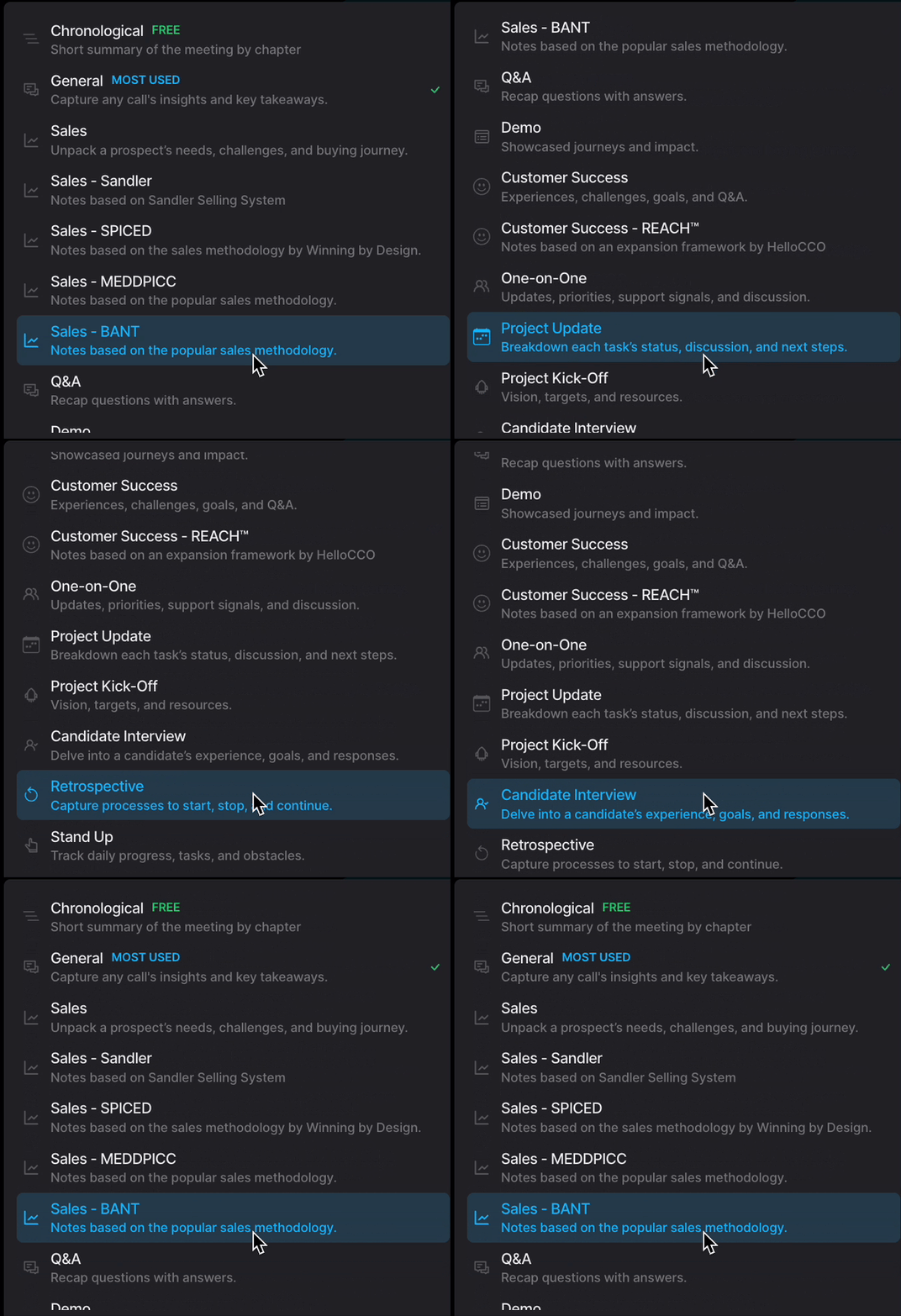
The “Ask Fathom” feature is another standout. It lets me search or ask questions about what was discussed, so I can quickly find details like “What did the client say about pricing?” without rewatching the recording. Even if I want to, I can go to the specific timestamps without scrolling through the entire recording.
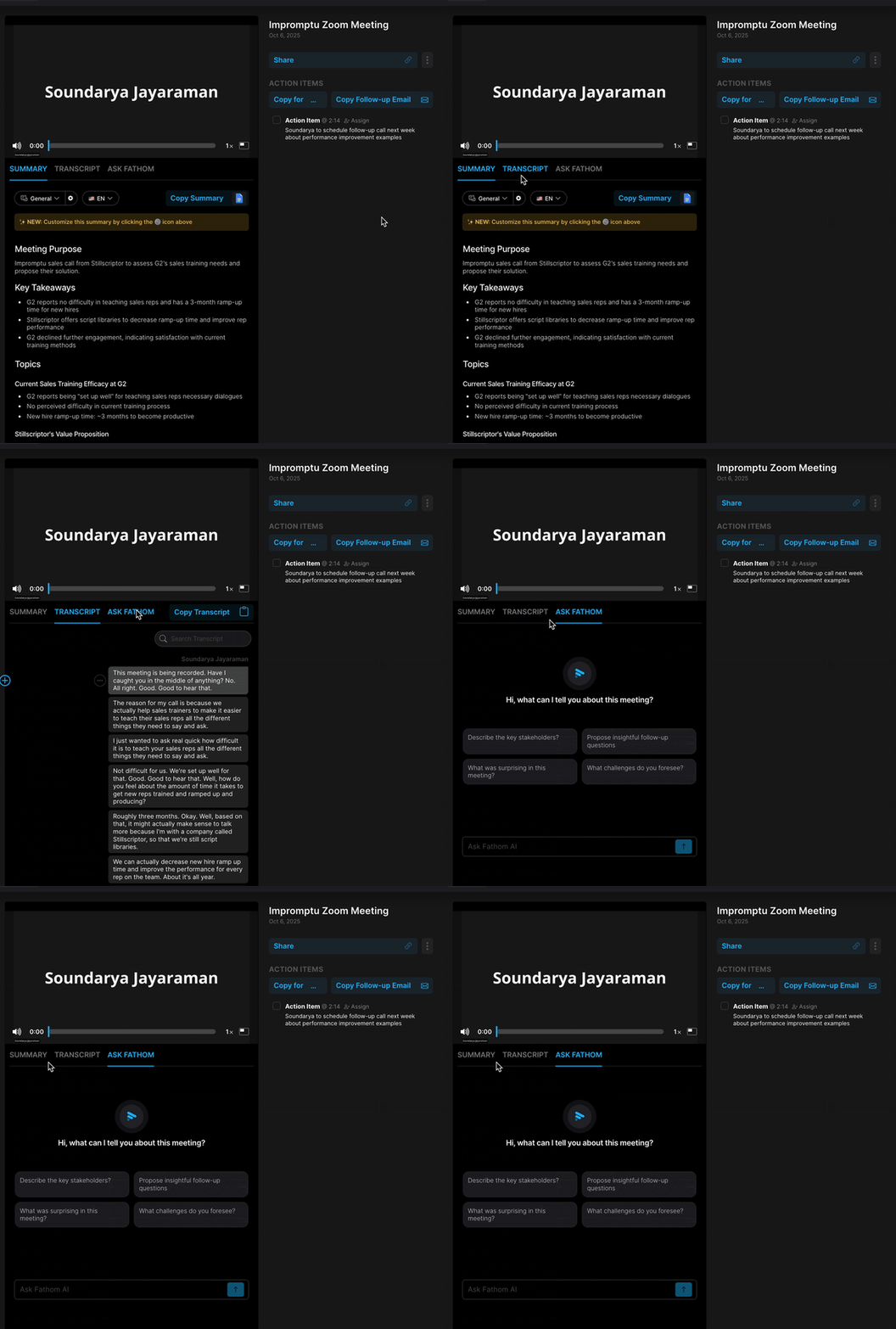
Fathom also connects with tools like HubSpot and Salesforce, where it automatically pushes meeting summaries, highlights, and tasks into the right contact or deal records. It also integrates with Slack, Asana, and Zapier, which makes it easy to share notes or automate follow-ups across different workflows.
And mind you, we get all of this with the free plan itself. In fact, Fathom has one of the most generous free plans among AI meeting assistants I’ve tried. It includes unlimited recordings and transcriptions, instant call summaries delivered to your inbox, and the ability to create clips, playlists, and search across all your calls, plus premium features like advanced summaries, Ask Fathom, and action items for the first five calls of the month.
The G2 user reviews echo a similar sentiment. According to G2 Data, Fathom performs exceptionally well across nearly every metric. It scores 97% for ease of use and setup, and 98% for quality of support, numbers that match my own experience.
The most praised features include automated note-taking (98%), smart summaries (91%), and action item tracking (95%), showing how strong it is at capturing and surfacing relevant insights. Its user base, spanning marketing, consulting, software, and training, also reflects where it excels: teams that spend a lot of time in meetings and rely on clear, accurate recaps afterward.
At the same time, G2 reviews point to a few small trade-offs worth noting. Like most AI note-takers, this one isn’t completely immune to occasional transcript slips, though they rarely affect overall comprehension. I noticed a few of these myself, but they’re typically easy to spot and correct. Its accuracy remains strong enough for capturing key themes and action items, making it reliable for everyday meeting documentation.
The platform integrates smoothly with popular CRMs and messaging tools, covering the most common workflows for sales and support teams. Some reviewers mentioned they’d like to see an even broader range of integrations, which would further extend its flexibility for more specialized or cross-departmental use cases.
Still, these are small concessions in what’s otherwise a reliable and well-designed experience. With a perfect 5 out of 5 rating on G2, it’s clear I’m not the only one impressed. Users genuinely trust and enjoy it.
So whether you’re in sales, customer success, marketing, or project management, or just have a lot of meetings, Fathom will make those meetings easier to manage and much more productive.
What I like about Fathom:
- I love how hands-free Fathom feels — it automatically records, transcribes, and delivers detailed summaries with action items right after every meeting.
- The flexibility to switch summary templates by context (sales, customer success, project management, interviews) makes my notes far more useful and tailored.
What G2 users like about Fathom:
“As a project manager working with a large team of software engineers and UX designers, staying on top of meetings, discussions, and action items is crucial to keeping projects on track. Fathom has become an indispensable part of my workflow. I use it daily.
The ability to record meetings, generate accurate transcripts, and receive clear, structured summaries has significantly improved how I manage communication and documentation across the team. Instead of scrambling to take notes during high-stakes discussions, I can stay fully engaged in the conversation knowing Fathom is capturing everything.
One of the standout benefits for me is how easily I can convert meeting takeaways into Jira tickets. The clarity and organization of Fathom’s summaries help me extract the key decisions, requirements, and action items without having to rewatch entire meetings or dig through messy notes. It’s also helped improve transparency and alignment across the team. Engineers and designers can refer back to transcripts or meeting highlights if they need context or clarification — which reduces back-and-forth and miscommunication.”
– Fathom review, Sarah C.
What I dislike about Fathom:
- Some users (and I have occasionally noticed this too) mention small transcription errors, especially with names or fast speakers, although this seems fairly common across most AI note-takers.
- A few reviewers also mentioned wanting more integrations beyond CRMs and existing tools, a sign that teams are finding more ways to fit Fathom into their broader workflow.
What G2 users dislike about Fathom:
“There isn’t much to dislike. Occasionally, I’ll notice small transcription errors or that certain niche industry terms aren’t always captured perfectly, but the overall meaning is always clear. I’d love to see even more integrations in the future so the workflow is completely frictionless across all the tools I use.”
– Fathom review, Dee A.
3. Fireflies.ai: Best for insights-driven meeting analytics
Fireflies.ai is one of the more popular AI meeting assistants out there, and for good reason. It’s built to do more than just take notes.
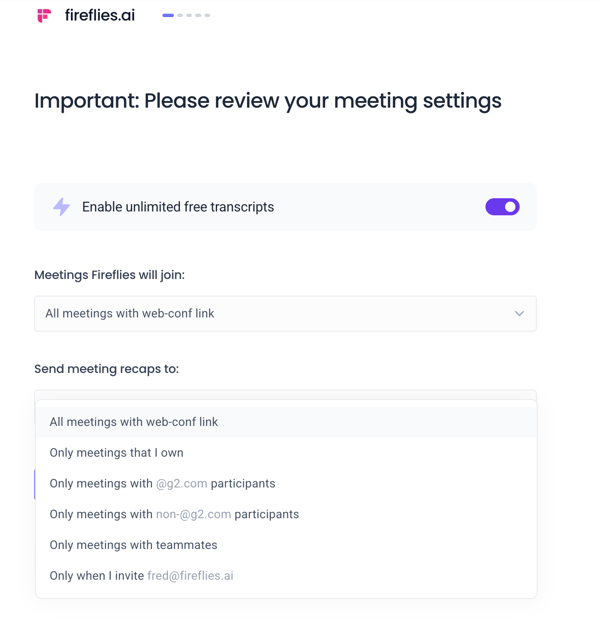
From my very first use, what stood out was how customizable the setup felt. It gave me detailed control over how it joins meetings and who receives the recaps, something I appreciated, especially since it offers even more flexibility in this area. That level of customization immediately made it feel more personal than most AI meeting assistants I’ve tried.
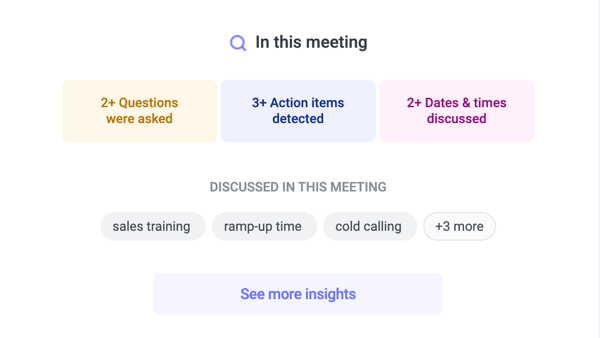
 What impressed me right away was the kind of insights Fireflies shared after each meeting. Instead of just providing a basic summary and list of action items, it broke things down with context, showing how many questions were asked, how many action items were detected, and which topics were discussed. It’s a richer, more interactive view than what I’ve seen from most AI note-takers, and it helped me quickly understand the meeting flow before diving into the full transcript.
Using the free plan, I could record, get meeting transcripts, audio recordings, and the ability to create short audio clips or shareable snippets from any part of the meeting. I could also bookmark key moments, leave timestamped comments, and tag action points for my team to follow up on.
My favorite feature, though, was how all my action items automatically showed up under My Tasks, neatly organized and ready to sync with tools like Asana, ClickUp, or Monday.com, making it one of the top-rated AI assistants for action item tracking.
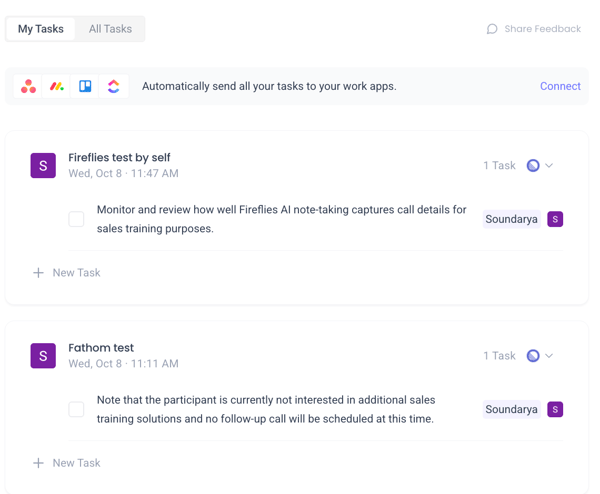
Speaking of syncing with other tools, Fireflies offers one of the most extensive integration libraries I’ve seen, connecting seamlessly with CRMs, ATS platforms, project management, and collaboration tools, so it fits naturally into any existing workflow.
I also liked other thoughtful features like the pre-meeting briefs, which summarize context and key insights from previous conversations, and the post-meeting analytics that show talk time, sentiment, speaker insights, and team-level trends. These are particularly useful for sales and customer success teams who want to track engagement, analyze conversations, or coach their reps more effectively.
My experience matched what I later saw in G2 data. Fireflies performs impressively well across usability and automation, scoring 94% for ease of use, 95% for setup, and 93% for meeting requirements.
Its top-rated features include automated note-taking (94%), smart summaries (92%), and action item tracking (90%), which aligns perfectly with how effortless it felt to use. Consulting, marketing, IT, and software professionals make up a large portion of its user base, proving that Fireflies can adapt to almost any team’s workflow.
That said, G2 reviews also surface a few minor hiccups. Like many AI note-takers, this one is built to capture conversations even in less-than-ideal conditions — think overlapping voices, background chatter, or fast-paced discussions.
That level of adaptability means speaker labels can occasionally need a quick adjustment afterward, but the transcript itself remains accurate and easy to follow. I didn’t personally run into these issues during my own testing, and most reviewers mention they’re simple to resolve directly within the transcript.
Recording controls are straightforward and reliable, making it easy to start or stop sessions as needed. A handful of users mentioned that restarting a recording after canceling could
Fireflies currently holds an impressive 4.8 out of 5 rating on G2, with 94% of users giving it five stars. It’s not just another meeting recorder; it’s a tool that actually helps you act on what was discussed. With its mix of analytics, task tracking, and deep integrations, Fireflies is perfect for anyone who wants to spend less time digging through notes and more time getting things done.
- I love how Fireflies doesn’t just take notes. It gives me action items, insights, and even analytics that help me see how my meetings actually went.
- The integrations are a huge win. Syncing tasks to tools like Asana or ClickUp and pulling CRM context right into my notes saves me a ton of time.
What G2 users like about Fireflies.ai:
“The summaries are incredibly accurate and insightful, and I love that you can expand any point for more context (a great perk on the Pro plan). The ability to view the meeting summary alongside the full transcript is a huge time-saver, and the linked timestamps make it easy to jump straight to the part of the conversation you need.
The Google Calendar integration is super flexible. I can choose which meetings the notetaker joins, even if I’m not the meeting owner. Plus, the integrations with tools like Slack, Jira, and Asana make it easy to plug tasks directly into our workflows. Can’t recommend this app enough. It’s completely changed how I manage meeting follow-ups and documentation.”
– Fireflies.ai review, Paula L.
What I dislike about Fireflies.ai:
- Some users on G2 mention small transcription errors or mislabeled speakers in meetings with lots of background noise or multiple speakers. I didn’t run into those personally, and it seems to happen rarely.
- A few users mention that restarting a recording after canceling it could be smoother, and the bot occasionally misses rescheduled or password-protected meetings, but those instances seem rare, and the desktop app usually helps minimize them.
What G2 users dislike about Fireflies.ai:
“It’s not perfect. Sometimes the speaker labeling gets it wrong, especially if people talk over each other. Also, if the audio quality isn’t great or someone has a strong accent, the transcript might need a bit of manual editing.
Another thing is that some of the more advanced features, like deeper integrations or analytics, are locked behind the higher-tier plans. It’s worth it if you use it a lot, but it can feel limiting if you’re just getting started or working with a smaller team.”
– Fireflies.ai review, Fernando B.
Fathom vs Fireflies.ai: What G2 Data shows
Honestly, it comes down to what kind of meetings you run most and the features you want. Based on G2 data and what I’ve seen in user reviews, Fathom shines for its simplicity and ease of use, while Fireflies.ai stands out for its depth and analytics.
Want more details before you take a call? Compare ratings for different features of Fathom vs Fireflies.ai based on 7,000+ user reviews on G2.
4. Webex Suite: Best for enterprise teams
Webex Suite has long been known as one of the best video conferencing platforms for enterprises, and that reputation now extends to its AI-powered meeting assistant. Built for scale, it combines Webex’s trademark reliability with automation features that help teams save time and stay organized.