


Ever feel like every MDR provider is promising “round-the-clock protection” but no one tells you what that actually looks like at 2 a.m. during a live ransomware incident?
Same. I’ve spent the last two years researching and writing about cybersecurity, covering everything from zero trust to threat intelligence, and I’ve had countless conversations with security leads, analysts, and IT teams stuck in alert fatigue.
One thing they all want? A partner, not just a product. So I decided to cut through the buzzwords and evaluate 15+ vendors to identify the top MDR providers who actually deliver when it matters most. Not just fast SLAs and shiny dashboards, but hands-on help when you’re short-staffed, and proactive threat hunting when your in-house team’s swamped.
If you’re in the market for MDR, chances are you already know the stakes. Whether you’re battling resource constraints, dealing with executive pressure to prove ROI, or just trying to avoid becoming the next breach headline, this guide is for you.
I’ve broken down what truly sets the best MDR services apart, from service quality and analyst access to how they handle escalation, onboarding, and integration with your existing stack.
Let’s get into the top MDR providers that earned my confidence, impressed many G2 users, and might just win your team’s trust too.
6 top MDR providers for 2025: My top picks
| MDR service provider | Best for | Standout feature | Pricing |
| Huntress Managed EDR | Small businesses with limited IT staff | 24/7 SOC with fast detection, guided remediation | Custom pricing |
| Sophos MDR | Mid-market and enterprise seeking layered protection | 24/7 SOC with fast detection, guided remediation, | Custom pricing |
| Arctic Wolf | Organizations needing concierge-style support | Named concierge security team (CST) with proactive guidance | MDR Basic Monitor (up to 100 users with MDR) costs $44,000 per year, according to AWS Marketplace data |
| ThreatDown | SMBs and MSPs seeking automation + SOC | Transparent pricing bundles and ransomware rollback built into core plans | Starts at $ 345 per year for 5 devices |
| Blackpoint Cyber | MSPs and SMBs needing quick, aggressive response | Direct call-in support and live containment actions without extra approval steps | Custom pricing |
| Red Canary | Security-mature teams that want deep visibility | Flexible telemetry collection from existing EDR tools plus clear analyst context on every alert | Starts at $120 per endpoint/year (User accounts $100/year, cloud resources $250/year, network $20/year), according to AWS marketplace data. |
*These MDR providers are top-rated in their category, according to G2 Grid Reports.
6 top MDR providers I suggest after evaluating 15+ tools
Outsourcing security isn’t new. I’ve seen companies rely on managed security service providers (MSSPs) since the late ’90s. But MDR is a different breed. Unlike traditional MSSPs that mostly forward logs and alerts, MDR actually helps you figure out what’s happening and what to do next. It combines technology with real human analysts who detect, investigate, and respond to threats in real time.
For lean, overworked security teams, that shift from passive monitoring to hands-on response is defining, and I’ve come to really appreciate it more given the nature of security incidents these days. 88% of ransomware attacks occur outside normal business hours, and nearly 4.75 million cybersecurity staff are needed to fill the workforce gap today.
What surprised me most as I compared MDR providers is how similar they sound, until you look closer. “24/7 SOC,” “threat hunting,” “real-time response” — it’s all on the website. But what actually separates the great from the good is the experience: how fast they act, how well they understand your environment, and how often you’re left guessing.
The best managed detection and response software don’t just integrate with your stack. They integrate with your team. And that makes all the difference.
How did I find and evaluate the top MDR providers?
I started with G2’s Grid Reports, my go-to source for real, unbiased user feedback, to build a shortlist of best MDR services. I looked at a mix of well-established leaders and emerging players with strong ratings.
Since MDR is a high-touch, always-on service, most providers offer demos but not free trials. So I focused on researching each product’s technical capabilities, from supported integrations to response playbooks, and dug deep into user reviews to understand what real users say about their everyday experience and outcomes.
When I couldn’t try or demo a platform firsthand, I consulted cybersecurity professionals with direct experience and cross-referenced their insights with G2 feedback.
To add context, I used AI tools to analyze hundreds of G2 reviews. It helped me spot consistent strengths like fast response and analyst support, and red flags like alert fatigue or poor integrations.
The screenshots featured in this article are a mix of visuals taken from G2 vendor pages and publicly available product materials.
What makes the top MDR providers: My criteria
Once I narrowed down the top MDR vendors, I focused on the technical capabilities, operational strengths, and hands-on value that make a provider stand out. Here are the key criteria I used to evaluate them:
- Real-time threat detection and rapid response: Speed is everything in modern threat defense. I looked for providers offering true 24/7 monitoring with the ability to detect, triage, and respond to threats in near real-time. This includes endpoint isolation, account lockout, or containment at the network level, ideally within minutes of detection.
- Direct access to experienced security analysts: Automated alerts only go so far. I wanted to know if there were human analysts behind the scenes. The top providers offered access to their SOC (security operations center) around the clock, with dedicated analysts who not only validate threats but also provide tailored remediation guidance through post-incident analysis when needed.
- Integration with the existing security stack: My priority was to avoid teams starting from scratch. The best MDRs support seamless integration with tools already in use, whether that’s Microsoft Defender, SentinelOne, CrowdStrike, Okta, or AWS. I also looked for pre-built integrations with SIEMs, ticketing systems, and cloud-native platforms to minimize friction and maximize visibility.
- High signal-to-noise ratio: It’s easy for an MDR to surface every suspicious event. What’s hard and valuable is filtering out the noise. I evaluated how well each provider enriches alerts with context (like user behavior or asset sensitivity), minimizes false positives, and provides actionable intelligence that security teams can trust and act on quickly.
- Customizable response playbooks and escalation paths: Incident response isn’t one-size-fits-all. I prioritized vendors that let the teams define response thresholds and customize escalation workflows. That meant configuring when they should isolate a device, notify specific contacts, and defer to internal policy, giving me control while still offloading the grunt work.
- Time to deploy and onboarding quality: MDR solutions don’t deliver value on day one; their deployment and tuning matter. I assessed how long it typically takes to get up and running, what kind of onboarding support is provided, and whether they help with tuning detection rules, integrating across the environment, and educating internal teams on what to expect.
- Visibility, transparency, and reporting: I didn’t want a black box. I wanted a partnership. That means full visibility into active threats, response actions, and incident timelines through a live portal or regular reports. Some providers offer analyst notes, root cause breakdowns, and MITRE ATT&CK mapping to add deeper context. Those were big pluses.
- Compliance and audit readiness: For any team subject to HIPAA, PCI-DSS, NIST, or SOC 2, MDR providers need to support compliance efforts, not hinder them. I looked for features like detailed incident logs, report exports, data retention policies, and alignment with compliance frameworks to ensure audit readiness.
The list below contains genuine user reviews from the platform software category. To be included in this category, a solution must:
- Monitor client networks and endpoints for security incidents
- Resolve threats on the client’s behalf
- Provide these managed services without the need for client assistance
*This data was pulled from G2 in 2025. Some reviews may have been edited for clarity.
1. Huntress Managed EDR: Best for rapid response and analyst support
Huntress Manager EDR quickly made its way to the top of my list of MDR service providers, and it wasn’t hard to see why. From the moment I looked at it, it was clear this wasn’t just another EDR tool with MDR slapped on.
One of the first things I noticed? Deploying Huntress is refreshingly simple. Whether you’re installing it via a script or using your RMM, it’s quick, efficient, and doesn’t leave you guessing. No bloated onboarding process. Just a lightweight agent that gets to work almost immediately without hogging system resources. In fact, Huntress EDR is often regarded as some of the best MDR software for small business security.
G2 Data also says the same thing. The platform consistently scores well above average for ease of use (96%) and ease of setup (97%), making it one of the most user-friendly MDR software options out there, especially for small or mid-sized businesses. And for security teams that are lean or stretched thin, that simplicity means a faster path to protection.
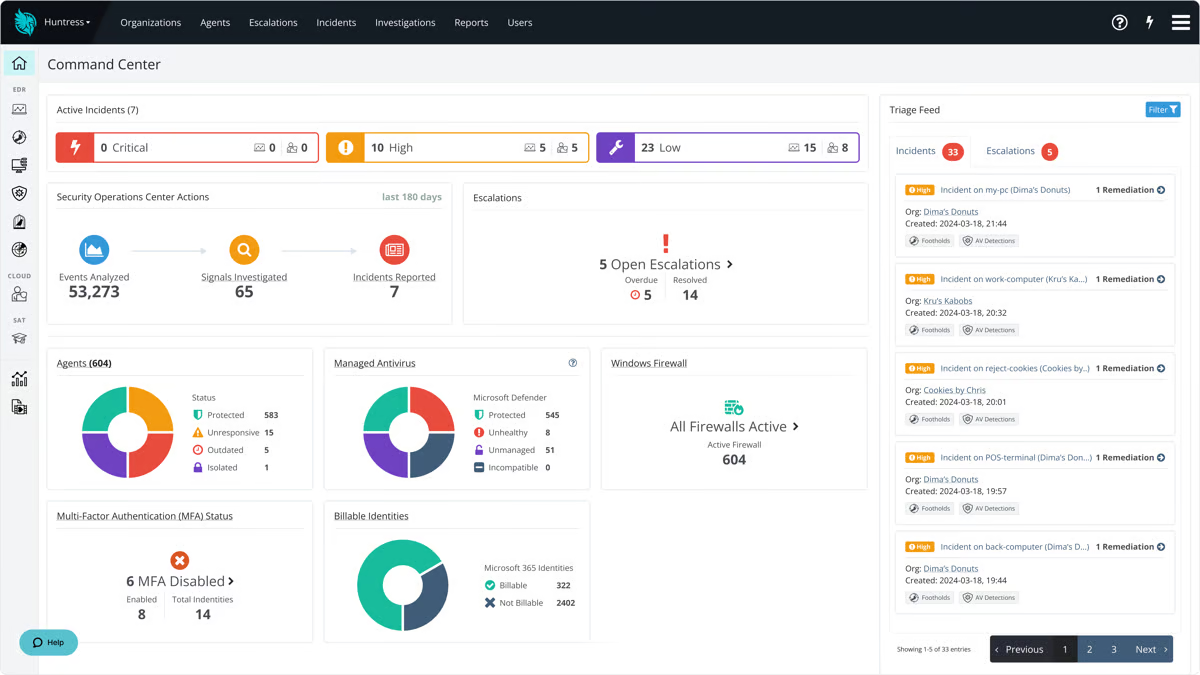
Where Huntress shines for me is the fully staffed 24/7 Security Operations Center (SOC) that actually watches your back. This isn’t some “set it and forget it” software. If something’s off, real analysts review it, investigate it, and send actionable reports.
The praise from users is also loud and consistent: nearly every review mentioned how responsive the team is and how effective the platform is at real-time threat detection. In fact, users rated its 24/7 support, proactive threat hunting, and rapid response time at 96% and above, which isn’t just impressive; it’s one of the category-leading scores.
Another standout I saw? Ransomware canaries. This is probably one of my favorite features. Basically, Huntress plants decoy files across your environment. If ransomware starts encrypting them, it triggers an instant alert. No more waiting until half your network is locked down. It’s clever and simple, and it works.
That said, a couple of things stood out in user feedback. First, if your organization is heavy on Macs, you’ll want to plan ahead. MacOS deployment with Huntress tends to be more hands-on than Windows, especially when it comes to permissions and configuration. Still, I liked that Huntress is upfront about this and provides clear documentation to guide teams through the process, something users consistently called out in a positive light.
There were also a few lighter mentions across G2 reviews, such as occasional noisy alerts during busy periods or a desire for more customization in reporting. Generally, these didn’t come up often and were noted as minor improvements that were needed.
Would I recommend it? Absolutely. If you’re an IT lead at a small business, an MSP juggling multiple clients, or even a startup with limited internal security resources, Huntress delivers.
What I like about Huntress Managed EDR:
- From everything I gathered, ease of setup and use is a clear win — users consistently said they were up and running fast, and that the interface felt intuitive even for smaller teams.
- One thing I kept seeing in reviews was how strong and responsive the analyst support is. When users ran into issues, they didn’t just get alerts. They got real help from humans who know what they’re doing.
What G2 users like about Huntress Managed EDR:
“As a small MSP, it is comforting knowing that I have Huntress Labs Managed MDR installed and protecting my clients’ computers. Their support is as good as any I’ve seen. Most importantly, knowing if something should happen, I have their highly experienced SOC at the ready to assist in remediating the issue.
Unlike some other products I tested, Huntress is excellent about keeping a low profile and controlling the amount of noise. It was surprisingly easy to implement. I also very much like their dashboard, which makes it easy to monitor the security health of my clients’ computers. I’m happy with my decision to go with Huntress MDR and have recently begun rolling out their ITDR module to my customers.”
– Huntress Managed EDR Review, Richard G.
What I dislike about Huntress Managed EDR:
- Several users pointed out that macOS deployment takes more effort than Windows, especially when it comes to permissions and initial setup.
- There were also a few mentions of alert noise and limited reporting customization. While not major complaints, they might be worth noting for teams with complex needs.
What G2 users dislike about Huntress Managed EDR:
“Huntress was a little slow on getting MAC compatibility working, they were upfront about it and had a realistic timetable, but it still took a bit.”
– Huntress Managed EDR Review, Jacob S.
MDR tools often work best when paired with a strong endpoint detection and response (EDR) foundation. Explore our in-depth guide to the best EDR software to compare vendors, see reviews, and understand how EDR fits into a layered security strategy.
2. Sophos MDR: Best for midsize and enterprise teams needing unified protection
Sophos MDR is one of those names you hear over and over, whether you’re talking to a lean IT team at a midsize business or a security consultant cleaning up after an incident. So I wanted to see for myself whether the reputation matched the reality.
What stood out to me pretty quickly was how Sophos approaches managed detection and response less like a bolt-on service and more like an evolution of their entire platform.
If you’re already using Intercept X, Sophos Firewall, or their cloud security tools, Sophos MDR integrates almost seamlessly. You get a single, unified view in Sophos Central instead of juggling multiple consoles or fragmented alerts.
Even if you rely on third-party data sources like Microsoft 365 or AWS, the MDR team can still monitor and respond effectively; it just takes a bit more setup to connect everything. Either way, the experience is designed to feel cohesive, not like an add-on pasted over your environment.
That tracks with what users say. The satisfaction rating of Sophos MDR stands at 94–95% for ease of setup, ease of use, and ease of admin.
Sophos gives you a clear choice in how incidents are handled by its MDR Ops team, which I think is one of its strengths. You can pick Collaborate mode, where the MDR team investigates threats and keeps you in control of any containment actions, or Authorize mode, where they proactively neutralize threats and loop you in afterward. It’s a practical model that feels more flexible than what you get with many MDR providers, where you either have to do everything yourself or hand over full control by default.
I also noticed Sophos consistently gets strong marks for 24/7 support, proactive threat hunting, and rapid response time, with satisfaction ratings above 95%.
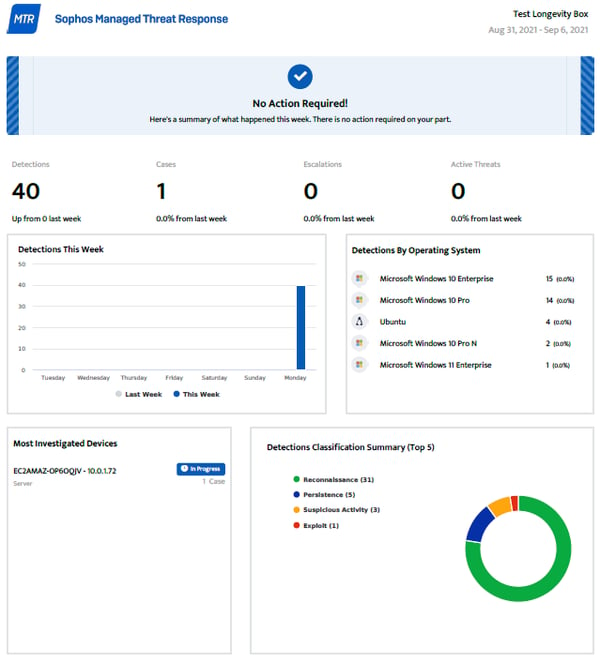
I found the weekly and monthly reports valuable. They give you a clear snapshot of threat activity, response actions, and overall health across your environment, so you’re not left wondering what’s happening behind the scenes.
However, quite a few G2 reviewers mentioned that report customization feels a little limited, especially if you need granular or compliance-specific details beyond the defaults.
Also, I did see a few comments about alert tuning and false positives. To combat this issue, some teams mentioned spending extra time reviewing detections to be sure they were actionable. To be fair, false positives are pretty common across most MDR solutions, so I wouldn’t consider them unique to Sophos.
Overall, if you’re searching for an MDR service provider that balances robust coverage with options to stay hands-on (or let them take over when needed), Sophos MDR makes a strong case. I’d recommend it to midsize and enterprise security teams, especially in industries where compliance and fast escalation matter.
What I like about Sophos MDR:
- From what I’ve read, integration is a big strength. Many reviewers said they were able to get Sophos MDR running quickly, especially if they were already using other Sophos tools like Intercept X.
- I noticed a lot of positive feedback about 24/7 analyst support and proactive threat hunting, which consistently scored above 95% satisfaction.
What G2 users like about Sophos MDR:
“Since implementing Sophos MDR, we have experienced a significant improvement in our security posture. Sophos MDR actively monitors our network and login activity, and they have alerted us to suspicious behavior on our Entra account within just one to two hours of compromise. Moreover, they provide clear, step-by-step remediation guidance, which has been invaluable. For our on-premises infrastructure, we’ve configured the system to allow Sophos to autonomously address any issues they detect.”
– Sophos MDR Review, Stephen S.
What I dislike about Sophos MDR:
- Few G2 reviewers mentioned that report customization feels limited, especially if you need more granular or compliance-focused details beyond the default dashboards.
- I also came across comments about occasional false positives or needing extra alert tuning, which can take additional time to sort through and prioritize.
What G2 users dislike about Sophos MDR:
“While Sophos MDR is overall a strong solution, there are a few areas for improvement. Sometimes the alerts can be a bit too frequent or not fully prioritized, which can lead to alert fatigue. Additionally, the response time from the MDR team, while usually fast, can occasionally be slower during non-critical issues. Pricing might also be a concern for smaller organizations, as the service can become costly depending on the number of devices or endpoints.”
– Sophos MDR Review, Alan L
3. Arctic Wolf: Best MDR for visibility across your security environment
If you’re exploring ways to strengthen your security without building an entire SOC from scratch, Arctic Wolf’s Managed Detection and Response (MDR) is worth a look. I’ve spent some time digging into how the MDR service provider works, and here’s what stood out to me.
When you sign up, you’re paired with what they call a concierge security team (CST), basically, a group of security pros who become an extension of your IT staff, similar to what Huntress and Sophos MDR provide. They help you install their sensors, agents, and cloud connectors to monitor your cloud environment.
From what I’ve read, that concierge approach isn’t just a marketing term. In G2 reviews, users consistently rated Arctic Wolf highly for 24/7 support, proactive report alerts, and rapid response time, with satisfaction scores in the 95–98% range.
Several teams mentioned that having a predictable point of contact made it much easier to stay ahead of issues, especially in industries like healthcare, finance, and manufacturing, where compliance requirements and incident timelines can get complicated quickly.
The ease of setup and ease of administration were also a bright spot, with ratings that hovered around 92%, which is impressive given that MDR deployments usually come with plenty of moving parts. Many G2 users described the onboarding process as structured and thorough, and said the day-to-day experience didn’t require constant oversight once everything was in place.
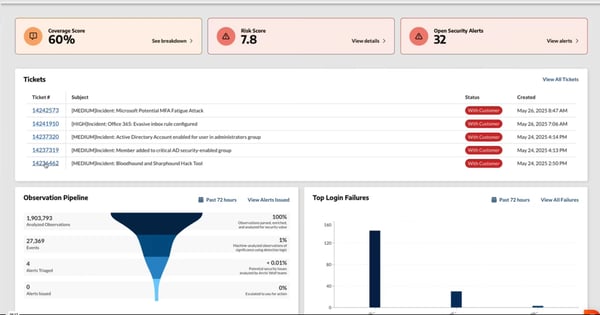
One of the other things I kept coming across in reviews was how strong the visibility is across your environment once Arctic Wolf is fully set up. From everything I’ve read, the platform seems to give teams a level of clarity they didn’t have before.
Whether it’s spotting trends in endpoint behavior, correlating logs from different tools, or just knowing where to focus first when something looks off, a lot of users said it made them feel more confident about what was happening across their network. For smaller teams that want to know exactly where they stand in terms of security, that kind of visibility can be a huge advantage.
Of course, there are a few trade-offs to be aware of. One theme I noticed in reviews is that Arctic Wolf isn’t cheap, especially for smaller organizations or public sector teams watching their budgets closely. Many users said the value was worth it, but the price can be a hurdle.
Another thing that came up was the portal and dashboards, which some teams felt could be more user-friendly or flexible. A few reviewers mentioned that navigating all the data takes some getting used to and that they’d like more customization options to sort and prioritize what matters most.
That said, if you are looking for an MDR solution that delivers strong support and a high-touch experience, Arctic Wolf is easy to recommend. It’s consistently recognized among the leading MDR services for financial services firms, healthcare, and other regulated industries that need predictable support and strong visibility.
What I like about Arctic Wolf:
- I appreciate how hands-on the concierge security team is. A lot of users said having named contacts and consistent guidance made them feel like they had a true partner, not just another vendor.
- I find it valuable that the platform provides strong visibility across the environment, helping teams see patterns, correlate logs, and stay ahead of issues without feeling in the dark.
What G2 users like about Arctic Wolf:
“Arctic Wolf’s ability to gain broad visibility in my environment helps me with the awareness that I may not have had otherwise. Also, I love the Concierge Security Team working with me, reviewing my environment to help find and close gaps.”
– Arctic Wolf Review, Joe M.
What I dislike about Arctic Wolf:
- Cost can be a barrier, according to G2 reviewers, especially for smaller organizations or those with tight budgets.
- I also saw feedback about the portal and dashboards sometimes being tricky to navigate, with a learning curve to get everything tuned the way you want.
What G2 users dislike about Arctic Wolf:
“The only real downside is cost. However, they are not far off from other vendors in this area.”
– Arctic Wolf Review, Matthew K.
4. Threatdown: Best for affordable MDR
I’ve known Malwarebytes for quite some time, but I wanted to see how ThreatDown, offered by the company, holds up when you look past the brand name and focus on what users actually experience day to day.
The thing I appreciate is how upfront ThreatDown is about pricing. Honestly, the pricing part alone is a huge plus for me. So many MDR vendors make you jump through hoops just to figure out what you’ll pay, but ThreatDown lays it all out clearly. For teams that don’t have time to negotiate back and forth, that level of transparency around packages is refreshing.
I spent some time looking into what you actually get in each plan. Even the Advanced bundle includes some solid capabilities like ransomware rollback, EDR, patch management, firewall management, and managed threat hunting, which is a lot more than basic antivirus. If you step up to the Elite plan, you get 24/7 managed threat detection, hunting, investigation, and remediation, which feels closer to a true around-the-clock SOC experience.
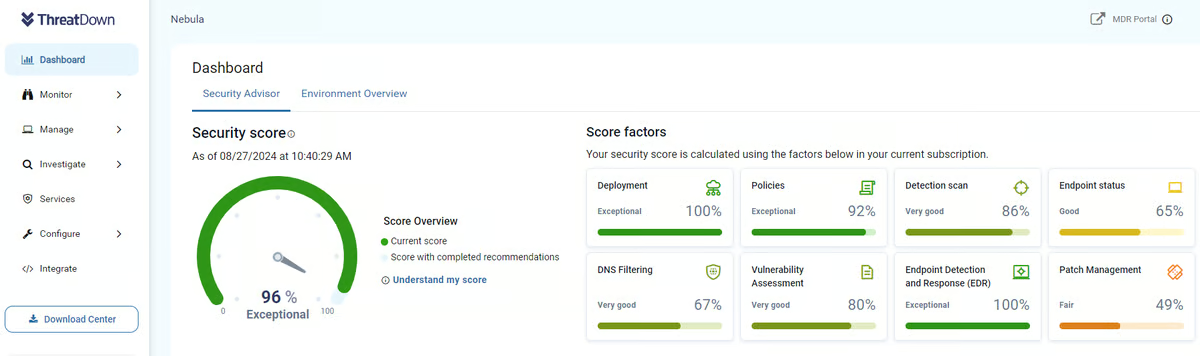
ThreatDown delivers the core capabilities you’d expect from the MDR: continuous monitoring, proactive threat hunting, and incident response support. But what seems to resonate most with customers and honestly stood out to me as I read through reviews is how the service makes the advanced threat detection approachable.
Instead of forcing your team to become experts in managing detection rules or correlating logs, ThreatDown’s analysts do the heavy lifting behind the scenes. They collect and analyze telemetry across your environment, identify suspicious behaviors, and escalate confirmed threats with clear, actionable guidance. I came across multiple examples where users said this approach cut down on alert fatigue and helped them focus on real issues instead of spending hours sorting through noise.
Features like rapid response time (93% satisfaction), proactive report alerts (91%), and automated investigation (91%) were all among the highest-rated areas on G2. Even its automated remediation capabilities are rated 90%, showing that customers consistently find value in ThreatDown’s ability to quickly neutralize threats without constant manual intervention.
And if you need to tailor your reporting, 86% of users reported being satisfied with the platform’s customizable reports, according to G2 Data.
That said, there were a couple of drawbacks worth noting. Some users described inconsistent customer support, saying their experience depended a lot on which engineer handled their case, which could be challenging during time-sensitive incidents. I also saw feedback about communication gaps, like not always getting clear updates when new features were introduced or when the rebrand happened.
On the whole, though, most teams still rated ThreatDown highly for day-to-day reliability and felt it delivered strong protection without overwhelming complexity.
If you’re looking for an MDR solution that prioritizes speed, simplicity, and a clear path to operational security, ThreatDown is worth considering.
I’d especially recommend it for IT teams in mid-sized organizations, manufacturing, government, or education, where you need strong coverage without a steep learning curve. For many teams, it’s a user-friendly and adaptable MDR tool for businesses that want strong protection without the complexity of enterprise platforms.
What I like about ThreatDown:
- I find it valuable that ThreatDown is transparent about pricing and bundles, which makes planning and budgeting a lot simpler compared to other MDR options.
- I really like that even in the more affordable plans, customers get ransomware rollback, patch management, and managed threat hunting, features not always included in entry-level MDR tools.
What G2 users like about ThreatDown:
“ThreatDown is very user-friendly with an intuitive interface that makes threat detection and response straightforward. The tool provides quick insights into security threats, simplifying my workflow significantly. Your paying for a quality product.”
– ThreatDown Review, Carlos P.
What I dislike about ThreatDown:
- Some reviewers mentioned inconsistent customer support, where the level of help depended on which engineer you worked with.
- I came across feedback about communication gaps, like not always getting timely updates when features change or when new capabilities roll out.
What G2 users like about ThreatDown:
“Support from the vendor is rarely required, but if you ever need it, be patient. First-level support personnel are very friendly and willing to help, but they have limited knowledge. Second-level support personnel are great and capable of solving any problems, but they take a long time to respond.”
– ThreatDown Review, Yuri K.
5. Blackpoint Cyber: Best for MSPs and IT-focused teams
Blackpoint Cyber kept coming up as a standout, especially for IT and security-focused companies that need proactive coverage without a lot of extra complexity. From everything I’ve read, it has built a strong reputation not just for managed detection, but for combining that with fast, hands-on threat hunting.
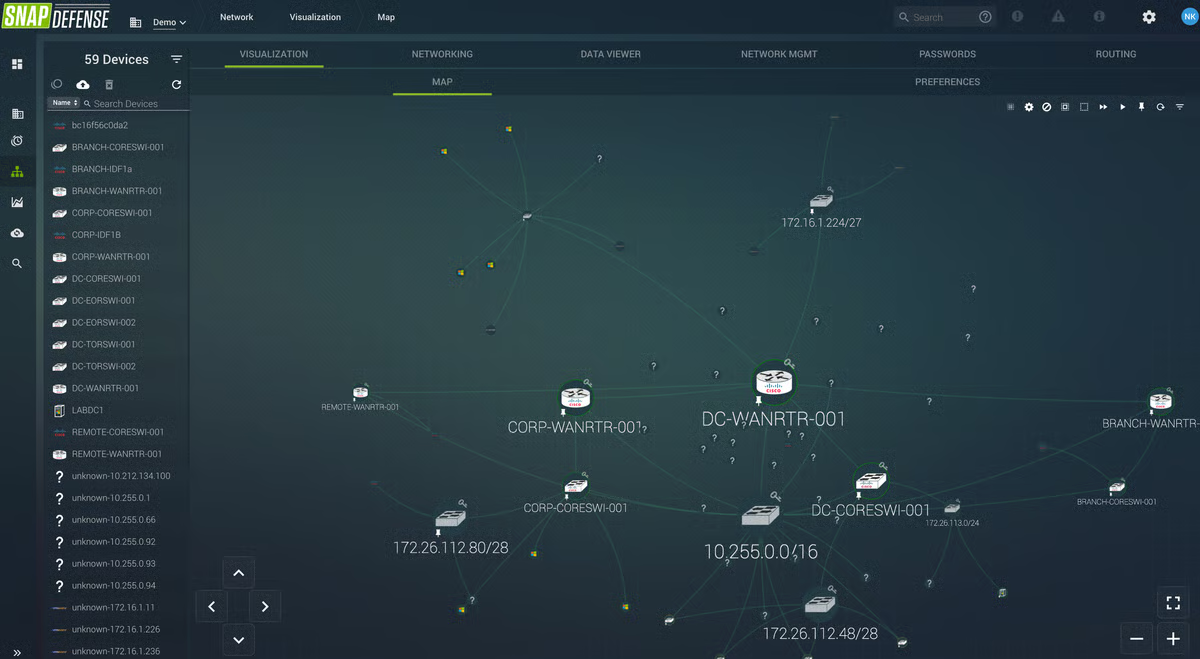
I was struck by how unapologetically focused Blackpoint is on stopping threats fast, not just detecting them. In a lot of MDR offerings, you see vendors highlight visibility and alerting as the main selling points. Blackpoint certainly does that, but what makes it stand out is how much emphasis it puts on live response and containment baked right into the service.
One thing I found especially notable is that you can call in directly if something urgent happens, instead of relying only on tickets or email updates. While plenty of other MDR providers offer containment and remediation, Blackpoint’s approach feels a bit more personal and immediate. You can actually talk to someone in real-time while they kill malicious processes or remove persistence, which can make a big difference when every minute counts.
At the core of Blackpoint’s approach is its proprietary live network map — a real-time visualization of all the hosts and user sessions in your environment, showing exactly how devices and accounts are connected. That level of visibility pairs well with their focus on hands-on response.
Another strong point is how Blackpoint handles 24/7 monitoring without burdening customers with excessive configuration. From what I’ve gathered, most of the detection logic and workflows are prebuilt and tuned by their team, so even smaller security teams can deploy them without spending weeks setting up custom detection rules. And the G2 Data backs this up. The satisfaction ratings for ease of use and setup hover around 94–96%.
I also noticed the platform is especially popular with companies in IT services and network security, which makes sense given how much focus Blackpoint puts on real-time containment and keeping friction low.
Overall, most users seemed genuinely happy with how Blackpoint delivers on speed and proactive protection, and many reviews praised how hands-off the day-to-day management feels. That said, there were a few limitations that were shared by users on G2.
I came across feedback about pricing, with some reviewers saying it can feel expensive for smaller firms or budget-conscious organizations. Even so, most people agreed that the combination of live response and strong support made it worth the investment, especially if you value a solution that takes real action when something goes wrong.
I also came across some feedback noting that the web portal has room for improvement, with a few users mentioning that the experience could be smoother. But these were far and few in between, and some also noted that recent updates have made it better.
From everything I’ve seen, Blackpoint Cyber is worth serious consideration if you value real-time containment, operational simplicity, and a response-oriented mindset.
Along with Huntress, and Sophos MDR, Blackpoint Cyber has earned a reputation as one of the most reliable MDR software solutions for IT companies. So, I’d definitely recommend Blackpoint to IT service providers, MSPs, or any mid-sized business.
What I like about Blackpoint Cyber:
- I appreciate how hands-on the platform is with containment. You can actually call in and talk to someone while they take action to kill malicious processes or remove persistence, which feels a lot more immediate than waiting on tickets.
- I find it valuable that most of the detection logic is prebuilt and tuned, so you don’t have to spend weeks customizing rules before you feel protected.
What G2 users like about Blackpoint Cyber:
“Blackpoint is great with identifying suspicious activity and making good decisions on locking something down to prevent compromises. They have been very quick with their detections, and it is always a human who reaches out to make sure we acknowledge the issue and take over with the next steps.
The incident response reports are great and very similar to the ones my team makes, which really cuts down on duplicated efforts. We were able to deploy Blackpoint quickly and easily. Blackpoint has an integration with our PSA, allowing us to automatically keep license counts in sync with our agreements. We use Blackpoint now exclusively because they have quickly built trust with our team.”
– Blackpoint Cyber Review, Justin H.