


TL;DR
Cvent Event Marketing & Management is the best event management platform, according to G2’s latest Fall 2026 Grid® Report for Event Management Platforms, earning the highest G2 score of 98. Here are the other top-rated options I evaluated, broken down by use case:
- Webex Events & Webinars: Best for hybrid conferences and multi-track webinars
- vFairs: Best for immersive virtual and hybrid event experiences
- Eventbrite: Best for quick event setup and public-facing ticketing
- Swoogo: Best for intuitive, highly customizable event registration
- Whova: Best for attendee networking and event engagement
- Bizzabo: Best for end-to-end corporate event management
When it comes to event management, you know that choosing the wrong platform doesn’t just slow you down — it shows up on event day, in registration bottlenecks, disconnected tools, and reporting gaps you don’t catch until it’s too late. But the right one handles everything end-to-end, so your team isn’t firefighting when it matters most.
To help you find the best event management platform, I evaluated 25+ software solutions by analyzing thousands of verified G2 reviews, satisfaction scores, and feature ratings. My goal was to identify tools that actually keep everything working together, from registrations, attendee management, and engagement to post-event reporting. I also paid close attention to the limitations users mentioned. Whether you’re an event planner, a marketer, or just someone trying to pull off a seamless experience, this list is for you.
Comparison of the 7 best event management platforms for 2027
The table below compares the 7 best event management platforms for 2027 by G2 rating, starting price, typical company size, and G2 score, so you can see how they stack up at a glance before reading the full breakdown.
Rating and pricing details are as of October 2026. Verify with the vendor for current details.
7 best event management platforms I’d recommend in 2027
When you’re managing multiple stakeholders, tight deadlines, and high expectations, the platform you choose becomes the backbone of your entire operation — not just a convenience.
That’s why I focused on tools that go beyond basic task management. The reviews from event professionals I evaluated indicated a need for platforms that could handle event creation, ticket sales, registrations, agenda building, attendee engagement, and post-event reporting, all without requiring a different tool for each job. I also weighed how each platform performed under pressure, because a great onboarding experience means little if the system buckles on event day.
The market reflects this shift in expectations. The global event management software market is projected to reach $17.33 billion by 2030, growing at a 13.2% CAGR, and the platforms driving that growth are those that have moved beyond registration and ticketing into full-cycle event intelligence. Industry confidence backs this up: the American Express survey found that 85% of respondents are optimistic about the year ahead, with AI and analytics topping their investment plans.
How did I find and evaluate these event management platforms?
I started by analyzing the latest Fall 2026 Grid® Report for Event Management Platforms to identify platforms with strong scores across satisfaction, market presence, and feature ratings. That gave me a data-backed foundation of tools that real event professionals consistently rate highly.
From there, I used AI to surface patterns across thousands of verified event planning software G2 reviews, identifying recurring themes around ease of use, quality of support, onsite performance, and likelihood to recommend. I prioritized reviews that spoke to real-world usage: how platforms held up during live events, not just in setup. I also looked closely at what users disliked, because friction points at scale tell you more about a platform’s reliability than its feature list does.
I also compared how these event management systems connect registration, attendee engagement, onsite operations, and reporting without forcing organizers to rely on disconnected tools. G2 Data scores, including feature-level ratings across registration, marketing and communications, event operations, and attendee engagement, were used to validate and compare platforms at a granular level.
The screenshots throughout this article are of publicly available material and verified visuals sourced from vendor G2 profiles.
What makes the best event management platforms worth it: My perspective
Here’s what I looked for when deciding whether an event management platform is worth the time, money, and long-term commitment.
- Event website and landing page builder: The event page is where the attendee journey begins. I looked for platforms with drag-and-drop builders, built-in templates, and branding controls that didn’t require a developer to customize. A professional-looking page that matches your brand shouldn’t take three days to build.
- Registration and ticketing management: Manual registration management creates bottlenecks before the event even starts. I prioritized platforms that support multiple ticket types, such as free, paid, and early-bird, along with automated confirmations, waitlist management, and integrated payment gateways. The less your team has to touch manually, the better.
- Agenda and session planning: For multi-track or multi-day events, agenda management can make or break the attendee experience. I looked for platforms that made it easy to build complex schedules, assign speakers, and let attendees create personalized session plans.
- Attendee engagement tools: Engagement doesn’t happen by accident. I evaluated platforms on the strength of their built-in Q&A, live polling, surveys, chat, and push notification capabilities, features that keep attendees active participants rather than passive observers, whether in-person or virtual.
- Marketing and promotion features: I looked for platforms with email marketing, promo code support, social media integrations, and channel-level analytics so organizers can track what’s actually driving registrations, not just how many came in.
- Real-time analytics and post-event reporting: Every event should make the next one better. I prioritized platforms with dashboards that track registrations, attendance, engagement, and feedback in one place and make it easy to export and act on that data after the event wraps up.
- CRM and third-party integrations: Event data is only useful if it flows into the tools your team already uses. I weighted platforms that integrate cleanly with HubSpot, Salesforce, Intuit Mailchimp, and Zapier to reduce manual data entry and keep your stack connected.
- Mobile-friendly experience: Attendees live on their phones. I looked for platforms with mobile-optimized event pages and companion apps that give both organizers and attendees a seamless experience from registration through check-in.
The list below contains genuine user reviews from the Event Management Software category. To be included in this category, a solution must:
- Enable the creation of a branded, event-specific landing page or event website
- Provide customizable forms for attendee registration and allow users to manage attendee lists
- Include or integrate with payment processing tools
- Offer event marketing features, such as email marketing, social media marketing, or other means of event promotion
- Include features for the planning and management of on-site events, such as on-site check-in, badge printing, lead retrieval, and floor plans
- Report on event metrics such as attendance, engagement, and ROI via built-in analytics or dashboards
*This data was pulled from G2 in October 2026. Some reviews may have been edited for clarity.
1. Cvent Event Marketing & Management: Best for enterprise-scale event management
Cvent Event Marketing & Management is purpose-built for organizations running complex event programs at scale. With a G2 Score of 98, Cvent is the default choice for enterprise event teams that need a single platform to manage the full event lifecycle without stitching together separate tools.
Based on my understanding, reviews like how Cvent handles event websites, registration, attendee communications, on-site logistics, and post-event reporting in one place. For organizations managing multiple simultaneous events across large teams, the ability to control data accuracy and branding consistency from a single account is an operational advantage.
Registration customization is where Cvent particularly excels. G2 reviewers described building custom registration paths with widgets, data tags, and custom contact fields to capture exactly the information needed from different attendee types. Automated email responses triggered by registration actions further reduce manual communication work. G2 Data puts Cvent’s user registration process score at 87%, reflecting how consistently this holds up across complex event configurations.
Attendee management is another standout capability. Users appreciated being able to organize thousands of attendees, process bulk uploads, update participant information in batches, and segment audiences for personalized communication. That centralized approach helps enterprise teams spend less time managing spreadsheets and more time delivering better event experiences.
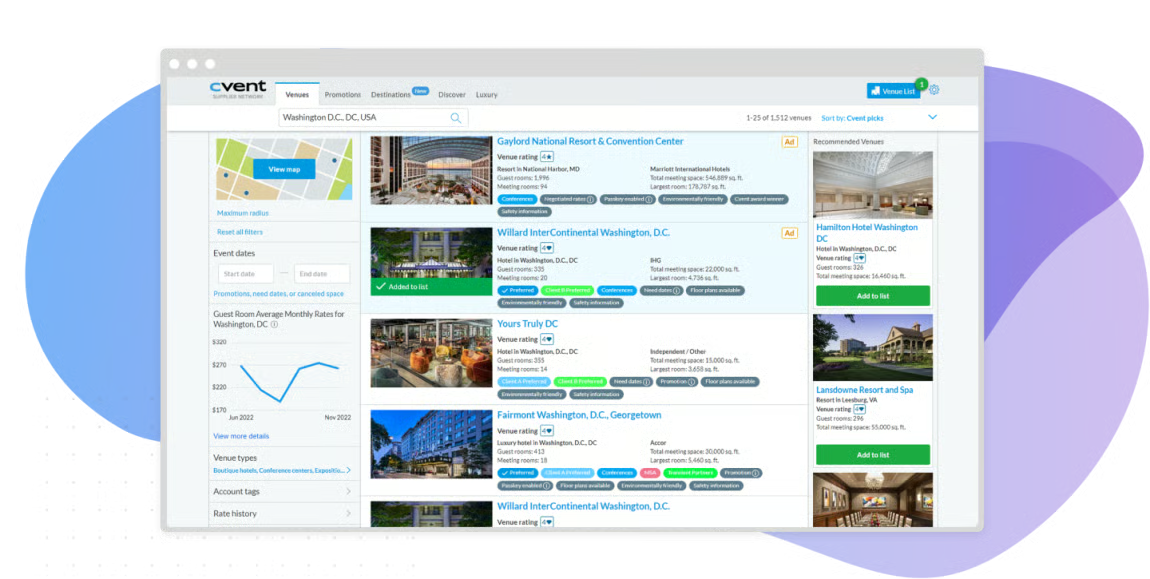
Reporting is a theme reviewers keep coming back to, and recent reviews reinforce this: several specifically called out having all reporting tools in one central location as a genuine time-saver, rather than hunting across multiple systems for the same data. Teams can generate detailed, segmented reports and share them via web portals with stakeholders who don’t have Cvent access, a practical feature when leadership needs updates without logging into a new system.
CventIQ, the platform’s AI layer, continues to draw praise for cutting down manual work. Reviewers credit it with generating event content and session summaries that save planners meaningful time during build-out, and several more recent reviews specifically called out Cvent’s pace of shipping new AI-driven features as a reason they keep choosing the platform year over year.
Support quality rounds out Cvent’s enterprise credentials. G2 reviewers consistently praised 24/7 availability across phone, chat, and case submission, with fast response times and support reps who could troubleshoot confidently even during live event escalations. G2 Data puts Cvent’s quality of support score at 89%, and newer reviews echo this sentiment; several first-time users specifically called out how quickly the support team helped them get comfortable with the platform.
Cvent’s depth comes with a learning curve that G2 reviewers remain candid about. The volume of features, configuration layers, and backend settings can feel overwhelming for new users, and some advanced customizations require either technical assistance or dedicated product training. That said, reviewers were equally consistent in noting that familiarity with the platform pays off once the initial ramp is behind them; teams described the same depth as a competitive advantage in managing complex programs.
In more recent reviews, I also noticed onboarding support come up as an area reviewers want strengthened, particularly when ramping up new team members outside the annual Cvent Connect event. For teams willing to invest a bit of extra time upfront in Cvent’s self-learning modules and documentation, most still land on the platform’s depth as the bigger advantage once the team is comfortable with it.
Overall, Cvent Event Marketing & Management holds a 4.3/5 rating on G2 and now ranks at the top of this category’s Grid Report. Its highly configurable registration workflows, powerful attendee management, enterprise reporting, and dependable customer support make it the strongest choice on this list for organizations managing large conferences, multi-event programs, and complex event portfolios.
What I like about Cvent Event Marketing & Management:
- The full-lifecycle coverage means teams managing complex events don’t have to context-switch between platforms, registration, communications, on-site logistics, and reporting, all live in one place.
- CventIQ’s AI-generated content and session summaries, paired with centralized reporting, give planners real-time feedback during build-out and post-event analysis.
What G2 users like about Cvent Event Marketing & Management:
“I am a new Cvent user but I am already so impressed! Their customer service is top-notch and I have never felt like I have been a nuisance as I ask lots of questions while trying to learn and adjust. Everyone has always been so friendly and eager to help. And Cvent as a company is clearly committed to innovation and staying current with technology advances.”
– Cvent Event Marketing & Management review, Rebekah W.
What I dislike about Cvent Event Marketing & Management:
- The volume of features and configuration layers creates a real onboarding challenge for new users. The learning curve is steep, but reviewers who pushed through it consistently described the platform’s depth as a long-term advantage.
- Some reviewers felt the badge designer and parts of the website builder could be more modern. Even so, most agreed these were minor tradeoffs compared to Cvent’s powerful registration and event management capabilities.
What G2 users dislike about Cvent Event Marketing & Management:
“Cvent is a powerful platform, but some areas can be overly complex, especially when managing multiple registration types, pricing rules, discounts, and registration logic. Small changes can sometimes impact other parts of the event build, making thorough testing essential. While the interface is generally user-friendly, certain administrative tasks require navigating through multiple menus, which can slow down configuration updates. Reporting is strong, but creating highly customized reports can have a learning curve for newer users.”
– Cvent Event Marketing & Management review, mandi D.
2. Webex Events & Webinars: Best for hybrid conferences and multi-track webinars
As I evaluated user reviews for Webex Events & Webinars, the clearest signal across the board was reliability at scale. With a G2 market presence score of 89, it’s the platform that enterprise and mid-market event teams keep coming back to when the stakes are high.
The first thing that stood out to me was how intuitive the platform feels. Many reviewers mentioned they could build event websites, configure registration, and manage sessions without spending weeks learning the platform. That aligns with its 92% ease of use score on G2, making it one of the easiest platforms in this category to adopt.
Registration and agenda management are other strengths. Webex scores 93% for event creation and 90% for user registration. In one documented conference use case, organizers created separate technical, business, and beginner tracks so attendees could filter sessions by interest rather than navigate a single agenda. This illustrates how customizable session planning can make complex events easier to navigate.
For engagement, Webex offers live Q&A, polling, chat, emoji reactions, and breakout sessions in one interface, with an 88% attendee engagement score in G2 Data. Its simulive functionality also supports prerecorded presentations alongside live chat and Q&A, giving organizers flexibility when speakers cannot attend every session in real time.
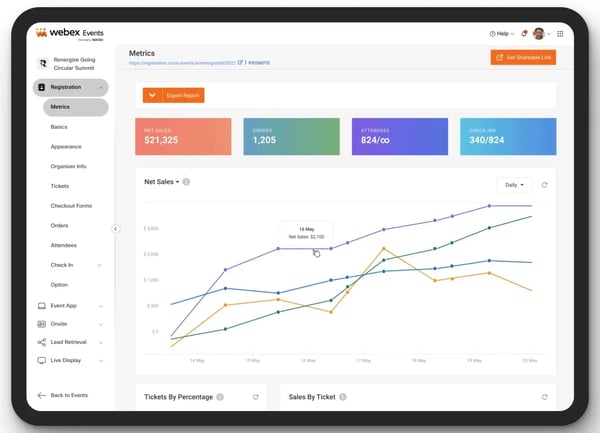
Session scheduling is where Webex particularly excels among the tools on this list, with a G2 Data score of 91%. For multi-track conferences where timing and session flow are critical, this is especially important.
Customer support was another recurring theme across reviews. Users frequently described the support team as responsive and knowledgeable, especially during event setup and live event execution. Combined with a 97% quality of support satisfaction score, it’s clear that buyers value having expert help available when timelines are tight.
Post-event, the reporting and recording features add lasting value. Reviewers noted being able to review full session recordings, track attendance, and assess engagement outcomes, giving teams the data needed to improve future events rather than just debriefing on what went wrong.
As some reviewers note, Webex’s comprehensive feature set does come with a learning curve. With so many configurations available, locating specific dashboard settings can take time for new users. That said, most emphasized that the interface becomes intuitive once you’ve run a few events through it, and the depth of features quickly becomes an advantage rather than a hurdle.
On the technical side, reviewers on limited bandwidth or older devices occasionally experienced slow load times and performance lag during live sessions. Webex is a feature-heavy platform, and it shows in its resource requirements. Reviewers were quick to note that these issues were the exception rather than the rule for well-equipped teams.
Webex Events & Webinars holds a 4.6/5 rating on G2 and a G2 Score of 81 in the Fall 2026 Event Management Platforms Grid. While Cvent leads the category with a G2 Score of 98, Webex stands out for its hybrid event capabilities, attendee engagement tools, and post-event reporting. For teams running multi-track conferences and webinars, it’s one of the strongest options I evaluated.
What I like about Webex Events & Webinars:
- The real-time sync between the backend, event website, and app means changes made mid-event propagate instantly: no manual updates across multiple surfaces during a live session.
- Built-in Q&A, polling, chat, and breakout sessions give organizers the tools to keep large audiences engaged without having to stitch together separate tools for each function.
What G2 users like about Webex Events & Webinars:
“We used to just hand sales a flat list of everyone who registered, no way to tell who was actually a decision maker versus someone’s intern signed up out of curiosity. Built the registration form to ask a couple of qualifying questions, company size and role mainly, and scored responses so sales could see who to prioritize the moment the webinar ended instead of working through names alphabetically. Our best rep started calling the top scored leads within an hour of the session wrapping and closed one before the week was out.”
– Webex Events & Webinars review, Florence B.
What I dislike about Webex Events & Webinars:
- The platform’s depth means first-time users often spend time hunting for specific settings. The learning curve is real, but most reviewers noted it flattens quickly. And once familiar, the same depth becomes an operational advantage.
- Participants with limited bandwidth or older hardware can experience lag during live sessions, which is worth factoring into pre-event tech checks for global audiences. That said, reviewers running well-equipped setups consistently described the platform as stable and reliable when it counts most.
What G2 users dislike about Webex Events & Webinars:
“Speakers assigned to sessions across different tracks occasionally got double booked in our planning spreadsheet before the actual event, had to catch and fix two scheduling conflicts manually before the day of since the platform itself didn’t flag that for us.”
– Webex Events & Webinars review, Jimmy A.
3. vFairs: Best for immersive virtual and hybrid event experiences
If you’ve ever tried cobbling together webinars, booths, and networking tools from a bunch of platforms, you know how messy it gets. With vFairs, it’s all under one roof.
The virtual event experience is where vFairs shines. Reviewers frequently highlighted its customizable virtual lobbies, exhibit halls, auditoriums, and networking lounges that create a more engaging experience than standard webinar platforms. Rather than simply joining a video session, attendees can explore a fully branded event environment that feels closer to an in-person experience.
Setting up those experiences also seemed easier than I expected. Many users appreciated being able to build event websites, manage registrations, and configure sessions without extensive technical expertise. Combined with its 92% ease of use satisfaction score on G2, vFairs strikes a strong balance between flexibility and accessibility, and reviewers running their first virtual conference consistently described the platform as intuitive even without prior experience.
From what I read in reviews, the dedicated project manager support is what sets vFairs apart. Every reviewer who mentioned support described having a named project manager available throughout planning, build, and live event execution, who responded quickly, handled last-minute changes, and provided live troubleshooting on event day. G2 Data reflects this positive experience: vFairs earns a 98% quality of support rating. Reviewers also highlighted the value of having dedicated project managers available throughout event planning and execution.
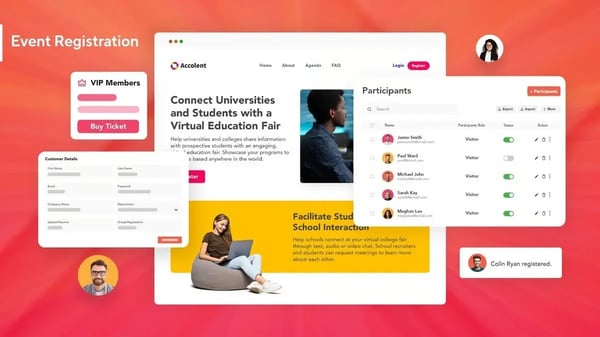
The event app and attendee experience tools are well executed on both desktop and mobile. Reviewers highlighted built-in agenda management, real-time updates, attendee connection features, and push notifications, all accessible through a single app interface that attendees could navigate without guidance. Many reviewers also liked attendee directories, one-on-one meeting scheduling, live chat, and discussion spaces that make it easier for participants to connect throughout the event.
Email communication and built-in survey tools drew consistent praise from organizers managing multi-touchpoint event programs. Reviewers appreciated the ease of building and sending targeted email communications within the platform, as well as the surveys and gamification features that kept attendees engaged before, during, and after the event.
Registration and analytics round out the core workflow. Reviewers called out the real-time analytics dashboard, specifically its ability to track registration numbers by registrant type, which gave teams an accurate picture of event momentum during the build-out phase. G2 Data puts vFairs’ user registration process score at 92%.
Some G2 reviewers noted that booth setup and graphical templates can feel restrictive. Getting graphics to fit properly within template constraints occasionally requires back-and-forth with the vFairs team. The flip side is that the same team is highly responsive to those requests, and most reviewers described the collaborative customization process as smooth once the workflow was established.
A few reviewers also mentioned occasional technical hiccups during live events or felt the mobile experience wasn’t quite as polished as the desktop version. Even so, most emphasized that these issues were infrequent and quickly addressed by the support team, leaving their overall experience largely unaffected.
vFairs holds a 4.7/5 rating on G2. For organizations that want an immersive virtual or hybrid event environment and a support model that treats every event as a partnership, it’s the most service-forward platform on this list.
What I like about vFairs:
- The immersive environment, virtual auditoriums, 3D exhibit halls, and networking lounges create an attendee experience that stands apart from standard video conferencing, and reviewers consistently noted that attendees noticed the difference.
- The dedicated project manager model means teams aren’t navigating setup and live event execution alone. Having a named, responsive contact throughout the process is a genuine operational advantage, especially for first-time virtual event organizers.
What G2 users like about vFairs:
“I really appreciated vFairs’ end-to-end functionality, which prepped us for 600+ delegates at our Annual Conference in Dublin. With professionals from all over the Retail & CPG industry, we really needed robust registration, a strong event experience, and app functionality for our delegates. But what I like best is the team behind vFairs. Ali and Saad worked with us weekly, then daily leading up to the conference, to implement the features we needed, troubleshoot very niche questions we were experiencing, and automate processes that made us all more efficient.”
– vFairs review, Cristina D.
What I dislike about vFairs:
- Booth setup and graphical templates have constraints that can make custom branding fiddly. The vFairs team handles these adjustments responsively, and most reviewers found the iterative process straightforward once the working relationship was established.
- Some reviewers reported occasional technical glitches or a less polished mobile experience, but most agreed these were minor issues that didn’t affect the platform’s overall reliability.
What G2 users dislike about vFairs:
“Emails sent from the app are fully customizable, but there are no pre-set templates, so we built our own (with an example from Ahsan). Editable starter templates would be a nice addition. On event day, time zone issues caused notifications to go out an hour early and “in progress” alerts to run ahead of schedule, and it took a while to get things back in sync. Finally, the chat feature went unused because it wasn’t clear how attendees would start a chat room. Next time, we’ll set up rooms ahead of time.”
– vFairs review, Michelli C.
4. Eventbrite: Best for quick event setup and public-facing ticketing
If you’re looking for a solution that gets an event live fast, with a ticketing and registration experience that attendees already know and trust, Eventbrite is a good option.
Event creation is where Eventbrite is hard to beat. Reviewers described setting up a fully published event page in under two minutes, with step-by-step prompts, built-in templates, and no design experience required. For teams that run frequent events and can’t afford to spend hours in a page builder each time, that speed is a real operational advantage. Eventbrite’s G2 Data event creation score of 93% reflects how reliably this experience holds up across user types.
The event pages themselves are customizable enough to make a strong first impression without a designer in the loop. G2 reviewers highlighted the multi-purpose page layouts and built-in social sharing functionality as features that meaningfully reduced their promotion workload, enabling them to reach broader audiences without pulling in additional marketing resources.
Ticketing is Eventbrite’s core strength. Some G2 reviewers reported generating nearly 30% of ticket sales through Eventbrite’s marketplace, illustrating the potential value of its built-in discovery channel. That result isn’t representative of every event, but it shows why organizers running public-facing events may benefit from the platform’s audience reach. G2 Data also gives Eventbrite a 92% mobile check-in rating, the highest among the seven tools I evaluated.
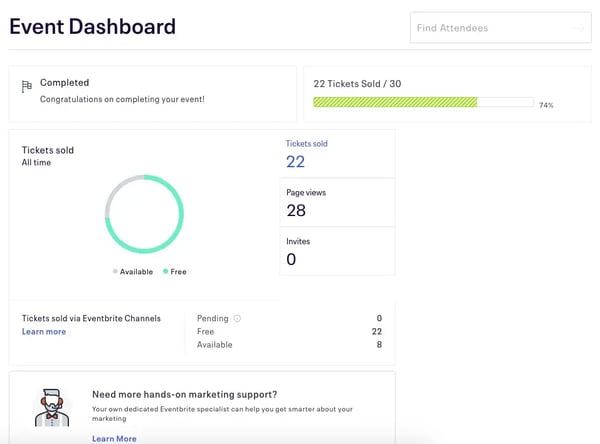
I was also impressed by its CRM integration. Reviewers specifically called out the HubSpot integration as seamless, where registration data flows directly into their CRM without any manual processing, keeping their pipeline clean and their team focused on follow-up rather than data entry. A full-featured API also allows teams to connect Eventbrite with internal systems and other third-party tools.
Attendee communication and analytics round out the core workflow. Reviewers praised the ability to manage registrations, ticketing, and attendee messaging from a single interface, with analytics and attendee insights that help teams understand engagement patterns and improve future event performance.
I also noticed consistent praise for the platform’s ease of use. Eventbrite holds a 91% ease-of-use satisfaction score on G2, and reviewers often describe the interface as intuitive enough for first-time organizers while still offering the flexibility needed for recurring events. That shorter learning curve means teams can spend less time figuring out the software and more time planning the event itself.
That said, Eventbrite’s pricing structure is a recurring point of friction in G2 reviews, particularly for smaller organizations or teams running high-frequency events. Per-ticket service fees add up quickly, and some reviewers found the cost difficult to justify against tighter budgets. But many reviewers pointed to Eventbrite’s free tier for free events, which gives smaller teams a low-risk entry point before committing to paid plans.
Reporting is another area where G2 reviewers flagged limitations. Combining Eve