


I have been following some of the best AI chatbots space ever since ChatGPT made a stunning debut in 2022.
While ChatGPT may have made chatbots mainstream, it’s no longer the only player in town. In fact, I chat with several of them on a daily basis to tackle my personal and professional tasks.
And I must say, not all chatbots are smooth operators. Some give you exactly what you need, while others leave you shouting, “That’s not what I meant!” (Been there, trust me.) With so many options popping up, it’s tough to know which ones are truly worth your time.
That’s why I’ve put together this guide. As someone who spends far too much time exploring these tools, I’ve rounded up the best AI chatbots of 2025–the ones that impressed me with their smarts, usefulness, and ease of use. And the best part? They’re free to start experimenting.
Whether you’re a business owner trying to get a bot to handle customer queries faster, a student looking for help simplifying complex topics, or a professional searching for a tool to make your job easier, there’s a chatbot out there designed just for you.
7 best free AI chatbots for 2025
- ChatGPT, for general-purpose tasks ($20/month)
- Claude, for engaging conversations and creative tasks ($18/month)
- Gemini, for real-time fact-checking and general-purpose tasks ($19.99/month)
- Gleen AI, for building custom customer support chatbots ($1/conversation)
- Google Cloud Dialogflow, for building multi-channel AI chatbots (Custom pricing)
- Kore.ai, for enterprise chatbot solutions ($50/month)
- Microsoft CoPilot, for casual conversations without signup ($20/month)
*These AI chatbots are listed alphabetically and come with free trials or freemium options and include chatbot builders too. I have included their starting price for easy comparison.
What makes the best AI chatbot?
There are 240+ AI chatbots available in the market-ranging from general-purpose tools like ChatGPT to specialized enterprise chatbots. So, what sets the best chatbots apart? From my research and hands-on testing, it boils down to a few essential qualities:
- Advanced AI capabilities: I’ve found that the best chatbots are powered by cutting-edge large language models (LLMs), allowing them to deliver accurate, context-aware, and engaging responses. It’s this foundation that makes conversations feel less robotic and more human-like.
- Ease of use: Accessibility is a big deal for me. A great chatbot should feel intuitive right from the start–simple enough for beginners to understand but with enough depth to keep advanced users engaged. These are non-negotiables in my book.
- Adaptability and features: I need a chatbot that can handle it all–writing content, managing workflows, or tackling domain-specific queries. The ones I love most also let me customize style, tone, and responses or workflows to fit exactly what I need, making them even more versatile.
- Privacy and transparency: Data security is always on my mind. The best chatbots I’ve used handle user data responsibly and let me know and opt out of data sharing if needed. It’s reassuring to know my information isn’t being misused.
- Scalability and versatility: Scalability is key for businesses. I’ve tested chatbots that can manage high volumes of interactions while adapting to growing demands. That kind of efficiency is a huge plus, especially for enterprise-level tasks.
How did I find the AI chatbots to test and evaluate?
To start, I turned to G2’s AI Chatbots category page, grid reports, and product reviews to create an initial list of contenders. I focused on platforms with web-based accessibility, ensuring they’re easy to use for students, marketers, developers, and small business owners alike. Plus, I prioritized tools offering freemium plans or free trials so users could experiment without commitment.
How did I put these AI chatbots to test?
My experience with chatbots has shown me that evaluating AI chatbots is trickier than it seems. Their capabilities are vast, and their applications often depend on what we want from them. What worked brilliantly for me might not work for someone with a different ask. So, I kept it practical and focused on what matters to most users while acknowledging that no single test can cover everything.
How did I test these AI chatbots: My criteria
Testing AI chatbots isn’t just about casual conversations. It’s about assessing how well they meet real-world needs. With tools serving varied purposes, I focused on the following key aspects to ensure a fair and comprehensive evaluation:
- Foundational AI model: I looked at the base model behind the chatbot. I looked at where the model stands in the LLM leaderboard. Knowing this gave me an idea of how it might perform in terms of conversational quality and flexibility.
- Real-world scenarios: I rolled up my sleeves and tested these chatbots like I’d actually use them.
For general-purpose AI chatbots, I focused on tasks like writing content, answering complex questions, analyzing datasets, or generating creative ideas.
For business and enterprise-focused chatbot tools, I evaluated how well they handled tasks like setting up an AI customer support chatbot or automating workflows. This hands-on approach helped me see how they performed in real-world use cases.
- Conversational ability and response speed: How accurate, natural, and context-aware the chatbot’s responses are and how quickly the chatbot delivers answers, especially during complex queries.
- Privacy and security: How user data is handled and whether there’s a disclosure about using user data to train models.
- Free vs. paid plans: What features are available for free, and how do they compare to paid tiers?
7 best free AI chatbots I liked
After extensively testing and analyzing numerous AI chatbots for days, I realized the best chatbots are those that go beyond simple responses to become true problem-solving companions. The ones that made this list impressed me with their ability to handle diverse tasks.
It includes general-purpose AI chatbots and platforms that help build AI bots for business use. While they are not perfect and match all the criteria I set out to check them against, each of these AI assistants brings a distinctive edge, offering a balance of innovation, adaptability, and real-world practicality.
* This data was pulled from G2 in 2024. The product list is ranked alphabetically. Some reviews may have been edited for clarity.
1. ChatGPT
I’ve been using ChatGPT since the day it debuted, and in my opinion, it’s the best free AI chatbot out there–both based on my own tests and what G2 reviews say. This OG chatbot revolutionized how we interact with AI, and what I love most is how incredibly easy it is to access and use.
Once you sign in, it’s as simple as typing what you want to know or choosing one of the prompts provided. And just like that, your conversation begins.
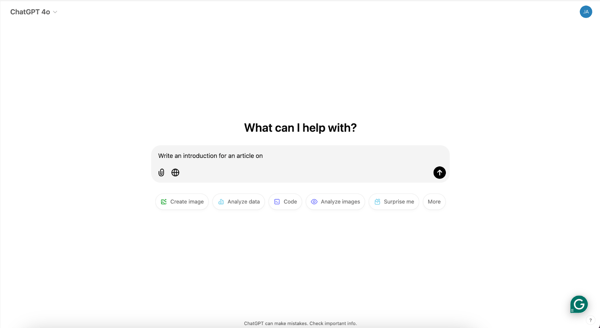
Straightforward UI of ChatGPT
Over time, I’ve used ChatGPT for all kinds of tasks—writing blog posts, brainstorming ideas, analyzing data for my content, generating social media images, planning a house party, and even dabbling in coding to tweak my site. And honestly, it’s done a great job on all of them.
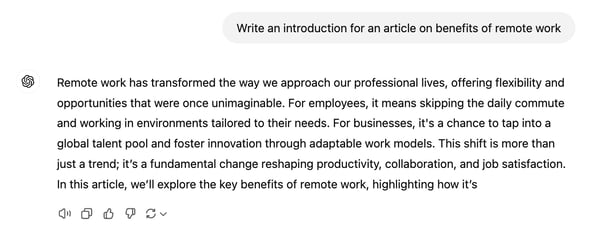
ChatGPT’s response to one of my prompts
While the responses look very generic at the first attempt, adding more details to the follow-up prompts often brings us the desired results.
The free version runs on GPT-3.5 but also offers access to multimodal LLMs like GPT-4o mini and GPT-4o, which gives you a taste of advanced AI without paying a dime. It should be noted the GPTs rank consistently in the top positions in the LLM leaderboard. I really liked how I could jump between two conversations. It felt like the bot genuinely “remembered” where we left off, making interactions seamless and natural.
The memory feature on ChatGPT was also helpful, allowing me to set custom instructions for how I wanted the bot to respond. One feature I loved is its ability to take inputs in different formats, like images and CSVs, which opens up so many possibilities for creative and analytical work.
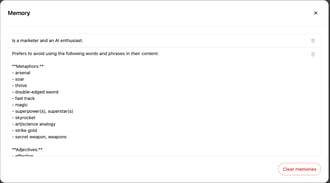
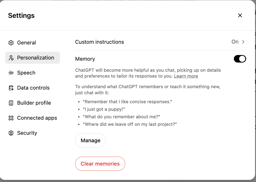
Options to update memory and add custom instructions on ChatGPT
Of course, there are some downsides. The free version can’t fully browse the Internet, and I found the limits on using advanced models and image generation to be extremely annoying. Sometimes, it hallucinates and stubbornly insists it’s right even when it’s not–trust me, it’s a little infuriating! Plus, access to newer features like SearchGPT and voice mode is locked behind the paid Plus plan.
That said, ChatGPT remains a powerful and reliable tool for a variety of tasks, especially considering it’s free. I believe it has set a really high standard for any free AI chatbot in the market.
OpenAI may use your messages and chats to train and improve their model when using ChatGPT free and Plus plan.
What I liked about ChatGPT:
- Good context awareness to jump between topics without losing the flow of the conversation.
- The versatility of handling varied tasks like content writing, brainstorming, data analysis, and coding with ease.
What are G2 users saying:
“Whenever I’m facing writer’s block or seem to be short in time to complete multiple tasks, it comes in great help to give me ideas and or help me organize tasks, and even finish emails.”
– ChatGPT Review, Sam C.
What I didn’t like about ChatGPT:
- Advanced models and tools like SearchGPT and voice mode are restricted to the paid plans.
- Sometimes hallucinates and insists on being right even when it’s clearly not.
What are G2 users saying:
“One reason for which I find ChatGPT frustrating is that it can’t give me information in real-time or keep me updated on current events since it doesn’t have internet access. This limitation means it can’t fully answer questions about recent happenings. While ChatGPT can mimic human-like responses well, it sometimes struggles to grasp the intricacies of certain subjects, resulting in answers that may not fully meet my needs or be entirely accurate.”
– ChatGPT Review, Vaibhav S.
2. Claude
Claude by Anthropic quickly became one of my favorite chatbots for its natural and human-like conversations. Compared to other AI tools, including ChatGPT, Claude feels more thoughtful and engaging, avoiding the generic tone or, as it is called, “AI speak” that we often find in other chatbots.
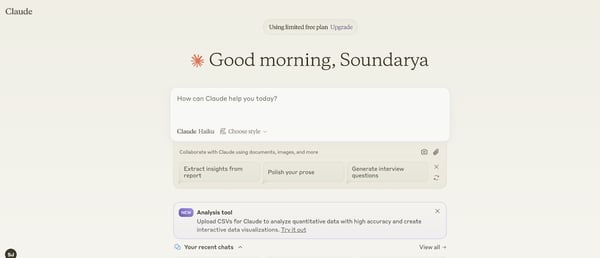
The UI of Claude
Accessing Claude is simple, just like ChatGPT. The free version primarily runs on the Claude Haiku model. Occasionally, it provides limited access to advanced models like Claude 3.5 Sonnet or Opus.
You can see from its response how Claude’s output is much better in terms of writing style.
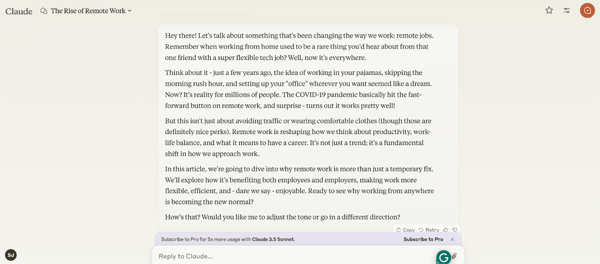
Claude’s response to one of my prompts
Another feature that I absolutely loved was Claude Artifacts, which are content or tools you create with Claude that can be shared with the community. I had a blast creating them. For example, I’ve used it to design things like mini-calculators and even small interactive tools. The UI of artifacts is another highlight–I loved how I could switch between the finished product and the underlying code with just a click.
Claude’s Artifacts UI to see code and output side-by-side
Claude also let me set conversation styles, making it feel like I’m customizing the bot to match my workflow or tone.
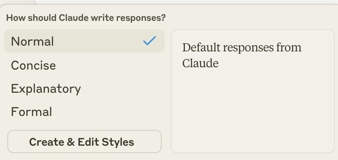
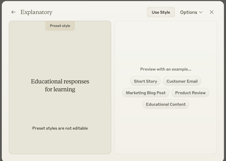
Options to customize response style on Claude
But there are some frustrations. The free version downgrades models mid-conversation when you hit usage limits, which can disrupt the flow. Worse, you can’t send any messages when you hit the cap–you’re forced to wait for a few hours to regain access, which is pretty annoying. Also, Claude cannot browse the web, so for any analysis or input on current events, you’ll need to copy and paste the relevant text or content into the chat.
Still, Claude’s conversational flow and context retention make it feel less like a chatbot and more like a collaborative partner. Also, Anthorpic doesn’t use your inputs to train its models unless you give permission or if it’s marked by their team for safety.
What I Liked About Claude:
- Natural, human-like responses.
- Claude Artifacts to create standalone content, apps, and more.
What are G2 users saying:
“What’s most useful about Claude is the AI’s ability to flow more naturally. I like that responses feel more like human-to-human conversation. Another thing I like about Claude is that its responses are contextual and engaging. I also like it tries to give accurate responses and acknowledges its limitations when it doesn’t know something.”
– Claude Review, Scott J.
What I Didn’t Like About Claude:
- Downgrades models mid-conversation when usage limits are hit.
- Free version caps can stop usage entirely for hours
3. Gemini
Google’s Gemini (formerly Bard) may have entered the AI chatbot game a bit later than ChatGPT, losing some first-mover advantage. However, I believe its latest version is a strong competitor to ChatGPT and Claude, offering unique features that make it stand out.
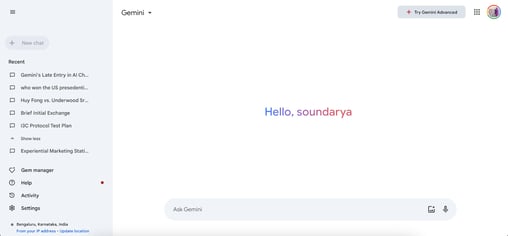
Gemini’s interface
I absolutely loved the fact that it can access real-time data via Google Search. I’m also a huge fan of the “Double-check with Google” feature. When you click on it, the chatbot highlights sourced information in green and unsourced data in orange. With this, you can really know whether something might be hallucinated or inaccurate. This makes it one of the best AI chatbot for research.
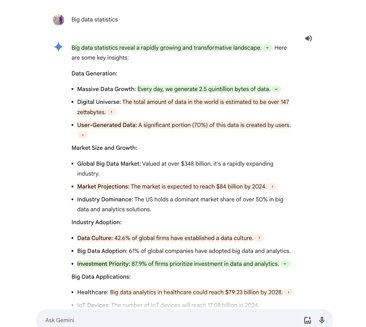
Fact-checking feature on Gemini
Free image generation with Imagen was another aspect I liked. While Gemini does mention usage limits, I don’t think I ever hit them or saw an error message.
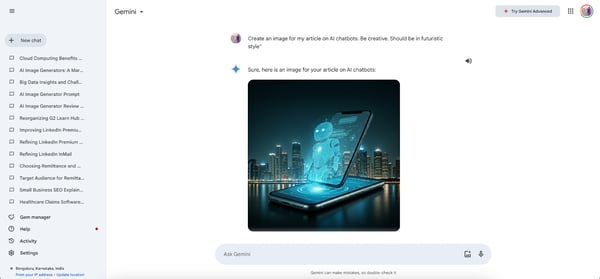
Generating pictures with Imagen 3 model on Gemini
Gemini can write, create content, code, and do everything ChatGPT does. However, a major drawback is the lack of support for adding files for conversations. I couldn’t upload files, be it word or CSV, for analysis as I could with ChatGPT or Claude, which felt restrictive.
Also, Gemini doesn’t offer much in the way of customization for tone, style, or responses except via prompts. I found this restrictive since I wanted some control over how the bot responded to me. The free version runs on Gemini Flash 1.5, one of the fastest AI models available, but a paid plan is required to access the advanced Pro model and features like file upload.
Overall, it’s a good ChatGPT alternative, albeit with some limitations.
What I Liked About Gemini:
- Good ChatGPT alternative.
- Real-time data access and the “double-check with Google” feature for accurate, sourced information.
What are G2 users saying:
“It can access and process information from the real world through Google Search to keep its responses consistent with search results.”
– Gemini Review, Ankita P.
What I Didn’t Like About Gemini:
- No file upload support, limiting its versatility for certain tasks.
- Limited customization options for tone, style, and responses beyond detailed prompts.
What are G2 users saying:
“It doesn’t give consumers extra options so they can alter the UI to suit their organizational or personal preferences.”
– Gemini Review, Frank O.
4. Gleen AI
Now, Gleen AI is not an AI chatbot, but it’s a platform that allows you to create your own chatbot specifically for customer support. I found it to be incredibly useful for online businesses of all sizes.
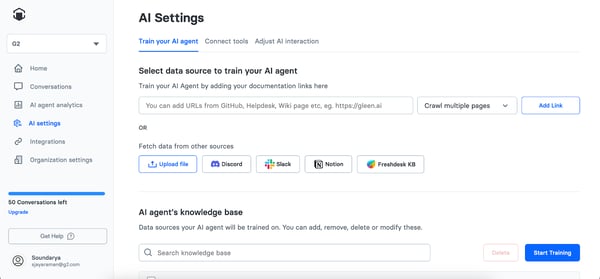
AI settings on Gleen AI to add training data for custom AI chatbot
What really impressed me was how easy it was to set up and train my chatbot. The interface is super user-friendly, even for someone who isn’t particularly tech-savvy. I could pull in data from multiple sources, like websites, and files from tools like Slack, Discord, and Notion or from a Shopify store, and train the model with those data. I could also customize it with my own rules, and add it to the website. It felt like building a custom Retrieval-Augmented Generation (RAG) model, but much simpler.
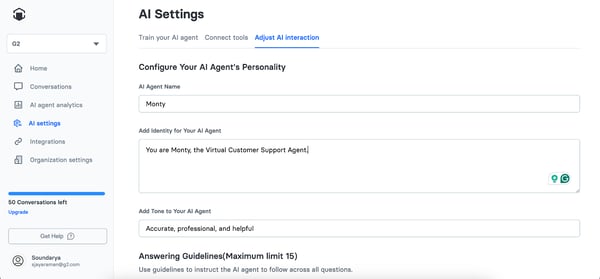
Options to customize the AI chatbot on Gleen AI
And the chatbot answers are straightforward, with links to the support documentation too. I could get data on the total number of AI chats, average response time, upvoted and downvoted queries, or those escalated to human agents through their dashboard. I could easily see how this tool can transform customer support by delivering quick, accurate responses 24/7 for reptitive queries.
The free version only allows only one chatbot and 50 AI conversations, which I felt was quite restrictive for any online business. And the paid version might be pricey.
Additionally, Gleen AI’s effectiveness also heavily depends on the quality and breadth of the data you provide–if your documentation or knowledge base isn’t well-organized, it may not perform as expected. Some customer support professionals also need more features like in-depth dashboards and notifications to be improved.
Finally, this tool is clearly designed for businesses, so individuals or teams looking for a general-purpose chatbot may find it too niche.
What I liked about Gleen AI:
- Easy to set up and train a customer support chatbot.
- User-friendly interface with a detailed dashboard for insights like response times and conversation data.
What are G2 users saying:
“A great assistant in the field of e-commerce! It is easy to set up – just provide a link to the store, and the bot will study all the available information and then communicate with potential customers. This is definitely a huge plus.”
– Gleen AI Review, Bogdan P.
What I didn’t like about Gleen AI:
- Effectiveness depends on the quality and organization of the data you provide.
- Limited free version.
What are G2 users saying:
“They are a bit expensive compared to alternatives.”
– Gleen AI Review, Andrew D.
5. Google Cloud Dialogflow
Google Cloud Dialogflow, offered as part of Google Cloud, was a new discovery for me while researching AI assistants. I found it similar to Gleen AI as a platform to build conversational AI bots for customer support.
I have to admit, getting started with Dialogflow wasn’t exactly intuitive. Google uses very specific terms like intents (what the bot should do for specific queries) and entities (key details within a query) to train the AI bot, and understanding these concepts took me some time.
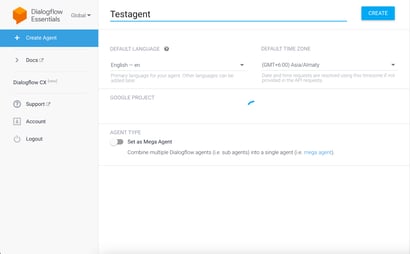
The UI of Dialogflow
Once I got the hang of it, though, I could see the potential. I could access a number of pre-built templates for AI agents to get started quickly. I also liked that Dialogflow supports both voice and text interactions in multiple languages. This flexibility is a great feature, especially for global businesses.
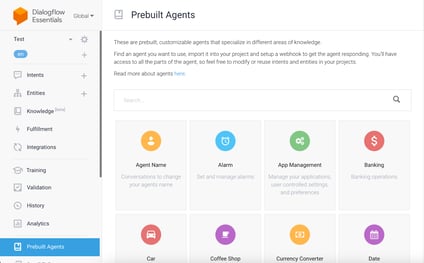
Templates for AI bots on Dialogflow
However, using the platform wasn’t the smoothest experience. The website was noticeably slow at times, which made the setup feel more tedious than it should have. Also, better support documentation could have made my life easier. After a point, I couldn’t customize the pre-built templates.