



The best free customer self-service software for tech startups in 2027 includes Agentforce Service Cloud, Fin, Freshdesk, Jotform AI Agents, HubSpot Service Hub, Zendesk for Customer Service, and Zoho Desk. I selected these tools by analyzing G2 reviews from software and IT professionals, focusing on self-service capabilities, ease of setup, free plan limitations, and suitability for growing support teams.
If you’ve ever tried to scale customer support at a startup without scaling headcount, you already know the trap. The free plan looks generous until your user base doubles and you’re hitting limits on every feature that actually matters, such as knowledge base articles capped, AI responses locked behind a paywall, or integrations that only work if you upgrade. And the tools built for enterprise support orgs? They’ll either ovewhelm a five-person team or charge you for seats you don’t need.
For this guide, I evaluated the top free products on G2’s customer self-service software category page and assessed each one through the lens of a tech startup: how quickly can a lean team deploy it, what does the free plan realistically cover, where does it start to crack under growth, and what’s the moment it pushes you toward a paid tier? Here’s what I found.
What are the best free customer self-service software for tech startups in 2027?
-
Agentforce Service Cloud: Best for tech startups already using Salesforce
For tech startups that manage customer data in Salesforce and want AI-powered self-service, knowledge management, and case resolution without moving customer data into another platform.
-
Fin: Best for startups that want AI-first customer self-service
For product-led startups with an existing help center that want an AI agent to resolve customer questions autonomously and escalate conversations to human agents when needed.
- Freshdesk: Best for startups that want an all-in-one support platform
For small tech teams that need a knowledge base, customer portal, ticketing, and automation in one platform, without paying for enterprise functionality before they need it. - HubSpot Service Hub: Best for tech startups already running their CRM on HubSpot
For tech startups that want self-service, ticketing, and customer feedback connected directly to their HubSpot CRM, giving support, sales, and marketing teams a shared customer view. - Jotform AI Agents: Best for startups that want no-code conversational self-service
For non-technical startup teams that want to launch an AI-powered self-service agent quickly without writing code or relying on engineering resources. - Zendesk for Customer Service: Best for tech startups planning to scale support operations
For fast-growing startups that want a mature knowledge base, AI-assisted self-service, and a platform that scales with increasing support volume. - Zoho Desk: Best for tech startups building on the Zoho ecosystem
For budget-conscious startups that want a self-service portal, omnichannel support, and an affordable upgrade path, especially if they’re already using Zoho CRM or Zoho One.
*Tools are listed alphabetically. These tools offer free trials, free forever options, or freemium models.
Comparison of the best free customer self-service software for tech startups in 2027
Here’s a side-by-side look at free plan limits and pricing before diving into the full reviews.
| Tool | G2 rating | What the free plan covers | Paid starts at |
| Agentforce Service Cloud | 4.4/5⭐ |
|
Service Cloud: $25/user/month Agentforce for Service AI Agent: $2/conversation |
| Fin | 4.5/5⭐ |
|
$0.99/outcome + Intercom seat from $19/seat/month |
| Freshdesk | 4.4/5⭐ |
|
$19/agent/month billed annually |
| HubSpot Service Hub | 4.4/5⭐ |
|
$15/seat/month billed annually |
| Jotform AI Agents | 4.5/5⭐ |
|
$34/month billed annually |
| Zendesk for Customer Service | 4.3/5⭐ |
|
$19/agent/month billed annually |
| Zoho Desk | 4.4/5⭐ |
|
$7/user/month billed annually |
*This research was conducted in October 2026. Free plans, trial availability, pricing, and included features may change, so I recommend checking each vendor’s official pricing page for the latest details.
Zendesk’s 2026 CX Trends research found that 85% of CX leaders say customers will drop a brand over an issue left unresolved, even on first contact. For tech startups where every early customer relationship counts, a self-service tool that fails at the last mile is not just an efficiency problem, but a retention risk.
For tech startups, that trajectory matters more than it might seem. When your support team is two or three people, a self-service layer that deflects even a fraction of repetitive queries buys back hours that go toward building, not answering the same onboarding question for the fifth time that week. The problem is that most free plans are designed to look capable without actually being capable — a knowledge base with no search worth trusting, an AI chatbot that escalates everything, or a customer portal that takes a full sprint to set up.
How did I find and evaluate these free customer self-service software for tech startups?
I started with G2’s free customer self-service software category page, which lists tools that offer free plans, free trials, or freemium models. From there, I took the top products as they appear on the page and evaluated each one specifically from a tech startup perspective: how quickly a small team can deploy and configure it, what the free plan genuinely covers in terms of knowledge base, AI capabilities, and customer-facing self-service, where each free tier starts to show its limits under real usage, and what the trigger is that pushes a growing tech startup toward a paid plan.
I cross-referenced verified G2 user reviews, filtered to small businesses in the computer software and IT services industries, to understand real-world patterns beyond my own evaluation: what tech teams rely on, what frustrates them over time, and how each tool holds up as customer volume grows.
The screenshots featured in this article may be a mix of those taken from the vendor’s G2 page or from publicly available materials.
What I look for in free customer self-service software for tech startups
Testing these tools in a tech startup context made certain things obvious fast. Here’s what I actually paid attention to:
- Free plan depth that holds up under real usage: A free tier that caps your knowledge base at 10 articles or locks AI behind a paywall isn’t a free plan; it’s a trial with a longer expiration date. I looked at what each tool actually lets you do without paying: how many articles you can publish, whether the AI assistant is available on the free tier, and how many users or seats are included before the upgrade pressure starts.
- Speed to first deflection: For a tech startup with a small team, the value of self-service lies in how quickly it starts working. I paid attention to how quickly each tool can go from signup to a live, customer-facing knowledge base or AI agent without needing a developer to configure it or a week of content migration to make it useful.
- AI that resolves, not just routes: There’s a meaningful difference between an AI that suggests an article and one that actually answers the question. I evaluated whether the AI component on each free plan could handle a real conversational query end-to-end, or whether it handed off to a human the moment anything got slightly specific.
- Integration with the tools startups already use: A self-service tool that sits in isolation creates more work, not less. I looked at whether each product connects natively with the CRMs, ticketing systems, and communication platforms that early-stage tech teams are already running without requiring a paid plan to unlock those integrations.
- Escalation path that doesn’t break the experience: Self-service fails when there’s no graceful way to reach a human. I assessed how each tool handles the handoff: whether a customer who can’t find an answer gets routed cleanly to a support channel, or hits a dead end that sends them straight to your inbox anyway.
- Upgrade cost and runway on the free plan: Some free plans can support a startup in the long term, while others are better suited to getting started. I looked at how much runway each free tier realistically gives a growing tech startup before the limits kick in, and what the jump to a paid plan actually costs, because a tool that’s free today but forces a $300/month upgrade at 500 users is a migration waiting to happen.
To qualify for inclusion in the Customer Self-Service Software category, a product must:
- Provide information to customers without human interaction
- Assist end users in completing common tasks
- Provide 24-hour support to customers seeking assistance
- Organize and distribute information for commonly asked questions
*This data was pulled from G2 in 2026. Some reviews may have been edited for clarity.
1. Agentforce Service Cloud: Best for tech startups already using Salesforce
Agentforce Service Cloud (formerly Salesforce Service Cloud) makes the most sense for tech startups that already run their customer operations on Salesforce and want AI-powered self-service without creating another customer data source. The 30-day free trial gives you enough time to evaluate the platform’s AI, case management, and service workflows before committing. Existing Salesforce Enterprise Edition customers can also use Salesforce Foundations, which includes 1,000 Agentforce AI conversations at no additional cost, making it easier to test AI-powered support inside an environment you’re already using.
What impressed me most during testing wasn’t the AI itself. It was the context behind every response. Instead of relying solely on a knowledge base, Agentforce could reference customer records, previous cases, account history, and other Salesforce data to build a more complete picture before suggesting the next action. For B2B tech startups managing a smaller number of high-value customer relationships, that level of context feels much more valuable than simply answering FAQs. It’s also reflected in G2 Fall 2026 Grid® Report for Customer Self-Service, where the platform earns 89% for proactive assistance and 90% for cross-system integration, both well above the category average.
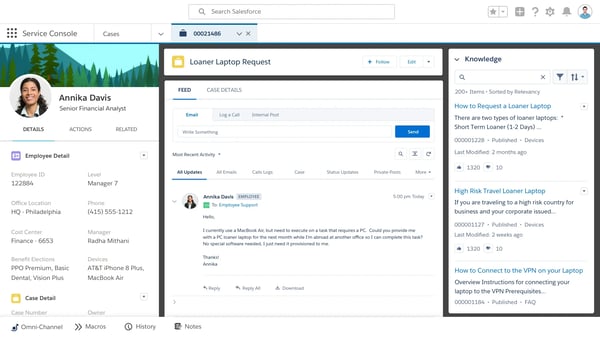
also found the AI especially useful for reducing repetitive support work without removing the human element. Case summaries, suggested responses, and intelligent routing all helped shorten the path to resolution while keeping agents in control of customer conversations. G2 reviewers echoed this experience, highlighting the platform’s contextual AI, 360-degree customer view, and ability to surface relevant information without switching between systems.
What does Agentforce Service Cloud’s free option include?
- 30-day free trial with full access to Service Cloud features; no credit card required (availability may vary by region)
- AI-assisted case summaries and response suggestions
- Knowledge base creation and self-service portal evaluation
- Case management with omnichannel routing (email, chat, and other supported channels)
- Agent Workspace with a unified view of customer history and support interactions
- Workflow automation and case assignment rules
- Reports and dashboards for monitoring support performance
- Access to Agentforce Builder and AI-powered service workflows during evaluation (trial configuration may vary)
- For existing Enterprise Edition users: Salesforce Foundations plan offers 1,000 AI conversations, 200,000 Flex Credits, and 250,000 Data Cloud credits included at no additional cost
When should you upgrade your Agentforce Service Cloud free option?
I would upgrade Agentforce Service Cloud when my team needs automated case routing, SLA tracking, and AI-assisted responses at scale beyond what the free evaluation provides. The 30-day trial lets me test these capabilities, but it isn’t a permanent free plan. I’d also account for AI usage costs alongside the Service Cloud license, since conversation-based billing can increase expenses as support volume grows.
Where Agentforce Service Cloud genuinely stands out:
- The unified customer view is its biggest advantage for Salesforce users. During my testing, I found it easy to view customer details, case history, related records, and previous interactions in a single workspace, rather than jumping between multiple applications. G2 reviewers praise this 360-degree customer view for helping agents resolve issues faster with more context.
- Workflow automation is highly configurable as your support operation grows. I found it straightforward to evaluate automated case routing, approvals, and escalation workflows using the platform’s built-in tools. For tech startups already invested in Salesforce, this flexibility makes it easier to standardize support processes and adapt them over time without relying heavily on custom development for every workflow.
What G2 users like about Agentforce Service Cloud:
“What I like best is the transition from static bots to autonomous AI agents. With Agentforce, the ability to ground generative AI in our specific Salesforce data (Data Cloud) makes the service truly contextual. It doesn’t just provide scripted answers; it understands the customer’s history and can perform actions directly within the workflow without constant human hand-offs.”
– Agentforce Service Cloud review, Naampreet K.
Is Agentforce Service Cloud right for your tech startup?
- Best for: Tech startups already using Salesforce that want AI-powered self-service, case management, and customer support workflows built on the same platform as their CRM. It’s particularly well suited for B2B SaaS companies managing high-value customer relationships and looking to centralize customer data and support operations.
- Not ideal for: Early-stage tech startups looking for a lightweight or permanently free help desk. If you’re not already invested in the Salesforce ecosystem or need a simple, low-cost support solution, the platform’s implementation effort, pricing, and learning curve may outweigh its benefits.
What I dislike about Agentforce Service Cloud:
- As per G2 user reviews, the initial setup is more involved than with most tech startup-focused help desks. Getting the best results from the AI depends on having well-organized Salesforce data and knowledge articles, so there can be some upfront preparation. That said, for tech startups already running their customer operations on Salesforce, the additional setup pays off with more contextual and consistent support experiences.
- Some routine actions take more clicks than I expected. Logging updates or switching between case views often requires passing through multiple screens and validation steps, which can slow you down when you need to move quickly. G2 reviewers describe similar friction when trying to get simple things done fast. That said, for tech startups that value structure and auditability in their support workflow, the extra steps also mean fewer things fall through the cracks.
What G2 users dislike about Agentforce Service Cloud:
“It requires complex implementation, as per the requirements, so the implementation side is somewhat tough. It is not easy to configure. Sometimes the pricing is high when there are fewer queries from consumers, but the cost is the same, so at that time it costs us more; something like dynamic pricing will help”
– Agentforce Service Cloud review, Kshitij T.
2. Fin: Best for startups that want AI-first customer self-service
Fin stood out to me because it isn’t trying to be another help desk, but to resolve customer conversations before they ever reach one. I looked at the 14-day free trial, which includes full access to both the Intercom help desk and Fin AI Agent. When I tested it, the setup was genuinely fast. Fin pulls from your existing help center articles and starts answering questions almost immediately.
I really liked how conversational the testing experience felt. Instead of directing customers to a list of help articles, Fin understood the question, pulled the relevant information from the knowledge base, and responded naturally while maintaining context throughout the conversation. Follow-up questions felt like part of the same interaction rather than a fresh search each time. For tech startups with a well-maintained help center, this creates a self-service experience that’s much closer to talking with a support agent than browsing documentation.
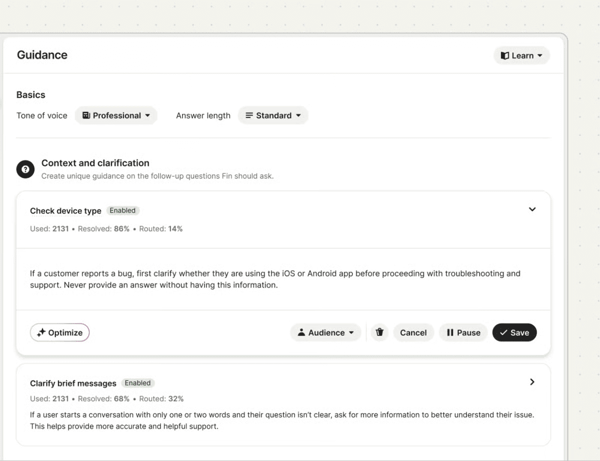
The G2 Data backs up that knowledge-first experience: Fin scores 91% for knowledge base and 91% for searchable articles, above the category averages of 89% and 88%, respectively. G2 reviewers echoed this, praising Fin’s natural-language responses, fast setup, and ability to accurately resolve a large share of repetitive customer questions.
I also appreciate how little effort it took to get started. Fin immediately began using my existing help center content, so I didn’t need to migrate articles or build complex decision trees before seeing useful results. When a conversation required human intervention, the handoff preserved the full context instead of forcing customers to repeat themselves.
Ownership update (September 2026): Salesforce completed its acquisition of Fin in September 2026. Fin now operates within Salesforce AI Labs and continues serving existing customers, expanding Salesforce’s AI-powered customer service portfolio alongside Agentforce.
What does Fin’s free option include?
- 14-day free trial with full access to the Intercom help desk and Fin AI Agent
- No credit card required and no seat minimums or maximums during the trial
- Unlimited Fin AI outcomes throughout the trial period
- AI-generated answers grounded in your existing knowledge base
- Automated conversation routing and human handoff workflows
- Custom AI guidance, procedures, and workflows
- Help Center management
- Inbox, ticketing, and teammate collaboration
- Early Stage Startup Program: Eligible startups receive one year of Fin free, including 300 outcomes and 15 sales qualifications per month, plus 93% off eligible Intercom charges in year one. Startups must have fewer than 15 employees, up to $10 million in funding, and must not be existing Fin customers.
Important: “One year free” does not mean unlimited usage. Additional Fin outcomes and certain communication charges are billed separately. The Early Stage program also has a discounted help desk component rather than an entirely free Intercom subscription.
When should you upgrade your Fin free option?
I would upgrade Fin when my team needs to handle higher conversation volumes, improve AI resolution rates, or introduce more advanced workflows across customer support channels. Fin’s usage-based pricing starts at $0.99 per outcome, so I’d estimate monthly resolution volume before committing. If I also need the Intercom help desk, I’d budget for its separate seat subscription.
Where Fin genuinely stands out:
- The speed of deployment is its biggest advantage. During my testing, I connected an existing knowledge base and had Fin answering customer questions within minutes. For tech startups that already have well-documented help content, it’s one of the fastest ways to add AI-powered self-service without rebuilding an entire support stack.
- Fin reduces repetitive support work without replacing your help desk. Fin handled routine questions autonomously during my testing and escalated complex conversations to human agents as needed, without any manual routing rules. G2 reviewers echoed this, highlighting that the seamless handoff allowed small support teams to focus on higher-value customer conversations rather than repetitive requests.
What G2 users like about Fin:
“Fin is a platform that I have been working with for years since it was known as Intercom. At first, it functioned as a direct chat with your customers, allowing you to resolve their queries easily. Fin has been reinventing itself for years, adding more features without compromising the ease of navigating its platform or the product’s overall configuration. What I like the most is that a large part of the success of our SaaS has been due to the efficient technical support, and we have managed to provide it thanks to Fin.”
– Fin review, Ricardo M.
Is Fin right for your tech startup?
- Best for: Product-led tech startups with an established knowledge base that want AI to resolve repetitive customer questions before they reach the support team. It’s a particularly strong fit for lean support teams looking to automate tier-1 support without replacing their existing help desk.
- Not ideal for: Early-stage tech startups that haven’t built out their help center or documentation yet. Since Fin’s responses are grounded in your existing knowledge base, teams with limited or outdated support content may need to strengthen that foundation before they’ll see the best results.
What I dislike about Fin:
- As per G2 user reviews, Fin is only as good as its knowledge base. During testing, it answered well-documented questions accurately, but edge cases and product-specific scenarios still required careful guidance or escalation rules. The good news is that the platform makes it relatively straightforward to refine responses over time as your documentation improves.
- I also noticed that configuring more advanced workflows takes some experimentation, especially if you want precise control over when the AI should answer versus hand conversations to a human. However, that flexibility is also one of Fin’s strengths, and many reviewers felt the initial setup effort was worthwhile once the automations were dialed in.
What G2 users dislike about Fin:
“Our primary concern is that FIN workflows do not always perform as intended. We follow the instructions given, but we usually have to dig deeper to get FIN to respond the way we want. We have also received steps from FIN indicating that we do not have the level at which the feature is available. That should be part of the information.”
– Fin review, Kristen B.
If you’re looking for agentic AI to take over your customer support workflows, explore top-rated AI agents on G2 and compare verified reviews to find the right fit.
3. Freshdesk: Best for startups that want an all-in-one support platform
Freshdesk stood out to me because it combines customer self-service and ticket management in a single platform, making it easy to support customers before and after they submit a request. For a tech startup that needs to stop losing customer issues in email and start tracking them properly, the free plan is a genuinely useful starting point.
I evaluated Freshdesk through its free access options, using the trial to explore the more advanced capabilities. The knowledge base was the strongest self-service feature for me. I could organize articles into categories and folders, publish them to a customer-facing help center, and make the content searchable without involving a developer. I also liked that the same articles could support both customers and agents, reducing the need to maintain separate internal and external documentation. That strength is reflected in G2’s Fall 2026 Grid data, where the knowledge base is Freshdesk’s highest-rated feature, with an 89% rating.
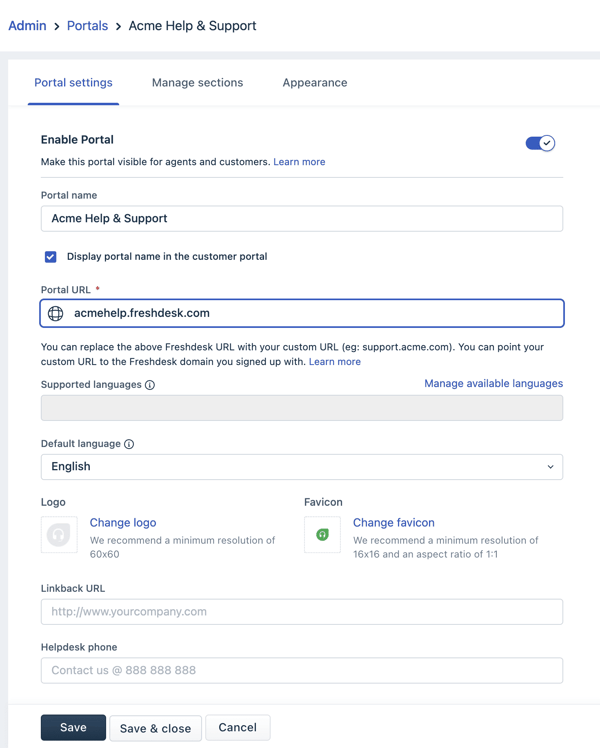
I also checked how the customer portal connected self-service with ticket submission and follow-up. Customers could search for an answer first, then raise and track a request when the documentation did not solve the issue. The trial also let me explore the Freddy AI Agent, which used the knowledge base to answer routine questions in a conversational way. Its performance depended on the quality of the underlying articles, but for startups with reliable documentation, it added a useful first layer of support before a ticket reached the team.
What does Freshdesk’s free option include?
- Free for 2 agents with a 6-month limit
- Email and customer portal support only; no live chat, phone, or social channels
- Unlimited tickets, knowledge base, and ticket trend reports
- Ticket dispatch: basic automatic assignment to agents
- No automation rules, SLA management, collision detection, or marketplace integrations on the free plan
- 14-day trial of the full Enterprise tier runs concurrently with free plan signup
- Freddy AI Agent for AI-powered customer self-service (during the trial)
- Custom reports, analytics, and dashboards (during the trial)
- Shared inbox with team collaboration tools (during the trial)
- Marketplace integrations and API access (during the trial)
When should you upgrade your Freshdesk free plan?
I would upgrade from Freshdesk’s free plan when my team needs Freddy AI for intelligent ticket routing and automated customer responses, advanced workflow automations, SLA management, or omnichannel support across chat, phone, and social channels. The free plan works well for early-stage support operations. Still, once ticket volume outgrows a two-agent setup, or self-service requires more than basic knowledge-base functionality, a paid plan becomes the practical next step. Freshdesk’s paid plans start at $19 per agent per month, billed annually, giving startups a relatively affordable path to expand their support capabilities as they grow.
Where Freshdesk genuinely stands out:
- The knowledge base is one of Freshdesk’s biggest strengths. G2 reviewers consistently praise how easy it is to create, organize, and manage self-service content alongside customer tickets. During my testing, I also found it straightforward to publish articles and make them searchable, making it easy for customers to find answers before submitting a support request.
- Automation helps bridge the gap between self-service and assisted support. Reviewers frequently highlight Freshdesk’s intuitive automation engine for routing tickets, assigning requests, and reducing repetitive manual work. I liked that when customers couldn’t resolve an issue through the knowledge base, automated workflows helped move their requests to the right team, creating a smoother transition from self-service to human support without adding unnecessary complexity.
What G2 users like about Freshdesk:
“Freshdesk is easy to use and has extensive tutorials that help you through it. You have a lot of options for automations and settings to really customize your own experience.”
– Freshdesk review, Joni L.
Is Freshdesk right for your tech startup?
- Best for: Startups that want to launch customer self-service quickly without piecing together multiple tools. It’s a strong fit for teams looking for a knowledge base, customer portal, and ticketing system on a single platform, with room to add automation and AI as support needs grow.
- Not ideal for: Startups that need conversational AI self-service on a permanent free plan; Freddy AI Agent sessions are billed separately and aren’t included in the free tier, though the free trial does give you access to test it. Also not the best fit for solo founders or very small teams who want a permanent free option, since the free program is time-limited.
What I dislike about Freshdesk:
- Customizing the self-service portal to feel fully on-brand took more workarounds than I expected. G2 reviewers note similar limits around whitelabeling, and that the knowledge base leans more toward a simple Q&A/FAQ format than a true documentation site. For tech startups that want their help center to read like a polished product doc, this can mean extra manual formatting work.
- Deeper customization also takes more effort than the basic setup suggests. G2 reviewers similarly flag that advanced configurations around workflows and reports can be less intuitive to set up, especially for teams without a dedicated admin. The tradeoff, as reviewers note, is that Freshdesk remains easy to use for everyday support, and the added complexity only becomes relevant as the service operation matures.
What G2 users dislike about Freshdesk:
“It does the job, but when it comes to whitelabelling and making the tool feel like it’s part of our product, we found the customization options to be limited. We had to work around those limitations in both customization and whitelabelling. Also, the knowledge base feels more like a Q&A or FAQ, and we can’t really set it up in a documentation-style format.”
– Freshdesk review, Ganapathi K.
4. HubSpot Service Hub: Best for startups already running their CRM on HubSpot
Based on what I observed, HubSpot Service Hub is great for a tech startup that’s already using HubSpot for sales or marketing and wants customer support and self-service to live in the same ecosystem. The CRM integration was immediately apparent during my analysis. Every support interaction, including tickets, live chat, and knowledge base article views, is linked to the customer’s full HubSpot contact record, so there’s no guessing about what a customer has already seen or done before they reach out.
The knowledge base is straightforward to build out, with articles published to a branded help center that customers can search without opening a ticket. What I found particularly useful is that the same content powers the AI chatbot, which can surface relevant articles in conversation before escalating to a human agent. That AI-assisted experience stands out in G2’s Grid data too: Service Hub scores 90% for proactive assistance, compared with the 81% category average, and 88% for natural language interaction, five points above the 83% average.