



I evaluated 20+ tools to find the seven best headless CMS software. These are
Sanity, Storyblok, Hygraph, Contentstack, Prismic, Umbraco, and Prepr CMS.
Look, I’m no web developer. I don’t mess with code or follow the latest JavaScript frameworks. But as a marketer with years of experience, I know the pain of juggling content across multiple online platforms. Whether it’s updating website banners, refreshing app content, or aligning everything with an email campaign, the process can feel like trying to rewrite a billboard while driving past it at full speed.
Working with traditional CMS platforms made some tasks easier, like managing content in one place, but they often created more challenges in the long run. Their rigid templates and limited flexibility left me stuck waiting on developers for updates—or worse, unable to deliver the experiences we needed at all.
That’s when I decided to explore the best headless CMS software—and I haven’t looked back since. Headless CMS has completely changed the way I approach content. It gives developers the freedom to build exactly what we need while letting me focus on getting the right message out to the right audience, without all the back-and-forth.
Over the years, I’ve worked with a number of headless CMS platforms, each with its own strengths. These tools have made it so much easier for me to manage content, work alongside developers, and keep everything running smoothly across multiple platforms.
In this article, I’ll share with you the 7 best headless CMS platforms that I’ve come to rely on—and that my developers love too. I’ll break down their strengths, weaknesses, and what sets them apart, so you can find the one that works best for your needs.
7 best headless CMS for 2026: my top picks
These headless CMS software are top-rated in their category, according to G2 Summer Grid Report 2026. I’ve also added their monthly pricing to make comparisons easier for you.
| Software | Best for | Standout feature | Pricing |
| Sanity | Real-time collaboration and content customization | Live content editing, content authoring, and image management | Starts at $15/seat/month |
| Storyblok | Visual editing and market-friendly UI | Visual editor, sound effects, and personalization | Starts at $99/month |
| Hygraph | GraphQL native structured content | GraphQL APIs tailored for composable content architecture. | Starts at $199/month |
| Contentstack | Enterprise-grade governance, automation, and scalability | Flexible navigation structures, content repository, and robust RBAC. | Pricing on request |
| Prismic | Content modeling with flexibility | Reusable content blocks, unlimited environment, and rapid iteration. | Starts at $150/month |
| Umbraco | .NET-based solutions with full customization | Deep .NET integration with open source flexibility | Starts at $55/month |
| Prepr CMS | Built-in personalization and A/B testing | Native A/B testing, personalization, and Visual Editor in one platform | Starts at $345/month |
Whether you’re a marketer or a developer looking for a flexible solution, or me, these platforms strike the perfect balance between creativity and functionality.
As headless CMS offers key features like GraphQL API, content template builder, and governance and audit services, it is evolving the decision-making process as evident in the current headless CMS market share, projected to grow up to $22.28 billion by 2034, with a CAGR of 21.42%, as reported recently.
7 best headless CMS systems I recommend
For me, a headless CMS is more than just a fancy buzzword. It’s the tool that gave me the freedom to manage content the way I’ve always wanted. Unlike traditional CMS platforms, which tie the backend (where you manage content) to the front end (how it looks on your website or app), a headless CMS separates the two entirely.
This separation matters because it allows me to create and organize content independently of how it’s displayed. I no longer need to wait for developers to build or refresh pages for every update. Instead, I can manage everything in one place and instantly push updates to multiple platforms. For instance, when I update a product description, it reflects across the website, app, and even our marketing materials, saving time and effort.
Meanwhile, my developers have full flexibility and control over the code they use. They aren’t tied to specific frameworks or languages and can work with modern tools like React or Vue to build dynamic, custom experiences. With APIs connecting everything together, they stay in full control of the code, and I stay in control of the content.
This balance is what makes a headless CMS so powerful. Developers build the systems; I create the pages; and together, we deliver what we need—quickly and efficiently, without compromise.
How did I find and evaluate the best headless CMS systems?
To ensure I was selecting only the best, I began with G2’s Grid Reports, which rank headless CMS solutions based on real user reviews and market presence. This gave me a solid shortlist of top-rated tools, including both well-established platforms and high-performing newcomers.
Next, I worked closely with my developer team to better understand the day-to-day needs of technical users. We focused on key priorities like API performance, scalability, hosting options, compatibility with modern frameworks, and ease of integration with existing systems. This collaboration helped shape a well-rounded evaluation criterion that balanced technical and marketing perspectives.
To deepen my analysis, I used AI-powered tools to comb through hundreds of verified G2 reviews. This helped uncover recurring feedback themes—such as workflow flexibility, support responsiveness, and integration limitations—adding valuable context to my hands-on experience.
In cases where I couldn’t test a CMS directly, I consulted a professional developer with hands-on experience, validating their insights with real user reviews from G2. The screenshots featured in this article are a mix of visuals taken from G2 vendor pages and publicly available product materials.
One interesting observation I noticed in G2 data was that content management was one of the fastest-growing markets, quarter over quarter, with an increase of 2.2% as per G2’s state of software report last year.
The earlier reliance of web developers or coders has now seen a shift to a smarter and more innovative medium of website creation.
What makes the best headless CMS: My criteria
Selecting the right headless CMS wasn’t just about ticking off a list of basic features. I needed a platform that could truly bridge the gap between what marketers like me need and what developers expect to work with. To make sure I found the best fit, I focused on these key factors during my testing and evaluation:
- Ease of use for marketers: First, I wanted a CMS that doesn’t require me to call a developer every time I need to update a page or tweak some content. I need a clean user interface for managing content. I tested features like drag-and-drop editing, content scheduling, and version control. If I couldn’t navigate it quickly or train my team on it, it didn’t make the cut.
- API performance and flexibility: For my developer team, robust application programming interface (API) functionality was non-negotiable. The CMS needed to have fast, well-documented APIs (like REST or GraphQL) that allowed developers to fetch and deliver content seamlessly across platforms. We tested API response times and how well the CMS handled large datasets. If an API felt clunky or lacked flexibility, it was out.
- Omnichannel content delivery: A great headless CMS should make it easy to distribute content across multiple platforms—websites, mobile apps, IoT devices, and more. I tested how efficiently the CMS could deliver content through APIs to different endpoints and whether I could maintain a consistent brand experience across channels without extra effort.
- Scalability: Scalability is crucial, especially for teams managing large content libraries or preparing for growth. I tested how well each CMS handled increased traffic and content volume. Features like CDN (Content Delivery Network) integrations, global content distribution, and caching mechanisms were a big plus for ensuring fast load times.
- Developer flexibility: I evaluated how easily developers could integrate the CMS with modern frameworks like React, Vue, or Next.js. A platform that supported their preferred tools and workflows scored higher. I also checked for extensibility—could developers add custom plugins or extend the CMS functionality if needed?
- Content modeling capabilities: As a marketer, I need the freedom to structure content in a way that fits our strategy. I tested each CMS’s ability to create flexible, reusable content models—think modular blocks that I could repurpose across multiple pages or platforms. If the CMS restricted how I could structure or organize content, it didn’t make the list. I also looked for a previewing feature, the ability to instantly publish, and, most importantly, language translation capability for localizations.
- Collaboration features: Since marketing and development teams work closely, I looked for features that encouraged collaboration, like user roles, permissions, and workflows. The ability to assign tasks, leave comments, and track approvals streamlined the process for both teams.
- Pricing and value for money: Let’s be real: budget matters. I analyzed each CMS’s pricing structure and compared it to the features offered. Some platforms charge extra for things like API usage or scaling content, so I had to factor in the long-term costs. A platform that delivered excellent functionality without hidden fees stood out.
- Security: Security was another critical factor. I evaluated features like two-factor authentication (2FA), role-based access control, and data encryption. The CMS also had to comply with major security standards like GDPR or SOC 2 to ensure the protection of our data and content.
- Community and support: Finally, I looked at the developer and user communities surrounding each CMS. Platforms with active forums, responsive customer support, and detailed documentation scored higher because they made it easier to solve problems quickly.
After evaluating 20+ tools, I narrowed my list down to the seven best headless CMS systems. Each of these tools offers unique strengths, from seamless content management workflows to robust developer-friendly APIs, and they’ve been tested to ensure they meet the demands of real-world projects.
The list below contains genuine user reviews from the Headless CMS Software Category. To be included in this category, a solution must:
- Offer content modeling.
- Allow for the creation, reading, updating, and deleting of content.
- Facilitate content production workflow.
- Organize content in a cloud-based repository.
- Give businesses the opportunity to repurpose content across multiple channels
*This data was pulled from G2 in 2026. Some reviews may have been edited for clarity.
1. Sanity: Best for real-time collaboration and content customization
Sanity is one of the most flexible and practical headless CMS platforms I’ve worked with. As a marketer, what stands out to me is its structured content approach.

Apart from the standard features of creating reusable content blocks and integrations with API, I absolutely enjoyed working with Sanity Studio because of the flexibility it provides in terms of personalizing all of our workflows and processes. I can customize my dashboard to other languages apart from English. How cool is that?
Our blog automatically refreshes with top content in real-time with Sanity instead of one of our editors manually configuring it every time. Nice, right?
From a developer’s perspective, Sanity gets high marks for its schema customization and API performance. My developer team appreciates how easily they can define content models that work for our specific needs by writing their code from scratch or by using the already available templates in different frameworks, plugins, schemas, and snippets
These templates provide a solid starting point for common use cases like blogs, e-commerce sites, and portfolios, in my view. Our developer could even create a content block for adding real-time photomap for location data on our site. Also, its REST and GraphQL APIs are quick and well-documented and make fetching content straightforward.

One feature I’ve personally found useful is the real-time collaboration. Working with developers and content creators often involves a lot of back-and-forth, but with Sanity, we can make edits simultaneously and see updates live. This makes it much easier to finalize content without endless review cycles or miscommunication.
On the pricing side, I think Sanity offers great value, especially for teams just starting out. The free tier includes features like unlimited admin users, projects, and real-time collaboration, which many platforms lock behind paid plans. For larger teams or those handling high volumes of content, the paid plans provide more advanced features and support, but the price might seem a little costly, in my opinion.
Sanity is a powerful, flexible platform, but it does come with a learning curve, especially if you’re new to schema-based systems. From my own evaluation and the sentiment in G2 reviews, more advanced workflows can feel complex for non-technical users at first. That said, the documentation is genuinely thorough and has improved noticeably of late, reviewers point to newer AI-ready resources and fuller guides that make onboarding a project today meaningfully faster than it once was.
Sanity also uses its own query language, GROQ, which G2 feedback describes as efficient but niche. In my experience, our developer team had mixed opinions; some appreciated its capabilities, while others preferred the familiarity of GraphQL. It is evident from G2 review patterns, and we even found that adopting Sanity requires some upfront investment in learning, but once you’re up to speed, it delivers solid customization and control.
Regardless of these challenges, Sanity is a platform I genuinely enjoy working with. If you’re a content-heavy organization, like an e-commerce brand, media or news company, or digital agency, managing content across multiple platforms with quick updates, I’d definitely recommend giving Sanity a try for its sheer flexibility and collaborative capabilities.
What I like about Sanity:
- I love how Sanity Studio lets me and my developer tailor the editing experience to our needs. Customizing the interface and using reusable content blocks that sync across websites, apps, and other platforms saves me time and keeps everything consistent.
- The real-time collaboration feature is a standout for me. Being able to work simultaneously with my teams reduces back-and-forth and makes the workflow much smoother.
What G2 users like about Sanity:
“I really appreciate Sanity for its ease of use during the developer setup and editing process. It’s also very convenient for the marketing team, allowing them to add content effortlessly. Additionally, the initial setup of Sanity was very easy, which made the transition from Webflow smooth, as we heard it was easier to use.“
– Sanity review, Kara H.
What I dislike about Sanity:
- While the documentation is fine, it can be hard to navigate for more advanced tasks, and you sometimes land on what you need only after some trial and error.
- GROQ, Sanity’s query language, is an adjustment for developers used to GraphQL — but it’s genuinely powerful, and once my team got comfortable, they came to value the precision and control it gives them.
What G2 users dislike about Sanity:
“The learning curve at the beginning was steeper than I expected – not because Sanity is poorly designed, but because the documentation for more advanced use cases was pretty thin when I first got started. I ended up spending a fair amount of time piecing things together from community posts and examples.“
– Sanity review, Samet D.
2. Storyblok: Best for visual editing and market-friendly UI
Storyblok has been an interesting experience for both my team and me. What immediately caught my attention was the visual editor. As a marketer, having a true what-you-see-is-what-you-get (WYSIWYG) interface makes creating and editing pages far less stressful. And Storyblok does exactly. This allows the marketing and editorial team to easily add content the way we want with reusable content blocks.
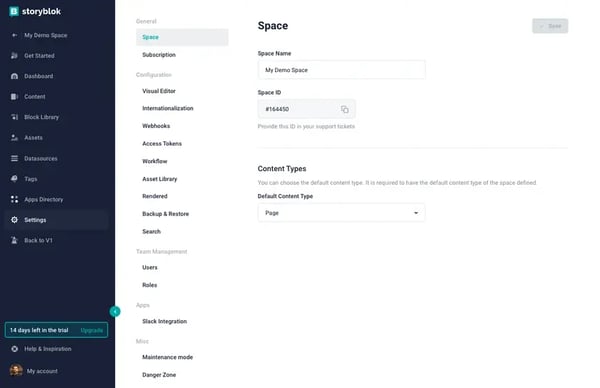
I really enjoy the preview that we can configure to the system. It’s particularly helpful as it allows my team to see how my updates will look in real time across multiple channels. Also, I’d say Storyblok’s collaborative feature is on par with Sanity. I can tag, comment, and reply to a task right there.
Given these capabilities, Storyblok is one of the best headless CMSes to work with if you need to build multiple landing pages quickly for your website.
From a technical perspective, Storyblok’s biggest strength is its component-based architecture. My web development team has been able to build reusable content with blocks of multiple components. Once they set up the required content types and components, we can start adding and managing our content independently without breaking anything.
Localization is another area where Storyblok pulled its weight. Several G2 reviewers manage content across many markets and languages and the folders, roles, and workflows make it easy to keep brand and country-specific content organized while configuring global settings just once. With built-in AI translation now part of the mix, rolling content out across regions felt far less manual than it used to.
I’d also call out two things that quietly make day-to-day work smoother: support and assets. I see a lot of praise for how responsive and genuinely invested Storyblok’s support team is, even as the company scales. And the built-in asset CDN—with focal points and scheduled publishing—meant my team didn’t have to worry about hosting media or timing releases by hand, which is a real plus when content has to go live at a precise moment.
From what I heard from them, the platform integrates well with frameworks like Vue, Next.js, Astro, and Nuxt, making the development process smooth and efficient no matter what stack we’re using.
Storyblok’s visual editor and component-based architecture make it genuinely compelling for teams building content-heavy sites at pace. That said, G2 reviewers consistently note two considerations worth planning for. Pricing scales quickly as your needs grow — several reviewers flag that features previously included in lower tiers have moved up, and the per-language cost can add up for teams publishing across multiple markets, so mapping your requirements against current plans before committing is worthwhile.
The initial setup and content modeling also reward upfront investment: G2 users describe the component structure as taking time to get right, and non-technical editors sometimes need more onboarding than the polished interface suggests. Once that foundation is in place, though, reviewers consistently say the day-to-day editing experience is exactly what content teams need — fast, visual, and genuinely independent of developers.
For mid-sized businesses or enterprises with robust content needs, it’s a solid investment. Minor cons aside, there’s no denying that their CMS is the real star, it’s what you come for, and it’s what they truly excel at.
What I like about Storyblok:
- I really like the visual editor with preview. It’s such a relief to see real-time updates as I make changes. It saves so much time when tweaking content for campaigns and eliminates the guesswork.
- Storyblok makes content management surprisingly effortless, in my view. The simple UI, fast previews, and easy publishing mean I can push updates quickly without jumping through hoops. Even non-technical users can pick it up fast.
What G2 users like about Storyblok:
“I’ve worked with many CMSs over the years, and Storyblok truly stands out. It’s exceptionally user‑friendly, especially for non‑technical stakeholders, without sacrificing flexibility for developers. The visual editor makes content updates intuitive and incredibly fluid.”
– Storyblok review, Danielle v.
What I dislike about Storyblok:
- G2 reviewers note that some features have shifted to higher tiers over time and per-language costs can add up for multi-market teams, so it’s worth pressure-testing the current plan structure against your actual roadmap before signing.
- The component-based setup takes more upfront planning than the visual editor’s polish might suggest. G2 users describe a ramp-up period for teams new to block-based architecture, though once the content model is configured, the day-to-day editing experience runs smoothly and editors work independently with confidence.
What G2 users dislike about Storyblok:
“The plugin marketplace still has room to grow, and a couple of bulk actions need to be improved. You have to go on the hunt for some really good community plugins. They exist, but it’s difficult to find them if you are not on Discord and the community hubs.”
– Storyblok review, Benedikt G.
If reusable content blocks are becoming central to your workflow, I’d also explore our guide on the best CCMS software for 2026, especially for managing structured content across documentation, help centers, and multi-channel publishing.
3. Hygraph: Best for GraphQL native structured content
I’ll admit that I have a real appreciation for a well-thought-out interface, and Hygraph definitely delivers on that front. It’s one of those platforms that just feels good to use—everything is responsive, and well-organized in a way that makes managing content feel less like a chore.
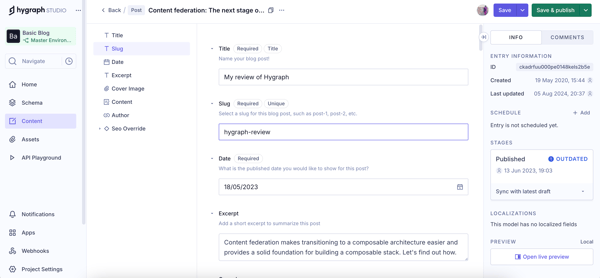
From what I heard from my web developer team, Hygraph’s GraphQL API is rock solid. The API is incredibly fast, and querying content is a smooth experience, especially when working with large datasets. My team appreciates how well it integrates with modern frameworks like Next.js and Astro, allowing us to build highly dynamic frontends with minimal friction. We’ve built some pretty complex content models, and Hygraph handles them effortlessly.
Another notable aspect for us has been webhooks. My team was able to automate multiple options, from triggering Slack notifications for new leads to sending email alerts when a fresh blog post goes live with them.
Beyond the developer side, Hygraph turned out to be approachable for non-technical teammates too. Several reviewers described setting up and managing a blog or landing pages in minutes with little to no learning curve, and one marketing team noted they could edit pages without pulling in product or engineering. For me, that meant less time maintaining a custom CMS and more time actually publishing.
I also appreciated working with a true content repository rather than thinking in pages and templates. Reviewers highlighted how Hygraph lets you structure content once and reuse it across channels and campaigns without inconsistencies, and publish or update entries without waiting on engineering. That reusable, block-based approach kept our messaging consistent everywhere we publish.
Value was another pleasant surprise. While costs can climb as you scale (more on that below), multiple reviewers called the free and lower tiers genuinely generous, with multi-user access included rather than locked to a single seat. It also integrated cleanly with tools like Vercel and tied neatly into back-office systems, which made setup and handover fast.
Media handling deserves a mention of its own. Reviewers singled out Hygraph’s asset management, being able to upload a wide range of formats (WebP, PNG, JPEG, GIF, MP4) while keeping images crisp without bloating file sizes, and having every uploaded asset visible and easy to retrieve in one place. I can be the fix for a long-standing problem with oversized images, and for a content-heavy site, that reliable asset layer kept our pages consistent and fast.
On pricing, Hygraph sits between Sanity and Storyblok. Its free plan is generous, but user caps and API call limits can become a bottleneck, costs can climb quickly as a project scales, and features mid-to-large enterprises need—custom roles, granular permissions—sit behind higher tiers. The upside is that the lower tiers are genuinely reasonable and multi-user friendly, so for most small and mid-sized projects, you get strong value long before you hit those ceilings.
I also found the documentation a little thin once you move past the basics. Onboarding gets harder with complex content models or advanced queries, and other G2 reviewers describe the same gap. That said, the support team came up repeatedly as quick and responsive (often same-day), which reliably helped bridge the moments where the docs left off.
Nonetheless, I’d say Hygraph is a great fit for teams that need a CMS built around flexibility, customization, and a GraphQL-first approach.
What I like about Hygraph:
- The GraphQL API is reliable, making it easy to pull exactly the data my developer needs without unnecessary overhead. It feels optimized for performance, which is a huge plus when dealing with large datasets.
- The content modeling flexibility is top-notch—I can structure content exactly how I want without feeling restricted by predefined templates.
What G2 users like about Hygraph:
“I really like Hygraph because it allows us to create and structure blogs visually with all the necessary elements like headings and subheadings, making them look good. I also like the capability to upload various image types such as webp, PNG, JPEG, GIF, webp, and mp4 files, which keeps the photos crisp and doesn’t take up too much space, solving an issue we’ve had with large image sizes.”
– Hygraph review, Calin L.
What I dislike about Hygraph:
- The documentation could be better for troubleshooting and onboarding; I sometimes had to piece solutions together from several sources.
- Costs can climb fast on larger or high-traffic projects, so it’s worth planning for — but the generous lower tiers mean you get real value before scaling ever pushes you up a plan.
What G2 users dislike about Hygraph:
“The Hygraph Studio interface can sometimes be a bit buggy (doesn’t show full error messages of what to fix and why it needs to be fixed). The documentation isn’t as detailed for complex or advanced integration. For complex projects, it can be a bit hard to find the field you want to edit and to know what edits it will cause.”
– Hygraph review, Verified User in Design.
4. Contentstack: Best for enterprise-grade governance, automation, and scalability
I’ve heard a lot about Contentstack before but this was the first time I explored it fully. Contentstack strikes a balance, it’s structured, API-driven, and built for teams managing complex workflows.
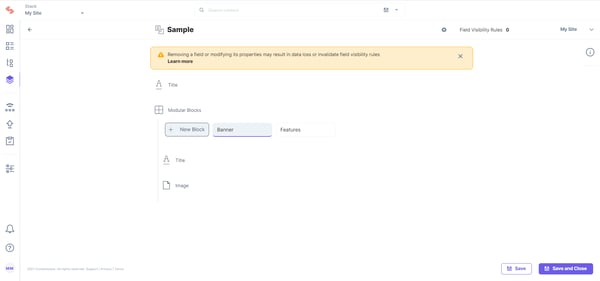
If Sanity has Studio and Storyblok has its Visual Editor, Contentstack’s answer to them is its Visual Builder, a WYSIWYG interface that lets me create, manage, and edit pages in real-time—without getting stuck in a rigid template structure. The drag-and-drop blocks are a lifesaver, allowing me to use developer-created content components while still having the flexibility to arrange and customize pages.
One of my favorite features is preview sharing. It’s such a small thing, but having an external preview link that I can send to stakeholders without requiring them to log in is a huge time-saver.
Another noticeable aspect to me was how well it handles multi-team collaboration. With built-in SSO, role-based permissions, and structured workflows, it’s clear this platform was designed for organizations where content isn’t just published—it goes through layers of approvals, edits, and governance. Their tasks features like tag, comments.
From a technical standpoint, Contentstack includes everything and more of what other CMS tools offer. My developers highly value its robust API ecosystem, with its Content Delivery API, Content Management API, image API and GraphQL API, making content retrieval and management easy across platforms.
The modular content approach was the biggest win my team kept coming back to. Reviewers running large, frequently-changing sites described reusing components across pages and launching updates quickly without heavy developer involvement, spinning up event or campaign pages fast while keeping everything structured and consistent. For high-volume sites, that speed without chaos is exactly what you want.
Contentstack also proved itself for global content operations. Some manage content across roughly 25 languages and credit the platform with keeping it all structured and quick to publish, while others pointed to scheduled publishing for precise, low-risk releases and version comparison for tracking exactly what changed. For enterprise teams juggling many locales and release windows, those governance touches add up.
Contentstack offers powerful content modeling, but with a few usability snags. Editing inside complex templates — clicking through blocks, sub-sections, and nested elements — can feel more involved than it should, and G2 reviewers managing large or deeply structured content note the same. Even so, that depth is exactly what lets the modular, reusable components keep big sites consistent and fast to update, so the trade-off largely works in your favor once the structure is set.
I’ve also seen occasional slowness loading large content lists; it’s not a blocker, but the lag adds up at high volume, and G2 feedback flags it as a common theme. To be fair, it’s been improving, reviewers credit steady UI and search enhancements over the past couple of years, and the responsive support plus quick publishing mean it rarely gets in the way of actually shipping content.
What I like about Contentstack:
- The visual builder makes content updates so much easier. I can drag and drop blocks, edit the text in real time, and preview pages without relying on developers for every small change.
- The API flexibility is a huge win for my team. Whether we’re using REST or GraphQL, integrating Contentstack with our tech stack is smooth, and managing content programmatically saves us a ton of manual work.
What G2 users like about Contentstack:
&