


I’ve repeatedly heard my peers working in finance complain about the time spent chasing invoice approvals rather than actually analyzing financial performance. When invoices live in inboxes, spreadsheets, or disconnected systems, even small delays ripple into cash flow uncertainty, missed discounts, and stressful month-end closes.
That’s what pushed me to take a closer look at the best invoice management software available in the market. I evaluated 20+ leading platforms based on verified G2 reviews, user feedback, adoption data, and real-world finance use cases. I focused on tools that reduce manual back-and-forth, centralize approvals, integrate cleanly with accounting systems, and provide real-time visibility into invoice status and spend.
Based on my evaluation, I finalized a list of the seven best invoice management software. These include Xero, Paylocity, SAP Concur, BILL AP/AR, Stampli, Payhawk, and SAP Cloud ERP.
At its core, invoice management software standardizes how invoices move through an organization. It captures invoice data, whether uploaded manually or received digitally, routes it through approval chains, matches it against financial records, processes payments electronically, and stores documentation for future reference. Some platforms extend this with mobile approvals, payment allocation controls, and integration with procurement or billing systems.
For accounting teams, the impact is operational clarity. Paper trails are replaced with searchable digital records. Payment processing becomes structured rather than reactive. Historical invoices are easy to retrieve, and financial documentation is centralized rather than scattered across inboxes and file cabinets.
If you’re looking to streamline approvals, improve financial visibility, or scale your accounts payable (AP) and accounts receivable (AR) processes with confidence, this guide walks through the best invoice management software options for 2026 and what each one does best.
7 Best invoice management software for 2026: My top picks
-
Xero: Best for small business accounting, bookkeeping, and financial management
Connects invoicing with accounting, bank reconciliation, and real-time financial reporting in one cloud platform. (Pricing from $29/month) -
Paylocity: Best for payroll and human capital management
Combines payroll processing, workforce management, and HR workflows within a centralized system. (Custom pricing) -
SAP Concur: Best for centralized travel, expense, and invoice management
Unifies travel booking, expense reporting, and invoice approvals in a single enterprise platform. (Custom pricing) -
BILL AP/AR: Best for intelligent accounts payable and accounts receivable automation
Automates payables and receivables with structured approvals, digital payments, and accounting sync. (Pricing from $49/user/month) -
Stampli: Best for AI-driven procure-to-pay automation aligned with your ERP
Uses AI-powered workflows to streamline invoice capture, coding, approvals, and ERP-aligned procure-to-pay. (Custom pricing) -
Payhawk: Best for finance teams looking for global spend management
Centralizes corporate cards, expense tracking, and multi-entity spend management for global teams. (Custom pricing) -
SAP Cloud ERP: Best for streamlining finance at an enterprise level
Integrates financial operations, reporting, and enterprise controls within a scalable cloud ERP environment. (Custom pricing)
*These invoice management software are top-rated in their category, according to G2’s Winter 2026 Grid Reports. I have included their pricing information for easy comparison
7 best invoice management software I recommend for 2026
For most businesses, invoice management is tied to cash flow clarity, approval accountability, and how smoothly month-end closes run. When approvals happen over email, data lives in separate systems, payment status isn’t easy to track, and small inefficiencies compound quickly.
It’s not surprising that the invoice management software market is expected to grow at a 7.1% CAGR from 2026 to 2034. Businesses are steadily moving away from spreadsheets and email-based approvals toward structured, automated workflows.
As companies grow, data silos become harder to manage. More vendors, more entities, and higher transaction volumes mean invoice workflows need structure and automation. The software you choose plays a central role in how controlled and predictable your financial operations feel.
The seven invoice management tools I recommend for 2026 stood out for different reasons. Some are ideal for companies that want deep AI-driven automation. Others are better suited for teams managing global entities and multi-currency payments. A few shine when tightly integrated with accounting systems, while others are built for full-scale enterprise finance transformation. The best choice depends on your team’s size, structure, and financial maturity.
What the strongest platforms have in common is that they reduce manual back-and-forth, centralize approvals, and give finance teams real-time clarity into invoice status and spend. Using these tools, teams can operate proactively instead of reacting to bottlenecks.
The best-suited invoice management software offers smarter workflows, cleaner integrations, and better financial visibility.
How did I find and evaluate the best invoice management software?
To identify the best invoice management software, I analyzed real user reviews on G2 to see how finance, IT, procurement, and HR teams use it in practice. This helped clarify which platforms consistently deliver value and which tend to fall short.
From there, I shortlisted seven platforms that stood out for distinct use cases, including AI-driven procure-to-pay, global spend management, payroll-connected workflows, enterprise ERP finance, and streamlined AP/AR automation.
To dig deeper, I used AI to comb through the latest G2’s Grid Report and user feedback to compare customer segments served, invoice processing capabilities, account syncing, and overall user satisfaction ratings across these platforms.
Screenshots included in this article are sourced directly from vendor listings on G2 and publicly available product documentation.
What makes the best invoice management software: My criteria
After digging into G2 Data and evaluating how businesses address invoice management, I noticed a few themes that consistently stood out. Here’s what I focused on when evaluating the best invoice management tools:
- Automation capabilities: Invoice management should eliminate repetitive tasks, not create new ones. I prioritized platforms that automate invoice capture, approval routing, recurring billing, bank reconciliation, and payment reminders.
- Strong accounting and ERP integrations: Invoice workflows must connect seamlessly with accounting systems. I evaluated how well each platform integrates with tools like QuickBooks, Xero, NetSuite, and SAP environments. Strong integrations reduce duplicate entries, improve financial reconciliation accuracy, and maintain a single source of truth.
- Flexible approval workflows: Every organization has different approval structures. I looked for solutions that support multi-step routing, role-based access controls, and entity-level controls. Whether through AI-supported approval paths, spend-based controls, or enterprise governance frameworks, workflow flexibility was a key differentiator.
- Real-time visibility into cash flow and spend: Invoice management is ultimately about visibility into cash flow and spend. I focused on platforms offering dashboards that track outstanding invoices, payment statuses, spend by department, and budget alignment.
- Scalability for growing complexity: As invoice volume, subsidiaries, or global operations increase, the platform must scale. I assessed support for multi-entity operations, multi-currency transactions, and high-volume invoice processing.
- User experience and adoption: Ease of use matters, especially for cross-functional teams. I considered navigation, clarity of dashboards, mobile capabilities, and overall adoption feedback.
- Security, compliance, and control: Invoice management involves sensitive financial data. I evaluated audit trails, approval logs, structured access controls, and compliance alignment.
The best invoice management software isn’t defined by a single feature. It’s defined by how effectively automation, integrations, visibility, governance, and scalability come together to support your financial operation.
The list below contains genuine user reviews from our best Invoice Management Software category page. To qualify for inclusion in the category, a product must:
- Pull invoices from other software or through scanning and OCR
- Store invoice files, along with approval and payment history
- Consolidate multiple invoices or split an invoice into multiple
- Provide standard approval workflows that can be customized by users
- Match invoices with purchases and sales orders, as well as with payments
- Sync with company accounts to transfer payments for approved invoices
- Track different types of payment, such as deposits or partial payments
- Apply multiple payments to one invoice or one payment to multiple invoices
- Monitor due dates and late payments for AR and AP invoices
*This data was pulled from G2 in 2026. Some reviews may have been edited for clarity.
1. Xero: Best for small business accounting, bookkeeping, and financial management
G2 rating: 4.4/5
Xero is one of the top-rated cloud-based accounting software solutions widely adopted by small businesses. According to G2 Data, 69% of its users are from small businesses. Xero’s invoice management capabilities are complemented by powerful accounting, bookkeeping services, real-time reporting, and seamless integrations, making it much more than a basic invoicing tool.
I found that users love its clean, intuitive interface and often describe the software as straightforward to navigate and efficient for day-to-day use. They highlight how easily they can generate professional invoices, track payment statuses like paid, pending, or overdue without unnecessary clicking, and view financial insights in one place.
From my evaluation of G2 reviews, Xero’s invoicing connects tightly with its core accounting system. Users can create and send professional invoices, reconcile bank transactions with automated bank feeds, and view updated financial dashboards all within the same platform.
Xero’s workflow spans expense tracking, comprehensive reporting, and basic inventory tracking, and it supports payroll where available or through integrated services. Its broad integration ecosystem lets teams connect payment systems, payroll tools, expense capture apps, and other business systems to tailor workflows and sync data across functions.
I noticed high praise for Xero’s automation capabilities. Reviewers consistently highlight saving time and reducing manual work through automation. From automated bank feeds that bring in daily transaction data to smart matching and reconciliation, Xero helps teams keep their books current without repetitive data entry. Users also note that recurring invoices and automatic payment reminders keep cash flow moving while minimizing follow-up.
Another area where Xero stands out is its multi-user collaboration and cloud-first design. Because the platform is fully cloud-based, business owners, accountants, and internal finance teams can access the same real-time financial data from anywhere.
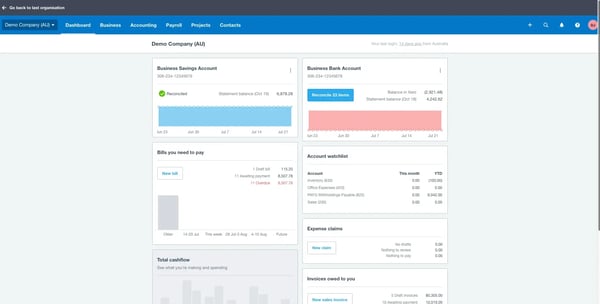
Xero delivers strong configurability through customizable dashboards and reporting filters. Reviewers note that highly advanced reporting layouts or specialized accounting structures may require deeper setup or integrations. For most small and mid-sized teams, however, the balance between structure and flexibility keeps workflows efficient without adding complexity.
The invoice management software offers help resources and support, but the experience with support responsiveness varies based on the type of inquiry and region. Some teams indicate that getting detailed guidance on specific accounting scenarios or feature questions can take additional time. That said, many users leverage Xero’s community forums, help center, and partner network to complement direct support and ensure they stay productive.
Overall, based on my evaluation, Xero’s combination of robust invoicing, deep accounting features, automation, and strong integrations makes it a standout choice for businesses that want their invoice management tightly woven into their financial operations.
What I like about Xero:
- The invoicing connects seamlessly with bank reconciliation, expense tracking, real-time dashboards, and reporting. It feels like a unified financial system rather than a standalone billing tool.
- Automation capabilities reduce manual work and help keep financial records consistently up to date.
What G2 users like about Xero:
“The best thing about Xero is its simple and clean interface. Even someone new to accounting software can understand it easily. Bank reconciliation is excellent and saves a lot of manual effort by matching transactions automatically. The dashboard gives a clear overview of cash position, outstanding invoices, and upcoming bills. Invoicing is very smooth, and invoices can be shared directly with customers via email. Being cloud-based based I can access data anytime without depending on office systems. The integration is reliable for document sharing and communication. I use it daily for creating and tracking sales invoices, recording expenses, monitoring cash flow, reconciling bank transactions, etc.”
– Xero review, Pranjal P.
What I dislike about Xero:
- While Xero offers customizable dashboards and reporting filters, businesses needing highly specialized financial layouts or complex accounting structures may need deeper setup or integrations to achieve their ideal view.
- Xero works well for everyday accounting workflows, but teams seeking immediate, in-depth guidance on complex accounting scenarios may find that response timelines vary depending on the type of request.
What G2 users dislike about Xero:
“Xero handles most accounting needs really well, I do wish the reporting customization was a bit more flexible. For bigger organizations like ours that have more complex reporting needs, the standard templates can feel pretty restrictive sometimes.“
– Xero review, Nishtha C.
2. Paylocity: Best for payroll and human capital management (HCM)
G2 rating: 4.5/5
According to G2 Data, 77% of Paylocity‘s users come from mid-market teams, and the platform maintains an impressive 83% average user adoption rate, reflecting strong internal engagement across organizations. While best known for payroll and HCM, I noted that Paylocity also helps teams align labor data with invoice and vendor payment workflows.
Users describe the invoice management tool as intuitive and straightforward, both for administrators and employees. Whether navigating payroll modules or accessing employee information, reviewers often mention that the interface feels organized and efficient for daily use.
I found consistent praise for Paylocity’s payroll processing capabilities. Reviewers frequently highlight how easy it is to run payroll, review pre-process registers, make adjustments, and process off-cycle payroll when needed. Automated tax updates and compliance features help teams process payroll confidently and on time.
I observed reviewers highlighting Paylocity for its integrated time and labor management tools. Timecards, PTO tracking, scheduling, and attendance data flow directly into payroll, helping reduce discrepancies and improve overall payroll accuracy without manual intervention. Reviewers also mention that this centralized workforce data helps HR and finance teams maintain better visibility into employee hours and labor costs throughout the pay cycle.
Beyond payroll, the platform supports HR management, including onboarding, benefits administration, performance tracking, and employee record management. Reviewers appreciate having the full employee lifecycle, from applicant tracking to active employment, managed within one connected ecosystem.
I noted that Paylocity’s integration ecosystem extends beyond payroll operations. Through connectors and APIs, the platform syncs workforce data with accounting systems and financial ledgers, supporting broader financial visibility and simplifying downstream reconciliation processes.
Paylocity also offers robust reporting and analytics that help financial and HR leaders gain visibility into labor costs, payroll expenses, compliance metrics, and spend trends. These reporting tools support invoice workflow decisions and improve cross-department financial insights.
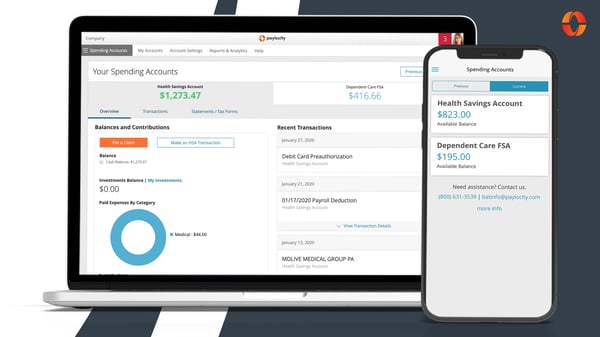
While Paylocity offers a broad range of payroll, HR, and financial workflow tools, reviewers note that there are certain capabilities that teams sometimes look for in specialized invoice or accounts payable (AP) systems that aren’t yet deeply developed within the platform. Teams mention that they augment Paylocity with additional tools.
Reviewers highlight that getting fully up to speed with Paylocity’s breadth of features can take a bit of orientation for new users. Once teams become familiar with the layout and workflows, many describe the system as intuitive and efficient for ongoing use, underscoring how initial orientation transitions into productive daily operations.
Based on my evaluation, Paylocity’s combination of structured payroll processing, integrated time tracking, HR management capability, and intuitiveness makes it a powerful choice for organizations seeking centralized payroll and human capital management.
What I like about Paylocity:
- The intuitive interface and structured workflows make day-to-day payroll and HR management efficient.
- The direct flow from time and labor data into payroll, because of the integrated payroll and workforce management capability, helps improve accuracy and streamline pay cycles.
What G2 users like about Paylocity:
“Paylocity has proven to be extremely helpful when it comes to onboarding new employees and managing payroll. The onboarding process is straightforward and user-friendly, which helps save time and minimize mistakes. Processing payroll is also intuitive and efficient, allowing for accurate and confident completion each pay period.”
– Paylocity review, Carla H.
What I dislike about Paylocity:
- Because Paylocity combines payroll, HR, time tracking, and reporting within one platform, new users may spend time becoming familiar with where certain tools and settings are located before establishing steady workflows.
- While Paylocity supports payroll-driven financial workflows and foundational AP processes, organizations seeking highly specialized invoice automation or complex billing configurations may complement it with purpose-built systems.
What G2 users dislike about Paylocity:
“What I dislike about Paylocity is that some features can be a bit slow or complicated to navigate, especially when switching between different sections like reports and approvals. Certain functions, such as customizing forms or uploading multiple documents, could be more efficient. It also takes time for new users to learn all the tools available. Overall, while it’s a great system, there’s room for improvement in speed and ease of use.”
– Paylocity review, Paul A.
If you’re modernizing invoice workflows, it might be time to streamline payroll too. Explore the best payroll software options.
3. SAP Concur: Best for centralized travel, expense, and invoice management
G2 rating: 4/5
According to G2 Data, SAP Concur serves a strong share of enterprise (50%) and mid-market organizations (39%), reflecting its positioning as a solution built for complex travel, expense, and invoice workflows.
One of SAP Concur’s most valued capabilities is its centralized expense and invoice tracking system. I noticed reviewers highlighting how the platform consolidates travel expenses, vendor invoices, and supporting documentation into one structured environment, making financial records easier to manage and audit.
SAP Concur offers automated invoice capture and approval routing, allowing finance teams to intake vendor invoices digitally, apply coding rules, and streamline multi-level approval workflows. Reviewers appreciate the visibility this provides into invoice status and payment timelines.
The mobile receipt capture functionality stands out in particular, allowing users to take photos of receipts and instantly attach them to expense reports, reducing manual entry and keeping documentation organized in real time. Reviewers also note that capturing receipts on the go helps ensure supporting documentation is recorded immediately, making expense submission faster and easier to manage later.
I found reviewers praising its policy enforcement and compliance controls. SAP Concur allows organizations to embed travel and expense policies directly into workflows, helping flag out-of-policy spend before approval. Finance teams note that this structured enforcement reduces compliance risks and improves audit readiness.
Another major strength of SAP Concur is its deep integration capabilities. I found reviewers consistently highlighting how smoothly the platform connects with enterprise resource planning (ERP) systems, payroll environments, corporate finance tools, and company credit cards. This connectivity ensures that travel bookings, expense submissions, and invoice data flow directly into existing financial systems without duplicate entry.
By aligning with backend accounting infrastructure, SAP Concur helps organizations maintain consistency across departments while improving accuracy and reducing administrative effort in reconciliation and reporting. This integration allows expense and invoice data to flow directly into financial systems, helping finance teams maintain more reliable records without duplicate entry.
I observed that for global teams, the ability to handle multi-currency transactions within the same system further strengthens the invoice management tool’s value, especially when managing employee expenses and international vendor invoices across regions. It also allows teams to process and review international expenses without switching between different financial systems.
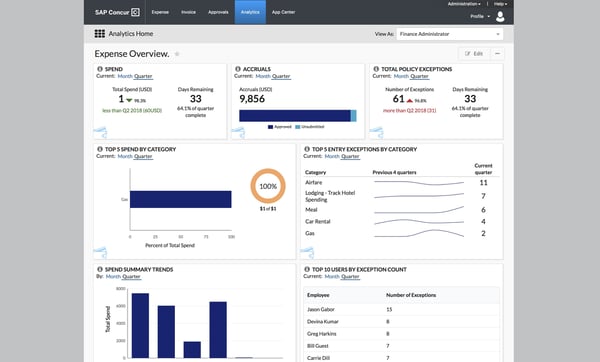
SAP Concur offers a comprehensive travel, invoice, and expense platform. However, reviewers mention that the interface structure can involve multiple steps for routine tasks, particularly when navigating between reports and approvals. Once users become familiar with the workflow structure, many describe it as supportive of organized financial processes.
While SAP Concur delivers robust functionality across modules, reviewers mention that loading times for detailed reports and large receipt uploads can vary, particularly during peak usage periods. This is more noticeable when switching between modules or uploading high-resolution documents. Even so, many organizations continue to rely on the platform for its depth of capabilities and centralized control.
Overall, based on my evaluation, SAP Concur’s combination of automated invoice capture, travel integration, compliance enforcement, ERP connectivity, and global scalability makes it a powerful choice for organizations seeking centralized travel, expense, and invoice management.
What I like about SAP Concur:
- SAP Concur brings travel booking, expense reporting, and invoice processing into one structured system. Having everything organized in a single platform improves visibility and simplifies financial record management.
- The seamless integration with ERP systems, corporate credit cards, and backend accounting tools helps ensure data flows accurately across finance workflows, reducing duplicate entry and improving reconciliation efficiency.
What G2 users like about SAP Concur:
“Here are a few things that stand out in the features of SAP Concur that I noticed. The automation and accuracy are impressive. Receipt scanning, automatic categorization, and built-in policy checks significantly reduce the need for manual entry and help minimize errors and wrong coding. Policy compliance and approval hierarchy are in place, so employees are guided to stay within company guidelines before submitting and approving the invoice. Its global readiness is another advantage, as it supports multiple currencies, various tax rules, and local compliance requirements, making it especially valuable for multinational organizations. Very easy to use and beginner-friendly as well.”
– SAP Concur review, Mark B.
What I dislike about SAP Concur:
- While the platform delivers robust functionality, reviewers note that loading detailed reports or uploading larger receipt files can take additional time, particularly during peak usage periods.
- For users completing quick tasks, navigating between modules and reports may involve multiple steps before submission. Once familiar with the layout, many teams find that it supports organized and controlled financial processes.
What G2 users dislike about SAP Concur:
“The interface feels clunky and unintuitive, making it difficult to get started due to the steep learning curve. Performance is often slow, particularly when handling large amounts of data or receipts. I have also encountered frequent bugs, and the mobile app is not user-friendly. Additionally, the lack of offline support and the presence of frustrating error messages further detract from the overall experience.”
– SAP Concur review, MadhuSudhan L.
4. BILL AP/AR: Best for intelligent accounts payable (AP) and accounts receivable (AR) automation
G2 rating: 4.4/5
BILL AP/AR is widely adopted by small businesses (61%) and mid-market teams (29%) looking to modernize their invoice workflows through automation. Designed for accounts payable and receivable operations, the platform centralizes bill intake, approvals, payments, and collections within one connected environment, helping organizations reduce manual effort and improve cash flow visibility.
Reviewers praise BILL AP/AR’s automated invoice capture and approval routing. The invoice management platform enables electronic invoice receipt and automatically extracts key invoice details before routing them through configurable approval workflows. Finance teams can track invoice status in real time, ensuring visibility from submission through payment authorization.
I observed that this invoice management tool simplifies vendor payments through its multi-method disbursement capabilities. Organizations can process ACH transfers, wire payments, or paper checks directly within the system, allowing accounts payable teams to manage the full payment lifecycle without switching platforms. This flexibility supports diverse vendor requirements while keeping documentation centralized.
I noticed BILL AP/AR provides streamlined digital invoicing and payment collection tools. Users can send electronic invoices, enable online payment options, and monitor outstanding balances from a unified dashboard. Automated reminders and structured follow-ups help accelerate collections and support healthier cash flow management.
Another major feature is its two-way accounting software synchronization. The platform integrates with systems such as QuickBooks, Xero, and NetSuite, automatically syncing invoice data, payment records, and ledger updates. This real-time connectivity reduces duplicate entries and simplifies reconciliation during the month-end close. This is reflected in the 90% user satisfaction rating for accounting, according to G2 Data.
Reviewers mention that the invoice management software further enhances invoice oversight by integrating spend and expense management controls. Through BILL Spend & Expense, organizations can issue corporate cards, set budget parameters, and monitor real-time spending activity. Transactions flow into the system automatically, aligning card spend with invoice and accounting records to maintain financial consistency.
I like that security and compliance are central to the platform’s design. BILL AP/AR incorporates bank-level encryption, role-based permissions, fraud safeguards, and audit trails, helping finance teams maintain control over vendor payments and receivables data while supporting audit readiness.
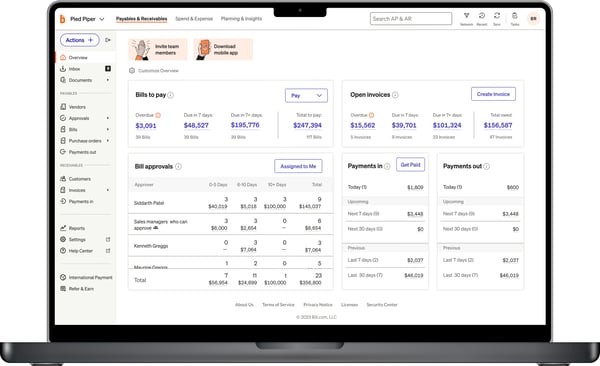
BILL AP/AR provides flexible payment options across automated clearing house (ACH) payments, checks, and international transfers. However, reviewers note that organizations operating across multiple countries may centralize payments through a primary entity rather than managing fully localized subsidiary disbursements.
This software provides strong automation for invoices and payments. But reviewers mention that some actions, such as bill processing or status updates, may take a moment to reflect in the system. For teams working on tight timelines, this may require a bit of planning around processing cycles. Even so, many users continue to value the platform’s overall organization and efficiency in managing payables and receivables.
Based on my evaluation, BILL AP/AR’s combination of automated invoice capture, digital receivables tools, accounting synchronization, spend management integration, and built-in security controls makes it a powerful solution for organizations seeking intelligent accounts payable and receivable automation.
What I like about BILL AP/AR:
- It extracts invoice data automatically and routes bills through configurable approval chains, reducing manual entry and improving visibility into payment status.
- The two-way sync with platforms like QuickBooks, Xero, and NetSuite keeps invoice data, payments, and ledger updates aligned without duplicate work.
What G2 users like about BILL AP/AR:
“I like how easy it is to post invoices in different manners. It integrates smoothly with Sage Intacct, making my accounting job easier since everything posts automatically into Sage Intacct, and the general ledger always ties to what it should. It’s also easy to void payments. I really appreciate the super-easy setup, especially with implementation support. Overall, I find processing vendor invoices much easier with BILL AP/AR.”
– Bill AP/AR review, Brett A.
What I dislike about BILL AP/AR:
- Because BILL AP/AR operates within structured automation cycles, certain bill processing or status updates may take a moment to reflect in the system. Teams managing time-sensitive transactions may plan around these processing intervals.
- While it supports multiple payment methods, organizations with multiple global subsidiaries may manage payments through a primary entity rather than fully localized disbursement structures.
What G2 users dislike about BILL AP/AR:
“Since we have subsidiaries in other countries, right now, we are only able to pay through our US entity. Even though we have bills from Canada, UK, and Mexico, we have to centralize them all in the US. We would rather have a subsidiary for each country and make local payments instead of international.“
– Bill AP/AR review, Jose G.
5. Stampli: Best for AI-driven procure-to-pay (P2P) automation aligned with your ERP
G2 rating: 4.6/5
Stampli is purpose-built for procure-to-pay (P2P) workflows, aligning tightly with ERP systems rather than replacing them. From purchase requests to invoice approvals and payments, Stampli is designed to operate within existing financial structures. According to G2 Data, Stampli serves a strong mix of small businesses (30%) and mid-market teams (62%).
Across G2 reviews, I repeatedly saw praise for Billy, the AI assistant, which supports invoice capture, coding, and approval routing. The AI assistant extracts invoice data, flags exceptions, and helps manage vendor compliance directly within the workflow. This embedded AI capability allows finance teams to process invoices faster while maintaining structured oversight.
Reviewers appreciate Stampli’s ERP-aligned architecture. The platform mirrors charts of accounts, entities, cost centers, and approval hierarchies directly within connected ERP systems such as NetSuite, Sage Intacct, SAP, and others. This tight integration reduces duplicate data entry and ensures invoice information syncs in real time without disrupting existing accounting environments.
I observed reviewers talking about its collaborative approval workflow. Stampli centralizes invoice discussions, approvals, attachments, and audit trails in one interface. Reviewers frequently mention that the ability to communicate directly on invoice records reduces back-and-forth