



Every JavaScript framework promises a better developer experience. The real question is whether it still feels like the right choice a year later.
The JavaScript web frameworks space doesn’t have a shortage of options. It has a surplus of options that look right at the start, but become expensive to live with. Most teams don’t replace a framework once development is underway. They patch it, extend it, and work around it until those workarounds become part of the codebase. I went through G2 reviews for the best JavaScript web frameworks to find the ones developers continue to trust once projects become more demanding.
I wanted to go beyond demos and see what happened in month twelve. Month eighteen. When the component library hits a wall, browser edge cases start appearing, documentation stops helping, and you’re left figuring things out on your own. That’s where the strongest frameworks separate themselves.
TL;DR: Here are the top seven JavaScript Web Frameworks. Syncfusion Essential Studio® for teams standardizes UI components across web, desktop, and mobile. Progress Kendo UI for enterprise teams building across jQuery, Angular, React, and Vue. Node.js for scalable, event-driven backend development. AngularJS for maintaining legacy MVC-based single-page applications. Angular for large-scale front-end development with TypeScript and built-in tooling. Express.js for lightweight, flexible API development on Node.js. Highcharts for data-intensive applications that rely on advanced visualization.
7 best JavaScript web frameworks for 2026: My top picks
- Syncfusion Essential Studio®: Best for comprehensive UI component libraries
A full-stack development suite offering 1,600+ user interface (UI) components across web, desktop, and mobile platforms. (Free trial available; price available on request) - Progress Kendo UI: Best for enterprise UI components across frameworks. A professional UI component library with pre-built widgets for Angular, React, Vue, and jQuery. (Paid plans start at $799 per developer/year)
- Node.js: Best for scalable, event-driven server-side JavaScript development
A runtime environment that lets developers run JavaScript on the server for fast, non-blocking applications. (Free and open-source) - Angular.js by Google: Best for building dynamic, component-driven web applications JavaScript-based open-source framework by Google for building structured, maintainable web applications with two-way data binding and modular architecture. (Free and open-source)
- Angular: Best for large-scale, structured single-page application development
A TypeScript-based front-end framework by Google for building complex, maintainable web applications. (Free and open-source) - Express.js: Best for lightweight, flexible Node.js web application development
A minimal web framework for Node.js that simplifies routing, middleware, and application programming interface (API) construction. (Free and open-source) - Highcharts: Best for interactive data visualization in web applications
A JavaScript charting library that renders complex, interactive charts across all modern browsers. (Free for non-commercial use; paid plans start at $185 per seat for an internal license
*These JavaScript web frameworks are top-rated in their category based on G2’s Winter 2026 Grid® Report. I’ve included their strengths and ideal use cases to help you choose the right option for your team.
7 best JavaScript web frameworks I recommend
As I worked through the G2 reviews, the same themes kept coming up. Developers from different teams, industries, and company sizes often described the same strengths and the same frustrations. Those recurring patterns shaped every recommendation in this guide.
I paid close attention to what everyday development looked like after the initial build. How frameworks handled growing codebases, supported ongoing development, and fit into production environments mattered far more than any single feature.
The frameworks below stood out because developers consistently described them as reliable choices for real-world applications. Each one solves a different problem, but they all earned a place here by holding up where performance, scalability, and long-term maintainability matter most.
How did I find and evaluate the best JavaScript web framework?
The shortlist came from G2’s Winter 2026 Grid® Report for the JavaScript web frameworks category, with G2 score, user satisfaction ratings, and market presence across company sizes as the primary filters. The goal was to stay focused on frameworks with demonstrated adoption in production environments, not tools that look clean in controlled conditions but stall when requirements get complex.
From there, I applied AI-driven analysis across a large set of verified G2 reviews to surface what actually shows up in real-world feedback: workflow signals rather than feature checklists. Which rendering behaviors cause problems? Where documentation falls short. What breaks first when a codebase grows beyond its original scope?
Findings were cross-referenced against feedback from developers, engineering leads, and product teams using these frameworks in active codebases across company sizes. That step helped distinguish isolated complaints from structural limitations that recur across different team sizes and use cases. All visuals and product references are drawn from G2 vendor listings and publicly available framework documentation.
What makes the best JavaScript web framework worth it: My criteria
After reviewing a large volume of G2 user reviews, studying real-world development workflows, and speaking with developers, engineering leaders, product managers, and technical stakeholders, the same themes kept recurring. Here’s what I prioritized when evaluating the best JavaScript web frameworks:
- Component architecture that holds up at scale: A framework’s component model is easy to evaluate early and hard to escape later. I looked at how well each framework enforces clear boundaries between components, how reusable those components are across contexts, and whether the architecture degrades gracefully as codebases grow.
- State management integrated into the framework’s core workflow: State is where the messiest bugs live. Frameworks that treat state as an afterthought force teams to bolt on external solutions that don’t always fit cleanly. I rated tools higher when state handling is coherent and predictable, and when they don’t require significant custom infrastructure to work reliably in production.
- Rendering performance under realistic load: Most frameworks perform acceptably on a demo. The divergence becomes apparent when the interface handles complex, data-driven interactions at scale. I evaluated each framework on how it handles complex, data-driven interfaces under realistic load. Specifically, whether re-renders stay targeted, async updates resolve cleanly, and responsiveness holds when the interface is carrying real usage rather than demo data.
- Ecosystem depth and integration fit: A framework used in isolation is rarely a realistic picture. I prioritized tools with strong ecosystems, including well-maintained third-party libraries, reliable application programming interface (API) integration conventions, and backend compatibility that doesn’t require significant workarounds. When these elements are weak, teams end up maintaining glue code that should not exist.
No framework excels at everything. The right choice depends on your team’s priorities — whether that’s flexibility, scalability, ecosystem maturity, or ease of development. The best frameworks fit naturally into existing workflows rather than forcing teams to adapt to rigid architectures.
Below, you’ll find authentic user reviews from the JavaScript web framework category. To appear in this category, a tool must:
- Support component-based architecture, state management, and application coordination
- Provide centralized visibility into performance, data flow, and application structure
- Enable integration with APIs, backend systems, and development tools
- Deliver ongoing updates and scalability across modern web applications
This data was pulled from G2 in 2026. Some reviews may have been edited for clarity.
1. Syncfusion Essential Studio®: Best for comprehensive UI component libraries
Syncfusion Essential Studio® stands out for the breadth of its component library, offering more than 1,600 UI components across web, desktop, and mobile development. Its support for frameworks like Angular, React, Vue, Blazor, and NET Multi-platform app UI (.NET MAUI) makes it a practical option for teams looking to standardize UI development across multiple platforms.
Across G2 reviews that I analyzed, I noticed that teams working in finance, healthcare, and data-heavy environments consistently highlight the charting and visualization components as a standout strength. Many describe significantly reducing development effort on custom visualizations by using Syncfusion’s built-in chart and graph controls, a capability rated positively by 91% of users, which is above the category average of 88%.
It’s also evident that teams frequently turn to Syncfusion when new component needs arise, often finding the functionality already available within the suite — from spreadsheet-style editors to PDF viewers to file managers. The component library carries a Libraries rating of 91%, reflecting the depth of ready-to-use tooling available within a single API model.
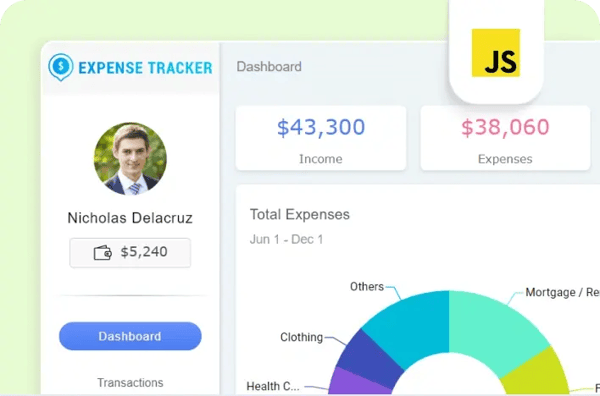
The same component library works across JavaScript, TypeScript, Angular, React, Vue, Blazor, and NET MAUI, which G2 users describe as a practical advantage. Teams working across web and mobile environments apply the same component knowledge across platforms without needing to relearn new systems. Syncfusion Essential Studio® holds a browser support rating of 93%, and G2 reviews consistently link this cross-environment reliability to faster onboarding and more aligned codebases as products evolve.
G2 users also show high regard for Syncfusion’s support team. They are consistently called out for being highly responsive, which, to me, is a green flag. Reviews describe fast response times, detailed answers, custom code examples, and consistent follow-through until issues are resolved. For small teams, this level of support acts as a direct extension of their capabilities, helping reduce development issues and keep projects moving forward.
I also came across reviews that highlighted measurable reductions in development time. One user noted reducing development effort by relying on ready-to-use components instead of building UI from scratch. The suite receives frequent updates, with new components and AI-powered enhancements introduced in each release cycle, and is described as a platform that continues to evolve alongside growing requirements.
Syncfusion’s document processing libraries cover Word, Excel, and PDF generation and editing, and G2 reviewers describe using them to build reporting features, manipulate documents, and deliver file outputs directly from web applications without requiring Office on the server. Teams building internal business tools, finance applications, and client-facing portals describe this as one less dependency to manage outside the Syncfusion suite, keeping the stack consistent.
Some G2 users note that documentation depth drops off for edge cases, particularly around complex event handling and cross-platform customization outside NET. I noticed this the most amongst teams working on highly customized implementations that push beyond standard component usage. I wouldn’t, however, worry too much about it because it’s already established that Syncfusion’s support team works really well to help users through such executions. This reduces how often documentation gaps end up as a bottleneck.
Licensing costs recur annually, which G2 users flag as a consideration when managing tight or project-specific budgets. Smaller teams and independent developers working outside community edition eligibility encounter this friction most directly. The annual licensing model funds a release cycle that consistently expands the component library and introduces AI-powered enhancements. This keeps production applications current without requiring independent tooling investments.
Overall, Syncfusion Essential Studio® makes a strong case for teams that want one reliable, deeply supported component suite rather than a collection of libraries from different vendors. The breadth of 1,600+ components, the consistency across frameworks, and the free community tier give it a reach that few commercial alternatives can match at this price point. For small teams building production-grade applications on limited budgets, few tools reduce the amount of work needed to build a working UI as efficiently.
What I like about Syncfusion Essential Studio® :
- The 1,600+ component library covers a wide range of use cases within a consistent API model, reducing the need for third-party tools and helping teams maintain a unified codebase across frameworks.
- Strong browser support ensures reliable cross-environment performance and helps teams avoid last-minute quality assurance (QA) issues and release delays.
What G2 users like about Syncfusion Essential Studio® :
“I really appreciate the wide range of high-quality UI components and how easily they integrate across different frameworks. They significantly speed up development thanks to well-documented controls, rich features, and consistently reliable performance. The components are also highly customizable, regularly updated, and backed by excellent technical documentation along with responsive support.”
– Syncfusion Essential Studio® review, Ziyad K.
What I dislike about Syncfusion Essential Studio® :
- Documentation lacks depth for advanced customization scenarios, which is most apparent in complex implementations, though the support team and community forums reliably fill the gap without significant delays.
- Recurring licensing costs can be a consideration for smaller teams or short-term projects that fall outside community edition eligibility, though the free tier covers the full suite for qualifying organizations.
What G2 users dislike about Syncfusion Essential Studio® :
“The documentation is NOT clear at times. And some controls make it much harder to work with because of convoluted legacy implementations.”
–Syncfusion Essential Studio® review, Samuel S.
2. Progress Kendo UI: Best for enterprise UI components across frameworks
Built natively for jQuery, Angular, React, and Vue, Progress Kendo UI delivers a consistent component library across all four frameworks without requiring teams to switch APIs or relearn component behavior.
G2 reviews I analyzed highlight the data grid as one of the most impactful components within the suite. Filtering, sorting, exporting to PDF and Excel, and remote data binding are available out of the box, allowing teams building data-intensive interfaces to move quickly without additional configuration. The suite’s component depth is reflected in a Libraries rating of 94%, the highest in this list, and G2 users describe the grid as a central part of long-term implementations spanning years, with consistent performance across version upgrades.
Applying the same component knowledge across jQuery, Angular, React, and Vue projects is a consistent operational advantage, according to developers. The suite performs consistently across environments, with a browser support rating of 92%. This, in my opinion, provides a strong operational advantage to multi-framework teams, supporting alignment across projects as they scale.
Kendo UI’s documentation is noted as clear, structured, and easy to navigate. Component-level API references are detailed, and examples cover a wide range of use cases. The Kendo Dojo interactive sandbox allows developers to prototype and test implementations before moving to production. Several G2 users note that they are able to resolve implementation questions directly through documentation, supported by ongoing improvements across releases.
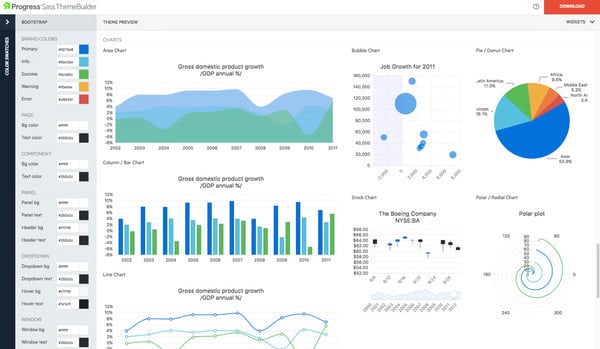
Across G2 feedback, there is a lot of love for the Theme Builder tool and cascading style sheets (CSS) customization model. These are frequently highlighted as practical strengths. Teams describe selecting or modifying themes and applying them consistently across components with minimal effort. For teams managing brand or design system requirements, this approach helps maintain visual consistency while simplifying implementation.
Kendo UI ships with built-in web content accessibility guidelines (WCAG) 2.1 accessibility compliance across its component library, eradicating a whole family of challenges for the development team. The widget library meets the category average at 84%, with reviewers in regulated and public-sector environments specifically calling out tested, documented components as a reason the suite holds up in regulated industries.
Now coming to my favorite part: G2 users consistently report faster front-end development cycles when using Kendo UI. Teams describe writing less code to deliver production-ready interfaces, with built-in handling for data binding, pagination, export, and responsive rendering. This leads to faster delivery timelines across both prototyping and full-scale application development.
Kendo’s per-developer pricing is a concern for developers who have been fans of open source alternatives. Some G2 reviewers mentioned that the per-developer pricing adds up quickly and could become a concern for engineering organizations with larger headcounts or tighter per-seat budgets. The commercial support structure, WCAG compliance, and quarterly release cadence deliver sustained value that justifies the investment for teams where long-term stability is non-negotiable.
There is also some concern voiced in a few G2 reviews about the documentation running thin for edge-case scenarios and complex customizations. Teams working beyond standard component implementations are most likely to hit these gaps and need to rely on forums or support channels. Core API references remain detailed and navigable for the majority of use cases, and the support team resolves advanced queries efficiently. The quarterly release cadence also means that gaps in documentation coverage tend to close over successive versions rather than persisting indefinitely.
Taken together, Progress Kendo UI is a reliable choice for teams that need a commercially supported, enterprise-tested component suite with consistent behavior across multiple JavaScript frameworks. The quarterly release cadence, WCAG compliance, and depth of the data grid make it particularly well-suited for organizations building data-intensive applications where long-term stability and support accountability matter more than upfront cost.
What I like about Progress Kendo UI:
- The consistent API across jQuery, Angular, React, and Vue allows teams to reuse component knowledge across projects, speeding up onboarding and reducing fragmentation between frameworks.
- The data grid includes built-in support for filtering, sorting, remote data binding, and export to PDF and Excel, covering most enterprise data needs without requiring additional tools.
What G2 users like about Progress Kendo UI:
“It allows my development team to create user interfaces with little to no effort on their part. The libraries are extensive and suit our purposes well. They’re flexible enough for our needs and easy to customize.”
– Progress Kendo UI review, Kent H.
What I dislike about Progress Kendo UI:
- Per-developer licensing scales in cost as headcount grows, most apparent for larger engineering teams. Commercial support, WCAG compliance, and long-term release stability deliver value that holds up across the full lifecycle of a production application.
- Documentation thins out for advanced customization scenarios, affecting teams working outside standard implementations. Core API references remain detailed for most use cases, and the support team resolves edge-case queries efficiently.
What G2 users dislike about Progress Kendo UI:
“The main downside is the error messages and logs. Sometimes, when we implement a feature, an error appears, but the message itself isn’t clear and doesn’t explain what it really means. It also doesn’t point to our own file; instead, it references a file inside the library with thousands of lines. Without more detailed information, it’s very hard to trace the exact issue.”
– Progress Kendo UI review, Jordan D.
3. Node.js: Best for scalable, event-driven server-side JavaScript development
Node.js gives frontend developers a familiar language for backend work while providing backend teams with a runtime designed for speed and concurrency, with an event-driven, non-blocking (input/output (I/O)model that handles large volumes of simultaneous connections efficiently.
Access to the node package manager (NPM) ecosystem is one of the most frequently cited advantages I’ve come across in Node.js reviews. Packages covering authentication, database connectivity, file handling, email delivery, WebSockets, and more allow teams to assemble functionality without building everything from scratch. The breadth of available tooling is reflected by a library’s rating of 95%. In my opinion, this depth is consistently associated with faster API delivery and shorter development cycles.
Working across both client and server layers in JavaScript removes the friction of maintaining separate language stacks. This allows developers to move between frontend and backend tasks without switching context, which supports faster onboarding and smoother collaboration.
Performance in I/O-heavy workloads remains a core strength. Built on Google’s V8 engine, Node.js handles concurrent requests efficiently. I’ve seen this in use cases such as real-time applications, notification systems, live data pipelines, and APIs. G2 reviewers describe deploying Node.js across serverless environments, microservice architectures, and alongside frameworks like Express and NestJS while maintaining consistent performance under load.
An active developer ecosystem supports ongoing development and problem-solving. Users describe finding tutorials, maintained packages, and solutions across forums, making it easier to resolve implementation challenges. The community strength behind Node.js shows in a rating of 96%, remarkably above the category average, and the OpenJS Foundation’s governance gives reviewers confidence in continuous updates and long-term stability.
Getting backend services running happens quickly with minimal setup, which, in my opinion, matters most for reducing time to development. G2 users describe a fast path to building functional APIs, allowing teams to focus on application logic early in the development process. Whether used with Express for lightweight routing or NestJS for a more structured architecture, Node.js is described as a runtime that supports rapid development without slowing early progress.
I have observed that deploying Node.js applications across different environments stays consistent and reliable for developers. G2 reviewers describe running the same codebase across Windows, Linux, macOS, Amazon Web Services (AWS) Lambda, Docker containers, Kubernetes clusters, and major cloud platforms such as Google Cloud and Azure. Cross-environment consistency is rated at 94% by G2 users, and teams managing distributed infrastructure describe this reliability as reducing maintenance work and keeping release cycles predictable.
Across G2 reviews, the single-threaded model surfaces as a constraint when workloads shift toward CPU-intensive tasks like heavy data processing or machine learning inference. Teams building computation-heavy pipelines feel this most, where worker threads or external services are needed to maintain performance. The event-driven architecture continues to deliver strong, predictable performance for I/O-heavy applications, where Node.js remains the default runtime of choice across production environments.
Some npm packages are poorly maintained or outdated, a gap that G2 users flag most in larger projects where dependency bloat and version conflicts surface under scale. Teams without structured vetting practices are most exposed to this variability. The ecosystem’s sheer depth means mature, well-supported alternatives exist for virtually every backend requirement a production application demands.
All considered, Node.js earns its place as the default server-side JavaScript runtime for teams that need fast I/O handling, a massive package ecosystem, and the ability to build and ship backend services without switching languages from the frontend. Its community depth, deployment flexibility, and low barrier to entry make it a strong anchor for full-stack JavaScript teams at any scale.
What I like about Node.js:
- The non-blocking, event-driven architecture handles high volumes of concurrent connections efficiently, making it well-suited for real-time services and API-heavy backends where response speed matters.
- Using JavaScript across both frontend and backend removes context switching between languages, helping teams stay flexible and making onboarding faster across layers.
What G2 users like about Node.js:
“Node.js is really fast and lightweight. I set up a small web app on Hostinger Node in about 30 minutes, and it just worked without me touching server settings. I found it very easy to use and implement, even for a small project like mine.”
– Node.js review, Zain A.
What I dislike about Node.js:
- The single-threaded model imposes constraints on CPU-intensive workloads, most relevant to computation-heavy pipelines. The event-driven architecture delivers strong, consistent performance for I/O-heavy applications across production environments.
- Some npm packages lack consistent maintenance, most apparent in larger dependency-heavy projects. The ecosystem’s depth ensures mature, well-supported options exist for virtually every backend requirement.
What G2 users dislike about Node.js:
“Dependency on npm can sometimes be an issue, as packages may become deprecated. Async debugging can be challenging, and it is not ideal for large data processing, LLM workloads, web scraping, or CPU-intensive tasks compared to Python.”
– Node.js review, Hiro J.
4. Angularjs by Google: Best for building dynamic, component-driven web applications
AngularJS by Google is a JavaScript-based open-source front-end framework originally developed by Google for building structured, maintainable web applications with two-way data binding and a modular model-view-controller (MVC) architecture. It introduced declarative templating directly in HyperText Markup Language (HTML) and a dependency injection system that made large-scale front-end applications more organized and testable.
From what I analyzed, two-way data binding is the capability most consistently highlighted across G2 reviews. Changes in the model are automatically reflected in the view with no manual DOM manipulation needed. Teams building data-driven interfaces, e-commerce applications, and dashboards describe this as one of the most direct productivity gains the framework offers. This reduces the synchronization code that would otherwise need to be written and maintained separately.
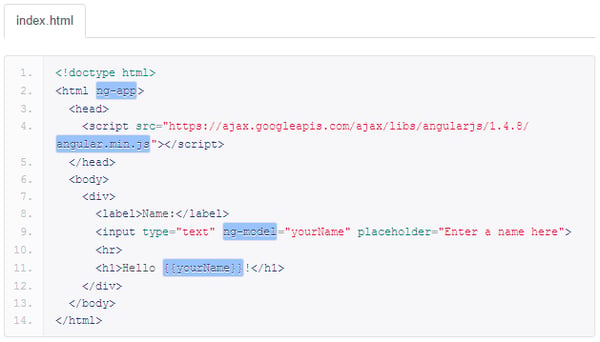
AngularJS will be a natural choice for developers who are fans of modular development. The MVC-based architecture divides applications into Model, View, and Controller layers, giving development teams a consistent structure for organizing code across large projects. G2 users building internal portals and enterprise web applications describe this separation as making codebases easier to navigate and extend as the scope grows. AngularJS carries a Libraries score of 84%, reflecting built-in tooling across routing, dependency injection, and templating that reduces reliance on third-party packages for core application needs.
Dependency injection is a core part of how AngularJS manages services and component relationships. G2 reviewers working on large-scale applications describe the dependency injection (DI) system as making it straightforward to share services across components without tight coupling, keeping the codebase modular and testable. Teams that built multi-service architectures on AngularJS point to dependency injection as what held the project together as projects grew.
I noticed quite a bit of praise for reusability amongst AngularJS users. Reusable components and directives allow teams to define custom HTML elements that encapsulate logic and presentation. G2 users describe writing a directive once and applying it across the application, reducing duplication and keeping implementations consistent. For teams maintaining large codebases, this reusability is described as one of the primary reasons AngularJS remained the framework of choice for projects that needed to grow without fragmenting the codebase.
AngularJS applications run consistently across modern browsers without requiring environment-specific workarounds. The framework carries a Browser Support score of 87%, exceeding the category average. G2 users maintaining production applications across diverse user environments describe this cross-browser reliability as reducing QA effort and keeping release cycles predictable.
Google’s backing and the maturity of the AngularJS ecosystem mean teams can find documentation, community answers, and integration examples for most implementation scenarios. G2 reviewers describe the community resources as extensive enough to resolve most development questions without formal support, and AngularJS carries a Community score of 84%, reflecting the depth of available guides and maintained examples.
One concern that some G2 reviews have highlighted is the learning curve associated with the directive syntax and dependency injection conventions. I believe this concern would mostly be amongst teams onboarding contributors without prior framework experience. Once core patterns are internalized, the same conventions that slow initial progress become the structural backbone that keeps large codebases organized and consistent.
Performance constraints in large-scale applications and limited native mobile-first support come up consistently in G2 feedback as recurring considerations. Teams building consumer-facing or responsive-first products are most likely to encounter these boundaries. The MVC architecture and two-way binding model continue to deliver reliable, structured development for desktop-oriented single-page applications (SPAs) and internal tools where neither constraint surfaces in day-to-day work.
angularjs is the most practical choice for teams maintaining existing single-page applications built on the framework, or for organizations where the structured MVC model, two-way binding, and Google-backed origin remain the right fit for the codebase. Its dependency injection system, reusable directive model, and broad browser support make it a reliable foundation for structured web application development where architectural consistency matters more than modern syntax.
What I like about AngularJS:
- The two-way data binding model keeps UI and application state synchronized automatically, reducing the manual synchronization code teams would otherwise need to write and maintain across data-intensive interfaces.
- The MVC structure and dependency injection system give large teams a consistent architectural model, making codebases easier to navigate, test, and extend as applications grow.
What G2 users like about AngularJS:
“It’s an open-source front-end web framework. It supports a two-way data binding mechanism, which makes it easy to work. Reusable components. supports dependency injection, routing, etc.”
– AngularJS review, Nishedh J.
What I dislike about AngularJS:
- Directive syntax and dependency injection require a meaningful ramp-up for developers from plain JavaScript backgrounds, most apparent in early project stages, though the same conventions provide lasting structural consistency across large codebases.
- Performance limitations and limited native mobile support are most relevant for consumer-facing or responsive-first products, though desktop-oriented SPAs and internal tools operate reliably within the framework’s established scope.
What G2 users dislike about AngularJS:
“Less community support, tougher syntax, and drastic changes in the next versions, and it’s not easy to implement as a challenger.”
– AngularJS review, Aditya P.
5. Angular: Best for large-scale, structured single-page application development
Angular is a complete, TypeScript-based front-end framework built and maintained by Google, with routing, HTTP client, form validation, dependency injection, and testing utilities all included out of the box.
One thing I couldn’t overlook in G2’s review data is that TypeScript consistently comes up as a core part of the Angular experience. The compile-time error detection catches data type issues before the code reaches the browser. Reviewers say this reduces production bugs, especially in larger, multi-developer codebases. Angular’s built-in tooling carries a Libraries rating of 90%, and developers with backgrounds in Java or C# describe the strong typing and class-based architecture as aligning closely with enterprise back-end patterns they already know.
Angular keeps your code organized by forcing you to keep HTML, CSS, and TypeScript in separate files for each component. This makes large projects easier to manage, improves navigation, and helps teams work together more effectively on complex systems like CRMs and dashboards.
Angular uses RxJS to manage how data and state move through your application. For teams building complex, data-heavy interfaces, this is a major benefit: UI components update automatically when data changes, and it helps handle background tasks smoothly. This approach gives developers better, more predictable control over how data flows through their application.
I kept landing on the same insight while reading through Angular reviews: the command-line interface (CLI) came up as a core part of how developers work daily. Generating components, services, modules, guards, and pipes through a single command, with associated test files created automatically, removes repetitive scaffolding work. Reviewers mention getting new developers contributing production-quality structure from their first day, as the CLI enforces consistent file layout without requiring manual setup decisions.
Angular ships with built-in support for unit testing via Jasmine and Karma, and one pattern that showed up repeatedly in reviews was how often this came up. Test files are generated automatically alongside each component and service, so the testing scaffold exists from day one. Reviewers building applications in banking, healthcare, and enterprise internal tools highlight this integrated testing model when discussing environments where reliability and compliance are required.
Google’s long-term backing is a factor G2 reviewers mention when explaining why Angular was chosen, particularly in organizations where framework longevity matters for procurement decisions. The community behind Angular is rated at 89% by G2 users, reflecting the depth of resources, forums, and maintained examples available to teams at any stage. Regular quarterly releases and a publicly communicated roadmap allow teams to plan upgrade cycles with confidence.
Angular’s architecture introduces multiple interdependent concepts simultaneously (TypeScript, dependency injection, RxJS, and the module system), which reviewers flag as slowing early momentum. Developers transitioning from plain JavaScript backgrounds carry the steepest adjustment. The opinionated structure that creates this initial friction is the same mechanism that enforces consistency, testability, and maintainability across large distributed teams over the long term.
Breaking changes between major Angular versions can force refactoring across the codebase, something G2 users flag as a recurring cost of staying current, particularly for teams maintaining large applications. Each upgrade cycle ultimately produces a cleaner, more stable codebase that reflects current best practices and benefits from Angular’s ongoing performance and security improvements.
Angular is the most defensible choice for teams building complex, long-lived front-end applications where structural consistency, TypeScript safety, and Google-backed stability matter more than minimal setup or maximum flexibility. Its full-framework model removes the library assembly decisions that slow other stacks down, and its enterprise adoption record provides procurement confidence that few JavaScript frameworks can match.
What I like about Angular:
- The full-framework model includes routing, HTTP, forms, and testing out of the box, reducing the need to manage multiple packages and simplifying integration decisions.
- TypeScript enforcement and CLI-driven scaffolding help maintain consistency across large, multi-developer codebases as applications grow.
What G2 users like about Angular:
“The component-based architecture keeps everything organized and scalable. Two-way data binding and the built-in CLI save a ton of time. Having everything — routing, forms, HTTP — out of the box without hunting for third-party libraries is a big plus.”
– Angular review, Vinay S.
What I dislike about Angular:
- Angular’s architecture introduces multiple interdependent concepts simultaneously, making the initial ramp-up most demanding for developers from plain Jav