



7 best regulatory change management software I recommend
- Optro (formerly AuditBoard): Best for managing regulatory change within integrated risk, audit, and compliance programs
Centralized controls, policy management, and automated change tracking for large compliance teams. (Pricing available on request – enterprise/custom quotes only) - Visualping: Best for monitoring regulatory website changes and updates
Automated alerts when regulators update rules, guidance, or disclosures across tracked pages. (Starts at $25/month; higher-volume and team plans cost more) - Ideagen Policy Logic: Best for structured policy and regulatory change governance
Controlled policy lifecycle management with approvals, versioning, and regulatory alignment. (Pricing available on request – vendor quote required) - Ncontracts: Best for mid-market financial institutions managing compliance, risk, and vendor oversight
End-to-end regulatory intelligence, obligation tracking, and compliance workflows tailored to banks and credit unions. (Pricing available on request – enterprise/custom pricing) - Apptega: Best for mapping regulatory requirements to controls and frameworks
Unified compliance platform for managing regulatory changes across multiple standards. (Pricing available on request – quote based on scope and users) - Axeptio: Best for consent management and privacy regulatory compliance
Consent collection, tracking, and reporting aligned with GDPR, CCPA, and global privacy laws. (Pricing available on request – varies by traffic volume and use case) - Hyperproof: Best for evidence-driven compliance and regulatory readiness
Automated evidence collection and change tracking across evolving regulatory requirements. (Pricing available on request – custom enterprise plans)
*These regulatory change management platforms are top-rated in their category based on G2’s Winter 2026 Grid Report®. I’ve included their strengths and ideal use cases to help you choose the right platform for your team’s compliance and regulatory workflows.
7 best regulatory change management software I recommend
What I consistently see in strong regulatory change platforms is that they do more than track updates. Review patterns suggest the best tools surface impact, map changes to policies and risks, and force clear accountability. They reduce interpretation drift. They make it obvious which regulations apply, what actions are required, and what evidence will be expected later. Instead of inbox alerts and spreadsheets, teams get a system that creates order under constant regulatory pressure.
This category is not limited to large compliance departments. Adoption patterns show up across financial services, healthcare, manufacturing, and highly regulated mid-market teams. Smaller teams often lean on these tools to compensate for limited compliance headcount. Larger organizations use them to coordinate across legal, risk, audit, and operations without losing traceability. Most platforms emphasize faster setup because regulatory change waits for no one.
How did I find and evaluate the best regulatory change management software?
I used G2’s Winter 2026 Grid Report®, starting with category-level rankings and satisfaction signals across regulatory change management platforms used by small teams, mid-market organizations, and enterprises. From there, I analyzed a large volume of verified user reviews using pattern-based analysis. I focused on what repeatedly comes up in real compliance workflows.
This made it clear which tools tend to reduce compliance drift and which ones introduce friction as regulatory volume grows. Since I have not personally used every platform covered, I validated these findings through discussions and workflow exposure with compliance officers, risk managers, audit teams, and regulated operations leaders who actively work with these tools.
Visuals and product references in the article come from vendor listings and publicly available product documentation. The goal throughout was consistency, over anecdotes, and separating tools that support sustained regulatory execution from those that simply track change on paper.
What makes the regulatory change management software worth it: My criteria
These insights come from patterns I’ve seen across many user reviews, along with understanding how teams work in regulated environments. I focus on what tends to break, slow teams down, or create risk when regulations change faster than teams can keep up. Below are the criteria I use to tell apart systems that actually help teams handle regulations from those that mainly just track or document them.
- Clear signals, fewer distractions: The best regulatory change management software filters noise before it hits the team. Review patterns consistently show frustration with tools that flood users with updates without context. Strong platforms filter by what applies to your industry and geography, so teams spend time assessing impact instead of sorting alerts. Poor signal quality leads to missed obligations or wasted cycles.
- Clear impact assessment tied to real obligations: Tracking that something changed is not enough. The strongest tools force a structured answer to what changed, which policies or controls are affected, and what actions are required. Across reviews, teams value systems that reduce interpretation drift by anchoring change to concrete obligations. When this is weak, ownership blurs and remediation stalls.
- Ownership and accountability that does not leak: Regulatory execution breaks down when responsibility is implied rather than explicitly assigned. High-performing platforms make responsibility explicit and visible, with escalation paths that hold up under audit. Users consistently describe better outcomes when accountability is embedded in the workflow instead of managed through side emails or spreadsheets. When ownership leaks, deadlines slip quietly.
- Traceability from regulation to evidence: Formal reviews expose gaps in documentation and decision continuity quickly. The best platforms keep a clear trail: from the original regulation, through the impact assessment, to the action taken, the control updated, and the proof filed. Review patterns show that teams struggle most when evidence lives outside the system or requires manual reconstruction. Strong traceability reduces audit fatigue and rebuild work.
- Cross-team coordination without handoff friction: Regulatory change rarely sits with one function. Legal, compliance, risk, audit, and operations all touch the process. Platforms that surface shared context and reduce handoff friction often earn stronger feedback. When coordination is weak, updates bounce between teams, and timelines stretch. The cost shows up as delays, not errors.
- Audit readiness as a default state: Strong tools assume scrutiny is constant. They structure data, decisions, and evidence so teams are always audit-ready, not scrambling at the end of a cycle. Review patterns suggest that platforms built this way reduce stress during regulator inquiries. Tools that treat audits as an afterthought force reactive work.
Using these criteria, I narrowed the list to tools that help teams stay clear, accountable, and effective under regulatory pressure. No platform covers everything equally well, so the right choice depends on where your risk sits. Some teams need strong audit trails, while others need faster ways to interpret and act on changes. The goal is to choose a tool that handles regulatory change without slowing down your workflows.
To be included in this evaluation, platforms had to meet all of the following criteria:
- Actively track regulatory changes from external sources
- Support structured impact assessment and response workflows
- Maintain traceability from regulation to action and evidence
- Be used in regulated industries for ongoing compliance execution
This data was pulled from G2’s Winter 2026 Grid Report®. Some reviews may have been edited for clarity.
1. Optro: Best for audit, risk, and compliance at enterprise scale
G2 Rating: 4.6/5
Optro (formerly AuditBoard) is commonly used in audit-led compliance programs, particularly in organizations operating under sustained regulatory scrutiny. It is built to support audits, SOX, risk, and regulatory workflows within a single structured platform. This design aligns well with larger organizations, which is reflected in its user mix where enterprise and upper mid-market teams account for a significant share.
Audits, controls, risks, workpapers, evidence, and frameworks all live in the same system and stay linked to one another. Users describe being able to trace audit tests back to controls and risks with minimal effort, creating continuity across reporting cycles.
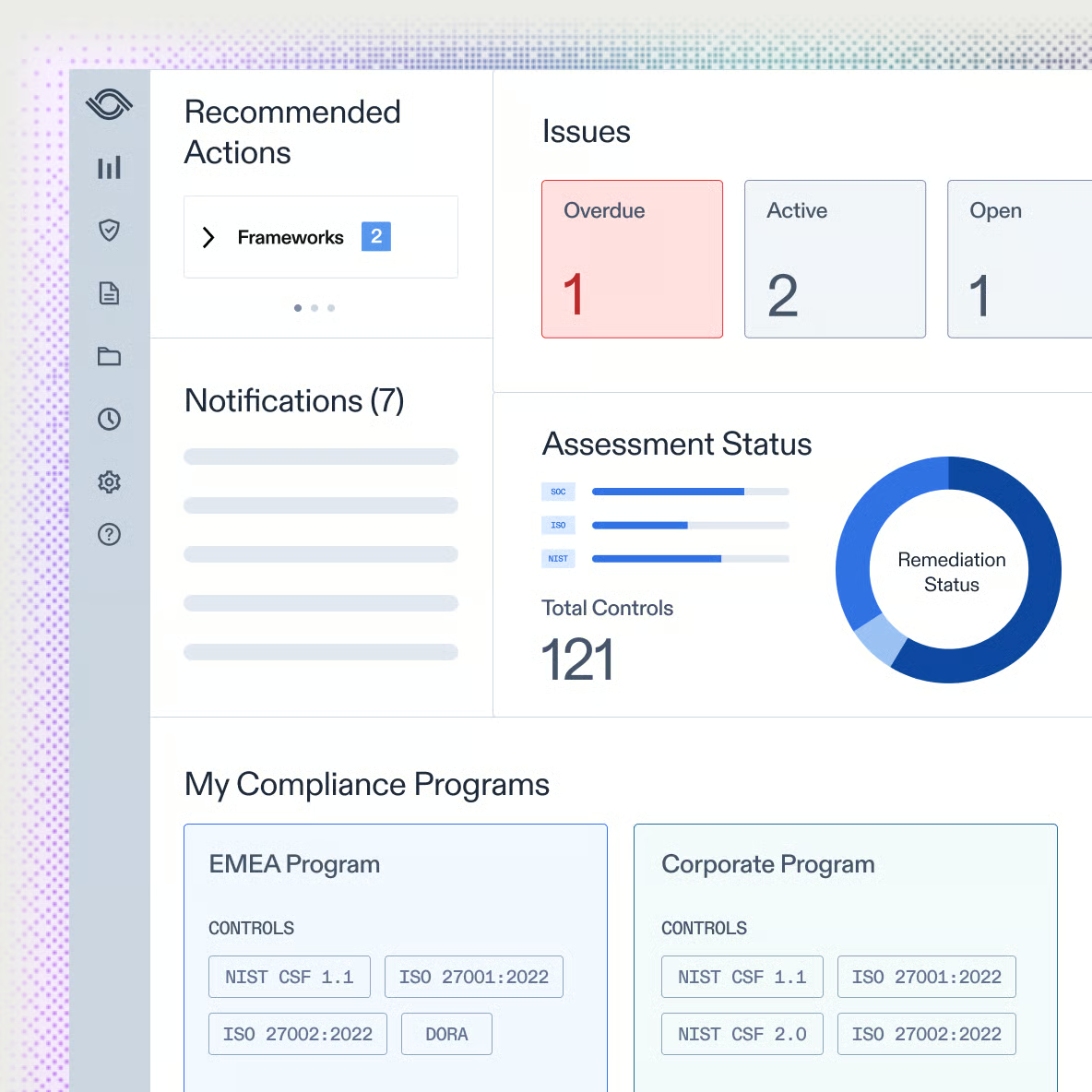
Public companies and heavily regulated teams note that prior audits, historical evidence, and issue resolution paths remain accessible and reusable. This reduces repeated setup work and supports more predictable audit execution.
The platform makes it easier for auditees to handle audits with clear dashboards and structured workflows. All communication stays in one place instead of scattered across emails, which helps teams stay accountable.
Evidence collection, control testing, attestations, and issue follow-ups follow defined workflows. These processes reduce manual coordination and help teams keep documentation current with less effort. For organizations managing multiple audits at once, this structure supports steadier timelines and fewer gaps.
G2 reviewers describe Optro as genuinely responsive to client feedback, with the team taking industry best practices into account as the product evolves. Ease of Setup scores 83%, slightly below the category average of 87%, which aligns with the onboarding investment larger programs typically require. For teams on multi-year programs, this development trajectory supports confidence in the platform as requirements change.
Because the platform is configurable, dashboards and reporting often require setup to match internal tracking standards. Teams with very specific board-level or governance reporting formats may need to invest time tailoring views before they reflect internal expectations. The core audit and risk reporting coverage is solid, and the configuration options give teams meaningful control over how outputs are structured.
Implementation support follows a structured schedule of sessions rather than a hands-on, embedded model. Teams that are new to dedicated audit software and rolling out multiple modules at once may take time to become familiar with terminology and workflows.
Optro functions as a system of record for audit and risk teams that need scale, structure, and long-term consistency. Optro earns its position in programs where audit structure, support quality, and long-term traceability matter more than a lightweight setup.
What I like about Optro:
- Optro brings audits, SOX, risk, and compliance into one connected system, making it easier to trace controls, evidence, issues, and frameworks without relying on ad-hoc documentation or side-channel coordination.
- G2 reviewers highlight the intuitive day-to-day experience, especially streamlined evidence collection, linked workpapers, and clearer collaboration with auditees through shared dashboards.
What G2 users like about Optro:
“I find AuditBoard to be a very simple and user-friendly application. The dashboard is particularly helpful as it allows me to see all project statuses in one place, like submitted, certify, and completed statuses for tests. It’s great for managing SOX Control testing and risk registers because I can create tests and easily track details through the dashboard. The initial setup was smooth, thanks to the AuditBoard learning resources, which made it easy to complete tasks like bulk import and document upload.”
– Optro review, VIDYASAGARREDDY K.
What I dislike about Optro:
- Optro is designed for structured, mature audit and risk programs, so early adoption works best when teams already operate with defined audit and risk processes.
- Reporting and dashboards cover core audit and risk needs well, though teams with very specific internal or board-level reporting formats may need to spend time tailoring views to their governance preferences.
What G2 users dislike about Optro:
“One thing I dislike about Optro is that it can be a bit overwhelming at first, especially for new users who aren’t familiar with audit platforms. The learning curve is noticeable, and while there are plenty of features, it sometimes feels like too many options are packed into one space. Additionally, the system can lag occasionally when handling larger datasets or complex workflows, which slows down productivity. I also think the customization options could be more flexible to better fit unique organizational needs.”
– Optro review, Prince C.
2. Visualping: Best for automated website change monitoring and compliance tracking
G2 Rating: 4.6/5
Visualping is used by compliance, legal, and web operations teams that need visibility into external website changes. G2 review patterns reflect steady confidence in its reliability as a monitoring tool. The user base leans toward small businesses, which account for 61% of users, with consistent adoption across mid-market and enterprise teams in compliance and QA roles.
Compliance and legal teams use Visualping specifically to catch regulatory page updates, changes to terms, disclosures, or guidance — before they create gaps in internal documentation. That early detection is where the tool earns its place in a compliance workflow. This approach supports different levels of urgency without adding operational complexity. Ease of Use rates 93% and Ease of Setup 89%, both above category averages, reflecting how quickly teams reach productive monitoring.
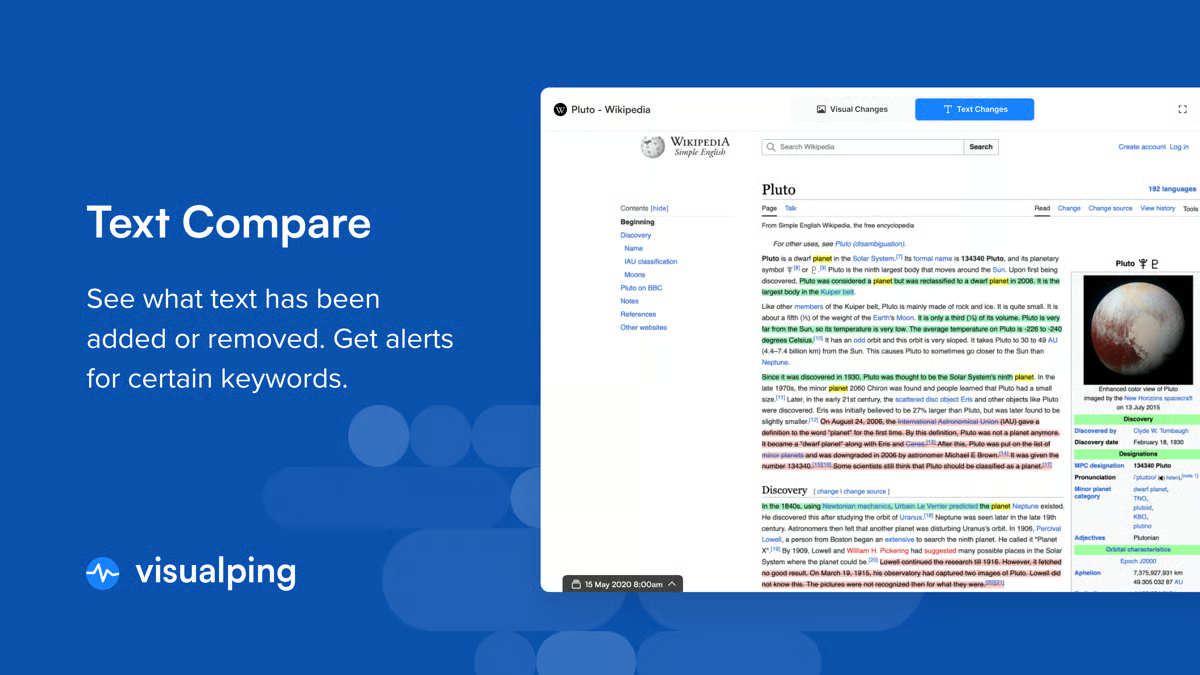
AI text summarization helps teams understand what changed on a page without reviewing raw diffs or screenshots. This is especially useful in regulatory and legal monitoring, where context matters as much as detection.
Alerts are delivered through email and Slack in a consistent and timely way. Teams describe relying on notifications without needing to manually recheck pages. For many users, this supports ongoing monitoring without constant oversight. Meets Requirements scores 94%, above the category average of 90%.
Settings can be refined to reduce alert noise from pages with dynamic elements. G2 reviewers describe adjusting monitoring parameters to filter out cookie banners, rotating ads, and layout shifts that do not reflect meaningful regulatory or content changes. This control helps teams focus on signals that require action rather than managing a high volume of low-value notifications.
Web and QA teams use Visualping for post-deployment checks and site maintenance. Reviewers mention monitoring WordPress updates, plugin changes, and front-end deployments to catch issues early. Integrations with existing tools and features like static IP support allow it to fit into established workflows.
Pages with highly dynamic elements can trigger alerts from minor layout shifts, rotating ads, or cookie banners. Teams monitoring large numbers of URLs may need to invest time dialing in settings before alert volume reflects only meaningful changes. Once configured, the monitoring setup runs reliably without requiring constant manual adjustment.
Credit-based usage and bulk monitoring require operational awareness at scale. Teams running frequent checks across many pages benefit from actively planning monitoring schedules to balance coverage and credit usage. The flexibility to adjust frequency at a granular level helps teams manage this across different priority tiers.
Visualping fits teams that need dependable, automated awareness of website changes. For compliance, legal, QA, and web operations teams focused on understanding when something changes and assessing its impact quickly, it provides a practical and reliable monitoring setup.
What I like about Visualping:
- Visualping removes the need for constant manual website checks by delivering timely alerts when meaningful visual or content changes occur across monitored pages.
- Reviewers consistently highlight the AI-powered change summaries, which help teams quickly understand what changed and why it matters without scanning screenshots line by line.
What G2 users like about Visualping:
“I find Visualping incredibly valuable for automating website change monitoring, which saves me the hassle of manual checks every day. The service helps me stay informed about important changes, like terms and conditions or updates on program pages, which would otherwise be a tedious task. I appreciate how easy and quick the setup was, as I could do it all online without complications.
Visualping consistently provides reliable service, which is why I chose it over other options, even though I considered several. The automatic alerts and the auto red line feature are especially useful for my day-to-day tasks, enabling me to quickly identify and address changes without delay.”
– Visualping review, David R.
What I dislike about Visualping:
- Visualping captures a broad range of visual and content changes, which suits teams that want full visibility but may feel more detailed than necessary for high-level monitoring only.
- Managing usage credits and alert volume across many pages adds overhead, though the granular frequency controls help teams prioritize what matters once settings are configured.
What G2 users dislike about Visualping:
“I find that Visualping sometimes flags too many changes, making it difficult to differentiate important updates from noise. The monitoring page often has issues with loading due to blocking bot activity or failures, which complicates the tracking process. The product struggles with websites that fail to load, and I believe I should not be charged if the website shows a loading sign.”
– Visualping review, Benjamin N.
3. Ideagen Policy Logic: Best for structured policy and regulatory change governance
G2 Rating: 4/5
Ideagen Policy Logic is designed for organizations operating under sustained regulatory pressure, particularly in education, aged care, and similarly governed environments. The platform focuses on keeping policies aligned with legislative changes and best-practice updates. Reviewers describe this alignment as reducing policy drift and supporting confidence in day-to-day compliance work.
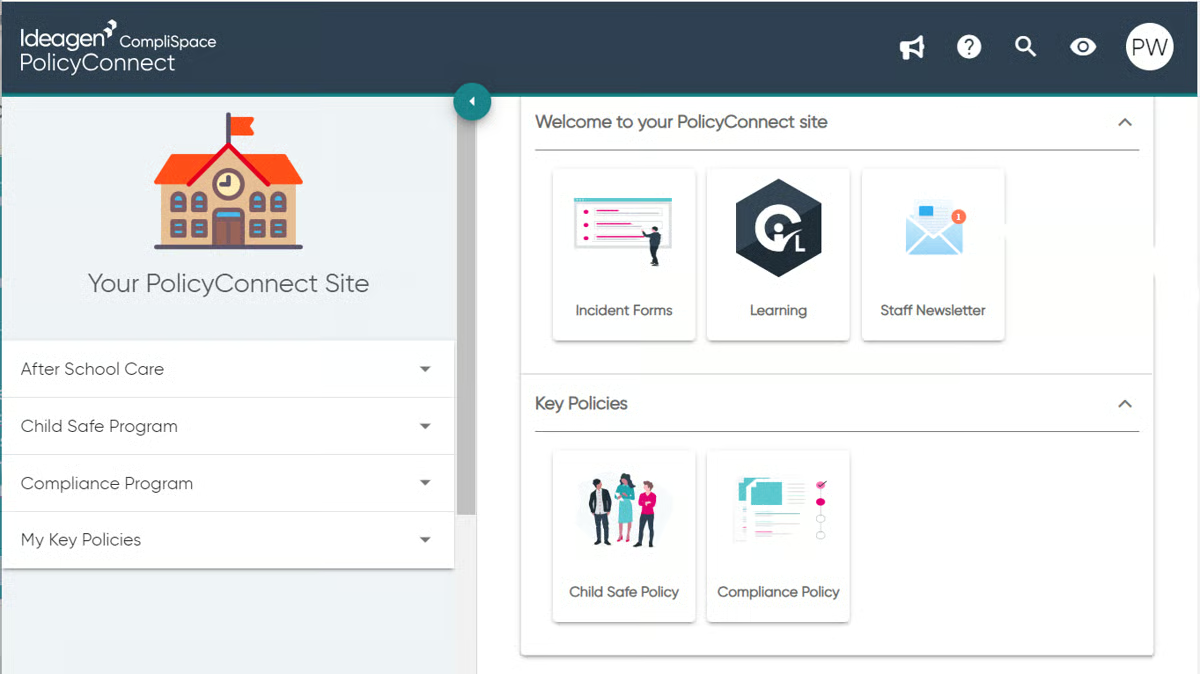
Approval status, historical versions, and published guidance sit in one place, clearly organized so staff always work from current material. This structure replaces shared drives and disconnected folders with a single source of truth.
Adoption patterns reinforce where the platform fits best. About 79% of users come from mid-market organizations, with a smaller representation from SMBs and limited enterprise usage.
Policy Logic functions as a central reference point when used alongside modules such as Assurance and PolicyConnect. Policies, forms, incidents, hazards, complaints, and feedback are linked through workflows that integrate compliance into routine operations.
Sector alignment appears clearly in user feedback. Education teams note that templates, language, and workflows reflect real operational processes around duty of care, complaints handling, and risk management. Implementation is described as manageable, and many teams use the main policy page as a central access point for staff. Meets Requirements scores 84%, which sits below the category average of 90%, reflecting the platform’s focus on a defined sector rather than broad applicability.
Auditors and external reviewers can be given direct access to the platform to retrieve the information they need independently. G2 reviewers describe this as reducing the back-and-forth typically associated with audit preparation. It also supports cleaner handoffs between internal teams and external oversight without requiring manual document compilation. Quality of Support scores 78%, which is worth factoring in for teams that expect hands-on, ongoing support.
The platform consolidates compliance plans, risk registers, and linked tasks in one place, which G2 reviewers describe as particularly useful for managing obligations across multiple programs. Teams working across several compliance frameworks note that having everything centrally accessible reduces duplication and makes it easier to demonstrate coverage.
Policies remain available and traceable beyond staff turnover, helping preserve institutional knowledge.
Working across multiple linked policies can require navigating several documents in complex scenarios. Organizations with highly specific role structures may spend additional time managing individual content variations to maintain precision across their policy suite. The single-source structure means that once teams are oriented, navigation becomes more predictable over time.
The modular structure means components operate cohesively but not as a single unified interface. Some users also note accessibility considerations, particularly for staff using assistive technologies, where interactive layouts may require adjustment. The platform’s sector-specific design means these configurations are typically well-understood within its core user communities.
Ideagen Policy Logic fits mid-market organizations in education, aged care, and regulated public-sector environments that need dependable, legislation-aware policy management. For teams prioritizing centralized access, clarity, and long-term compliance stability, it supports structured governance without introducing unnecessary operational friction.
What I like about Ideagen Policy Logic:
- Ideagen Policy Logic centralizes policies and keeps them aligned with legislative changes, helping teams reduce policy drift and stay current without constant manual review.
- Reviewers highlight the structured environment for policies, forms, incidents, and complaints, which makes compliance part of routine operations rather than a periodic scramble.
What G2 users like about Ideagen Policy Logic:
“Everything from the language used to the structure of policies, templates, and workflows feels relevant and usable. It aligns with how schools actually function. When you’re dealing with risk management, child protection, excursions, or complaints handling, the system speaks our language and supports our processes rather than complicating them.”
– Ideagen Policy Logic review, Brigette K.
What I dislike about Ideagen Policy Logic:
- The platform emphasizes completeness and cross-referencing, which can require users to navigate across related policies when working through complex scenarios.
- Customization favors consistency across policies, so organizations with highly specialized structures may need additional planning to align content to internal models.
What G2 users dislike about Ideagen Policy Logic:
“Not very easy to navigate. There have been instances where I have had to be guided in a school process by various policies and procedures, and I have ended up with a dozen tabs open at the same time, and thoroughly lost.”
– Ideagen Policy Logic review, James R.
Effortlessly turn meetings, interviews, and videos into accurate, searchable text using powerful AI transcription tools.
4. Ncontracts: Best for mid-market financial institutions managing compliance, risk, and vendor oversight
G2 Rating: 4.5/5
Ncontracts is adopted primarily by regulated financial institutions operating under ongoing audit and exam requirements. A large majority of its G2 user base comes from larger, compliance-focused organizations, which is reflected in how the platform emphasizes structure, documentation, and regulatory alignment.
Reviewers describe this consolidation as reducing manual coordination and making daily compliance work more predictable. Meets Requirements scores 93%, above the category average of 90%.
Regulatory updates are tracked and linked directly to policies and issues. Notifications surface changes as they occur, and reports and templates reflect formats regulators commonly expect during exams.
Vendor oversight is handled through the NVendor module. Vendor documents, risk assessments, alerts, and review cycles are managed within standardized workflows. Users describe being able to onboard vendors and maintain compliance even when stakeholders have limited prior experience.
Workflows remain consistent across modules such as NVerify, NFindings, and NContinuity. Navigation and behavior are similar from one area to another, which reduces context switching. G2 reviewers consistently describe the Ncontracts support team as responsive, knowledgeable, and thorough in following through on tickets.
Users note that support staff takes ownership of issues rather than redirecting them. For compliance teams under exam pressure, this level of responsiveness reduces the risk of unresolved platform issues that could affect regulatory readiness. Quality of Support rates 98%, and Ease of Doing Business, With 97%, both well above category averages.
Adopting multiple modules at the same time can require a short adjustment period. Teams rolling out compliance, risk, and continuity areas together may need time to become familiar with workflows and terminology across each area. The consistency of navigation across modules means that familiarity gained in one area transfers relatively quickly to others.
Some processes follow defined manual steps to preserve audit traceability. Teams expecting deeper automation or tighter system integrations with loan platforms and core banking systems may need to plan around these boundaries. For exam-focused teams, the structured approach directly supports the documentation trails that regulators expect.
Ncontracts fits mid-market financial institutions that need centralized, exam-ready compliance and vendor risk management. For organizations prioritizing documentation, regulatory alignment, and predictable oversight, it supports structured compliance work without unnecessary complexity.
What I like about Ncontracts:
- Ncontracts brings regulatory change management, policies, issues, vendor oversight, and risk assessments into one system, helping compliance teams replace fragmented spreadsheets and email-based tracking.
- Reviewers consistently point to strong alignment with regulatory exams, especially through fair lending, CRA, and change tracking features that mirror examiner expectations.
What G2 users like about Ncontracts:
“I have been using Ncontracts for two years primarily for compliance purposes through my work, and I’ve found it very beneficial. I appreciate how straightforward the initial setup process was, as it wasn’t difficult at all, allowing us to get up and running quickly. The software excels at streamlining processes, which has greatly saved me time and increased efficiency in my workflows. One of the standout features for me is the regulation change management feature, which has proven to be extremely useful. Additionally, the notification of regulation changes is a smart feature that helps me stay updated with the latest compliance requirements effortlessly. This functionality is instrumental in helping me manage compliance changes effectively, ensuring that I remain informed and can act promptly.”
– Ncontracts review, Celeste B.
What I dislike about Ncontracts:
- Because Ncontracts covers multiple compliance and risk domains, teams adopting several modules may benefit from a phased rollout to get comfortable with workflows and terminology.
- Some processes rely on defined manual steps to preserve audit traceability, which suits exam-focused teams but may feel structured for those expecting deeper automation or system integrations.
What G2 users dislike about Ncontracts:
“Some of the older features that are part of the products we have do not integrate or transfer well to other areas of the services. These features were resolved through new products and services they have created, but the new offerings come with additional costs. We understand the reason, but being charged for the better versions of something we have is difficult to get through budgeting. They will, however, work with you to find the best balance for costs for your organization.”
– Ncontracts review, Cassandra B.
5. Apptega: Best for small and mid-sized teams managing multiple compliance frameworks
G2 Rating: 4.5/5
Apptega is designed to bring structure to compliance work without introducing enterprise-level complexity. Its user base skews toward small businesses and mid-market organizations, which is reflected in how the platform prioritizes clarity and daily usability. This positioning aligns well with lean security teams and MSSPs that need repeatable compliance programs without rebuilding processes for every engagement. It sits clearly in the mid-market and SMB space, where structured compliance without enterprise overhead is the priority.
Multiple compliance frameworks are managed within a single workspace. Standards such as NIST, CMMC, ISO, and HIPAA are centralized and supported through pre-mapped controls, reducing duplication across overlapping requirements. Teams select the frameworks they need, and the platform applies a consistent structure underneath, which simplifies setup and ongoing maintenance. Ease of Setup scores 96% and Ease of Use scores 95%, both well above category averages, reflecting how quickly lean teams reach productive compliance work.
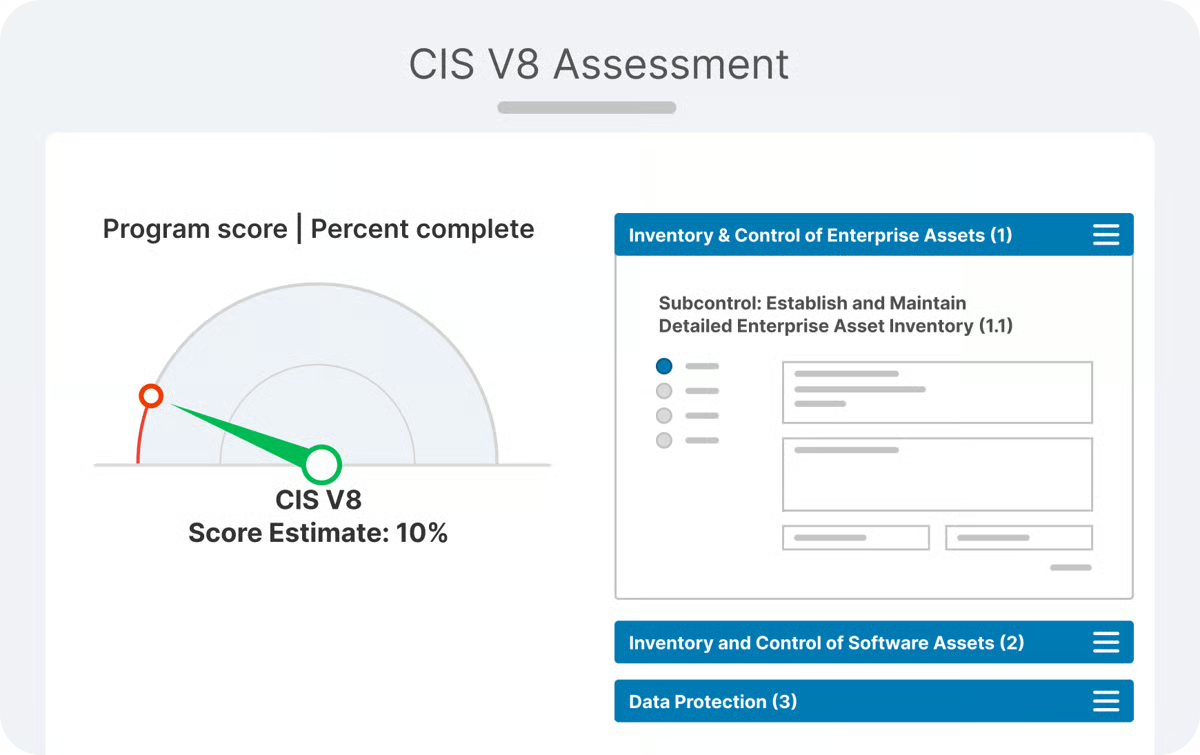
Compliance programs can be built incrementally. Assessments often start at a foundational level and expand as requirements mature, matching how most organizations grow their security posture. This approach supports progress without forcing teams to define every control upfront.
Dashboards and scorecards provide visibility into compliance status and progress. Reporting is designed for executive consumption, giving leadership a clear view of posture without requiring deep technical interpretation. This helps keep stakeholders informed without adding reporting overhead to practitioners.
Customer engagement plays a role in how teams experience the platform. Users describe responsive support and ongoing communication around product updates and roadmap direction. Long-term users note that capabilities have expanded steadily over time, reflecting continued development driven by practical use cases. Quality of Support rates 97% and Ease of Doing Business rates 99%, both well above category averages.
AI text summarization scoring 85% helps reduce the effort required to review compliance content and documentati