



As a sales associate in my early professional days, I’ve gathered hands-on experience working with VoIP providers. I also personally believe voice to be the most effective sales channel.
But things have not always been smooth sailing. I’ve had my fair share of challenges with these tools, which eventually led to missed sales opportunities. I’ve dealt with issues such as inbound contact data not being stored and long wait times, latency, jitter, and call disconnections.
That’s what motivated me to put together a list of the Best VoIP providers in 2026 to help those looking for tools that solve these problems. The right tool helps employees connect remotely, integrates with CRM, converts recordings to voicemail, and keeps minimal latency and call disturbance.
Whether you’re a Sales development or customer support representative encountering the same issues I did, or a business owner who uses VoIP for business connectivity, these tools are worth your attention. To summarize, my top 7 providers are Zoom Phone, Nextiva, RingEX, Quo, Webex Calling, Dialpad Connect, and Vonage Business Communications.
7 best VoIP providers in 2026: most workable options
- Zoom Phone: Best for unified communication within the Zoom ecosystem
A seamless VoIP solution that combines calls, meetings, and messaging into one platform, ideal for teams already using Zoom. (Pricing: Starts at $15/user/month) - Nextiva: Best for phone features with modern automation
A reliable VoIP system with strong call quality, automation features, and customer support, suited for growing businesses. (Pricing: Starts at $15/user/month) - RingEx: Best for team collaboration with screen sharing
An advanced VoIP platform with AI-powered call summaries and collaboration tools, ideal for distributed teams. (Pricing: Business phone is custom upon request) - Quo: Best for smart call recording and virtual number management
A simple, intuitive VoIP tool with strong messaging and call management features, ideal for small teams and startups. (Pricing: Starts at $15/user/month) - Webex Calling: Best for enterprise-grade VoIP and unified communications
A robust VoIP system with strong security, reliability, and integration within the Webex ecosystem for larger organizations. (Pricing: Custom pricing) - Dialpad Connect: Best for intelligent calling with prospect data logging
An AI-powered VoIP platform that offers real-time transcription, call summaries, and CRM integrations for sales teams. (Pricing: Starts at $15/user/month) - Vonage Business Communication: Best for customization and voicemail
A flexible VoIP solution with multi-channel communication, integrations, and voicemail transcription for diverse business needs. (Pricing: Starts at $19.99/month/line)
* These VoIP service providers are top-rated in their category, according to G2 Spring 2026 Grid Report. I’ve also added their monthly pricing to make comparisons easier for you.
7 best VoIP providers I strongly recommend
Voice over Internet Protocol (VoIP) tools have quickly replaced traditional phone lines as the primary medium for business communications, thanks to the convenience and flexibility they offer.
When I was in sales, even though I didn’t play a part in shortlisting a VoIP provider, I was part of the outbound sales team that explored and used the tools actively. Over two years of working with cloud-based phone systems, I can say that an ideal VoIP system should offer extensions to a remote workforce, integrate with CRM, and scale as the business grows.
By solving these issues, VoIP systems help enhance communication flexibility and reduce operational costs. This can help cut costs by 45% compared to traditional phones and increase productivity by 67%. It’s no surprise that this market is estimated to reach 127.1 billion by 2035 alone.
At the end of the day, choosing the right VoIP provider isn’t just a technical decision, but a strategic one that can directly impact how efficiently your team communicates and scales.
Note: Evaluating and using a VoIP service might require additional hardware and investments. It’s important to account for these costs when planning your budget.
How did I find and evaluate these best VoIP providers?
I spent weeks researching and analyzing various VoIP tools from the latest G2 Grid® Report to form a well-researched opinion for this article. I analyzed the key features, pros and cons, pricing, additional costs, and real-time G2 reviews that give substance to my research and provide complete information on these 7 VoIP systems.
During my research, I also deployed AI tools to uncover software trends, sort reviews, and list user sentiments for each platform. I combined the AI analysis with my hands-on research to cover all the software’s parameters.
When I couldn’t personally test a tool due to limited access, I consulted a professional with hands-on experience and validated their insights with verified G2 reviews. The screenshots featured in this article may include both those captured during testing and those obtained from the vendor’s G2 page.
In this list, you will find the 7 best VoIP Software, ranked to the proprietary G2 score, an aggregate of several factors such as ease of use, administration, market presence, customer segment, and customer satisfaction.
What makes the best VoIP provider worth it: My honest take
After combining my experience as an erstwhile sales professional, analyzing G2 Data, and reviewing 40+ tools, I found some common themes.
While jitter-free, clear, high-quality audio exchange with VoIP software is crucial to call center teams, a business looking to gather intel to choose the right tool will need to factor in more details. Factors such as contract value, trial periods, configuration costs, hardware requirements (IP phones and adapters), and UI/UX compatibility to integrate it with your existing call center stack.
To help you choose wisely, I’ve listed a few important parameters to check while evaluating a VoIP system:
- Call quality and reliability: I prioritized providers that deliver consistent call connectivity and clear audio. If call quality drops, nothing else matters. I looked for high-definition voice, minimal latency and jitter, strong uptime SLAs, and systems built on reliable infrastructure with automatic failover.
- Integration capabilities: I checked whether each VoIP system integrates smoothly with tools like CRM platforms, helpdesk software, and ticketing systems. Strong integrations reduce manual work, prevent data silos, and streamline agent workflows. Some platforms also offer AI-powered call summaries and logging, which further improve efficiency.
- Scalability and multi-location support: I focused on solutions that scale with business growth. Whether supporting a small team or a large call center, the system should handle expansion without added complexity. Features like dynamic call routing, virtual extensions, and support for remote teams and multiple locations are essential.
- Security and compliance: Security is non-negotiable. I looked for providers that comply with standards like GDPR, HIPAA, or PCI-DSS. Strong VoIP systems should provide end-to-end encryption to ensure your data exchanges are secured against malware.
- Total cost of ownership (TCO): I evaluated the full cost beyond base pricing, including setup, configuration, add-ons, and international calling charges. A lower upfront price can become expensive if essential features are locked behind upgrades.
- Support and service level agreements (SLAs): I ensured these platforms offer reliable 24/7 support, clear SLAs, and responsive service teams. In high-volume communication environments, timely support is critical to avoid disruptions.
- Cost-effectiveness and ROI: I shortlisted providers that balance pricing with performance and long-term value. I considered trial availability, transparent pricing, bundled features like analytics or auto-dialers, and whether the platform can grow with the business. Some tools also use AI-driven insights to help teams track performance and improve call outcomes.
Using these parameters, I’ve shortlisted the top 7 VoIP systems you can implement with a softphone or a VoIP phone.
The list below contains genuine reviews from the VoIP Providers category page. To be included in this category, software must:
- Provide VoIP PBX systems for businesses or offer a VoIP softphone application
- Include features that help manage incoming calls, such as call forwarding, call transferring, and routing
- Enable real-time network monitoring via dashboards
- Offer integration compatibility with communication and CRM platforms
*This data was pulled from G2 in 2026. Some reviews may have been edited for clarity.
1. Zoom Phone: Best for seamless communication within the Zoom ecosystem
G2 review: 4.6/5
While Zoom needs no introduction, its VoIP-first product scores highly among the other tools in the grid report. Zoom Phone is built as a cloud-based VoIP system that brings calling, messaging, and meetings into one unified platform, while naturally fitting into the Zoom ecosystem. This makes it easier to manage communication without constantly switching between tools.
Based on G2 data, Zoom Phone scores highly across key usability metrics, including ease of use (94%), meets requirements (94%), and ease of setup (92%). Its collaboration features are also well rated, with video calls (95%), conference calls (94%), and screen sharing (94%), which highlights its strength as a unified communication platform.
One of the first things that stood out to me was how easy it is to get started. The setup process is quick, and if you have used Zoom before, the interface feels instantly familiar. I didn’t have to spend much time figuring things out, which made onboarding much smoother.
I also liked how everything is connected within the same ecosystem. I could move from a call to a meeting, share my screen, or drop a message without opening a separate app. This kind of continuity makes a real difference when you are managing multiple conversations throughout the day.
The cross-device experience is another strong point. Whether I was using my laptop or switching to mobile, the experience stayed consistent. I could pick up calls from anywhere and continue conversations without interruptions.
Call quality is generally reliable. Based on G2 reviews, many users highlight clear audio and stable performance during regular use, especially on a strong internet connection. It is not perfect in every situation, but for most day-to-day communication, it holds up well.
Features like voicemail transcription, call recording, and call history also help keep everything organized. I didn’t have to manually track conversations, and having those details readily available made follow-ups much easier.
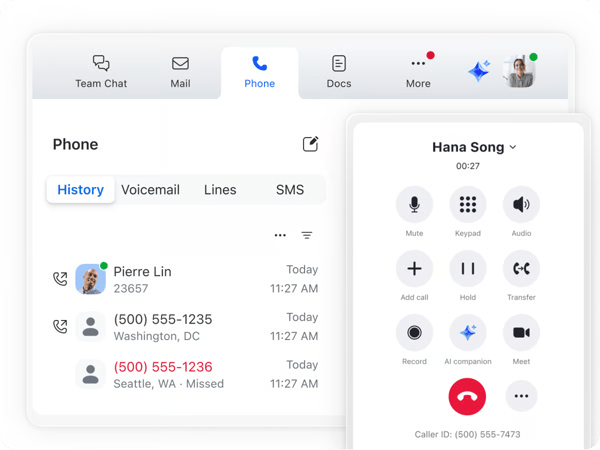
That said, Zoom Phone does have its drawbacks. Based on G2 reviews, call quality can sometimes be affected by internet stability, with occasional drops or brief disruptions during weaker connections. While this is not unique to Zoom Phone, it can be noticeable in certain situations. That said, on a stable network, the calling experience remains clear and reliable for most day-to-day use.
Another area where users have noted some friction is the app experience. There are occasional issues with login sessions, call notifications, or staying connected across devices. While these instances are not very frequent, they can disrupt workflows. However, once logged in and set up, users state that everything runs smoothly and the platform delivers a consistent communication experience.
To sum it up, Zoom Phone brings calling, meetings, and messaging together into one cohesive platform, which makes it a strong choice for teams already using Zoom. With its easy setup, familiar interface, and seamless cross-device experience, it works well for businesses that want to simplify communication without adding complexity. It is especially well-suited for teams that value convenience, quick adoption, and a unified workflow across tools.
What I like about Zoom Phone:
- I really liked how everything in the Zoom ecosystem is connected, making it easy to switch between calls, meetings, and messages without juggling multiple tools.
- It is very easy to set up and use, with a familiar interface and consistent experience across desktop and mobile.
What do G2 users like about Zoom Phone:
“Zoom Phone offers reliable call quality and seamless integration with the Zoom ecosystem, making communication simple and centralized. The ability to manage calls, voicemails, and call logs from both desktop and mobile helps sales teams stay responsive and organized, whether working remotely or in the office.”
– Zoom Phone Review, Jyoti H.
What I dislike about Zoom Phone:
- Based on G2 reviews, call quality can sometimes depend on internet stability, with occasional drops or disruptions on weaker connections, although it performs well on a stable network.
- There is also mention of minor issues with app sessions or notifications at times, which may interrupt workflows, but overall usage remains consistent once everything is running smoothly.
What do G2 users dislike about Zoom Phone:
“The Zoom app logs me out more often than I would like. The login experience is easy, but I would like it to keep me logged in for longer.”
– Zoom Phone Review, Aubrey K.
2. Nextiva: Best for phone features with modern automation
G2 review: 4.5/5
As a category leader on G2, Nextiva stands out for its strong user satisfaction, with quality of support (92%), meets requirements (92%), and ease of use (89%). Its core calling capabilities are also highly rated, including phone calls (93%), VoIP numbers (93%), and desk-to-desk calls (93%), reinforcing its reliability for business communication.
When I first started looking for a reliable VoIP solution, I explored several options before landing on Nextiva, which turned out to be a strong fit for my needs.
What impressed me most was the clear and consistent call quality, even when working remotely or handling multiple conversations at once. The voice clarity was noticeably better than what I had experienced with previous providers, making everyday communication smoother and more professional.
I also found the platform to be robust and dependable, with features such as real-time call routing, built-in texting, and voicemail-to-email that help streamline communication. Having messages automatically transcribed and delivered to my inbox made it easier to stay organized and avoid missing important updates.
Beyond core calling, Nextiva’s contact center capabilities added significant value. Features like detailed call analytics and intelligent routing improved response times and helped us manage customer interactions more efficiently at scale.
Another area where Nextiva performs well is usability. The platform feels intuitive for everyday tasks, which aligns with its strong G2 scores for ease of use (89%) and overall ability to meet business requirements.
I also want to highlight their customer support. In my experience, reaching a representative was quick, and the responses were helpful and practical. This is reflected in its quality of support (92%), which makes a noticeable difference when issues need to be resolved quickly.
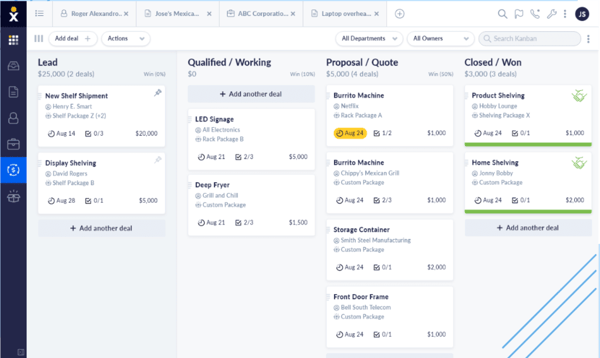
That said, Nextiva does have some areas that could be improved. Based on G2 reviews, the mobile app experience can feel less intuitive compared to the desktop version, especially when navigating features or managing calls on the go. However, for teams that primarily rely on desktop workflows, this may have a limited impact, and the core functionality remains reliable for everyday use.
There is also some scope for improvement when it comes to setup and configuration. Reviewers note that certain features and workflows may require additional steps or guidance during initial setup, slowing down new users. However, once everything is properly configured, the platform runs reliably and supports day-to-day communication effectively.
Overall, Nextiva is a powerful and reliable VoIP solution that optimizes outbound and inbound calling and offers detailed calling reports. This allows us to automate our growth and build a hassle-free client experience.
What I like about Nextiva:
- Nextiva’s phone system is reliable for day-to-day communication, especially when handling multiple calls or working remotely. The consistent call quality made interactions feel more professional and dependable.
- The convenience of having features like voicemail-to-email, built-in texting, and access across desktop and mobile makes it easier to stay connected and manage conversations efficiently.
What do G2 Users like about Nextiva:
“I really like that I don’t have to download an app to use Nextiva, which makes it easy for me to access it wherever and whenever. I can just go to the website and use it without any additional steps. The ability to make international calls is a big plus, too, as it usually comes with extra steps or costs, but with Nextiva, I don’t have to worry about those. The initial setup was pretty easy, which helped in getting started smoothly.”
– Nextiva Review, Caren F.
What I dislike about Nextiva:
- While Nextiva is great, the system unfortunately dropped my calls several times, and when my call was picked up by a human, I dropped again without a follow-up call to reconnect, as also echoed in G2 reviews.
- After a cellphone update, I noticed the app faced some temporary performance issues. These were frustrating at times, though they seem consistent with feedback from other G2 users and may improve with future updates.
What do G2 users dislike about Nextiva:
“The mobile app is not very user-friendly. It would be better if the app were more integrated with the phone itself to make receiving incoming calls easier. Also, the initial setup was a bit difficult at first, but it became easier once we got the hang of it.”
– Nextiva Review, Michael B.
In 2026, put your customer service workflows on intelligent autopilot with the best autodialer software and welcome a new way of collaboration in business.
3. RingEx: Best for team collaboration with screen sharing
G2 review: 4.2/5
RingEx was built as an advanced VoIP and call analytics solution that helps initiate high-volume calling, generate AI-powered summaries, and streamline workflows with built-in automation.
Based on G2 data, RingEx performs well across key areas like meets requirements (89%), ease of use (87%), ease of admin (84%), and ease of setup (83%). Its core calling capabilities are also highly rated, including phone calls (92%), VoIP numbers (92%), and desk-to-desk calls (91%), which reflects its reliability for everyday communication.
The AI functionality of RingEx is simply awesome, and not just a gimmick. It helps document calls, summarize voicemails, and nudge me when I drift from the call script. It feels like having a quiet and efficient call assistant in the background.
I also want to highlight the flexibility RingEx offers. Once you set up the VoIP system, you can make or receive calls from your desk phone, mobile app, or even a softphone on your laptop and switch between them without any friction.
Features like call flip and the seamless handoff across devices make remote work feel less fragmented. When I’m on the move, the mobile app comes to my rescue and does not feel like a watered-down version of the desktop experience.
On the admin side, I found the platform easy to manage. The admin portal makes it simple to manage users and tweak call routing without adding unnecessary complexity, which even our IT team appreciated.
Another thing that stood out to me was the real-time analytics dashboard. It made it much easier to track KPIs, monitor agent performance, and stay on top of calling workflows without relying on external tools.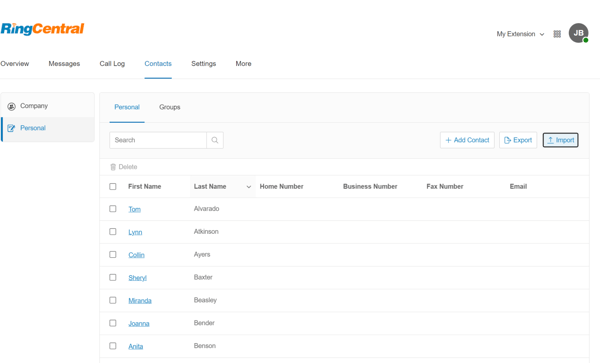
That said, RingEx does have a few areas where it could improve. G2 reviews mention that the admin and configuration side of the platform can feel a bit complex, especially when managing users or setting up more advanced workflows. It may take some time to become familiar with the backend, but once everything is configured, day-to-day operations become easier to manage.
Customer support is another area where experiences can vary. Based on G2 reviews, while many users have had positive interactions, some mention occasional delays or inconsistencies in response times when handling more complex issues. However, for teams that rely more on self-serve features and a stable core platform, this may not significantly impact day-to-day usage.
Overall, RingEx offers advanced calling features, voicemail to email, call recording, and advanced call analytics to set robust calling protocols and maintain a smooth contact center infrastructure network.
What I like about RingEx:
- I found the AI functionality to be genuinely useful, especially for summarizing calls and guiding conversations in real time without interrupting the flow.
- I also liked the flexibility of switching between devices and features like call flip, which made remote work feel seamless and less fragmented.
What do G2 Users like about RingEx:
“I love the flexibility and forward-thinking that RingEX provides, especially with the implementation of their new AI features that benefit our business and make the jobs of our associates easier. We appreciate the use of the AI receptionist, which is helping us direct callers more effectively to users who can assist them with their specific needs. The ability to access cloud services is another aspect I like about RingEX. We are also excited about demoing the new AVA product to see how it can further benefit our users.”
– RingEx Review, Stacy P.
What I dislike about RingEx
- Based on G2 reviews, the admin and configuration side of the platform can feel complex at times, especially when setting up workflows or managing users, although it becomes easier once everything is in place.
- Reviewers state that customer support experiences can occasionally vary, particularly for more complex issues, but teams that rely on the platform’s core features may not find this significantly disruptive.
What do G2 users dislike about RingEx
“I find the admin portal really confusing to use. It’s hard to figure out where to go to change features and other settings, and I often have to hunt around to find what I need. I really wish it were more user-friendly and easier to navigate.”
– RingEx Review, Shannon B.
4. Quo: Best for smart call recording and virtual number management
G2 review: 4.7/5
Quo, formerly known as OpenPhone, is a private, reliable VoIP provider that integrates calls, texts, and messages into one app to better serve consumers. It also offers AI-powered transcription to summarize calls, extract crucial data, and integrate with CRM.
Based on G2 data, Quo stands out with strong user satisfaction, including ease of use (95%), ease of admin (95%), meets requirements (94%), and ease of setup (94%). Its core features are also highly rated, such as VoIP number (95%), instant messaging (95%), and phone calls (95%), reflecting its reliability for everyday communication.
The interface really stood out to me. It was clean and intuitive and worked just as well on the desktop as it did on mobile, which is huge for me because I am bouncing between devices all day. I can add client info, set custom voicemail greetings, and seamlessly switch between different numbers in the app. It also includes team-wide shared inboxes, so no matter who responds, the whole team stays in the loop. We even set up roles for better call routing, which is especially handy for managing support vs. sales calls.
The call quality has been consistently solid, and I love how it lets me record calls, which is perfect when I am juggling multiple conversations and want to circle back later. One of my favorite features is the AI-powered call summaries. They save me from typing out notes and help me stay on top of follow-ups.
I have also started leaning more toward integrations. Quo integrates with Slack, HubSpot, and even Zapier, which opens up a lot of workflow automation possibilities. For instance, I have set up automatic notifications for missed calls or voicemails in Slack, which helps our team stay updated even when we are not in the app.
The pricing is surprisingly fair, especially considering the availability of features like call recording, voicemail transcription, custom business hours, and contact syncing in the subscription tiers. The standard and premium plans include integrations, auto-replies, snippets, analytics, and multi-number support.
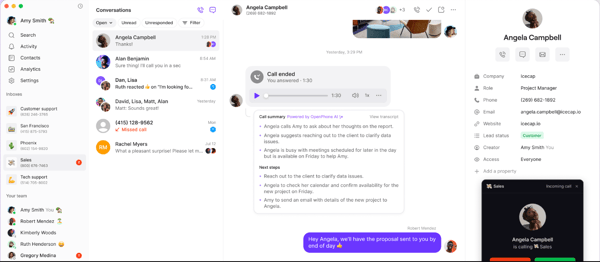
However, no app is perfect, and Quo does have its drawbacks. While the platform is simple and easy to use, users state that it can feel a bit limited when it comes to more advanced features and workflow customization. As teams grow, users have mentioned wanting more control over call handling, automation, and deeper routing options. That said, for small teams or businesses looking for a straightforward communication setup, this simplicity can actually work in their favor.
Another area where users have noted some limitations is messaging. Based on my analysis of G2 reviews, certain use cases, such as receiving OTPs or messages from banks and financial services, may not always work as expected, likely due to carrier and shortcode restrictions. However, for everyday business communication, such as standard texting and follow-ups, the platform still effectively covers most common needs.
Despite these limitations, Quo is one of the most agile and reliable solutions to offer a high-speed call network, store inbound data, and route active calls to the right person while providing customer-centric features to a business.
What I like about Quo:
- I loved how I could use a separate business number without sharing my personal phone number, while still managing everything from my own device.
- I also found Quo to be affordable, easy to use, and time-saving, especially with features like snippets, voicemail transcription, and a clean, intuitive interface.
What do G2 Users like about Quo:
“Quo offers a seamless experience that allows me to reach users with a dedicated US phone number. So far, I have had no downtime, no bugs, and the calls have always been smooth and clear.
On top of this, Quo has a suite of further features that allow users to define and refine their voicemail, call forwarding, AI agent, texting, and call transcription that feel streamlined, and I have not found any redundant features. Everything serves a function and is clearly and easily accessible. I had no problems integrating Quo into my daily routine.
I use Quo on a daily basis, and I have been more than happy about this product. I have not had to rely on customer support yet.”
– Quo Review, Nathan V.
What I dislike about Quo
- While the platform is simple to use, users state it can feel limited when it comes to advanced workflow customization and automation, especially as team needs grow. However, for smaller teams, this simplicity can make it easier to manage.
- Based on G2 reviews, certain messaging use cases, like receiving OTPs or messages from financial services, may not always work as expected due to carrier limitations, although standard business texting works reliably for most everyday needs.
What do G2 users dislike about Quo
“While Quo is helpful for basic task management and collaboration, there are a few areas where it could improve. One thing I noticed is that the platform sometimes feels limited when handling more complex workflows or larger projects. It works well for simple tracking, but when multiple dependencies or detailed reporting are needed, the features can feel a bit restrictive.
Another drawback is the lack of deeper customization. Teams often have different ways of working, and having more flexibility in dashboards, notifications, or task views would make the tool more adaptable. At times, navigating between sections can also feel slightly less intuitive, especially when switching between projects or trying to locate specific updates quickly.”
– Quo Review, VINAY P.
Track your inbound calls seamlessly and easily store missed call details with 10 free call-tracking tools to close sales opportunities.
5. Webex Calling: Best for enterprise-grade VoIP and unified communications
G2 review: 4.5/5
Built as a part of Cisco’s Webex Suite product, Webex Calling is a reliable VoIP tool that offers PBX infrastructure for companies so they can manage incoming calls without switching to another telephone network. It also stores call details, offers transcription, and supports enterprise communication workflows. What impressed me is that this is a platform built primarily for enterprise-grade reliability.
Based on G2 data, Webex Calling performs strongly across key areas like meets requirements (94%), ease of use (93%), and quality of support (91%). Its core features are also highly rated, including phone calls (94%), video calls (93%), and conference calls (92%), which reflects its reliability for business communication.
What stood out to me about Webex Calling was how easy it is to set up. The dashboard is user-friendly, easy to navigate, and intuitive even for non-technical users. The whole process, including number provisioning and user assignments, took me less than an hour.
One of the strongest aspects of Webex Calling is the high-quality audio and video. The high-definition calling and built-in noise cancellation make a noticeable difference, especially during longer meetings or international calls.
Call quality stays consistent even when bandwidth dips slightly, though, like any VoIP service, it can still struggle under poor internet conditions. On a stable connection, conversations remain clear with minimal latency.
The platform is built around a centralized cloud PBX system that manages calls, extensions, and voicemail seamlessly. I can switch between my desk phone, mobile app, and desktop client without interruptions, and features like call forwarding and voicemail transcription help keep everything organized.
It also supports advanced capabilities like call queuing, hunt groups, shared lines, and location-based routing. This makes it especially useful for larger teams that need flexibility in how calls are handled.
There is also a strong focus on the app experience. Both the mobile and desktop interfaces are responsive, and features like one-click meeting scheduling, calendar integrations, and real-time collaboration tools such as screen sharing and in-call chat reduce the need for multiple platforms.
Another advantage is that it cleanly integrates closely with the broader Cisco Webex Suite. If you are already using Webex Meetings or Webex Teams, the calling functionality fits naturally into your existing workflow.
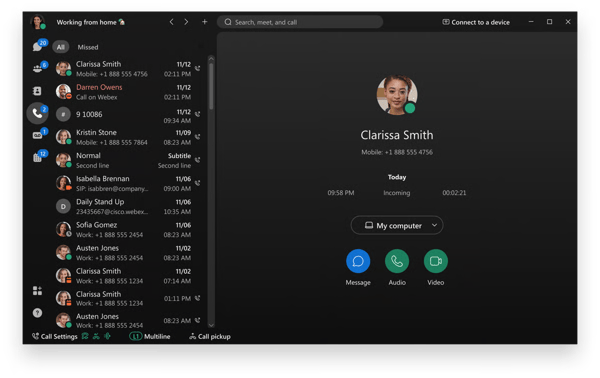 However, Webex Calling has its drawbacks like any other platform. Based on G2 reviews, the user interface can feel a bit clunky at times, especially when navigating between different features or using the web client. While it does offer a wide range of functionality, it may take some time to get used to the layout. That said, once you become familiar with it, the platform becomes easier to navigate for day-to-day use.
Another area where users have noted some friction is app performance. Based on G2 reviews, there can be occasional lag, slow loading times, or minor glitches, particularly during heavier usage. While these issues are not constant, they can interrupt workflows at times. However, on a stable setup, the overall calling and collaboration experience remains reliable for most business needs.
If you’re looking for a strong enterprise-grade VoIP platform, Webex Calling is the one you should turn to. It is a reliable Cisco tool that provides some reliability, uses TLS/SRTP encryption to protect calls, and seamlessly manages cloud call operations.
What I like about Webex Calling:
- Webex Calling is easy to use, with a simple and intuitive dashboard that makes it easy to manage tasks and stay connected with my team.
- I also liked features like screen sharing and strong security controls, which made collaboration smoother while keeping data protected.
What do G2 Users like about Webex Calling:
“I’ve been using Webex Calling daily, and what I appreciate most is :
1. Reliable communication with stable messaging and video chat
2. Provides consistently crisp and clear audio quality during calls
3. Multi-device flexibility, which allows me to work from anywhere
4. Smooth integrations with other Webex tools, for example, Meetings and Messaging, which create a centralized collaboration space
5. Easy to use, manage, and makes call forwarding simple.”
– Webex Calling Review, Patrick C.
What I dislike about Webex Calling:
- Based on G2 reviews, the user interface can feel a bit clunky at times, especially when navigating between features or using the web client. However, once you get familiar with the layout, it becomes easier to use for everyday tasks.
- Users mention that there can be occasional performance issues like lag or slow loading times during heavier usage, although the platform generally remains stable for most business needs.
What do G2 users dislike about Webex Calling:
“They can definitely work on UI. Like, Zoom or Microsoft Teams have the best UI, I think. They should concentrate more on UI and UX. And, lately, they have improved a lot, but there is still a lot of work to be done.”
– Webex Calling Review, Sumanth K.
6. Dialpad Connect: Best for intelligent calling with prospect data logging
G2 review: 4.4/5
If I had to