



I’ve worked closely with marketing, research, and growth teams that rely on target audience intelligence to shape campaigns, make product decisions, and justify big budgets. They often struggle with surface-level insights that fail to explain why customers behave the way they do.
That’s why I evaluated more than 20 best audience intelligence platforms based on verified G2 reviews and user feedback. I looked for platforms that go beyond basic demographics to offer rich behavioral and psychographic insights, strong audience segmentation, and the ability to connect insights across channels.
According to G2 reviewers, the best audience intelligence software have flexible dashboards, intuitive interfaces, predictive insights, and AI-assisted analysis that help recognize patterns without requiring constant manual intervention.
Whether you’re building personas, monitoring audience shifts, activating real-time segments, or defending strategy and budgets with data, this guide is designed to help you the best audience intelligence solutions that truly fits how you work and the decisions you need to make.
8 best audience intelligence platforms for 2026: My top picks
-
GWI: Best for global consumer insights at mid-market scale
Offers survey data from over 3 billion people across 53 markets, ideal for quick profiling based on audience attitudes, habits, and interests. ($1500 /user/year) -
Brandwatch Consumer Intelligence: Best for social listening and brand mention tracking
Delivers AI-enriched data from over 100 million sources with dashboards, Boolean search, and real-time trend tracking. (Custom pricing) -
Adobe Analytics: Best for customer journey analysis and custom reporting
Captures real-time behavioral data and uses AI to uncover audience patterns, friction points, and customer journey insights. (Custom pricing) -
Meltwater: Best for global media and social media coverage analysis
Tracks millions of online sources in real time for sentiment analysis, share of voice reporting, influencer identification, and brand mention tracking. (Custom pricing) -
YouScan: Best for visual social listening and image recognition
Uses conversational AI for social listening and visual analysis to interpret consumer behavior in images. (Pricing from $499/mo) -
Adobe Real-Time CDP: Best for real-time customer data unification
Unifies customer data in real time, enabling precise segmentation, instant activation, and personalized experiences at scale. (Custom pricing) -
Salesforce Data 360: Best for real-time personalization at enterprise scale
Improves responsiveness with real-time data processing, enhances personalization with advanced segmentation, and 360° customer profiles. (Consumption-based credit model pricing)
-
OMNA from Stirista: Best for real-time identity resolution and omnichannel targeting
Offers privacy-compliant audience insights, cross-device tracking, and strong connected TV (CTV) match rates. (Custom pricing)
* These audience intelligence platforms are top-rated in their category, according to G2’s Winter 2026 Grid Reports. I have included pricing information for tools that publicly share their pricing plans.
My 8 best audience intelligence platform recommendations for 2026
I’ve seen firsthand how fragmented data, outdated surveys, and disconnected dashboards can slow down teams. That’s why I focused on platforms that help teams move faster without sacrificing depth of insights into audience behavior.
Users expect their audience intelligence platforms to help them understand who their audiences are, how they behave, what motivates them, and how those insights translate into action, often in real time. Advanced teams also look for predictive segmentation and analysis coupled with AI-assistance.
According to Future Market Insights, the audience intelligence platform market is valued at $8.2 billion in 2025 and is projected to reach $34 billion by 2035, growing at a strong 15.3% CAGR, highlighting how quickly these tools are becoming essential for data-driven marketing and customer understanding.
The eight audience intelligence platforms I recommend for 2026 consistently stood out for their ability to turn complex data into easy-to-visualize dashboards and actionable insights. Each one serves a slightly different need, but all of them help teams move beyond surface-level metrics and build a clearer, more confident understanding of their audiences.
These platforms demonstrate strong real-world traction, with an average user adoption rate of around 63%, underscoring their practical value across marketing, research, PR, and analytics teams.
How did I find and evaluate the best audience intelligence platforms?
To identify the best audience intelligence systems, I analyzed real user reviews on G2 to see how marketing, research, and PR teams use them in practice. This helped clarify which platforms consistently deliver value and which tend to fall short.
I evaluated how each platform supports key use cases, whether it’s tracking brand mentions in real time, analyzing sentiment, identifying visual and textual trends, or setting competitor benchmarks.
To dig deeper, I used AI to comb through the latest G2’s Grid Report and user feedback to compare customer segments served, dashboard quality, visualization details, advanced filtering options, and overall satisfaction across these platforms.
This guide includes screenshots from vendor G2 pages to show what these audience intelligence platforms actually look like in use.
What I prioritized when evaluating the best audience intelligence platforms
As I combed through G2 reviews for the best audience intelligence tools, a few themes kept surfacing. Users want depth over vanity metrics, real-time over static dashboards, and tools that are actually usable across teams.
These criteria shaped how I evaluated each audience intelligence platform in this list.
- Data depth and insight quality: Strong audience intelligence depends on rich, connected data and how well it’s transformed into actionable insight. I prioritized platforms that unify multiple data sources to build a complete target audience profile and reveal deep demographic and psychographic insights, including granular buyer personas, intent signals, and affinities.
- Real-time insights: Audience preferences change quickly, so having up-to-the-minute data makes a difference. A platform that only offers static or delayed reports could result in a missed trend. That’s why I gave extra weight to platforms that provide live dashboards or real-time alerts.
- Ease of use: Even the smartest platform isn’t worth much if it’s hard to use. Teams should quickly get up to speed with target audience insights without needing a data science degree. I weighed G2 user feedback and listed platforms with intuitive dashboards, clear navigation, and minimal learning curves.
- Audience segmentation: Hyper-personalization and targeted marketing hinge on understanding distinct audience groups. I evaluated platforms for advanced filtering, visualization of segment insights, and comparison dashboards. I also focused on the ability to export audience segments to other marketing tools.
- AI-powered analysis: There’s too much data to sift through manually. I preferred platforms that use AI analysis to highlight non-obvious insights and save me time. The best audience intelligence platforms implement predictive analytics to anticipate trends and guide marketing actions.
- Seamless integration: Insights lose value if I can’t act on them quickly or connect them across channels. I prioritized platforms with strong marketing and ad integrations, high satisfaction with data exporting, and the ability to sync with existing CRMs and BI tools.
The list below contains genuine user reviews from our Audience Intelligence Platforms category page. To qualify for inclusion in the category, a product must:
- Use artificial intelligence to analyze data on a company’s target audiences
- Provide insights on audience psychographics and demographics
- Create customer personas or audience segments based on information gathered about them
- Offer tools for sharing or exporting audience segments to marketing and digital advertising platforms
*This data was pulled from G2 in 2026. Some reviews may have been edited for clarity.
1. GWI: Best for global consumer insights at mid-market scale
According to G2 Data, I found that Global Web Index (GWI) is used by 45% of mid-market and 31% of enterprise teams to quickly analyze consumer audiences, uncover market trends, and inform their marketing strategies.
As an audience intelligence platform, GWI provides access to a massive global consumer survey, covering almost 3 billion people across 50+ markets. This makes it feasible for marketers like me to analyze rich audience data on one platform.
GWI’s data depth and breadth are another big theme in the reviews. Users love that they can pull extensive and granular demographic and psychographic data on any audience. These resources have become a go-to for building personas and backing up sales pitches.
One aspect that stood out to me from G2 reviews is how intuitive and user-friendly the interface is for such a powerful tool. Many reviewers noted that everything is laid out clearly, with drag-and-drop filters, logical menus, and customizable dashboards, making it easy to build target segments.
As users explore the platform more deeply, the strength of its analysis tools becomes more apparent. GWI makes it easy to cross-tabulate behaviors, beliefs, and attitudes or compare one audience segment against another.
Users appreciated GWI’s new AI-powered Spark assistant, where you can simply ask questions and get insights. One highlighted how the AI-assistant will add a whole new layer of ease when it comes to research.
Personally, I find it reassuring when a software company invests in customer support, and GWI seems to deliver on that. Users frequently praise the team’s helpful guidance and responsive support. Additionally, the platform offers webinars that feature trends and insights specifically designed to assist users.
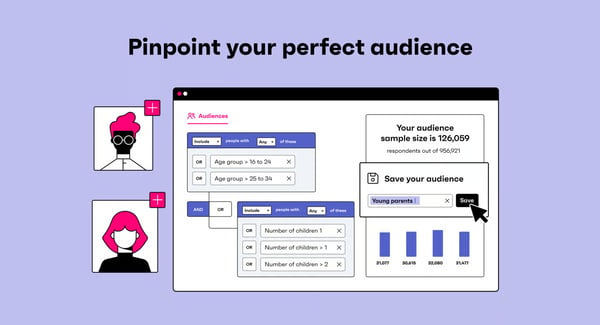
GWI packs a lot of data and features, which is ideal for teams that want to explore deep audience research. That said, some G2 reviewers mention that if you’re newer to research platforms or only need quick, lightweight insights, the amount of information can feel like a lot at first, so it helps to plan a little onboarding time upfront. Once you’re oriented, navigation gets easier and the depth of insights becomes a clear advantage.
Some users note opportunities for expanded insights in more niche topics or smaller markets.
Overall, GWI is widely regarded for its intuitive interface, comprehensive global consumer data, quick audience insights with the help of AI, and responsive customer support, making it an ideal platform for agencies, researchers, and marketing teams who need to deeply understand their audiences and plan data-driven campaigns.
What I like about GWI:
- In-depth global data coverage spanning different markets and categories helps pull any demographic and psychographic data across audience segments.
- The intuitive user interface with drag and drop filters, customizable dashboards, and the ability to cross-tabulate behaviors makes it easy to explore GWI’s data.
What G2 users like about GWI:
“GWI shines with its extensive and in-depth consumer data, offering a truly global perspective that’s invaluable for understanding diverse audiences. The platform’s strength lies in its ability to provide rich, granular insights into consumer behavior, attitudes, and demographics, which empowers businesses to move beyond assumptions and make data-driven decisions. I particularly appreciate its user-friendly interface and customizable dashboards, which streamline the process of segmenting audiences and extracting actionable intelligence for marketing strategies.”
– GWI review, Jodie C.
What I dislike about GWI:
- GWI’s strength lies in standardized, survey-based insights across major markets. Teams needing broader coverage in smaller or non-US regions may want to pair it with complementary data sources.
- It is positioned for teams that can fully leverage its depth of insights. For smaller teams or lighter use cases, the investment may feel better suited to organizations with more frequent or advanced research needs.
What G2 users dislike about GWI:
“I do not like how most questions are the same for every country that GWI operates in. Because of this, some questions do not really work as well for the country I operate in. It would be better to make questions different for every country with answer options that are relevant for that specific market.“
– GWI review, Jan B.
2. Brandwatch Consumer Intelligence: Best for social media listening and brand mention tracking
Brandwatch Consumer Intelligence is widely adopted by larger organizations. 35% of its users are mid-market teams, and another 35% are enterprises. Based on my evaluation, the platform excels at capturing brand mentions in real time, which is invaluable for understanding how people feel about your brand or campaign at the moment.
Users love that they can collect conversations from virtually the entire social web and analyze them in one hub. They prefer using the platform to gain a 360° view of consumer sentiment and spot emerging trends.
I found that reviewers frequently highlight how powerful the tool feels while remaining easy to use once they become familiar with it. Brandwatch’s intuitive dashboards and flexible query builder allow users to navigate the platform confidently and customize views to their specific needs.
The query builder’s support for advanced Boolean logic and detailed filters makes it simple to refine datasets and uncover precise audience segments. This strength is reflected in Brandwatch Consumer Intelligence, earning an 89% score for advanced filtering and visualisations, underscoring how central these capabilities are for users.
I found teams leveraging Brandwatch to compare their brand’s share of voice and sentiment against competitors side-by-side. It can generate charts and trend lines that make it simple to see where you stand in the market and how consumer perception differs between brands.
As someone who often needs to craft data-driven reports, being able to pull a quick chart on how we stack up against a rival, in terms of buzz or sentiment, is incredibly valuable. Brandwatch has also been investing in AI capabilities to make insights more accessible.
Another aspect users frequently appreciate is the comprehensive and flexible nature of the analysis. People are using it for everything from brand monitoring and PR crisis management to market research and competitor analysis.
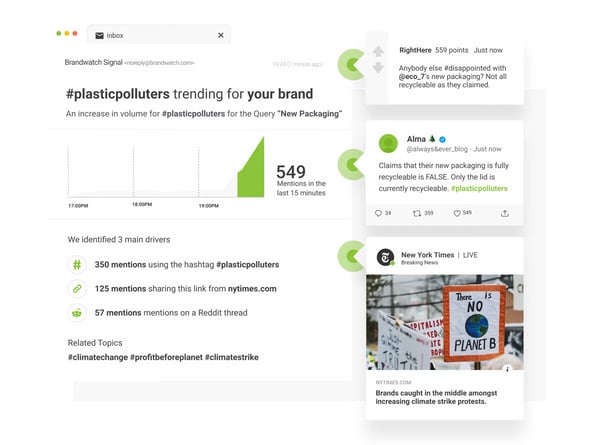
Brandwatch offers a broad set of analysis tools, which can require a higher level of familiarity with advanced queries and filters for teams new to social listening platforms.
Brandwatch delivers broad media and social coverage, which works well for teams tracking large-scale conversations across major platforms. That said, some G2 reviewers mention that niche or region-specific sources may not always be covered out of the box, requiring coordination with Brandwatch to add them.
Overall, based on my evaluation, Brandwatch Consumer Intelligence’s blend of real-time monitoring, historical data, and AI-driven analysis makes it an invaluable platform for anyone who needs to stay on top of public opinion and online trends.
Its strengths lie in its comprehensive global data coverage, the ability to quickly surface actionable insights from millions of online conversations, and a feature set that balances powerful analytics with approachable usability.
What I like about Brandwatch Consumer Intelligence:
- The dashboards are customizable and visually clear, and building queries or filters feels logical.
- Brandwatch aggregates conversations from all over the internet in real time and provides powerful features like advanced Boolean search and trend lines to drill into the data and identify emerging trends and consumer sentiment.
What G2 users like about Brandwatch Consumer Intelligence:
“The Brandwatch Consumer Intelligence platform is very comprehensive, offering a wide range of features that meet various needs, not leading me to look for other providers. The tool stands out for its intuitiveness, making configuration and use uncomplicated. It is highly useful for monitoring social networks, brands, and competitors, as well as helping in crisis management and providing better results and insights to clients. I value the tool’s ability to consume and build complex queries using Boolean logic, which enhances the collection of valuable information in the world of social networks. The tool has remarkable power and is ideal for various contexts, being both powerful and versatile.”
– Brandwatch Consumer Intelligence review, Bianca Cristina O.
What I dislike about Brandwatch Consumer Intelligence:
- Brandwatch’s data coverage is broad, but users report coverage gaps in niche areas requiring coordination with the Brandwatch team for adding those datapoints.
- The platform is powerful and flexible, which rewards thoughtful query building. New users may need some onboarding time to learn which filters and combinations deliver the most actionable insights.
What G2 users dislike about Brandwatch Consumer Intelligence:
“One challenge I’ve encountered with Brandwatch Consumer Intelligence is the steep learning curve that comes with its wide range of features. Although the platform is quite powerful, it can take a while to become comfortable with its advanced tools and to tailor dashboards to specific needs. I’ve also noticed that some reports can feel overwhelming when working with particularly large datasets, which means it takes additional effort to filter and pinpoint the most relevant insights. However, after getting used to the system, I find that the platform’s robust capabilities more than make up for these initial hurdles.”
– Brandwatch Consumer Intelligence review, Nilesh P.
3. Adobe Analytics: Best for customer journey analysis and custom reporting
Adobe Analytics is used by 46% of enterprises and 32% of mid-market companies to dig deep into customer journeys and drive data-driven decision-making.
As an enterprise-level digital analytics platform, Adobe Analytics empowers marketing and product teams to collect and analyze vast amounts of web and app data across multiple channels.
I found users leveraging the platform to understand how customers navigate their digital properties, from first touchpoints to conversion, and to generate flexible, detailed reports on consumer journeys that inform marketing strategies and optimize user experience.
Many reviewers appreciate the balance Adobe Analytics strikes between advanced capabilities, like real-time reporting and segmentation, and an interface that supports a drag-and-drop canvas to build queries, custom dashboards, and visualizations.
This combination allows teams to make smarter, faster decisions while still benefiting from enterprise-grade analytics, backed by strong documentation and customer support.
I have seen users highlighting how easy it is to track customer behavior and journey in real time, organize and categorize data, and build custom dashboards that focus on the metrics that matter most. The ability to analyze data across devices, such as desktop, tablet, and mobile, helps teams get a complete view of user journeys.
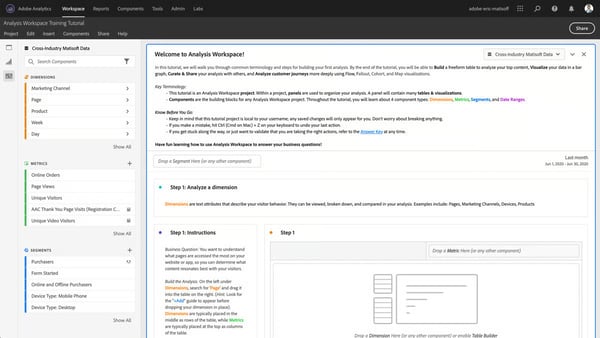
Adobe Analytics offers deep visibility into data, which is ideal for teams that want granular control over tracking and reporting. Some users mention that the volume of available properties and custom conversion variables, or eVars, can make it harder to quickly find specific details. With experience and better configuration, teams are able to navigate this depth more efficiently.
The platform is built to handle large volumes of complex data, but reviewers observe occasional lag or slower load times when working with large datasets or dashboards with many visualizations. This performance impact typically appears in more advanced, data-dense use cases rather than everyday analysis.
Based on G2 reviews, Adobe Analytics excels at providing enterprises with a complete picture of digital customer behavior and the tools to act on that information. This makes it an ideal platform for large marketing and analytics teams that want to understand their customers, attribute marketing impact across channels, and continually refine the user experience.
What I like about Adobe Analytics:
- I appreciate how Adobe Analytics turns complex data into clear, actionable insights and custom dashboards that help guide smarter marketing decisions.
- The segmentation capabilities are incredibly powerful and help analyze very specific user paths and behaviors over time.
What G2 users like about Adobe Analytics:
“It is one of the most powerful data analytics and reporting tools I have come across. I love how easy it is to track user behavior and see what’s working on my website. The real-time reports are super helpful, and I can easily create custom dashboards to focus on what matters most. It helps me make smarter decisions quickly.”
– Adobe Analytics review, Gurunath J.
What I dislike about Adobe Analytics:
- The platform’s depth can feel steep without prior analytics experience or dedicated training.
- The pricing reflects that the platform is built for enterprise-scale use. It can be a stretch for smaller teams or lighter use cases.
What G2 users dislike about Adobe Analytics:
“The learning, especially for non-technical users or those transitioning from simpler analytics platforms like Google Analytics. Initial setup and configuration require substantial planning and expertise. Documentation, while extensive, can feel overwhelming or slightly outdated in parts. Additionally, the cost may be prohibitive for smaller teams or organizations without a clear data strategy.”
– Adobe Analytics review, Abhishek G.
4. Meltwater: Best for global media and social media coverage analysis
Meltwater is a G2 leader in PR and Marketing, helping teams monitor, manage, and enhance their reputation more effectively. What stands out to me immediately is that Meltwater positions itself as an all-in-one solution, bringing media monitoring, social listening, analytics, engagement, and influencer management into a single platform.
Users value being able to monitor brand mentions across both traditional media and social media without switching tools. It has partnerships for print and broadcast monitoring, and can listen to conversations in real time across social platforms like X (formerly Twitter), Facebook, Instagram, YouTube, as well as forums, review sites, message boards, comments, and hundreds of millions of blogs.
Besides monitoring coverage, Meltwater helps PR teams identify relevant journalists, outlets, and media contacts tied to specific topics or beats. Users value having media intelligence and outreach capabilities connected, since it streamlines pitching and relationship-building efforts with the right journalists.
I found users appreciating how the dashboards are sleek, intuitive, and easy to navigate, and help them visualize media impact and measure ROI for PR and marketing campaigns. Reviewers like the ability to monitor competitor activity, and quickly share reports with leadership.
Influencer marketing is another area where Meltwater differentiates itself, thanks to Klear, its influencer management solution. Many users like being able to have influencer marketing and social listening in one place. Users highlight the ability to discover and vet influencers from a global database of 35+ million creator profiles across major social platforms.
Meltwater consistently earns praise for its excellent customer support. Users love the prompt responsiveness and the availability of self-explanatory content. Many mentioned their appreciation for the quick onboarding, seamless integration, and frequent implementation of new features and enhancements.
Users frequently highlight Meltwater’s AI-driven capabilities, especially Mira AI, as a major value-add. They appreciate how AI helps surface patterns, summarize coverage, and speed up analysis that would otherwise be manual and time-consuming.
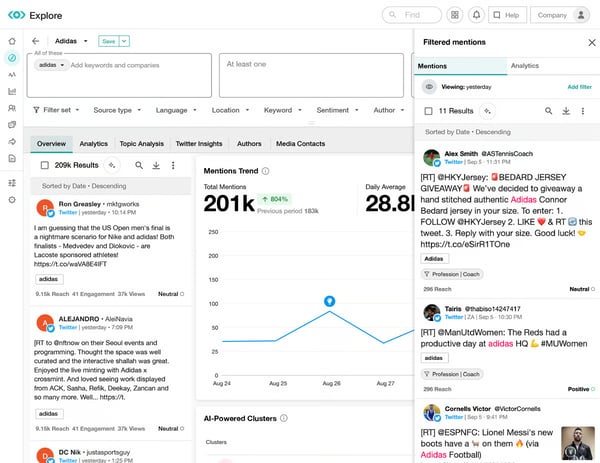
Mira AI adds an intelligent layer to the platform, but some reviewers mention that its value isn’t always immediately clear and teams might have to invest time in exploring the AI assistant to fully understand or apply it in day-to-day workflows.
Another area users talk about is data refinement and reporting flexibility. Meltwater does a strong job capturing large volumes of media and social data, but some reviewers mention that refining results, such as filtering out irrelevant mentions or customizing reports, can require manual oversight.
Overall, Meltwater is widely appreciated for its massive media and social coverage, integrated journalist outreach, AI-powered insights, and influencer management capabilities. It’s especially well-suited for organizations that want a single platform to manage brand intelligence, while maintaining the ability to report on impact and act on insights quickly.
What I like about Meltwater:
- Meltwater makes it easy to identify and reach relevant journalists using real media data, helping PR teams move from monitoring to outreach without switching tools.
- By combining media monitoring, social listening, analytics, publishing, and reporting in one place, Meltwater simplifies workflows and gives a unified view of brand performance.
What G2 users like about Meltwater:
“What we value most about Meltwater is its ability to give us a comprehensive, real-time view of our media presence. Their platform allows us to easily track earned media mentions, monitor key conversations through customized keyword searches and social listening, and distribute press releases directly to targeted journalists. The ability to export clear, usable data for campaign, event, and reporting purposes is a major asset for our communications work.”
– Meltwater review, Lucas D.
What I dislike about Meltwater:
- Meltwater provides extensive reporting and alerting capabilities, which work best for teams willing to fine-tune filters and parameters to surface the most relevant insights.
- The breadth of Meltwater’s tools and reports can make navigation less intuitive for teams without established PR or analytics workflows.
What G2 users dislike about Meltwater:
“There are almost too many places where tools can live. It feels like monitoring, exploring, analyzing, media relations, etc, each has so many features within them, that sometimes it can be hard to remember where to perform a task or where a certain saved search or report is housed. I find myself toggling around a lot within the platform.“
– Meltwater review, Emily B.
5. YouScan: Best for visual social listening and image recognition
According to G2 reviews, YouScan is a leading social and visual listening platform with 49% of users from mid-market organizations. I especially like its brand logo detection and visual content reporting capabilities that make YouScan stand out from its competitors in the audience intelligence platform space. With YouScan, users are uncovering insights that text-only audience intelligence platforms often miss.
A frequent mention among users is YouScan’s broad source coverage, particularly across visual-first platforms like TikTok, Instagram, and Facebook, which can be harder to access consistently in other social listening tools.
Users repeatedly highlight the platform’s intuitiveness and ease of use. YouScan gives them a clear view of conversation trends and brand presence without needing to manually sift through posts. YouScan makes analysis faster and more structured, largely due to its AI-assisted Insights Co-pilot, clean interface, and visual layout.
Reviewers also appreciate the variety of filtering options, especially around sentiment and visual content, which let teams drill into specific data segments with high precision. The automatic segmentation feature is applauded as a major time-saver, since it speeds up the process of reading and interpreting insights.
I observed users highlighting that charts are easy to understand, simple to adjust, and quick to export in different formats, which makes reporting more efficient than with other tools. Users appreciate that YouScan fits into existing workflows without needing a full rebuild because of its extensive integration capabilities.
Reviewers consistently praise YouScan’s customer support and onboarding experience. They state that the onboarding feels white-glove, with hands-on guidance and rich supporting materials that help teams adopt the platform more confidently.
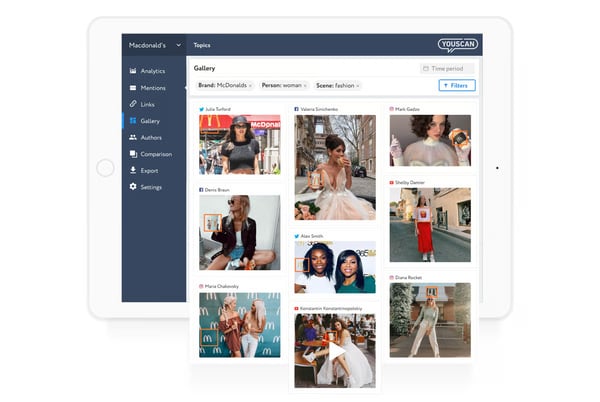
YouScan offers advanced configuration options that give teams a high level of control over analysis. However, some users mention that features like Boolean queries, topic setup, and historical time-range controls aren’t always intuitive at first and can require extra setup. Once users get familiar with the workflow, these tools become much easier to use and highly effective for deeper analysis.
The platform delivers strong value through its depth of features and capabilities, but pricing and access can be a consideration, particularly for smaller teams or more advanced use cases. However, many users share that the value they get over time makes the investment feel justified as adoption grows.
Overall, accor