



When I first learned statistics in high school, it felt like piecing together a puzzle: manually calculating probabilities and drawing graphs. Statistical software seemed unnecessary back then, but studying economics in college changed that. Managing larger datasets and complex analyses became overwhelming. I had to adapt and learn to use the best statistical analysis software to interpret data, run regressions, and make sense of the numbers.
Later, while working with data professionals, I gained a deeper appreciation for the nuances of these tools. We evaluated various statistical analysis software, comparing their strengths and weaknesses. My research and G2 user reviews taught me that the right software simplifies workflows, eases complex analyses, and ensures accuracy. But I also noticed how technical challenges, like limited functionality, compatibility with data formats, or un-intuitive interfaces, could slow down even the most experienced analysts.
This list combines the best statistical analysis software to help you avoid those frustrations. Whether you’re looking for a user-friendly platform, advanced modeling capabilities, or software tailored for specific industries, you’ll find options here that cater to newcomers and experienced data professionals. By choosing the right tool, you can focus less on wrestling with the software and more on uncovering essential insights.
8 best statistical analysis software: My picks
-
IBM SPSS Statistics: Best for complex statistical analysis in social sciences ($1069.2/year/user)
For researchers running advanced tests (GLM, mixed models, survival) with survey/data prep tools and broad add-ons. -
SAS Viya: Best for enterprise-scale data mining and predictive modeling (pricing available on request)
For teams needing governed ML/AI pipelines, robust data prep, and deployment across cloud/hybrid environments.
-
JMP: Best for interactive visualization and exploratory data analysis ($1320/user license)
For scientists and engineers who want dynamic graphs, design of experiments, and point-and-click modeling.
-
Minitab Statistical Software: Best for quality improvement and education ($1851/year/user)
For Six Sigma/Lean programs and classrooms needing control charts, capability, DOE, and teaching-friendly workflows.
-
QI Macros SPC Add-in for Excel: Best for quick SPC inside Excel ($369, perpetual license)
For teams standardizing control charts and process capability without leaving spreadsheets.
-
EViews: Best for econometrics and time series analysis ($2375/user license)
For economists modeling ARIMA/VAR/cointegration with streamlined data management and forecasting.
-
OriginPro: Best for publication-quality graphs and curve fitting ($675/year)
For labs needing high-end plotting, peak analysis, and nonlinear fitting for papers and reports.
-
Posit: Best for statistical computing with R at scale (pricing available on request)
For data teams building reproducible analyses and apps (RStudio IDE, Shiny, Posit Connect) with enterprise governance.
*These statistical analysis software solutions are top-rated in their category, according to G2 Grid Reports. I’ve also added their annual or perpetual pricing to make comparisons easier.
8 best statistical analysis software I recommend
For me, statistical analysis software is a gateway to making sense of raw data. These programs are designed to help users process, analyze, and interpret datasets, ranging from simple descriptive statistics to complex predictive modeling. Features like regression analysis, hypothesis testing, analysis of variance (ANOVA), and time series forecasting allow you to dig deeper into patterns, correlations, and trends.
How did we find and evaluate the best statistical analysis software?
I collaborated with data professionals to explore various statistical analysis software, evaluating everything from basic tools for descriptive statistics to advanced platforms with AI-powered predictive modeling.
I also spoke with real-world users to understand how these tools perform across different scenarios. I evaluated their core features, identified pain points, and used AI to analyze hundreds of G2 reviews for deeper insights.
Additionally, I cross-referenced all external insights with G2’s Grid Reports, assessing each software based on ease of use, analytical power, and overall value for money. After this comprehensive research, I’ve curated a list of the best statistical analysis software solutions. All the screenshots in this article are gathered either from the vendor’s G2 page or publicly available material.
What I find particularly valuable is how these tools automate repetitive calculations, support large datasets, and offer advanced features like multivariate analysis and machine learning integration. They also provide powerful data visualization options like scatterplots, histograms, and heatmaps that make it easier to present findings in a way that’s both impactful and easy to understand.
Beyond the technical aspects, I’ve learned that compatibility matters, too. Good statistical software integrates well with tools like Excel, R, Python, or databases like SQL. Whether working with financial models, running econometric analyses, or conducting A/B tests, statistical analysis software has become indispensable for turning complex datasets into actionable insights. Also, did you know? The global statistical analysis software market was valued at approximately US $9.32 billion in 2024, and is expected to grow to about US $14.83 billion by 2029, at a CAGR of around 9.6%.
How I evaluated, compared, and selected the best statistical analysis software
I considered the following factors while testing the top statistical analysis tools.
- Statistical capabilities: When choosing statistical analysis software, I first consider whether it supports the specific methods needed. Whether it’s regression analysis, ANOVA, time series forecasting, or more advanced techniques like Bayesian analysis or machine learning, the software has to align with the complexity of projects. Look for a tool that allows you to explore the data comprehensively without running into limitations when things get technical.
- Data handling and performance: Data volume can be a real bottleneck in analysis, so I pay close attention to how well the statistical analysis software handles large and complex datasets. It’s essential that the tool processes data efficiently without lagging or crashing. Scalability is also a key consideration.
- Reproducibility and documentation: Good statistical analysis software allows users to annotate their workflows, save data analysis steps, and share them easily with colleagues. This not only ensures collaboration runs smoothly but also helps maintain the integrity of work. A clear, documented process makes validating and replicating the results easier.
- Integration capabilities: Integration capabilities are necessary because no software can operate in a vacuum. The best tools need to work seamlessly with the other systems and platforms used, whether importing data from SQL databases, integrating with R or Python for custom scripts, or exporting results to a data visualization platform. This compatibility makes the workflow smoother and saves users from unnecessary back-and-forth conversions.
- Cost and licensing: Budget is always a factor, so I evaluate the cost of the software carefully. I consider not only the upfront licensing fees but also any recurring subscription costs, update charges, or additional technical support expenses. Open-source software can be an appealing alternative when budgets are tight, but I weigh that against the potential trade-offs, like a steeper learning curve or less reliable support.
I considered all these factors when evaluating statistical analysis software to ensure I found the best options. I focused on their ability to handle diverse statistical methods, from basic calculations to complex modeling, while also evaluating how intuitive and user-friendly they were. I explored how each tool performed with large datasets and how well they integrated with platforms like R, Python, and SQL. Cost was another key consideration.
Finally, I prioritized tools with strong support systems, detailed documentation, and reproducibility features to ensure seamless collaboration and accurate results. These criteria guided my selections and ensured I only chose tools that could truly deliver.
To be included in the statistical analysis software category, a product must:
- Support advanced and complex statistical analyses
- Enable seamless data importing, preparation, and modeling
- Include robust statistical analysis capabilities, equations, and modeling tools
*This data was pulled from G2 in 2025. Some reviews may have been edited for clarity.
1. IBM SPSS Statistics: Best for complex statistical analysis in social sciences
IBM SPSS Statistics is frequently praised on G2 for offering a comprehensive suite of tools for advanced statistical analysis. As of now, G2 shows 913 total reviews with an overall score of 4.2/5. Many users recommend it for regression analysis, multivariate testing, and factor analysis, especially when working with complex datasets. I noticed several reviewers highlighting the value of its specialized modules for niche tasks like time-series forecasting and survival analysis—making it a go-to for academic and professional research.
SPSS is also considered highly reliable when handling large datasets. G2 users often point out that it maintains accuracy and data integrity, even when performing complex calculations. Unlike some platforms that may crash or produce errors under load, SPSS is seen as minimizing the risk of data loss during intensive analysis. This level of reliability is one reason it’s popular in data-heavy industries like finance and healthcare.
I’ve seen strong feedback around SPSS’s capabilities with survey data, too. It offers built-in tools for analyzing Likert scales, running cross-tabulations, and summarizing responses—features that market researchers and social scientists regularly rely on. Reviewers also appreciate that data can be imported from various survey platforms with minimal hassle.
Another feature that gets a lot of attention is the SPSS syntax editor. Advanced users value the ability to automate workflows by writing and saving custom scripts. I’ve seen several mentions of how this saves time when working with large datasets or repeating complex analyses. The editor’s built-in error-checking is also viewed as a plus, helping scripts run smoothly and accurately
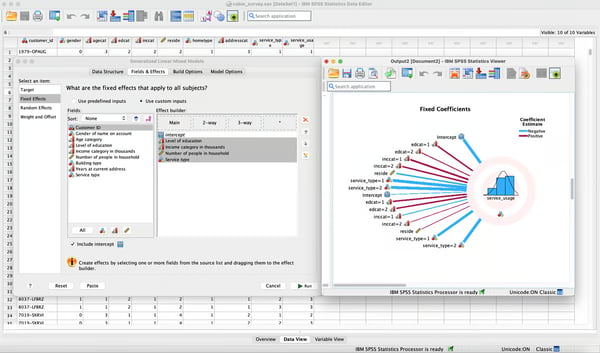
According to G2 reviews, IBM SPSS Statistics helps users uncover hidden patterns and predict trends using tools like regression models, decision trees, and clustering algorithms. I came across several reviewers who’ve used it for customer segmentation, risk analysis, and demand forecasting. SPSS also supports advanced statistical methods such as structural equation modeling and multivariate analysis, which users find valuable for conducting complex, multi-variable studies.
SPSS is stable and predictable out of the box. Some G2 reviewers note that its fixed workflow can feel rigid when connecting to non-standard data sources or building highly custom visuals, which limits personalization for niche use cases. Teams needing bespoke pipelines often pair SPSS with R/Python or a BI layer to extend flexibility.
The menu-driven interface is familiar to many analysts. G2 users say it can feel dated and more click-heavy than newer tools with streamlined designs, which slows power users accustomed to modern UIs. Saved syntax, custom dialogs, and keyboard shortcuts typically speed everyday tasks. Routine analyses run reliably. For multi-million-row datasets or complex, multi-variable models, some G2 feedback cites slowdowns; common mitigations include using syntax (vs. GUI), chunking data, and offloading heavy transforms to SQL/Python before modeling.
Overall, G2 reviewers consistently highlight SPSS for its statistical depth, reliability, and strong foundation for regulated or academic workflows. With light extensions (syntax, R/Python, or BI), many teams get both the consistency they trust and the flexibility they need.
What I like about IBM SPSS Statistics:
- Users are impressed by SPSS’s ability to handle survey data with built-in tools for analyzing Likert scales, cross-tabulations, and summarizing results.
- G2 reviewers loved how the SPSS syntax editor saved them time by automating tasks through custom scripts that replicate workflows. It’s especially helpful for handling large datasets or complex analyses.
What G2 users like about IBM SPSS Statistics:
“I am not an expert in statistics, but I found IBM SPSS Statistics very easy to use. It’s way less scary than trying to code everything on my own. There are a lot of tutorials and helpful menus too, which is very handy whenever there is some difficulty with any task.
IBM SPSS Statistics has a lot of features. It can do simple things like averages, and percentages to difficult analyses that I do not even understand (e.g. multivariate regressions). A lot of features with the software help me in my day to day tasks and assignments.
IBM SPSS Statistics shows clear results, which is something that I expect from software like this. The tables and charts are simple and easy to understand, even for someone like me who’s not an expert in statistics. It makes it convenient for me to explain my findings to teammates and other stakeholders.”
– IBM SPSS Statistics Review, Rajan S.
What I dislike about IBM SPSS Statistics:
- While IBM SPSS Statistics is powerful, several reviewers found its rigid framework limiting when they wanted to integrate unconventional data sources or create unique visualizations.
- G2 reviewers praise SPSS for its familiar, reliable analytics backbone and broad procedure coverage; however, several note the interface feels dated versus modern statistical tools and that menu-driven workflows can be cumbersome. Still, teams that lean on SPSS’s syntax editor and templates report faster repeatable analyses, keeping it effective for established, compliance-heavy workflows.
What G2 users dislike about IBM SPSS Statistics:
“The pricing is overwhelming for beginners and small organizations. I would love more optimized SPSS for big data analytics like other big data engines such as Apache Spark or Power BI.”
– IBM SPSS Statistics Review, Mohammed G.
2. SAS Viya: Best for enterprise-scale data mining and predictive modeling
Users liked how SAS Viya reduced the need for extensive programming. Rated 4.3/5 on G2, SAS Vinya is ranked as the second easiest to use software in the statistical analysis category. This version allows you to perform data analysis in real time directly through a browser, eliminating the complexities of traditional programming environments.
SAS Viya also offers numerous automated features that simplify data preparation, programming, and visualization. These features helped users avoid repetitive tasks and focus on interpretation and decision-making. Automation enhances productivity for teams managing large datasets by significantly reducing manual labor and human error.
I’ve seen G2 reviewers consistently highlight the strength of SAS Viya’s visualization tools. Users mention being able to create dynamic, interactive charts and dashboards that make it easier to explore, analyze, and share insights. Many say these visualizations are especially useful in presentations and stakeholder meetings, helping to communicate complex findings in a more accessible way.
Another point that comes up often is SAS Viya’s flexibility with open-source languages. According to reviewers, the platform integrates well with Python, R, and Java, allowing teams to use their preferred tools alongside SAS. For example, users might handle data preprocessing in Python and then shift to SAS Viya for visualization and advanced analytics. This kind of interoperability helps reduce tool-switching and supports a more streamlined workflow.
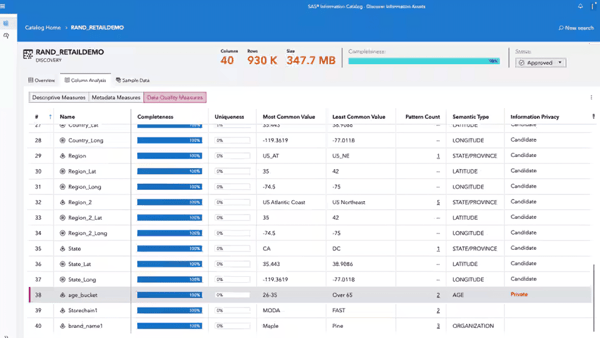
I’ve seen G2 reviewers—especially those in data-intensive fields—highlight SAS Viya’s strength in real-time analytics. Teams working in areas like Internet of Things (IoT) and AI often point out its ability to process and analyze streaming data with minimal delay, which enables immediate action. This seems particularly valuable in industries like manufacturing, where real-time monitoring can prevent costly downtime, and in AI use cases, where fast feedback loops help refine models more effectively.
SAS Viya delivers a governed, enterprise-grade stack. Some G2 reviewers note that open-source–style customization (modifying core code or adding features directly) is limited unless routed through SAS tooling, which can slow highly bespoke use cases. Teams often pair Viya with Python/R notebooks or APIs to extend workflows.
Cloud deployments scale well when resourced correctly. G2 users mention that fully leveraging Viya may require hardware upgrades, extra storage, or expanded cloud capacity, tougher for smaller orgs with lean IT. Right-sizing clusters and using managed services helps control cost and complexity. The interface is approachable for basics. For advanced ML and custom programming, some G2 feedback points to a steeper ramp that benefits from formal training or prior SAS experience; enablement plans and role-based learning paths tend to accelerate proficiency.
G2 reviewers consistently highlight SAS Viya’s strength in governed analytics pipelines, scalability, and enterprise reliability. With pragmatic extensions (Python/R integration, APIs) and a clear enablement plan, teams unlock robust, production-grade analytics with confidence.
What I like about SAS Viya:
- Users appreciate how SAS Viya minimizes the need for complex programming. Being able to perform real-time data analysis directly through a browser makes the process much simpler and more efficient.
- Creating dynamic, interactive charts and dashboards helped teams analyze data better and made presenting insights to stakeholders much more effective. Users also like how it integrates with open-source languages like Python and R, making it easy to switch between tools for different parts of the workflow.
What G2 users like about SAS Viya:
“Currently, I am working on SAS Viya as a Data analyst. I like using SAS Viya software due to its simplicity. It is so easy to understand all coding languages. It helps us with big data analysis and data modeling. Also, I like it because it doesn’t get stuck in the code running process. The customer care service is one of the best if I have any query regarding the software.”
– SAS Viya Review, Manik K.
What I dislike about SAS Viya:
- One thing I noticed in G2 reviews is that SAS Viya can feel restrictive. Since it’s proprietary, users aren’t able to modify the underlying code or add custom features without going through SAS. Compared to open-source platforms, several reviewers found this limiting.
- G2 reviewers highlight strong performance at scale and robust feature depth, but many also note the infrastructure demands: teams often upgrade hardware, expand storage, or increase cloud capacity to fully leverage the software, which can be a hurdle for smaller, budget-constrained orgs. Still, reviewers say careful capacity planning and phased rollouts help capture the upside without overspending.
What I dislike about SAS Viya:
“Due to its extensive features and capabilities, there can be a learning curve, especially for beginners. Once users are familiar with the platform, they often find its vast functionality worth the initial investment in time and training.”
– SAS Viya Review, Verified User in Government Administration
Looking to use artificial intelligence for data analytics? Learn how AI data analytics can transform your workflow.
3. JMP: Best for interactive visualization and exploratory data analysis
JMP offers an extensive suite of statistical tools covering a wide range of analytical needs, from basic descriptive statistics to complex predictive modeling. Users liked its ability to create interactive graphs, charts, and dashboards. This visualization capability helped them instantly adjust variables and see their impact on the graphs.
I’ve seen several G2 reviewers highlight the value of JMP’s scripting language (JSL) for building custom workflows. Users mention using JSL to automate repetitive tasks like monthly reports or routine quality control checks. I also came across reviews where teams created custom dashboards tailored to their specific needs, making the platform more adaptable across different industries.
JMP also gets strong feedback for its exploratory data analysis capabilities. Reviewers say it’s especially useful for uncovering trends, relationships, and anomalies. I noticed multiple users pointing out how the platform makes it easy to identify outliers or correlations using built-in visual and statistical tools. Unlike other platforms that require a lot of preprocessing, JMP is often praised for letting users dive directly into raw data.
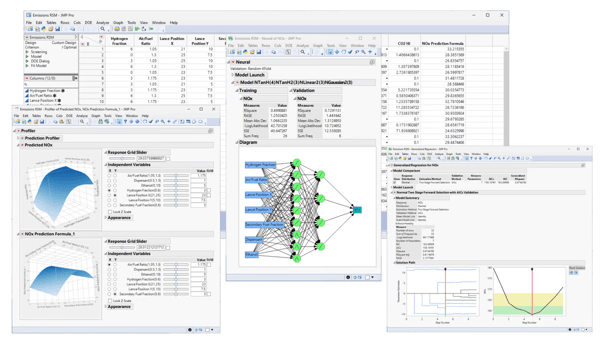
Another thing users appreciate about JMP is its ability to manage large datasets without significant slowdowns. For example, in manufacturing or healthcare, datasets often contain millions of rows, and JMP can handle these efficiently. This scalability ensures that users do not need to worry about data size constraints, which can be a limitation in other software.
JMP’s visual, point-and-click workflow makes basics approachable. Some G2 reviewers note that mastering advanced capabilities, like scripting in JSL, requires specialized know-how, so non-programmers benefit from templates, examples, and short enablement sessions. Local, interactive analysis is JMP’s sweet spot. G2 users point out limits around real-time collaboration, version control, and simultaneous editing, which can slow distributed teams; many pair JMP with Git/SharePoint for versioning and use exports or dashboards to share results.
All in all, JMP’s strength in exploratory analysis and dynamic visualization is often highlighted. Rated 4.5/5 on G2, users feel that with light training and a simple collaboration wrapper (repos, shared drives, scheduled exports), teams get fast insights without heavy overhead.
What I like about JMP:
- G2 reviewers often highlight JMP’s ability to create interactive graphs, charts, and dashboards. I’ve seen users mention how adjusting variables in real time and instantly seeing the impact on visualizations makes data exploration more intuitive and dynamic.
- The platform’s scripting language, JSL, also gets a lot of praise. According to reviews, it helps automate repetitive tasks like monthly reporting and quality control checks. I noticed several users say this flexibility saves them significant time and effort in their day-to-day analysis workflows.
What G2 users like about JMP:
“JMP offers a wide variety of statistical tools that are surprisingly easy to use whether you’re a beginner or a seasoned data analyst. One thing that stands out to me is how it simplifies otherwise complicated analysis tasks. For example, its interactive visuals and intuitive design make diving into data less intimidating. Plus, being able to customize scripts and automate workflows has saved me so much time; it’s been a real productivity booster.”
– JMP Review, Armin S.
What I dislike about JMP:
- While JMP is often praised for its ease of use with basic tasks, I’ve seen several G2 reviewers mention that mastering its advanced features—especially JSL and workflow automation—requires a steep learning curve. Many say it took considerable time and effort to get fully comfortable with scripting.
- Another common drawback is the lack of real-time collaboration tools. Users note that JMP doesn’t support simultaneous editing or version control, which can make it difficult for distributed teams to work together efficiently on the same analysis or dashboard.
What G2 users dislike about JMP:
“Although it’s easier for a professional to understand and use JMP, newcomers can find it difficult to understand various parameters in the functionality to perform reliable data analysis. Also, it can be tricky to understand complex data output if the parameters are different than similar software.”
– JMP Review, Devendra K.
Annotating data to provide context for training ML algorithms? Learn common data labeling methods and how they benefit you.
4. Minitab Statistical Software: Best for quality improvement and education
Minitab Statistical Software offers a broad range of statistical tools and techniques, including regression, ANOVA, and hypothesis testing. Users liked how this holistic toolkit allowed them to perform multiple analyses without requiring additional software. Minitab Statistical Software holds a 4.6/5 rating from 214 verified reviews on G2. Top pros themes called out by reviewers include Ease of Use (50 mentions), Data Analysis (44), Statistical Analysis (33), and Analysis Capabilities (27).
Minitab is also exceptionally good at handling large datasets and performing computations. Its ability to process data helped analysts spend more time interpreting results and implementing decisions rather than waiting for data analysis.
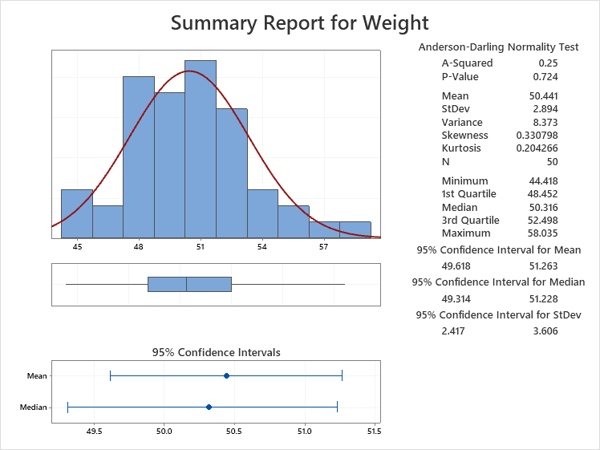
Minitab’s standout features are clear and visually appealing graphs, charts, and reports. Several reviews praised the software transforming complex data into easily understandable visuals like histograms, scatter plots, and control charts.
I’ve seen G2 reviewers consistently highlight how Minitab makes data import easy across multiple file formats, including Excel, CSV, and various databases. This flexibility helps teams integrate it into existing workflows without the hassle of reformatting or heavy preprocessing—something I noticed many users appreciate.
Minitab’s Windows-first design keeps desktop performance consistent. Some G2 reviewers note that Mac users often rely on Parallels/Boot Camp, which adds cost and setup time; many teams standardize on a Windows VM or shared server for a smooth experience.
Core statistics and quality tools are Minitab’s sweet spot. For predictive modeling, NLP, or deep learning, G2 users say flexibility lags R/Python; shops needing modern ML often pair Minitab with notebooks or a lightweight ML platform. The licensing model covers varied deployments. G2 feedback mentions unclear billing terms and occasional activation hiccups that slow rollout; clear SKU mapping and centralized license admins typically streamline setup.
Minitab’s strength in quality improvement, DOE, and manufacturing analytics is what it stands out for. With a Windows-based rollout and optional R/Python for advanced ML, many organizations get reliable stats workflows plus room to innovate.
What I like about Minitab Statistical Software:
- I’ve seen G2 reviewers consistently highlight Minitab’s comprehensive set of statistical tools. Having access to regression, ANOVA, and hypothesis testing in one platform saves time and eliminates the need to juggle multiple tools.
- Another thing I noticed is how often users praise the platform’s clean, visually intuitive charts. Graphs like scatter plots and control charts are frequently mentioned for helping teams turn complex data into easy-to-understand visuals.
What G2 users like about Minitab Statistical Software:
“It can do most any type of statistical analysis relatively well. It is a broad package that offers many different tools, and thus a very practical and powerful tool for a practicing statistician, engineer, or others engaged in data analysis and statistical application.”
– Minitab Statistical Software Review, Kerry S.
What I dislike about Minitab Statistical Software:
- Users dislike that it doesn’t support macOS natively. Having to rely on virtualization software or dual-boot systems is inconvenient and adds unnecessary cost and complexity.
- Reviewers also do not like its limited capabilities for advanced machine learning tasks like predictive modeling or deep learning. It feels outdated compared to the flexibility and power of tools like R or Python.
What G2 users dislike about Minitab Statistical Software:
“The data view and spreadsheet-like functionality could be better with filtering or sorting and data manipulation.”
– Minitab Statistical Software Review, Vimal O.
5. QI Macros SPC Add-in for Excel: Best for quick SPC inside Excel
QI Macros SPC Add-in for Excel simplifies complex statistical processes. Users loved using it to quickly perform quality control and analysis tasks within Excel. This integration eliminates the need for separate statistical software, reducing the learning curve.
I’ve seen G2 users call out how helpful QI Macros SPC Add-in is for automating the more tedious parts of statistical analysis. Chart generation and data processing are handled automatically, which several reviewers say saves them from manually calculating statistics or formatting visuals. This is especially useful for teams working with large datasets or running multiple tests—it frees up time to focus on interpreting results instead of managing spreadsheets.
QI Macros also gets strong feedback for its support of statistical process control (SPC). Reviewers in quality management and production monitoring consistently mention how easy it is to apply SPC techniques using the tool. It’s commonly used in industries like manufacturing, healthcare, and services, where process monitoring and control are essential.
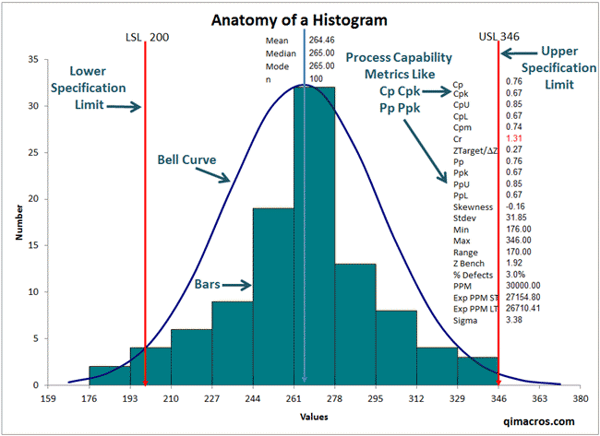
Several G2 users highlight QI Macros SPC Add-in for Excel as a go-to tool for those involved in Six Sigma and lean manufacturing. It offers a solid set of statistical tools, including control charts, Pareto charts, regression analysis, and hypothesis testing. From what I’ve read, the combination of functionality and ease of use makes it especially appealing for quality professionals who want to stay within Excel.
QI Macros ships with a broad set of SPC charts and reports that cover common quality workflows. Some G2 reviewers note that tailoring templates for niche datasets or atypical reporting can take extra steps; many teams use custom Excel templates or light VBA to bridge gaps. Staying inside Excel makes adoption easy for spreadsheet-first teams. Users who primarily work in R/Python or specialized platforms say context-switching into Excel can break their flow; a common fit-for-purpose approach is to reserve QI Macros for SPC deliverables and keep exploratory/ML work in code.
Everyday files run smoothly. Several reviews mention slowdowns with very large or high-dimensional data, since complex stats inside Excel can add overhead; filtering, sampling, or pre-aggregating data typically restores responsiveness.
G2 reviewers consistently highlight QI Macros as a fast path to SPC and capability analysis for spreadsheet-centric teams.
What I like about QI Macros SPC Add-in for Excel:
- I’ve seen G2 reviewers consistently highlight how QI Macros simplifies complex statistical processes by integrating directly into Excel. Users appreciate not having to learn a separate platform, which significantly reduces the learning curve.
- Another thing I noticed in reviews is how much time it saves by automating tasks like chart generation and data processing. Instead of spending time on manual calculations, users say they can focus more on analyzing results and drawing conclusions.
What I like about QI Macros SPC Add-in for Excel:
“The best feature I like about QI Macros is the visual analysis with the help of tables and charts. The way it analyses raw data to provide key insights into uncharted business opportunities is delightful. Also, anyone unsure of the tool initially can opt for a 30-day trial which gives the user access to all the benefits and features the software offers.”
– QI Macros SPC Add-in for Excel Review, Mithin M.
What I dislike about QI Macros SPC Add-in for Excel:
- I’ve seen G2 users mention the lack of flexibility when customizing predefined charts and reports. It can be frustrating when working with specific or niche data requirements that don’t fit the default templates.
- Performance is another common issue. I noticed several reviewers pointing out that QI Macros can lag with very large datasets, especially during complex analysis tasks. This slowdown disrupts workflow efficiency and can be a real drawback in data-heavy environments.
What G2 users dislike about QI Macros SPC Add-in for Excel:
“The add-in requires a purchase, which could be seen as a barrier for users or organizations with limited budgets, especially if they only need occasional use of its features.”
– QI Macros SPC Add-in for Excel Review, Ganta R.