



Ever watched a high-potential customer slip away without warning? I have—and even from the outside looking in, it’s frustrating. What’s worse is knowing it was probably avoidable.
Churn rarely shows up with flashing lights. It’s often a slow fade: a drop in usage, unanswered emails, and quiet complaints. And from everything I’ve learned researching this space, spotting those signs early is nearly impossible without the best customer success software.
I don’t work in customer success, nor do I send quarterly business review (QBR) decks or manage renewals. But I spend my days analyzing the tools that help SaaS companies grow. Customer success software consistently stands out as one of the most valuable investments a team can make.
I’ve spoken to CS leaders, read through countless reviews, and analyzed how teams are using software to turn those “at-risk” moments into retention wins. The more I dig into this space, the clearer it becomes: great customer success software isn’t just a “nice-to-have.” It’s a lifeline for retention, expansion, and long-term customer loyalty.
Still, with so many tools claiming to solve the same problems, choosing the right one isn’t easy. That’s why I’ve pulled together 9 best customer success software worth your attention based on user feedback, key features, and how well they actually help teams stay ahead of churn.
9 best customer success software for 2025: My top picks
- Salesforce Service Cloud for enterprise teams already deep in the Salesforce ecosystem. ($25/user/month)
- Gainsight Customer Success for data-driven CS teams at large B2B companies. (available on request)
- ChurnZero for SaaS businesses focused on reducing churn through automation. (available on request)
- Vitally for product-led teams needing fast, flexible CS workflows. (available on request)
- Planhat for flexible, modular CS setups (available on request)
- Totango for teams wanting prebuilt CS journeys and quick setup (available on request)
- Catalyst for startups seeking a modern, intuitive CS platform (available on request)
- Staircase AI by Gainsight for AI-powered relationship intelligence and sentiment analysis. (available on request)
- ZapScale for early-stage CS teams in B2B SaaS space. ($500/month)
*These are the top-rated customer success software in their category, according to G2 Grid Reports. Pricing for most of these products is available upon request, except for the ones for which I’ve already included the details.
9 best customer success software I recommend
From what I’ve seen, customer success software isn’t just about stopping churn. It’s about delivering a better customer experience, strengthening relationships, and driving long-term retention. It helps teams stay proactive, not reactive, and that shift alone can make a huge difference.
I’ve seen how the right platform can give CS teams the visibility they need to scale personalized support, track product adoption, and uncover opportunities to add value. These tools make it much easier to manage a growing list of accounts without missing a beat. You can track usage trends, automate check-ins, and spot red flags before they become real issues.
It’s not just about reacting when things go wrong; it’s about being one step ahead and making sure customers see success every step of the way.
And if you’re in the middle of evaluating tools, I know how overwhelming it can get. That’s why I put this list together—to spotlight platforms that consistently stand out for their usability, retention-driven features, and the real impact they’re making for customer success teams.
How did I find and evaluate the best customer success software?
I started with a shortlist of top-rated customer success tools on G2 and dug into each platform’s features, pricing, and usability. I focused on how well they handled key functions like onboarding, customer health scoring, playbooks, automation, account tracking, and collaboration between CS and other teams.
To go deeper, I used AI to analyze G2 reviews and surface recurring themes, whether it was pain points users kept mentioning, features they couldn’t live without, or areas where certain tools consistently outperformed others.
Please note: While some platforms offer free trials, demos, or guided tours, there were a few I wasn’t able to try firsthand. In those cases, I connected with professionals who’ve used the tools directly and compared their insights with verified G2 reviews and my own independent research. The screenshots in this article include a mix of those captured during my research and testing, as well as images sourced from the vendors’ G2 profiles.
What makes the best customer success software: My criteria
When I set out to evaluate these tools, I focused on what actually helps CS teams do their jobs better. Here’s what I prioritized while reviewing each platform.
- Ease of use: Even the best features don’t matter if the platform’s hard to use. I paid attention to how intuitive the UI felt, how smooth onboarding was, and whether users would need heavy training to get started.
- Onboarding and lifecycle automation: I looked for platforms that make it easy to build and automate customer journeys. Triggered emails, task flows, and success milestones matter when scaling.
- Health scoring and risk alerts: I paid close attention to how each tool handled customer health—how flexible the scoring models were, what data they pulled from, and whether alerts actually helped teams act before issues escalated.
- Integrations with CRM and support tools: Customer success doesn’t live in a vacuum. I prioritized tools that play nicely with CRMs like Salesforce or HubSpot and support platforms like Zendesk or Intercom so teams get a unified view of the customer.
- Playbooks and success planning: I looked for built-in playbooks and templates that help standardize processes like renewals, QBRs, or escalations. Bonus points if the tool lets teams customize and automate them based on account type or lifecycle stage.
- Reporting and visibility for CS leaders: I wanted to see how easily teams could report on churn, NRR, retention, or segment performance. Executive dashboards and exportable data made a big difference here.
Using these factors, I compared over 20 tools and narrowed them down to 9 best customer success software. While they aren’t perfect, checking every single box in my checklist, they each excel in key areas that make them worth considering.
The list below contains genuine user reviews from G2’s customer success software category page. To be included in the list, a tool must:
- Build or identify customer profiles.
- Capture customer data, history, and feedback, including survey results, renewals, invoicing, product usage, sentiment, and team interactions.
- Facilitate engagement with customers throughout the customer lifecycle.
- Provide feedback, customer success scores, and success reports based on the analysis of historical data.
- Automate workflow processes like communications, alerts, coordinating engagements, analyses, success planning, and reporting.
- Predict future customer growth, red flags, and trends as dashboards or graphs using data related to interactions, payments, inquiries, and more.
- Scale, according to the size of the company and method of customer adoption or engagement.
*This data was pulled from G2 in 2025. Some reviews may have been edited for clarity.
1. Salesforce Service Cloud
Salesforce is one of the most well-known and widely used CRM and customer success platforms out there. It’s pretty much the gold standard for large enterprises and support-heavy teams that need deep case management, omnichannel service, and cross-functional alignment at scale.
If I had to describe Salesforce Service Cloud in one sentence, it would be: incredibly powerful, but not without its quirks. It leans more towards support and customer service workflows.
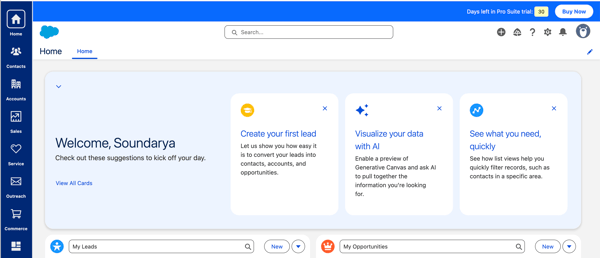
What stood out to me right away was how robust the platform is for case management. From what I’ve seen and what users consistently mention, it handles support at scale like a pro. The omnichannel capabilities, including web, chat, and email case routing, are a huge win for support teams juggling multiple channels.
In the screenshots I captured during my trial (before setting up the channels), you can see just how centralized and clean the case view is. You can assign labels, change owners, merge cases, and track everything with customizable filters. Everything, from setting up a new case and updating them to adding knowledge base articles, felt neat once you understood the flow.
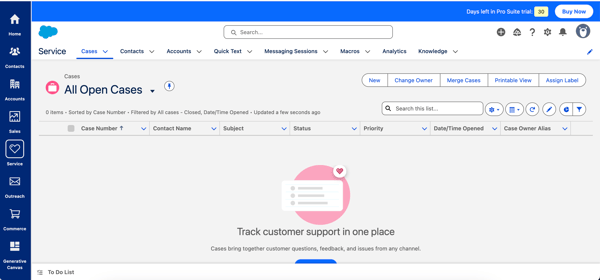
Where Salesforce Service Cloud really shines, according to users, is in customizability. You can tailor workflows, automate actions, and build dashboards that actually reflect your customer lifecycle. During my research, I saw this mentioned again and again: it’s a centralized system that makes collaboration easier, not harder.
Another thing that jumped out to me was the way AI is subtly integrated throughout the platform. From generating answers to summarizing customer conversations to using Einstein AI for predicting trends, Salesforce seems to be taking a thoughtful approach to automation.
That said, there are a few trade-offs to keep in mind. One thing that came up in several reviews was the pricing, which can become a consideration for growing teams.
A few users also mentioned that while the platform is highly customizable (which is a strength), making the most of that flexibility sometimes requires admin or developer support. From my own trial, I’d agree there’s a bit of a learning curve. It’s not difficult to get started, but configuring more advanced workflows or settings can take some time if you’re not already familiar with the Salesforce ecosystem.
That said, if your team has the resources to get it up and running properly, it can absolutely become the backbone of your customer success operation, especially if you already have Salesforce in your stack for CRM.
What I like about Salesforce Service Cloud:
- The case management experience is genuinely powerful—it’s easy to track, assign, and organize support requests across multiple channels without things slipping through the cracks.
- I really like how customizable the platform is. Being able to tailor workflows, dashboards, and automation to fit different CS processes is a huge plus.
What G2 users like about Salesforce Service Cloud:
“Salesforce Service Cloud excels in Omni-Channel routing, AI-powered automation, and seamless integrations with tools like Intercom and WhatsApp. Its case management, knowledge base, and real-time analytics enhance efficiency, while customization and scalability make it ideal for growing support teams.”
– Salesforce Service Cloud Review, Ian H.
What I dislike about Salesforce Service Cloud:
- I realized that some advanced configurations require admin or developer help, which can slow things down if your team doesn’t have in-house support.
- The pricing structure feels like something to watch closely—especially for growing teams where costs could stack up fast, based on my research.
What G2 users dislike about Salesforce Service Cloud:
“Salesforce Service Cloud is a very good platform, but requires a lot of add-ons for what I would have considered basic functionality, such as quote formatting. All of these add-ons are often all priced per user, so costs quickly rise depending on the number of users that you have on the Salesforce Platform.”
– Salesforce Service Cloud Review, Jon S.
2. Gainsight Customer Success
Gainsight Customer Success is exactly what its name suggests in my opinion. It gives customer success teams the insight they need to drive real gains in retention, engagement, and growth. Based on what I’ve found till now, Gainsight’s a favorite among mature CS orgs with dedicated ops or admin support.
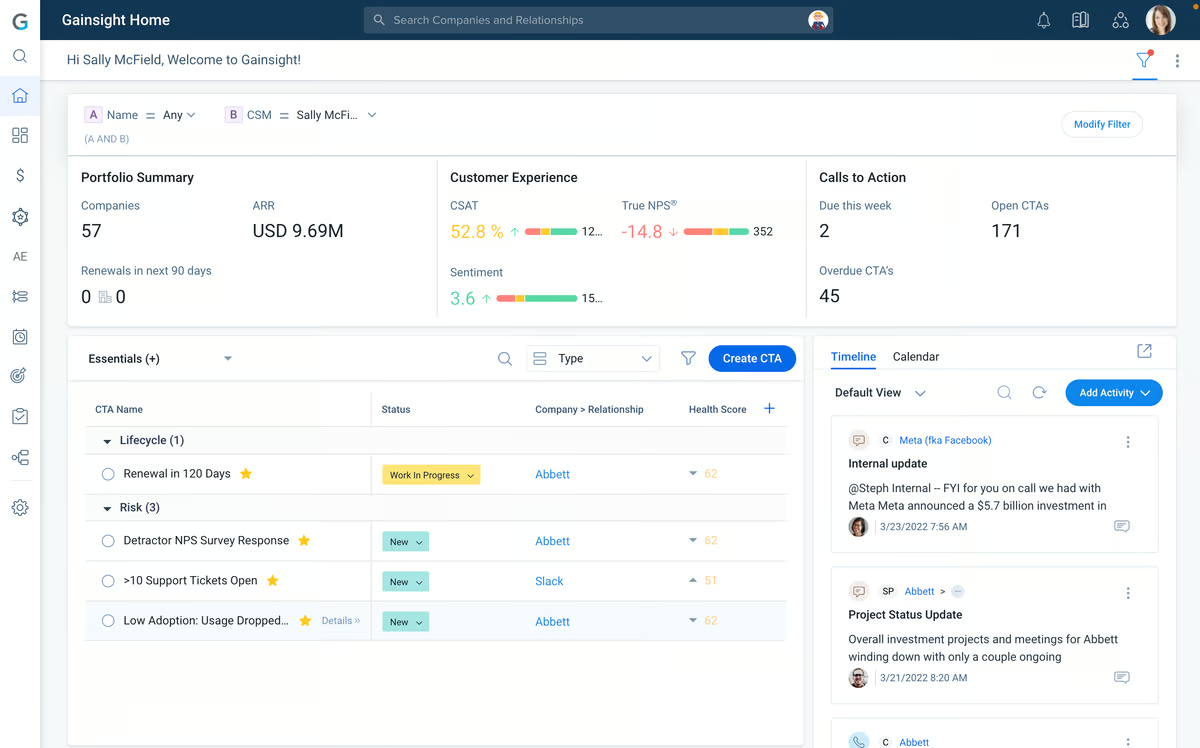
I only had access to a demo of Gainsight, but even without getting hands-on, I can see why so many CS teams swear by it. From what I gathered during my demo and confirmed by dozens of user reviews, it’s clearly built for teams that need full visibility into customer health, relationships, and outcomes.
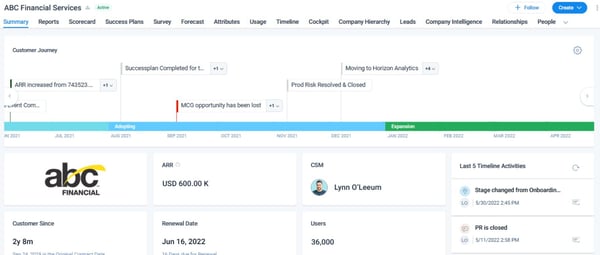
What stood out to me first is how many users rave about the Timeline and 360-degree views. It sounds like Timeline has become the go-to spot for staying on top of every interaction, touchpoint, and update tied to a customer. A lot of CS professionals described it as their single source of truth, especially when juggling a large book of business. That’s the kind of structure I know a lot of teams wish they had—less hunting across tools, more time actually helping customers.
I also saw a ton of love for Gainsight’s dashboards and automation features. Users mention how easy it is to track account health, set up alerts, and even forecast risk. The ability to customize playbooks and trigger workflows based on behavior or product usage seems like a huge plus, especially for CS teams trying to scale without losing that personal touch.
That said, there are a few things to keep in mind. A few users that the platform can feel a bit click-heavy at times based on what I heard. Accessing certain features often takes more steps than you’d expect, and that can add friction to your day if you’re working through a high volume of accounts.
Another theme that I saw often was the complexity that came with its feature-rich nature. Gainsight is incredibly powerful, but that power comes with a learning curve. It’s not exactly plug-and-play.
These aren’t dealbreakers, but more like things to plan for, in my opinion. If your team has the right resources (or is willing to invest in them), the long-term payoff seems to be there.
Still, it’s clear that Gainsight isn’t just another CRM add-on—it’s a purpose-built customer success platform with real depth. Whether it’s surfacing product adoption trends or supporting interdepartmental collaboration, the tool seems to deliver value across the board.
I may not have gotten to try it fully myself, but if I were part of a CS team looking to level up our operations, I’d absolutely want this on the shortlist.
What I like about Gainsight Customer Success:
- I love how Gainsight pulls everything into one place. Having a 360-degree view of accounts, timelines, health scores, and playbooks makes it way easier to stay proactive.
- The dashboards and automation options are impressive. It feels like I can build workflows that actually reflect how the CS team works, not just force us into a preset system.
What G2 users like about Gainsight Customer Success:
“Some of the things I like most about Gainsight is the breadth of functionality. It helps us centralize our customer data for our Customer Success Management teams. In addition, there is an ability to highly customize the set up of your environment.
We can write rules based on specific actions unique to our organization; we can create connected actions from rules to JO programs, to reports and dashboards, and back again. Similar to many other organizations, our data does not just live in one source, so we take advantage of its ability to connect to other sources, primarily through API calls but Amazon S3 and even CSV when needed.”
– Gainsight Customer Success Review, Carol K.
What I dislike about Gainsight Customer Success:
- Based on G2 reviews, what I found is that some parts of the platform feel a bit click-heavy. It takes a few extra steps to get where you want to go, especially when you’re managing a lot of accounts.
- From what I saw, Gainsight has a learning curve and works best when you have a power user or an admin to manage setup and ongoing customization.
What G2 users dislike about Gainsight Customer Success:
“Gainsight has come a long way with their user interface but there are still some admin features that are click heavy and some error messages that aren’t informative enough, requiring an admin to contact Gainsight support.”
– Gainsight Customer Success Review, Dan A.
3. ChurnZero
Keeping track of dozens of accounts, health scores, and touchpoints isn’t easy. But from everything I’ve read, ChurnZero helps make it manageable. Full disclosure: I didn’t get the chance to demo or test ChurnZero myself with a free trial, but after digging into recent G2 reviews and doing a deep dive into what the platform offers, I can see why it’s gaining traction with customer success teams. It’s especially popular with fast-growing mid-sized CS teams.
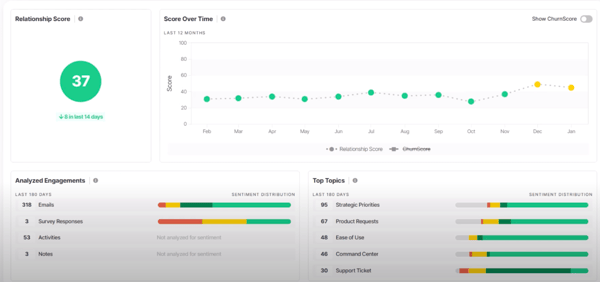
What stood out to me immediately, from both research and user feedback, is how well ChurnZero brings everything together. It’s designed to be a true command center for CS teams: account overviews, task tracking, playbooks, health scores, customer journeys are all in one place.
Many users mentioned how helpful it is to have visibility across the customer lifecycle without jumping between tools, and that definitely came through in the way people described their daily workflows.
Customization also seems to be a big win. Users consistently mentioned how easy it is to tailor dashboards, automate processes, and segment accounts based on whatever metrics matter most to them. It sounds like ChurnZero gives teams a lot of flexibility without complexity. There’s also a strong emphasis on proactivity. Things like reminders, alerts, and playbooks seem to help teams take action before problems snowball into churn.
That said, it’s not without its friction points. One thing I noticed in several reviews, and something I’d keep in mind if I were evaluating ChurnZero for my team, is that it takes a little time to get fully comfortable with the platform. There’s a lot under the hood, and while that depth is definitely a strength, it takes some time.
I saw a few reviewers also mention that the interface, while functional, could feel a little dated or click-heavy in places. It sounds like once you’re familiar with the system, the navigation becomes second nature, but there may be a bit of an adjustment period upfront.
For most teams, these are manageable trade-offs. On the whole, ChurnZero is definitely a strong contender in the customer success space.
What I like about ChurnZero:
- Everything’s centralized—tasks, customer data, journeys, and notes all live in one place, which makes staying organized so much easier.
- The automation and customization options stood out. From what I’ve seen, it’s flexible enough to support different CS models without forcing a one-size-fits-all setup.
What G2 users like about ChurnZero:
“ChurnZero covers all aspects of Customer Success and has the total circle of the client journey covered. It is specifically dedicated to Customer Success processes and that is what makes it unique. It is very easy to use and it’s customer support is also amazing. I have reached out a couple of times and they were always helpful.
ChurnZero is included in our daily tasks and we use it very often, for the most of our processes. I have managed to succesfully integrate it with my Microsoft accounts (Calendar and Email) and I am able to see all messages in the account profile and the meetings as well, which makes my day organised.“
– ChurnZero Review, Ivana S.
What I dislike about ChurnZero:
- From the reviews, it seems like the platform isn’t something you just jump into. It takes a little time to learn, especially if your team doesn’t have admin support.
- A few users mentioned that the interface can feel a bit clunky or dated in spots and that some tasks take more clicks than they probably should.
What G2 users dislike about ChurnZero:
“The interface can feel a little outdated – there could be some improvements made to the UX.”
– ChurnZero Review, Orla M.
4. Vitally
From what I saw in the product tour and backed by tons of G2 feedback, Vitally feels like it’s built to give customer success teams their time back. Everything about it seems designed for clarity, speed, and customization, especially for teams that want data front and center without drowning in it.
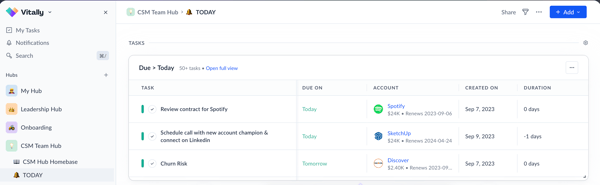
The UI was one of the first things that stood out to me. It looks clean, modern, and actually enjoyable to navigate. Multiple reviewers echoed that—it’s customizable, constantly improving, and gives you control over how you see customer data. You can tell it’s designed with day-to-day usability in mind.
I also liked how clearly tasks and account renewals surfaced. Just from the screenshot alone, it’s easy to imagine a CSM jumping in each morning and knowing exactly what needs attention.
What really impressed me is how Vitally balances being powerful without being overwhelming. It pulls data from multiple tools like CRMs, support systems, product analytics and makes it usable, not just visible. Users seem to love how easy it is to centralize insights and take action.
Another bonus: the playbooks and automation workflows look genuinely useful for repetitive tasks like onboarding and lifecycle management. They’re visual, editable, and don’t seem to require a technical background to tweak.
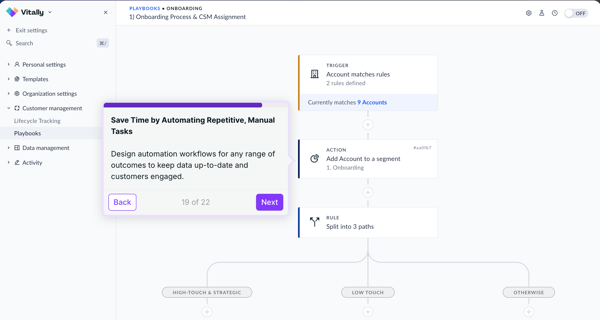
Of course, no tool is perfect. Based on what I’ve seen in the reviews, getting Vitally fully set up and making sure all your integrations are working the way you want definitely takes some time. It can be a little difficult to create and put your playbooks in place as they require careful consideration.
A few users also pointed out that while the UI is clean and modern overall, some parts of it could be a bit more intuitive or robust, especially when it comes to accessing certain features. That said, once everything’s in place, most users seem to agree that the flexibility pays off.
Overall, Vitally looks like one of the more modern, CS-first platforms out there. It doesn’t just help you manage customer data, it helps you act on it. If your team wants something powerful but still approachable, this one’s worth a serious look.
What I like about Vitally:
- I really liked how clean and customizable the UI felt—it’s easy to imagine a CSM starting their day and knowing exactly what to focus on.
- From what I saw and read, the ability to automate playbooks and centralize key data from different tools makes it a super efficient hub for CS teams.
What G2 users like about Vitally:
“If your integrations are set up correctly, it is the perfect tool to bring together all relevant infomation for your CS team. We integrate our product, amplitude, and Hubspot – which means I can evaluate any relevant cilent data in once place.
I also like that you can use it as acommuncation tool between teams/ indivduals where things are less likely to get buried like it would in something like Slack.“
– Vitally Review, Patricia S.
What I dislike about Vitally:
- Some users mentioned (and I can see why) that getting everything set up, especially integrations and workflows, and getting comfortable with the tool takes a bit of upfront effort.
- A few parts of the interface, while generally modern, could be more intuitive or flexible when it comes to configuring alerts or visualizing data.
What G2 users dislike about Vitally:
“I do think that learning Vitally takes a bit of time and investment, since it is so customizable. You really need to have people on your team who are invested in “figuring out” the best ways to make Vitally work for your company and team. In addition, it’s hard for somebody who is outside of your processes and org to log in and instantly understand the value that the org is getting, since each Vitally view is so customizable to the person using it. It’s not necessarily “intuitive”, especially if somebody new just logs in without the proper set up (or understanding that they need to do a set up).“
– Vitally Review, Melissa S.
5. Planhat
.From renewals and QBRs to portfolio health and account insights, Planhat built to give CS orgs the clarity and structure they need to stay on top of their pipeline and customers. It’s especially popular with mid-market and enterprise teams that need visibility into what’s happening across segments without losing speed.
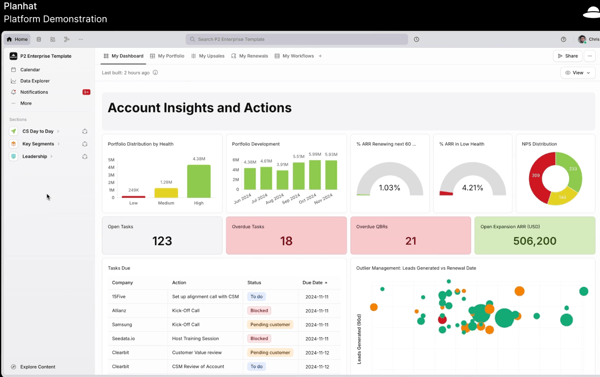
After watching the platform demo and digging into recent G2 reviews, it’s clear that Planhat puts real thought into the CS workflow. The dashboard design is sharp. It’s simple, but packed with context.
You can quickly see account health, task status, renewal risk, and open expansion opportunities all in one view. I found the way it visualizes customer portfolios genuinely helpful. Several reviewers called out the time they save by having everything, from NPS scores to overdue QBRs. in one place.
What stood out the most was the balance of flexibility and structure. You’re not forced into a rigid playbook, but you still have the tools to keep things consistent: playbooks, lifecycle tracking, alerts, and integrations that actually plug into your day-to-day tools.
That said, it’s not a tool you master overnight. Some users mentioned the learning curve, especially when trying to configure dashboards or navigate advanced workflows. Others noted that while the interface looks clean, it can take a bit of exploring to get comfortable with how everything fits together.
I also saw few reviewers mentioning that integration options could be more extensive or easier to configure, especially when trying to connect tools beyond the core ecosystem.
But overall, people seem to genuinely enjoy working in Planhat—mostly because it helps them stay organized, align better with internal teams, and prioritize the right customer actions without guessing. So, I’d say it’s definitely worth trying out.
What I like about Planhat:
- I really like how customizable the dashboards are. It’s easy to tailor views around account health, renewals, and customer activity without feeling locked into rigid templates.
- The way Planhat pulls in data from different systems and gives you a full picture of your portfolio makes it feel like a true operational hub for CS teams.
What G2 users like about Planhat:
“The product is made for Customer Success Teams, and it’s clear it has the people behind the product with the same mindset. Any lack of clarity in a help center article is more than resolved by reaching out to their superior level Support Team. Do I have questions? Chat. Needing to feel inspired or have someone to brainstorm with? Chat. It’s a level-up above anyone else in the industry.“
– Planhat Review, Hannah D.
What I dislike about Planhat:
- From what I saw in reviews, some parts of the platform can take time to learn, especially if you’re trying to build out more advanced workflows or views.
- A few users mentioned that integration options could be more extensive or simpler to configure, depending on what tools you’re connecting.
What G2 users dislike about Planhat:
“Difficult to get the hang of initially. Filtering can be difficult on the data view, particulary saving your preferred view. The calendar/ task planning feature is not the most intuitive.”
– Planhat Review, Joash G.
6. Totango
Totango definitely caught my attention as a platform that tries to keep things simple without stripping away functionality. From the walkthrough I saw, it feels like it’s built to support CS teams that want visibility, structure, and flexibility—without having to rely on a CS ops expert just to get started.