



I’ll be honest and admit right away that when AI tools like DALL-E and GPTs started popping up, I was hyped. Then, in late 2022, when ChatGPT blew up, and suddenly everyone was talking to AI, I knew generative AI was going mainstream, and I had to check it out.
Since then, I’ve tested AI chatbots, content generators, image creators, AI video generators, and other generative AI tools. Some were great. Others? Let’s just say I spent more time setting them up than creating (looking at you, early AI image generators).
But through all the hype and half-baked tools, I’ve kept my focus on the best generative AI tools, the ones that actually help professionals, writers, coders, marketers, and creators, work smarter, not harder. It’s clear this isn’t just a passing trend — the global generative AI market was valued at USD 16.9B in 2024 and is projected to reach USD 109.4B by 2030, growing at a rapid 37.6% CAGR.
From OpenAI’s ChatGPT to Google’s Gemini, from MidJourney’s mind-blowing images to Synthesia’s AI video magic, I’ve seen how far these tools have come.
TL;DR
- Top product picks: I tested 50+ tools and picked ChatGPT, Gemini, and GitHub Copilot as the best for startups and teams. These rank high on G2 and fit well for anyone seeking top generative AI tools for small businesses or enterprises.
- Key features: Most tools offer advanced LLMs, multimodal support, and customization options. Great for those needing the best generative AI toolkits for app development or efficient AI for digital services.
- Common use cases: I’ve used these for writing, coding, videos, and AI content detection. Ideal for SaaS teams wondering what AI infrastructure service companies rely on or what tools scale reliably.
Now, after sorting through the good, the bad, and the just plain unnecessary, I’ve put together a list of the best generative AI tools that actually deserve a spot in your workflow.
9 best generative AI tools for 2025: My top picks
- ChatGPT: Best AI chatbot for conversations and productivity
Delivers human-like interactions, creative assistance, and productivity tools for everyday tasks. (Pricing from $20/month) - Gemini: Best for advanced reasoning and content generation
Offers powerful multimodal capabilities and serves as the top ChatGPT alternative. (Pricing from $19.99/month) - GitHub Copilot: Best AI coding assistant for developers
Provides real-time code autocompletion and context-aware suggestions to boost developer productivity. (Pricing from $10/month) - Grammarly: Best AI writing assistant for error-free communication
Enhances grammar, clarity, and tone across emails, documents, and web apps. (Pricing from $12/month) - AKOOL: Best AI tool for image and video generation
Creates realistic visuals with advanced face-swapping and editing features. (Pricing from $39/month) - Synthesia: Best for AI-generated video creation with avatars
Produces professional-quality videos using lifelike AI avatars and voiceovers. (Pricing from $18/month) - Murf.ai: Best AI voice generator for professional content
Generates studio-quality AI voices for videos, podcasts, and presentations. (Pricing from $19/month) - Canva: Best AI design tool for content and marketing teams
Combines intuitive design templates with AI-powered image and copy generation. (Pricing from $12/month) - GPTZero: Best AI detection tool for identifying AI-written content
Accurately detects AI-generated text for educators, publishers, and researchers. (Pricing from $8.33/month)
* These are the top-rated software in their respective category of generative AI tools on G2, ranging from AI chatbots and large language models to AI content creation platforms and AI content detectors. Most of these tools provide a free plan or trial. I have included the starting price of their paid plans for easy comparison.
9 best generative AI tools I’ve tried and loved
For me, generative AI tools aren’t just software. They’re creative partners, problem-solvers, and (on really busy days) lifesavers. They help me brainstorm faster, automate the tedious stuff, and unlock ideas I wouldn’t have thought of on my own.
At their core, these tools generate something new — text, images, code, videos, and even voices, based on what they’ve learned from massive datasets. But the best ones? They don’t just spit out generic results. They enhance how we think, create, and work. They give us a starting point, a creative boost, and sometimes, a much-needed reality check when we realize that AI still isn’t perfect.
I’ve had moments where AI completely transformed how I approach work and others where I’ve sat there, staring at a screen, wondering why it gave me the most ridiculous output (seriously, why does AI struggle with hands?). But that’s part of the journey: finding the tools that actually make life easier, not harder.
How did I find and evaluate the best generative AI tools?
There are new AI tools released every day. To cut through the noise, I started with G2 data, using their grid reports across nine categories, namely, AI chatbots, coding tools, image and video generators, writing assistants, content platforms, content detectors, large language models, and more. I narrowed it down to the top five tools in each category.
Beyond G2, I scoured online communities to spot trending AI tools that professionals were actually using, resulting in a shortlist of 50 AI tools.
Over the next few months, my colleagues and I tested these tools within our respective domains. While I focused on AI writing assistants, chatbots, image generators, and content platforms, my colleagues, who have written extensively on AI coding tools, LLMs, content detectors, and text-to-speech apps, brought in their expertise to evaluate those categories.
To get a broader perspective, we also used AI to analyze and summarize thousands of G2 user reviews (well, didn’t I say I use AI extensively in my workflow?) to understand what other G2 users like and dislike about these tools and compare their experiences with ours.
I also tested platforms with enterprise-grade deployment in mind. If you’re offering products or digital services, the most efficient AI infrastructure software I came across offered developer APIs, deployment flexibility, and strong LLM integration — especially helpful for SaaS and AI-native teams.
What makes the best generative AI tool: My checklist
With so many generative AI tools on the market, choosing the best isn’t just about picking the most popular names. My colleagues and I followed a structured evaluation process to test and compare each tool, ensuring we prioritized performance, usability, and real-world value over hype.
For larger teams or developers building new systems, I also explored the most recommended generative AI infrastructure for software companies, especially those integrating AI across their codebase, dev environments, and customer workflows.
Here’s the detailed checklist we used to separate the best from the rest.
- Accuracy and output quality: Generative AI is only as good as the content it produces. We assessed each tool’s ability to generate accurate, high-quality results across different applications.
For AI writing tools, we tested for coherence, factual accuracy, grammar, and contextual understanding, ensuring minimal hallucinations. AI coding tools were evaluated based on syntax correctness, efficiency, and debugging capabilities across various programming languages. AI image generators were judged on realism, detail, resolution, and adherence to prompts, while AI video generators were analyzed for frame consistency, lip-sync accuracy (for avatars), and animation smoothness. For text-to-speech tools, we focused on natural tone, pronunciation, emotional variation, and response time. A tool that consistently produced high-quality, usable results with minimal intervention ranked higher.
- Usability and learning curve: A powerful AI tool is useless if it’s a pain to use. We paid close attention to how intuitive the interface felt: was the dashboard clean and easy to navigate, or did I have to dig through endless menus just to get started? The best generative AI tools worked right out of the box, while the ones that required excessive setup or technical know-how quickly dropped down our list.
- Speed and performance: AI should enhance productivity, not slow it down. We measured response time, processing efficiency, and overall system performance to see how quickly AI-generated text, images, code, or videos were produced. We prioritized tools that offered quick, seamless results without lag or crashes, especially for large-scale tasks like long-form content generation.
- Reliability and consistency: Some generative AI tools perform well one day and fail the next. To ensure stability, we tested them across multiple sessions over weeks to check for degradation in quality. Variability in outputs was another key factor: did the AI remain consistent, or did results fluctuate unpredictably? Additionally, we analyzed how well the tools handled complex prompts and nuanced requests without producing misleading or irrelevant results. Generative AI tools that delivered stable, repeatable performance were rated higher than those with unpredictable behavior.
- Customization and control: We looked at how much control users had over AI-generated content by assessing prompt tuning, adjustable styles, and revision capabilities. Tools that allowed detailed, fine-tuned prompts, let users define brand voice, artistic style, or coding conventions, and offered an interactive feedback loop for refining results ranked higher. Those that produced rigid, one-size-fits-all outputs scored lower.
- Data privacy and security: Generative AI tools process vast amounts of user data, making security and privacy considerations critical. We examined data handling policies, checking whether tools stored, shared, or used user data for further model training. Privacy-focused features such as local processing, opt-out options, and transparent data policies scored higher.
- Pricing and value for money: Not every AI tool justifies its price tag. We analyzed free vs. paid features, subscription costs, and overall return on investment. Some tools offered robust free plans, while others had essential features locked behind high-priced tiers. We prioritized tools that struck the right balance between affordability and functionality, ensuring that paid plans actually provided significant value.
After evaluating 50 AI tools across different categories, I narrowed it down to the 9 best generative AI tools. They’re reliable and friendly and make our workflow more productive and efficient. The list below contains genuine G2 user reviews from the respective product pages on G2.
*This data was pulled from G2 in 2025. Some reviews may have been edited for clarity.
1. ChatGPT: Best AI chatbot for conversations and productivity
Category: AI chatbot software, AI code generation software
ChatGPT is probably the most well-known generative AI tool out there. I’ve used it for just everything from drafting blog posts and brainstorming marketing ideas to answering random late-night questions like “Why do cats knock things off tables?” (spoiler: they’re just tiny chaos agents). But like any tool, it’s got its strengths and a few quirks.
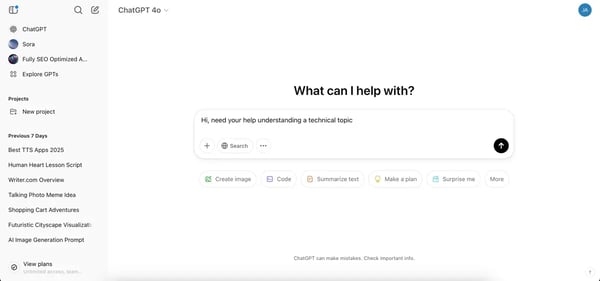
Accessing ChatGPT is super-easy now, with no login requirement. It’s as simple as opening a site and starting to ask questions. But for features like voice mode or image generation, we need to sign up for either a free plan or a paid one.
Let me be frank here: I’m a ChatGPT Plus user. The upgrade makes a difference to me as I use it extensively for writing, coding, brainstorming, and research. The access to advanced models, like GPT-4o, GPT-4, and GPT-o, that are noticeably sharper, and the added perks (like access to new features) make it worth it. That said, the free version is still solid for everyday tasks.
Should you upgrade to ChatGPT Plus? I break it down in my full review: Is ChatGPT Plus worth it? Check it out to see if the extra features justify the price!
ChatGPT is fast, efficient, and surprisingly good at structuring ideas when my brain refuses to cooperate. One of its biggest strengths is how versatile it is. I can ask for a witty tweet one minute and try writing a code in the next minute, and it handles both with ease. It also keeps track of context within a conversation, so I don’t have to repeat myself constantly.
My favorite feature is ChatGPT’s memory controls. I can explicitly tell it to remember things, ask what it remembers, and even reset or update its memory, either through conversation or settings.
Honestly, if I had to pick just one tool as the best generative AI infrastructure for my tech startup, ChatGPT Plus, with its advanced models, code generation, and file handling, would top the list.
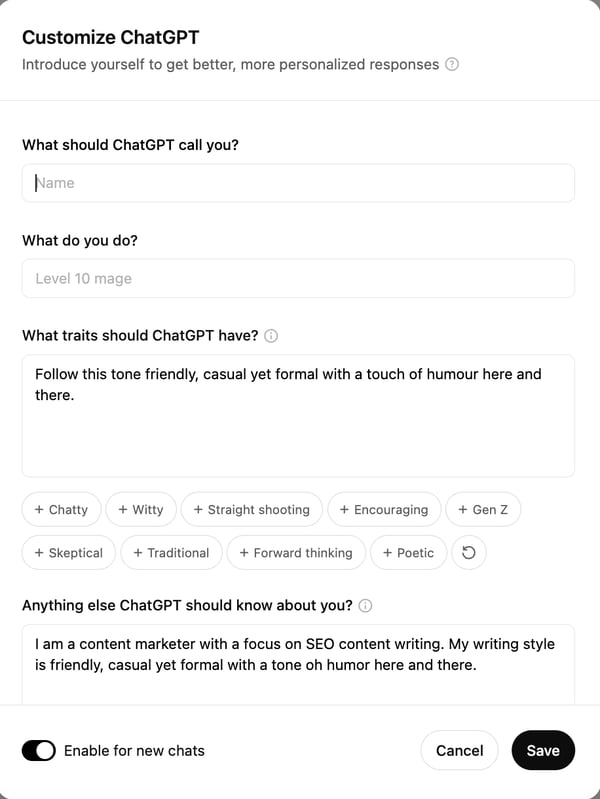
But the feature that excites me the most is the ability to build custom GPTs. Instead of a one-size-fits-all chatbot, I can fine-tune ChatGPT to behave exactly how I want, whether for a specific writing style, a coding assistant, or even an AI persona for brainstorming.
I’ve relied on ChatGPT to write HTML and JavaScript for interactive tools and web pages — ones that are now live on our website. Note that I have no experience coding at all, but that hasn’t stopped me from using it to build things that actually work. ChatGPT helps me generate full scripts, optimize code, understand algorithms, and even help with debugging.
It’s also been incredibly useful in breaking down complex datasets, writing Excel formulas I wouldn’t have figured out on my own, and even generating Pandas scripts to automate repetitive tasks. I wouldn’t have thought of using these advanced methods if not for ChatGPT honestly. And did I mention that we can now browse with SearchGPT also? If I need real-time information, I just switch to browsing mode and get up-to-date search results.
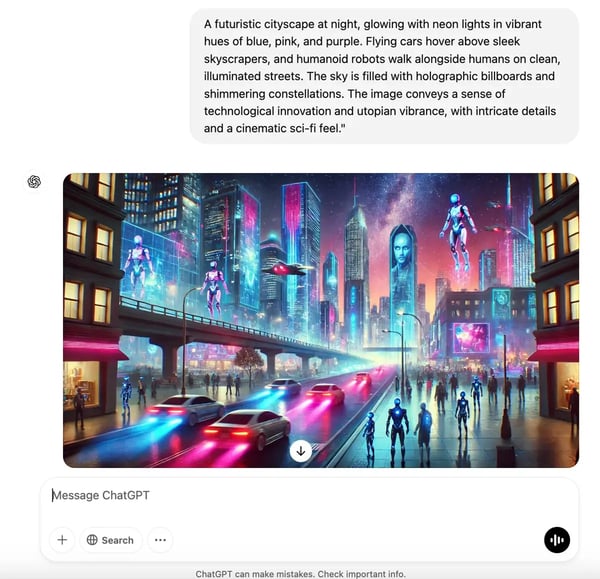
ChatGPT can also double down as an AI image generator powered by the DALL E3 model, albeit with limits on the number of images you can generate in the free tier and with fewer controls for tweaking it. I’d say there are other free AI image generators that do an even better job with more controls.
I’ve been genuinely impressed by how helpful ChatGPT is in my day-to-day work. It’s great for brainstorming ideas, breaking down complex topics, and speeding up writing or research — it really feels like having a supercharged assistant at my fingertips. That said, it does have its quirks. I’ve noticed it can sometimes sound overly confident, even when the answer isn’t entirely accurate. But once I got into the habit of fact-checking key details, it became much easier to rely on it for solid first drafts and quick insights.
While it’s fantastic for general knowledge, I’ve found that it can occasionally fall short on highly technical or niche topics, offering more surface-level answers. Still, for most creative, writing, or research tasks, its clarity and versatility more than make up for it. Sometimes it repeats information or slightly misses the point of my prompt, so I’ve learned to reword my input to guide it better. On the flip side, when it gets the context right — which it often does — the output is spot-on and saves me a ton of time.
Even the free version is impressive, though the limits on chats, uploads, and data analysis can feel a bit restrictive. As a Plus user, I’ve found that access to the latest models and faster responses more than justify the upgrade. Overall, despite a few hiccups here and there, ChatGPT remains one of the most capable and genuinely useful AI tools I’ve used. If you haven’t tried it yet, I’d definitely recommend giving it a go.
What I like about ChatGPT:
- It’s my go-to for brainstorming and research. Whether I need content ideas, a quick summary of a complex topic, or help structuring an article, ChatGPT saves me so much time. It feels like having a personal assistant who’s always ready to help.
- It makes coding easier even for someone without a formal coding background. I’ve used it to generate HTML and JavaScript, troubleshoot errors, and understand concepts that would have taken me hours to figure out on my own.
What G2 users like about ChatGPT:
“I love this tool beyond anything! ChatGPT has made my life so simple, and I can literally ask anything that comes to my mind. It is like a friend, mentor, guide, or anything you like it to be. I can ask anything, and it gives me the answers, and after a little back-and-forth, it gives me the perfect answers every time!!”
– ChatGPT Review, Sakshi S.
What I dislike about ChatGPT:
- The usage limits can be challenging. Even as a Plus user, I’ve hit message caps at the worst times, especially when I’m deep in research or debugging something. Having to wait or switch models disrupts my workflow.
- Sometimes, it just doesn’t get what I’m asking. There are times when I have to tweak my prompt multiple times because ChatGPT either misunderstands the request or gives a vague, generic response instead of something useful.
What G2 users dislike about ChatGPT:
“Sometimes, ChatGPT struggles with deeply nuanced or highly specialized queries. It might provide answers that are too general or miss subtle details, requiring additional clarification or manual fine-tuning.“
– ChatGPT Review, Shikar S.
Other Top AI Chatbots I’ve Tried: The Best ChatGPT Alternatives
- Gemini for Google-integrated AI assistance and research
- Simplified for AI-powered marketing content creation with chat like interface
- Zoom Workplace for AI-driven meeting summaries and collaboration
- Kore.AI for enterprise-grade AI chatbots and automation
- Tidio for AI-powered customer support and live chat
- Podium for AI-enhanced messaging and reputation management
- Claude for natural, context-aware conversations with a focus on safety and ethics.
For a detailed review of each product, you can read my article on the best AI chatbots.
2. Gemini: Best for advanced reasoning and content generation
Category: Large language models, AI chatbot software
If there’s one chatbot I keep open all the time, along with ChatGPT, it’s Gemini. But if I call it just a chatbot, that doesn’t do it justice. It’s one of the top-rated large language models (LLMs) out there, optimized for everything from text generation to multimodal tasks like processing images, audio, and video.
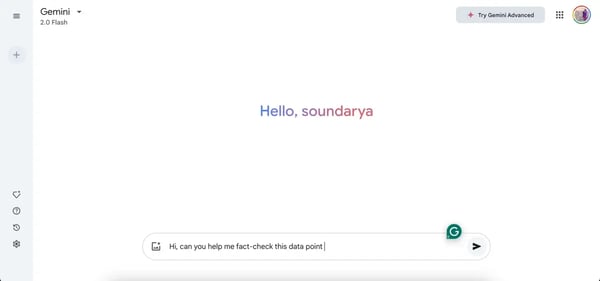
Gemini 2.0 Flash, the latest iteration, is designed for speed and versatility, while previous models like Gemini 1.5 Pro focused more on complex reasoning. From what I’ve seen, Google has clearly positioned Gemini as more than just a conversational AI. it’s a full-fledged LLM built to handle high-volume data processing, creative content generation, and advanced problem-solving.
It can analyze text, generate creative content, assist with coding, and even process images, making it more than just a chatbot.
With the release of Gemini 2.0 Flash, I feel it’s faster, smarter, and better at handling everyday tasks. If you’ve used Gemini 1.5 before, you’ll notice the step-up immediately. Responses feel more refined, the model understands context better, and overall, it’s just a smoother experience.
What sets Gemini apart from ChatGPT, in my experience, is its focus on natural, flowing conversation. While ChatGPT is excellent at generating text and following instructions, Gemini feels more like a true dialogue. It’s less about giving commands and more about having a back-and-forth. I find myself using them for different purposes – ChatGPT for structured tasks, and Gemini when I want to explore ideas and have a more dynamic interaction.
Beyond conversation, Gemini has features that have impressed me over time. It supported real-time web browsing long before ChatGPT got that capability, which was a huge plus. The fact-check with Google feature is another favorite. I can easily verify AI-generated responses with sources from the web, making it especially useful when researching or cross-checking information.
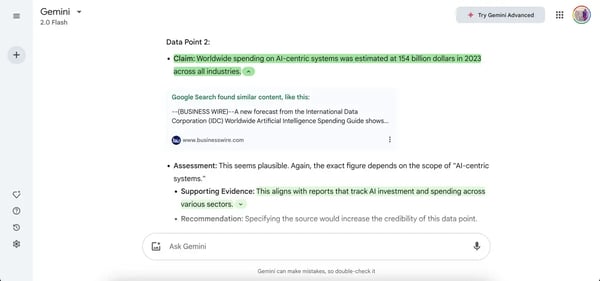
I also like its AI image generation capabilities powered by the Imagen 3 model. It’s not as sophisticated as other AI image generators but I definitely like to play a lot with it, creating a number of images given it has no limits on number of images generated.
Whether you’re exploring multimodal content generation or building LLM-powered systems, Gemini stands out among the top generative AI tools for enterprise use — it’s fast, well-integrated, and strong on fact-checking, which makes it a reliable choice for professional workflows.
That said, there are a few areas where it could improve. For example, the free web version doesn’t yet allow file uploads for data analysis or other advanced tasks — I can only upload images in the browser. File uploads are available in the mobile app, but switching devices for that can sometimes be inconvenient. Similarly, some of Gemini’s deeper integrations with Gmail, Docs, and other Google tools are limited to Google One AI Premium or Workspace users, which might make the experience feel a bit segmented.
Even so, Gemini continues to be one of my go-to AI tools. It’s fast, thoughtful, and feels more like a real assistant than just another chatbot. For research, content creation, or everyday productivity, it’s definitely worth having open alongside ChatGPT.
What I like about Gemini:
- Unlike some AI models that just follow commands, Gemini actually keeps up with the flow of a discussion. I can jump between topics, and it still understands the context, making interactions feel way more natural.
- I love that I can verify responses with Google’s fact-check feature. It’s super handy when I need up-to-date info or want to double-check something without leaving the chat
What G2 users like about Gemini:
“It is the best assistant to have as a writer and editor. It can be used to brainstorm ideas for any work and is very helpful with innovative insights. It is one of the best research assistants, and it doesn’t disappoint.”
– Gemini Review, Dr. Fizza Y.
What I dislike about Gemini:
- It’s challenging that I can’t upload files for analysis unless I’m using the mobile app in the free version. On the web version, I can only add images, which feels limiting compared to other AI tools.
- It’s a little disappointing that features like Gmail & Docs integration are only available with the Google One AI Premium Plan. It would be great if at least some of these were accessible for free users.
What G2 users dislike about Gemini:
“Sometimes, Gemini will fail to provide accurate solutions and does not accept documents and doesn’t have the ability to read and understand documents”
– Gemini Review, Suma G.
Other LLMs you can consider trying:
- BERT for natural language understanding and text embeddings.
- Meta Llama 3 for open-source AI development and research.
- GPT-3 for general-purpose text generation and conversation.
- IBM Watsonx.ai for enterprise AI solutions and business automation.
- GPT-4 for advanced reasoning, coding, and human-like responses.
- Megatron-LM for high-performance AI training on large datasets.
- AutoGPTfor exploring autonomous AI agents and task automation.
Check out our in-depth article on the best LLMs. for a detailed breakdown of their features, strengths, and use cases.
3. GitHub Copilot: Best AI coding assistant for developers
Category: AI code generation software
As I’ve mentioned before, I’m not a coder by trade. But ever since I started using generative AI tools, I’ve found myself diving into coding more than ever. And if there’s one tool that kept coming up in conversations with my developer friends, it was GitHub Copilot.
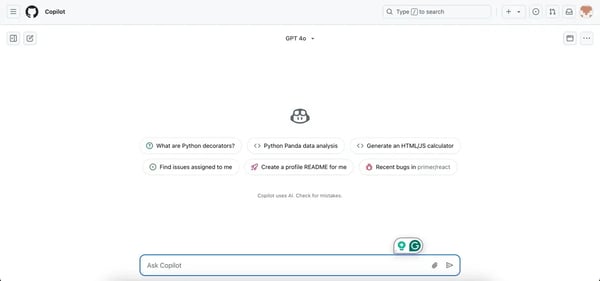
Right off the bat, I noticed that GitHub Copilot gives users the option to choose their preferred large language model (LLM) for generating code, including GPT-4o, Claude 3.5 Sonnet, and the o1 models from Azure OpenAI.
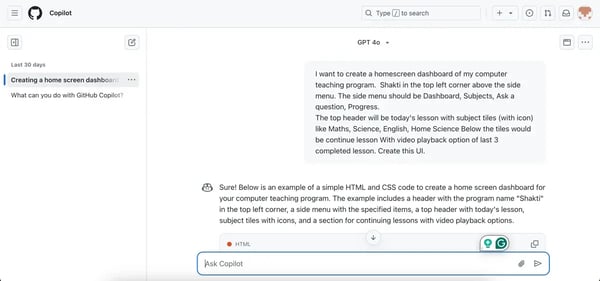
I gave the tool a try and immediately appreciated that I don’t have to start from scratch. I can describe what I need in plain English, and Copilot generates a working code snippet that I can tweak, much like ChatGPT. For someone like me, without a formal coding background, it’s been a huge confidence booster, helping me understand code structure, syntax, and logic without feeling overwhelmed.
For example, see how I used it to generate code for a home screen dashboard for my pet project. With a few tweaks here and there, I had a working dashboard.
That being said, my experience with GitHub Copilot is still at a beginner level, so I relied on insights from my colleague, who uses it extensively for development work.
From what I’ve seen and from their feedback, Copilot is a massive time-saver for developers, whether they’re writing new code, debugging, or automating repetitive tasks. Instead of spending hours searching through documentation, Copilot provides smart code suggestions that speed up the process and make development smoother.
Most of the time, it suggests code that they would write out anyway, and if the suggestion is wrong, they just start typing what they want, and it usually figures it out pretty quickly.
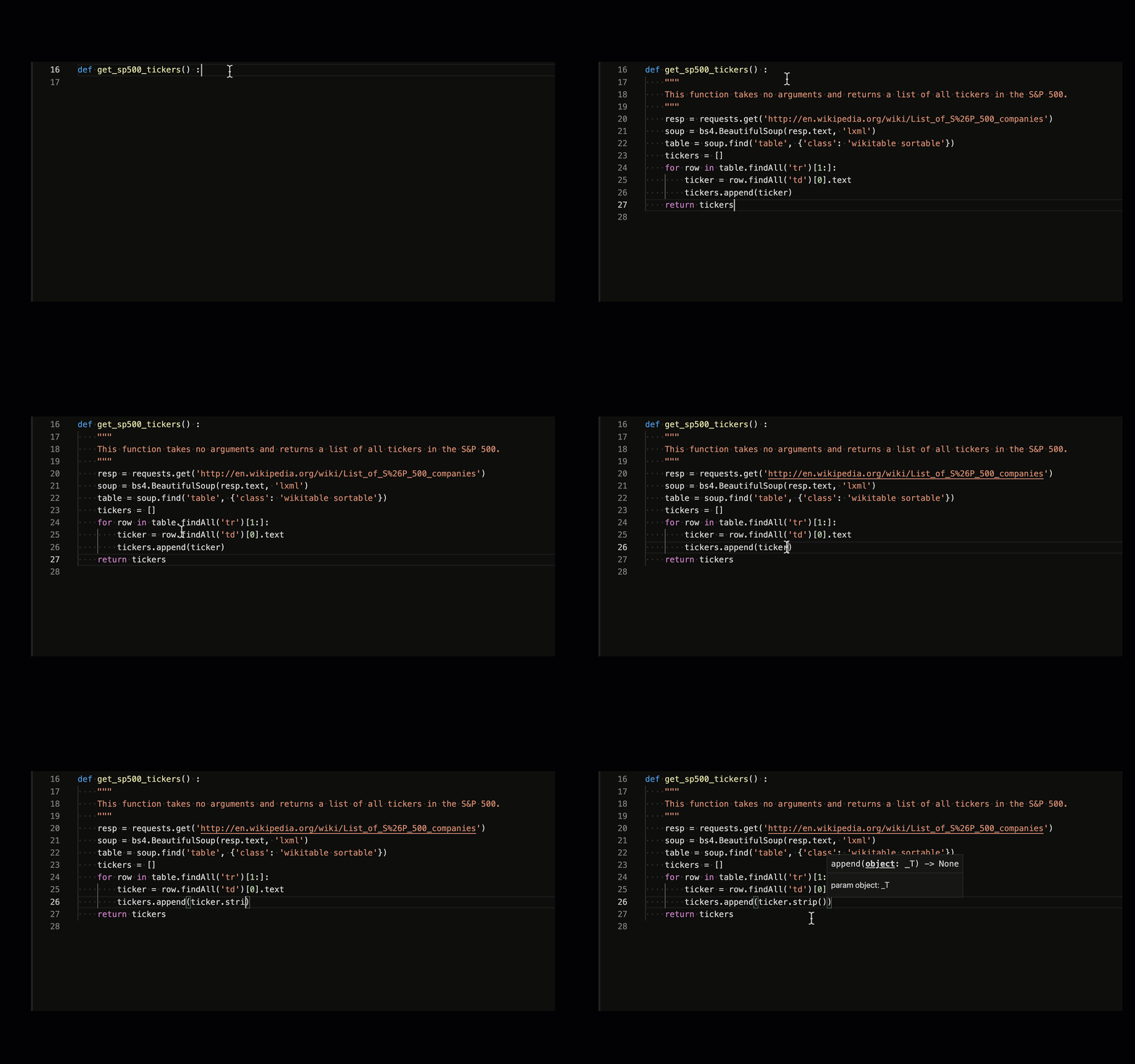
The best part, according to them? It integrates directly into their IDE (Visual Studio Code, IntelliJ), making it incredibly seamless to use. Copilot works right inside the editor, generating real-time suggestions as they type.
If you’re looking to build from scratch, Copilot pairs well with other developer-friendly options in the best generative AI toolkits for launching a new app — like Replit, Pareto, and Salesforce Platform — each offering different levels of code generation, automation, and customization.
That said, there are a few things to keep in mind. From what my colleague has shared, Copilot occasionally suggests functions that don’t actually exist, which can require a quick review before implementation. While it’s excellent at completing code within a single file, it doesn’t always capture dependencies across an entire project, so a bit of manual oversight is still needed to ensure everything aligns correctly.
Even with these minor limitations, GitHub Copilot remains one of the best AI code generators available — a reliable companion that helps streamline development and boost productivity.
What I like about GitHub Copilot:
- It makes coding so much more approachable. As someone without a formal coding background, I love that I can describe what I need in plain English, and Copilot generates a working code snippet that I can tweak. It’s like having a coding mentor guiding me through the process.
- My developer colleagues like that it works directly inside the IDE. It gives them real-time suggestions as they type, which makes coding feel more seamless and intuitive.
What G2 users like about GitHub Copilot:
“It excels in providing code snippets, which save a lot of time when automation repetitive tests or when dealing with complex logic. It gave us a huge advantage during migration from Cypress to the Playwright framework. (I like that I can) chat with Copilot inside VS code studio.”
– GitHub Copilot Review, Rostyslav B.
What I dislike about GitHub Copilot:
- GitHub Copilot can sometimes hallucinate code that doesn’t exist. My colleague has pointed out that Copilot occasionally suggests functions that aren’t real, leading to unnecessary debugging.
- Based on what I heard, Copilot doesn’t always grasp the full context of a codebase, meaning it can miss dependencies or suggest solutions that don’t fit the broader project.
What G2 users dislike about GitHub Copilot:
“The model is not trained enough to comprehend a somewhat difficult question. Sometimes it ignores the prompt that’s given, it sort of hallucinates. For example, it calls for a function of a module that doesn’t exist.”
– GitHub Copilot Review, Rheyhan F.
Other best AI code generators to try based on my research:
- Duet AI for coding support in Google Cloud & Workspace.
- Pieces for Developers for AI-powered code snippets and context-aware coding recommendations.
- Sourcegraph Cody for open-source AI coding assistant with AI-driven code search and project-wide understanding.
- Amazon CodeWhisperer for real-time code suggestions optimized for AWS development.
- Crowdbotics Platform for AI-assisted app development with pre-built components.
- Pareto for accessing multiple AI models through a single platform for AI coding and content generation.
- Salesforce Platform for low-code and no-code features and Einstein for developers to automate CRM functions.
If you’re wondering what’s the best generative AI platform for app development, Copilot, Replit, and Crowdbotics all offer great starting points, especially for fast prototyping and real-time iteration.