


You’ve run the A/B test, shipped the redesign, and users are still dropping off at the same point. The best heatmap tool tells you what your usual dashboard data can’t, by turning clicks, scrolls, and cursor movement into clear evidence of where attention fades, frustration builds, and sessions end.
The heatmap and session recording software market is projected to grow from $1.28 billion in 2025 to $3.5 billion by 2035, at a CAGR of 10.6%. That growth tracks with a broader shift: analytics tells you what happened, heatmaps tell you why.
I built this list using G2 Grid Reports, AI-assisted G2 review analysis, and practitioner cross-checking with product, UX, and growth teams actively using these tools. Every recommendation is matched to a specific workflow need.
TL;DR: The 9 best heatmap tools include LogRocket, Fullstory, Glassbox, Luck Orange, Clarity, Mouseflow, Contentsquare, Heatmap, and Hotjar by Contentsquare..
9 best heatmap tools for 2026: My top picks
- LogRocket: Best for fast, visual debugging and understanding real user behavior
Session replay with embedded network logs to fix issues faster and improve UX. (Free tier available; paid plan starts at US$69/month) - Fullstory: Best for deep user behavior and experience analytics
Captures user sessions, clicks, frustration signals, and conversion funnels to optimize UX. (Free trial available, paid plan pricing available on request) - Glassbox: Best for enterprise-grade digital experience insights
Combines session replay, advanced analytics, and anomaly detection for customer experience teams. (Pricing available on request) - Lucky Orange: Best for affordable heatmaps and session recordings
Heatmaps, visitor recordings, polls, and live chat to understand and convert site traffic. (Free tier available; paid plan starts at US$39/month) - Clarity: Best for free heatmaps and AI-assisted behavioral insights
Free heatmaps, session recordings, and AI-powered Copilot summaries with no traffic limits or session caps. (Free forever) - Mouseflow: Best for combined heatmaps and funnel analysis
Recordings, heatmaps, funnels, and form analytics to uncover user behavior bottlenecks. (Free tier available; paid plan starts at €25/month) - Contentsquare: Best for enterprise CX and journey optimization
Behavioral insights, zone heatmaps, AI-driven recommendations, and journey analytics. (Free tier available; paid plan starts at US$40/month) - Heatmap: Best for simple click and scroll visualization
Simple click, move, and scroll heatmaps to analyze visitor engagement. (Free tier available; paid plan starts at US$29/month) - Hotjar by Contentsquare: Best for heatmaps combined with user feedback and surveys
Heatmaps, session recordings, conversion funnels, and built-in survey and feedback tools for UX and CRO teams. (Free plan available; paid plans start at ~$39/month)
*These tools are top-rated in their category based on G2’s 2026 Winter Grid Report. I’ve included their strengths and pricing details to help you choose the right platform for your team’s product, UX, and optimization workflows.
The 9 best heatmap tools I recommend
Not every heatmap tool earns a place in a team’s daily workflow. Some look impressive in a demo and become shelfware within a quarter. What I looked for when building this list was simpler: do teams actually change decisions based on what this tool shows them?
The platforms I recommend here do more than render a color overlay on your page. They give you enough context to act. That means connecting behavioral signals to session recordings, segments, or funnel steps so you’re not left guessing whether a drop-off is a design problem, a device issue, or a content gap. What stood out to me across the review data is that the strongest tools make those patterns easier to interpret, reducing the amount of manual analysis teams have to do.
I also paid attention to fit across team types. A tool that works well for a two-person CRO team at a SaaS startup is not automatically the right call for an enterprise product org managing multiple properties across regions. G2 review data backs this up: adoption in this category spans small teams, mid-market companies, and large enterprises, and the friction points differ significantly across each. The tools I’ve included reflect that range.
If you’re evaluating heatmap tools, use the workflows and trade-offs in this guide to narrow the field. Match the tool to where your team currently loses clarity, and you’ll find the right fit faster than running every platform through a trial.
How did I find and evaluate the best heatmap tool?
I started by using G2’s 2026 Winter Grid Reports to shortlist leading heatmap platforms based on verified user satisfaction and market presence across small teams, mid-market companies, and enterprise organizations.
From there, I used AI-assisted analysis to review hundreds of G2 user reviews and surface recurring feedback patterns tied to real-world product, UX, and optimization workflows. I focused on signals such as data clarity, ease of interpretation, session replay depth, segmentation flexibility, performance impact, and how well insights connect to conversion or UX decisions. This made it easier to distinguish tools that consistently support decision-making from those that tend to generate noise or slow teams down.
Since I have not personally used every tool covered, I validated these findings against insights from product managers, UX researchers, CRO leads, and analytics teams who actively work with heatmap software in production environments. All screenshots, visuals, and product references in this article are sourced from G2 vendor listings and publicly available product documentation to ensure accuracy and transparency.
What makes the heatmap tool worth it: My criteria
The criteria below are the ones I used to evaluate every platform on this list. They come from recurring themes across hundreds of verified G2 reviews rather than feature lists or vendor claims. Each one reflects an area where these tools consistently differ in day-to-day use and where the right fit has the biggest impact.
- Behavioral signal clarity: If you need to explain what a heatmap is showing before your team can act on it, the tool is already creating friction. Strong platforms make clicks, scroll depth, and attention signals immediately readable. Insights that require a second layer of analysis lose momentum before they influence anything.
- Context beyond the heatmap: A color overlay tells you where users clicked. It rarely tells you why they didn’t click what you expected. The tools worth using connect visual behavior to session recordings, user segments, or page intent, so you’re diagnosing real problems rather than optimizing based on incomplete evidence.
- Actionability across roles: Heatmap data that only makes sense to one person on the team tends to sit unused. I looked for platforms where a product manager, a designer, and a growth lead can each pull a clear next step from the same view, without routing everything through an analyst first.
- Segmentation that reflects real questions: Averages hide friction. Device type, traffic source, and behavioral cohorts can tell completely different stories about the same page, and if your tool makes those comparisons hard to run, you’ll default to aggregate data that masks what’s actually going wrong.
- Signal reliability at scale: This is where several otherwise capable tools fall down. Sampling gaps, delayed rendering, and inconsistent session capture start small and compound. Once your team starts second-guessing whether the data is accurate, the tool stops influencing decisions regardless of what it costs or how long it’s been installed.
Some teams prioritize depth of behavioral insight, others need speed and simplicity, and some require enterprise-grade control and scale. No tool excels at everything. The right choice depends on where friction currently slows your decisions and how directly a platform helps remove it without adding new complexity.
Below, you’ll find authentic user reviews from the Heatmap Tools category. To appear in this category, a tool must:
- Provide a visual analysis of user interaction behavior
- Support heatmap-based insights beyond static screenshots
- Be actively used by product, UX, or growth teams
- Have sufficient verified review data to identify usage patterns
This data was pulled from G2 in 2026. Some reviews may have been edited for clarity.
1. LogRocket: Best for fast, visual debugging and understanding real user behavior
Frontend teams rarely get a clean bug report. Users describe symptoms, not causes, and one pattern I kept seeing in the review data is how much time teams spend trying to reproduce issues from incomplete reports. That’s exactly the gap LogRocket is built to close. Session replay sits alongside console logs, network activity, and error data, giving developers the context they need to identify root causes without piecing the story together manually.
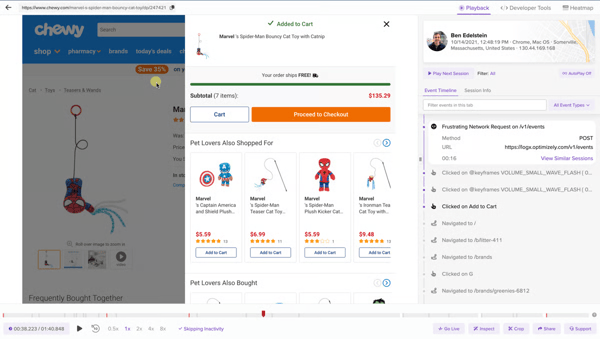
LogRocket session replay dashboard
The first capability that caught my attention was LogRocket’s session replay. It captures clicks, cursor movement, console output, network payloads, and Redux state in one pixel-accurate view. G2 reviews keep coming back to this as the capability that changed how their teams work, reproducing issues in seconds rather than spending afternoons building hypotheses from partial data. At 95% on G2, session replays are the capability reviewers anchor their praise to most consistently, reflecting how central they are to the platform’s day-to-day value.
Error grouping and proactive issue surfacing are another area that stood out to me in the G2 reviews. The dashboard flags trouble areas without requiring manual searching, stacking error patterns against user impact so your team can prioritize fixes based on what affected real users rather than what simply looked severe in a log file. Several G2 reviews describe this visibility as what shifted their debugging posture from reactive to anticipatory, backed by a 90% rating for monitoring on G2.
One pattern I kept seeing across G2 reviews is how often teams mention the speed of implementation. Integration across major frontend frameworks is described as taking minutes rather than days, with minimal custom code required. The SDK captures a broad range of behavioral data out of the box, and from my evaluation of the review data, that low-friction setup is one of the reasons teams continue relying on the platform well beyond the initial rollout.
Ask Galileo was another capability that caught my attention while working through the reviews. The AI layer allows teams to query session data using natural language instead of building filters manually. G2 reviewers consistently describe product managers and other non-technical stakeholders pulling session-level insights independently, reducing reliance on engineering teams for routine analysis. What I found notable is how often reviewers connect that accessibility to faster decision-making across product and UX teams.
Filtering and session search draw consistent praise for handling large session volumes. G2 users describe narrowing sessions by errors, device type, behavioral attributes, and custom events as central to their diagnostic workflow. G2 feedback rates heat maps at 87%, complementing session filtering as a visual layer for teams investigating interaction patterns alongside technical errors.
Session sharing emerged as another recurring strength in the review data. G2 reviews describe sharing session links across product, support, design, and engineering as the cleaner alternative, aligning teams on root cause through shared visual evidence rather than written descriptions. Non-technical team members can follow along without needing technical context, and feedback notes it cuts back-and-forth cycles significantly.
One theme that surfaced in G2 reviews was the depth of LogRocket’s interface. Features like compound filters and advanced debugging tools give teams a high level of control, but they also make the platform feel more layered than lighter session replay tools. This is most noticeable for teams adopting LogRocket as their first observability platform, while engineering teams with established debugging workflows are more likely to appreciate the additional flexibility once they’re familiar with the interface.
G2 reviewers also mention that session recording and retention limits become more noticeable as usage scales. Organizations monitoring multiple applications or handling high session volumes are more likely to encounter these constraints than teams with more predictable debugging workloads. Even so, reviewers generally find the available retention model well suited to day-to-day investigation and troubleshooting, particularly when paired with LogRocket’s broader debugging capabilities.
LogRocket shortens the gap between user behavior and technical resolution in a way that’s difficult to replicate with separate tools. Session replay, proactive error visibility, and fast implementation work together seamlessly. For teams where frontend reliability and UX clarity directly affect release quality, it earns its place in the stack.
What I like about LogRocket:
- Session replay paired with console logs, network payloads, and error data makes it possible to reproduce frontend issues in seconds without needing user-described context.
- Fast SDK integration and out-of-the-box behavioral capture mean teams start generating actionable insight almost immediately after deployment.
What G2 users like about LogRocket:
“LogRocket has become essential in our frontend stack: setup took minutes in React/Next.js, and the pixel-accurate session replay paired with console logs, network payloads, and Redux/RTK actions lets us reproduce issues in seconds.”
– LogRocket review, Ala M.
What I dislike about LogRocket:
- G2 users note that the dashboard takes some getting used to, especially when using advanced filters. New users will notice this most, while the core session and error views remain easy to navigate from day one.
- Session recording and retention limits vary by plan. G2 feedback states that teams with high session volumes or longer investigation windows will notice this most, while the recorded sessions still provide the depth needed for effective root-cause analysis.
What G2 users dislike about LogRocket:
“The pricing gets expensive as your team or traffic grows, especially for startups with limited budgets.”
– LogRocket review, Deepak P.
Heatmaps show you where users drop off, but A/B testing is how you fix it. Check out the best A/B testing tools on G2 to start validating changes once your behavioral data points the way.
2. Fullstory: Best for deep user behavior and experience analytics
FullStory is designed to move beyond surface-level behavioral data. It connects user actions with the context behind them, making customer journeys easier to understand and act on.
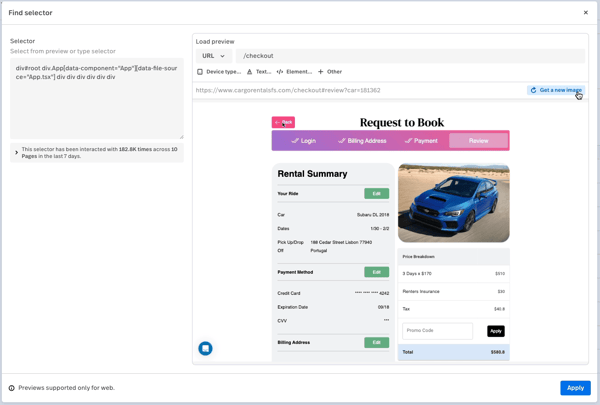
Fullstory load preview session
I noticed early in the review data that this platform pulls in an unusually wide mix of teams: product, UX, engineering, and CX all show up as active users. Its tagless capture architecture records interactions across the entire digital experience without pre-instrumentation. So, questions your team has not yet thought to ask are already being answered in the background.
Session replay is the capability I kept coming back to while reviewing FullStory, and it is easy to see why. The platform’s record-everything approach lets teams revisit any session without needing to predefine events or tag interactions in advance. That becomes especially valuable when issues surface well after a release. Backed by a 94% session replay score on G2, reviewers consistently describe it as making investigations faster and more straightforward, replacing guesswork with a complete replay of what actually happened.
Click maps do exactly what they’re expected to do: show which page elements attract attention and which are ignored. What stood out to me, though, is how often reviewers describe moving directly from a heatmap into the session replay that produced it. That continuity turns heatmaps into an investigation tool rather than just a visualization. Backed by a 91% heat maps score on G2, the feature consistently comes through as a core part of day-to-day UX analysis.
Webpage element analysis was another capability that caught my attention while reviewing the feedback. G2 reviews describe using it to understand why users interact with specific UI elements, particularly during design refinement where aggregate click data lacks context. With an 89% rating on G2, reviewers consistently point to the granular interaction data as a way to validate design decisions, and from what I saw, it complements experimentation platforms rather than replacing them.
I always pay attention when product and growth teams describe a platform as something they actually use daily rather than open once a quarter. G2 reviews describe building dashboards for A/B tests, feature releases, and bug alerts as fast and repeatable, and moving from a funnel drop-off directly into the sessions behind it is what seals it. That connection between metrics and behavior is cited consistently as what keeps Fullstory in the room when decisions get made.
Session links and shared dashboards mean your product, engineering, design, support, and compliance teams are all working from the same behavioral evidence without anyone playing telephone. Several G2 reviews note that non-technical stakeholders extract value independently without leaning on analysts, and that is not something the rest of this category has caught up to.
Not every platform’s customer success team earns a mention in product reviews, but Fullstory’s does, repeatedly. G2 reviews name specific team members and describe them as active partners in configuring the platform, building dashboards, and surfacing insights nobody had thought to ask for yet. For teams newer to behavioral analytics, that support layer is cited as the difference between a tool that sits unused and one that embeds itself into the weekly workflow.
One recurring theme in G2 reviews is that FullStory’s breadth of features takes time to get familiar with. The platform offers extensive analytics, session replay, funnels, and dashboards, but knowing which metrics to use and how to connect them to real questions requires some initial orientation, particularly for teams new to digital analytics. Once teams become familiar with the platform, that same depth becomes one of its biggest strengths, helping uncover insights that lighter analytics tools often miss.
G2 reviewers also note that exporting data from FullStory is less flexible than working within the platform itself. This is most noticeable for organizations that rely on external reporting workflows, while teams collaborating directly within FullStory are less likely to encounter the limitation. Shared dashboards and session links continue to provide an effective way for cross-functional teams to review findings without relying on exports.
What stays with me after going through the Fullstory review data is how consistently teams across different functions describe it as indispensable. Tagless capture, session depth, funnel visibility, and cross-team usability combine into something that is startlingly difficult to replicate with separate tools.
What I like about Fullstory:
- The record-everything approach means teams can answer behavioral questions retroactively without prior instrumentation, removing a common bottleneck in analytics-driven product work.
- Funnels, dashboards, and session replay connect seamlessly, letting teams move from a drop-off metric directly into the sessions behind it without switching contexts.
What G2 users like about Fullstory:
“Fullstory gives us a clear, visual understanding of how users interact with our product. The session replay feature is especially helpful for identifying pain points and validating feedback from users or support teams. It’s also easy to share recordings across teams to drive alignment and prioritization.”
– Fullstory review, James W.
What I dislike about Fullstory:
- FullStory’s breadth of features takes time to get familiar with. Teams new to digital analytics will notice this most, while those using the platform regularly are more likely to benefit from its depth and flexibility.
- G2 reviews mention that exporting data is less flexible than working within FullStory. Teams relying on external reporting workflows will notice this most, while shared dashboards and session links make collaboration straightforward for teams working inside the platform.
What G2 users dislike about Fullstory:
“The lack of customization available in reporting, but more importantly how difficult it is to share data from within the tool to someone outside the tool. The data is highly interactive within Fullstory itself with hover states and dynamic elements, but when you export dashboards or reports as PDFs, you lose that interactivity and much of the data.”
– Fullstory review, Hope B.
For ecommerce teams, behavioral data only goes so far without the right analytics layer behind it. See how the top ecommerce analytics tools on G2 complement what your heatmap tool already tells you.
3. Glassbox: Best for enterprise-grade digital experience insights
One theme I wasn’t expecting to see so consistently in the Glassbox review data was the emphasis on forensic-level visibility. Once I looked at the types of organizations using the platform, that pattern made complete sense.
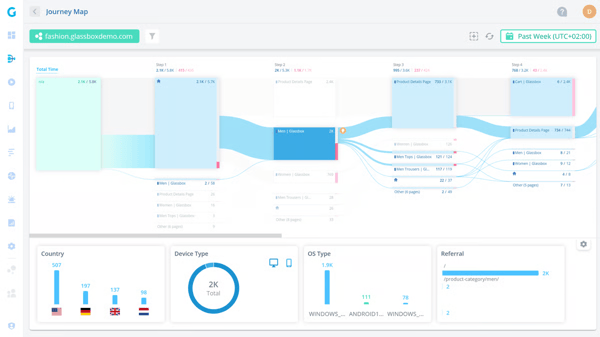
Glassbox journey map
Glassbox captures every interaction, API call, and DOM state across web and mobile without requiring teams to decide in advance what to track. It appears most often in financial services, insurance, and regulated digital commerce, where understanding exactly what a customer experienced is an operational requirement rather than a nice-to-have.
Session replay is a standard capability across this category, but what stood out to me in the Glassbox reviews is the level of detail it captures. Reviewers describe being able to see exactly what customers experienced, including where they hesitated, what they clicked, and how the application responded at that moment. Several reviewers specifically mention this as making customer complaint validation far more straightforward because the full context is already available.
One pattern I kept seeing across the G2 reviews is how much value teams place on automatic data capture. API calls, UI interactions, and behavioral signals are recorded without requiring tagging, pre-instrumentation, or new engineering work whenever tracking requirements change. That means the data is already available for retrospective analysis, regardless of what teams initially expected to investigate. Reviewers in product and engineering roles consistently describe this as one of Glassbox’s biggest operational advantages because it removes the delays that often come with gathering additional telemetry after an issue has surfaced.
The struggle score is one of the capabilities I kept coming back to while reviewing Glassbox. What stood out to me is how often reviewers describe using it to identify user friction before support tickets or bug reports surface. The feature automatically flags sessions where users encounter difficulty, allowing analysts to jump directly to the relevant moments instead of reviewing hours of recordings. Across support, UX, and product teams, reviewers consistently describe this as making issue triage faster and easier to scale.
Heatmaps are another area where Glassbox consistently earns praise. What I found notable is how often reviewers describe combining heatmaps with segmentation to isolate specific user cohorts and understand where journeys begin to break down. Backed by a 100% heat maps score on G2, the feature repeatedly comes up as the visual context that complements session replay, giving teams stronger evidence for UX decisions rather than relying on assumptions alone.
Search and reporting also emerged as recurring strengths in the review data. Reviewers describe locating sessions, building funnels, and segmenting user behavior as straightforward, even for newer users. With a 100% data segmentation score on G2, the capability is used across product, support, and fraud investigation workflows. From my evaluation of the reviews, that breadth of use is what makes the segmentation capabilities particularly compelling.
Cross-device investigation is another capability that stood out to me. Reviewers consistently describe filtering sessions by device, browser, behavioral attributes, and error type to narrow large datasets down to the interactions that matter most. Backed by a 99% mobile device analysis score on G2, that level of filtering is especially valuable for teams investigating issues that appear only on specific devices or environments. It consistently comes through in the reviews as a practical advantage for faster root-cause analysis.
Session recordings in Glassbox aren’t stored indefinitely. Depending on your configuration, data is typically retained for between 30 days and six months, which G2 reviewers say can be limiting when investigating issues from several months earlier. Glassbox is built for active investigation, though, and reviewers consistently praise its session replay and struggle scoring for helping teams catch issues while they’re still unfolding.
Getting the most out of Glassbox takes some upfront investment. Advanced reporting, anomaly detection, and alerting require time to configure, with the initial setup feeling most involved for teams jumping straight into the platform’s more advanced capabilities. Once everything is in place, G2 reviewers consistently describe Glassbox’s forensic depth as one of its biggest strengths for enterprise-scale investigations.
Glassbox is built for organizations that need complete visibility into the customer journey. Forensic-level session replay, automatic data capture, struggle scoring, and precision segmentation consistently stand out in the review data. For enterprise teams where complete customer context is a requirement rather than a preference, Glassbox is a strong fit.
What I like about Glassbox:
- Automatic data capture without tagging means teams can investigate any session retroactively without pre-instrumentation, removing a significant dependency on engineering for new tracking requirements.
- The struggle score actively flags friction before teams go looking for it, letting support, UX, and product functions triage high-impact sessions faster than manual review allows.
What G2 users like about Glassbox:
“Glassbox provides out-of-box session replay with search and filtering, allowing developers to directly observe user interactions, pinpointing UI/UX friction and reproducing bugs in their original context. The DOM snapshots accelerate debugging and inform targeted improvements, reducing time spent on issue replication.”
– Glassbox review, JY.
What I dislike about Glassbox:
- Session recordings are retained for 30 days to six months, depending on your configuration. G2 reviewers say this is most noticeable for teams investigating long-term behavioral trends, while Glassbox continues to excel at surfacing issues as they happen.
- Advanced reporting, alerts, and anomaly detection take time to configure. This stands out most for teams new to the platform, but G2 reviewers consistently highlight the platform’s investigative depth once the initial setup is complete.
What G2 users dislike about Glassbox:
“Currently, we can only look back at records from the last 30 days. It would be good to have access to a longer history, as we sometimes need to refer to older sessions and end up in situations where those sessions have already been cleared.”
– Glassbox review, Pratik N.
4. Lucky Orange: Best for affordable heatmaps and session recordings
Lucky Orange exists for the teams that need answers today, not after a three-month implementation. Heatmaps, session recordings, live visitor monitoring, and on-site chat in a single lightweight interface with almost no technical overhead to deploy. G2 review patterns show it landing most consistently in ecommerce, marketing agency, and small SaaS team workflows where immediate visual clarity matters more than analytical depth.
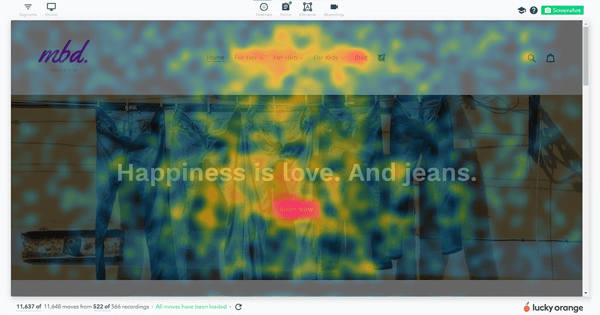
Lucky Orange heatmap
Heatmaps consistently emerge as one of Lucky Orange’s strongest capabilities. Scoring 93% on G2, click maps and scroll maps are the clearest, most immediately actionable outputs the platform produces. Missed CTAs, poorly placed content, and interaction gaps across landing pages surface without needing an analyst to interpret them. That combination of clarity and speed is what keeps this capability at the center of the platform’s value.
Session recordings are another capability I kept coming back to while reviewing the feedback. Where a click map shows a pattern, a recording shows the sequence of events behind it. With an 89% session replay score on G2, reviewers consistently describe using recordings to understand how users move through a page, where they hesitate, and why they leave. Several reviewers specifically mention that session replay surfaced design issues they would not have identified through heatmaps alone.
Real-time visitor monitoring is another highlighted feature. Watch actual users navigate your updates as they happen, spot friction before it compounds, and respond before it becomes a pattern. For ecommerce operators and growth-focused marketing teams, that kind of live visibility is not a luxury. Monitoring scores 91% on G2, reflecting exactly how much the speed of feedback matters in practice.
Implementation speed came up repeatedly across the G2 reviews. Reviewers describe adding a single script and beginning to collect behavioral data within minutes. Shopify, BigCommerce, and HubSpot integrations are consistently described as straightforward, without requiring dedicated technical resources. From what I saw in the review data, that low implementation effort is one of the main reasons smaller teams adopt the platform quickly.
Customer support on Lucky Orange gets called out in G2 reviews with a specificity that stops you mid-scroll. Reviews name individual team members and describe them as proactive, fast to respond, and sharp. Several describe onboarding calls as the thing that got them up to speed faster than anything else could have. If your team does not have a dedicated analytics person, that support layer fills the gap in a way that most platforms simply do not bother with.
Device-based segmentation is another capability that caught my attention while reviewing the feedback. It turns aggregate behavioral data into something much more actionable by separating sessions and heatmaps by device type. G2 reviewers consistently describe this as particularly useful for diagnosing friction that appears on one device but not another. From what I saw in the review data, that level of precision helps teams move beyond combined averages and identify patterns they can actually act on.
Monthly session caps on lower-tier plans can become a limitation for high-traffic websites. G2 reviewers mention this most often for ecommerce teams and agencies managing spiky or rapidly growing traffic, where session allowances can be exhausted before the month ends. Heatmaps and live visitor tools continue to deliver meaningful insights within the available sessions, helping teams investigate user behavior while data is still being captured.
Navigating between recordings, heatmaps, and live visitor views takes some initial familiarity. A handful of G2 reviewers mention spending time finding the right view when first using the platform, particularly on lean teams without a dedicated analytics specialist. The interface itself remains clean and uncluttered, and reviewers generally find moving between views becomes intuitive after the initial learning period.
Lucky Orange proves that behavioral insight doesn’t have to come with analytical complexity. Heatmaps, session recordings, live monitoring, and fast setup make it a strong fit for teams that want actionable insights without added operational overhead.
What I like about Lucky Orange:
- Heatmaps and session recordings deliver immediate, interpretable behavioral evidence that teams without dedicated analysts can act on directly, which keeps insight accessible across the whole organization.
- Setup is tangibly fast across major ecommerce and CMS platforms, with live visitor data available within minutes of deployment, no technical configuration required.
What G2 users like about Lucky Orange:
“Lucky Orange makes it incredibly easy to visualize how users interact with our site through heatmaps, session recordings, and live chat. Setup was fast, and the UI is intuitive, making it easy for our whole team to access insights without needing technical support.”
– Lucky Orange review, Matt N.
What I dislike about Lucky Orange:
- Lower-tier plans include monthly session caps that can run out before the month ends on high-traffic sites. Ecommerce teams and agencies are most likely to notice this, while heatmaps and live visitor tools continue providing valuable insights within the available sessions.
- Moving between recordings, heatmaps, and live visitor views takes some initial familiarity. Lean teams without a dedicated analytics specialist will notice this most, while the interface becomes intuitive once users get comfortable with the layout.
What G2 users dislike about Lucky Orange:
“I find that the rate limiting could be increased due to the large volumes of users we handle. The number of sessions available can be exhausted quickly, which is a limitation when dealing with a substantial user base.”
– Lucky Orange review, Will D.
5. Clarity: Best for free heatmaps and AI-assisted behavioral insights
Clarity takes a different approach to behavioral analytics by making enterprise-grade capabilities available at no cost. Session recordings, heatmaps, frustration signal detection, and AI-assisted session summaries at no cost, no session caps, and no traffic limits. If you have been putting off behavioral analytics because the budget conversation felt premature, this is where that excuse runs out.
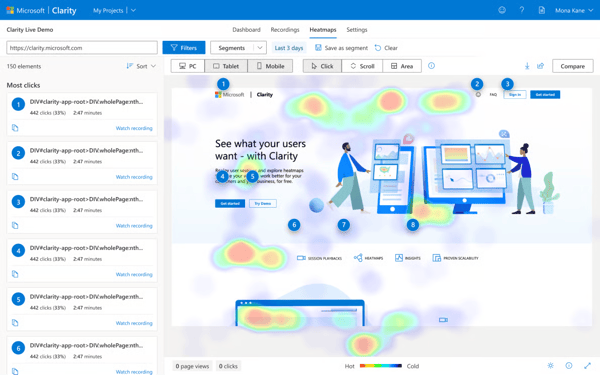
Microsoft Clarity heatmap analysis
Data retention is often one of the biggest constraints in session recording tools. Clarity removes much of that limitation. Long-term storage keeps recordings accessible well beyond those windows. Reviews describe this as particularly valuable for investigating churn patterns and qualitative UX issues that do not reveal themselves overnight. At 91% on G2, session replays are the capability reviews return to most, describing them as what makes understanding a user’s experience feel less like reconstruction and more like being in the room.
Heatmaps start collecting data almost immediately after implementation. No manual setup per page, no configuration required. The interface organizes everything by page, device type, and traffic filter automatically. Reviewers describe using the data to reorganize page layouts and keep visitors engaged further down the page. Heat maps score 90% on G2, and the visual output is cited as readable by anyone on your team, no analytics background needed.
One pattern I kept noticing in the Clarity review data was how often reviewers mentioned rage cli