


Deal negotiations are the onus of several commitments: faster vendor contract approvals, contract editing and revisions, compliance audits, and a centralized repository of documents.Earlier, I was under the impression that deals are a handwork of sales, marketing and finance teams.
But that was before I understood the importance of legal teams who utilize contract lifecycle management software to reduce compliance risks, tackle limited visibility into legal documentation, and manage manual approvals that slow down velocity.
To interpret legal operations and commitments, I spoke to the legal team in my company and understood the who’s who of legal contract management.
In this listicle, I have explored the top 7 contract lifecycle management tools that automate contract revisions, track contract negotiations and compliance requirements, and aid in faster and more efficient contract approvals.
- Conga CLM for contract creation, notifications and reminders and template creation and flexibility. (Available on request)
- Salesforce Revenue Cloud for pricing flexibility. approval workflow and discounting. ($200/user/month)
- Docusign CLM for contract collaboration, review and approval processes and contract editing. (Available on request)
- LinkSquares for advanced contract analytics, contract database and contract templates. (Available on request)
- DealHub.io for AI-powered CPQ, version control, commercial rules and guided selling. (Available on request)
- Juro for document signing, signature workflow, sign-in process and auditing. (Available on request)
- Ironclad for approval process, contract attachments, digital contracting and managing and storing contracts (Available on request).
According to G2 Grid Reports, these contract lifecycle management software programs are top-rated in their category.
Whether browsing through old contracts to relook at termination or renewal clauses, getting visibility into financial metrics with centralization, or getting approvals for faster audits and negotiation, the best contract management lifecycle software automates these needs for enterprises, thus expediting deal cycles with legal flair.
7 best contract lifecycle management software that I strongly recommend
Now, I am not a contract connoisseur, but throughout the course of my professional career, I have been actively engaged in sales deals, vendor negotiations, account renewals, and client deboardings as a part of the sales and marketing team. While legal teams are heavily focused on automating contract renewals, redlining and revisions, and fast approvals to scale processes, this list is aimed at describing features, pros, cons, and pricing details of the top CLM tools today.
Now is the time to invest in appropriate CLM solutions. With this personalized evaluation of CLM tools for legal and finance teams, you will never lose sight of a valuable and profitable deal, mess up your compliance auditing, or ignore bottlenecks within vendor contracts.
How did I find and evaluate the best contract lifecycle management software?
I spent weeks trying and evaluating the best contract lifecycle management software and its features, pros and cons, integrations, pricing, implementation, and post-implementation workflows to provide a complete picture that eases the software decision-making process.
This list of software eliminates delays in deal closures due to legal back-and-forth and the hassle of generating multiple contracts quickly and accurately. It offers a set of unique features that help fact-check contracts and automate clause creation, allowing you to get faster approvals and close deals.
In cases where I couldn’t test software due to legal or access-based restrictions, I referred to professionals who have had hands-on experience working with it. I also used AI-powered tools to narrow down key sentiments, stand-outs, and differentiators outlined in real-time G2 user reviews to give a unique angle derived from real-time buyer experiences.
Please note that the screenshots added in this article might be a mix of those taken from vendor profiles and G2 product pages. If you are looking for validation, searching for new comparison charts, or diving deep into features, this list is a fit for your step-wise evaluation.
What makes a contract lifecycle management software worth it: my opinion
Personally, I feel that there are times when neither the vendor nor the closer pays attention to the sensitivity, expiration date, and advisory regulations of a contract and does not notarize or attest it. When you check a contract lifecycle management software, you need to ensure that it offers financial exposure, visibility into contract status and negotiations, and information regarding active contracts or terminated contracts to invest your legal resources wisely and not track billables for void contracts.
Also, it goes without saying that a contract lifecycle management should ease the daily manual workflows of writing and editing contracts, revising new changes and getting faster approvals to help negotiate deals better and maintain legal frameworks for sensitive financial transactions.
Below are some details that you must be aware of before investing in or signing up for a contract lifecycle management software:
- End-to-end workflow automation: I shortlisted these contract management tools for fast approvals and end-to-end workflow automation. I can’t stress enough how important it is to have automated workflows that optimize content creation, contract approvals, and pre- and post-signature obligations. I looked for customizable triggers, auto-routing to legal or finance, and built-in alerts to help the teams stay updated. If your team is still manually moving contracts within departments, you might be losing hours every week, which might lead to missed deal opportunities.
- Clause library with dynamic version control: One feature that consistently stood out in the best CLM tools was the exhaustive clause library with smart versioning, which allowed legal teams to better track laws and clauses. This isn’t just about templates; it’s about having pre-approved, legally vetted language that ensures compliance while letting teams move fast and gain approvals. I also shortlisted some platforms that can flag deviations from standard clauses automatically.
- Built-in E-signature and audit trails: If your CLM tool doesn’t have native e-signature integration (or at least seamless ones like DocuSign or AdobeSign), then you are stuck with the physical signature that delays the duration of the contract lifecycle and makes the process cumbersome. And not just the signatures, I also paid attention to detailed audit trails that help track who did what, and when. It is a feature that many don’t pay attention to until and unless they’re put under compliance checks.
- Advanced search and metadata tagging: I evaluated tools that offered AI-driven search and tagging that pointed out active contracts for renewals or termination. When you are managing hundreds to thousands of contracts, this feature helps you to access agreements by simply putting the details of clients, clause-type, renewal date, or risk level. I felt this is something that differentiates a standard tool from a time-saving automation-oriented tool.
- Proactive renewal and obligation tracking: For me, these are the features that determine the real return on investment (ROI). I shortlisted tools that alert you proactively on upcoming renewals, deadlines, and obligations. I included tools with dashboards that flag upcoming auto-renewals or unpaid milestones. Not only does it consider every client obligation and remedy it, but it also shifts contract management from reactive to strategic.
- Granular and role-based access control: The last but not the least non-negotiable factor for me was the security. The best CLM tools offer granular user permissions that allow access for employees based on roles in legal, sales, procurement, finance, and even external parties. It is the only way to collaborate without risking sensitive data exposure. This kind of control can give you confidence to collaborate across departments and with external parties, without worrying about data leaks or version confusion.
Out of the 40+ tools in my initial research dataset, I evaluated the top 7 contenders, which stood out in terms of automating contract approvals, proactive renewal, and obligation management, and pre- and post-e-signature flexibility.
As far as my research and market evaluation are concerned, these tools are beneficial for legal, procurement, finance, and sales teams to optimize compliance audits, gather financial intel, add or remove clauses, and get faster approvals to negotiate and review client contracts better and reduce churn.
The list below contains genuine reviews from the contract lifecycle management category page. To be included in this category, a software must:
- Provide all the features of a contract management solution
- Manage the entire contract lifecycle from start to finish
- Track and monitor the contract creation and delivery process
- Allow users to estimate the efficiency of the contract lifecycle and find ways to improve it.
- Provide regular reporting to internal and relevant external parties about the contracts and performance with respect to obligations.
- Comply with industry requirements, government regulations, audits, and respond to lawsuits.
*This data was pulled from G2 in 2025. Some reviews may have been edited for clarity.
1. Conga CLM
Conga CLM helps you design and streamline your entire contract lifecycle management process across hundreds and thousands of contracts. It also helps automate contract revisions, pre-run compliance audits, and gather faster approvals that support new deals.
If you’ve ever been stuck in an endless chain of back-and-forth emails just trying to finalize a single contract, you’ll understand why I genuinely appreciate what Conga brings to the table.
From the get-go, it handles the entire contract lifecycle end-to-end, including drafting, collaboration, version control, e-signatures, and even compliance tracking, all in one tidy platform.
One of the biggest selling points for me is how well it integrates with Salesforce. I can generate contracts directly from Salesforce data in just a couple of clicks. I didn’t feel the need to hop between systems or duplicate entries.
I also appreciated the automated workflows. Because approvals and notifications happen automatically, we’ve cut down on so much admin workload. And even the version tracking was seamless. I can instantly see who changed what and why, which is huge for legal audits.
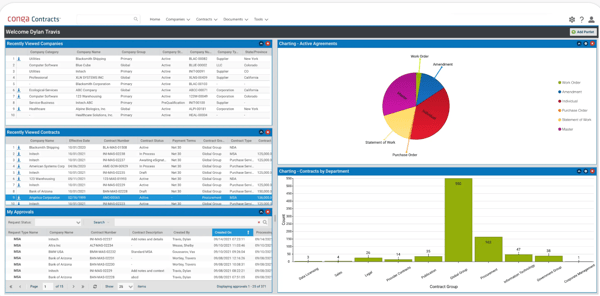
However, there were some limitations of the platform. The UI was a bit clunky to operate. It can feel unintuitive at times, especially when I first started out. Navigating between templates, clauses, and contract records isn’t always as smooth as it should be.
A lot of users I’ve talked to had the same issue that the interface could be cleaner and more modern. It also took me a while to figure out some of the bulk-edit options and report-generation workflows. It’s the real power, but you need to dig a little to unlock it. It’s one of those tools where the learning curve is front-loaded, but once you learn about things, everything is a smooth sail.
In terms of pricing, while the basic tiers give you essentials like document storage, e-signature capabilities, and workflow routing, the premium subscriptions unlock advanced features like clause libraries, granular user permissions, AI-powered risk analysis, and more configurable automation.
The analytics dashboard in higher plans also gives visibility into bottlenecks and turnaround time, which helps our teams optimize how we work with legal and procurement.
But one of my biggest gripes was flexibility, especially around configuration. There are moments when you want to do something outside the norm, but Conga’s rigidity prevents you from doing so.
If you like to tinker with layouts, workflows, or UI customizations, be prepared to temper your expectations or call an admin. Depending on your subscription tier, some features, like advanced reporting or integration extensions, may feel like gated content.
Overall, Conga surprised me with its ability to offer version control, content creation, e-signature, and compliance audit trails all in one defined platform to maintain the status quo between vendors and clients.
What I like about Conga CLM:
- I appreciated how Conga CLM helps customers create the agreement, generate the document, review it for the legal team, and send it to the client for necessary signatures.
- I also found that it is a user-friendly product, with easy and step-by-step documentation to guide you through all the stages of the contract lifecycle management process.
What do G2 Users like about Conga CLM:
“As a Consultant, I am using Conga CLM for Managing contracts. We are using this software to manage our contracts in different regions of the world. By using this tool, we are managing it efficiently.”
– Conga CLM Review. Kanchan T.
What I dislike about Conga CLM:
- While Conga CLM offers a centralized repository of contracts, it still has a complex setup and configuration process. Also, issues are encountered when handling large volumes or complex contracts.
- Even though the interface is user-friendly, I noticed that new users might find the depth of features overwhelming at first without additional training.
What do G2 users dislike about Conga CLM:
“Some users are a bit worried about the UI being a bit clunky and not very user-friendly. When working on a larger number of contracts or documents, the application sometimes slows down.”
– Conga CLM Review, Ravi V.
Apart from managing contracts, tracking client outstanding billables, and remunerating your attorneys, consider checking out the best legal billing software in 2025.
2. Salesforce Revenue Cloud
Salesforce Revenue Cloud streamlines contract creation and revision, digitizes signatures, and ensures accurate versioning and clause revisions for legal and finance teams to make necessary pre-deal negotiations and deal arrangements.
What impressed me the most was how it manages the entire revenue lifecycle in one place. From product catalog management and quoting to order management and billing, everything just flows. I am talking real-time configure, price, quote (CPQ) capabilities tied directly to automated invoicing.
It felt like Salesforce had finally cracked the code on unifying revenue workflows without any clunky back-and-forth that consumes more time of enterprise teams.
One of my favorite parts is how seamlessly the Salesforce CPQ and Billing modules integrate. When I generate a quote, it instantly syncs across the platform, so billing and finance don’t need to chase me down for updates. This really cuts down on manual errors.
I especially appreciate the automation behind invoice generation and revenue recognition, which is a godsend for anyone working in SaaS or subscription-based models. It ensures compliance and accuracy without the need to micromanage every line item.
I also want to highlight data centralization. Having sales ops, finance, and customer data all in one ecosystem makes reporting and forecasting useful, not just a checkbox task. This kind of visibility has helped my team reduce time to cash and optimize renewals better.
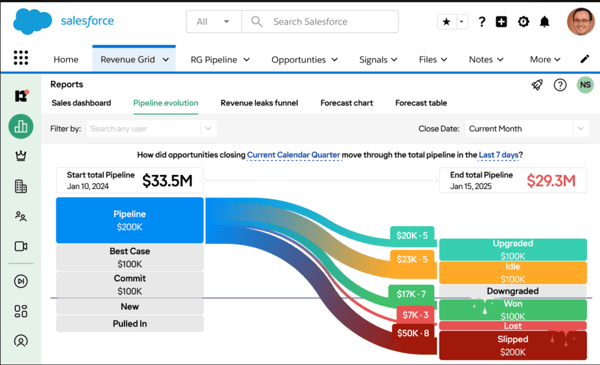
This said, it is not all on the up and up. You would need some skills to navigate the platform, as it isn’t completely plug-and-play. The UI has improved a lot, and it’s generally user-friendly, but if you’re not already familiar with Salesforce’s ecosystem, there’s definitely a learning curve.
There were moments when I had to dig through several tabs just to find one piece of information, and that kind of clunkiness is always uncomfortable. Also, the customization can be tricky unless you are pretty hands-on with sales development tools.
In terms of pricing, Salesforce Revenue Cloud can get expensive, especially if you are a smaller business or operating on a tight budget. More premium features like guided selling, advanced approvals, and multi-dimensional quoting are hidden behind locked paywalls.
I was also a bit disappointed that it doesn’t integrate as smoothly with some of our other tools, like Oracle or SAP, without significant customization. Out-of-the-box connectors are hit-or-miss, which feels like a missed opportunity given how interconnected today’s tech stacks need to be.
Overall, Salesforce Revenue Cloud is the go-to contract management solution for small businesses or enterprise teams. It automates version control, proactively seeks renewals or terminations, and tracks audit trails to optimize time to cash deals.
What I like about Salesforce Revenue Cloud:
- What I appreciate most is that Salesforce Revenue Cloud connects sales, billing, and finance teams on a single platform, ensuring a smooth flow of legal operations.
- I also loved how it streamlines the entire revenue process, including CPQ, billing, finance, and accounting, on a single platform, so stakeholders can have all the details in one place.
What do G2 Users like about Salesforce Revenue Cloud:
“As an Admin, I really loved the Salesforce Revenue Cloud because of its comprehensive tools for managing the entire revenue lifecycle. Most importantly, it connects with other third-party applications seamlessly without any Lag.”
– Salesforce Revenue Cloud Review, Balamurugan P.
What I dislike about Salesforce Revenue Cloud:
- One gripe that I found is that you will need to hire an experienced consultant or developer to deploy the tool successfully, irrespective of how easy it is to configure.
- I also noticed that it can be a little complex to customize and requires a learning curve for advanced configurations.
What do G2 users dislike about Salesforce Revenue Cloud:
“There are a few reasons why I might not like Salesforce: It is difficult to set up and use. It requires a team of experts to set up and maintain, and it can be difficult to customize to fit the needs of a specific business. It is expensive.”
– Salesforce Revenue Cloud Review, Pranavi M.
Learn how you can strengthen the legal backbone and invest in the right legal manpower, operational tools, and spending or finances with an enterprise legal management guide to keep in line with legal requirements.
3. Docusign CLM
Docusign CLM aims to automate all stages of a contract lifecycle, provide intelligent agreement features, and automate signature processes to streamline pre- and post-signatory requirements, all in one place for better contract management.
When I first started using Docusign CLM, I wasn’t quite sure what to expect. But I’ll tell you this, getting rid of paper-based processes was a major shift. The platform makes it easy to manage contracts, from drafting to signing and everything in between. It stopped me from chasing down signatures or email reminders anymore.
Docusign CLM automates a big chunk of that process, so contracts just move, smoothly and without bottlenecks. What also won me over is how accessible and mobile-friendly the experience is. I’ve approved documents right from my phone during a coffee break. The most crucial functionality is the e-signature functionality.
Whether I am sending something to a client or reviewing a vendor agreement, the workflow is intuitive. The interface is generally easy to use, even for someone who is not particularly tech-savvy.
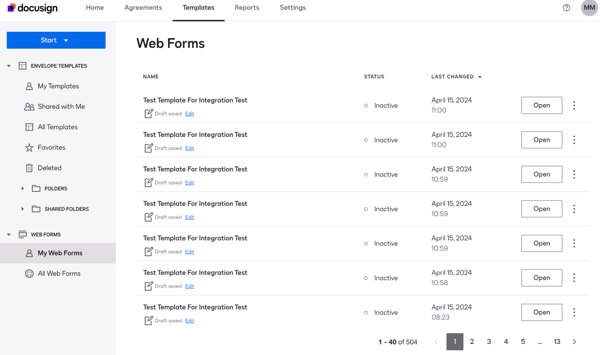
That said, the platform does have its share of drawbacks. I’ve noticed that viewing all folders at once isn’t possible, and that can be annoying when I am managing a large volume of contracts. Also, you cannot export and download an entire folder of documents, which would have saved time if it were possible.
I also want to discuss issues with clause automation and searchability. It’s a relief to search for a clause without manually browsing through five contracts. With version history and audit trails, I can view the changes and restore things if needed. But there is a pain point. Depending on your plan, some features seem limited.
For instance, we were restricted in how many envelopes we could use monthly. This felt like a roadblock, especially during a busy quarter.
I also felt that while the tech is solid, it can feel a bit clunky when you are onboarding. The learning curve isn’t steep, but it exists, especially if you are prone to automated workflows. If you are banking on real-time customer support, you might need to prepare in advance for delays or refer to help documentation.
That said, Docusign CLM helps you edit, review, and alter your contracts from any device, fasten approvals, and control digital signatures across several contracts to maintain client satisfaction and optimize deals.
What I like about Docusign CLM:
- Users could seamlessly connect documents across systems, making it easier than ever to connect on agreements.
- I also appreciate how Docusign guides you to where your signatures are and other inputs required for approval, review, and authorship of the document.
What do G2 Users like about Docusign CLM:
“Docusign has proven to be an effective tool for managing contracts, particularly thanks to its functionality that allows others to prepare documents for me, leaving me responsible only for the signing. This significantly streamlines the process, saving time and reducing complexity.
The platform is user-friendly, even for team members who aren’t especially tech-savvy. The ability to delegate document preparation and then quickly review and sign fits seamlessly into our workflow.“
What I dislike about Docusign CLM:
- As much as Docusign helps you manage and review documents, it could be more flexible in terms of customization and branding.
- I noticed that it offers limited customization and is a bit more complex for new users. There were also delays in customer support.
What do G2 users dislike about Docusign CLM:
“All the features could seem overwhelming when you first use it, but if you only need it for a handful of documents, this is the platform for you! For us, it’s the right amount of customization, but I could see many firms only need maybe 3 or 4 things this platform offers.”
– Docusign CLM Review, Ryan C.
Keep track of your lawsuits and the requirements of plaintiffs and defendants to interpret your legal assistance precisely with the best legal case spending software that my peer analyzed for 2025, and organize your spending.
4. LinkSquares
LinkSquares offers predictive and generative AI capabilities, known as the LinkAI engine, to modify and review contracts, fact-check, streamline collaboration with internal and external teams, and check the accuracy of clauses or legal language within contracts.
From the moment I got onboarded, the experience felt smooth. The customer success folks were responsive, the training sessions were genuinely useful, and within a week, we were up and running with our contract repository completely set up.
One of the things I love most is the AI engine, especially the OCR tool. I’ve uploaded legacy PDFs that would usually take hours to process manually, but LinkSquares reads, indexes, and tags everything accurately.
The smart tagging and metadata extraction have saved me and my team countless hours of manual review. The search tool is also helpful. I can type in a clause or keyword and instantly pull up every related document. It even supports fuzzy matching and clause variants, which helps when terminology differs across contracts.
I also rely heavily on the reporting dashboard. It gives me visuals and summaries of renewal dates, termination clauses, and obligations across hundreds of agreements. The customization here is underrated. Whether I want high-level trends or line-item data, it’s all exportable and easy to interpret. We’re on a premium plan, and I genuinely think the analytics tools alone are worth it.
Also, the UI is crisp and user-friendly, which I didn’t expect from a CLM tool. However, I did stumble a bit during the first week. It took me a little bit of time to understand all the features, and I wish there were more contextual tooltips early on.
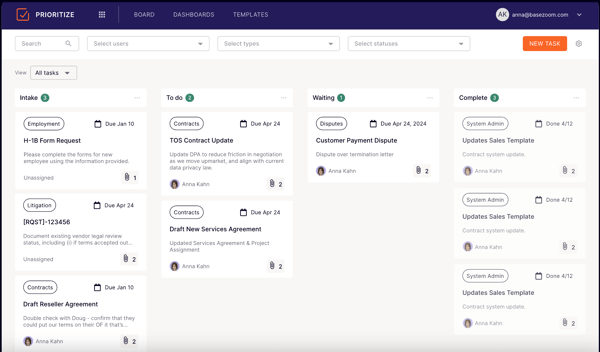
However, I did grapple with some challenges too. The AI sometimes gets contract names wrong, especially when the file names are ambiguous. It’s a small issue, but I often found myself manually correcting those labels now and then. Also, some features like advanced clause comparisons or bulk actions required a bit more clicking around than I like. There is definitely room to streamline the workflow.
Pricing-wise, if you’re a large team managing hundreds of contracts, LinkSquares offers great ROI. But, for smaller teams, some modules may feel too advanced or pricey if you are only looking for basic repository functions.
Overall, LinkSquares is one of the most modular, user-friendly, and flexible tools for easing contract version control, reviews, and approvals, improving compliance audits, and obligation tracking to assist legal teams.
What I like about LinkSquares:
- LinkSquare’s ability to store, search, and organize contracts with AI-powered tagging, which saves a lot of time.
- I also found out that once the contracts are uploaded and tagged properly, they are easy to locate.
What do G2 Users like about LinkSquares:
“What I like the best about Link Squares is its AI-powered contract analysis. It helps legal teams to quickly extract key data from contracts, streamlining the entire contract cycle.
This saves time, reduces errors, and provides better insights, all within a centralised, easy-to-use platform.”
– LinkSquares Review, Oviya M.
What I dislike about LinkSquares:
- While LinkSquares helps tag contracts properly for accessibility, it would have been great to create an address book for users not in the system. Also, I noticed a decrease in email traffic when implementing LinkSquares.
- Users also noticed some bugs in the system, which the CS addressed. I also wish that OCR abilities were a bit cleaner.
What do G2 users dislike about LinkSquares:
“LinkSquares offers a variety of customizations, but if I had to pick something to dislike, it’s that one particular feature hasn’t been given that kind of attention yet. Event notifications for contract dates can only be set up system-wide, but we’re hopeful for the ability to apply filters for multiple configurations soon.”
– LinkSquares Review, Laura B.
5. Dealhub.io
Dealhub.io offers multiple features, such as spend management, billing management, subscription management, digital sales rooms, and CPQ, to centralize the entire deal negotiation and contract approval process for sales, legal, and finance teams.
What initially drew me in was how seamlessly it integrates with CRMs like Salesforce and HubSpot. The synchronization between platforms means I’m not wasting time toggling between systems, and I can pull deal data directly into quotes and contracts without juggling multiple platforms.
One of the standout features was DealHub’s CPQ engine. It’s surprisingly intuitive and allows me to build quotes with real-time pricing logics, even for complex configurations.
I’ve used it to set up tiered pricing models, subscription billing structures, and even run discount approvals, which normally require a lot of back-and-forth with finance.
I also want to call out DealRoom, a shared digital space where internal teams and customers can collaborate, negotiate, and redline documents in real time. Compared to old-school email attachments and chaos, the experience feels modern and dynamic.
I also appreciated the built-in e-signing and approval workflows. They automated everything from quote generation to signature capture. DealHub didn’t skimp on analytics either. There is a solid analytical dashboard where I can monitor pipeline velocity, engagement scores, and the stage-by-stage progress of my deals.
It even lets me track buyer behaviour, like which section of DealRoom got the most views, so I can tweak my approach based on engagement data.
However, the tool has its drawbacks. While the initial onboarding was fairly quick, the platform has nuances that take a bit to master, especially when it comes to customizing templates or workflows.
Some users on my team found the DealRoom permissions and deletion logic a bit confusing. Certain approver routing workflows added more time than expected.
Also, while the analytics are robust, I wish there were more advanced reporting filters or drill-downs available out of the box.
In terms of pricing, the premium plans unlock more advanced features, like deeper CRM integrations, contract redlining, advanced guide selling, and so on. While the basic plan offers features like CPQ, e-signature, and DealRoom access, enterprise plans have more customization capabilities.
Overall, DealHub engages in careful contract analysis, redlining, and revision and enables cross-functional collaborations to ensure the contents of your agreement are up to date and deals don’t suffer.
What I like about DealHub.io:
- The seamless and intuitive UI and smooth integration with other tools, which streamlines the deal management process and saves time for my team.
- I also observed that DealHub provides the best-in-class customer support with an AI chatbot for real-time and fast responses to any problem.
What do G2 Users like about DealHub.io:
“DealHub has a great UI and is easy to set up and implement compared to Salesforce CPQ. I really appreciate their great account managers and very responsive support team. Of all the vendors I’ve worked with, they have the fastest and most thorough support system. I also really appreciated their DealHub University tutorials that have you build out a sandbox environment while following a step-by-step tutorial.”
–