



In this comprehensive guide, we will delve into the world of knowledge base tools and help you understand why they are an essential asset for any business. We will explore the key features that make an effective knowledge base tool and discuss the different types available. By the end, you will have all the information you need to choose the right knowledge base tool for your specific needs. So, let’s dive in and unlock the power of knowledge base tools.
Understanding Knowledge Base Tools
Knowledge base tools are powerful platforms that enable businesses to organize, store, and share important information and resources. They act as a centralized hub where employees and customers can access self-help articles, guides, videos, FAQs, and more. Think of it as a treasure trove of knowledge, readily available at your fingertips.
But what exactly are knowledge base tools and why are they so important in today’s business landscape?
What are Knowledge Base Tools?
Knowledge base tools are software applications or platforms that allow businesses to create and manage a repository of knowledge. This knowledge can include product information, troubleshooting guides, best practices, policies, and procedures, among other things. The tools provide a user-friendly interface that makes it easy for both employees and customers to search for and access the information they need.
These tools typically offer various features such as categorization, tagging, search functionality, and analytics. They allow businesses to structure their knowledge base in a logical and organized manner, making it easier for users to navigate and find the information they are looking for.
Furthermore, knowledge base tools often support collaboration and content creation, allowing multiple contributors to add, edit, and update articles. This ensures that the knowledge base remains up-to-date and relevant.
Importance of Knowledge Base Tools in Business
Knowledge base tools are not just a fancy addition; they play a vital role in streamlining business operations. By providing a self-service option, they empower customers to find answers to common queries on their own, reducing the load on your support team. This not only improves customer satisfaction but also frees up your support agents to focus on more complex issues and provide personalized assistance.
Similarly, internal knowledge base tools enhance productivity by enabling employees to access critical information quickly, without the need to reach out to their colleagues or managers. This saves time and eliminates unnecessary interruptions, allowing employees to work more efficiently and autonomously.
Knowledge base tools can also serve as a training resource for new employees. They can access the knowledge base to learn about company policies, procedures, and best practices, helping them get up to speed faster and reducing the need for extensive onboarding.
Additionally, knowledge base tools can contribute to knowledge sharing and collaboration within an organization. They provide a platform for employees to share their expertise, insights, and solutions, fostering a culture of continuous learning and improvement.
Knowledge base tools can help businesses stay organized and compliant. By centralizing information and resources, they ensure that the latest versions of documents and policies are easily accessible to everyone. This reduces the risk of outdated or conflicting information being circulated within the organization.
Key Features of an Effective Knowledge Base Tool
User-Friendly Interface
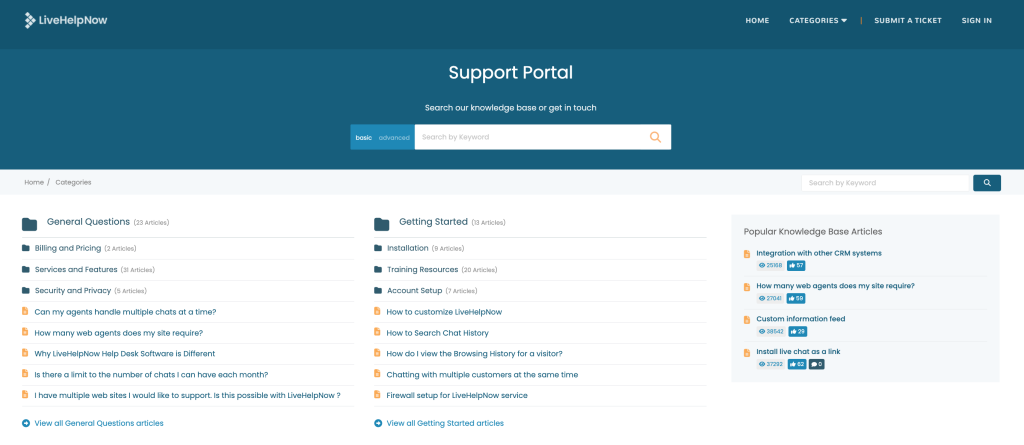
A great knowledge base tool should have a user-friendly interface that makes navigation effortless. It should be intuitive, with a clear structure and easy-to-use search functionality. After all, your knowledge base is only as good as its accessibility.
Advanced Search Capabilities
Imagine a knowledge base tool with a vast amount of information but a poor search function. Frustrating, isn’t it? An effective tool goes beyond simple keyword search and offers advanced search capabilities, such as filters, tags, and boolean operators, to help users quickly find what they need.
Analytics and Reporting
Tracking and analyzing user behavior within your knowledge base is crucial for continuous improvement. Look for a tool that provides detailed analytics and reporting features, allowing you to identify popular topics, customer pain points, and areas that may need more attention.
Multi-Language Capabilities
Multi-language functionality in knowledge base tools enables seamless content creation and retrieval in diverse languages. Users can access information in their preferred language, enhancing communication and ensuring effective knowledge sharing across global teams, fostering collaboration and efficiency.
Related Read: Multilanguage Knowledge Base Support
AI-Powered Features
Knowledge base integration with AI offers several advantages for businesses. It enhances efficiency by automating processes, enabling faster information retrieval, and improving response times in customer support. AI, such as ChatGPT, can provide personalized assistance, improving user experience and customer satisfaction. Additionally, AI-driven knowledge management systems continuously learn from user interactions, ensuring the information remains up-to-date and relevant. This integration also allows for innovative solutions like chatbots, which can handle routine inquiries, freeing up human resources for more complex tasks.
Choosing the Right Knowledge Base Tool for Your Needs
Assessing Your Business Needs
Before jumping into the sea of tools, it’s vital to assess your business needs and goals. Consider the size of your organization, the nature of your products or services, and the level of support you aim to provide. Knowing your specific requirements will help you narrow down your options and find the perfect fit.
Comparing Different Knowledge Base Tools
Once you have a clear understanding of your needs, it’s time to compare different knowledge base tools. Look for trial versions or demos to get hands-on experience and evaluate how well each tool addresses your specific requirements. Pay attention to factors like user reviews, pricing, customer support, and ease of implementation.
Armed with all this information, you are now equipped to make an informed decision and choose the best knowledge base tool for your business. Remember, a well-structured and easily accessible knowledge base can be a game-changer for your organization, enhancing productivity, improving customer satisfaction, and ultimately, boosting your bottom line. So, go ahead and unlock the power of knowledge base tools!
Ready to elevate your customer service to the next level? Try LiveHelpNow, the omnichannel customer support suite that integrates seamlessly with all your communication platforms. Our advanced AI-driven tools are designed to automate routine inquiries, freeing up your team to tackle more complex issues. With LiveHelpNow, you’ll not only enhance your knowledge base but also streamline your entire customer service operation. Sign up now for a Free 30 Day Trial and experience the difference for yourself!


