


Choosing the right personal cloud storage solution can send you into choice paralysis —so many options and each with a strong feature set. But when it comes to business, the stakes may be higher than choosing a place to store family photos. We’re talking about safeguarding company data, boosting team productivity, and of course, getting the most bang for the buck.
Enter three key players in the file storage world: Box, OneDrive, and Dropbox. Each boasts a unique set of features and functionality that could serve your business well by keeping your files safe and shareable.
Whether you’re operating a small startup or a flourishing enterprise, it’s crucial to make an informed decision when picking the right tools in your tool stack. We’ll dive into how to evaluate these three tools and how to choose the right one for your business, with a spotlight on cutting down costs without cutting corners on quality.
Table of Contents
- Top 5 features to consider
- Storage capacity and pricing
- Security
- File sharing and collaboration
- Ease of use
- Integrations
- Box vs OneDrive vs Dropbox: Which should you choose?
- Final Notes
Top 5 features to consider
Here are five cloud storage features to consider when evaluating tools, and why they matter:
- Storage capacity and pricing: How much data you can store per user, per dollar matters. It’s vital to find a balance that doesn’t just fit your current needs, but is scalable for future growth without breaking the bank.
- Security: Your digital vault needs to serve as a fortress, protected by strict security protocols and compliance measures. Protect your sensitive information and keep data confidential and intact.
- File sharing and collaboration: Share files with others and collaborate in real time, regardless of physical location.
- Ease of use: A tool’s interface and overall user experience can dramatically affect adoption rates within your organization. Intuitive design ensures that your team can maximize the platform’s functionality without enduring a steep learning curve.
- Integrations: Create a seamless workflow, where data moves smoothly across different applications, enhancing productivity and reducing the friction of working with multiple platforms. Integrations are the glue that holds your digital infrastructure together, keeping your suite of tools working in concert rather than in isolation.
Next, let’s see how Box, OneDrive, and Dropbox stack up against each of these features.
|
Features |
Box |
OneDrive |
Dropbox |
|
Storage capacity and pricing |
3.5/5 |
5/5 |
4/5 |
|
Security |
5/5 |
4/5 |
3/5 |
|
File sharing and collaboration |
4.5/5 |
5/5* *for Microsoft users |
3.5/5 |
|
Ease of use |
4/5 |
4.5/5 |
5/5 |
|
Integrations |
5/5 |
4/5 |
4.5/5 |
1. Storage capacity and pricing
Box
Free plans start at 10 GB. Paid plans range from 100 GB to unlimited storage, though business pricing tiers with unlimited storage start at $15 per user/month, which is notably more expensive than Box’s competitors. However, unlimited storage means that businesses can scale up their storage endlessly as their needs grow.
Individual files can only be up to 150 GB each.
Rating: 3.5/5
OneDrive
Free plans start at 5 GB. Paid plans range from 100 GB to up to 1 TB per user.
OneDrive has a value for money that’s hard to beat. Pricing for OneDrive is much more affordable than its competitors, often rolled into Microsoft 365 subscriptions, or available for only $5/user/month as a standalone cloud storage solution. On Microsoft 365 Enterprise plans, OneDrive comes with unlimited storage.
Individual files can be up to 250 GB each.
Rating: 5/5
Dropbox
Free plans cap at 2 GB, but paid plans range from 2 TB to up to 5 TB per user. Dropbox’s plans are generally less expensive than Box’s, but more expensive than OneDrive’s.
Individual files can be up to 2 TB each, the largest single file size of these three tools.
Rating: 4/5
2. Security
Box
Box stands out for its compliance with a wide range of strict regulatory standards, including GDPR, HIPAA and FedRAMP. It’s the go-to option for industries with stringent data protection needs.
It stands out with its robust advanced security features, including:
- Data loss protection
- Managed encryption keys
- Granular access controls to define who can view, edit, or share files
- Activity logs and audit trails
- Remote device wipe and account deactivation
- Watermarking
Rating: 5/5
OneDrive
OneDrive benefits from Microsoft’s comprehensive security framework, offering strong protections and compliance capabilities such as Azure Active Directory for enterprise-grade centralized identity and access management. It meets a wide range of compliance certification requirements, including ISO 27001, HIPAA, and EU Model Clauses.
OneDrive and Microsoft 365 subscriptions include advanced threat protection and malware scanning to alert users to potential threats, and block malicious files from being uploaded or shared.
OneDrive also features a Personal Vault to store locked files with an extra layer of security.
Rating: 4/5
Dropbox
Dropbox offers strong file encryption and features like two-factor authentication, watermarking, and remote wipe. While it meets some compliance requirements, like ISO 27001 and 27018, it lags slightly behind Box and OneDrive in enterprise-level compliance features.
Rating: 3/5
Read more: The Ultimate Guide to Virtual Executive Assistants in 2024
3. File sharing and collaboration
Box
Box allows users to preview and share files via links for both internal and external collaboration, with granular access controls and security features like password protection and expiration dates.
Have a task that’s not listed here? No worries. We can support you with any objective, repeatable process and are happy to hop a quick call with you to explore how we can meet your specific needs.


Users can preview, edit, and comment with @ mentions on files, with or without a Box account. Users cannot comment on folders, however — a feature that’s only available on OneDrive.

It integrates with popular productivity suites like Google Docs and Microsoft 365 for real-time co-editing on documents. It has strong version control, allowing you to track changes across and revert to up to 100 previous versions of files.
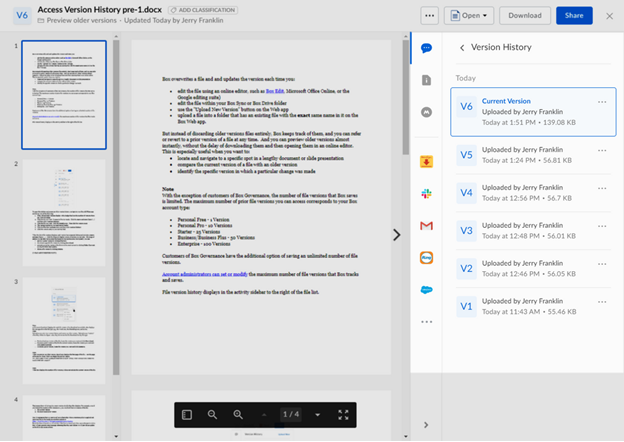
Source: Box
Rating: 4.5/5
OneDrive
OneDrive shines in collaboration, especially for businesses using Microsoft 365. Its native integration with Microsoft Office apps facilitates real-time co-authoring and editing in Word, Excel, and Powerpoint files.
You can save any Microsoft Office file to OneDrive with a simple click of the “Share” button.

Source: Microsoft
It includes @ mentions, comments, and activity feeds for every file or folder.
 |
 |
OneDrive also integrates seamlessly with Microsoft Teams.

Source: Microsoft
You can set sharing permissions for files, as well as expiring dates and password protection for shared links.

OneDrive’s version history stores up to the latest 500 versions of a file within the last 30 days.
Rating: 5/5 for Microsoft Office users, 4/5 for non-Microsoft users
Dropbox
Dropbox makes sharing files and folders via links extremely easy. It has permissions settings, but not with the same level of granular access control as Box.

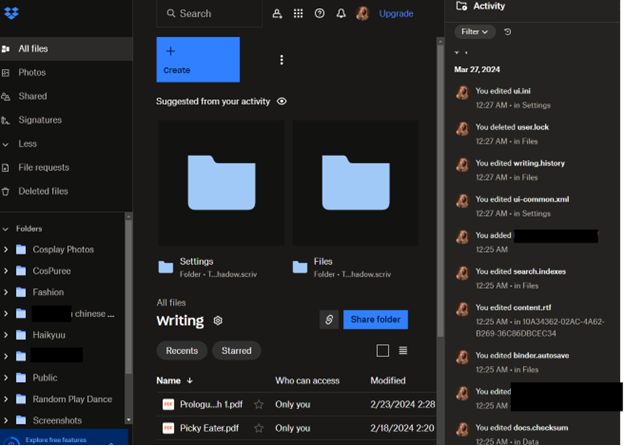
You can view each file or folder’s activity, but can only leave comments on files or parts of files.

Dropbox has introduced real-time document editing through Dropbox Paper, but this is a newly-fledged first-party solution that teams may or may not want to use.