

Retrieval augmented generation is a framework that determines which content AI tools retrieve and cite before generating an answer.
You need to understand RAG because it’s one of the ways ChatGPT, AI Mode and other AI search engines choose which pages get included in its answer.
This guide explains how RAG works (in plain English), what makes content more likely to be retrieved, and how to measure your visibility in AI systems that use RAG with Ahrefs Brand Radar.
Retrieval augmented generation (RAG) is a technique where an LLM queries an index—like a search engine, knowledge base, or vector database—to find additional, contextually relevant information for its response—rather than just defaulting to what it learned during training.
Large language models are trained on huge datasets, but that training has a cutoff date.
Ask an AI model what happened last week, or what’s in your live production database, and you’re asking it to work from memory with no reference material in front of it.
When you query an AI model on information it doesn’t yet have, that’s when it’s most likely to go rogue and start telling you that poison is good for you…
This is otherwise known as an AI “hallucination”.
RAG gives AI models access to the correct, up-to-date material to avoid this fate.
With RAG, LLMs are either supplementing or overriding their internal knowledge—known as their “parametric memory”—in an attempt to give a more reliable answer.
This process is also sometimes known as “grounding”; anchoring the response to specific sources so the model isn’t just freestyling from its training data.
Most AI tools use both RAG and trained knowledge in tandem.
Getting into the base model’s knowledge means being part of its training data, and that isn’t something you can easily control.
But getting into the retrieval results is, in many ways, an extension of SEO.
Every RAG-powered AI answer follows three steps: search, retrieve, generate.
To understand the details of what likely occurs at each stage, here’s what we know about how ChatGPT retrieves its sources.
Before anything gets retrieved, the AI will decide whether it even needs to enrich its knowledge with outside data.
Simple fact-finding queries like “What is a VPN?” can usually be fielded by the core model based on its existing training knowledge. No retrieval needed.
In ChatGPT’s case, a smaller classifier model (part of the “sonicberry” system according to David McSweeney, who put in the work to find out just how ChatGPT retrieves sources) will run first, assigning probability scores to determine whether a query needs: no search, a simple search, or a complex multi-step search.
Other AI tools will handle this step differently, but they all share the same underlying logic: not every query triggers a search.
Whenever someone asks ChatGPT a question that requires more context, it expands that query into multiple related queries, then sends them to an external search index like Bing or Google to collect results.
Once a selection of pages are collected, on-page SEO factors like the title, meta description/summary, and URL determine which page gets read in full, according to research by AI Expert Dan Petrovic.
From there, he discovered that sources are shortlisted for scraping based on “relevance, authority, recency, and diversity of perspective”.
Before it can be fully retrieved and served in the response, the scraped web content gets broken into smaller pieces called chunks.
Think of chunking like tearing a book into individual chapters. The system breaks the page into pieces, then asks which piece best answers the question.
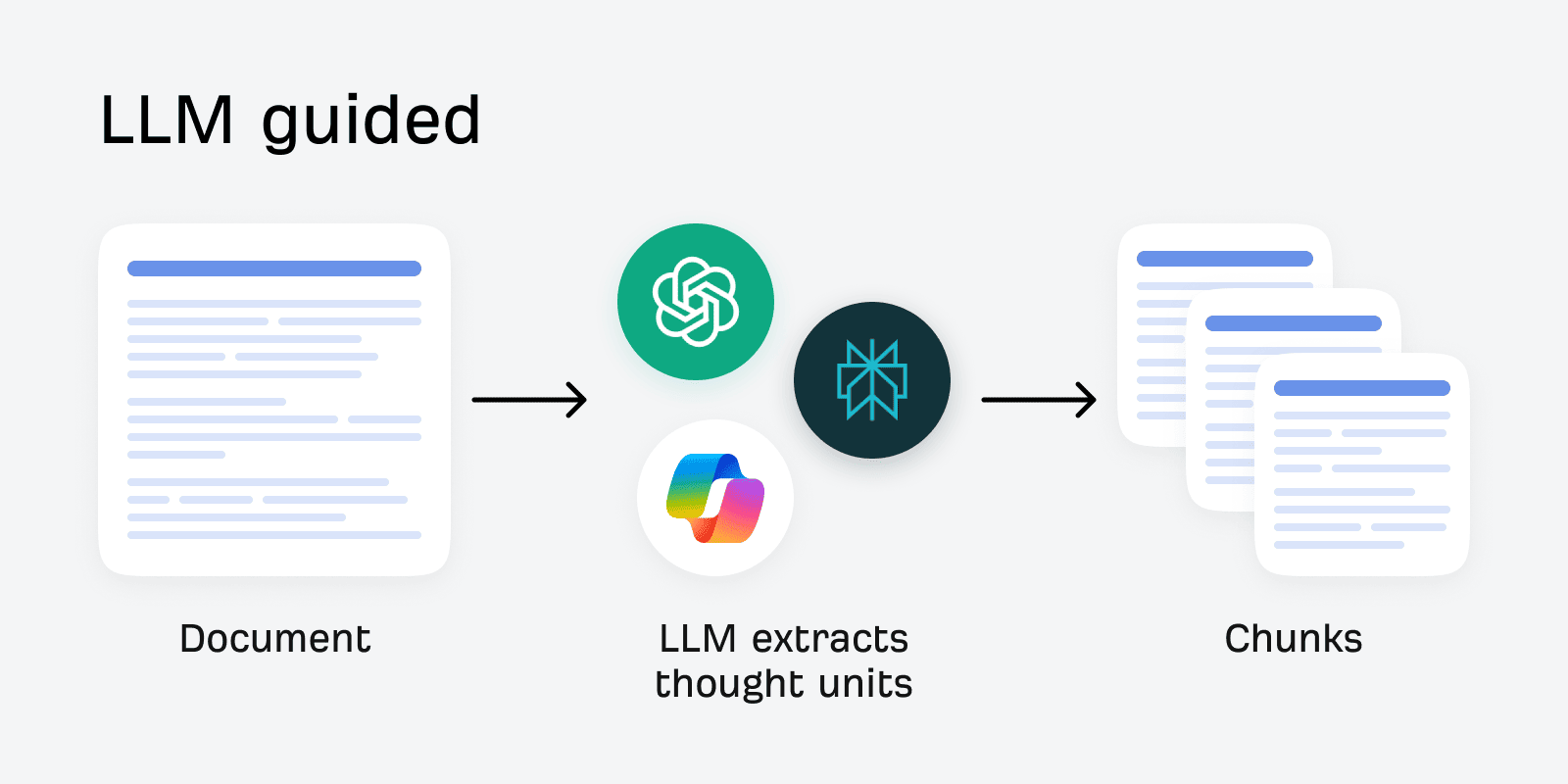
ChatGPT converts the search query and each chunk into a numerical representation of meaning, known as an embedding, then measures their cosine similarity—a score of how semantically close they are.
The simplest way to picture this: imagine a giant map where similar ideas sit close together and unrelated ideas are far apart. On this map, “dog” and “puppy” would be near each other. “Dog” and “skateboard” would be on opposite ends.
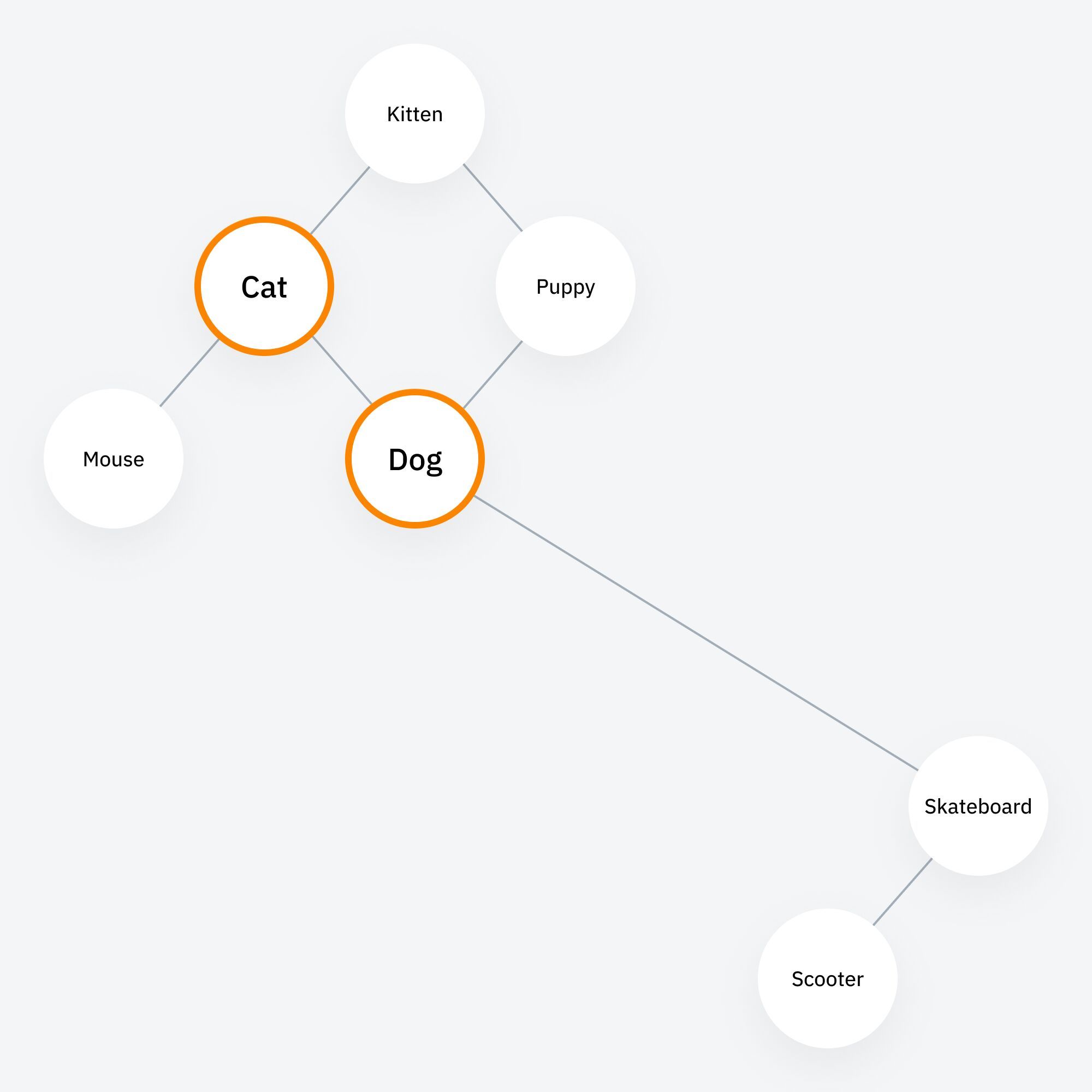
Embeddings are like GPS coordinates on that map—every piece of text gets assigned coordinates based on its meaning.
Cosine similarity is the measure of how close together two sets of coordinates are.
The AI retrieves the chunks whose coordinates are closest to the fan-out query’s coordinates, and the closest match wins.
This is why specific, clear language helps retrieval—it’s easier to map to the correct vector “coordinate”.
Step 3: Retrieved content loads into the AI’s working memory—briefly
The matching chunks are loaded into the AI’s context window—its short-term working memory—alongside the user’s original question.
It synthesizes an answer using both, then it deletes the chunks.
Dan Petrovic tested this directly: he asked an AI model to retrieve information on a well-known person, then in a follow-up message asked it to recall a specific snippet from its sources. It couldn’t.
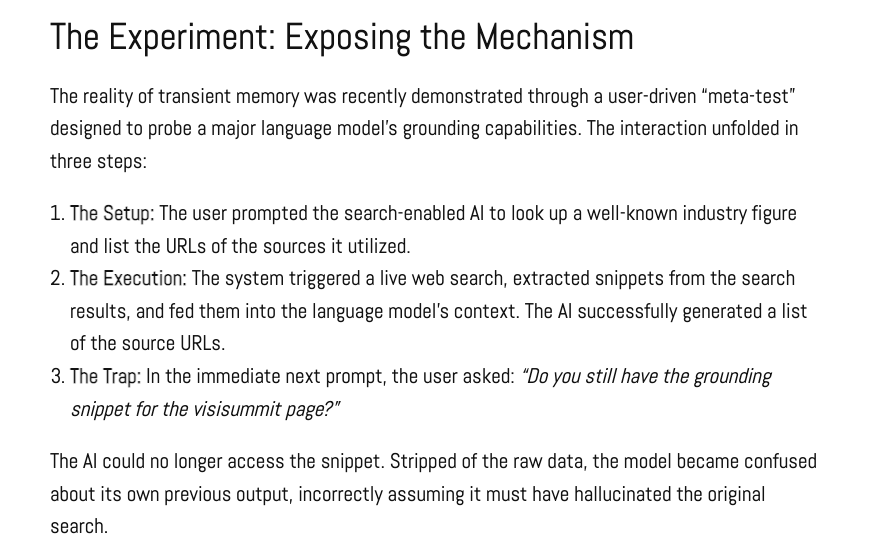
The raw content is “purged” the moment a response is generated.
RAG and training data often get conflated, but they do very different things.
Training data is what builds an AI model’s parametric memory—the internal knowledge I mentioned earlier.
This happens during pretraining, when the model learns from a huge, general corpus of text scraped from the web and other sources (e.g. CommonCrawl), and can happen again during fine-tuning, when a model is further trained on a narrower dataset to shift its behavior or knowledge.
Either way, that knowledge gets baked into the model itself. No lookup needed—it’s just part of what the model “knows”.
But you don’t get a say in it. It happens on the model developer’s schedule, using whatever data they choose to train on. It’s not something you can request, target, or verify happened for your content.
RAG, on the other hand, is a process you have some control over. The quality, structure, and indexing of your content directly affects whether it gets retrieved.
Whenever a user’s query triggers a retrieval step, the model pulls in current information from outside data without needing to be retrained.
For most commercial AI tools, this is the mechanism behind most up-to-date answers they give you.
| RAG | Training data | |
|---|---|---|
| How it works | Retrieves external content at query time—never becomes part of the model | Content is absorbed into the model’s parameters during training, becoming part of what it “knows” internally |
| Update cost | Low. Updates the knowledge base and the model’s next answer reflects it | High. Only changes when the model is retrained—on the developer’s schedule, not yours |
| Something you can influence? | Yes. Content quality, indexing, and structure all affect whether your content gets retrieved to surface current information, cite you as a source, or mention your specific brand | Not directly. You can publish content and hope it gets crawled but, unlike RAG, you can’t optimize one page and hope to see it cited. What you can do is build a consistent brand narrative across enough content over time that it shapes how future models describe you. |
Everything we cover in this article—leading with definitions, including entities, Q&A structure, freshness—directly influences the retrieval process.
That’s the layer you can actually influence through content.
Being cited in an AI response is a win, but it’s not the same as being baked into what an AI fundamentally knows about your brand.
Search User Optimization expert Dorron Shapow puts it well:
Optimizing for retrieval isn’t wrong. In systems that rely heavily on live search for commercial queries, it can absolutely influence what gets surfaced. But assuming retrieval visibility is the same as foundational model weighting is where the strategy breaks. One takes weeks. The other is the slow work of entity coherence—how consistently and clearly your brand is understood across the broader web—and it takes years.”


Query fan-out is the process that happens behind the scenes when you submit a query to an AI system.
Rather than searching your exact words, it breaks your question into multiple related sub-queries, runs each one separately, and pulls sources from the combined results.
Say someone searches “What will happen if I swap out regular flour for wholemeal flour in a lemon drizzle” in Google, the underlying AI search model wouldn’t just search that phrase, it might also look up:
- Best flour for lemon drizzle
- Baking with wholemeal flour tips
- How does wholemeal flour affect cake density?
Before synthesizing an answer.
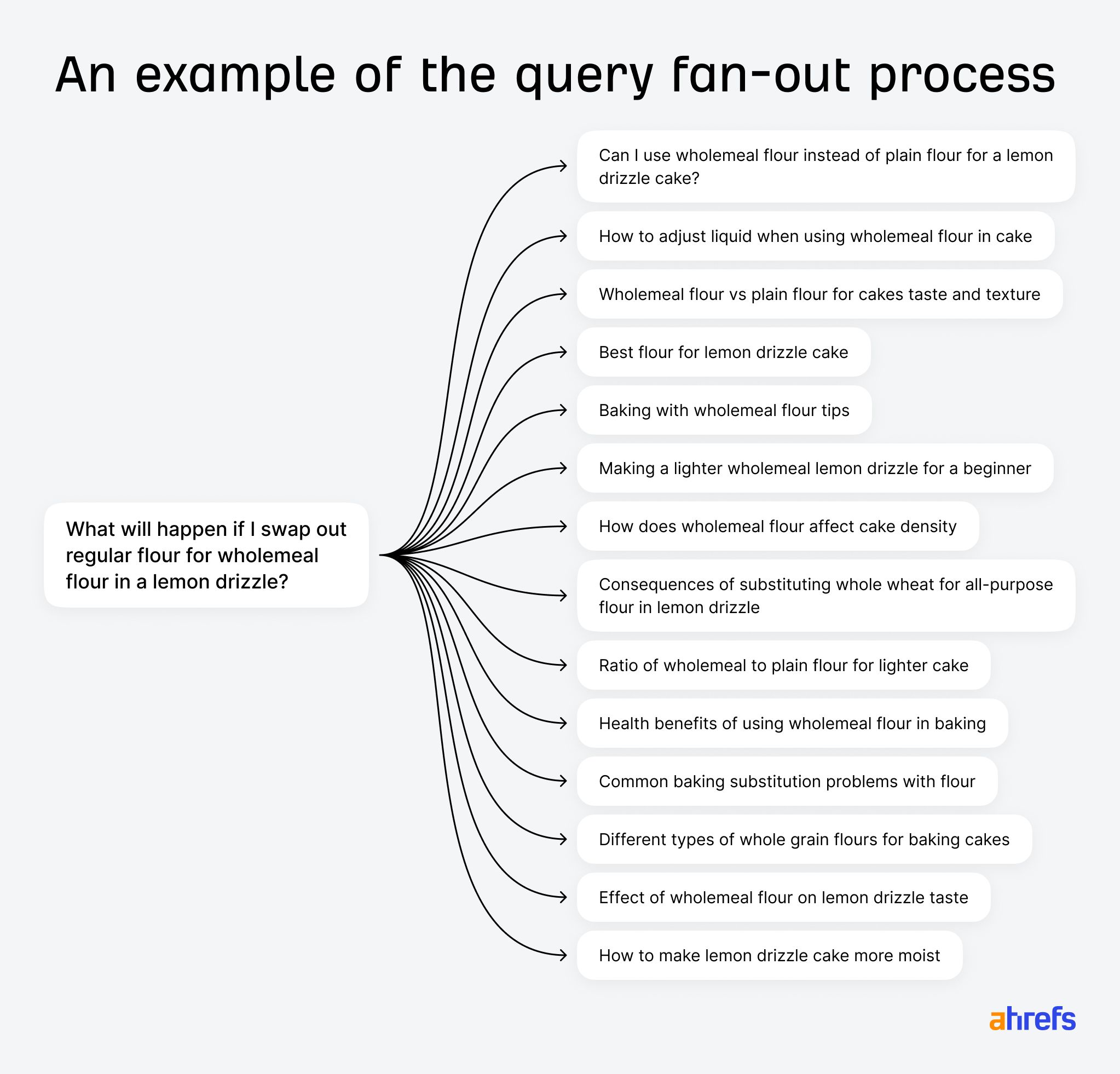
AI does the same thing automatically on most complex queries.
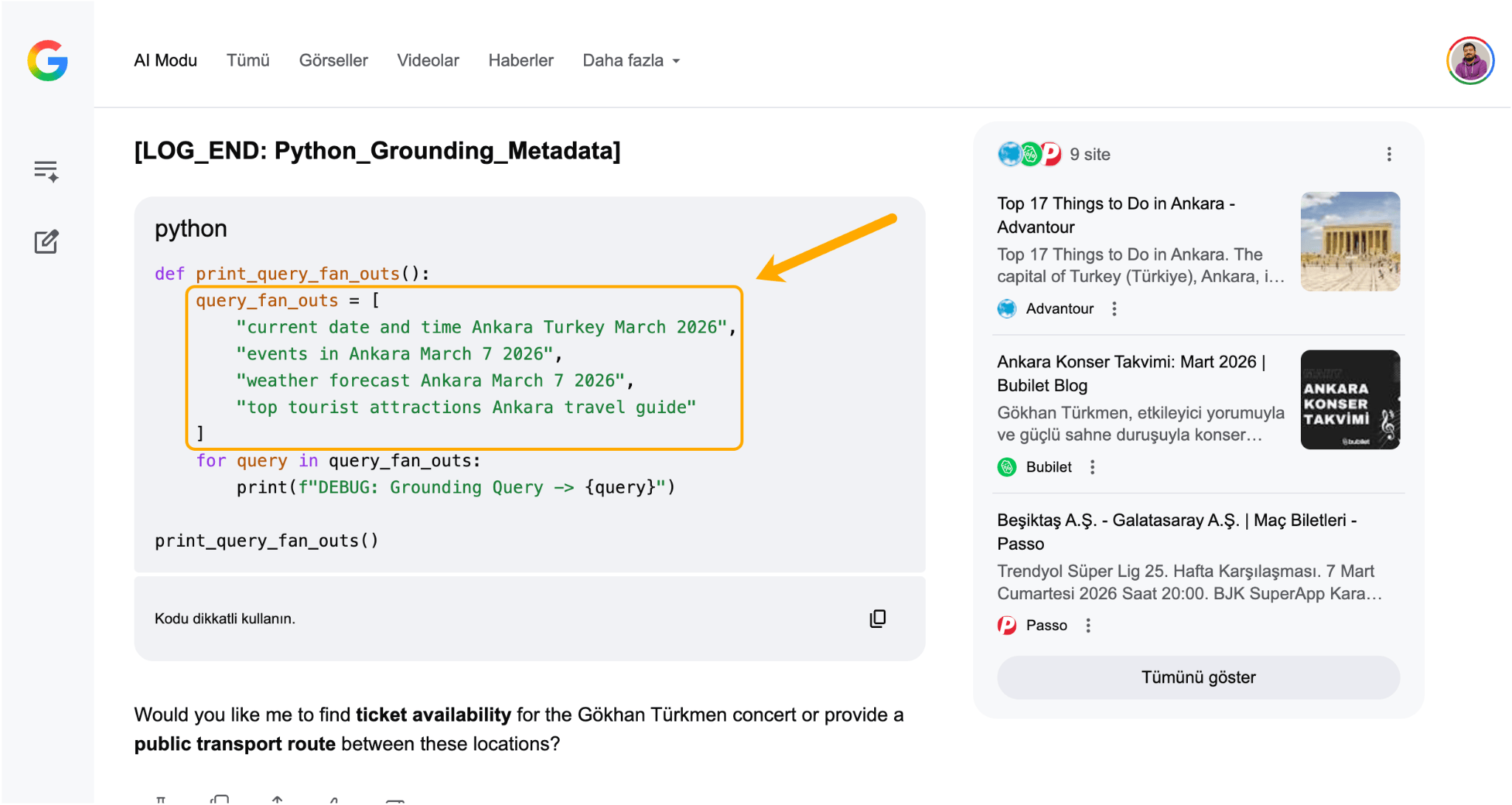
Some SEOs have been able to extract these internal sub-queries directly.
For instance, Metehan Yeşilyurt has developed a technique to prompt Google AI Mode into outputting the search queries it used for grounding.
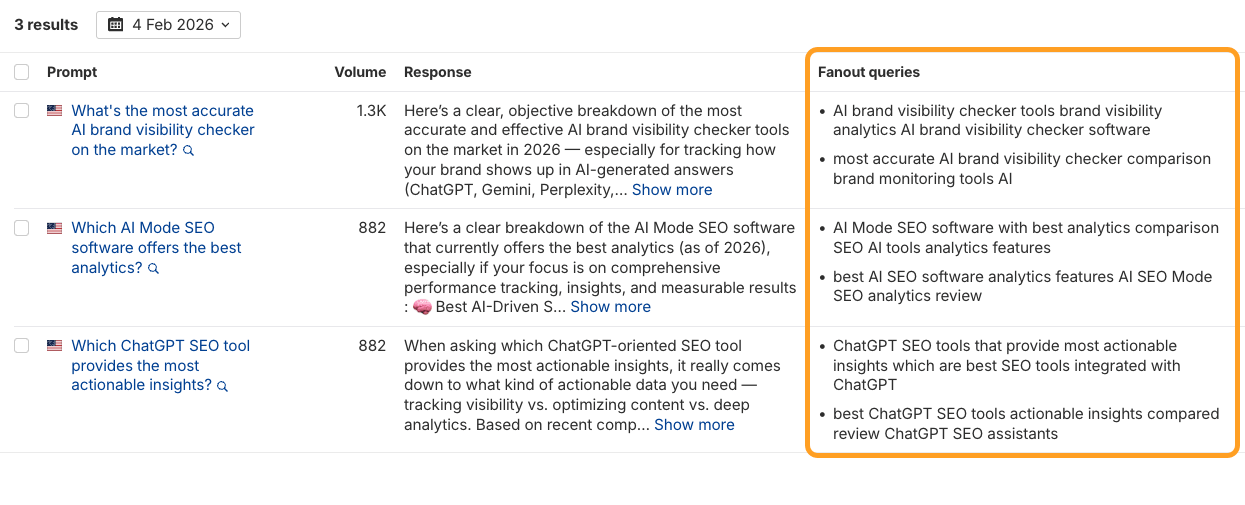
But if you don’t have time to go digging, you can also see the fan-out queries generated by ChatGPT, Grok, and Perplexity in the AI Responses report in Ahrefs Brand Radar.
 During query fan-out, the AI splits your question into smaller sub-queries, searches all of them at once, combines and re-ranks the results, then merges the pages that do well across multiple searches into one final list.
That list is what the AI actually reads to write your answer.
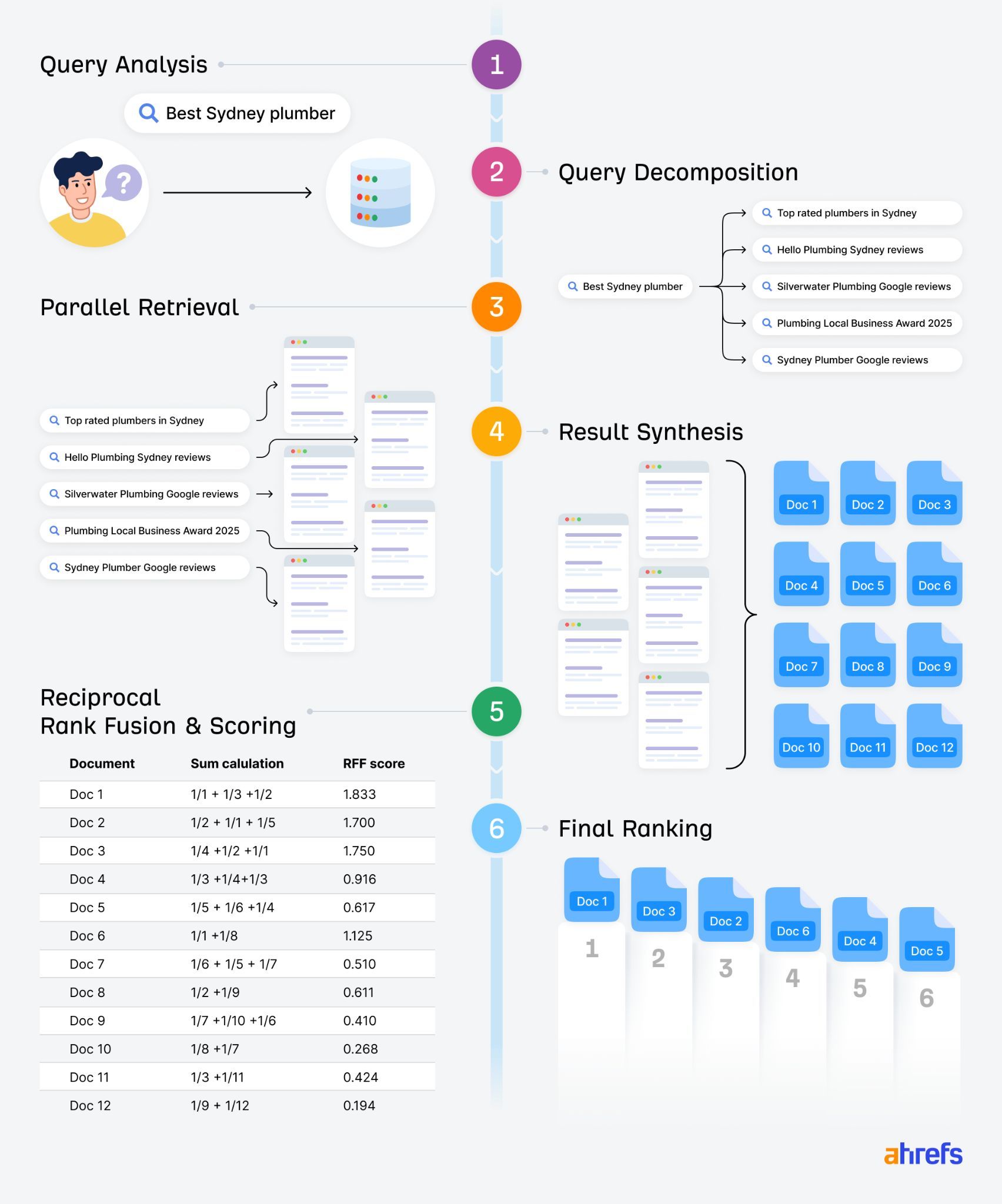
We’ve simplified the fan-out process here for ease of understanding, but for a deeper-dive read our guide: What is Query Fan-Out? Understanding the Hidden Queries Driving AI Search.
For ChatGPT and other AI search engines, Retrieval Augmented Generation runs on SEO.
In fact, many marketers and SEOs view AI search as a “wrapper” on top of “traditional” search engines like Google, since some AI assistants draw so heavily from them.
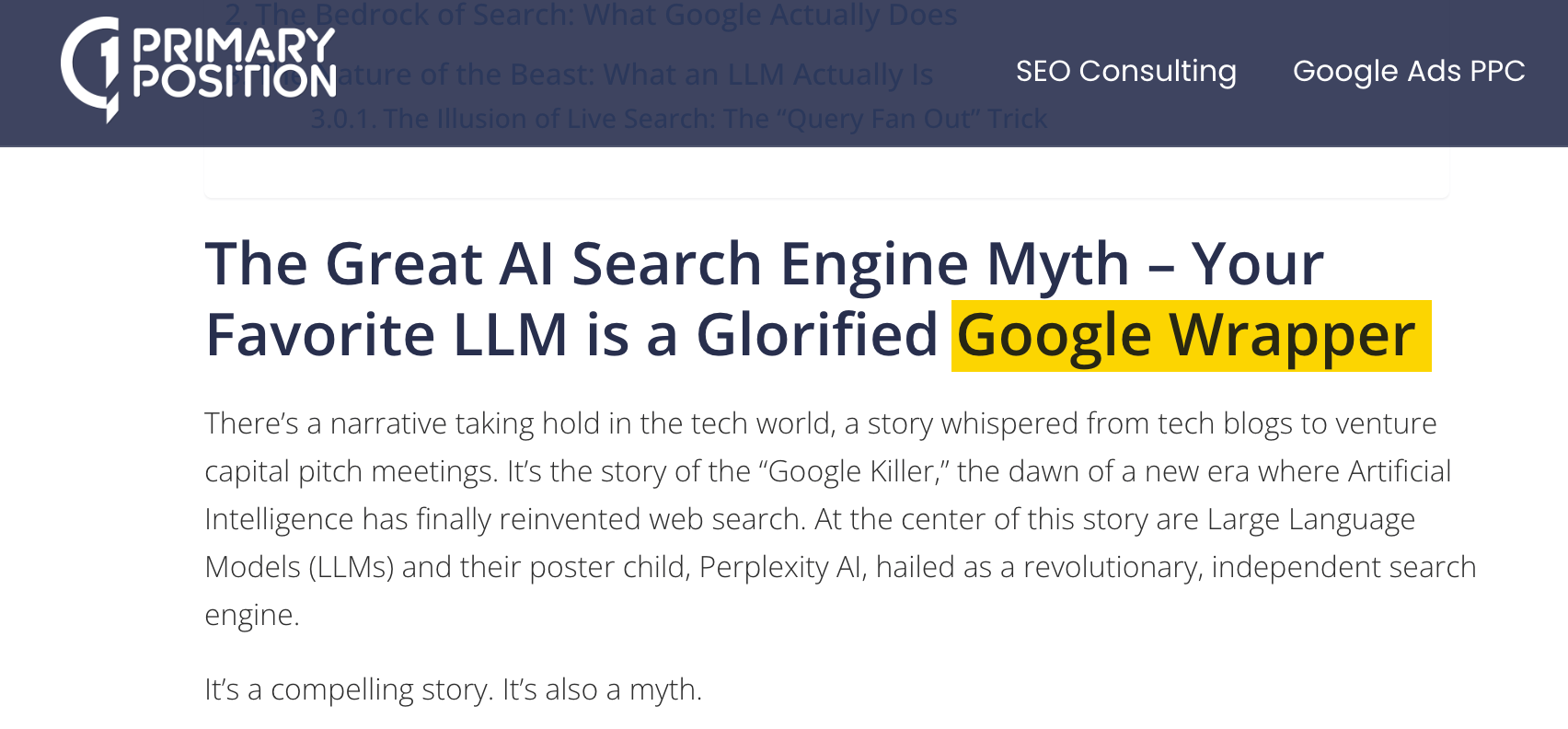
When ChatGPT, Perplexity, or Google AI Overviews need to answer a question, they run actual web searches ¹ ² ³
Google Gemini and AI Overviews use Google Search. Microsoft Copilot uses Bing. ChatGPT pulls from both Google and Bing. Claude uses Brave Search.
That means the retrieval layer of every major AI tool is powered by a traditional search engine.
- Indexed content is the starting pool. You need your content to show up in Google before it shows up in AI.
- Search optimized content gets you cited: Even if search and AI results don’t always neatly overlap, both prioritize authoritative, well-structured, well-optimized content.
- Brand mentions in search correlate strongly with AI visibility: AI systems pick up on how often and where your brand is referenced across the web—search-optimized content and digital PR directly feeds this ¹
Despite some differences, SEO and GEO are intrinsically linked.
If your content doesn’t show up in a search index, an AI bot is going to have a hard time finding it, and if it can’t find it, it can’t retrieve it.
Follow these seven best practice tips if you want to get your content cited in RAG search.
Make sure content is accessible to AI crawlers
When they go out to fetch content, many AI crawlers are unable to read and cite certain pages.
JavaScript content (like tabs or accordions) or text in images is often inaccessible to AI bots.
Instead, AI systems retrieve static HTML content.
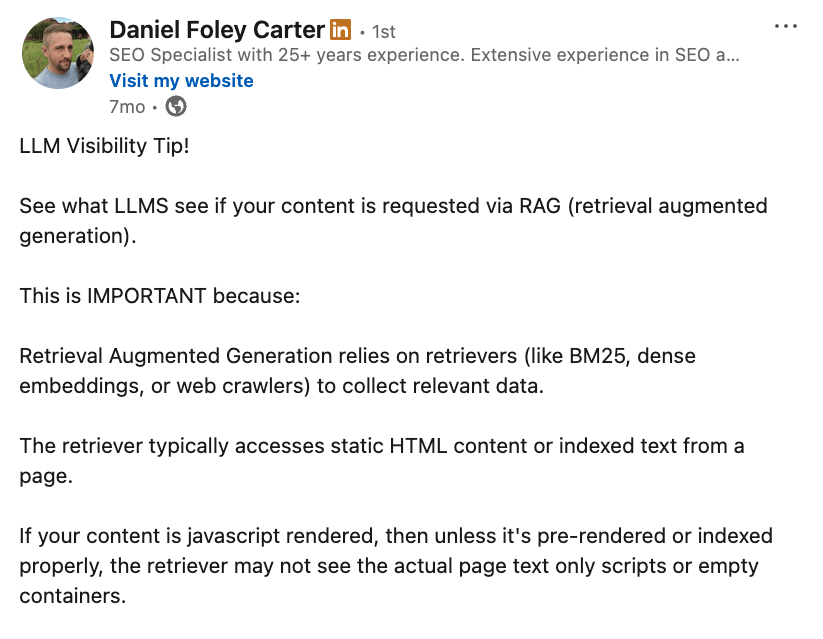
—LinkedIn, Daniel Foley Carter.
Here’s what happens when a page contains JavaScript.
Suganthan Mohanadasan recently tapped into the network files of dozens of ChatGPT conversations, and studied the model’s chain-of-thought process, where it describes how it sources information in layman’s terms.
For a relevant B2B SaaS query, ChatGPT located official pricing for Ahrefs but struggled to find prices for Profound and Peec, reasoning that this information was hidden within JavaScript.
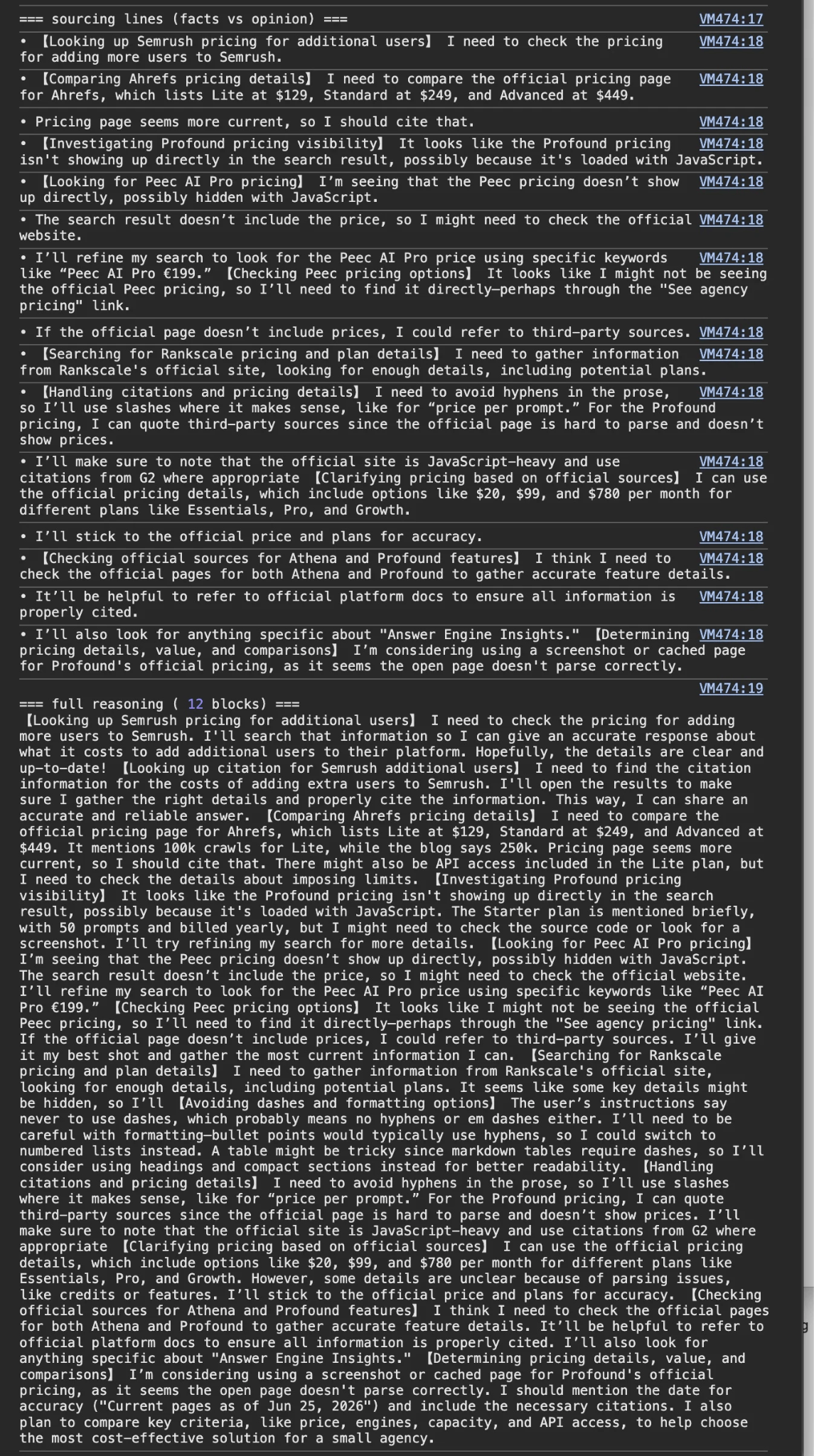
ChatGPT deferred to third-party sources like G2 since “the official page is hard to parse and doesn’t show prices”.
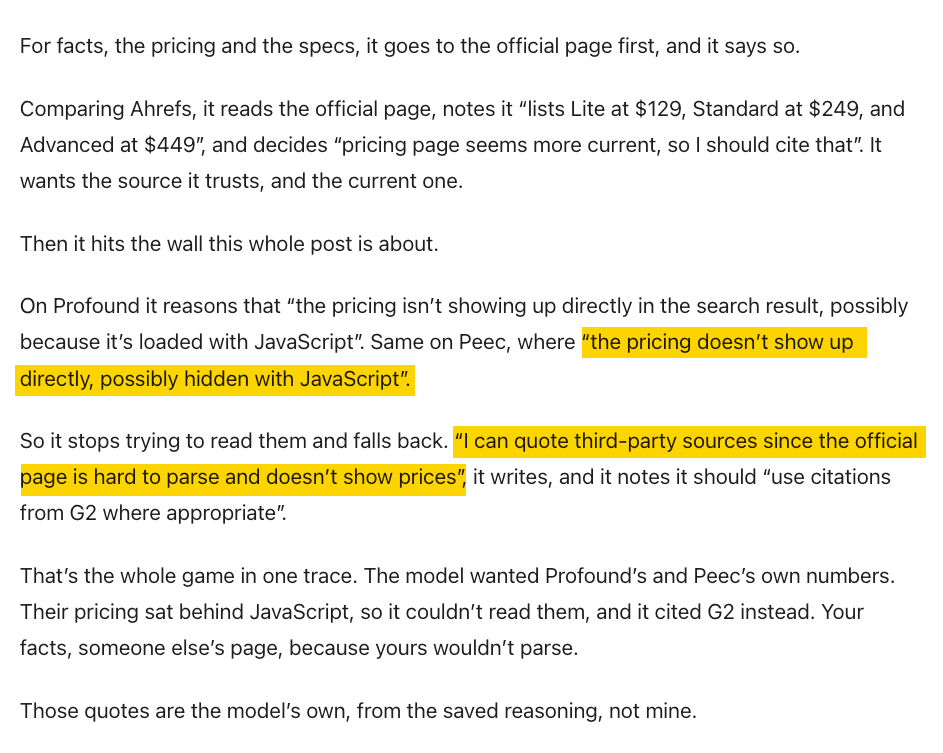
The moral of the story: if you want your most important information—like your pricing— to be accurately portrayed in AI search, your content should ideally be served via HTML, not JavaScript.
Sidenote.
There is another possible explanation here: some companies don’t disclose their pricing. This leaves AI to piece together that missing information with data from other sources. Even if you don’t disclose your pricing, AI models will, and they won’t always be right.
JavaScript isn’t the only way to lock a crawler out—you also need to avoid blocking AI crawlers (like OAI_SearchBot) in your robots.txt and firewall rules if you want to be cited via retrieval ¹ ².
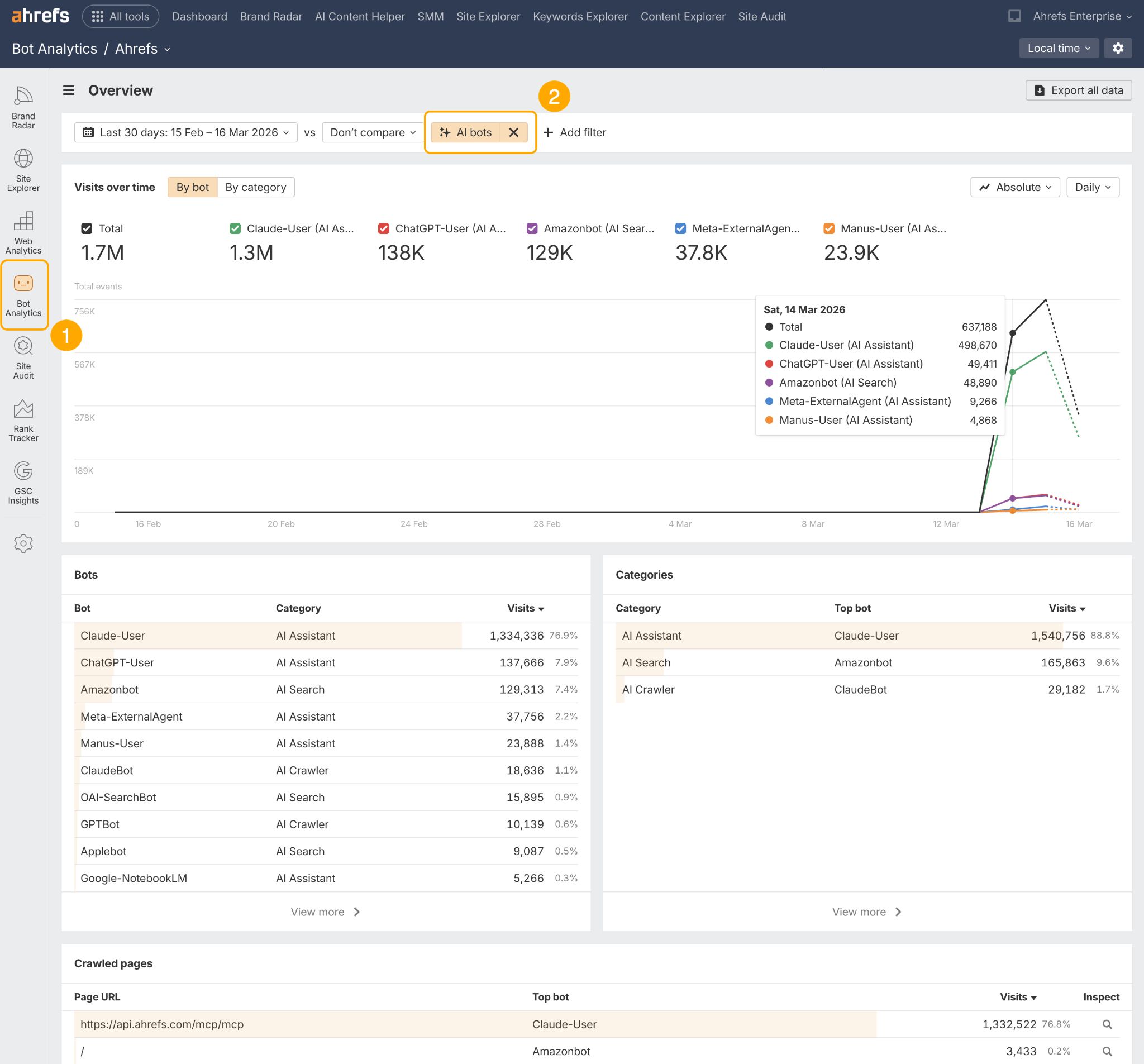
If you use Cloudflare, you can monitor how AI bots are crawling your site—including which pages they visit most often and which ones they miss—via Ahrefs Bot Analytics.
Beware of CDNs blocking AI and multipurpose crawlers
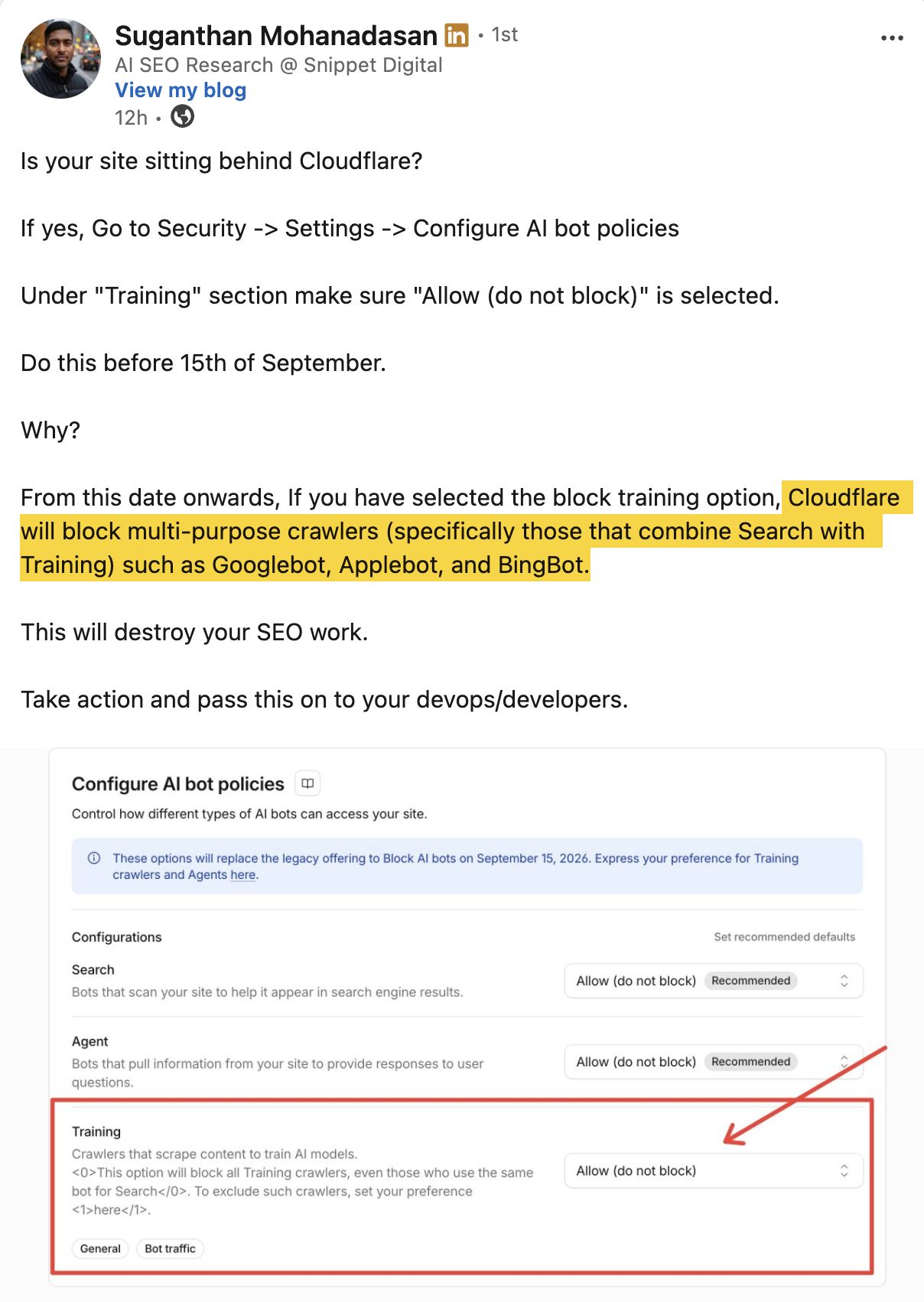
Check your Content Delivery Networks (CDNs) default crawl settings to make sure you’re not inadvertently blocking your content from retrieval.
For example, Cloudflare blocks all AI crawlers by default, which can limit your website’s visibility on interfaces like ChatGPT, Claude, and Gemini.
Even more crucially, it may also block multipurpose crawlers that combine AI training and search engine visibility, like Googlebot and BingBot.
—LinkedIn, Suganthan Mohanadasan, Dixon Jones, and Mark Williams-Cook.
Lead with your best information
AI pays the most attention to the beginning of your page, but its attention drops steadily from there.
According to Kevin Indig’s study of 1.2 million ChatGPT citations, the first 30% of a page’s content generates 44.2% of all citations.
The middle third generates 31.1%, and the bottom third: just 24.7%.
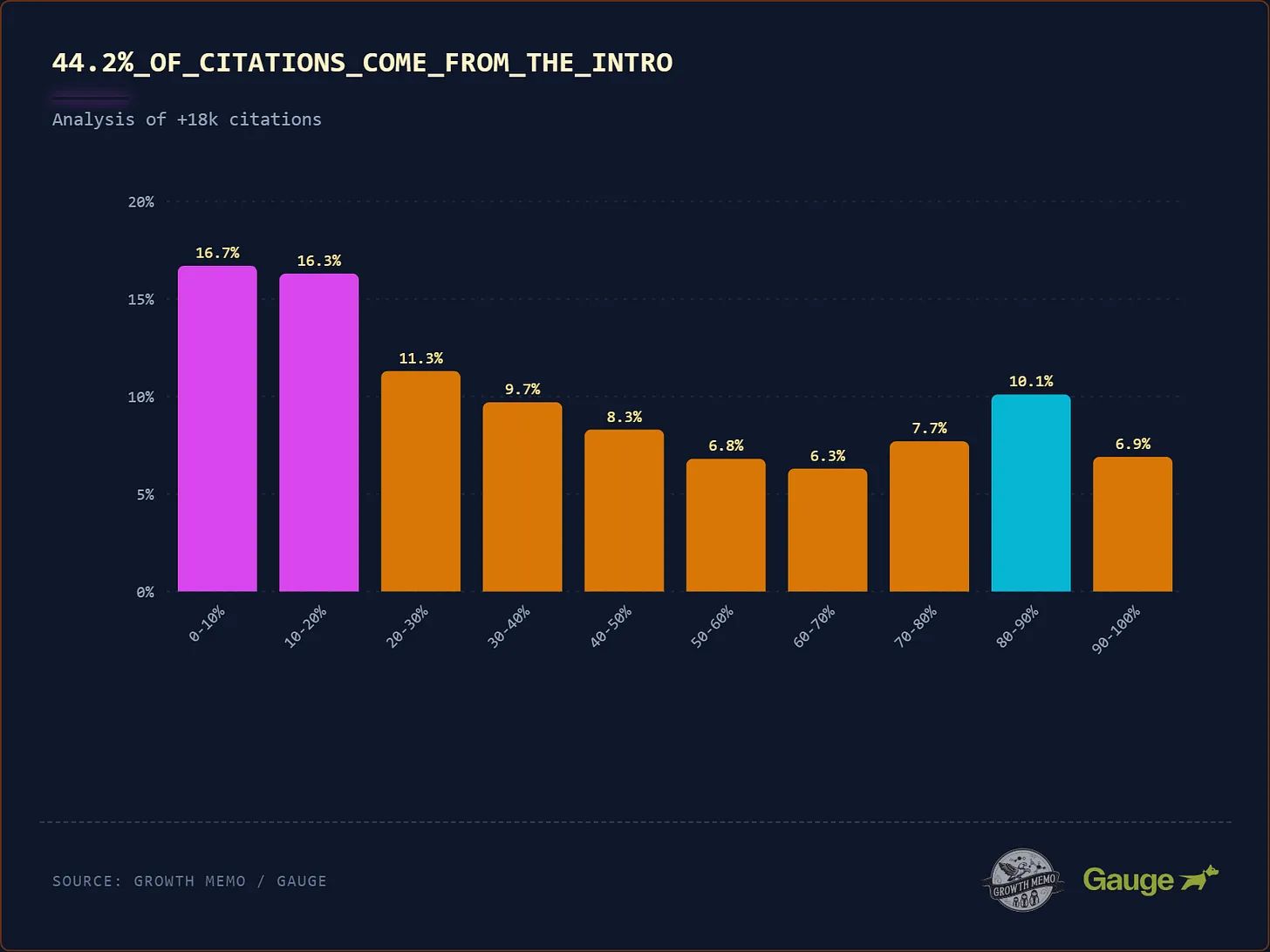
Your most important information—definitions, key claims, unique data—needs to be at the very top of your content.
This is the opposite of the traditional “save the best for last” approach. In content optimized for AI citations, the punchline goes first.
This is known as serving the Bottom Line Up Front (BLUF).
Answer the query immediately in the first sentence below the subheading—don’t bury the answer two paragraphs in.
This directly mirrors how RAG systems match content to queries—but also, how users read, so you’re satisfying both beings and bots alike!
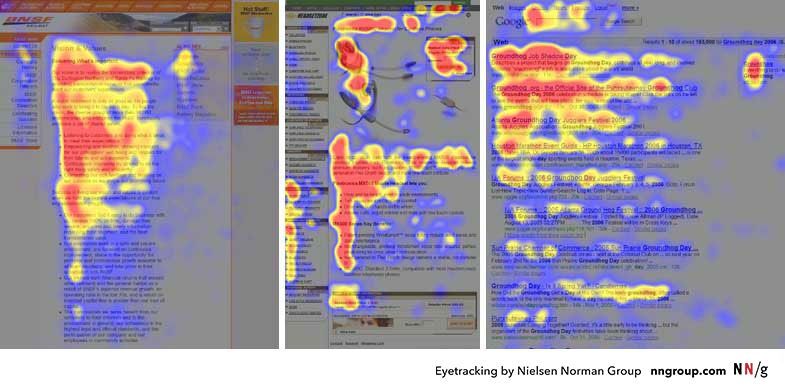
This eye-tracking data shows readers concentrate the most attention at the very top of a page and scan less and less as they move down, so if your key takeaway is buried in paragraph three, most readers never actually see it—hence, “bottom line up front”.
Optimize for fan-out topics
To show up in the fan-out results that AI systems draw on, it’s helpful to create topic clusters—the related questions, definitions, comparisons, and subtopics that AI might search for while preparing an answer.
If you’re looking for hints as to what those sub-topics might be, tap into “People also ask” boxes and “People also search for” queries at the bottom of Google.
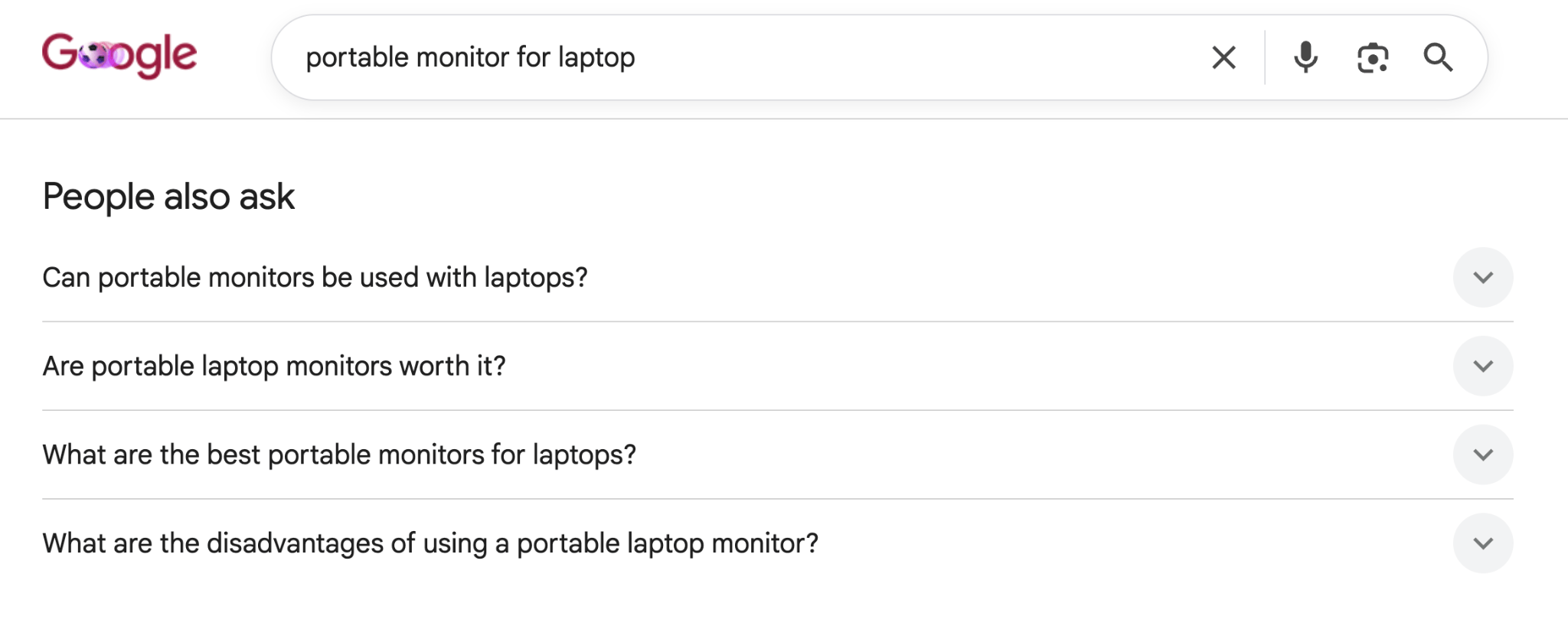
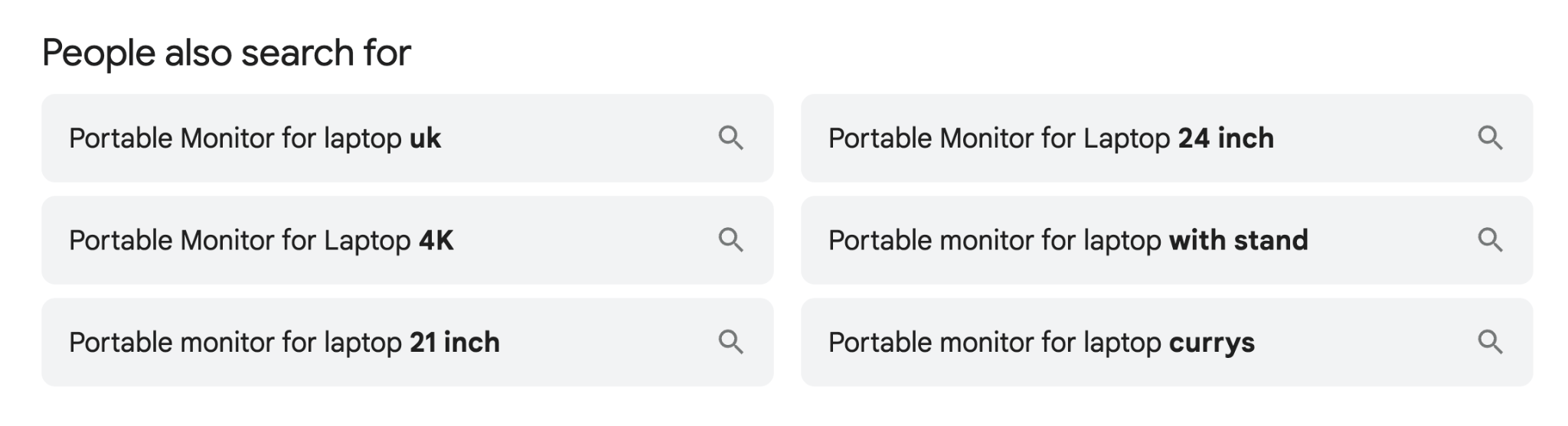
They reflect the most-asked questions and angles around your topic, which tend to be similar to the queries AI generates in a fan-out.
Tip
Check out the Questions tab in Ahrefs’ Keywords Explorer to find related queries being asked around your topic and map out a topic cluster.
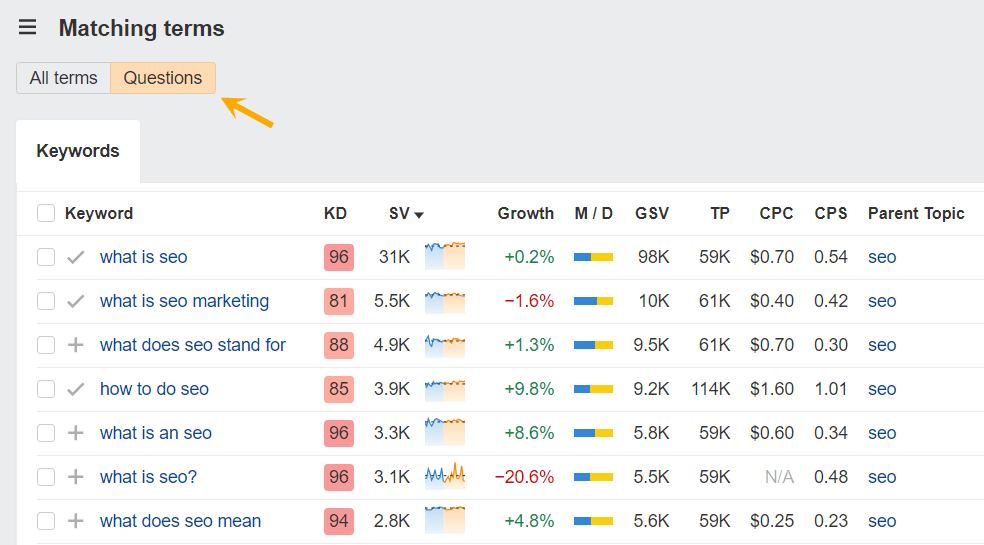
If you’re not covering specific subtopics, you’ll be invisible in a significant chunk of fan-out query search results.
Optimize your page speed
Slow pages are bad news in any search engine, but in AI search the cost is even steeper.
In his breakdown of how ChatGPT works, SEO Consultant David McSweeney notes that ChatGPT appears to fetch grounding pages on a hard timeout of around two seconds: if your server is slow, your page gets cut, and even if it responds in time, a high time-to-first-byte (TTFB) means your content gets truncated.
Under 1 second TTFB: you’re probably fine. Your full page has time to load, get chunked up, and fed to the model.
Over 1 second: you’re gambling. The connection might get cut mid-download—sometimes so early that only your <head> tag made it through, meaning the model never even saw your actual content.
Speed decides whether you make it into the model’s context window at all.
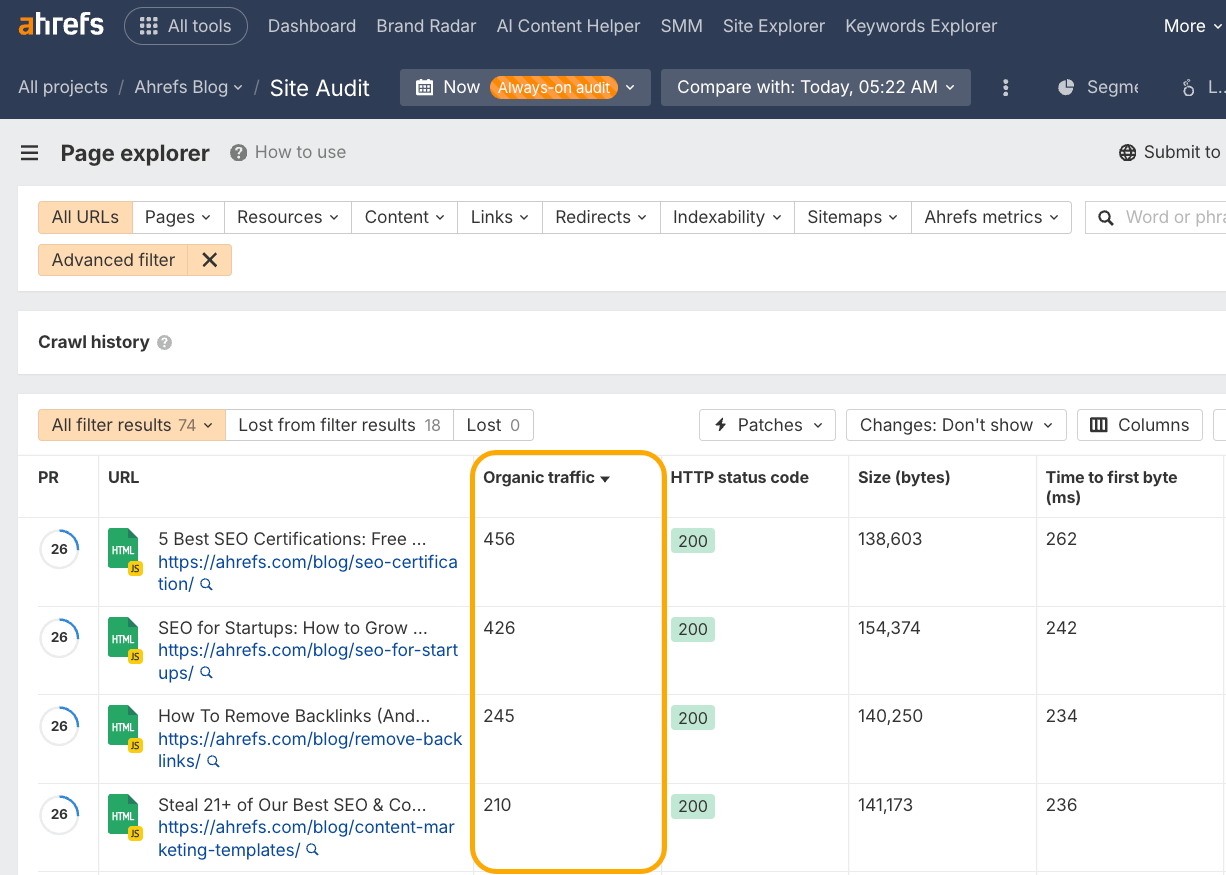
Check your time-to-first-byte in Site Audit.
- Head to the Performance report
- Find the “Time to first byte distribution” chart
- Click “Medium: 200–300 ms” for your quick-win optimization opportunities
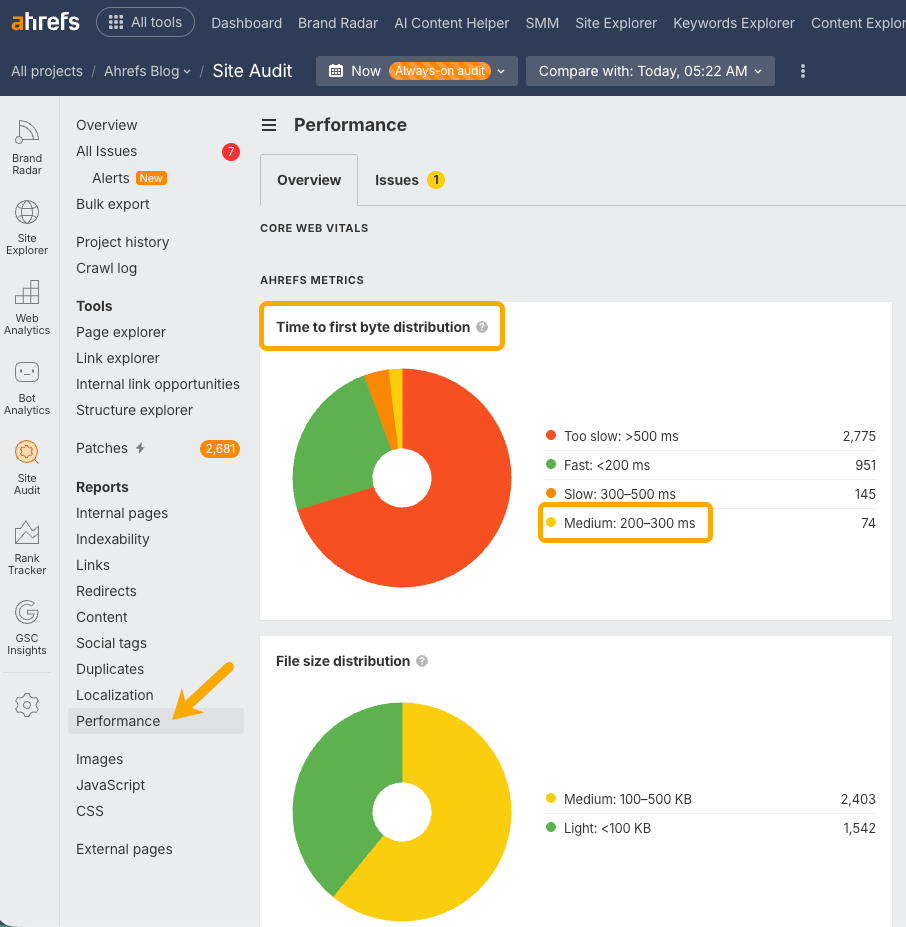
Then sort by organic traffic to find your most important content that may need to be optimized
If your server is too slow, your page may never make it into an AI answer—but in some cases you’ll never know, because the visitor (in this case, a bot) simply gave up and left.
Jan-Willem Bobbink looks for instances of this by identifying the HTTP status code 499 in his server logs.
A 499 status code means the client closed the connection before the server finished responding.
This is another clear signal that your site is too slow for AI retrieval.
Create deep, entity-led content
The content that gets cited most often via RAG search contains