But updating website content shouldn’t just mean changing a publish date.
It’s a chance to improve user experience, build your owned audience, and shape how AI represents your brand.
I’ll walk you through tactics that help you accomplish all of the above—without eating up days of your time.
Watch tutorial on YouTube
Not every blog post you publish will rank in search engines. Even if you’ve done keyword research and written great content, it’s not always possible to get things right on your first attempt.
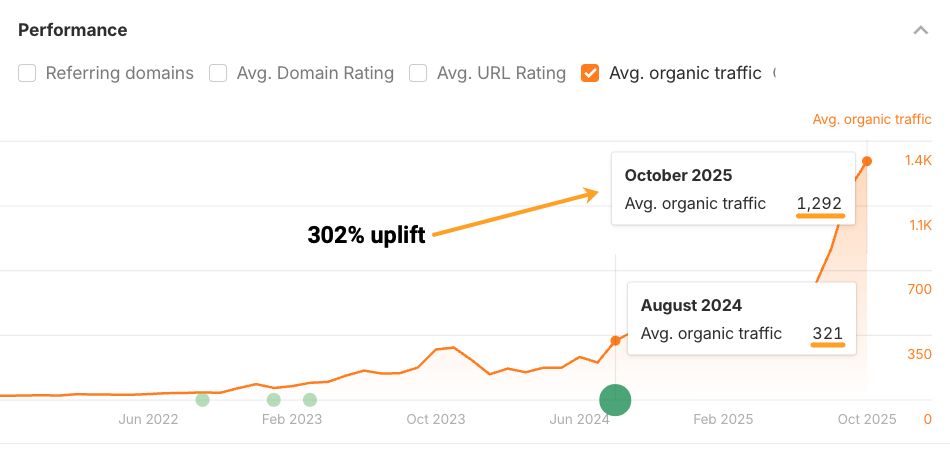
For example, we published a post about “link reclamation” in 2018. It wasn’t a complete failure, but it never got more than an estimated 350 organic visits per month.
So, in August 2024, we rewrote and republished the post. Traffic has not doubled but tripled since then.
Regular content updates trigger Google to resurface your pages, earn you spots in AI answers, and turn one-time visitors into repeat readers.
You can revive slipping rankings and reclaim lost traffic
Refreshing content is crucial for traditional search visibility.
Google has a search ranking system called “query deserves freshness” where it prioritizes content that has been recently published or updated—it’s usually for timely content like recent events, trending topics, breaking news, and even “best” product recommendations.
So updating website content can help you revive slipping rankings and reclaim lost traffic.
Content updates also impact user signals.
For example, when you have an outdated title, you tend to get fewer clicks.
According to the Google exploit discovered by Mark Williams-Cook, Google uses CTR when re-ranking your content, and have built “Click probability” models that can change based on things like how you modify your page title.
AI relies on search content for fresh information
Most AI assistants fetch fresh search results through the process of retrieval augmented generation, otherwise known as RAG.
They’re pulling fresh information from search indexes, not just relying on static training data.
AI cites “fresher” content
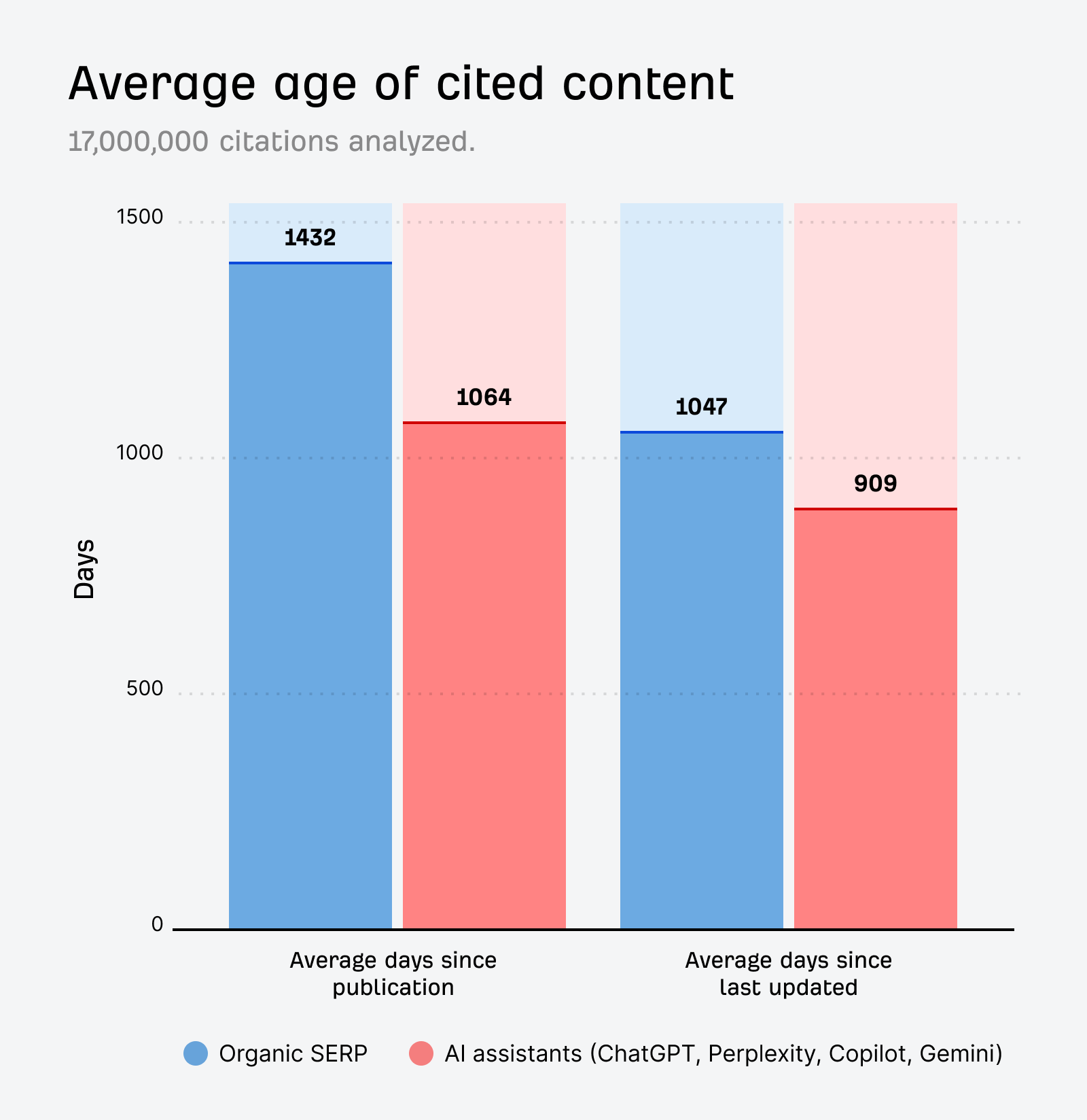
According to our own AI content freshness research, URLs cited by AI assistants are 25.7% “fresher” compared to URLs in the SERPs.
ChatGPT is the most likely to cite newer pages, and Perplexity and ChatGPT actually order their citations from newest to oldest.
ChatGPT even has a “URL freshness score”
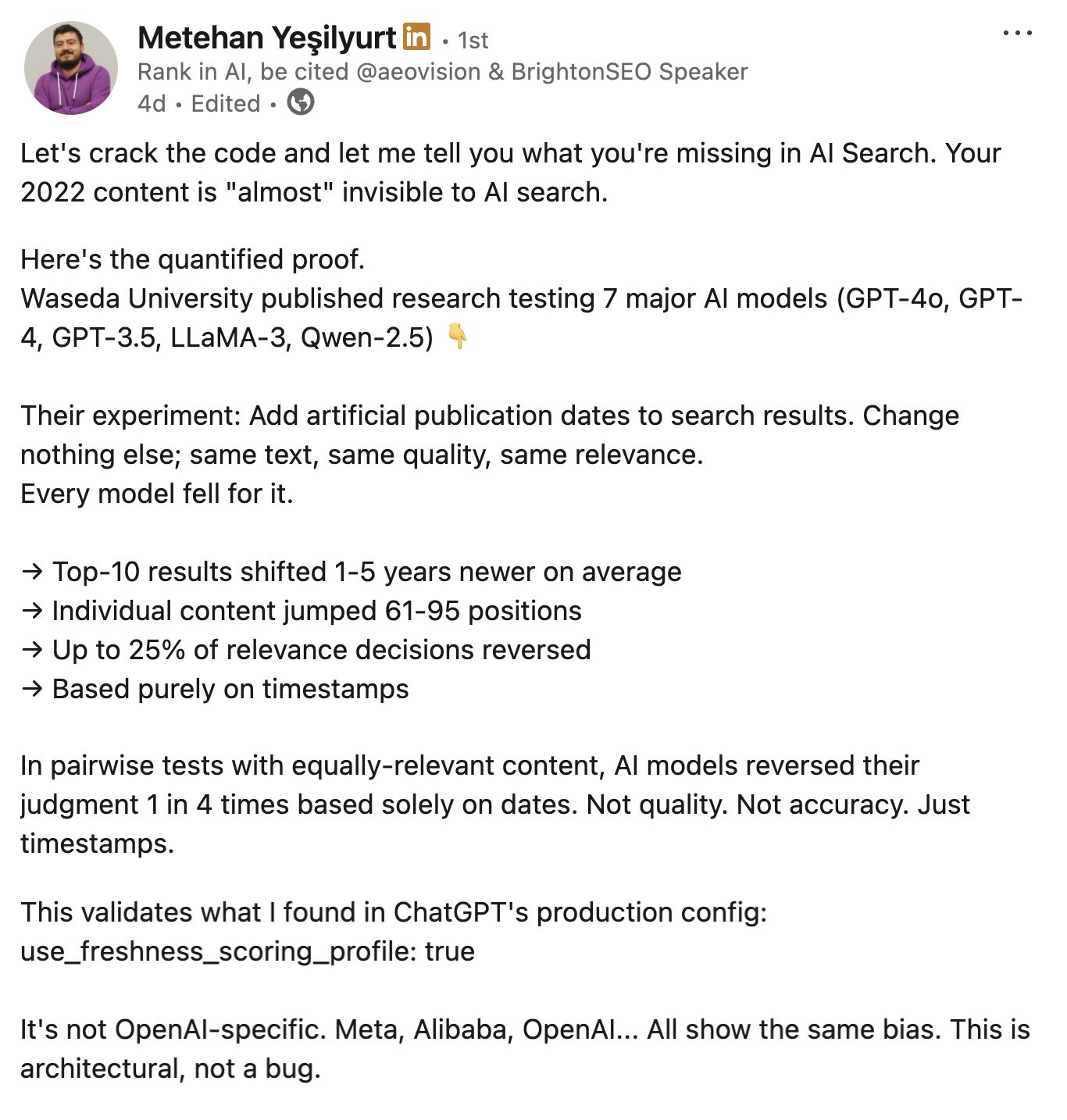
Chris Long recently found that ChatGPT fan-out queries regularly retrieve “2025 content”, and Metehan Yeşilyurt discovered that ChatGPT actually has a “URL_freshness_score”, which creates a kind of recency bias in its cited responses.
He also writes about a university study where researchers added artificial dates to various pieces of content, and observed them jumping up 95 places in the rankings of 7 different AI models.
It’s not just about robots—readers still matter
Traffic is dropping, but many users will still end up clicking through to your site.
If your examples are outdated or your data is years old, that’s a great way to build a negative brand perception.
Republishing content is therefore just as much about reputation management as it is about visibility.
And that reputation matters more than ever now that direct traffic has become a moat.
If you’re trying to build a destination site or forge a community, irrelevant content isn’t going to have users seeking you out or returning to your site.
Fresh content is what will keep people coming back.
Your content shapes AI’s perception of your brand
Updating website content doesn’t just get your brand cited more often in AI, it gets it mentioned more accurately.
When you republish content, you can make sure AI assistants have the right information about things like your pricing, USPs, features, and benefits.
Keeping those “brand facts” up-to-date is crucial now that any piece of web content can be used as the basis for an AI response.
Zero-click search means that users don’t end up visiting your site as often. So, the effort:reward ratio of updating content has decreased.
The question is, can you justify spending time and energy on refreshing content if you’re getting less exposure in return?
At Ahrefs we regularly refresh our content, but we break those updates into two categories:
1. Quick updates
I think of these as “minimum viable content updates”. What are the smallest tweaks you can make that lead to outsized returns?
2. Rewrites
The second type of update is full-on rewrites.

You usually do these updates when you have a secondary business goal—beyond just improving organic traffic.
For example, if you’ve released a new product that’s relevant to the topic of an old blog, then you might want to do a full rewrite of that blog instead of a quick update.
In that case the content refresh doesn’t just have the goal of increased search visibility, it also has a customer support goal or a sales goal.
For the rest of this article, I’m going to focus on “Quick updates”.
There are no hard-and-fast rules for updating content. Ok, I lied, there is one: Don’t just change the publish date.
As Roxana Stingu points out
“Google spent a lot of time refining how it handles [updates] and it can look back across multiple versions of a page and assess whether a change is meaningful enough outside of just getting a new timestamp.”
Right now, changing a publish date might be working for AI visibility—but it works until it doesn’t…
As Mark Williams-Cook says…
“Google also has a binary trust signal when it comes to things like lastmod. So abuse it if you want to lose it.”
Given that a number of AI citations are Google rankings in disguise, I’d say it’s best to avoid wholesale content republishing with zero actual modifications.
Great. Now that we’ve got that out of the way, let’s get into a few practical ideas of how you can go about updating your content.
When you start off, you want to find lower effort, higher reward updates. So, here’s an idea of how to do that.
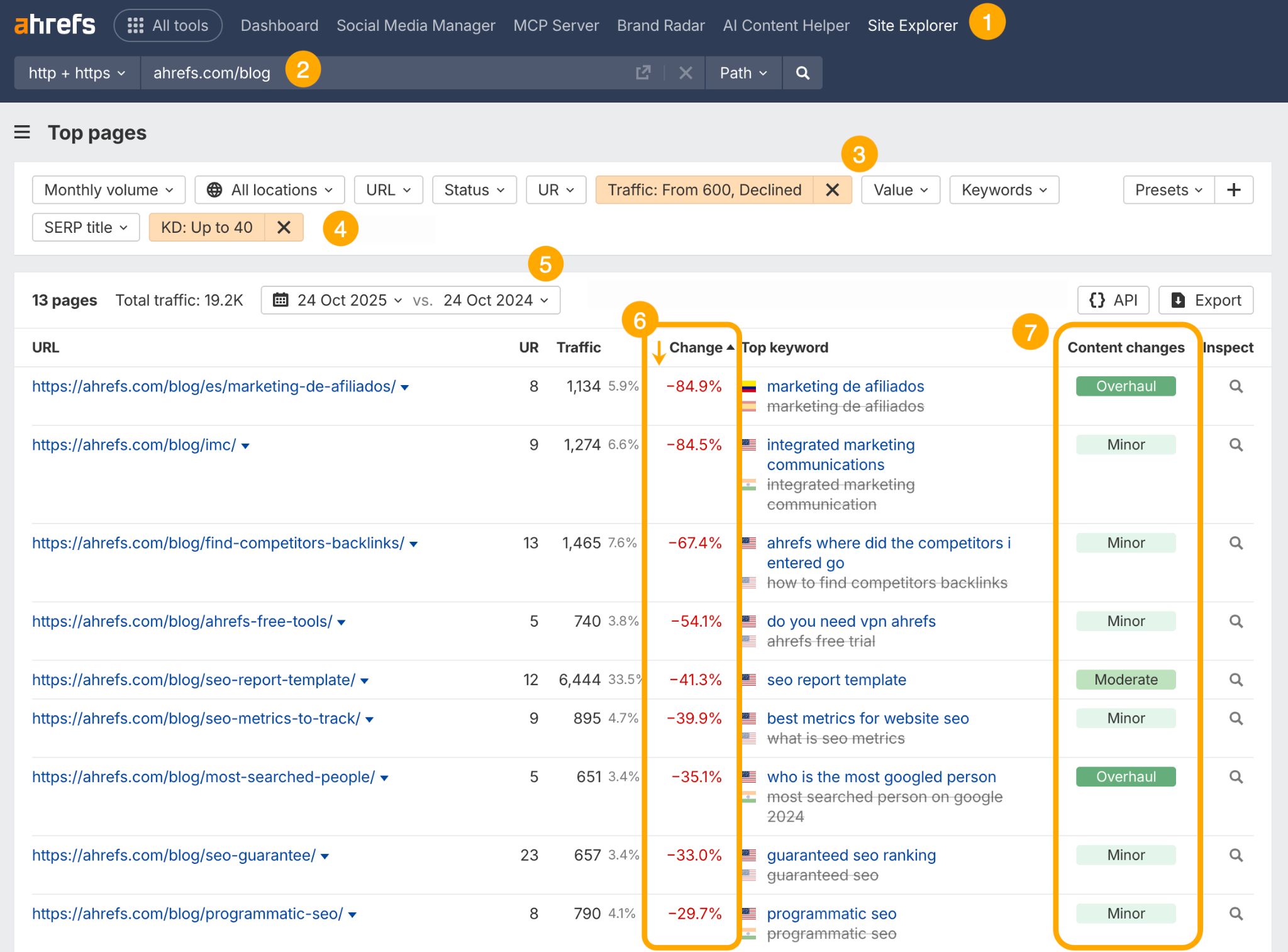
- Head to the Top Pages report in Ahrefs Site Explorer.
- Drop in your site—either the domain or a specific subfolder. Below, I’ve gone with the Ahrefs Blog.
- Set up a traffic filter, and set that to “declining”. You want to choose a monthly traffic number that is towards the top end of what you usually achieve from your best, most visible pages.
- Set a low KD filter (e.g. up to 40). Content isn’t always the reason your posts stop ranking. It can also be because the pages outranking you have more high-quality backlinks and, therefore, “link authority”. Setting a low Keyword Difficulty score will show you update opportunities in a less competitive SERP.
- Select the date range you want to monitor the decline over. For me, that’s one year.
- Sort by negative traffic change. So you’re basically zeroing in on the top pages on your site that have dropped off lately.
- Check Content Changes. This shows you which pages have been updated over your date range.
Members of your team might have already pushed an update recently, so aim to avoid pages with “Major” or “Overhaul” changes, like our /most-searched-people/ blog.
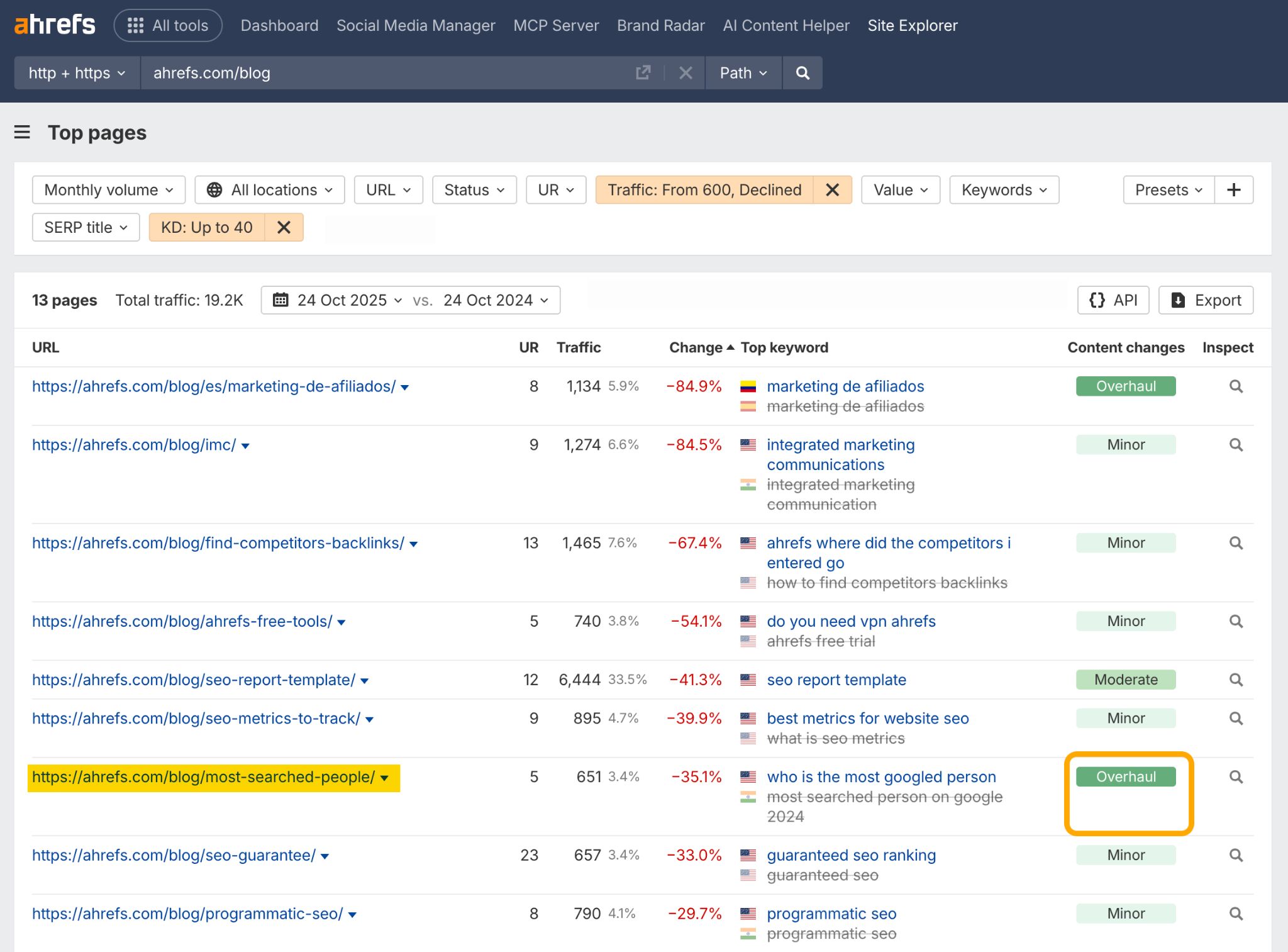
Instead pay attention to the pages that haven’t been republished.
Content with “Minor” changes will usually only have had tiny tweaks made, like: dynamic content blocks or widgets changing.
Articles with “Moderate” changes typically have had a couple of sentences rewritten. Both make for good update opportunities.
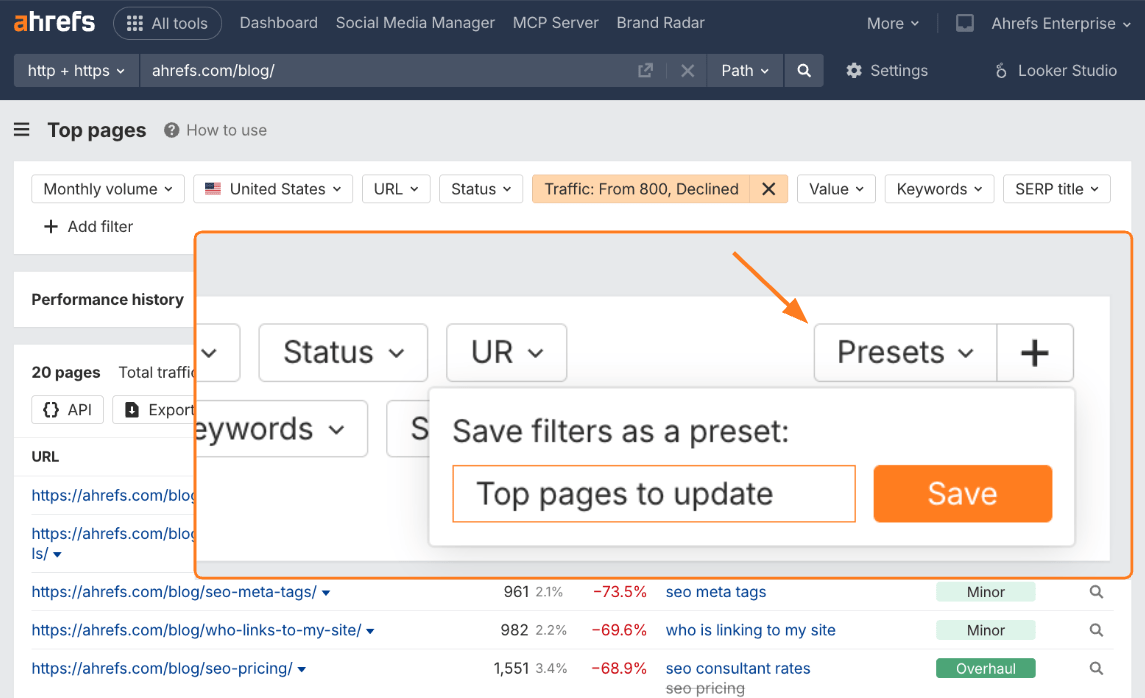
As a side note, you can now save this filter configuration as a preset, and come back to it whenever you want to update your top pages.
In Ahrefs Content Explorer you can analyze the content of a specific domain, then hit the “Republished pages” filter to see which pieces of content have been most recently updated.
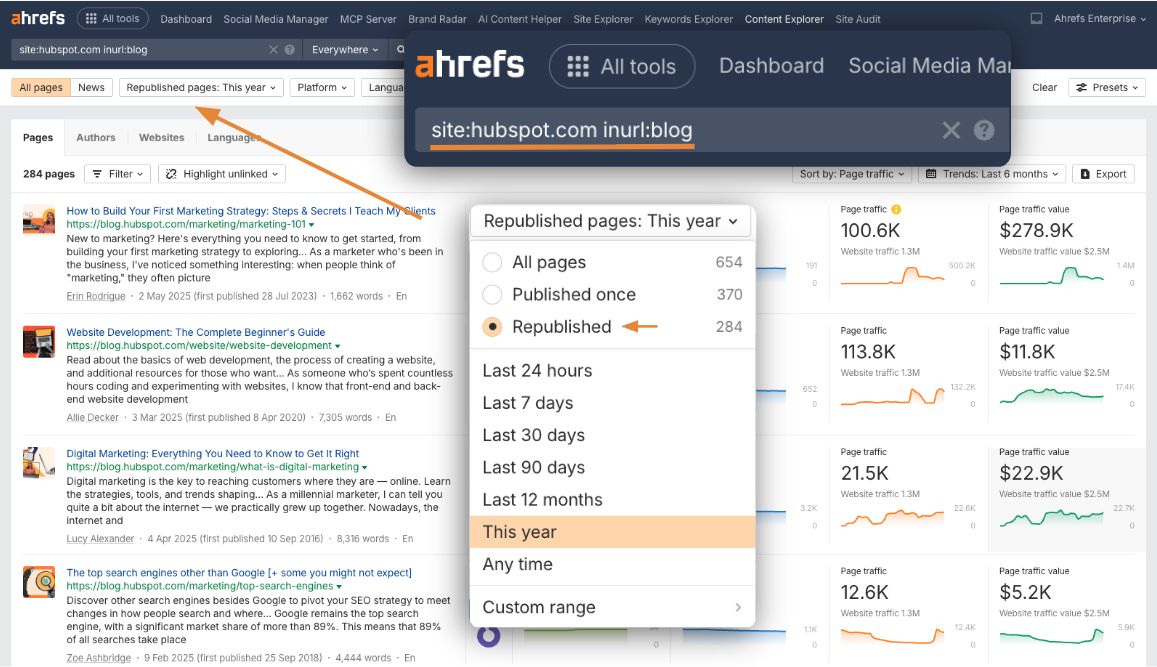
In this example, I’m digging into all of the content on the HubSpot blog that’s been republished over the last year.
You can add in your domain if you want to check your own content updates, but in this instance I’m conducting a sort of competitor analysis on HubSpot.
They’re not a direct competitor of ours, but we create a lot of overlapping content. So, my aim here is essentially to recreate their most successful updates.
I especially like using the Content Explorer view for updates because it gives you the chance to see multiple trend lines at once.
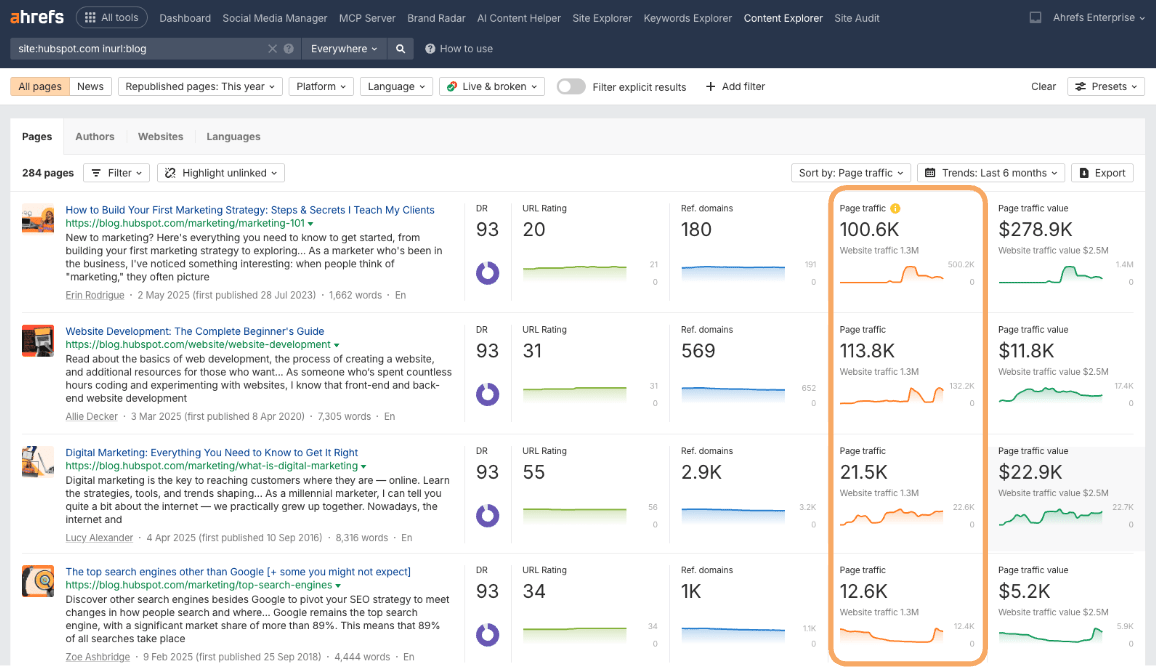
You can scroll through the list of content, instantly spot the traffic spikes, and understand which updates have been a success.
Or, if you’re auditing your own content, you can quickly grok which updates didn’t work, so you can try again.
What I will say is that not all of these trend peaks and dips are due to sites republishing content. There are other reasons for traffic change, like algorithm updates.
But generally speaking, this report is a good springboard for deeper analysis of “successful” content.

This HubSpot blog caught my eye because we also have a blog on the “Top search engines”.
I’m interested in what learnings we can take from HubSpot’s update that we can apply to our own blog update.
Once you’ve found a successful update idea, you can take the URL over to Site Explorer to do a deep-dive analysis.
Start off by following the trend line, and look out for the green circles. This is another element of the Content Changes tool I mentioned earlier.
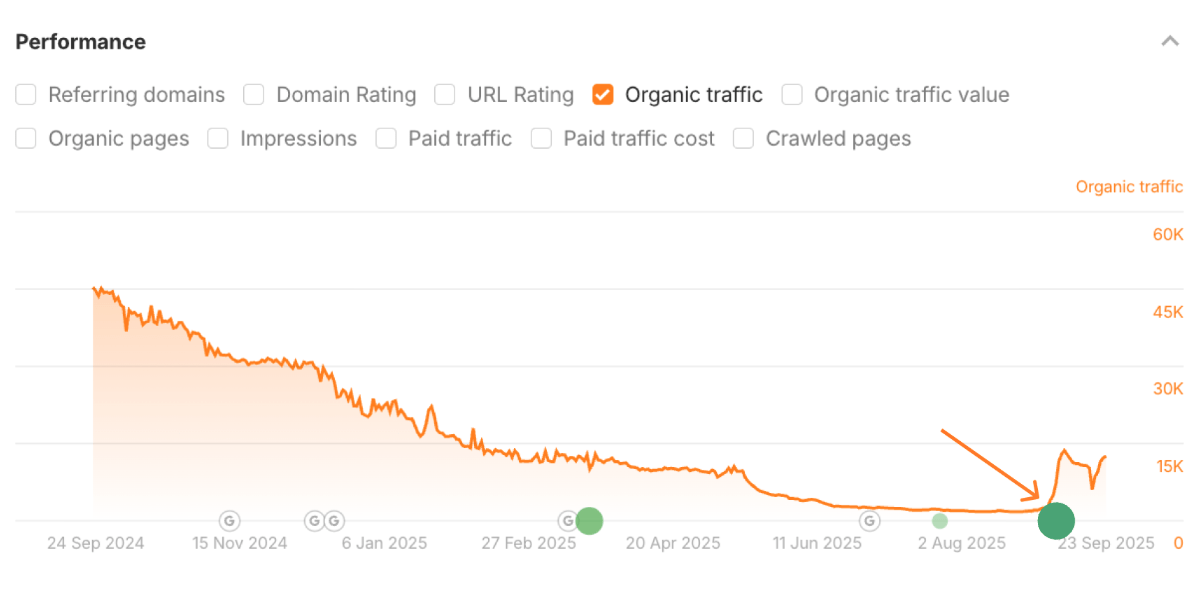
If you see a circle preceding a traffic spike, then it’s a tell-tale sign that traffic has improved as the result of a content refresh.
The size of the circle indicates the amount of content that was changed, and the placement of the circle on the x-axis signifies the date that the content refresh occurred.
So, in this example, HubSpot made “Overhaul” changes to their article in early September.
If you click on that circle, you will see a side-by-side comparison of the article content before and after the update, so you know exactly what content has been changed and added.
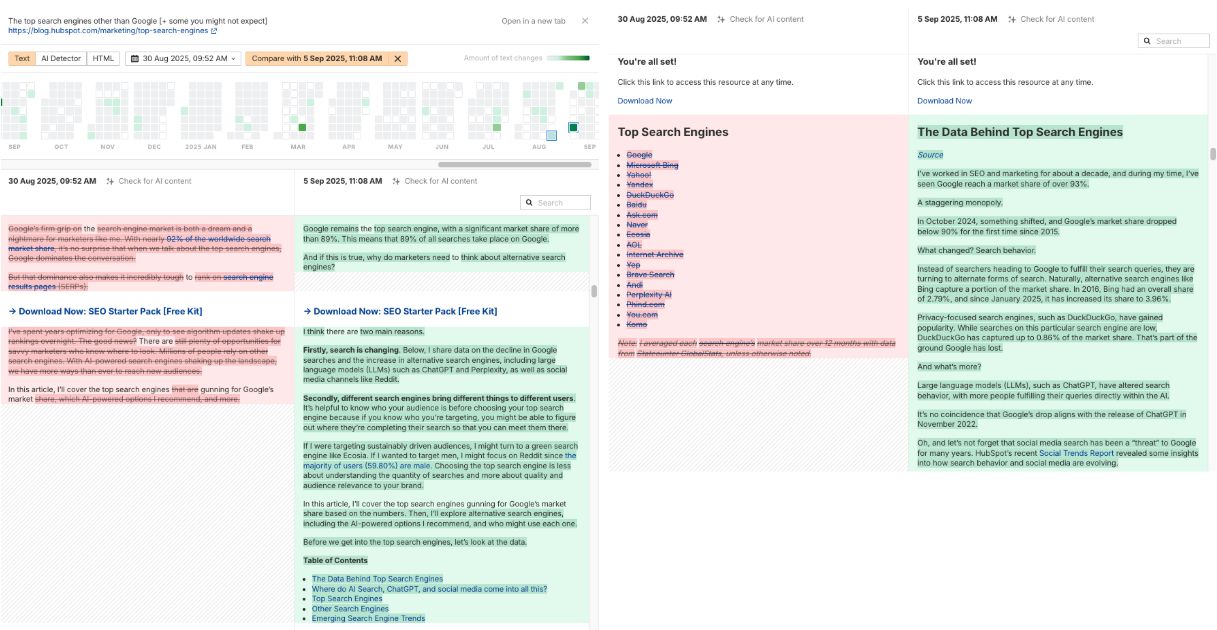
As you can see, HubSpot have rewritten a fair chunk of the blog content here and, as a result, they’ve managed to claw back 10K+ monthly organic visits.
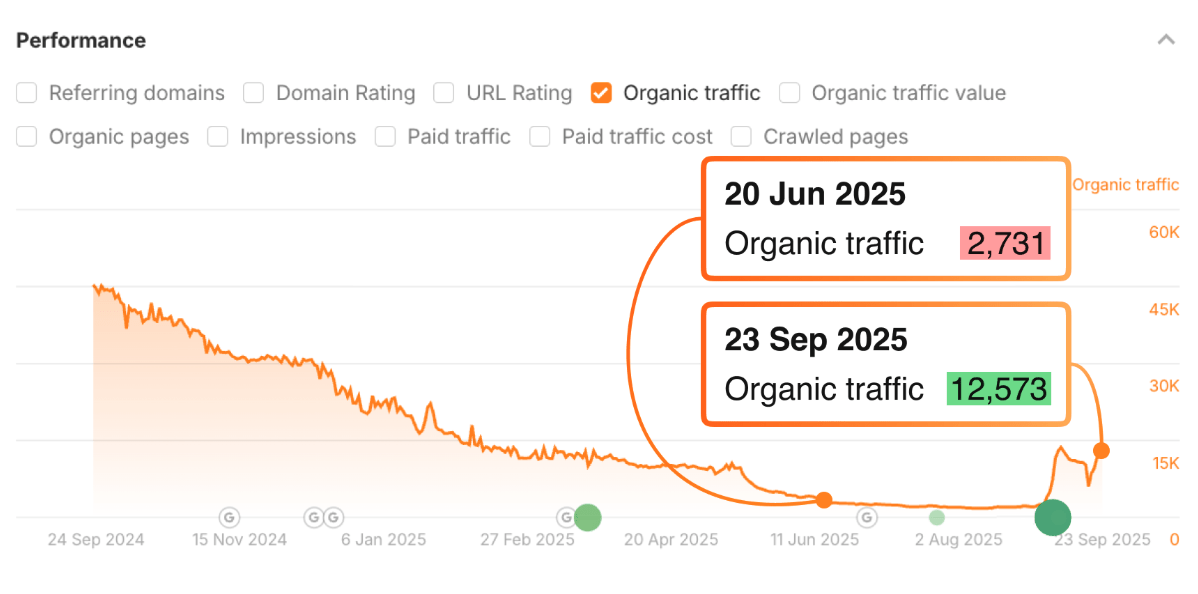
I’d call that a success.
On the other hand, this is a view of our own blog on the same topic of “top search engines”.
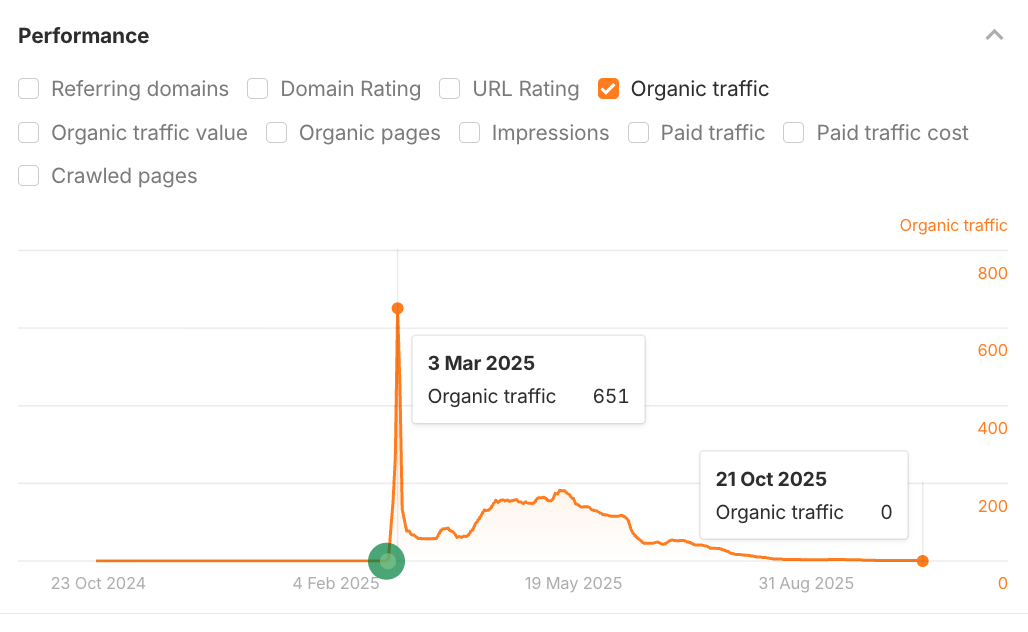
As you can see it isn’t actually doing too well right now.
We updated it back in March and it saw a cursory spike, but since then it’s flatlined.
The aim is to learn what HubSpot got right with their update, so that we can revive our own content.
You can repeat this analysis for multiple competitors to get ideas for topics to create and update.
It’s tricky to know what’s going to actually drive traffic in a zero-click search landscape, so this is a strategy that can give you reassurance.
You can validate whether traffic opportunities exist before you start updating your content.
If your ultimate goal is AI visibility, you can study your competitors’ updates, and see if they are winning new AI citations.
Here’s what I mean.
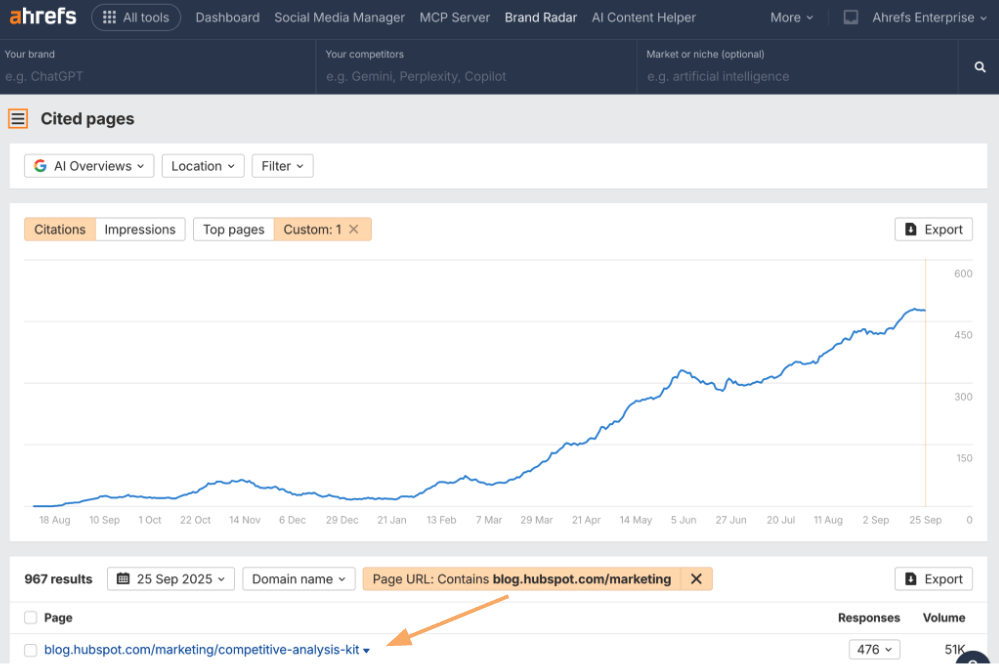
I’ve headed to the Cited Pages report in Ahrefs Brand Radar, our AI visibility tool, and dropped in the HubSpot blog as a page URL filter.