



On a scorching summer day, the office AC broke down. The maintenance team scrambled to find the issue, but without a proper tracking system, they had no record of past repairs or replaced parts.
As a result, it took hours to fix, and in the meantime, productivity plummeted, and everyone struggled in the heat. That got me thinking—how do maintenance teams, facility managers, and manufacturers handling far more critical equipment deal with unexpected breakdowns?
That’s when I started exploring best computerized maintenance management system (CMMS) software.
I explored G2 reviews, researched various platforms, and evaluated G2 reviews for different CMMS tools to understand their impact. I found that these systems go beyond simple tracking—they optimize asset performance, reduce downtime, and improve overall efficiency.
If you’re searching for the best CMMS software solutions, keep reading. I’m sharing insights from my evaluation experience to help you find the right tool for your needs.
10 best CMMS software: My picks for 2025
- MaintainX: Best for quick work order setup and ample asset management.
for fast implementation, mobile friendly interfaces, and intuitive work order. ($16/user/mo) - Fiix CMMS: Best for AI-powered maintenance automation and deep analytics
to automate maintenance schedules, optimize asset time, and deliver analytics. ($45/user/mo) - Limble: Best for customizable workflows with intuitive UI
For customization, tailoring maintenance workflows, checklists and dashboards. ($69/user/mo) - UpKeep: Best for mobile-first maintenance teams and cloud access
For offline functionality, cloud-based accessibility, and modern UI.($20/user/mo) - eMaint CMMS: Best for compliance focused maintenance and scalability
For detailed audit trails, compliance reporting, and asset hierarchy management. ($69/user/mo) - Accruent Maintenance Connection: Best for enterprise grade asset lifecycle
For large enterprises needing advanced tools for complex asset lifecycles. ($1325/user/year) - Fracttal One: Best for predictive maintenance and IoT integration
To drive predictive maintenance insights and help reduce downtime.
(available on request) - Corrigo: Best for vendor co-ordination and facilities management
To drive predictive insights, reduce downtime and extend asset lifespan. (available on request) - eWorkOrders CMMS: Best for preventive maintenance scheduling
for strong preventive maintenance capabilities (available on request) - Click Maint CMMS: Best for simple maintenance scheduling and cost tracking For simplified maintenance planning and scheduling with affordability. ($35/user/mo)
* These CMMS tools are top-rated in their category, according to G2 Grid Reports. I’ve also added their monthly pricing to make comparisons easier for you.
My top 10 best CMMS software recommendations for 2025
Best CMMS software is designed to help businesses efficiently track, maintain, and optimize their assets. While exploring these tools, I saw how they simplify maintenance management, reduce unexpected downtime, and improve overall equipment reliability.
According to Grand View Research, the global computerized maintenance management system market size was estimated at USD 1.29 billion in 2024 and is projected to reach USD 2.41 billion by 2030, growing at a CAGR of 11.1% from 2025 to 2030.
Features like automated maintenance scheduling, real-time work order tracking, and predictive insights help businesses avoid equipment failures instead of constantly reacting to them. I could see how the best CMMS software did all of that and more.
How did I find and evaluate the best CMMS software?
I evaluated reviews for the best CMMS software extensively to understand how they manage and track maintenance tasks, automate work orders, and optimize asset performance.
I used AI to analyze user feedback and reviews on G2 and G2’s Grid Reports to gain further insights into each tool’s features, ease of use, and overall value. The screenshots featured in this article may be a mix of those captured during evaluations and ones obtained from the vendor’s G2 page.
By combining evaluations from expert feedback and user reviews, I’ve compiled a list of the best CMMS software to help you select the right one for your maintenance operations.
What makes CMMS software worth it: My opinion
When evaluating the best CMMS software, I focus on several key features to determine its effectiveness for IT and maintenance teams:
- Asset tracking and management: A CMMS should function as a centralized asset database, providing real-time visibility into equipment, machinery, and facilities. I evaluate how easily users can input asset data manually or via bulk import (CSV, API integration). Searchability is crucial, so I evaluated whether assets can be found using filters like asset type, location, serial number, or maintenance status. I also check for barcode and RFID scanning capabilities, which speed up asset identification. A well-designed CMMS should allow users to attach technical documents (PDFs, images, CAD drawings), warranty details, and IoT sensor data to each asset record for comprehensive tracking.
- Preventive maintenance scheduling: Automation in preventive maintenance ensures that equipment gets serviced before failures occur. I assess whether the CMMS allows scheduling based on time intervals (e.g., every 30 days), usage (e.g., after 500 machine hours), or condition-based triggers (e.g., temperature exceeding 80°C). I also check for built-in workflow automation—can it automatically generate work orders when a maintenance task is due? The best CMMS solutions integrate with IoT-enabled sensors to capture live equipment data and trigger maintenance alerts dynamically.
- Work order management and tracking: Work orders should be easy to create, assign, and update in real-time. I evaluate whether users can generate work orders manually or through automated triggers (e.g., an equipment fault detected by a sensor). A CMMS should support multi-user collaboration, allowing technicians to update job progress, attach images, log used spare parts, and enter detailed issue notes. I also evaluated mobile accessibility—can technicians access work orders from a smartphone or tablet while on-site? Advanced systems support role-based access control (RBAC), ensuring that only authorized personnel can modify critical work orders.
- Inventory and spare parts management: A well-integrated CMMS should track spare parts usage and stock levels, preventing downtime due to missing components. I evaluated whether the software provides real-time inventory updates, automatic reorder notifications, and integration with ERP or procurement systems. A good CMMS should support batch tracking, part serial number identification, and supplier management to streamline procurement. I also check whether it calculates lead times to ensure that essential parts arrive before stock runs out.
- Data-driven insights and reporting: A CMMS should transform raw maintenance data into actionable insights. I assess reporting tools for key performance indicators (KPIs) like Mean Time Between Failures (MTBF), Mean Time to Repair (MTTR), asset utilization rates, and technician efficiency. The best systems provide customizable dashboards with interactive visualizations (charts, heatmaps) and exportable reports (PDF, Excel, or JSON for API-based integrations). Predictive analytics is another valuable feature—some CMMS tools use AI and ML models to analyze historical data and forecast equipment failures before they happen.
- Compliance and audit readiness: Many industries require strict compliance with safety and maintenance regulations. I check whether the CMMS maintains a digital audit trail of maintenance activities, complete with timestamps, user logs, and digital signatures. Automated compliance tracking should cover industry standards like ISO 55000 (asset management), OSHA (safety regulations), or FDA 21 CFR Part 11 (electronic records). I also verify whether the software allows secure document storage for certifications, warranty records, and safety checklists, ensuring everything is accessible during audits.
By evaluating these technical aspects, I can determine whether a CMMS truly enhances maintenance operations or if it lacks the automation and integration necessary for modern IT and facility management teams.
According to G2’s State of Software report, CMMS is one of the 10 most visited traffic categories with the highest traffic with growing investment and adoption.
- Manage various types of assets and equipment across multiple locations
- Track inventory for spare parts and materials needed for maintenance
- Schedule maintenance activities such as inspections, repairs, and upgrades
- Manage resources (human and equipment) and allocate them to maintenance operations
- Deliver reports on asset utilization, maintenance costs, and technician productivity
- Ensure asset compliance with safety and environmental regulations
- Provide a mobile-friendly interface or mobile apps for field service technicians
This data has been pulled from G2 in 2025. Some reviews have been edited for clarity.
1. MaintainX: Best for quick work order setup and ample asset management
Based on my review of G2 user feedback, MaintainX is a cloud-based Computerized Maintenance Management System (CMMS) designed to streamline maintenance operations for businesses. It helps manage asset performance, work orders, and maintenance tasks, and is particularly appealing to professionals transitioning from spreadsheets.
As a category leader on G2, MaintainX has achieved a perfect satisfaction score of 100, with 96% users likely to recommend it for work order management, preventive maintenance and task templates.
One standout feature that I see getting a lot of praise is automated asset management. From what I’ve seen, G2 users frequently highlight how this functionality seamlessly connects work orders to the respective assets. Unlike outdated Excel-based systems, it automatically logs every maintenance action, creating a clear, searchable history. This helps eliminate the hassle of manual record-keeping and provides users with reliable, organized data.
The procedures feature is also often mentioned positively in G2 reviews. Users seem to appreciate how intuitive and adaptable it is. I’ve noticed that this feature isn’t just limited to maintenance tasks but can be used to support various workflows, which makes it more versatile than users initially expect.
Another frequently praised capability is the meter tracking system. Multiple reviewers mention how this feature provides immediate insights into asset performance, allowing users to catch potential issues before they lead to costly breakdowns. Given the importance of preventive maintenance, this tool seems particularly valuable to businesses aiming to reduce unplanned downtime.
From what I’ve gathered in G2 reviews, MaintainX is generally regarded as a robust and flexible tool. Customization options are a major benefit, enabling users to tailor the system to their needs. However, I’ve noticed some concerns about the risk of incorrect data entry when the system is heavily customized. Based on feedback, more control over user permissions could help mitigate this issue by ensuring more accurate modifications.
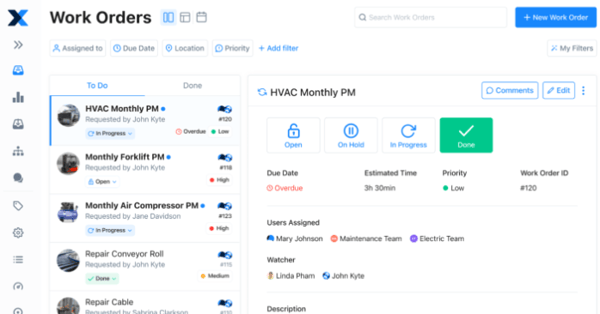
According to G2 user reviews, MaintainX is praised for its robust asset management and versatile preventive maintenance workflows, though some users mention that onboarding can feel a bit overwhelming. Reviewers note that once teams get past the initial setup, the platform’s intuitive mobile interface makes day-to-day use much easier.
Another area highlighted in G2 feedback is the QR code functionality, which some users feel could be more advanced. While it works for basic scanning, reviewers mention that richer labels with asset details would streamline operations further.
Overall, G2 sentiment reflects MaintainX as a feature-rich and reliable CMMS platform, with its strengths in mobility and workflow flexibility far outweighing these minor usability gaps.
What I like about MaintainX:
- One standout capability, according to users, is MaintainX’s automated asset management, which links work orders to assets automatically, building a searchable history without manual effort.
- I’ve seen G2 reviewers highlight the intuitive procedures feature, noting how it’s easy to adapt beyond maintenance tasks, making the system more versatile than expected.
What G2 users like about MaintainX:
“With MaintainX, we store all our operational procedures, assets, parts, repair records, preventive maintenance plans, and training documents in one place. This has significantly reduced the time our teams spend on communication and tracking repair statuses. It also helps us schedule recurring maintenance and efficiently assign work orders.”
– MaintainX Review, John W.
What I dislike about MaintainX:
- While the high level of customization is appreciated, I’ve noticed G2 reviewers point out that it can lead to incorrect data entry if users aren’t careful.
- Based on user feedback, the feature set can feel overwhelming at first, with several reviewers mentioning it took time to get comfortable and that new users might need more onboarding support.
What G2 users dislike about MaintainX:
“The only change I would make to MaintainX is the ability to customize the specific permissions of each full user in the system. “
– MaintainX Review, Joseph M.
2. Fiix CMMS: Best for AI-powered maintenance and deep analytics
Based on my review of G2 user feedback, Fiix CMMS is a cloud-based tool praised for its accessibility, scalability, and cost-effectiveness. Users appreciate its reduced IT requirements, automatic updates, and the ability to seamlessly analyze maintenance data through artificial intelligence.
Based on 375 user reviews, Fiix has achieved a customer satisfaction score of 80, with 93% G2 users willing to recommend it to others in the overall business segment.
One standout feature that I’ve noticed getting a lot of praise is the system’s ease of implementation. G2 reviewers commonly mention how smoothly the transition from paper-based systems went, and how intuitive the training process was, allowing users to quickly get everything up and running without complications.
A consistent theme in G2 reviews that I’ve noticed is Fiix’s data analytics capabilities. Many users highlight how easy it is to store and analyze historical maintenance data, identifying trends and tracking maintenance indicators in ways that are more seamless compared to other systems. This data-driven approach to maintenance planning is highly valued by users, particularly those looking to optimize their operations.
One feature that stands out in reviews is Fiix’s connectivity, particularly its ability to integrate with programmable logic controllers (PLC) for real-time data collection and automated machine responses. G2 users frequently highlight the system’s integration with integrated plant systems (IPS), centralizing operations and improving overall efficiency. Additionally, the predictive maintenance tools and vibration analysis integration are frequently praised for their ability to detect mechanical issues early and anticipate equipment failures, which are seen as incredibly valuable tools for maintenance teams.
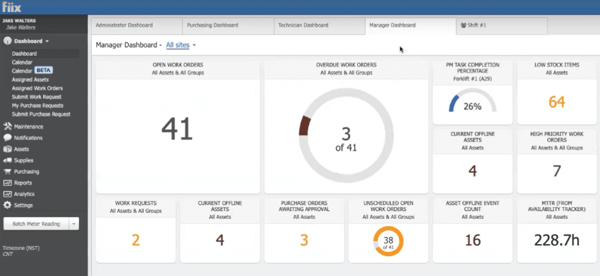
According to G2 user reviews, Fiix CMMS is highly regarded for its AI-powered scheduling and analytics, though some users mention that scheduling flexibility could be improved. While the platform provides a solid foundation for managing work orders, reviewers note that teams with dynamic maintenance needs sometimes wish for more customization.
Another theme in G2 feedback relates to the mobile experience. The app is valued for enabling teams to stay productive on the go, but a few users point out minor inconsistencies between iOS and Android versions.
Overall, G2 sentiment reflects Fiix CMMS as a powerful and analytics-driven maintenance platform, with strengths in automation and mobile accessibility outweighing these usability gaps.
What I like about Fiix CMMS:
- I’ve read G2 reviews highlighting that implementing Fiix CMMS was surprisingly smooth, with users noting a quick transition from paper-based systems and intuitive training that got them up and running fast.
- One feature that gets a lot of praise is the historical data record, which many users found helpful for tracking maintenance trends and using analytics tools to make data-driven decisions.
What G2 users like about Fiix CMMS:
“Fiix is an easy-to-use and intuitive tool for managing projects and tasks within companies. It offers robust reporting and data analysis features, making it a great software solution. Additionally, Fiix provides helpful instructions to assist new users in navigating the application. It is a user-friendly tool for various industries, and one of its biggest advantages is its excellent customer support.”
– Fiix CMMS Review, Weronika R.
What I dislike about Fiix CMMS:
- I’ve noticed G2 users often highlight the centralized scheduling as a helpful part of the work order management system, though some feel it’s not flexible enough for teams with evolving maintenance needs.
- Based on G2 reviews, there’s noticeable dissatisfaction around the mobile app experience, especially due to inconsistent features between Android and iOS versions, which can impact users relying on mobile access.
What G2 users dislike about Fiix CMMS:
“The system lacks an advanced option for creating scheduled maintenance work orders, similar to what is available in the SAP Materials Management (MM) module. It allows duplicate inspection orders without an intelligent check to prevent them. The app does not fully meet expectations, as the Android and Apple versions differ significantly. Some features are not translated into the selected language, leading to information being displayed in English. Additionally, there is no support for the Brazilian currency (reais). The system also does not allow estimated and execution times to be divided into minutes, making it difficult to convert fractional hours accurately.”
– Fiix CMMS Review, Guilherme C.
3. Limble: Best for customizable workflows with intuitive UI
Based on my review of G2 user feedback, Limble is a cloud-based CMMS that is frequently praised for its customizability, making it highly adaptable for industries like manufacturing, healthcare, and facilities management.
Based on 472 verified G2 reviews, Limble has recieved a customer satisfaction score of 93, with 97% users willing to recommend Limble to others for predictive maintenance, standard operating procedures and work order management.
A common theme in G2 reviews is the system’s flexibility, allowing users to configure custom fields and refine how maintenance tasks are tracked to fit their specific needs. This adaptability is particularly appreciated by teams looking to seamlessly integrate the system into their existing workflows without requiring major adjustments.
The user interface is another feature that receives a lot of positive attention from G2 reviewers. It’s described as clean, intuitive, and easy to navigate, which is especially beneficial for those new to CMMS software. From what I’ve seen, users appreciate how simple the setup process is, ensuring a smooth transition and minimizing complications when getting started.
Another standout feature, according to G2 reviews, is the dashboard, which updates every 5 minutes. Users frequently mention how customizable the dashboard is, allowing them to monitor key metrics in real-time and tailor the data to their preferences. Many users find this valuable for tracking performance and gaining insights at a glance, especially in high-pressure environments where quick access to information is crucial.
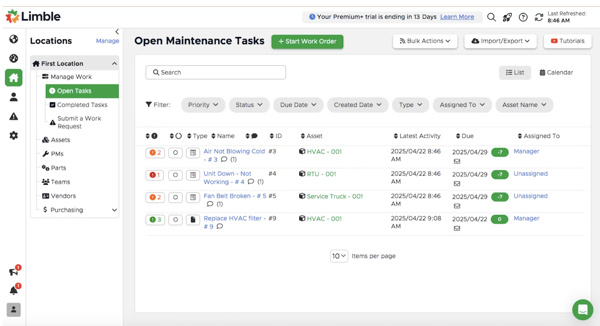
According to G2 user reviews, Limble stands out for its customization and intuitive interface, though setting up dashboard widgets can feel overwhelming. While the feature is powerful, some users note that the many technical options make it harder to fine-tune data displays without extra effort.
Another area mentioned in G2 feedback is reporting. Users appreciate Limble’s flexibility, but some find extracting detailed reports tricky and often export data to Excel for deeper analysis, adding an extra step to the process.
Overall, G2 sentiment shows that despite these refinements being requested, Limble remains a trusted CMMS for teams seeking customizable workflows and a user-friendly platform.
What I like about Limble:
- A consistent theme in G2 reviews that I’ve noticed is how customizable Limble is—users appreciate the ability to create custom fields and adjust task tracking to fit their workflows.
- I’ve come across many reviewers who praise the clean and intuitive interface, noting that even users new to CMMS tools find the setup process simple and the transition smooth.
What G2 users like about Limble:
“Limble is simple, powerful, and gets the team excited. The pricing is comparable to previous software but offers more value for our money, plus a free trial to demonstrate how easy it is to use—something no other company (from the demos I’ve seen) offers. It’s a one-stop place to find all the data we need to do our jobs effectively. After reviewing over 12 different CMMS programs, Limble checked all the right boxes, and our team is thrilled to use it every day. Another great thing is the support—Limble has truly excelled in customer service, being available day and night with solutions to even the most unique requests, always answering with “Yes!”
– Limble Review, Alex B.
What I dislike about Limble:
- One feature that I see getting a lot of praise is the customizable dashboard widgets, which let users personalize how they view data—though some G2 reviewers mention setup can be a bit challenging.
- I’ve read multiple reviewers mention struggles with reporting features, noting that while the platform is user-friendly overall, pulling detailed reports from specific datasets isn’t always straightforward.
What G2 users dislike about Limble:
“First, there’s no complete audit trail for task workflows, making it hard to attribute work completion to the correct technician, especially when tasks are assigned to multiple people. Second, metrics like downtime and Mean Time to Repair (MTTR) are only logged once tasks are closed, but some tasks take weeks or months to close, making the data outdated. It would be great if downtime on open tasks could be tracked automatically. Lastly, there’s no good scheduling module, and it’s challenging to manage task scheduling without changing fixed due dates or relying on manual inputs in Excel.”
– Limble Review, Verified User in Pharmaceuticals.
Explore inventory control tools that can provide real-time insights into the performance of your asset management processes.
4. UpKeep: Best for mobile-first maintenance teams and cloud access
Based on my review of G2 user feedback, UpKeep is a highly regarded mobile-first, fully featured CMMS designed to enhance maintenance management. A consistently praised feature is its intuitive design, which allows both technicians and requesters to be onboarded quickly.
Based on 952 verified G2 reviews, Upkeep has recieved a decent satisfaction score of 81, with 89% users willing to recommend it to others with small, mid and enterprise sized businesses.
G2 users frequently highlight how the system’s simplicity and ease of navigation enable new users to rapidly learn how to create and manage work orders without feeling overwhelmed. This user-friendly interface appears to be one of the standout features for many.
Adoption metrics are another aspect that receives positive feedback from G2 reviewers. The high customizability of this feature allows users to track how well teams are adopting the system and make adjustments as needed. According to feedback, this flexibility is especially appreciated by users who want to monitor progress and improve system engagement within their teams.
Another feature that stands out in reviews is seamless scheduling for both preventive and reactive maintenance. G2 users appreciate how easily they can assign, track, and adjust maintenance tasks, ensuring that no work orders are missed. Reviewers often mention how this feature contributes to smoother operations, especially when tasks can be built and scheduled simultaneously, helping technicians who are new to CMMS software feel more comfortable with the system.
Real-time work order tracking and mobile accessibility are also frequently mentioned in positive reviews. Users enjoy the ability to check work order statuses, update tasks, and communicate with teams on the go. This feature significantly improves maintenance efficiency, and the centralized data storage enhances collaboration by ensuring that all team members have access to the most up-to-date information, reducing miscommunication and delays.
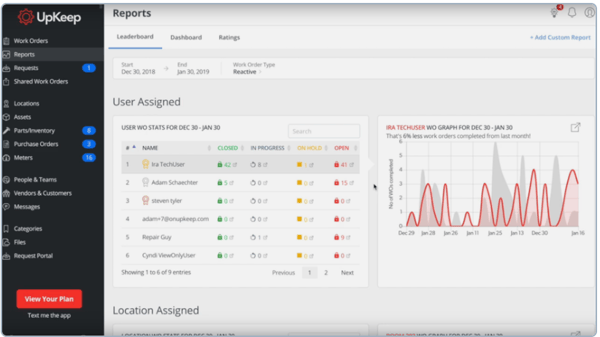
According to G2 user reviews, UpKeep is appreciated for its mobile-first design and customizable schedules, though bulk importing and exporting work orders can take more steps than expected. Reviewers note that while preventive maintenance is supported, streamlining bulk actions would improve efficiency.
Another theme in G2 feedback is inventory integration. Users value the asset management tools, but some point out that linking work orders directly to stock or automating updates on purchase orders requires more manual effort than they’d like.
Overall, G2 sentiment reflects UpKeep as a reliable and user-friendly CMMS, with its strengths in mobility and asset tracking continuing to outweigh these operational gaps.
What I like about UpKeep:
- I’ve seen many G2 reviewers highlight UpKeep’s intuitive design as a major advantage, making it easy for both technicians and requesters to onboard and manage work orders without much hassle.
- A commonly appreciated element is the adoption metrics feature—from what I’ve read, users value the ability to track system usage and make custom adjustments to boost adoption across teams.
What G2 users like about UpKeep:
“From my perspective in a training role, Diego at Upkeep gave us all the support we needed to get up and running. He took the time to work with various stakeholders, ensuring a proper introduction to the system and a clear understanding. He even joined an employee training call to answer any questions I couldn’t handle. The feedback has been positive—users appreciate how easy the app is to use and how it helps them stay organized, preventing them from losing track. I truly appreciated this level of support for a new system!”
– UpKeep Review, Glenda R.
What I dislike about UpKeep:
- I’ve read multiple G2 reviews pointing out that bulk importing and exporting PM work orders involves extra steps, which can slow down the process and reduce efficiency.
- From what I’ve seen, users express frustration with the inventory management integration, as it doesn’t automatically link work orders to assets or update inventory upon receiving items, requiring more manual work.
What G2 users dislike about UpKeep:
“A few areas for improvement include the PM process for exporting and importing large numbers of Preventive Maintenance tasks, which could be more efficient. Updates should be tested with customer support before being released to customers. More consideration needs to be given to the types of industries using Upkeep, though the platform is improving in this area. Additionally, better customization options for forms are needed.”
– UpKeep Review, William C.
5. eMaint CMMS: Best for compliance-focused maintenance and scalability
Based on my review of G2 user feedback, eMaint CMMS is widely praised for its ability to manage work orders, preventive maintenance, scheduling, asset management, spare parts inventory, and condition monitoring with ease.
Based on 199 verified G2 reviews, eMaint CMMS has achieved a customer satisfaction score of 55, with 90% users willing to recommend it to others in the overall business segment.
One feature that I frequently see getting a lot of praise is its organized system for tracking preventive maintenance. Many users highlight how this functionality is crucial for minimizing machine downtime and ensuring maintenance tasks are scheduled and monitored efficiently, keeping operations on track.
A commonly appreciated element is centralized asset management, which allows users to attach machine user manuals, work instructions, sign-off forms, and parts check-out details directly to each asset. According to G2 reviews, this centralized approach makes the system highly organized, and users seem to really appreciate how everything they need is stored in one place, reducing the hassle of searching across different platforms or physical records.
From what I’ve seen, the integration with inventory tracking and external systems like oil analysis labs is another feature that gets a lot of positive attention. This seamless connection ensures parts are available when needed, which is crucial for avoiding delays and enhancing the efficiency of maintenance operations. G2 reviewers seem to highlight how well this integration works in practice,