


I’ve worked alongside IT teams long enough to notice the pattern. A patch gets delayed, and suddenly it’s a security risk. A new employee joins remotely, and onboarding takes longer than it should because their device isn’t configured properly. A simple software rollout turns into a chain of tickets, manual installs, and back-and-forth messages. None of it feels dramatic in isolation, but together, it creates constant friction.
This is why I started researching the best endpoint management software. It sits quietly in the background of every modern organization, yet it directly affects security, productivity, compliance, and employee experience. When it works, nobody notices. When it doesn’t, everyone feels it.
I paid attention to what IT teams consistently praised in their reviews. Automation that genuinely saves time, patching that scales without drama, reporting that gives clarity instead of confusion, and security controls that don’t disrupt end users. After going through 20+ such tools, I settled on the top seven: NinjaOne, ManageEngine Endpoint Central, Datto RMM, Iru, Action 1, Atera, and ThreatDown. I have also included three bonus platforms to make it an even 10.
If you’re trying to bring structure to growing device fleets or simply want fewer urgent tickets in your week, this article will help you understand which endpoint management platforms stand out and why.
7 best endpoint management software for 2026: My top picks
-
NinjaOne: Best for IT teams managing a large, distributed, or mixed-OS environment
Unifies monitoring, patching, remote access, and automation in a single scalable console built for complex, hybrid IT environments. ($1.50/month for 10,000 endpoints) -
ManageEngine Endpoint Central: Best for end-to-end lifecycle management and endpoint protection
Combines device provisioning, patch management, compliance enforcement, and security controls to manage the full endpoint lifecycle. ($104/month/technician for cloud endpoint management) -
Datto RMM: Best for robust endpoint and data security with automated monitoring
Delivers strong security oversight with automated monitoring, scripting, and mobile-friendly management for MSPs and IT teams. (Custom pricing) -
Iru: Best for AI-powered endpoint security and compliance automation
Specializes in AI-driven compliance enforcement and Apple-focused device governance with integrated identity controls. (Custom pricing) -
Action1: Best for easy adoption and expansion in cloud-based endpoint management
Offers cloud-native patch management and automation with free coverage for the first 200 endpoints. (Custom pricing for more than 200 endpoints) -
Atera: Best for AI-powered remote monitoring and infrastructure management
Blends RMM and PSA with an AI-powered assistant to streamline troubleshooting, ticketing, and infrastructure oversight. ($149/month/technician) -
ThreatDown: Best for threat detection and security management across devices
Integrates vulnerability scanning, patch management, and centralized visibility into a unified security console. ($395 for 5 devices)
*These endpoint management platforms are top-rated in their category, according to G2’s 2026 Winter Grid Report.
7 best endpoint management software I recommend
Endpoint management helps IT teams maintain control in an environment that’s increasingly distributed, security-sensitive, and cloud-first. This software enables the management of hybrid workforces, multiple operating systems, and remote endpoints. Doing that manually simply doesn’t scale.
Based on my evaluation of G2 reviews, I noted that the right endpoint management software centralizes visibility across devices, automates patching and policy enforcement, strengthens security posture, and reduces the repetitive tasks that consume IT bandwidth. Instead of constantly reacting to device issues, teams can proactively manage performance, compliance, and risk from a single console.
The market momentum reflects this shift. According to Cognitive Market Research, the global endpoint management software market is projected to grow at a CAGR of 12.2% during 2025 to 2033, signaling how critical centralized endpoint control has become for organizations worldwide. As device counts grow and threats become more sophisticated, endpoint management has become foundational.
The platforms I included in the list below stood out because they balance control with usability. Some excel in automation and scalability. Others prioritize threat detection and compliance visibility. A few are designed for fast adoption by lean IT teams, while others support complex, distributed environments.
Ultimately, the right endpoint management platform strengthens your IT team. It gives them clarity across devices, consistency across policies, and confidence that endpoints are secure, compliant, and performing as expected.
How did I find and evaluate the best endpoint management software?
To build this list, I started with G2’s Grid® Report for endpoint management software to create a shortlist. This helped ensure a balanced selection of platforms that are both widely adopted and highly rated by real users.
From there, I evaluated each tool based on how effectively it supports device and OS coverage, patch management, automation workflows, security enforcement, reporting visibility, and scalability. I also considered broader security tools that modern IT teams rely on.
I used AI to analyze hundreds of verified G2 reviews, identifying consistent themes around ease of deployment, automation capabilities, compliance visibility, remote management performance, and overall reliability. This helped highlight where platforms truly deliver operational value versus where they may require additional configuration or oversight.
The screenshots featured in this article come from G2 vendor listings and publicly available product documentation.
What makes the best endpoint management software: My criteria
After digging into G2 Data and evaluating how modern IT teams operate, I noticed a few themes that consistently stood out. Here’s what I focused on when evaluating the best endpoint management platform:
- Device and operating system coverage: Modern environments rarely run on a single operating system (OS). I prioritized platforms that support Windows, macOS, Linux, iOS, and Android, with flexibility for mixed and distributed environments.
- Security and compliance enforcement: I focused on platforms that automate patch management for both operating systems and third-party applications, enforce encryption and security policies, and provide visibility into device compliance status. Solutions that integrate identity controls or conditional access mechanisms stood out for aligning device trust with broader security strategies.
- Automation and scalability: IT teams need platforms that reduce manual intervention. I looked for automated policy enforcement, scripted workflows, and proactive monitoring. Scalability was equally important, as the best tools should handle growth from hundreds to thousands of endpoints without creating performance bottlenecks or administrative complexity.
- Real-time visibility and reporting: Centralized dashboards are essential for maintaining control across distributed environments. I prioritized platforms that provide up-to-date inventories, compliance summaries, vulnerability insights, and exportable reports for audits or executive reviews.
- Ease of implementation and day-to-day usability: Endpoint management platforms should simplify operations, not add friction. I evaluated whether each solution offers a unified console, intuitive navigation, and straightforward deployment.
- Vendor reliability and support ecosystem: Strong documentation, responsive support, and consistent product updates were also part of my evaluation. I considered vendor reputation, product maturity, and feedback on service quality to ensure the tools listed are dependable for a long-term endpoint strategy.
The list below contains genuine user reviews from the Endpoint Management Software category page. To be included in this category, a solution must:
- Manage endpoint assets connected to a network
- Manage patch updates and ensure device compliance
- Detect new or suspicious devices connected to a network
- Have the ability to install new operating systems or applications to an endpoint device
*This data was pulled from G2 in 2026. Some reviews may have been edited for clarity.
1. NinjaOne: Best for IT teams managing a large, distributed, or mixed-OS environment
According to G2 Data, 50% of NinjaOne customers are mid-market organizations and 44% are small businesses. This distribution shows strong traction among growing and operationally complex IT teams, exactly the environments where centralized control and scalable automation matter most.
I noted that NinjaOne brings monitoring, patch management, remote access, automation, and reporting into one unified console, eliminating the need to juggle multiple disconnected tools. For IT teams supporting hybrid or global workforces, this consolidated visibility translates directly into faster response times and clearer operational oversight, making NinjaOne the best endpoint management software for IT monitoring.
Across multiple G2 reviews, users consistently praise its automated patch management. They highlight how easy it is to manage operating systems and third-party patches from a centralized dashboard and apply them at scale. These features reduce manual effort while improving overall security posture.
Another area where NinjaOne excels is remote monitoring and remote access. Reviewers frequently emphasize the speed and reliability of Ninja Remote, describing stable, responsive connections that allow technicians to resolve issues efficiently. This reliability is essential for geographically dispersed teams.
Rather than relying on fragmented third-party tools, NinjaOne embeds remote control directly into its workflow, enabling IT teams to view device details, access systems, run scripts, and remediate issues in real time, all without disrupting end users. That seamless integration is a major differentiator when comparing endpoint management platforms with overlapping core capabilities.
I observed reviewers mention that automation is another standout capability of this endpoint management tool. NinjaOne’s powerful scripting engine and policy-based automation allow teams to deploy updates, execute scripts in bulk, and standardize configurations across multiple devices.
Reviewers highlight the flexibility of custom fields and script deployment for managing device lifecycles at scale, including OS upgrades and mass policy updates. For managed service providers (MSPs) and internal IT teams alike, this level of automation shifts operations from reactive troubleshooting to proactive management, helping reduce downtime and improve SLA performance.
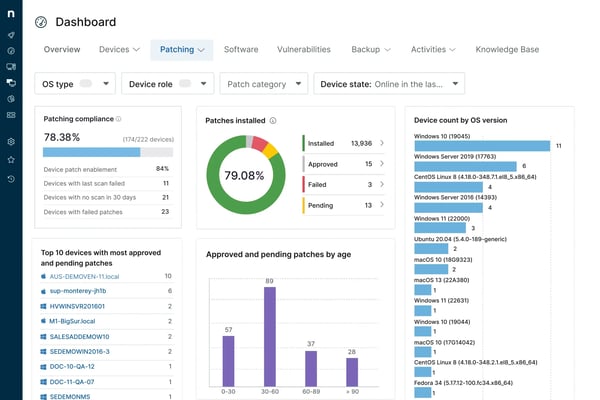
While NinjaOne provides built-in reporting within the centralized dashboard, reviewers mention that reporting can feel more structured compared to platforms designed specifically for advanced analytics. Teams that require highly customized executive reports or long-term trend analysis may find the reporting scope more operationally focused. For day-to-day visibility, however, the native reporting capabilities remain effective and aligned with core endpoint management needs.
While the overall interface is widely described as intuitive and modern, reviewers note that specific advanced settings or policy views could be presented in a more organized layout. For teams working extensively with complex automation or multi-layered policies, becoming familiar with these sections helps maximize efficiency within the platform.
Based on my evaluation, NinjaOne is widely appreciated for its centralized endpoint visibility, automated patch management, integrated remote access, scalable scripting capabilities, and cross-platform support. It is especially well-suited for IT teams managing large, distributed, or mixed-OS environments that want to unify operations, improve security posture, and scale efficiently from a single platform.
What I like about NinjaOne:
- Its powerful scripting engine allows teams to deploy updates, execute scripts in bulk, and standardize configurations across multiple devices.
- NinjaOne brings monitoring, patch management, remote access, automation, and reporting on one platform, eliminating the need to juggle multiple disconnected tools.
What G2 users like about NinjaOne:
“It’s really easy to add new scripts into NinjaOne, which makes tasks like deploying software straightforward. The device alerting is excellent, keeping us informed about vulnerabilities as well as issues like degraded RAID on servers. Overall, the product has been reliable for us, and the support has been great.”
– NinjaOne review, Mike W.
What I dislike about NinjaOne:
- Teams seeking highly customized executive reporting may export data or connect external analytics tools. That said, NinjaOne’s built-in dashboard reporting remains effective for most operational visibility and routine monitoring tasks.
- Some advanced policy or configuration views may take a bit of exploration at first. Overall, the platform’s intuitive interface and centralized console still make day-to-day endpoint management straightforward.
What G2 users dislike about NinjaOne:
“Reporting could be more customizable, especially for clients who want specific formats or detailed breakdowns. Some advanced automation options require manual setup that could be simplified. A few integrations feel limited compared to other RMM platforms. Nothing major, but there’s room for deeper customisation.“
– NinjaOne review, janam@netflo.co.uk P.
2. ManageEngine Endpoint Central: Best for end-to-end lifecycle management and endpoint protection
ManageEngine Endpoint Central by Zoho is an all-in-one unified endpoint management and security (UEMS) solution that delivers end-to-end life cycle management and endpoint protection. According to G2 Data, it is mostly used by mid-market teams (66%).
From my evaluation, what differentiates ManageEngine Endpoint Central is its end-to-end lifecycle management approach. The platform goes beyond basic monitoring and patching by covering OS deployment, software distribution, asset management, configuration enforcement, vulnerability scanning, security compliance, and device management within a unified system.
One of its strongest capabilities is comprehensive patch management. Across G2 reviews, users frequently highlight how efficiently they can manage operating systems and third-party patches across distributed devices. Automated patch deployment, testing workflows, and compliance tracking help IT teams maintain security standards without excessive manual oversight.
Reviewers highlight that another standout area is endpoint protection and vulnerability management. ManageEngine Endpoint Central integrates security-focused features such as vulnerability scanning, configuration enforcement, and device control policies. Reviewers note how having patching and security posture management within the same ecosystem strengthens visibility and reduces the risk of overlooked exposures.
The platform also excels in OS deployment and software distribution. IT administrators can automate operating system rollouts, distribute applications in bulk, and standardize configurations across device groups. Reviewers appreciate the ability to create deployment templates and enforce policies at scale, which simplifies onboarding and device provisioning.
I noted that ManageEngine Endpoint Central further supports IT teams with remote troubleshooting and device management tools. Built-in remote control, asset tracking, and reporting dashboards allow administrators to identify issues, access devices securely, and maintain real-time visibility across their environment. Reviewers frequently mention that this centralized oversight reduces administrative overhead and strengthens overall endpoint governance.
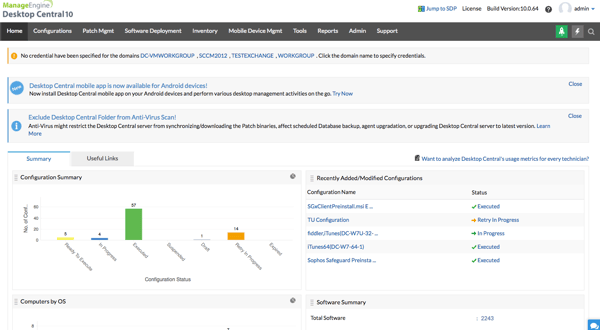
Because the platform offers a broad range of features, users mention that navigating between modules or locating specific advanced settings may require familiarity with the system’s layout. For organizations leveraging the full feature set, investing time in structuring workflows and permissions helps streamline day-to-day management.
While ManageEngine Endpoint Central supports extensive device fleets, reviewers note that planning and fine-tuning configurations can be important when managing high volumes of endpoints or complex network environments. Proper setup and infrastructure alignment ensure smoother execution of bulk operations such as mass patch deployment or OS rollouts.
Overall, ManageEngine Endpoint Central is widely appreciated for its comprehensive lifecycle management, structured patch governance, integrated endpoint protection, OS deployment automation, and centralized device oversight. It is especially well-suited for organizations that want a single platform to manage the full endpoint lifecycle, while maintaining policy-driven control and operational consistency at scale.
What I like about ManageEngine Endpoint Central:
- It is an all-in-one unified endpoint management and security solution that delivers end-to-end life cycle management and endpoint protection.
- Automated patch deployment, workflow testing, and compliance tracking features help IT teams maintain security standards without excessive manual oversight.
What G2 users like about ManageEngine Endpoint Central:
“What I like best about Endpoint Central is its patch management. It is reliable, automated, and makes it easy to keep all endpoints secure. I started with the Professional license and eventually upgraded to Enterprise because of the added features, especially advanced patching and remote office management. It really made a big difference in day-to-day operations.”
– ManageEngine Endpoint Central review, Raycian C.
What I dislike about ManageEngine Endpoint Central:
- Managing very large endpoint fleets or complex network environments may require thoughtful configuration and planning. In return, the platform offers strong control and flexibility for organizations with structured IT environments.
- Because Endpoint Central includes many capabilities, locating certain advanced settings can take some familiarity with the interface. Once teams get comfortable with the layout, the centralized console makes it easier to manage devices, patches, and security policies in one place.
What G2 users dislike about ManageEngine Endpoint Central:
“ManageEngine Endpoint Central is a solid tool, but the initial setup can be a bit complex, especially when configuring multiple modules like MDM and patching. The UI sometimes feels cluttered, which makes finding specific settings harder than it should be.”
– ManageEngine Endpoint Central review, Mukul R.
3. Datto RMM: Best for robust endpoint and data security with automated monitoring
Datto RMM is a cloud-native remote monitoring and management (RMM) platform designed for IT teams and MSPs that need robust endpoint security paired with proactive automation and monitoring. According to G2 Data, it is widely used by small businesses (64%).
From my evaluation of G2 reviews, Datto RMM is easy to use and access. Reviewers describe the platform as easy to understand, noting that technicians can even use it on mobile devices to assist customers on the go. This kind of flexibility is particularly valuable for distributed teams or MSPs that support clients from varied locations and devices.
Another core strength highlighted across G2 reviews is its automation capabilities. Users consistently emphasize how the platform’s automation streamlines routine tasks, from alerting and patch deployment to scripted maintenance and monitoring. Such automation directly reduces manual effort and improves proactive responsiveness.
Reviewers highlight that Datto RMM also delivers monitoring enablement and alerting that keep IT teams informed across their entire endpoint estate. With customizable alert thresholds and real-time system visibility, technicians can track performance metrics, endpoint status, and security events from a central dashboard. This consistent monitoring aids in quickly identifying and remediating issues before they escalate, which is especially important for security-conscious organizations.
I observed that security and data protection are tightly woven into the platform’s monitoring and management workflows. Reviewers cite built-in capabilities such as endpoint health tracking, patch status, and integration with backup. These features help align daily management tasks with broader security objectives, ensuring that vulnerabilities are addressed promptly while minimizing operational overhead.
The platform’s remote control and scripting engine receives special mention from reviewers. IT teams can securely access endpoints, run scripts in bulk, and standardize configurations across devices. This flexibility supports complex workflows and device groups, making Datto RMM a strong fit for MSPs that service diverse client environments.
Another advantage reviewers frequently highlight is Datto RMM’s integration capabilities. Users mention that the platform integrates smoothly with tools such as Autotask, Microsoft 365, and other Datto products, allowing IT teams to manage ticketing, monitoring, and backup workflows within a connected ecosystem.

Datto RMM remains highly regarded for its product capabilities, but reviewers note that support interactions often begin with documentation-aligned troubleshooting before progressing to more advanced technical investigation. For teams operating in time-sensitive environments, aligning on escalation pathways and response expectations upfront can help ensure a smoother support experience.
The platform has extensive remote monitoring and web-based management capabilities, but reviewers mention that the Web Remote portal may occasionally require refresh or reinitialization during sessions. For teams that rely heavily on browser-based administration, optimizing session management and workflow organization can help maintain a smoother operational experience.
Based on my evaluation, Datto RMM is widely appreciated for its intuitive usability, powerful automation capabilities, proactive monitoring, integrated security focus, and scalable remote management tools. It’s especially well-suited for IT teams and MSPs that want a platform capable of enhancing both endpoint security and operational efficiency through automation and unified oversight.
What I like about Datto RMM:
- Datto RMM is easy to use and access. Technicians can even use it on mobile devices to assist customers on the go.
- It prioritizes security and data protection. This ensures that vulnerabilities are addressed promptly while minimizing operational overhead.
What G2 users like about Datto RMM:
“I like that Datto RMM provides quick and secure access to my servers, which is crucial for our daily work. The automation tools are another great advantage, as they greatly simplify the task of generating alerts and executing commands on our systems. This level of automation increases our efficiency and keeps us proactively informed. The initial setup of Datto RMM was also quite simple, allowing for a smooth transition from the previous use of AnyDesk. This change has made our work more proactive and efficient. Additionally, I consider Datto RMM an excellent monitoring tool, which I have rated 9 out of 10 in terms of likelihood of recommendation, reflecting my high satisfaction with the product.”
– Datto RMM review, Eduardo Julio H.
What I dislike about Datto RMM:
- Support response often begins with documentation-aligned troubleshooting before progressing to more advanced help. Aligning on escalation pathways and response expectations upfront can help ensure a more streamlined experience.
- The Web Remote portal may occasionally require refresh or reinitialization during sessions. Optimizing session management and workflow organization can help maintain a smoother operational experience.
What G2 users dislike about Datto RMM:
“The Web-Remote portal sometimes does not work, and the fix isn’t totally clear. Support also can be slow to get back to you.”
– Datto RMM review, Dan G.
4. Iru: Best for AI-powered endpoint security and compliance automation
Iru positions itself at the intersection of AI-driven endpoint security, compliance automation, and identity and access management (IAM). Unlike traditional endpoint management platforms that focus primarily on monitoring and patching, Iru emphasizes intelligent automation and policy enforcement across devices, users, and access controls. Based on G2 Data, it serves a growing mix of small businesses (23%) and mid-market organizations (71%).
From my evaluation, rather than relying solely on static policies, Iru leverages AI-powered compliance automation to continuously assess endpoint posture against security benchmarks and compliance frameworks. This allows IT and security teams to identify configuration gaps, enforce controls, and remediate issues without manual oversight.
Reviewers appreciate that Iru connects endpoint security posture with user access controls, helping organizations align device trust with identity governance. By embedding IAM controls into endpoint workflows, the platform enables policy-based enforcement tied to user roles and device status. This approach reduces the risk of unauthorized access while maintaining centralized visibility into authentication and access patterns.
I observed that Iru’s vulnerability management capabilities come up as a practical value-add. Reviewers note that vulnerability management improves visibility into endpoint risk and supports a stronger overall security posture. Rather than treating vulnerability insights as a separate process, teams can use this visibility to identify risk areas and prioritize remediation within their endpoint management routine.
Iru also earns strong feedback for macOS fleet management, particularly around device enrollment and policy workflows. Reviewers mention that enrollment and policy management are straightforward, the UI is clean, and administration remains reliable for day-to-day tasks, making Iru the best endpoint management software for Mac.
Iru is described as purpose-built for Apple device management, and reviewers mention that Windows support is newer, which may be a consideration for organizations looking to manage Windows endpoints in the same system. For Apple-first teams, that specialization is part of what makes the platform simpler to operate.
Another area reviewers mention is the custom app deployment workflow. Some users note that when deploying custom applications, they would like a more native way to upload and run a folder alongside a pkg file for apps that require additional supporting files. Reviewers also indicate that there are workable ways to handle this today, but that a more streamlined native experience would strengthen the deployment process for teams managing complex custom apps.
Based on my evaluation, Iru is widely appreciated for Apple-focused endpoint management, standardized configuration enforcement, straightforward enrollment and policy workflows, and vulnerability visibility that supports a stronger endpoint security posture.
What I like about Iru:
- Iru connects endpoint security posture with user access controls, helping organizations align device trust with identity governance.
- Enrollment and policy management are straightforward, the UI is clean, and administration remains reliable for day-to-day tasks.
What G2 users like about Iru:
“We have been using Iru for macOS management for the past few years, and the biggest thing for us is reliability. It just works. New hires receive a Mac that is ready on day one with the right apps and security settings already in place. Updates and policy changes happen in the background without creating disruption. For a team that is mostly Mac-based, that consistency has made a real difference.”
– Iru review, Melonie L.
What I dislike about Iru:
- Windows support is still evolving, which may require some consideration for organizations that rely heavily on managing Windows endpoints alongside other systems. That said, the platform continues to expand its capabilities as it grows.
- Deploying custom applications may require additional steps when apps depend on supporting files alongside a pkg installer. However, Iru’s automation and deployment tools still make routine device management and security workflows efficient once configurations are set up.
What G2 users dislike about Iru:
“The tracking feature could be improved in terms of customization and performance. In some cases, it lacks flexible filters and advanced reporting options, which makes it harder to analyze data for specific time ranges or use cases. Occasional delays in updates also reduce real-time accuracy. Adding more configurable tracking views, faster refresh times, and exportable reports would significantly enhance the overall experience.“
– Iru review, Marwan M.
5. Action1: Best for easy adoption and expansion in cloud-based endpoint management
Action1 stands out for organizations looking to deploy cloud-native endpoint management without complex infrastructure or lengthy implementation cycles. Based on G2 Data, Action1 has strong adoption among small businesses (39%) and mid-market teams (58%), reflecting its appeal to growing IT environments that need scalable control without on-premise overhead.
A key differentiator for Action1 is its free-for-first-200-endpoints offering, which lets growing teams adopt a full-featured cloud endpoint management solution without an immediate licensing investment. This makes it especially attractive for small IT teams, startups, or organizations piloting a new endpoint strategy before committing to a larger purchase.
From my evaluation of G2 reviews, Action1 receives praise for its cloud-first architecture. There’s no need to maintain local servers or additional infrastructure. Reviewers frequently highlight how quickly they were able to get started, often emphasizing that setup is straightforward and endpoints can be enrolled rapidly.
Reviewers describe the interface as clean and intuitive, allowing administrators to navigate patching, monitoring, and remote management without extensive training. This ease of use makes Action1 especially appealing to lean IT teams or organizations without dedicated endpoint specialists.
Another standout capability is automated patch management for Windows operating systems and third-party applications. Reviewers frequently mention how easy it is to identify missing patches, approve updates, and deploy them at scale from a centralized dashboard.
I observed from reviews that Action1 also provides remote access and remote desktop functionality, allowing IT teams to connect securely to endpoints without requiring VPN dependencies. Reviewers appreciate the ability to troubleshoot devices directly from the browser-based console, which aligns well with distributed or hybrid work environments.
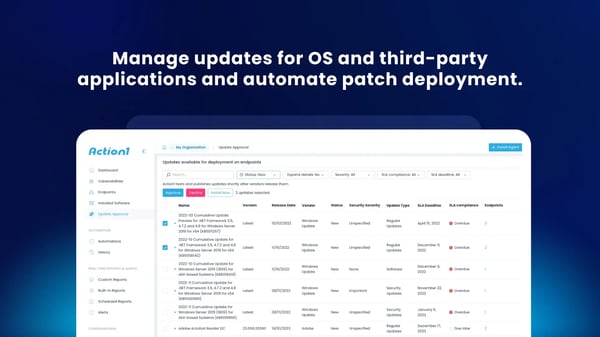
Action1 is especially strong in Windows-centric workflows. However, teams managing a highly heterogeneous device estate may want to evaluate how its cross-platform support aligns with their broader endpoint strategy. For Windows-heavy environments, though, this focus often translates into deeper visibility and streamlined patch management.
While Action1 delivers strong core capabilities in cloud-based patching and remote management, some reviewers note that certain enterprise-level features and deeper customization options are still evolving. For teams with highly specialized workflow or integration requirements, evaluating how those advanced needs align with Action1’s roadmap can help ensure long-term fit.
Based on my evaluation, Action1 is widely appreciated for its free tier for the first 200 endpoints, cloud-native deployment, intuitive interface, automated patch management, browser-based remote access, and policy-driven automation. It is especially well-suited for IT teams that want a fast-to-adopt, easy-to-manage, and expandable endpoint management sol