



Keeping track of expenses is a headache.
Whether it’s your spending spiraling out of control after a shopping trip or your business finances feeling like a tangled mess of receipts, invoices, and subscriptions, it’s easy to lose track. I’ve been there. I bounced between clunky spreadsheets and unreliable apps for years, trying to make sense of my finances with tools that never quite did the job. Spoiler alert: none of those worked well.
That’s when I decided to dive deep into the best expense management software, determined to find tools that could simplify life for both personal budgets and business needs. Along the way, I constantly asked myself what’s the best expense management software for small businesses since many teams struggle to balance ease-of-use with real financial oversight.
TL;DR
- Top product picks: G2 reviewers recommend Navan, Expensify, Ramp, Brex, and SAP Concur as top-rated software for managing business expenses, with strong feedback on automation, integrations, and real-time visibility.
- Key features: Expense management software stands out for receipt scanning, automated approval workflows, real-time expense tracking, and seamless accounting system integrations. Whether you’re searching for the best software for organizing business expenses or corporate expense tracking, these tools simplify financial reporting across companies of all sizes.
- Common use cases: Teams rely on these platforms to streamline reimbursements, enforce expense policies, and centralize company spending. From startups evaluating which expense management app is best for startups to growing companies seeking the best expense management platform for scaling teams, these solutions help eliminate manual errors while improving financial control.
I evaluated a wide range of software and dug into hundreds of G2 reviews. Some tools were built for businesses, packed with features like automated expense reports and team approvals. Others catered to individuals, offering clever ways to track daily spending, set savings goals, and stay within budget.
Now, I’m here to share my findings with you.
Best expense management software: My picks
- Navan (Formerly TripActions): Best for travel and expense control
Auto-matches receipts to trips and flags out-of-policy spend in real time. (pricing available on request) - Expensify: Best for painless receipt capture
SmartScan pulls receipt details and auto-matches to card transactions. ($5/month) - Ramp: Best for proactive spend controls
Issuable virtual/physical cards with AI-driven savings and duplicate-flagging. ($15/month) - Brex: Best for finance-stack workflows at scale
Real-time spend alerts in Slack/email plus detailed vendor-level insights. ($12/month) - SAP Concur: Best for enterprise travel and expense governance
Policy enforcement and corporate card imports with robust analytics. (pricing available on request) - Emburse Expense Enterprise (formerly Chrome River Expense): Best for highly configurable enterprises
Deep customization and the CR Snap app for fast, categorized receipt capture.(pricing available on request) - BILL Spend & Expense (Formerly Divvy): Best for budget-first card programs Vendor-specific and team cards with hard budget limits and visibility. (Free to use)
- Airbase: Best for all-in-one spend ops
Consolidates cards, invoices, and reimbursements with approval tracking.(pricing available on request) - Fyle: Best for fast small-team reimbursements
Real-time credit-card sync and AI receipt OCR with instant reminders. ($11.99/month)
*These expense management software solutions are top-rated in their category, according to G2’s Winter 2025 Grid Report. I’ve also added their monthly per-user pricing to make comparisons easier.
9 best expense management software solutions I evaluated
According to a recent study by Findity, 44% of employees manage expenses at work. Managing expenses efficiently is crucial for maintaining financial health and ensuring smooth business operations. As I reviewed these platforms, one question kept coming up: Which is the best solution for corporate expense tracking that works across small and growing companies? My short list has those answers.
Expense management software automates and streamlines the process of recording, tracking, and managing business-related expenses. I have seen business owners use expense management tools to gain real-time visibility into the company’s spending, enforce compliance with expense policies, and reduce the time spent on manual expense reporting.
The shift toward digital tools is clear. A Findity study also shows that the adoption of expense apps rose 5% between 2022 and 2024, while reliance on spreadsheets and pen-and-paper declined.
According to G2 data, these expense management tools have an average user adoption rate of 78% and a payback period of just 11 months. This shows that businesses don’t just adopt expense management software; they see a measurable return on investment quickly.
How did we find and evaluate the best expense management software?
I spent countless hours exploring various expense management software and reading through hundreds of real user reviews. To gain a comprehensive understanding, I connected with industry professionals and everyday users to see how these platforms perform in real-world scenarios. I evaluated their standout features, identified areas for improvement, and used AI to analyze hundreds of G2 reviews for deeper insights.
I also cross-referenced my findings with G2’s Grid Reports, evaluating each tool based on ease of use, functionality, and value for money. The screenshots featured in this article may be a mix of those captured during testing and ones obtained from the vendor’s G2 page. After this thorough research, I’ve compiled a list of the best expense management software available.
To me, the best expense management software is essential for streamlining financial operations and controlling company spending. Such software offers a comprehensive suite of features designed to automate and simplify the spend management process. Key functionalities include real-time expense tracking, allowing users to monitor expenditures as they occur, and receipt capture capabilities that enable them to digitize and store receipts effortlessly.
Automated approval workflows are also important to ensure that expense reports are routed to the appropriate approvers without manual intervention, thereby reducing processing time and errors. Integration with existing accounting systems is also vital, facilitating seamless data synchronization and financial reporting.
Moreover, the software enforces policy compliance by flagging or rejecting expenses that do not align with company policies, helping to prevent unauthorized spending. By incorporating these features, the best expense management software enhances efficiency and provides valuable insights into spending patterns, enabling more informed financial decision-making.
How I selected the best expense management software
I considered the following factors while evaluating expense management software solutions.
- Real-time expense tracking: Real-time tracking is vital when evaluating expense management software. I look for systems that enable employees to capture and upload expenses as they happen. This feature is particularly useful for teams on the go, as it minimizes delays in reporting. For instance, a sales representative can immediately log a meal expense after a client meeting, reducing the risk of lost receipts. Real-time tracking is also a huge win for anyone searching for the best app to track office expenses, since it helps employees log receipts before anything slips through the cracks.
- Optical character recognition: OCR technology is a game-changer for minimizing manual work and improving accuracy. I read about user experience uploading different receipts: printed, handwritten, faded, or crumpled. The best systems accurately extract details like merchant name, date, and amount, automatically populating these fields in the expense report. I also ensure the software supports multiple languages and currencies in OCR processing, which is critical for global teams.
- Customizable approval workflows: No two businesses have identical approval processes, so I prioritize software with highly customizable workflows. For example, you might want a workflow where expenses under $500 are auto-approved, while anything higher requires multiple layers of approval. The software should allow users to create, adjust, and automate these workflows without requiring coding expertise. I also check if users can assign delegates or backups for approvers to ensure smooth operations during absences.
- Expense policy reinforcement: I evaluate how well the software enforces expense management policies. Beyond flagging out-of-policy expenses, we want the system to prevent the submission of non-compliant claims altogether. For example, if employees are restricted from booking first-class flights, the software should automatically reject such claims or redirect users to approved options. This feature reduces back-and-forth between approvers and submitters while ensuring adherence to company policies.
- Integration with financial systems: Integration is one of the main aspects I assess. Seamless compatibility with tools like QuickBooks, NetSuite, or SAP is critical for syncing expense data with payroll and accounting systems. I also evaluate whether integrations include real-time syncing or periodic batch updates, as the former offers more immediate insights. For organizations using multiple software platforms, the ability to connect through APIs or middleware ensures consistent and reliable data flow.
- Advanced analytics: The value of expense management software extends beyond just recording transactions. It should provide actionable insights. I explore the types of reports the software generates, such as spending by category, department, or vendor. Dashboards that allow real-time monitoring of trends are especially useful for identifying areas where spending can be optimized. I also check for drill-down capabilities, which let users analyze individual transactions directly from the summary reports.
- Mobile app functionality: A robust mobile app is crucial for modern businesses, especially those with remote or traveling employees. I evaluate the expense management software to ensure it supports key features like receipt uploads, expense submission, and workflow approvals via their mobile app. GPS-based mileage tracking is another useful feature, as it simplifies travel expense calculations. The app’s ability to function offline is a bonus, allowing users to continue working without worrying about connectivity issues, with automatic syncing once online.
- Scalability and multi-currency support: Expense management software must keep pace as businesses grow. I check whether the solution supports an expanding user base without additional licensing costs or performance degradation. Multi-currency support is another critical feature. The software should handle conversions based on live exchange rates and accurately report transactions across different currencies. This feature simplifies the expense management process for global teams and prevents costly manual calculations.
When evaluating 20+ expense management software options, I focused on how each platform performs in real-world business contexts, based on patterns in G2 user reviews. I looked at how well receipt scanning (OCR) captures data, how flexible multi-level approval workflows are, and how reliably policy violations are flagged during out-of-policy submissions. Reviewers often highlighted integration quality with accounting and ERP systems, so I paid close attention to how data syncs and potential delays affect workflow efficiency. Mobile apps were evaluated for their support of offline uploads, GPS mileage tracking, and on-the-go approvals.
I also reviewed how well dashboards deliver actionable insights and whether platforms meet key security standards, including encryption protocols and compliance certifications. Analyzing these factors across platforms gave me a clear view of each tool’s practical strengths, limitations, and overall suitability for businesses of different sizes.
To be included in the expense management software category, a product must:
- Automate expense tracking, reporting, and management
- Integrate with existing accounting and administrative systems
- Establish a process to review all expenses before submission
Across all the G2 reviews I analyzed, these nine platforms consistently showed up as the most recommended business expense app options for companies trying to bring order to their spending.
*This data was pulled from G2 in 2025. Some reviews may have been edited for clarity.
1. Navan (Formerly TripActions): Best for travel and expense control
Whether you’re booking flights, hotels, rental cars, or just trying to keep your expenses organized, Navan seems designed to make life easier for people who juggle hectic schedules.
G2 reviewers frequently highlight how seamless Navan makes it to search, book, and manage travel and expenses from both mobile and desktop devices. Many users mention being impressed by its expense management capabilities — particularly how easy it is to upload receipts. According to reviews, simply snapping a photo allows the system to auto-fill most of the required details, and it even matches expenses to trips automatically, cutting down on manual entry.
Policy compliance is another standout. Navan came up repeatedly as a leading expense management software for service industry teams, especially for companies juggling frequent travel, client meetings, and on-the-go approvals.
I noticed reviewers consistently mention that Navan flags out-of-policy expenses before they’re submitted, which helps avoid surprises during the approval process. Users also appreciate that it doesn’t feel overly restrictive. The platform supports direct billing for hotels and rental cars, eliminating the need to pay out of pocket and wait for reimbursement.
Loyalty program integration is also a favorite among frequent travelers. G2 users mention they can still earn points while booking through Navan, and some also highlight the extra rewards the platform offers for booking budget-friendly options.
Search functionality gets strong marks too. Users say they can easily filter by brand (like Marriott or Delta), price range, and more. The platform even suggests the best available deals, helping travelers make more informed decisions.
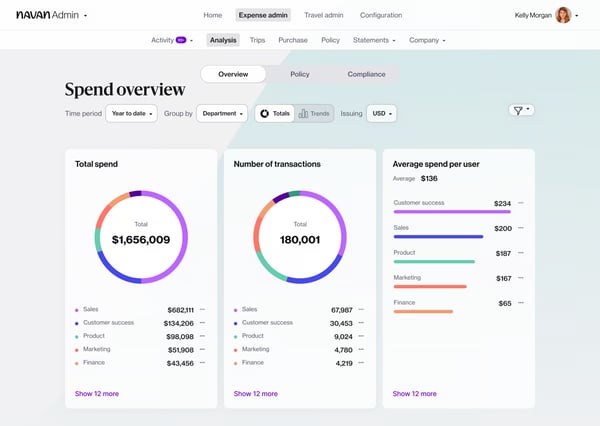
Many G2 reviewers appreciate how Navan streamlines booking and expense management for most business trips, but some point out that when part of a trip is booked outside Navan, like using a conference discount code, it becomes tricky to group those expenses with meals or transportation. This can make hybrid travel bookings feel more manual and unintuitive than usual.
On the other hand, the auto-fill feature generally earns praise on G2 for speeding up expense entry. A few reviewers, however, mention that it occasionally misreads receipt details. Fixing those errors, especially when uploading multiple receipts at once, can take a little more time.
The mobile app also receives positive notes for its clean design and essential functionality, but several G2 reviewers wish it had full feature parity with the desktop version. Tasks like editing itineraries or changing trip details mid-travel can get a little slower and less intuitive on mobile.
That said, many reviewers emphasize that despite these drawbacks, Navan’s automation, policy compliance, and ease of use far outweigh the frustrations. For most teams, the platform delivers significant time savings and smoother expense management, making it a strong choice for companies that want to simplify travel and expense tracking.
What I like about Navan:
- The platform’s interface is reported as a dream to navigate. Everything feels smooth and well-organized, whether booking a flight, reserving a hotel, or uploading an expense.
- One of users’ favorite features is the automation for expense tracking. Just snap a photo of your receipt, and the system auto-fills the details. It even links expenses to trips automatically, making reimbursements faster and more accurate.
What G2 users like about Navan:
“I had been using the same expense and travel Management software for years until my company recently implemented Navan. As a user, I was reluctant to learn a new system, but I found Navan very easy to use, and it has several benefits over the traditional legacy systems. I get paid faster, expenses are easier to enter, and travel booking is a breeze. Navan also implements a very interesting reward system that puts money in my pocket when I save my company money! This solution has some very interesting aspects, and I recommend you try it out.”
– Navan (Formerly TripActions) Review, Sam B.
What I dislike about Navan:
- I’ve seen G2 users mention that when part of a trip is booked outside Navan — like using a conference discount — grouping related expenses with meals or transportation can get tricky. The process often feels like a manual workaround and isn’t as intuitive as it should be.
- While the auto-fill feature is generally praised, some reviewers note that it occasionally gets details wrong. Manually correcting those errors, especially when uploading multiple receipts at once, can be frustrating.
What G2 users dislike about Navan:
“I had one issue where the hotel did not get the corporate credit card information before I arrived, which resulted in some back and forth with Navan and the hotel to verify the card information and that it was, in fact, a company card. Ideally, manual work never would have had to be done.”
– Navan (Formerly TripActions) Review, Yvonne W.
2. Expensify: Best for painless receipt capture
If you’ve ever felt buried under receipts or dreaded filling out expense reports, you should know about Expensify. While it’s not perfect, it’s pretty darn close to making expense tracking painless.
The first thing that stood out to me in the reviews is the SmartScan technology. Users can just take a picture of their receipt with the mobile app or email it directly to receipts@expensify.com, and it handles the rest. It pulls out all the details — amounts, dates, vendors — you name it. You don’t even need to think about organizing receipts because Expensify automatically matches them to your credit card transactions. Seriously, it’s like having an assistant who never sleeps.
G2 reviewers often highlight how well it integrates with platforms like QuickBooks and Concur. I’ve seen users say the syncing process is smooth and helps streamline bookkeeping and travel management, especially if you’re already using travel management tools.
Another feature that gets a lot of appreciation is the rule-setting function. It can auto-fill repetitive fields, which users say saves a lot of time during expense entry. The mobile app also gets strong praise. Reviewers mention being able to snap receipts, track mileage, and manage reports directly from their phones — no need to wait until they’re back at a desk to log expenses.
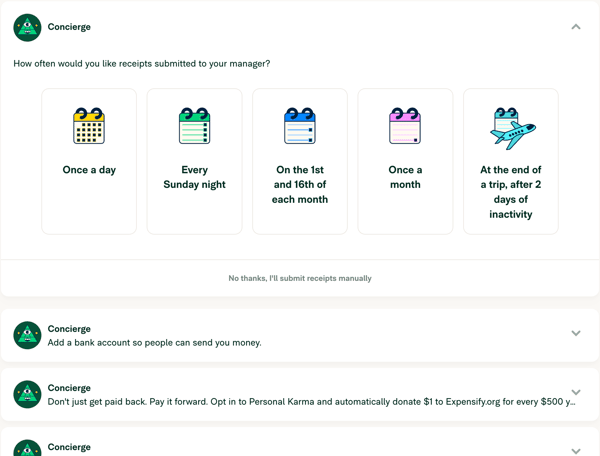
I’ve seen G2 users mention that while the SmartScan feature is helpful overall, it doesn’t always get things right. A few reviewers note they’ve had to manually correct receipt details, which can slow things down, especially when uploading in bulk. A few reviewers mention it can lag when they’re trying to upload receipts quickly. But this is something common in most tools with such a feature.
Also, while many G2 reviewers note that Expensify makes it easier to capture, categorize, and reimburse expenses, duplicate entries can still happen. Some users say that if they upload a receipt before the matching credit card charge appears, the system doesn’t always reconcile the two, leading to duplicates that must be cleaned up manually.
Irrespective of these small hiccups, Expensify shines for its SmartScan tech, card matching, and mobile-first design, delivering a practical, time-saving solution for individuals and teams alike.
What I like about Expensify:
- I love how users can just take a picture of a receipt or email it to Expensify, and the app pulls all the details for them. It’s a huge time-saver.
- Expensify also links to a user’s company card and matches receipts automatically, so they don’t have to manually input every little detail.
What G2 users like about Expensify:
“Expensify is an incredibly easy-to-use tool for managing expenses. Its user-friendly interface makes tracking and submitting expenses straightforward, even for those who aren’t tech-savvy. Features like receipt scanning and automatic expense categorization save a ton of time, and the mobile app ensures you can stay on top of things wherever you are. Overall, Expensify simplifies expense management and helps keep everything organized, making it a great choice for personal and business use.”
– Expensify Review, Gabriel A.
What I dislike about Expensify:
- I’ve seen G2 users mention that if a receipt is uploaded before the corresponding credit card charge imports, Expensify doesn’t always match them automatically. This can result in duplicates that have to be cleaned up manually.
- While many appreciate that SmartScan saves significant time by automatically extracting and organizing key receipt data, some users on G2 mention that it can sometimes get the details incorrect or lag occasionally when working with bulk uploads.
What G2 users dislike about Expensify:
“I wrote back and forth with the Expensify concierge for over a week because they were billing me double. I sent in the bank receipts and showed them the problems, and they continued to double-bill me. Finally, I had to delete my account. This company doesn’t think twice about stealing from its customers.”
– Expensify Review, Kelly C.
3. Ramp: Best for proactive spend controls
G2 Users liked how Ramp makes it easy to set up expense categories, issue virtual or physical corporate cards, and simplify reimbursements.
Ramp seems to work beautifully with tools like QuickBooks Online, Sage Intacct, and NetSuite. Once users link everything, it automates expense reports, reimbursements, and even accounts payable processing. A favorite feature among reviewers is the automatic receipt matching. You just forward an emailed receipt, and Ramp pairs it with the right transaction in seconds.
G2 reviewers often highlight how easy it is to issue both virtual and physical cards with Ramp. I’ve seen users mention how simple it is to set spending limits, restrict categories, or block specific vendors in real time. It’s frequently described as a built-in safety net that gives teams more control, and many say employees find the system intuitive to use.
Ramp’s AI features also get strong praise. I found it especially helpful for companies looking for the best expense management platform for growing companies who want to scale spending controls as they add new departments, vendors, and users. Reviewers note that it automatically flags duplicate expenses, categorizes transactions, and even suggests cost-cutting opportunities. Several users say these automations have helped them save both time and money across the board.
The reporting dashboard is another favorite. I came across reviews describing how it gives a real-time snapshot of company spending, including vendor-specific insights and ready-to-download audit reports. Being able to drill down into trends has made it easier for finance teams to stay on top of their budgets.
Approval workflows are also widely appreciated. G2 users mention that Ramp allows for flexible setups — like one-click approvals for smaller purchases and multi-level sign-offs for larger expenses. It’s a level of customization that helps teams keep things moving without compromising oversight.
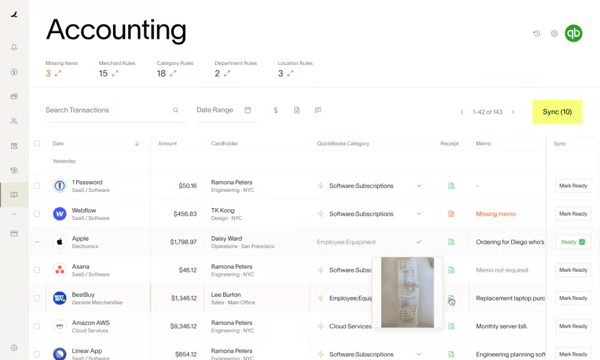
Many G2 reviewers highlight Ramp’s intuitive interface and quick approval workflows, but some note that setting up bank integrations isn’t always smooth. It can involve additional steps or back-and-forth troubleshooting, which can slow down teams that expect a time-saving setup right from the start.
Similarly, Ramp is often recognized for its real-time spend visibility and automated controls, yet some G2 users point to gaps such as payroll integration or detailed project-level expense tracking. While these aren’t deal breakers for every team, reviewers say they can limit more complex financial workflows.
Finally, users frequently mention Ramp’s strong reliability and ease of day-to-day use, but there are occasional technical hiccups reported in G2 reviews. Intermittent login delays or server timeouts aren’t common, but when they occur, they momentarily interrupt the flow.
Still, Ramp stands out for its proactive controls, AI-driven insights, and customizable workflows, giving finance teams the visibility and efficiency they need to scale confidently.
What I like about Ramp:
- The ability to issue virtual and physical cards with spending limits is a huge plus. Users can control who spends what, where, and how much, all in real-time.
- Ramp automates so many tasks. From matching receipts to transactions to categorizing expenses, it takes care of things people used to spend hours on manually.
What G2 users like about Ramp:
“Ramp is extremely user-friendly. The whole implementation was done by myself. It easily integrates with our accounting software (Sage Intacct) and provides various features for proper record keeping. We replaced three different providers with Ramp, and now our accounts payable, employee expenses reimbursement, and credit cards are all in one place. Customer support always responds quickly, even though I don’t contact them often, thanks to the very detailed and easy-to-navigate help center. And best of all, there is cash back when you use the Ramp Card, which adds up so quickly and can be used in a variety of ways.”
– Ramp Review, Nadiia D.
What I dislike about Ramp:
- Some reviewers on G2 mention that linking bank accounts was more time-consuming than they expected. Some say that they had to contact support several times to get everything working properly.
- While rare, a few users on G2 note some moments when the platform was slow to load or couldn’t log in due to a server issue.
What G2 users dislike about Ramp:
“I would love a built-in sync dashboard. The Dashboard would display the sync status of accounts payable/reimbursement and credit card transactions that synced or attempted to sync to the accounting system. Downloading the sync reports or clicking into each transaction with a sync error is not ideal for high transaction volume clients.”
– Ramp Review, Mikail S.
4. Brex: Best for finance-stack workflows at scale
G2 reviewers often describe Brex’s virtual cards as a standout feature. I’ve seen users highlight how easy it is to issue cards instantly, set dynamic spending limits for each team member, and track usage in real time. It’s a convenient way to stay in control without needing to micromanage every transaction.
Notifications are another area where Brex gets high marks. Whether it’s an approval request or a spending alert, users mention receiving instant updates through Slack or email, which helps cut down on internal communication loops. Cashback and travel points also come up often — many appreciate the added value Brex brings to everyday business spending.
Automation is a big win, too. Reviewers frequently mention that automated reconciliation aligns transactions with expense policies, reducing the need for manual work. The reporting tools also get positive feedback, especially for the level of detail they offer. Users say they can easily track trends and spot opportunities to optimize spending.
Many G2 reviewers highlight Brex’s intuitive dashboard, but integrations with accounting platforms like QuickBooks and NetSuite aren’t always seamless. Some users note that they’ve had to manually intervene to get data syncing properly, which can reduce the expected time-saving benefit.
Also, while the receipt attachment feature is widely used, some users on G2 note that while it works reliably, the extra steps involved can slow things down when moving quickly.
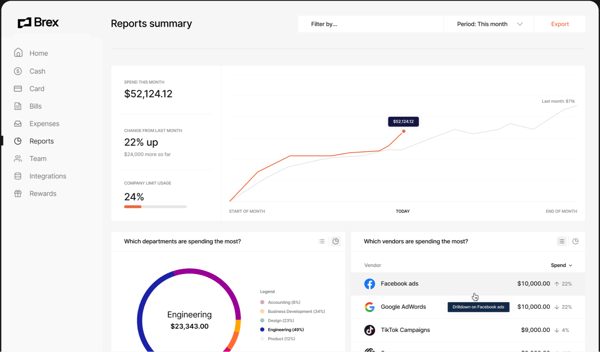
Another thing I’ve seen G2 users mention is that Brex offers so many features, it can feel overwhelming, especially for smaller teams or new users who don’t need everything right away. While the range of tools is impressive, the learning curve can be steep if you’re just getting started.
Real-time features are generally well-liked, but I’ve also come across G2 feedback about occasional delays in syncing updates. When you’re expecting instant results, even a short lag can be frustrating.
Nevertheless, Brex earns high marks for real-time spend alerts, flexible virtual cards, and valuable rewards, helping businesses stay in control while maximizing value.
What I like about Brex:
- Brex makes managing business finances ridiculously simple. Everything is intuitive, from issuing virtual cards to tracking expenses, and works without any steep learning curve.
- Users love how Brex sends instant updates via Slack or email for spending alerts and approvals. It keeps everything transparent and eliminates the guesswork.
What G2 users like about Brex:
“I like Brex for its seamless expense management and robust financial tools tailored for modern businesses. The platform simplifies company spending with features like virtual cards, automated expense categorization, and real-time tracking, which save time and reduce manual effort.
The upsides of using Brex include generous rewards tailored to business needs, such as travel and SaaS discounts, a high credit limit without requiring personal guarantees, and easy integration with accounting tools. It’s a great solution for scaling businesses looking for flexibility and streamlined financial management.”
– Brex Review, Alison S.
What I dislike about Brex:
- Brex integrates with tools like QuickBooks and NetSuite, but some users on G2 note that syncing can occasionally require manual steps.
- While attaching receipts to transactions is possible, G2 reviews note that it feels clunky and takes more steps than it should.
What G2 users dislike about Brex:
“The only shortcoming that Brex has is the lack of physical checks. While antiquated and outdated, checks can still be a big part of business dealings. I get $10,000 – $100,000 in monthly wire transfers from title companies. Occasionally, I get paper checks instead. When I used Bluevine, they recognized these as normal and made the entire balance of the checks available immediately. I’ve only deposited two checks with Brex, but both had very long holds placed on them. I would appreciate certified funds checks from title companies, not having any holds placed on them, as it can impact payroll and bill management.”
– Brex Review, Mike M.
While expense tools focus on individual reimbursements, spend management software covers broader company-wide financial oversight.
5. SAP Concur: Best for enterprise travel and expense governance
Juggling expense reports, travel receipts, and approval workflows can feel like a full-time job. That’s where SAP Concur steps in.
Users appreciated how SAP Concur handles expense reports. It automatically imports expenses from corporate cards. The mobile app lets you snap a photo, and it syncs instantly. The OCR technology is pretty sharp at pulling details from receipt images, saving you from manual data entry.
G2 reviewers were also impressed with the customizable dashboards. They could easily track spend, approvals, and pending tasks at a glance. Plus, there are built-in policy enforcement tools that flag out-of-policy expenses automatically. For managers, this means compliance headaches are almost non-existent.
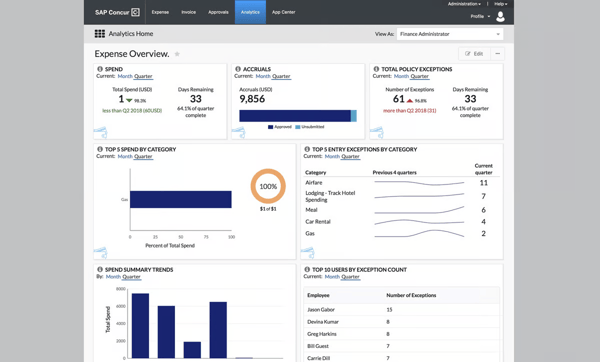
Another frequent highlight in the reviews is the reporting capabilities. SAP Concur lets you generate custom analytics reports on spending patterns, policy adherence, and vendor usage.
While the OCR tech is great, attaching receipts to expenses can sometimes feel little clunky, according to G2 reviews. The process isn’t always intuitive, especially on the desktop version, and uploading delays can test your patience.
While the platform’s extensive capabilities are valued by teams, a number of G2 reviewers say this depth can feel overwhelming for new users at first. Also some reviewers on G2 note that navigation could be smoother.
Its built-in reporting and compliance features are also seen as a strong point, yet several users mention slowdowns when moving between tabs or generating reports, especially at peak times.
Nonetheless, SAP Concur remains a powerhouse for enterprises, offering deep integrations, global support, and compliance features that make complex travel and expense programs manageable.
What I like about SAP Concur:
- SAP Concur automates tedious tasks. Users note that it takes much off their plate, from auto-populating expense reports to matching credit card transactions with receipts.
- The mobile app is described as a lifesaver. Snapping photos of receipts and having them instantly synced to the reports is super convenient.
What G2 users like about SAP Concur:
“SAP Concur has been a lifesaver for organizing and managing business travel and expenses. What I genuinely love is how easy it is to integrate with other tools and systems we already use everything feels connected. The mobile app is great, letting me snap a photo of a receipt and upload it instantly, saving me countless hours of manual entry. It is also very intuitive to use once you get the hang of it, and the detailed reports it generates are a goldmine for tracking company spending. For a global team like ours, it’s multi-currency and multi-language support has been useful and helps us maintain consistency no matter where we are.”
– SAP Concur Review, Shubham K.
What I dislike about SAP Concur:
- I’ve seen G2 users mention that Brex can feel sluggish at times. Waiting for pages to load or reports to process can be frustrating.
- Receipt uploads are another area where the experience can be hit-or-miss. While the feature itself is useful, some reviewers note delays, duplicate uploads, or issues where receipts fail to attach properly, which slows things down when you’re trying to move quickly.
What G2 users dislike about SAP Concur:
“Dealing with SAP Concur is a constant exercise in frustration. The system is incredibly slow, with pages frequently reloading at the worst possible times. What should be a quick expense reporting process turns into a long, drawn-out ordeal where you’re left staring at the screen, waiting for things to load or refresh — if they ever do.
On