


If you’re in sales or marketing, you’ve probably lived through the chaos of a product description gone wrong. One incorrect spec, one outdated data field — and suddenly, your customer is raising red flags.Working with product, marketing operations, and system integration teams is the trilogy that builds a good product reputation.
To get ahead of this, I talked to IT, integration teams, and product managers who supervise the backend of product operations. I also delved into product information software (PIM) tools that automate product feedback and incorporate fresh and accurate customer data at various stages.
I explored the top seven PIM software, and also dived into their specific G2 scores, implementation process, market presence, and user adoption patterns to back up this evaluation.
7 best PIM tools: my top software recommendations
- Best for product organization and easy data handling: Plytix Cloud PIM and DAM
For SMBs to simplify product management with strong import/export capabilities and support for various file types. ($786.36/mo) - Best for centralized product data and digital asset control: Sales Layer PIM
For centralizing product content across channels while offering robust access rights and digital asset management. (Pricing available on request) - Best for advanced product hierarchies and KPI tracking: Akeneo PIM
For advanced data lineage, metadata management, and KPI monitoring. ($3750/mo) - Best for data quality and global localization: Pimberly SaaS PIM & DIM
Blends PIM with Digital Information Management (DIM), for brands focused on global reach, compliance, and localization. ($3000/ mo) - Best for global data collection and syndication: 1WorldSync
For standardized data collection, classification, and publishing, especially across retail and manufacturing. (Pricing available on request). - Best for workflow-driven PIM with localization support: PIMworks
help maintain high data quality and emphasizes workflow automation, localization, and product categorization. (Pricing available on request). - Best for product experience and content transformation: Salsify PXM
for import/export, file transformation, and organizational interface. (Pricing available on request)
These PIM software are top-rated in their category, according to G2 Grid Reports. I’ve added their monthly pricing, wherever available, to make comparisons easier for you.
7 best PIM software I strongly recommend
As a product-oriented professional, what matters is how product information traverses your organizational workflows. If you lack a set system and manage product specs in silos, you’ll eventually be subjected to client frustrations.
Ideally, to shortlist the best PIM software, you need to first clean the room for your current product development workflows. Set a process to maintain data quality, accessibility, file management, file cleansing, and centralized client repositories to segregate them with revenue, manpower, and business goals.
Having a clear pipeline of product data and building compatibility for the data pipeline with the existing tech framework (integration with CRM and ERPs) is the first step in managing the ins and outs of a particular product across multiple channels.
How did I find and evaluate the best PIM software in 2025?
I spent weeks trying and testing out the best PIM software and factored in the core features of the stack, like centralized data management, digital assets, user access rights, multi-channel syndication, data quality and governance, integration capabilities, user-friendly interface, and role-based access control, to customize your demand according to the technical specifications.
To further personalize my approach, I used AI to summarize real user sentiments, product comparisons, key pros and cons, pricing, and other parameters crucial to your investment. I also did a deep dive into feature insights and G2 scores for each of these PIM software to evaluate the current market position and vendor reputation.
In cases where I couldn’t personally test or sign up for the tool, I collaborated with market research professionals who had used it firsthand and shared their first-person insights on working with PIM software.
The screenshots featured in this listicle combine screenshots taken from the vendor profile pages on G2 with screenshots from third-party websites to aid in your decision-making process.
What makes a PIM software worth it: my opinion
Vendors care when their product is highlighted by their client base. Parallely, most B2B firms deal with challenges like data silos, inaccurate data specifications, and redesigning product workflows for clients and vendors which are a part of their KPI.
As businesses explore PIM tools to manage their product content and keep a central SKU for it, the market for PIM tools also continue growing from USD 12.2 billion in 2022 to USD 223.8 billion by 2027, according to a markets and markets report.
According to me, tools that offer data storage, multi-channel syndication for content and media, a centralized repository for technical specifications, and integration of data to optimize quality and maintain client relations are crucial.
Below are some factors you can’t miss out on if you are researching for an effective PIM software:
- Centralized product data repository: I shortlisted the tools that act as a single truth for all product data, including descriptions, specs, SKUs, pricing, images, and localized content. A centralized system reduces data silos, increases consistency across teams, and supports omnichannel distribution with accurate product content.
- Multichannel syndication with integration capabilities: It was important for me to look at all angles that allow product specialists to store and share precise specifications. The top PIM software allows for seamless syndication of product data across multiple sales channels, marketplaces (Amazon and eBay), e-commerce platforms (Shopify, Magento), ERP systems, and print catalogues. You can benefit from pre-built connectors and APIs that ensure faster time-to-market and reduce manual effort.
- Data quality and validation tools: I factored in automated data quality checks in my analysis, including completeness scoring, rule-based validation, and duplicate detection. These tools help maintain high quality data, which directly impacts buyer’s trust and conversion rates. Features like data quality suggestions also make buyers trust that they’ll receive viable product suggestions and improvements with the tool.
- User roles and workflow management: A PIM tool doesn’t have to compromise on data security and encryption. Robust role-based access control and customizable approval workflows help teams collaborate efficiently. Whether it’s marketing, merchandising, or localization teams, you’d need a solution that supports clear ownership and visibility through the entire product content lifecycle.
Whether you are a B2B or B2C SaaS firm, having the right automations to store product details and sync them with your current IT infrastructure is crucial to your conversions.
Out of 40+ tools that I initially shortlisted, I went ahead and did a nose dive into 7 best PIM tools in 2025. To be included in this category, a software must:
- Collect and unify product information from various separate files into one source.
- Identify and fix problematic or inconsistent product data and metadata.
- Provide search or filtering functions that can be used internally or online by buyers.
- Organize product data based on their characteristics, attributes, and similarities.
- Push product information out into e-commerce, retail, social media, and marketplaces.
- Analyze product data, its quality, and usage across multiple channels.
*This data was pulled from G2 in 2025. Some reviews may have been edited for clarity.
1. Best for product organization and easy data handling: Plytix Cloud PIM and DAM
Plytix PIM helps you reduce your dependency on manual spreadsheets and third-party tools by consolidating product data across various channels into one unified platform. It also cuts down on data silos, increases multichannel syndication and improves your time to market.
From the outset, what stood out to me was how easy it was to use. The user interface is intuitive, the navigation is smooth, and everything feels designed for a broader audience, not just data engineers.
What I loved most about Plytix is how it helps centralize all product data, and makes managing information feel less like a chore and more like a smart collaboration. Bulk editing feature is another plus. The system allows for massive product data updates with just a few clicks, which is a lifesaver when it comes to managing extensive catalogues.
I also want to call out their team collaboration feature. Plytix makes it easy to align responsibilities, track changes and work across departments. And speaking of teams, their customer support? Top notch. They are always responsive and super friendly, whether it’s a live chat question or a detailed email request.
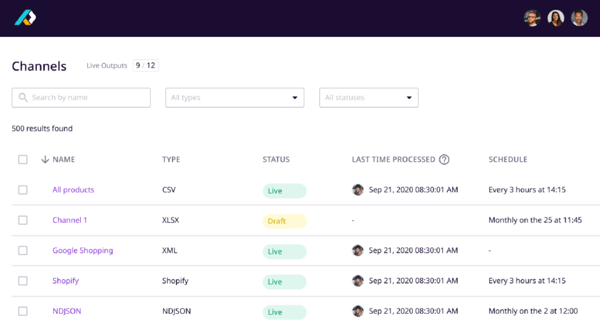
Plytix’s “Brand Portals” feature are custom, shareable product catalogues that you can build and publish online. While I love how it helps send curated lists to partners and distributors, I do feel like they can benefit from enhanced layout options and customizable options a bit more.
Plytix offers a freemium model that is surprisingly functional and can be a strong gateway for startups or small teams.
The premium tiers introduce features like channel management, where you can export product data in custom formats for platforms like Shopify, and Amazon, or even print catalogues. The custom attributes system also expands in these tiers, letting you structure data to fit complex workflows or regional compliance needs.
That said, there are some areas for improvement. For instance, setting up your attribute hierarchy can feel a bit rigid. The UI, while clean, sometimes hides advanced functions behind too many clicks. And if you are a larger organization with larger SKUs, the performance might be a bit lagging.
Overall, Plytix Cloud PIM and DAM help manage product data, integrate data seamlessly, and offer multi-channel product distribution to attract more conversions.
However, there are some issues to improve about the platform. For instance, setting up your attribute hierarchy can feel a bit rigid. The UI, while clean, sometimes hides advanced functions behind too many clicks. And if you are a larger organization with larger SKUs, the performance might be a bit lagging.
Overall, Plytix Cloud PIM and DAM helps manage product data, integrate data seamlessly and offer multi-channel product distribution to attract more conversions.
What I like about Plytix Cloud PIM and DAM:
- Plytix PIM completely transformed how we manage product data and digital assets. The platform is incredibly user friendly and intuitive, even to the members who aren’t super tech savvy.
- Plytix helps streamline the product listing process and makes life easier for product teams.
What do G2 Users like about Plytix Cloud PIM and DAM:
“Plytix is a PIM with a clear structure, the implementation was easy and there a lots of possibilities with calculated fields. Plytix has built a caching mechanism that speeds up the syncs to Shopify tremendously. Being able to sync to multiple stores at the same time is crucial for us. The customer support is friendly and fast. My team and I use it daily and are very happy with it.”
– Plytix PIM Review, Andries W.
What I dislike about Plytix Cloud PIM and DAM:
- According to users, language support for product data is currently not available and some import feed integrations still need improvement.
- I observed that getting it set up and configuring it took longer than expected, which is also highlighted frequently by G2 customer reviews.
What do G2 users dislike about Plytix Cloud PIM and DAM:
“Plytix uses what they call ‘Brand Portals’ to provide end user access to information, but as for exports it’s limited to only 1 PDF, 1 Excel/CSV file. Separate SKU info gets combined all into one PDF or EXCEL/CSV, where it should provide more options.”
– Plytix PIM Review, Michelle O.
2. Best for centralized product data and digital asset control: Sales Layer PIM
Sales Layer PIM enables automation of complex B2B processes and product centralization, along with compatible connectivity to your present B2B workflows to reduce time and error discrepancies.
What I noticed about the platform right away that how easy it is to get started. I didn’t need a manual or a crash course, as the interface is clean, intuitive, and kind of fun to use. Everything is where you’d expect it to be.
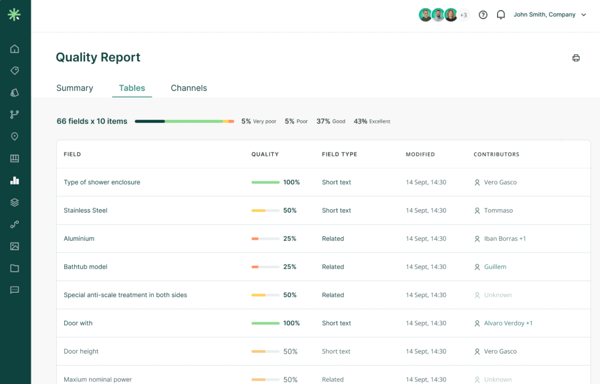
I also liked that managing product information across multiple platforms was really smooth. You could handle a ton of SKUs numbers, and with Sales Layer, it would feel like chaos is still under control. I can update a product description or a spec sheet in one place, and it’s live across all our sales channels.
Its ability to manage catalogs, push updates in real time, and even tweak fields in bulk is amazing — not to mention it saves you a considerable amount of time.
However, not everything is perfect. Their customer support used to be top tier, but ever since they switched to a ticketing system, the wait times have gotten a bit longer.
Moving on to advanced features: If you are on a basic plan, be ready for some limitations. To use formulas to automate data fields or set up advanced filters, you would need to buy a premium subscription. What’s more, creating these formulas isn’t exactly plug and play. It took me a while to figure the logic syntax and the documentation didn’t help.
If your catalogue is massive, the search function wouldn’t be as intuitive as you think. It works, but not as smartly as it should.
Regardless, Sales Layer PIM helps you manage product details across multiple SKUs and inventories, store precise product specs, and automate your client conversions seamlessly.
What I like about Sales Layer PIM:
- I like how Sales Layer PIM offers multi-channel capabilities like usage of typical dimensions to rate a PIM implementation, data analytics, connectivity, data integration as well as data governance, helpdesk and compliance.
- I observed how easy it is to implement the tool to meet the growing needs of the current market.
What do G2 Users like about Sales Layer PIM:
“The PIM focuses more on working with products and not so much with variants, which is how we actually work in our case. We expect an update with all our suggestions, which have always been addressed when we needed them. Besides what has already been mentioned, the data updates should be faster; currently, the export of Excel takes quite a while to update with the large amount of information we handle.”
– Sales Layer PIM Review, Ines G.
What I dislike about Sales Layer PIM
- I observed that the process of updating and refining data generated within connectors can be improved.
- While Sales Layer PIM offers a centralized product repository, there are still limits on the exportations.
What do G2 users dislike about Sales Layer PIM
“When we initially migrated from PIM to Sales Layer, we had problems with the import of family forms, since Sales Layer is very sensitive and allows the creation of attributes and attribute values regardless of whether they are found in the configuration of the families’ technical sheets. This duplicated the product characteristics if they had a tab or were in plural or singular. We have been able to minimize these cases by using family templates exported directly from SL.”
– Sales Layer PIM Review, Gisselle D.
Learn how you can safeguard your product assets safely with product portfolio management and create a secure internal library of product resources.
3. Best for advanced product hierarchies and KPI tracking: Akeneo PIM
Akeneo PIM is a leader in the product experience category, allowing multiple B2B and B2C brands to scale their omnichannel retail processes. Businesses across manufacturing, distributors, retailers, or global brands use it for product onboarding.
When I first started using Akeneo PIM, it was super easy to configure and set it up. It genuinely didn’t take me long to get familiar with the system, even with limited training. It’s web-based, lightweight, and just aesthetically well-designed. I could easily browse through product categories, manage attributes, and customize fields without needing to dive into a user manual every time.
One of the standout features for me has been its flexibility when it comes to managing complex product data. I work with thousands of SKUs, and Akeneo’s handling of variant product management, categorization, and attribute sets made it so much easier to maintain consistency across different marketplaces. The system supports bulk edits, tailored export builders, and an impressive import/export engine that’s highly configurable.
Akeneo also rolled out the new AI capabilities for generating product descriptions which can genuinely improve how you enrich your product content at scale.
Another thing I loved was its modularity. Akeneo is built on Symfony, which means it’s incredibly extensible. Whether you need a connector for Bynder, Magento, or any ERP system, you can either have a plug-and-play solution from the Akeneo Marketplace or build a custom connector relatively quickly.
Even the Community Edition feels powerful with a wide array of free plugins, though I’ll admit the Enterprise Edition (EE) packs a bigger punch with exclusive features like advanced rights management and tailored export options.
I’ve interacted with Akeneo’s customer team, and they’re passionate, quick to respond, and genuinely invested in helping users. The documentation is clear, detailed, and there’s an active community forum, which saved me more than once.
But, of course, everything has a flip side. One of the early challenges I faced was the initial setup, it’s not plug-and-play at the enterprise scale. If your product taxonomy is complex or your attribute logic is non-linear, expect to spend time mapping things out.
Also, while the GUI handles most admin tasks, some changes (like complex attribute rule definitions or metric unit updates) still require editing configuration files or YAML definitions, which feels like a step back for a product this mature.
The pricing model can be a bit of a hurdle, especially for smaller teams. Some G2 reviewers mentioned that key features like webhooks, smart attributes, or reference entity enhancements are only available in the EE version.
I found myself wishing Akeneo offered these as à la carte add-ons instead of locking them behind a paywall. While the API is well-documented and generally reliable, I did experience some latency in high-load environments — though I heard that’s being addressed in newer versions.
Apart from this, I ran into minor annoyances like the inability to easily convert column types (say from text to a dropdown). It was not possible to build nested attribute groups as well. This becomes frustrating when you’re trying to organize large, multi-level product datasets logically.
Lastly, the EE’s strict channel restrictions and lack of attribute/value inheritance felt limiting at times, especially when working with related products that shared overlapping data.
Regardless, Akeneo has been a game changer in how I manage product information. If you are looking for a modern, flexible PIM built with managers and developers in mind, it’s worth a shot.
What I like about Akeneo PIM:
- Akeneo has a user-friendly interface that allows users to easily configure product data.
- Akeneo provides powerful APIs
What do G2 Users like about Akeneo PIM:
“The platform is customizable for business which is nice. There are options and attributes for anything so it’s all inclusive for business needs.”
– Akeneo PIM Review, Patricia J.
What I dislike about Akeneo PIM:
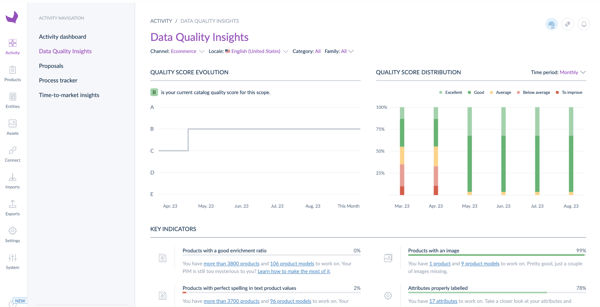
- While Akeneo PIM focuses on managing and enriching product information, I noticed it still has limited built-in analytics and reporting features.
- I found out that Rule Engine and Shared Catalogs are limited in it’s use. For both features, it is desirable to have more options in a complex setting.
What do G2 users dislike about Akeneo PIM:
“Some features are great but can still be fleshed out more: the ability to follow up the completeness and quality level of your enriched products is great, however, not flexible enough. Users who want to tweak this themselves will be disappointed. Same with the automation rules: a great tool, but I would like to see more features added (complexity in formulas, etc.)
–Akeneo PIM Review, Sabrina C.
Learn how you can manage your product lifecycle management from start to end to stablize your backend product workflows and build strong client relationships.
4. Best for data quality and global localization: Pimberly SaaS PIM and DIM
Pimerly SaaS PIM and DIM is a cloud-based PIM tool that manages product data across multiple channels. It is designed to optimize product workflows for sales, marketing and e-commerce applications and is used by several industries across fashion, retail, e-commerce, and banking to load and manage product data.
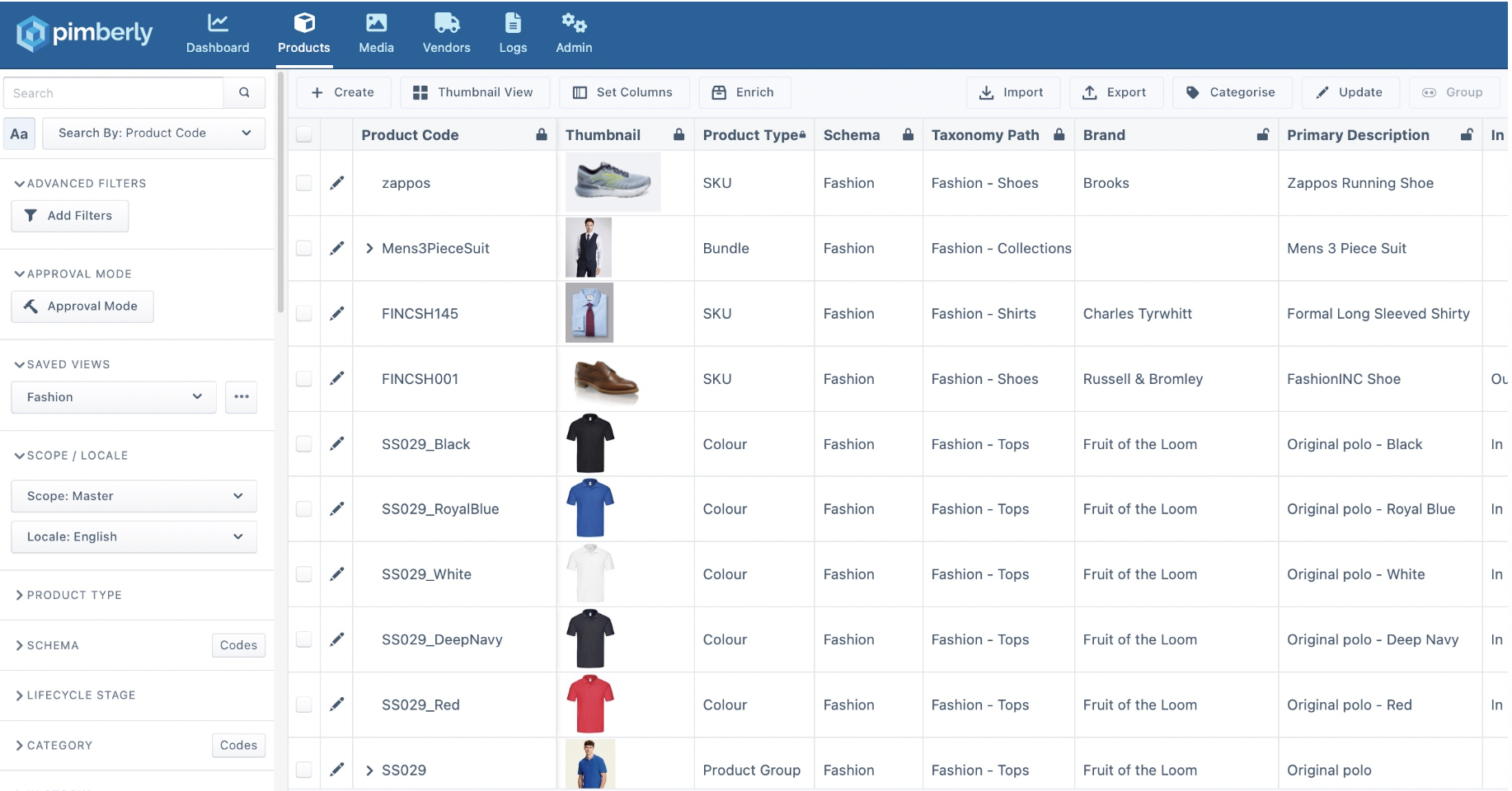
I’ve analyzed Pimberly for quite some months now, and honestly, it’s made managing product data feel way less chaotic. What stood out to me first was how smooth the export and import functionality is, especially when you’re juggling thousands of SKUs. It makes onboarding new products super easy, and bulk uploads are fast enough that I don’t find myself waiting around staring at a loading screen.
The UI is slick. It feels like it was designed with actual users in mind; the search function actually finds what you’re looking for, and the whole platform is extremely intuitive.
I’m not a super technical person, so the fact that I could just dive in without needing to call IT every five minutes says a lot. That said, for the folks on our team who do the actual work, the system is configurable.
The ability to tailor feeds and channels based on specific markets or retailers is a game-changer. For people working with multilingual and multichannel product content, and rest assured, Pimberly handles that complexity really well.
Now, I won’t pretend it’s all perfect. One thing that bugs me is the occasional sluggishness during uploads. I know that probably comes with the territory of working with large datasets and media-rich digital assets, but it’s still frustrating when you’re trying to move quickly.
Also, while automation is available, it’s a bit limited when it comes to more niche workflows. We’ve had to manually check or tweak a few steps that I wish we could fully automate.
Still, I’ve been genuinely impressed with the support team — they’re responsive and clearly know the product inside out. During implementation, they helped us map out all our data structures and metadata requirements without making it feel like a massive slog.
It’s clear they’ve built the system to evolve. We’re on one of the more advanced plans, and while I don’t know every tier by heart, I can say we’re getting solid value for the advanced data modeling and channel customization capabilities included.
One feature that surprised me is the integrated digital asset management (DAM). It’s seamlessly tied into the PIM, so linking product data with images, videos, and documents happens automatically once you set up the logic. That might save your creative team so much time. Plus, permissions and user roles are easy to manage across departments, which is huge if you’re working in a bigger team.
Overall, Pimberly plays a key role in organizing your SKUs, automating sales and marketing workflows, and integrating product data with the right commerce channel to give a supreme customer experience.
What I like about Pimberly SaaS PIM and DIM:
- Pimberly allows you to centralize and standardize our data, which greatly helps in business intelligence.
- I noticed that Pimberly’s platform is intuitive and can easily be integrated with a company’s existing systems.
What do G2 Users like about Pimberly SaaS PIM and DIM:
“The system is super easy to use and doesn’t take too long to get to learn. The constant updates to the new UI is very positive and gives hope for even better features to be added soon. Customer support are always fast to solve any issues and always take feedback on board.”
– Pimberly SaaS Review, Matthew B.
What I dislike about Pimberly SaaS PIM and DIM:
- While Pimberly is a standout solution, I observed that some users might initially find the extensive features overwhelming.
- I noticed that some of the automation in the channels is not easy to use and will require you to learn about workflows and automations.
What do G2 users dislike about Pimberly SaaS PIM and DIM:
““The AI product description assistant could be better, OpenAI is quite good at this, it might be worth integrating into Pimberly in the future. Pimberly can be quite technical as well, so training for it does take longer with product listings than other software.””
– Pimberly SaaS PIM and DIM Review, Nick T.
5. Best for global data collection and syndication: 1WorldSync
1WorldSync is a global PIM solution that helps manage SKUs, multi-channel syndication, and product data centralization for your business applications. It’s designed to promote ease of working for your teams and maintain product integrity.
At the first glance, 1WorldSync seemed a bit overwhelming. There are so many fields, configurations, and syncing options that I wasn’t sure where to begin. But once I got the hang of it, it started to make a lot more sense, and now I can’t imagine going back to the messy Excel sheets we used to rely on.
What really drew me in was how easy it is to publish and sync product information across multiple retailers. Whether it’s small-scale vendors or large retailers, the platform seems to adapt well, especially with automation baked in. I don’t have to worry about manually copying product data anymore: once I update something, it’s reflected across the channels I’ve integrated. That’s a huge win in terms of efficiency.
Another thing I’ve come to appreciate is the support. The customer service team is genuinely helpful and easy to reach. If you have to work on some time-sensitive projects, the support team will come through with precise advice and quick turnarounds. It’s reassuring knowing that help is just a call or message away, especially when you’re working with tight deadlines.
From a technical standpoint, 1WorldSync’s ability to handle detailed item data is impressive. Each product page allows me to upload enriched metadata like images, specs, SEO-friendly descriptions, GTINs, and even retailer-specific templates. It’s a centralized platform that reduces redundancy and keeps everything version-controlled.
For larger catalogs, especially when you’re managing SKUs in the thousands, that kind of granularity is essential.
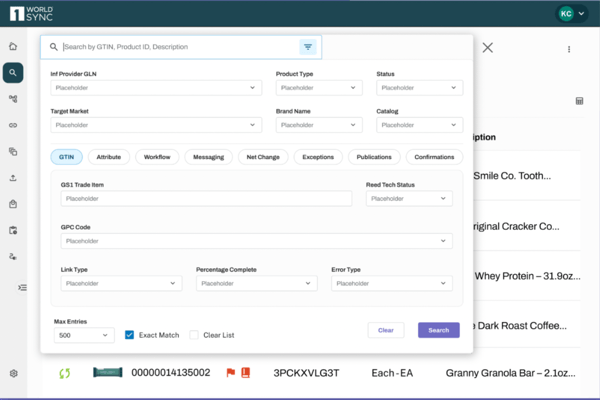
However, as expected, some features are hidden behind the premium paywall. With the higher-end plans, you get access to advanced workflow automation, expanded API capabilities for custom integrations, and dimensional asset management (that’s what the DIM in the name refers to).
The DIM features allow you to handle rich media, like 360-degree product views and HD videos, across platforms without compression issues or reformatting. It’s built for enterprise-level content syndication, and if your brand prioritizes consistent storytelling across markets, that’s a game-changer.
Still, there are areas that could use polishing. The UI, although functional, has a bit of a learning curve. You can feel a bit lost, especially when trying to link related products or variants. The error messages could definitely be more descriptive, too, or else you might not know what hit you.
Also, while the system is powerful, there’s a lack of built-in onboarding tutorials. If you’re not trained or don’t have someone guiding you, it might feel intimidating.
Overall, if you get past the initial hurdles, the productivity boost is real. 1WorldSync can save you countless hours on product setup, syndication, and corrections. With flexible data modeling, you can tailor the platform to suit your business logic.
What I like about 1WorldSync:
- 1WorldSync stores product information, allowing fast codification of new products or already existing ones.
- I found their biggest upside to be customer service. The support team is pretty prompt and goes the extra mile to resolve queries.
What do G2 Users like about 1WorldSync:
“Platform is utilized by most companies, data is easily uploaded en masse, errors are relatively easy to track down and correct. Also works with the Product Introduction platform. One of the best customer service depts anywhere.”
– 1WorldSync Review, Jeanne R.
What I dislike about 1WorldSync:
- While 1WorldSync stores your product credentials effectively, it is still a bit overwhelming. There are so many options and uses that it can be confusing as to what exactly you need to be using at the time.
- I noticed that users encountered challenges in pinpointing errors in their recent work and felt stuck and unsure of where the issues were.
What do G2 users dislike about 1WorldSync:
“I believe what can be improved is the UI for the platform. The user interface does look a bit archaic. Most other GDSN platforms have a cleaner, sharper look the user experience of their platform.””
– 1WorldSync Review, Richard C.
6. Best for workflow-driven PIM with localization support: PIMworks
PIMworks is a comprehensive product management tool that manages your product data across channels