


You can have the perfect pitch deck, a bulletproof CRM, and reps who know your product inside out, but if you’re not listening to what’s happening on sales calls, you’re flying blind!
That’s what pushed me to evaluate over 20 tools to find the best conversation intelligence software. Not just platforms that record calls, but ones that actually help sales leaders coach smarter, spot deal risks earlier, and replicate what top reps are doing best.
And it’s not just a nice-to-have, if you ask me or the market data. The global conversation intelligence software market is expected to grow from $25.3 billion in 2025 to $55.7 billion by 2035, with a CAGR of 8.2%. That kind of growth shows just how much pressure sales teams are under to make every conversation count.
The seven best conversation intelligence platforms in this list stood out for their rep-friendly design, actionable insights, and ability to support both lean sales teams and global RevOps organizations. Whether you’re trying to improve ramp times or standardize talk tracks, these tools can help.
7 best conversation intelligence software in 2025
- Gong: Best for AI-powered deal insights
Analyzes sales conversations to surface trends, coaching opportunities, and forecast risks in real time. (Customizable pricing) - Salesforce Sales Cloud: Best for enterprise pipeline visibility
Combines CRM power with conversational data to help sales leaders understand deal progress and rep effectiveness. ($25/mo) - Fathom: Best for call summaries and action items
Auto-generates meeting notes, highlights key moments, and integrates insights directly into your workflow. ($19/mo) - HubSpot Sales Hub: Best for integrated sales engagement
Brings together CRM, call tracking, and conversation intelligence to support the entire sales process in one platform. ($45/mo) - Fireflies.ai: Best for searchable call transcripts
Offers fast, accurate transcriptions with smart search, speaker tags, and integrations across CRMs and collaboration tools. ($10/mo) - Jiminny: Best for rep coaching and enablement
Records, scores, and analyzes sales calls to help managers coach with context and replicate top-performer behavior. (Pricing not publicly available) - Substrata: Best for real-time buyer signal analysis
Uses behavioral AI to read tone, silence, and hesitation during calls, offering a new layer of buyer intent intelligence. ($50/mo)
*These best conversational intelligence tools are top-rated in their category, according to the latest G2 Grid Reports. I’ve added their standout features and pricing information for easy comparison.
What makes a conversation intelligence software worth it?
Sales calls hold a lot more than just chatter — objections, buying signals, even silent red flags. But if you’re not actually capturing what’s said (and how it’s said), we may have a problem, Houston.
That’s where conversation intelligence software steps in. Instead of handing you raw transcripts, these tools highlight the moments that matter: when deals go off track, when reps miss cues, or when buyers drop subtle signals of intent. And because most of these tools sync with your CRMs, you’re not left piecing things together after the fact.
And it’s not just about closing new deals. If you don’t prioritize customer retention, you risk losing much of your business. When conversations drive both pipeline growth and long-term loyalty, having a clear view into every call becomes non-negotiable.
How did I find and evaluate the best conversation intelligence software?
I started with G2’s Grid Report, which ranks tools based on real user reviews and market presence, to move past surface-level comparisons. G2 Grid gave me a strong starting point that included both well-established leaders and promising up-and-comers in the conversation intelligence software category.
I then used AI-assisted analysis to dig into hundreds of verified G2 reviews. I focused on patterns around coaching effectiveness, ease of use, integrations, and transcript accuracy. This helped me understand what sales and RevOps teams value most, and where tools tend to fall short.
To balance the data with real-world context, I also spoke to fellow G2’ers managing revenue operations and enablement tools. Their feedback helped validate themes I saw in the reviews and gave me a clearer picture of usability, rollout experience, and the day-to-day impact these platforms actually have on sales performance.
All product screenshots featured in this article come from official vendor G2 pages and publicly available materials.
What I prioritized when evaluating conversation intelligence software
Not every tool in the conversation intelligence space is built for revenue impact. Some just record calls. Others surface actual insight. To narrow it down, I focused on platforms that deliver clear value to sales managers, reps, and RevOps teams alike.
Here’s what I prioritized when evaluating the best conversation intelligence software:
- Coaching and rep performance insights: The best conversation intelligence platforms don’t just hand over metrics; they help sales managers become better coaches. I looked for tools that spotlight talk ratios, objection handling, filler word usage, and time spent discussing key topics. Bonus points if they offer rep scorecards, trend tracking over time, and the ability to compare performance against top performers. Tools that can turn raw call data into coaching opportunities were high on my list.
- Searchable call transcripts and AI summaries: Speed matters when reviewing calls. I prioritized platforms that offer accurate, speaker-separated transcriptions and AI-powered summaries of each conversation. I also looked for tools that tag keywords, capture follow-up actions, and allow you to search past calls by topic or phrase.
- CRM and workflow integrations: Call intelligence isn’t helpful if it lives in a silo. I favored platforms that integrate cleanly with other core systems. Whether it’s auto-logging calls, pushing insights into the CRM, or triggering alerts in a team workspace, the tools that fit seamlessly into daily workflows stood out.
- Real-time guidance and alerts: Some tools don’t wait for the call to end. I looked for platforms that can offer in-the-moment prompts, like reminders to ask budget questions or flag when a competitor is mentioned. Beyond that, post-call alerts, such as notifications for risky deals, negative sentiment, or missed next steps, also played a huge role in my list. These real-time nudges help reps course-correct while it still matters.
- Scalability and user experience: A great platform can’t slow your team down. I paid close attention to onboarding workflows, interface clarity, and how quickly teams can start seeing value. Tools that support fast implementation, customizable dashboards, and clean user interfaces made the strongest impression.
The list below contains genuine user reviews from the conversation intelligence platform category page. To be included in this category, a solution must:
- Transcribe calls into text and data that can be searched and analyzed
- Analyze the transcription of a call and identify keywords, themes, and possible action items
- Provide statistics of a conversation, including talk ratios, customer interactivity, and total call duration
*This data was pulled from G2 in 2025. Some reviews may have been edited for clarity.
1. Gong: Best for AI-powered deal insights
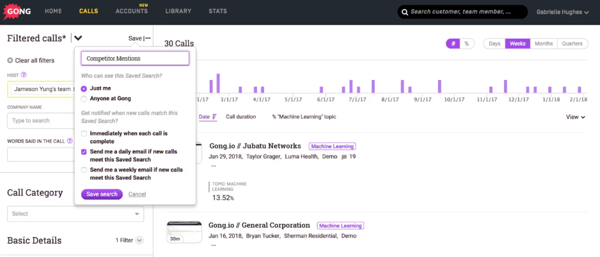
Gong is widely used by mid-market companies, with 71% of its users coming from that segment, according to G2 Data. It’s commonly adopted in industries like computer software, IT services, and marketing, where teams rely on conversation insights for coaching and sales performance. Gong currently holds a 100% satisfaction rating on G2.
One thing that stood out across reviews was how often coaching came up. I read multiple mentions of Gong helping managers spot talk ratios, objection handling, and key deal risks without having to sit through every minute of a call. Reps and enablement teams seemed to lean heavily on these features to pinpoint what top performers were doing differently and to create stronger onboarding programs.
The AI summaries also showed up frequently. Reviewers liked not having to take notes during meetings and appreciated how the platform automatically captured action items and follow-ups. I can see how this helps salespeople move faster between calls without losing track of next steps.
But I noticed some recurring feedback from reviewers about sentiment tagging. It isn’t a big problem, just something a few users pointed out. While users appreciated being able to understand sentiment during discussions, there were occasional misclassifications of tone or intent. It’s not a dealbreaker, but it’s something to keep in mind when relying on AI-generated content in general.
There were also a handful of comments from reviewers about missed or delayed recordings. Although it didn’t seem to happen often, I noticed G2 users saying that the call recording took time to load or wasn’t captured at times.
I also came across praise for Gong’s search functionality. Users mentioned being able to quickly find specific calls or jump to key parts of a transcript using keywords or timestamps. For managers reviewing multiple deals or prepping for follow-ups, this saved significant time.
Gong stands out as a reliable conversation intelligence platform that balances usability with real coaching value for mid-sized sales teams.
What I like about Gong:
- The coaching and call review workflows are frequently highlighted by reviewers. I read a lot of positive feedback around using Gong to pinpoint deal risks and coach reps more effectively.
- I appreciate the searchable transcripts and AI summaries. Users noted that these features helped them follow up quickly, prep faster, and avoid rewatching full calls.
What G2 users like about Gong:
“Gong has completely transformed how I approach sales calls. Being able to revisit recordings, track keywords, and see engagement insights has made it easier to coach myself and improve. I especially like how it helps spot trends across deals and keeps the whole team aligned. If you’re in sales and not using Gong, you’re missing out.”
– Gong Review, Valeria M.
What I dislike about Gong:
- Some reviews flagged issues with sentiment tagging, where the AI misinterpreted tone or emotional nuance.
- I also saw a few comments about occasional recording loading delays, especially when Gong wasn’t set up correctly for the meeting.
What G2 users dislike about Gong:
“Sometimes I forget to tag the call or add a comment right after, and it can be tough to find it later when everything blends together. A bit more structure or reminders would be helpful.”
– Gong Review, Emma L.
Related: Want to know why conversation intelligence matters? These sales enablement stats show how data-driven coaching boosts win rates and rep performance.
2. Salesforce Sales Cloud: Best for enterprise pipeline visibility
Salesforce Sales Cloud is one of the most widely recognized platforms in the sales tech stack, and while it’s traditionally known as a CRM, many teams also use it as a conversation intelligence platform through its integrations and built-in sales analytics features. According to the G2 Grid Report, it’s especially popular in computer software, IT services, and financial services, with 48% of users in mid-market companies and 34% in enterprises.
I came across a lot of reviews highlighting how customizable Salesforce is. From call outcome fields to automation triggers and dashboards, users said they could tailor nearly everything to match how their team works. That flexibility makes a big difference when trying to pull conversation data into the broader sales motion.
But that same depth seems to come with a trade-off; several reviewers admitted that it can feel overwhelming without a RevOps lead or Salesforce admin guiding the way. It’s not the kind of platform you want to figure out on the fly.

Reporting stood out as another major strength. Users liked how easy it was to create dashboards that pulled in call outcomes, notes, and contact engagement alongside pipeline metrics. In a few reviews, I saw managers mention building custom reports for call follow-ups or identifying stalled deals based on conversation history. It’s not a dedicated call analytics engine, but when integrated well, it functions like one.
Support, however, felt a bit inconsistent across the reviews. Some users had no issues, but I also read comments about slow resolution times and a lack of direct help for more technical configurations.
Cost came up as a common theme in G2 reviews, particularly in relation to add-ons and third-party connectors. Some users noted that expenses can increase as more features are layered in, which may be something to consider for teams with tighter budgets. Still, many felt the platform’s depth and capabilities delivered strong overall value.
That said, I saw a surprising amount of positive feedback on the overall experience once it’s set up. Despite the complexity, users found the UI approachable and the system well-organized. Reps claimed they could easily review deal activity and surface past conversations without bouncing between tools.
Salesforce Sales Cloud is a solid choice for sales organizations that want to bring call insights into a centralized, highly customizable CRM, particularly if they’ve got the admin resources to support it.
What I like about Salesforce Sales Cloud:
- I read a lot of praise around opportunity tracking and reporting. Teams seem to appreciate having conversations, contacts, and pipeline data all in one place.
- Customization was another standout. Users consistently mentioned how easy it was to shape Salesforce to fit specific sales motions and call workflows.
What G2 users like about Salesforce Sales Cloud:
“What I like most is how centralized and customizable everything is. I can easily track customer cases, view interaction history, and log updates across multiple channels in one place. The ability to automate follow-ups, use quick text, and customize reports makes it very efficient for managing customer service workflows. It also integrates well with other tools we use, streamlining my daily tasks.”
– Salesforce Sales Cloud Review, Lemuel P.
What I dislike about Salesforce Sales Cloud:
- Several users pointed out that it takes time to get comfortable, especially without a dedicated admin to manage setup and maintenance.
- I gathered that support and pricing were two common concerns. Some reviews noted delays in getting help, and others flagged the cost of unlocking more advanced features.
What G2 users dislike about Salesforce Sales Cloud:
“Outdated UI/UX: Despite its power, the interface feels dated and unintuitive. Some elements seem stuck in the 90s, and it can take too many clicks to get where you need to go.
Steep learning curve: New users often find the system overwhelming, and even experienced users can struggle with the layout or remembering where specific features live.
Performance lag: Occasionally, pages or reports can be slow to load, especially when dealing with large datasets or complex dashboards.”
– Salesforce Sales Cloud Review, Juan M.
Related: Great calls start with great reps. Use these essential sales skills alongside conversation insights to coach more effectively.
3. Fathom: Best for call summaries and action items
Fathom has quickly become a favorite among small teams, with 83% of users coming from small businesses, according to G2 Data. It’s especially popular in computer software, marketing and advertising, and consulting, where fast meeting turnarounds and clear next steps are key. With a 100% G2 Satisfaction Score, it’s safe to say users love how much time and mental energy it saves.
Across the reviews I analyzed, transcription quality was the most frequently stated strength. Users described it as highly accurate, even in fast-paced meetings, and appreciated how the output didn’t just capture words but formatted them in a way that made review easier. The structure, paired with timestamped highlights, seemed to help people find what they needed quickly without having to replay the entire conversation.
Summaries were another standout. I read dozens of comments about how much time Fathom saved by automatically generating meeting recaps that include action items and follow-ups. These summaries came with clear formatting, which made sharing notes with clients or teammates straightforward. Many users stated that this replaced their old note-taking routine entirely.
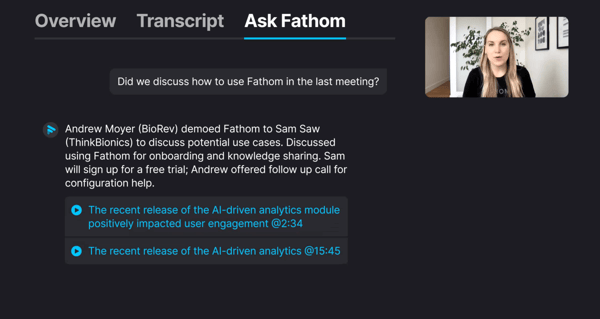
I also came across repeated callouts for ease of use. Even users new to conversation intelligence said they were able to get value right away, without digging through help docs or long tutorials.
Fathom’s integrations were another common theme, especially Zoom and HubSpot. Reviewers loved that Fathom ran seamlessly in Zoom calls, so they didn’t have to worry about setup during each meeting. A number of users also noted that the HubSpot integration helped with logging call outcomes and following up in the CRM, which made it easier to maintain consistent deal records.
However, not everything was frictionless. A few users flagged issues with Zoom integration, mostly around missed or delayed recordings when meetings were launched without preparation.
I also read a small number of reviews saying that regional accents occasionally impacted transcription accuracy, though this wasn’t called out as a dealbreaker.
Fathom is a strong fit for small teams and individual users who want fast, accurate meeting records with as little manual work as possible.
What I like about Fathom:
- Reviewers highlighted how structured and digestible the meeting summaries were. I appreciated that they weren’t just transcripts and were actually helpful for sharing and following up.
- People often brought up the Zoom and HubSpot integrations. From what I read, they made it easier to stay focused during calls instead of juggling tools.
What G2 users like about Fathom:
“I recently started using Fathom to record all Zoom meetings with customers. While I was originally hesitant to record meetings, the time that is now being saved is well worth it. I no longer have to take notes during my calls, and instead, I can focus my attention on what’s most important — the customer and their needs. Fathom has amazing AI summaries that connect automatically to HubSpot, allowing me to easily track conversations with customers. This tool has made my day-to-day work so much easier and efficient.
I love that you can also have the Fathom x HubSpot integration create tasks for follow-up items. Again, this is such a timesaver!”
– Fathom Review, Katie J.
What I dislike about Fathom:
- I came across a few reviews mentioning that impromptu meetings could cause issues if Fathom wasn’t added ahead of time. That feels like something fast-moving teams might want to watch out for.
- There was also some feedback around transcription accuracy dropping slightly with regional accents. It didn’t seem to be a major issue, but it’s something I’d want to test in a global team environment.
What G2 users dislike about Fathom:
“Fathom isn’t available on mobile devices. While the desktop experience is excellent, being locked out on a phone or tablet feels like a missed opportunity, especially when I’m trying to review a summary or reference notes on the go. In short, Fathom is a strong, trustworthy tool, just wish it supported mobile platforms too.”
– Fathom Review, Marty T.
Related: Curious how AI impacts sales? Learn how AI is driving smarter conversations, better forecasting, and faster deal cycles.
4. HubSpot Sales Hub: Best for integrated sales engagement
HubSpot Sales Hub is widely adopted by smaller and mid-sized teams, with 56% of users from small businesses and 39% from mid-market, according to G2 Data. It’s especially popular in computer software, IT services, and marketing, where teams want a single platform for CRM, email tracking, and light conversation intelligence features.
As I combed through reviews, one thing became clear: users love how effortless it is to log and track calls in HubSpot. Quite a few reps said they could easily attach calls directly to deals or contacts. That ease of tracking, combined with HubSpot’s clean activity timeline, makes it simple to pick up right where you left off in a deal.
The platform’s email tracking and engagement alerts also came up frequently. Reviewers appreciated knowing exactly when a prospect opened an email or clicked a link. While that’s not a traditional conversation intelligence feature, it gives sales teams helpful context before making a follow-up call.

Sales sequences also received consistent praise. G2 users noted that setting up sequences, including emails and call tasks, was simple and that the built-in templates helped maintain consistency across outreach. This seems particularly beneficial for smaller sales teams looking to scale their efforts without adding more tools.
I did see some concerns pop up, too. Pricing was the most common. While users said the base platform is accessible, several reviews pointed out that costs can climb quickly as your team scales or needs additional features.
I noticed comments about customization, with some dashboards and reports appearing restricted for users seeking more detailed control over sales or call tracking workflows.
HubSpot Sales Hub is a strong fit for growing sales teams who want limited conversation intelligence baked into their CRM, without needing to manage yet another tool.
What I like about HubSpot Sales Hub:
- Quite a few reviewers say they appreciated how easy it was to log calls and keep activity records updated. That seemed to make a real difference for sales teams juggling multiple deals.
- G2 users consistently praised the email tracking features. Knowing when a prospect opened an email or clicked a link gives reps just enough context to plan smarter follow-ups.
What G2 users like about HubSpot Sales Hub:
“I love how intuitive and user-friendly the platform is. It didn’t take much training for our team to get the hang of it, and now it’s part of our daily workflow. The pipeline view is especially helpful for keeping track of deal stages, and the automation features save us a ton of time. I also appreciate how well it integrates with our other tools like Gmail, Zoom, and Slack, it helps us work smarter, not harder.”
– HubSpot Sales Hub Review, Izel A.
What I dislike about HubSpot Sales Hub:
- Pricing came up repeatedly in G2 reviews. I noticed several users flagging that costs can add up fast as your team grows or needs advanced features.
- I came across a few reviews that noted the learning curve when trying to use more advanced automation or reporting features. It’s easy to start, but going deeper can take some time.
What G2 users dislike about HubSpot Sales Hub:
“The only real downside for me is the pricing; once you start scaling and need more advanced features, it can get expensive. Also, some customisation options feel limited unless you upgrade to higher tiers. But overall, the value is still there if you’re serious about sales.”
– HubSpot Sales Hub Review, Alexander Tsepo D.
5. Fireflies.ai: Best for searchable call transcripts
Fireflies.ai is a conversation intelligence tool designed for lean, fast-moving teams, and the data shows it. According to G2, 81% of users are from small businesses, with strong adoption in consulting, marketing, advertising, and IT services.
One of the most highlighted strengths in G2 reviews was transcription. I read dozens of comments about how reliable and clear the transcripts are, even in fast-paced conversations. Users highlighted that the AI does a solid job of breaking down who said what and when. However, I also saw a few reviews where people mentioned occasional errors, usually in noisy environments or when speakers overlap. It doesn’t seem like a dealbreaker, but it’s something users felt needed little editing now and then.
Beyond that, Fireflies’ summary and search features came up repeatedly. The platform pulls out highlights, action items, and speaker-level insights. Many reviewers liked being able to scan meetings for key phrases, filter by topic, or jump directly to decision points. From what I read, this saved teams a ton of time when prepping for follow-ups or referencing past discussions.

I also noticed a lot of praise for how easily Fireflies integrates with tools like Google Meet, Zoom, and Microsoft Teams. For Meet users in particular, the Chrome extension was a favorite; it lets the bot join without any extra work. But this ease doesn’t always carry over to other platforms. I gathered that you have to manually invite Fireflies to Zoom or Teams calls, which is a slight challenge for users running hybrid meeting stacks.
Another point that came up was Fireflies’ AI credit system. A few users said they felt limited by how credits are structured, especially when trying to use advanced features. It didn’t seem like a universal issue, but for heavier users, this was a noted friction point.
All things considered, Fireflies.ai is a great fit for small teams who need fast, searchable call transcripts and summaries without the overhead of a larger CI platform.
What I like about Fireflies.ai:
- I noticed consistent praise around how searchable and structured Fireflies makes every meeting. I liked how many users said it helped them pick up on missed context without rewatching recordings.
- It also stood out to me how easily the tool fits into daily workflows, particularly for Google Meet users. The hands-off setup is a clear plus.
What G2 users like about Fireflies.ai:
“Fireflies.ai has completely transformed the way I manage meetings. As someone who juggles multiple interviews, stakeholder calls, and project reviews daily, I used to struggle with note-taking and follow-ups. Fireflies quietly joins each call, transcribes the conversation with surprising accuracy, and then creates action items, summaries, and even speaker-specific notes — without me lifting a finger. The AI search and Smart Highlights features are especially powerful when I need to recall discussions from weeks ago in seconds.”
– Fireflies.ai Review, Mihir M.
What I dislike about Fireflies.ai:
- Some reviewers said the AI credits can feel limiting, especially when teams want to use more advanced features frequently.
- I also saw a few comments about having to manually invite the bot on Zoom or Teams, which could lead to missed recordings if you forget.
What G2 users dislike about Fireflies.ai:
“The AI credits. Wish there were more available for the Pro Plan or that some features didn’t cost credits.”
– Fireflies.ai Review, Paula L.
6. Jiminny: Best for rep coaching and enablement
Jiminny is purpose-built for coaching and sales enablement, and its user base reflects that. According to G2, 61% of Jiminny users come from mid-market companies, particularly in computer software, IT services, and marketing. It’s a tool that helps sales leaders get hands-on with call reviews, performance tracking, and call libraries.
I came across a lot of praise for its live coaching tools. Managers can listen in, leave time-stamped comments, and tag specific moments without interrupting the flow. That hands-on support, without hovering, came up as a big plus in reviews.
Transcriptions and summaries were also highlighted. Most users said the transcripts were clear and usable, even pulling out action items and next steps automatically. But I did see a few mentions that accuracy can dip if the call gets noisy or speakers overlap. It wasn’t a major complaint, more of a light touch-up situation.

What really stood out was the search functionality. Reps and managers liked being able to filter calls by topic or phrase and jump right to the relevant moments. The playlist feature got shoutouts, too. Reviewers talked about curating the best calls into libraries for new reps onboarding or team-wide coaching. It’s a clever way to repurpose actual sales conversations as learning content.
Some users commented that while the interface is generally easy to use, it can feel a bit dense when switching between calls or reviewing long recordings. A few reviewers shared they would prefer more flexibility in how the information is laid out to better suit their workflow.
I also saw notes about recording permissions. If a participant doesn’t accept the opt-in, the call won’t be captured. That’s fair from a compliance perspective, but I can see how it could throw teams off if they forget to confirm it ahead of time.
Integrations were mentioned positively, especially the sync with Salesforce, HubSpot, and calendar tools. It sounds like teams using Jiminny don’t have to waste time manually logging call activity or tracking follow-ups.
Jiminny feels like the right fit for teams that care about coaching with context and want their calls to double as training resources.
What I like about Jiminny:
- I saw a lot of feedback praising how easy it is to tag, review, and organize coaching moments. The playlists, in particular, felt like a smart way to reuse strong calls.
- The search filters really stood out to G2 users. Being able to pull up specific moments from transcripts without watching the whole call feels like a big time-saver.
What G2 users like about Jiminny:
“Jiminy is very user-friendly and easy to pick up. I can search for keywords and find calls relating to those words with ease. The information picked up by the AI is accurate and makes my life easier when listening to calls, so that I can easily see where calls went well and where they didn’t. The support by Jiminy is great, and they are quick at getting back to you. I use Jiminy on a daily basis and can’t say that I haven’t encountered any issues.”