


Securing your workplace against unauthorized access, maintaining audit-ready visitor records, and keeping check-ins quick and hassle-free are likely already on your list of priorities. The harder part is choosing the right visitor management software when dozens of vendors promise the same experience, enterprise-grade security, and compliance capabilities.
To separate marketing claims from real-world performance, I evaluated 20+ visitor management platforms on G2, based on the capabilities buyers care about most, including visitor registration, badge printing, identity verification, host notifications, reporting, integrations, and ease of use. I also analyzed thousands of verified user reviews to understand where each solution stands out, where it falls short, and which organizations it’s best suited for.
After comparing the top contenders, my top picks are: Zoom Workplace, Kastle, Envoy Visitors, Archie, FacilityOS, The Receptionist, and Eptura Visitor.
Whether you’re replacing a manual sign-in process, standardizing visitor management across multiple locations, or strengthening workplace security without sacrificing the visitor experience, this guide will help you identify the platform that best fits your organization.
7 best visitor management software: my personal picks
- Zoom Workplace: Best for desk booking and badge check-ins
Enables workspace reservations with secure badge printing for seamless arrivals. ($2/user/mo) - Kastle: Best for large visitor databases
Offers turnkey setup with load balancing and AI-powered search to maintain records. (Available on request) - Envoy Visitors: Best for fast check-ins and mailroom management
Provides visitor sign-ins, visitor logs, and mail management in one place. ($362/location/mo) - Archie: Best for hybrid offices managing visitors and workspaces
Combines visitor check-in, desk booking, and room scheduling on a single platform. ($109/location/mo) - FacilityOS: Best for compliance-heavy and regulated facilities
Includes a multi-module platform covering visitor management, contractor compliance, and emergency response. ($225/mo) - The Receptionist: Best for iPad-based kiosk check-ins
Manages customizable iPad kiosks with two-way visitor communication and host notifications. ($630/site/year) - Eptura Visitor (formerly Proxyclick): Best for enterprise visitor workflows
Enables a visual workflow builder with deep access control integrations for complex environments. (Available on request)
*These visitor management software tools are top-rated in their category, according to the latest G2 2026 Grid Report. I’ve added their standout features and pricing for easy comparison.
7 best visitor management software systems I recommend in 2026
I shortlisted platforms that hold up across the features that matter most in real-world facility environments: identity verification, check-in speed, access control depth, audit readiness, and host notification reliability.
The demand for these capabilities is only growing. According to Future Markets Insights, the global visitor management software market is projected to grow from $1.8 billion in 2026 to $6.9 billion by 2036, at an 11.7% CAGR. Software solutions are expected to account for more than half of market demand, while web-based deployments continue to dominate as organizations prioritize scalability and easier administration.
While corporate offices remain the largest adopters, healthcare providers, educational institutions, financial organizations, and other regulated industries are investing just as heavily as visitor accountability, security, and privacy become operational requirements rather than optional safeguards.
The 7 tools on this list reflect that range. Whether you need a dedicated iPad kiosk for a single-location office, a compliance-ready platform for a multi-site regulated facility, or a unified workspace solution that handles visitors as well as desk and room bookings, there’s a fit here.
How did I find and evaluate the best visitor management software?
I used the latest G2 Grid Report for Visitor Management Software, ranking platforms by G2 Score, user satisfaction, and market presence to build my shortlist.
I then used AI to analyze over 1,000 verified G2 reviews, looking for consistent patterns in check-in speed, identity verification, access control depth, audit trail quality, and host notification reliability. This helped me identify which platforms consistently deliver in practice and where teams tend to run into friction.
Since I haven’t used these platforms directly, I grounded my analysis in expert interviews with facility managers and office operations, cross-validating their feedback against verified G2 reviews.
The screenshots featured in this article come from G2 vendor listings and publicly available product documentation.
What makes the best visitor management software worth it: My perspective
These are the six criteria that separated the tools worth recommending from the ones that fell short.
- Watchlist screening and real-time access denial: I prioritized tools that automatically screen visitors against internal restricted lists and third-party watchlists at check-in, not after. The best systems flag a match instantly and deny entry without requiring manual intervention from front-desk staff, reducing both response time and human error in high-stakes situations.
- Rule-based visitor flow automation: I looked for platforms that support custom check-in workflows by visitor type, different flows for contractors, first-time guests, recurring visitors, and VIPs. Systems that require manual approval for every visitor create bottlenecks at scale. The tools I shortlisted let admins define rules up front so the correct protocol triggers automatically at check-in.
- Encrypted visitor data storage with role-based access: Visitor records contain sensitive personal and organizational data. I gave preference to platforms that offer encrypted storage and restrict data access by role, so only security, compliance, and operations teams can view visitor logs, while front-desk staff see only what they need to do their job.
- Multi-factor authentication and digital identity verification: A name typed into a kiosk isn’t verification. I looked for systems that support photo ID scanning, biometric authentication, photo capture, and QR-based entry, layering identity checks to tie access to verified credentials rather than self-reported information.
- Emergency evacuation and real-time occupancy tracking: At any point during an emergency, a facility manager needs to know exactly who is on-site. I shortlisted tools with live occupancy dashboards, digital evacuation rosters, and mass notification capabilities via SMS, email, or integrated alert systems, so no visitor is unaccounted for during an incident.
- Multi-site and zone-based access management: For enterprises managing multiple locations or large campuses, I focused on platforms that offer centralized visitor tracking across all sites while allowing local admins to configure zone-specific access rules independently. Returning visitors should carry their verified history across locations without needing to re-register at every site.
The list below contains genuine user reviews from the Visitor Management Software category. To be included in this category, a solution must:
- Deploy on a personal computer (PC), tablet, mobile phone, or self-service kiosk.
- Scan faces or IDs, store photos, and issue visitor badges.
- Automate on-site verification and visitor check-in.
- Provide real-time visibility on which visitors are on-site.
- Create databases with reports for company visitor information.
*This data was pulled from G2 in 2026. Some reviews may have been edited for clarity.
1. Zoom Workplace: Best for desk booking and badge check-ins
Zoom Workplace allows users to invite guests to the office with simple workflows, receive notifications when a guest arrives, and initiate secure badge printing to make the check-in process seamless.
Reviewers highlight the unified platform experience as Zoom Workplace’s most practical strength. G2 users note that consolidating meetings, chat, email, and workspace reservations into a single interface eliminates the tool-switching overhead that fragments hybrid workflows, with some reviewers estimating savings of around 4 hours per week previously lost to context switching.
Desk and workspace reservations are a standout capability for hybrid teams. Reviewers appreciate the Workspaces tab for allowing employees to reserve desks, manage visitor arrivals, and view digital signage from the same interface they use for daily meetings, eliminating the need for a separate room or desk-booking tool entirely.
The badge check-in and visitor management workflow earns consistent praise for its simplicity and security integration. G2 Data shows that 89% of reviewers rate the visitor check-in feature highly, with users noting that the platform integrates with security checkpoints to ensure only authorized individuals access restricted areas.
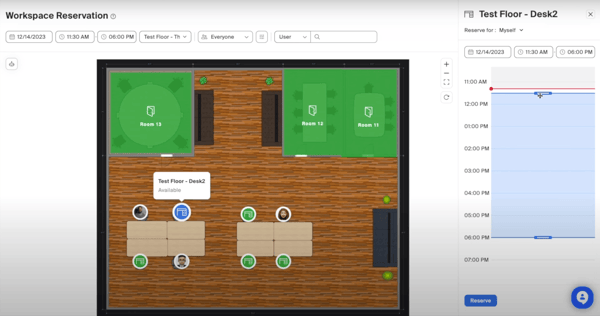
Zoom Workplace’s interface receives strong marks for usability across reviewer segments. G2 Data shows 90% of users rate the platform’s notification features highly, with reviewers noting that host alerts are delivered via email, chat, or SMS and are reliable and immediate upon a guest’s check-in, keeping front-desk operations running without manual follow-up.
Integration depth is a recurring positive across reviews. Reviewers note that Zoom connects cleanly with Google Calendar, Microsoft Outlook, Slack, and identity providers, making rollout straightforward for IT teams. G2 Data shows that 88% of users rate the integration capabilities highly, with calendar sync cited most frequently as the feature driving daily adoption.
AI-powered features add operational value beyond check-ins. Reviewers highlight AI Companion capabilities, such as automatic meeting summaries, note generation, and task capture, as practical time-savers that reduce administrative load for teams already using Zoom for daily collaboration alongside visitor workflows.
Some reviewers note that the breadth of features can feel overwhelming, particularly for new users onboarding into the full Zoom Workplace suite at once. The platform’s depth is genuinely useful once configured, but reviewers from smaller teams mention a learning curve when navigating settings across modules for the first time. That said, most note that the help center and live support resolve setup questions quickly.
A secondary concern raised in reviews is system resource usage. Reviewers on older hardware or slower connections report that running multiple Zoom Workplace features simultaneously, such as virtual backgrounds, whiteboards, and live meetings, can strain performance. Teams in these environments may need to manage which features run concurrently, though reviewers note that core meeting and check-in functions remain stable even under load.
Rated 4.5 out of 5 on G2, Zoom Workplace is a strong fit for hybrid organizations that want visitor management, desk booking, and team collaboration under one roof, without having to manage a separate tool for each.
What I like about Zoom Workplace:
- The user interface receives a lot of positive feedback for its clean and intuitive design. I’ve seen several reviewers mention how easy it is to navigate, even for those without a technical background.
- Integration is another area where Zoom Workplace seems to shine. Users appreciate how easily it connects with identity providers, email platforms, and other core business applications.
What G2 users like about Zoom Workplace:
“I’ve been using Zoom Workplace for daily meetings and team collaboration, and it’s been a really smooth experience. The video and audio quality are reliable, and joining meetings is quick and hassle-free. I also like that it combines chat, meetings, screen sharing, and file sharing in one place, which makes it easier to stay organized. The interface is simple to use, even for new users, and it works well across both desktop and mobile. Overall, it has made communication with my team much more convenient and efficient.”
– Zoom Workplace review, Ayush S.
What I dislike about Zoom Workplace:
- The breadth of features can feel overwhelming for new users. Reviewers note that some functions are buried in settings that aren’t immediately intuitive to find, though most add that the help center and live support resolve setup questions quickly once flagged.
- System resource usage is a recurring concern on older hardware. Reviewers report that running multiple features simultaneously can strain performance on lower-spec machines or slower connections, with occasional sync delays between chat, calendar, and meeting tools.
What G2 users dislike about Zoom Workplace:
“Zoom Workplace aims to be an all-in-one hub, but it can feel cluttered. For users who just want a reliable tool for video calls, the constant additions—whiteboards, extensive app integrations, notes, and AI companion features—have made the interface bulky, harder to navigate, and heavier on computer performance.”
– Zoom Workplace review, Raghav H.
2. Kastle: Best for large visitor databases
Kastle is a physical security and access management platform that combines camera surveillance, keyless entry, visitor management, and 24/7 remote monitoring into a single managed service, making it a strong fit for organizations managing large visitor databases across one or more secured facilities.
Credential and badge management is where Kastle earns the most consistent praise. Reviewers highlight how the system handles the full lifecycle of visitor and employee credentials, from initial provisioning to access revocation, with an admin portal that office managers describe as organized, easy to navigate, and straightforward for daily updates.
Camera surveillance and 24/7 remote monitoring draw strong feedback from security-conscious teams. Reviewers describe Kastle’s monitoring setup as providing genuine peace of mind, with on-the-ground security presence and real-time camera visibility across floors, giving facility leads continuous oversight of who enters and exits.
The mobile app access via Bluetooth is a standout for both staff and visitors. G2 reviewers note that the ability to use a smartphone as a building credential eliminates the need for physical keycards and gives admins the flexibility to grant limited, time-bound access to visitors directly from their phones, a practical advantage for high-traffic facilities.
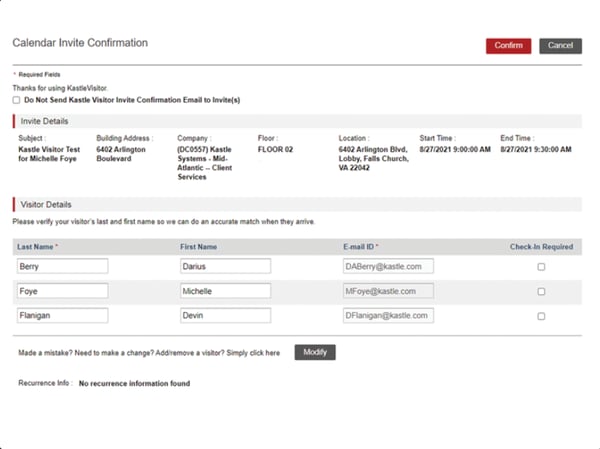
Customized, real-time reporting is another area reviewers highlight. G2 Data shows that 83% of users rate Kastle’s access control features highly, with reviewers calling out the ability to track entry trends by area and to pull compliance-ready reports, which is particularly valuable for organizations with audit and evidence-collection requirements.
Customer support responsiveness receives some of the strongest praise in Kastle’s reviews. Reviewers across company sizes note that dedicated account reps are quick to respond, proactive in check-ins, and effective at resolving issues, with several users specifically crediting support quality as a key reason they stayed with the platform.
AI-powered visitor search and large database management round out Kastle’s strengths for enterprises handling high visitor volumes. Reviewers note the system’s ability to quickly retrieve visitor history and maintain searchable records across a large credential database, reducing front-desk lookup times during busy arrival periods.
One-time guest access presents a recurring friction point in reviews. Kastle requires one-time visitors to download the mobile app to access certain areas, prompting complaints from conference attendees and short-term guests who have no ongoing need for it. Reviewers from event-heavy environments flag this as a consistent pain point, though badge-based check-in remains available as an alternative for facilities that prefer it.
Advanced analytics, deeper reporting, and priority support sit in higher tiers, something several reviewers wished were more accessible. Even so, the baseline feature set (directory sync, access control tie-ins, visitor logs) covers the essentials, and expanding to premium capabilities is there when scale demands it.
Net-net, with a 4.6/5 average rating on G2, Kastle remains a reliable option for remote visitor registration and sign-in. According to G2 reviews, it pairs robust security measures with clear audit trails, and with a few refinements around performance and tiered features, it could deliver even more value for larger, multi-site facilities.
What I like about Kastle:
- The admin portal stands out for its day-to-day usability. Reviewers consistently describe it as organized and easy to navigate, with credential updates, schedule changes, and visitor access grants all manageable without contacting support for routine tasks.
- The combination of 24/7 remote monitoring and mobile app access provides facility teams with oversight that goes beyond standard visitor check-in tools.
What G2 users like about Kastle:
“Kastle provides a reliable, user-friendly access control system that is easy to implement and manage across multiple tenants. The electronic keypads and access management significantly reduce physical key issues, streamline move-ins and vendor access, and improve overall security. Customer support is responsive, and the system integrates well into daily property management operations, making it a tool we rely on frequently.”
– Kastle review, Ashley B.
What I dislike about Kastle:
- One-time guest access works well for recurring staff and regular visitors, but requiring short-term guests to download the mobile app before entry generates friction for conference-heavy environments. Badge-based check-in remains available as a workaround for facilities that prefer it.
- Premium capabilities like advanced analytics, deeper reporting, and priority support are available as scale demands. Several reviewers wished these were more accessible at lower tiers, though the core offering holds up well for day-to-day facility management without needing an upgrade.
What G2 users dislike about Kastle:
“The timeliness and response can be inconsistent; sometimes they’re within a couple of seconds, and then sometimes a couple of hours after an alarm goes off.“
– Kastle review, Michael C.
3. Envoy Visitors: Best for fast check-ins and mailroom management
Envoy Visitors is a dedicated visitor management platform that covers the full front-desk workflow, from digital check-in, badge printing, NDA signing, and host notifications to real-time visitor logs, with customizable sign-in flows tailored by visitor type across one or multiple locations.
The shift from paper-based sign-in to Envoy’s digital platform is the change reviewers talk about most. G2 users describe the transition as immediate and impactful, with visitor logging, host notifications, badge printing, and confidentiality agreement collection all handled automatically from the moment a guest arrives, removing the manual overhead that paper systems place on front-desk staff.
Multi-site visibility earns strong praise from operations and facilities teams that manage multiple locations. Reviewers highlight the ability to monitor visitor activity across multiple sites from a single dashboard as a practical advantage for data center operators, corporate campuses, and any organization that needs consistent oversight without being physically present at each entry point.
Customizable check-in workflows by visitor type are a standout capability. G2 Data shows 95% of reviewers rate the visitor check-in feature highly, with users specifically calling out the ability to set different flows for contractors, first-time guests, and recurring visitors, including mandatory video viewing and instant audit log updates for contractor arrivals, which reviewers in facilities roles find particularly useful for compliance tracking.
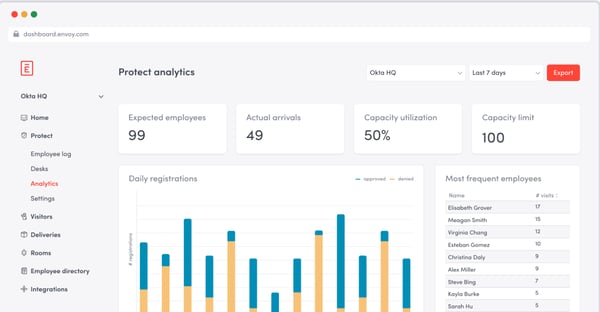
Automatic badge printing is consistently highlighted as one of Envoy’s most practical time-savers. Reviewers note that badges are printed directly during registration, including the visitor’s name, photo, and host details, thereby removing a manual step for reception staff and ensuring every visitor is visibly identified from the moment they check in. G2 Data shows 94% of users rate the ease of setup highly, reflecting how quickly the badge workflow becomes operational.
Instant host notifications receive widespread praise for their reliability and speed. The moment a visitor checks in, hosts are alerted via Slack, Microsoft Teams, or email, with reviewers noting that the immediacy of the notification eliminates the need for front-desk staff to manually track down hosts, keeping lobby wait times short even during high-traffic periods.
Integration with employee databases and access control systems rounds out Envoy’s strengths. Reviewers note that syncing with HR systems ensures only verified employees can invite and manage guests, while connections to building access systems restrict visitor movement to pre-approved areas, giving security teams confidence that check-in data and physical access are aligned.
The notification system works best when carefully configured up front. Reviewers note that default alert settings can generate unnecessary noise across teams if not tuned to the right contacts and thresholds, leading some admins to mute notifications altogether. That said, reviewers also confirm that once the notification rules are set correctly, alert delivery is reliable and genuinely useful for host awareness.
Advanced customization options are more accessible on higher-tier plans. Reviewers on entry-level plans note that branded check-in flows and deeper workflow configuration are available only with an upgrade, which can feel limiting for teams with specific front-desk requirements. The core check-in, badge printing, and notification features remain fully functional at the base tier, covering the essentials for most single-location deployments.
Overall, with a 4.7/5 average rating on G2, Envoy Visitors is a reliable choice for organizations looking to replace paper sign-in with a fast, audit-ready digital check-in experience across one or more facilities.
What I like about Envoy Visitors:
- The contractor management workflow stands out as one of Envoy’s more thoughtful features. The ability to require contractors to watch a safety video before check-in is completed gives facilities teams a compliance layer that goes beyond basic visitor logging without adding front-desk complexity.
- Multi-site visibility from a single dashboard is a genuine operational advantage. Reviewers managing multiple locations specifically call out how much easier it is to maintain consistent oversight without needing separate tools or logins per site.
What G2 Users like about Envoy Visitors:
“Something that really impressed me is how streamlined and secure the registration process is through a QR code on my mobile phone. Furthermore, the system sends automatic notifications as soon as a visitor arrives, and the whole process is extremely smooth and intuitive.”
– Envoy Visitors review, Alex A.
What I dislike about Envoy Visitors:
- The ID scanner doesn’t yet autofill visitor details from scanned documents, so reception staff still enter information manually. Reviewers note it’s a time-saving gap worth closing, particularly for high-volume entry points.
- Workflow setup takes some initial effort, especially for non-standard environments. Reviewers note that a responsive account manager makes the process considerably smoother, and once configured, the workflows run without ongoing intervention.
What G2 users dislike about Envoy Visitors:
“What I didn’t like is that if the internet goes down, the reception system collapses, since there’s only one point of failure.”
– Envoy Visitors review, Jake C.
4. Archie: Best for hybrid offices managing visitors and workspaces
Archie is built for organizations that want to manage more than just visitor arrivals. Alongside visitor registration and check-ins, it brings together desk booking, meeting room scheduling, workplace analytics, and office management tools, making it well-suited for hybrid workplaces where employees, guests, and shared spaces all need to be coordinated on a single platform.
The visitor check-in experience earns consistent praise for its speed and simplicity. Reviewers note that guests walk in, sign in on the iPad kiosk, and are done in under a minute, with the host automatically notified the moment check-in completes. G2 Data shows 94% of users rate the visitor check-in feature highly, with the combination of instant notifications and QR code self-check-in cited most frequently as the reason for short lobby wait times.
Desk booking alongside visitor management is Archie’s clearest differentiator. Reviewers highlight the ability to open the app in the morning, check which teammates are coming in, and reserve a nearby desk. This unified view of who is on-site at any given time, whether a visitor or an employee, is what hybrid teams point to most when explaining why they chose Archie over a standalone visitor management tool.
The interactive floor plan view receives strong praise from both admins and end users. Reviewers note that being able to see which zones are busy, where colleagues are sitting, and which desks are available before arriving at the office makes daily planning significantly more efficient, with the visual map replacing the back-and-forth that previously went through email or team chat.
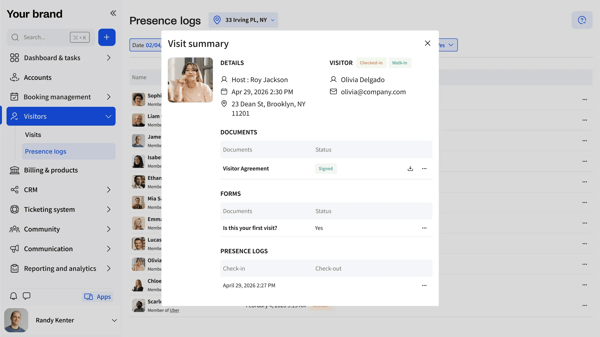
Outlook and Google Calendar sync is highlighted as a key driver of daily adoption. Reviewers note that bookings made in Archie appear automatically in their calendars, and that meeting rooms can be reserved directly from Outlook without switching tools, a detail that reduces friction for teams already living in their calendars for most of the workday.
The analytics dashboard adds genuine planning value for operations and IT teams. Reviewers with oversight responsibilities highlight the ability to see which areas of the office are most used, when capacity peaks are likely to occur, and how space utilization trends over time, giving facility leads data to make informed decisions about desk ratios and floor configurations as teams grow.
Support, quality, and responsiveness frequently come up in reviews. Reviewers across company sizes describe the onboarding team as hands-on and helpful during initial setup, with ongoing support praised for fast response times and a willingness to act on flagged issues, including bug fixes tied directly to customer-reported feedback.
On the flip side, some settings lack an in-app explanation, which can slow down initial configuration. Reviewers note that certain admin options are not immediately self-explanatory and can be difficult to locate, particularly during first-time setup of visitor flows and department-level policies. The core booking and check-in flows work reliably once configured, and support is responsive to any setup questions that arise.
New feature releases occasionally arrive without sufficient in-app guidance. Reviewers note that updates sometimes go live weeks before any announcement or documentation appears, leaving teams to discover changes on their own. Archie actively ships improvements at a consistent pace, and reviewers confirm that the product team is responsive to feedback, making the communication gap more of a process issue than a product limitation.
All in all, with a 4.9 rating on G2, Archie is a good fit for hybrid offices that want visitor management, desk booking, and occupancy analytics consolidated into a single, easy-to-adopt platform.
What I like about Archie:
- The same platform handles guest check-in, desk booking, and employee occupancy tracking, removing the need to cross-reference separate tools to get a complete picture of who’s on-site.
- G2 Data shows 95% of users rate the quality of support highly, with reviewers describing onboarding as hands-on and bug fixes as directly tied to customer-reported feedback.
What G2 Users like about Archie:
“I had a great experience from the beginning with the onboarding team, helping in any way possible to set up the product the way we needed. When it comes to the app itself, although it’s not perfect, it delivers a lot of value, and there are new features, big and small, coming up frequently. We use it in one location for now, and I’m very happy with the choice. Users find it very easy to use, and the few times we needed help, the support team was extremely nice and helpful.”
– Archie review, Katy C.
What I dislike about Archie:
- Some admin settings are buried and not immediately self-explanatory, though the core flows work reliably once configured and support steps in quickly when needed.
- New feature releases occasionally arrive without in-app guidance, leaving teams to discover changes on their own. Archie ships updates at a consistent pace, and the product team is responsive to feedback, making this more of a communication gap than a product limitation.
What G2 users dislike about Archie:
“Custom reports have been upgraded and work well now, but were too limited when we first started with Archie. There are minor issues here and there, for instance, the settings are not self-explanatory about what they do. Never came across any bug or downtime though, so that’s great. Overall, it’s not super polished, but all of the core features are robust, and we can trust the platform to work.”
– Archie review, Antom M.
5. FacilityOS: Best for compliance-heavy and regulated facilities
FacilityOS covers visitor management, contractor compliance, emergency response, and access control. It is purpose-built for regulated environments where visitor accountability, safety orientations, and audit-ready documentation are non-negotiable requirements.
Pre-registration is one of FacilityOS’s most consistently praised capabilities. Reviewers describe the visitor invite process as taking under 30 seconds: the host creates the visit, it syncs to their calendar, and the visitor receives an email link to complete registration in under a minute before arriving. G2 Data shows 91% of users rate the visitor check-in feature highly, with the pre-registration flow cited most frequently as the reason front-desk queues stay short even on high-traffic days.
Contractor compliance and safety orientation management sets FacilityOS apart from standard visitor management tools. Reviewers in food safety, manufacturing, and regulated industrial environments highlight the ability to require contractors to complete site-specific orientation content and quizzes before check-in is approved, with the system enforcing completion automatically rather than relying on front-desk staff to track it manually.
Driver and delivery management earns praise from facilities teams handling high volumes of truck and vendor arrivals. Reviewers note that the ability to pull up a driver’s name, trucking company, and photo via text message at the front gate makes identifying who is in the yard significantly faster, particularly when managing multiple simultaneous arrivals across a large site.
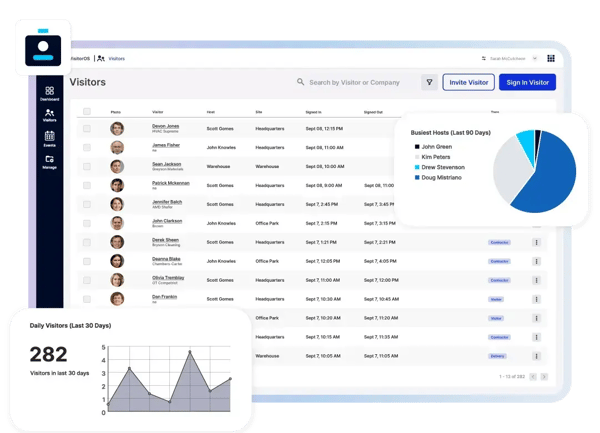
Emergency evacuation and real-time occupancy tracking are standout capabilities for safety-focused teams. Reviewers highlight the ability to pull a live visitor log instantly during emergency response drills, knowing exactly who is on-site at any given moment, as a feature that moves FacilityOS beyond check-in software and into genuine facility safety infrastructure.
Badge printing and on-demand reporting round out the platform’s operational strengths. Reviewers describe the badge printing workflow as straightforward and reliable, with customizable fields that match site-specific requirements. G2 Data shows 89% of users rate the reporting features highly, with reviewers calling out visitor traffic summaries and host-level visit frequency reports as practical outputs for both operations leads and compliance teams.
Support quality receives some of the strongest and most specific praise in FacilityOS’s reviews. Reviewers going through multi-site global rollouts describe the support team as exceptional, proactive, responsive, and genuinely invested in making deployments successful, with named account contacts credited directly for how smoothly transitions from legacy systems have gone.
That said, some reviewers report occasional system lag during high-volume sign-in windows. Reviewers from shift-based environments note that when multiple employees attempt to check in simultaneously at shift start, the screening process can buffer for several minutes, creating a queue at the kiosk. The platform performs reliably outside of these peak windows, and reviewers note the issue is most pronounced in the first hour of a shift.
Check-in interface customization is less flexible in practice than some reviewers expected based on the demo experience. Teams with non-standard field requirements note that modifying the kiosk form after initial setup requires more effort than anticipated, and some add-on features have not always behaved as described during pre-sale conversations. FacilityOS’s support team is responsive in resolving configuration questions, and the core check-in and compliance workflows remain robust regardless.
Overall, FacilityOS is an excellent fit for organizations that prioritize security, compliance, and centralized facility operations over lightweight visitor check-in tools. Its robust access management capabilities and dependable performance have earned it an average rating of 4.7 out of 5 stars on G2, making it a strong choice for enterprise environments.
What I like about FacilityOS:
- Having visitor records, access permissions, and monitoring in one place makes it easier to maintain a secure workplace without relying on disconnected systems.
- Features like searchable visitor logs, audit trails, and detailed reporting reduce the administrative burden while helping security teams stay prepared for internal audits or regulatory requirements.
What G2 Users like about FacilityOS:
“I like using FacilityOS for its hands-off efficiency, which helps in monitoring who is in the building at all times without much effort. I also appreciate the customer support, which is good.”
–