



I evaluated more than 25 tools to identify the best customer service automation software for teams looking to reduce ticket volume, speed up resolution times, and scale support without adding headcount. Based on the G2 reviews, product research, and category analysis I conducted, six platforms consistently stood out: Salesforce Service Cloud, Fin, Zendesk for Customer Service, Jotform AI Agents, Genesys Cloud CX, and Talkdesk.
One pattern I kept encountering while analyzing G2 reviews is that automation needs vary significantly across teams. What works best for customer service automation software for a small SaaS team handling repetitive chat queries looks very different from what a contact center needs to manage voice, email, and escalation workflows at scale.
I also noticed buyers evaluating far more than basic ticketing or chatbots. The strongest platforms in this category automate entire workflows, route complex queries intelligently, and hand off to human agents without friction. That range makes selecting the right platform more nuanced than it first appears.
In this guide, I’ll break down where each solution performs best and which teams are most likely to benefit from each one.
6 best customer service automation software: My top picks
-
Agentforce Service (formerly Salesforce Service Cloud): Best for enterprise service operations with AI-powered case management
Ideal for organizations that need intelligent case routing, SLA tracking, workflow automation, and a unified view of customer interactions. ($550/user/month
-
Fin: Best for AI-powered ticket deflection and self-service support
Designed for teams looking to resolve repetitive customer questions through conversational AI while reducing agent workload. ($0.99 per agent resolution
-
Zendesk for Customer Service: Best for scaling omnichannel support with AI assistance
A strong fit for growing support teams that want centralized ticket management, AI agents, and automation across multiple customer channels. (Starts at $19/agent/month)
-
Jotform AI Agents: Best for no-code AI support automation
Great for small teams that want to automate repetitive customer conversations, build AI agents quickly, and launch without developer support. (Starts at $34/month)
-
Genesys Cloud CX: Best for high-volume contact centers with complex routing needs
Built for organizations managing large customer interaction volumes with advanced routing, workforce engagement, and omnichannel support. (custom pricing)
-
Talkdesk: Best for AI-powered contact center automation
Well-suited for customer service teams that rely on voice support, intelligent call routing, conversation insights, and seamless agent handoffs. (Starts at $85/user/month)
*These customer service automation software are top-rated in their category, according to the G2 Summer 2026 Grid Report. I’ve added their standout features and pricing information for easy comparison.
6 best customer service automation software I recommend for scaling customer support efficiently
Customer service automation has become a core part of modern support operations, helping teams automate repetitive conversations, route customer requests intelligently, and free agents to focus on complex issues. That growing demand is reflected in the market itself.
The customer service automation market is projected to grow to $12.33 billion by 2030, as more organizations invest in AI-powered support experiences and workflow automation. While evaluating this category, I found that the best customer service automation software wasn’t defined by how many AI capabilities it offered.
The platforms that consistently stood out across G2 reviews helped teams automate repetitive work without disrupting the customer experience. That’s why I focused on where each product performs best, the workflows it supports most effectively, and the types of support teams that benefit most from it.
How did I find and evaluate the best customer service automation software?
I evaluated the best customer service automation software by reviewing G2 Grid data, verified user feedback, product capabilities, pricing pages, and recurring patterns in customer support use cases. I focused on how each platform helps teams reduce repetitive work, route conversations, manage tickets, support agents, and escalate complex issues without slowing down the customer experience.
I paid close attention to the areas that matter most to buyers when comparing automation tools: AI agent quality, ticket deflection, workflow customization, omnichannel coverage, reporting, integrations, security, and pricing flexibility. I also looked for signals around setup and maintenance, especially for teams searching for the easiest customer service automation tools to set up without a developer.
To keep the evaluation grounded, I compared product claims against what G2 reviewers repeatedly mentioned as strengths and concerns. When direct platform access or fresh screenshots were limited, I relied on verified G2 review patterns, vendor-provided product information, and current Grid Report data to validate each recommendation. Products are ordered by G2 Score, with satisfaction score used as the tiebreaker
What makes the best customer service automation software: My criteria
Customer service automation succeeds or fails long before a ticket is resolved. As I compared these products, I found myself paying the most attention to what happened between the moment a customer asked for help, and the moment an agent stepped in — if one was needed at all. The strongest platforms weren’t simply good at automating conversations; they knew when to answer, when to escalate, and how to keep every interaction connected.
These are the criteria I used to evaluate every product on this list:
- Conversational AI that understands customer intent: I prioritized platforms that use conversational AI and natural language understanding (NLU) to respond accurately, maintain context across conversations, and automate repetitive requests without making interactions feel robotic. I also considered how well they supported the growing AI adoption in customer service.
- Intelligent routing and escalation: Effective automation shouldn’t replace human agents; it should help them. I looked for tools that could classify requests, route customers to the right queue, and transfer conversations with complete context whenever human intervention was needed.
- Knowledge base and CRM connectivity: I evaluated how easily each platform connected with existing knowledge bases, help desks, CRM systems, and third-party applications. Strong integrations allow AI agents to provide accurate responses without creating disconnected support experiences.
- Workflow automation and customization: Every support team operates differently, so I valued platforms that let teams customize workflows, automate ticket lifecycles, and build routing logic without relying heavily on engineering resources.
- Reporting and operational visibility: I looked for reporting capabilities that help teams monitor ticket trends, automation performance, resolution times, and agent workloads. Actionable insights are just as important as automation itself when improving customer support.
- Scalability, security, and deployment: I also considered how well each solution scales with growing ticket volumes while maintaining enterprise-grade security, compliance, and administrative controls. Whether a business manages a lean support desk or a large contact center software environment, the platform should remain reliable as support operations evolve.
From more than 25 products in G2’s Customer Service Automation category, I shortlisted six that consistently demonstrated strong automation capabilities, reliable customer feedback, and broad support for modern service teams.
To qualify for inclusion in G2’s Customer Service Automation category, a product must:
- Be designed for application in a help desk and customer service environment.
- Use conversational AI and natural language understanding (NLU) to automate chats and support tickets.
- Provide intelligent case routing to human agents when needed.
- Continuously improve through adaptive automation and AI capabilities.
- Integrate with knowledge bases, help desk platforms, and CRM systems.
This evaluation reflects the latest G2 data available from 2026. Some review excerpts have been edited for clarity.
1. Agentforce Service (formerly Salesforce Service Cloud): Best for enterprise service operations with AI-powered case management
The deeper I went into the G2 reviews for Agentforce Service, the clearer it became that this platform isn’t simply competing on case management. It’s competing on visibility. Across review after review, support teams described the same core benefit: a single workspace where every customer interaction, case history, account note, and channel conversation lives together — and where AI acts on that data, not just reads it.
The numbers back that up. Agentforce Service holds a 4.4 out of 5 rating across 7,000+ G2 reviews, with 98% of users rating it four or five stars and a 90% recommendation rate. It serves 15% small businesses, 44% mid-market, and 41% enterprise, a distribution that reflects just how up-market the platform scales. Meets requirements is rated at 91%, and rext and ticket resolution rank among its highest-rated features at 86% and 85%, respectively.
Workflow automation emerged as one of the most consistent themes across the G2 reviews I analyzed. Reviewers across industries described Flows as reducing entire categories of manual work (auto-routing, case assignment, follow-up scheduling) without engineering involvement. For teams evaluating customer service automation software to scale support without adding headcount, Agentforce is the platform most frequently cited as a proof point.
The Agentforce AI layer is where the platform’s most significant recent development is. Based on the G2 feedback I reviewed, the shift from rule-based bots to autonomous AI agents — capable of summarizing cases, surfacing knowledge articles, and executing actions directly inside Salesforce workflows — is what distinguishes it from conventional AI customer support agents software. The AI doesn’t just recommend next steps; it completes them, freeing agents for conversations that genuinely need human judgment.
Omnichannel routing is another area where the G2 data is consistently strong. One pattern I kept seeing was teams managing voice, email, live chat, social, and messaging channels through a single queue — with intelligent routing distributing workload based on agent availability and skill set.
Salesforce ecosystem integration is the connective tissue that holds the platform together for enterprise buyers. Reviews I analyzed described data cloud, marketing cloud, and sales cloud connecting seamlessly into service workflows — surfacing customer context that would otherwise require switching between multiple systems. For organizations already embedded in the Salesforce stack, this integration depth creates compounding operational value over time.
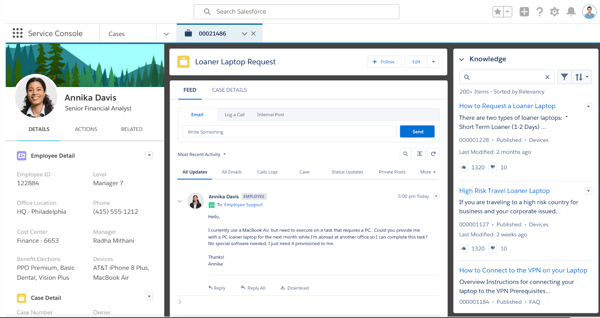
Reporting and analytics complete the picture. Agentforce delivers native dashboards that connect customer service trends to operational decision-making — first response times, resolution rates, CSAT, and AI containment — giving managers the visibility to act on performance data rather than simply report it.
In more complex deployments, G2 reviewers note that configuring workflows, routing logic, and AI agents typically requires dedicated admin support or external consultants. For teams that invest in that setup, the platform’s automation depth consistently delivers strong long-term returns.
The review patterns I analyzed suggest that licensing costs can expand meaningfully as teams add AI capabilities, additional channels, and integrations. Organizations that map the total cost of ownership early tend to get the clearest picture of where the platform delivers the strongest ROI.
Agentforce Service is the platform of choice for enterprise support operations where unified data, autonomous AI agents, and deep Salesforce integration create lasting operational leverage. For organizations already on Salesforce or planning to significantly scale support, it remains one of the most capable options in the customer service automation software category.
What I like about Agentforce Service:
- A recurring theme in the G2 reviews I analyzed was that the platform eliminates context switching by bringing cases, customer history, and channel conversations into a single workspace, so agents can focus on resolution rather than navigation.
- The G2 feedback I reviewed also consistently highlighted the automation layer, with routing, follow-ups, and case summaries handled without manual input, giving support teams more capacity for complex work.
What do G2 Users like about Agentforce Service:
“From a collections specialist perspective at iQor, a few things are especially strong. One of the biggest advantages is the unified customer view. Instead of jumping between billing systems, CRM notes, payment history, and contact logs, Service Cloud brings everything into a single case timeline. For collections work, that matters because your effectiveness often depends on how quickly you can understand the customer’s financial situation and past interactions.”
– Agentforce Service review, Arnold D.
What I dislike about Agentforce Service:
- G2 reviewers across complex deployments note that getting workflows, permissions, and AI agents running smoothly often requires a dedicated admin or specialist — and that this investment tends to pay off significantly once the platform is fully operational.
- As G2 reviewers point out, the cost picture can shift as teams layer on AI features, expanded channels, and deeper integrations. Teams that think through their scaling roadmap upfront are better positioned to evaluate the platform’s value relative to their long-term support goals.
What do G2 users dislike about Agentforce Service:
“The biggest downside is that the platform can feel a little overwhelming for new users, since it offers so many features and customization options. The initial setup and configuration can take a while, and some of the more advanced workflows require technical know-how to manage effectively.”
– Agentforce Service review, Muhammed O.
Managing customer conversations across channels is only part of the picture. If you’re also looking at how to strengthen the quality and consistency of those conversations over time, this guide to the best customer communication software covers tools built specifically for that layer.
2. Fin: Best for AI-powered ticket deflection and self-service support
What kept coming up as I worked through the G2 reviews for Fin was how differently users describe it compared to most chatbots. The word reviewers reach for repeatedly isn’t “helpful” or “fast” — it’s “feels like a teammate.” That distinction matters because it points to something Fin does that simpler rule-based tools can’t: it reads the flow of a conversation and responds to what the customer is actually asking, rather than retrieving a canned answer and moving on.
The numbers reflect that sentiment strongly. Fin holds a 4.5 out of 5 rating across 3,500+ G2 reviews, with 95% of users rating it four or five stars and an 89% recommendation rate. Knowledge Base integration scores highest among its rated features at 92%, and its Language and Text capabilities both come in at 88%, all of which align with reviewers’ descriptions of the experience in practice.
Ticket deflection is where Fin earns its reputation. Based on the G2 feedback I analyzed, teams that deploy Fin against high-volume, repetitive inquiry queues see measurable reductions in ticket load, with Fin containing conversations that previously required human intervention. For support teams evaluating customer service automation software with the best ticket deflection rates, the pattern across reviews is consistent: Fin resolves a significant portion of incoming queries without escalation, and does so in a way customers find credible.
What makes that possible, according to G2 reviewers, is how Fin draws on knowledge. It doesn’t limit itself to the help center. It pulls from saved replies, prior conversations, and other content sources, which means responses feel contextualized rather than generic. Training Fin on brand-specific tone and terminology is also a point reviewers highlight frequently, which matters for teams that need their AI to sound like their company, not a chatbot.
Workflow automation is another area where Fin consistently earns high marks. Reviewers describe building logic paths that determine when Fin deflects, when it routes to a specialist, and when it escalates, without requiring engineering support to configure. That kind of self-service routing control has made Fin a regular recommendation in discussions about AI agents for business operations, particularly for teams without large technical resources.
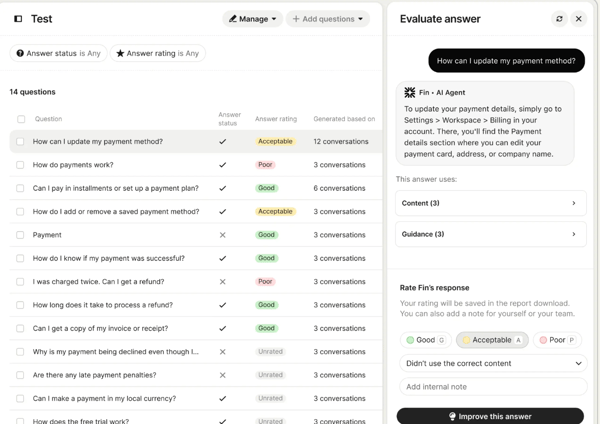
Human handoff is a feature that often comes up in the reviews I read. When Fin reaches the boundary of what it can confidently resolve, the transition to a live agent is consistently described as smooth, retaining conversation context so customers don’t have to repeat themselves. That continuity is part of what keeps satisfaction scores high even when AI resolution isn’t possible.
One thing worth noting is Fin’s implementation timeline. G2 reviewers indicate that getting Fin fully live typically takes around 1.5 months, a timeframe that reflects the knowledge base setup, content sourcing, and tone calibration required. For teams with well-organized help content, that ramp is manageable; for those starting from scratch, planning for that window is worth building into the rollout.
Fin’s performance on nuanced or edge-case queries is more variable. According to G2 reviewers, questions that fall outside the platform’s trained content can produce responses that are accurate for the trained material but generic when the customer’s situation sits outside that scope. That’s a characteristic shared by most AI-driven support tools, and for the high-volume, repeatable queries Fin is designed to handle, it rarely surfaces as a limiting factor.
The quality of Fin’s responses is also directly tied to how well the connected knowledge base is maintained. G2 reviewers point out that outdated or incomplete content leads to degraded output, meaning Fin rewards teams who treat their knowledge base as a living asset, not a one-time setup. For organizations that invest in that maintenance, the deflection rates and customer satisfaction scores tend to reflect the effort.
Fin is purpose-built for teams dealing with high volumes of repeatable support queries and looking to reduce ticket load without expanding headcount. For organizations that have clean, well-maintained knowledge content and want AI chatbots worth using at scale, the deflection rates and reviewer satisfaction scores speak clearly. When evaluating best customer service automation software, Fin consistently stands out as the platform teams return to when ticket volume is the problem and autonomous resolution is the goal.
What I like about Fin:
- According to G2 reviewers, Fin’s ability to draw on multiple content sources, including help center articles, saved replies, and prior conversations, produces responses that feel contextual and on-brand rather than templated.
- The G2 feedback I reviewed also highlights the workflow automation layer, where teams can define exactly when Fin deflects, routes, or escalates, all without needing engineering involvement.
What do G2 Users like about Fin:
“What I like most about Fin by Intercom is how naturally it handles customer conversations without sounding robotic. It understands context well, so users don’t have to repeat themselves or get pushed through rigid, scripted flows.
Another major plus is how quickly it reduces the support workload. Many repetitive questions get resolved instantly, which frees the team up to focus on more complex or higher-value issues instead of answering the same things over and over.
I also appreciate how easy it is to set up and improve over time.
Overall, it feels like having a dependable first line of support that’s available 24/7 and genuinely useful, rather than just a basic bot.”
– Fin review, Jagdish D.
What I dislike about Fin:
- Fin performs strongly on trained content, and G2 reviewers note that queries landing outside that scope can return responses that, while technically accurate, lack the specificity that more complex customer situations call for. For teams with well-maintained knowledge bases, this limitation surfaces infrequently.
- G2 reviewers point out that keeping that content current is an ongoing commitment, and for teams that prioritize that maintenance, Fin’s deflection performance tends to hold up consistently over time.
What do G2 users dislike about Fin:
“One downside is that the accuracy of responses heavily depends on the quality and structure of the knowledge base, which can require ongoing maintenance. In some cases, the AI may provide incomplete or slightly off responses, especially for more complex or edge-case queries.”
– Fin review, Farhan M.
Customer service quality depends as much on the people handling conversations as the tools supporting them. This guide to the essential customer service skills your team needs covers the human side of the equation, a useful complement to what Fin handles on the automation side.
3. Zendesk for Customer Service: Best for scaling omnichannel support with AI assistance
Support teams tend to quietly outgrow their tools. Tickets pile up, channels multiply, and suddenly what worked for a 5-person team is the bottleneck for a 50-person one. As I worked through the G2 reviews for Zendesk for Customer Service, what struck me was how consistently it shows up as the answer to exactly that inflection point, and more notably, how rarely teams leave it when they scale past it.
Zendesk holds a 4.3 out of 5 rating across 6,800+ G2 reviews, with 95% of users rating it four or five stars and an 88% recommendation rate. The adoption picture is equally strong: the average user adoption rate is 78%, with teams typically achieving ROI within 11 months. Customization leads its highest-rated features at 84%, ease of use scores 89%, and meets requirements comes in at 88%, numbers that together suggest the platform is earning its keep well past initial deployment.
Ticket management is the operational foundation on which everything else is built. Agents handle email, live chat, social, voice, and messaging in a single workspace, with full customer history and prior interaction context always available. G2 reviewers across industries describe this consolidation as the thing that meaningfully changes how fast and accurately their teams can work, particularly when volume spikes or a complex case requires cross-channel context.
The automation layer is where teams start compounding that efficiency. Triggers, macros, and SLA rules handle the mechanics of queue management automatically: routing tickets, tagging by priority, and updating statuses. Rather than spending agent time on queue administration, teams redirect that attention toward actual customer conversations. The G2 reviews I read showed this pattern most clearly in mid-market organizations managing high daily volumes across multiple channels.
Something I noticed repeatedly while reviewing G2 feedback: the reviewers describing the most significant operational gains weren’t newcomers. They were teams that had been on Zendesk for years, continuously deepening their use of automation and reporting without needing to migrate to something else. The customer self-service software layer contributes to that longevity, too. A well-maintained knowledge base and self-service portal deflect the repeat queries that would otherwise absorb agent capacity as the customer base grows.
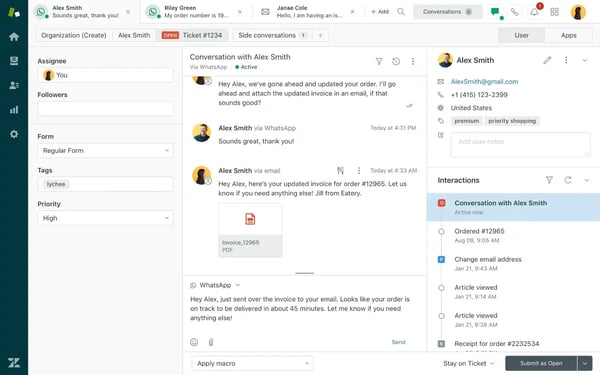
Reporting and dashboards give support leaders real-time visibility into SLA compliance, first response times, resolution rates, and agent workload. What stood out in the G2 data was how often this feature was cited not as a monitoring tool, but as something that directly shaped staffing and process decisions. That distinction matters for teams where operational reporting is tied to headcount planning.
For teams building toward conversational support software workflows, Zendesk’s omnichannel architecture handles continuity of conversation across channels well. A customer who starts in chat and follows up over email doesn’t have to start from scratch, and neither does the agent picking it up. When evaluating best customer service automation software, that continuity is frequently what separates the platforms that teams stay on from those they outgrow.
Zendesk’s analytics depth is a genuine asset, though it comes with a configuration cost. G2 reviewers handling high ticket volumes or multi-dashboard workflows describe an interface that can feel dense before it’s been set up to match how the team actually operates. The data is there; getting it arranged usefully takes admin investment. For teams with someone dedicated to platform management, the payoff in operational visibility is consistently cited as worthwhile.
Pricing reflects the platform’s breadth, and G2 reviewers note this plainly. Features that feel foundational, real-time reporting among them, sit behind higher-tier plans. Costs grow as capability requirements do. The teams that navigate this most smoothly are the ones that assess feature needs against long-term growth before signing, rather than adding capabilities reactively as headcount increases.
For organizations that need a single platform to carry their support operations from mid-market through enterprise scale, Zendesk consistently demonstrates it can hold that weight. The investment in configuration and the cost trajectory both deserve an honest evaluation up front, and G2 data suggests that most teams who do so find the trade-off worth making.
What I like about Zendesk for Customer Service:
- The automation tools, macros, and analytics aren’t surface-level features. G2 reviewers point to them as the operational core of how their teams run, with measurable impact on response quality and manual workload reduction.
- Something the G2 feedback I read kept surfacing was Zendesk’s scalability in practice: teams that started small describe the platform growing with them cleanly, without the experience degrading or requiring a platform change as complexity increased.
What do G2 Users like about Zendesk for Customer Service:
“What I like most about Zendesk for Customer Service is how organized and efficient it makes our customer support operations. The ticketing system is intuitive and easy to manage, and it helps our team respond to players quickly across multiple channels. I also appreciate the automation tools, macros, and analytics features, which save time and help improve the overall quality of our responses. The interface feels clean and reliable, and it scales well for both small teams and larger support environments.”
— Zendesk for Customer Service review, David A.
What I dislike about Zendesk for Customer Service:
- Zendesk gives support teams a lot of analytical horsepower, but G2 reviewers note that configuring dashboards and reports to match actual team workflows takes time and administrative effort. Teams with dedicated platform management resources describe the long-term visibility payoff as well worth that initial investment.
- G2 reviewers are candid that as teams grow into more of Zendesk’s capabilities, the cost picture shifts. Advanced reporting, AI features, and premium automation often require higher-tier plans. Teams that assess their two- to three-year feature roadmap before committing tend to have a cleaner experience with that cost progression.
What do G2 users dislike about Zendesk for Customer Service:
“I dislike that everything is an add-on. You have to purchase everything individually, and it can get quite pricy. There are items like real-time reporting that should be included from the get-go, but you have to pay to add it on. It feels like they just want to sell you another product rather than putting together plans that make sense for businesses. Some of the rules around SLAs and automation/triggers can be difficult to work with, and many require doing odd things to make them work.”
— Zendesk for Customer Service review, Lisa M.
4. Jotform AI Agents: Best for no-code AI support automation
Most AI agent platforms assume you have a developer somewhere nearby. Jotform AI Agents doesn’t. Browsing through the G2 reviews, the thing that kept surfacing wasn’t just that the setup was fast — it was that non-technical users were getting functional AI agents live on the same day they started, without filing a single engineering ticket. That’s a meaningfully different experience from what most platforms in this category deliver.
The numbers sit well above category averages. Jotform AI Agents holds a 4.5 out of 5 rating based on 650+ G2 reviews, with 97% of users rating it 4 or 5 stars and a 91% recommendation rate. Ease of admin scores 92%, ease of setup and quality of support both hit 91%, and learning is the highest-rated feature at 88%. Perhaps the most telling stat: 91% of its user base is small businesses, which says something specific about who the platform is actually built for and who trusts it with their support operations.
That small-business concentration isn’t incidental. For customer service automation tools for a small team that gets a lot of repetitive questions, Jotform AI Agents is the platform that removes the usual barriers to entry. No coding, no complex onboarding, no dependency on a specialist to get the first agent running. G2 reviewers describe building and deploying agents from a visual interface, training them on company documentation, and going live quickly enough that the tool pays for itself before the month is out.
The training mechanism is one of the features I found most discussed in reviews. Agents learn from whatever content you connect — help articles, FAQs, past conversations, custom knowledge bases — and the interface for managing that training is built for someone without a technical background. Reviewers describe updating agent knowledge by simply adding new content and watching response accuracy improve, making ongoing maintenance a task any team member can own.
Multi-channel reach is another area where the G2 data is consistently positive. Jotform AI Agents operates across web chat, WhatsApp, Instagram, and other channels from the same configuration layer, making it a practical option. The agent customization layer lets teams adjust tone, persona, and response style to match their brand rather than defaulting to a generic bot experience.
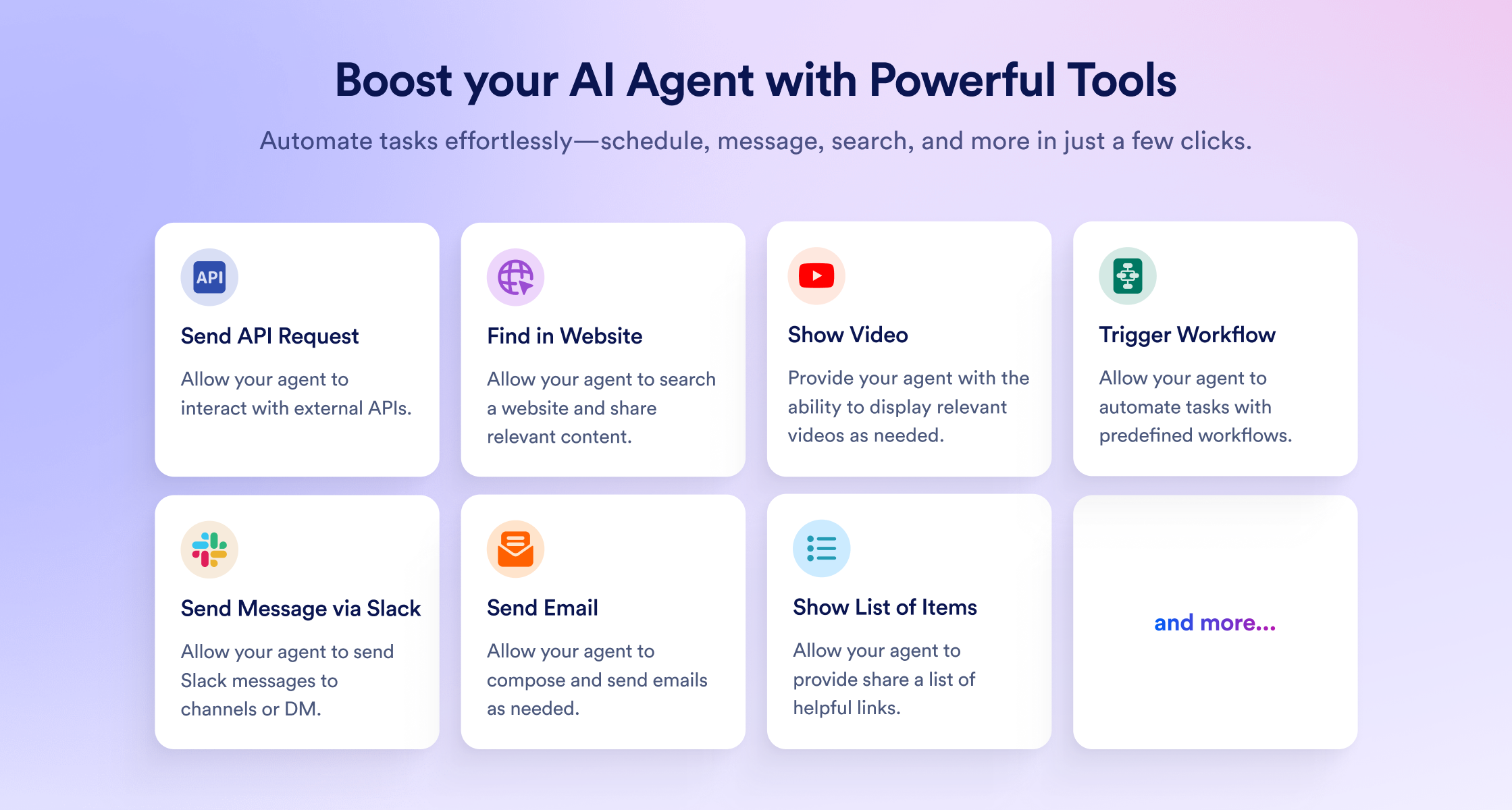
Customization goes deeper than surface-level persona settings. G2 reviewers describe building agents that handle specific workflows — lead capture, appointment booking, onboarding, support triage — each with their own logic and response structure. That flexibility is part of what makes Jotform AI Agents relevant beyond simple FAQ deflection.
For teams weighing the best customer service automation for a small, budget-conscious software company, the pricing model stands out. Rather than gating core functionality behind enterprise tiers, Jotform AI Agents delivers meaningful automation capability at entry-level pricing, which is part of why it keeps appearing in evaluations of best customer service automation software for resource-constrained teams.
Response quality before thorough training is the area where G2 reviewers are most candid. Out of the box, agents can produce answers that feel generic when the knowledge base is thin or the instructions aren’t detailed enough. Reviewers who invest time in training, adding business context, and specific response guidance, describe a noticeable and relatively quick improvement in accuracy. The platform is also expanding into AI voice assistant software, though G2 data shows Speech as its lowest-rated feature at 77%, suggesting the channel is still maturing relative to its text-based strengths.
The training investment is real, and G2 reviewers are honest about it. Getting an agent from functional to genuinely accurate requires upfront work: writing clear instructions, loading relevant knowledge sources, and refining responses based on how the agent actually performs. For teams that treat that process as an ongoing part of their support workflow rather than a one-time setup task, the accuracy trajectory improves steadily over time.
Jotform AI Agents occupies a clear lane: it’s the platform that makes AI-powered support automation genuinely accessible to teams without technical resources, at a price point that makes the ROI case straightforward. For small businesses handling high volumes of repetitive queries across multiple channels, it delivers more operational leverage per dollar than most alternatives at its price level.
What I like about Jotform AI Agents:
- The no-code setup is genuinely as fast as G2 reviewers describe — the platform’s 91% ease-of-setup score reflects a real experience in which non-technical users get functional agents live without developer involvement, which is rare in this category.
- Users on G2 also highlight the knowledge base’s versatility, noting that training the agent by simply loading company content, then watching response quality improve as that content grows, makes ongoing maintenance something any team member can own rather than a specialist task.
What do G2 Users like about Jotform AI Agents:
“The AI Agents make any form much easier to complete. The versatility of utilizing the knowledge base, training the Agent through conversations, and using add-on features to direct the Agent precisely ensures every interaction is customized to your liking. The interface for setting up the Agent is intuitive and extremely user-friendly. As an integrated feature of the pricing for the Jotform features, not an EXTRA cost for the AI Agents, the Return-on-Investment has Agents completing forms conversationally and providing summaries, turning otherwise mundane forms like our support queries into efficient and optimized workflows, and helping onboard staff members or new clients.”
– Jotform AI Agents review, David F.
What I dislike about Jotform AI Agents:
- Jotform AI Agents is built to improve with investment in training, and G2 reviewers note that out-of-the-box responses can feel generic. Adding specific business context, response instructions, and detailed knowledge sources is what moves the agent from functional to accurate, and reviewers who complete that process describe the improvement as significant and worth the effort.
- According to G2 reviewers, the onboarding experience for new users could do more to guide the training process up front — clearer recommendations on what content to add and how to structure instructions would help teams reach peak accuracy faster with less trial and error.
What do G2 users dislike about Jotform AI Agents:
“The biggest limitation I noticed is that the quality of responses depends heavily on how well the agent is trained. Out of the box, answers can sometimes feel generic until yo